Product Overview
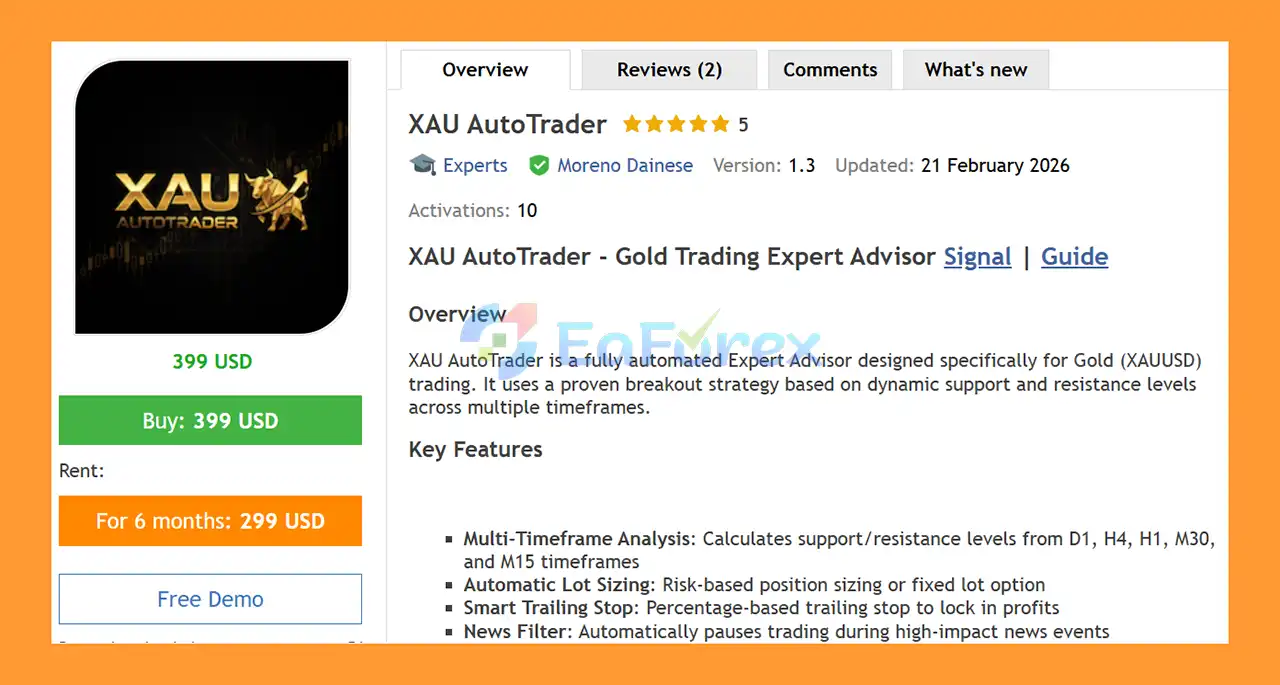
XAU AutoTrader EA MT5 is a fully automated Expert Advisor for MetaTrader 5, specifically designed for XAUUSD (Gold) trading. The system uses multi-timeframe support and resistance analysis to identify important market levels and automatically place pending breakout orders without requiring manual intervention.
The EA analyzes multiple timeframes, including D1, H4, H1, M30, and M15, to identify key support and resistance zones. When price breaks an identified level, the EA can trigger a Buy Stop or Sell Stop order according to its trading logic.
XAU AutoTrader EA MT5 also includes several risk-management and trading-protection mechanisms, such as automatic risk-based lot sizing, trailing stop management, spread control, weekend protection, and a news filter.
A major feature introduced in Version 1.5 is the integrated CSV News Builder, which allows traders to generate historical economic news data from the MT5 Economic Calendar and use that information during Strategy Tester backtests.
The recommended setup is XAUUSD on H1, with a minimum suggested deposit of $200 and a low-spread hedging account.
About the Developer
- Author: Moreno Dainese
- Experience: Over +5 years of experience on MQL5.
- Notable Products: XAU AutoTrader EA MT5, BTC AutoTrader EA MT5, Market Sentinel Pro MT5 and other advisors.
- Flagship Product: XAU AutoTrader EA MT5 is rated as the best performing product of the year.
>> Delivery time 24h-48h after payment.
>>> Refund if not delivered.
>>> You will receive the latest version without any limitations (ID+Time).
>>Reviewed by Jason Stap <<
Key Features of XAU AutoTrader EA MT5
Multi-Timeframe Support & Resistance Analysis
XAU AutoTrader EA MT5 analyzes several timeframes — D1, H4, H1, M30, and M15 — to identify potentially important support and resistance levels.
This multi-timeframe approach allows the EA to evaluate market structure from both higher and lower timeframes before placing breakout orders.
Automated Breakout Orders
Instead of entering trades manually, the EA automatically places:
- Buy Stop orders above selected resistance levels
- Sell Stop orders below selected support levels
This allows the system to participate when price breaks through predefined market levels.
Risk-Based Automatic Lot Sizing
The EA includes automatic lot calculation based on risk, helping traders determine position size according to their selected risk parameters rather than relying only on a fixed lot size.
Adaptive Stop Loss & Take Profit
Stop Loss and Take Profit levels are calculated using percentage-based parameters designed to adapt to changing market conditions.
Trailing Stop Management
The built-in trailing stop helps manage open positions as price moves in the desired direction.
Version updates have refined the trailing-stop validation so that legitimate trailing updates are less likely to be blocked by the broker’s minimum stop-distance requirements.
Integrated News Filter
The EA can pause new entries around high-impact economic events, helping reduce exposure during potentially volatile news periods.
CSV News Builder
Version 1.5 introduces an integrated CSV News Builder directly inside the dashboard.
The tool allows traders to:
- Generate historical news data with one click
- Select a custom date range
- Use quick presets such as 1Y, 2Y, 3Y, 5Y, and 10Y
- Filter HIGH and MEDIUM impact economic events
- Create news history from the MT5 Economic Calendar
- Automatically load the generated CSV during Strategy Tester runs
This feature is particularly useful for testing how the EA behaves around events such as NFP, FOMC, CPI, and other major economic releases.
Spread Control
The EA can avoid opening new trades when the current spread exceeds the configured limit.
This is particularly relevant for XAUUSD, where spreads can expand significantly during volatile market conditions.
Weekend Protection
The system includes a weekend protection mechanism designed to close positions before the market closes for the weekend.
Real-Time Trading Dashboard
The EA provides a real-time dashboard with drag-and-drop functionality and an integrated CSV News Builder for easier configuration and monitoring.
How Does XAU AutoTrader EA MT5 Work?
The trading process can be summarized in several stages.
Market Analysis
The EA continuously analyzes XAUUSD across multiple timeframes:
D1 → H4 → H1 → M30 → M15
The objective is to identify relevant support and resistance levels that may become important breakout areas.
Breakout Level Detection
After identifying potential support and resistance levels, the EA prepares pending orders around these areas.
A Buy Stop can be positioned above resistance, while a Sell Stop can be positioned below support.
Automated Entry
When market price reaches and breaks the relevant level, the pending order can be triggered automatically.
This means traders do not need to monitor the XAUUSD chart continuously or manually execute every breakout trade.
Risk-Based Position Sizing
The EA calculates the appropriate trading volume according to the selected risk parameters.
This provides a more systematic approach to position sizing compared with manually selecting a fixed lot size for every trade.
Trade Management
Once a position is open, the EA manages the trade using its configured Stop Loss, Take Profit, and trailing stop parameters.
News Protection
When the news filter is enabled, the EA can pause new entries around relevant high-impact economic events.
Weekend Protection
The system also includes protection designed to manage open positions before the weekly market closure.
Why Choose XAU AutoTrader EA MT5?
XAU AutoTrader EA MT5 may be suitable for traders who are specifically interested in an automated XAUUSD breakout strategy based on multi-timeframe support and resistance.
Instead of depending on a single technical indicator, the EA focuses on market levels and breakout behavior across several timeframes.
Another important advantage is the combination of automated trading and risk-management functionality. Features such as risk-based lot sizing, spread filtering, trailing stops, news protection, and weekend protection are designed to help structure the trading process.
The CSV News Builder is also useful for traders who want to examine historical performance while considering the potential effect of economic news. Because the standard MT5 Strategy Tester does not directly access the Economic Calendar during normal backtesting, the CSV-based approach provides an additional way to incorporate historical news events into testing.
The EA is particularly focused on XAUUSD, making it a specialized solution rather than a multi-symbol trading robot.
XAU AutoTrader EA MT5 Performance Review
🟣Signal Results
🔺XAUUSD (Gold) pair – 7 consecutive weeks
- Initial Deposit: €209.73
- Growth Rate: +82%
- Win Rate (% of total): 88%
- Maximum Drawdown: 11.3%
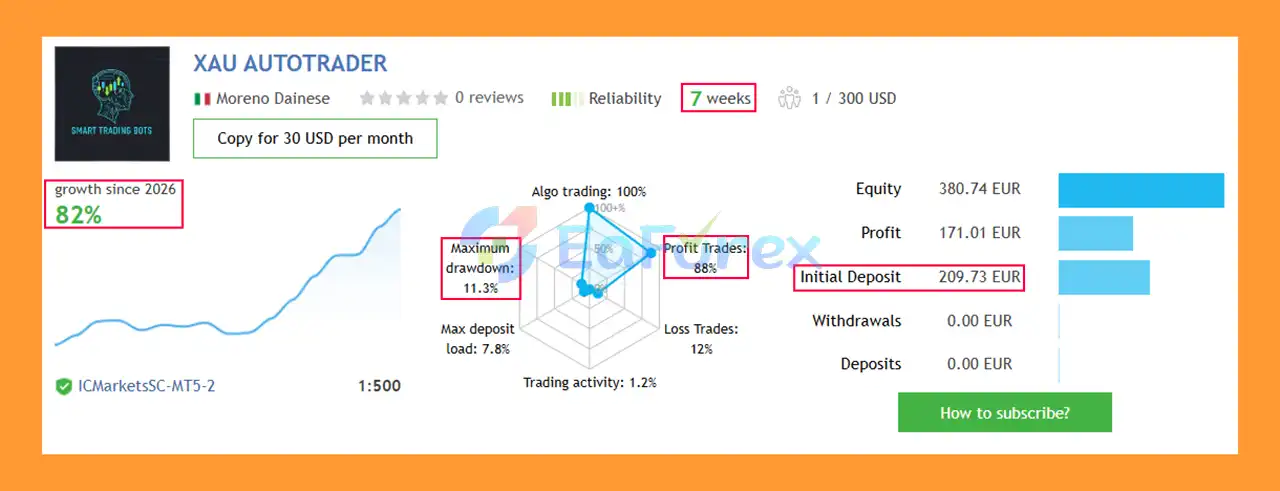
XAU AutoTrader EA Signal Results
🟣Backtest Results
🔺XAUUSD (Gold) pair
- Initial Deposit: $200
- Total Net Profit: $2,565.13
- Win Rate (% of total): 90.45%
- Maximum Drawdown: 10.39%
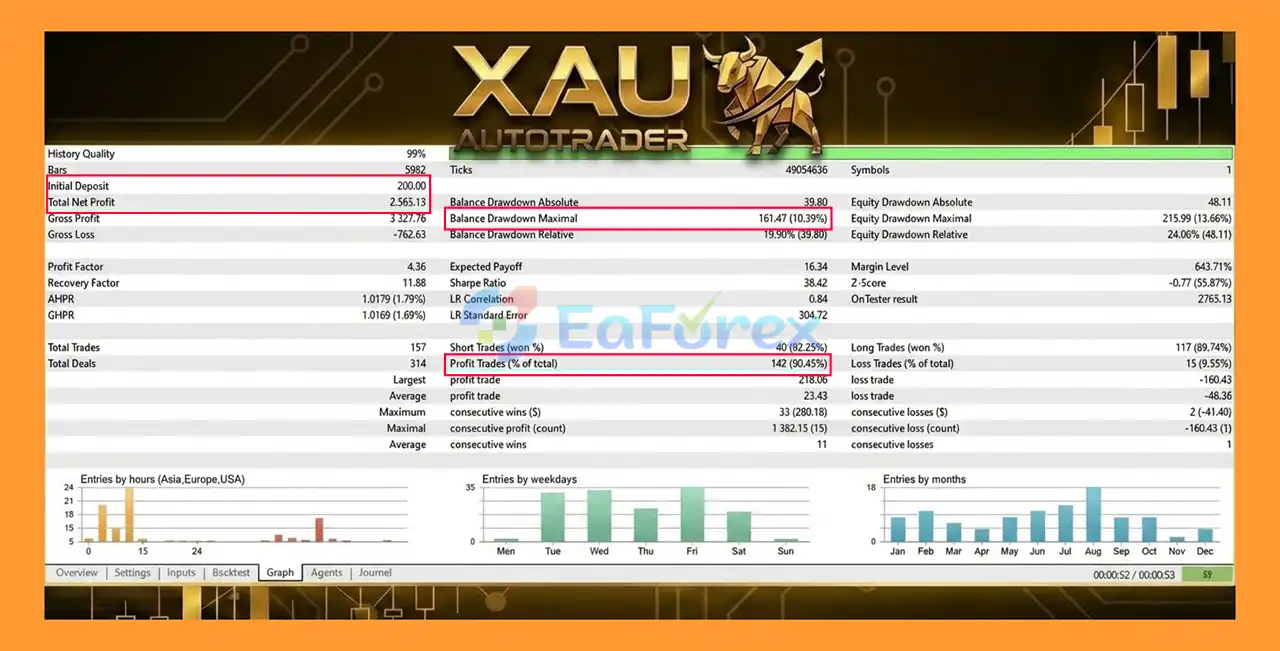
XAU AutoTrader MT5 Backtests
Performance and Risk Management
XAU AutoTrader EA MT5 includes several mechanisms intended to control trading risk and improve execution conditions.
Risk-Based Lot Calculation
Automatic lot sizing allows position volume to be calculated according to predefined risk settings. This can help maintain more consistent exposure as account equity changes.
Stop Loss and Take Profit
The EA uses percentage-based calculations for Stop Loss and Take Profit, allowing the configured parameters to adjust according to the trading setup.
Trailing Stop
The trailing stop can be used to manage an open position after price moves favorably.
The latest refinements also improve compatibility with broker minimum stop-distance requirements and Strategy Tester conditions.
News Filter
The news filter can pause new entries around selected economic events, particularly HIGH and MEDIUM impact news.
Historical News Backtesting
The CSV News Builder allows traders to generate historical economic-event data and use it when running Strategy Tester simulations.
This makes it possible to examine EA behavior around events such as:
- NFP
- FOMC
- CPI
- Other major economic releases
However, historical backtest results should still be treated as simulations rather than guarantees of future performance.
Spread Protection
The EA can skip new entries when the spread becomes too high. This is important for Gold because trading costs can increase significantly during periods of high volatility or reduced liquidity.
Weekend Protection
The EA includes a mechanism for closing positions before the weekend market closure, reducing exposure to weekend gaps.
Recommended Trading Environment
| Setting |
Recommendation |
| Symbol |
XAUUSD |
| Timeframe |
H1 |
| Minimum Deposit |
$200 |
| Account Type |
Hedging |
| Spread |
Under 30 points |
| Platform |
MetaTrader 5 |
Actual performance can vary depending on the broker, spread, execution speed, liquidity, price feed, account conditions, and trading environment.
Weaknesses and Risk Warnings
Although XAU AutoTrader EA MT5 includes several protection mechanisms, automated Gold trading still involves significant risk.
Broker Compatibility Is Important
The developer recommends testing the EA on a demo account for 2–4 weeks before using real money.
Different brokers can provide different:
- Spreads
- Execution speeds
- Price feeds
- Minimum stop distances
- Slippage conditions
- Trading conditions
Therefore, results from one broker may not be reproduced on another broker.
XAUUSD Can Be Highly Volatile
Gold can experience rapid price movements, especially around major economic announcements. Sudden volatility can result in slippage, spread expansion, and unexpected trading conditions.
Backtests Are Not Guarantees
Backtest results cannot guarantee future live performance. Even a detailed historical simulation may not accurately reproduce every aspect of real-market execution.
The integrated news backtesting feature can provide additional historical information, but it does not eliminate the limitations of backtesting.
News Filter Limitations
Economic-news filtering can help reduce exposure to scheduled events, but it cannot guarantee protection from all sudden market movements.
Unexpected geopolitical developments, market shocks, liquidity changes, or unscheduled events can still cause significant volatility.
Minimum Deposit Is Not a Safety Guarantee
The suggested $200 minimum deposit should not be interpreted as a guarantee that this amount is sufficient for every broker or trading configuration.
The appropriate capital level depends on risk settings, lot sizing, leverage, spread, execution conditions, and individual account circumstances.
Demo Testing Is Strongly Recommended
Before purchasing or using the EA on a live account, traders should test the free demo version on their intended broker.
If the backtest or demo performance is unsuitable under a specific broker’s conditions, the EA may not be appropriate for that trading environment.
Trading Gold involves substantial risk. Past performance does not indicate future results. Only trade with capital you can afford to lose.
Pros and Cons
Pros
- Designed specifically for XAUUSD Gold trading
- Fully automated MetaTrader 5 Expert Advisor
- Multi-timeframe support and resistance analysis
- Automated Buy Stop and Sell Stop breakout entries
- Risk-based automatic lot sizing
- Stop Loss and Take Profit management
- Built-in trailing stop
- High-spread entry protection
- Economic news filter
- Integrated CSV News Builder for Strategy Tester
- Supports historical news testing
- Weekend protection
- Real-time interactive dashboard
- Drag-and-drop dashboard functionality
Cons
- Designed primarily for XAUUSD rather than a broad range of symbols
- Recommended for a low-spread trading environment
- Results can vary significantly between brokers
- Gold volatility can create substantial trading risk
- News filtering cannot eliminate unexpected market events
- Backtest results do not guarantee future live performance
- Requires proper testing and configuration before live deployment
- A hedging account is recommended
How to Install XAU AutoTrader EA MT5
Step 1: Download the EA
Download the XAU AutoTrader EA MT5 package and locate the EA file, normally provided in EX5 format.
Step 2: Open MetaTrader 5
Launch your MetaTrader 5 trading platform.
Go to:
File → Open Data Folder
Then navigate to:
MQL5 → Experts
Copy the XAU AutoTrader EA file into this folder.
Step 3: Restart MetaTrader 5
Restart MT5 or refresh the Expert Advisors section in the Navigator window.
The EA should then appear under:
Navigator → Expert Advisors
Step 4: Open an XAUUSD Chart
Open an XAUUSD chart and select the recommended H1 timeframe.
The recommended setup is:
- Symbol: XAUUSD
- Timeframe: H1
- Account: Hedging
- Spread: Under 30 points
Step 5: Attach the EA
Drag XAU AutoTrader EA MT5 from the Navigator onto the XAUUSD chart.
Enable:
Allow Algo Trading
and make sure the main MT5 Algo Trading button is enabled.
Step 6: Configure Risk Settings
Set your preferred risk parameters, lot-sizing settings, Stop Loss, Take Profit, trailing stop, spread limit, news filter, and other available options.
Avoid using aggressive settings before completing sufficient demo testing.
Step 7: Configure the News Filter
If you want to use news protection, configure the appropriate news-filter settings.
For historical news backtesting, open the integrated CSV News Builder and select the required date range and news-impact levels.
Available quick date presets include:
1Y | 2Y | 3Y | 5Y | 10Y
Generate the CSV on a live chart. The resulting historical news data can then be loaded automatically when running the Strategy Tester.
Step 8: Test Before Going Live
Run the EA on a demo account for 2–4 weeks using your intended broker.
Compare the actual demo behavior with your backtest results, paying attention to:
- Spread
- Slippage
- Execution
- Drawdown
- Trading frequency
- News-event behavior
- Broker-specific conditions
Only consider live deployment after you have evaluated the EA under your own trading environment.
Real User Reviews and Feedback
🔺 XAU AutoTrader EA MT5 is highly appreciated by the MQL5 community for bringing stable and reliable profits. Below are 5 star reviews from users:
- Bob (2026.02.17): “It’s good but the “Fixed Lot” setting should default to False so I can more quickly add the EA.”
- Aymeric (2026.02.06): “Absolutely outstanding EA! I purchased the XAU Autotrader after testing many other EAs without success, and this one is clearly on another level. Everything is 100% in line with the seller’s signals, exactly as advertised. Highly recommended without hesitation!”
What’s Included in the Download Package?
- Setting (If Any).docx
- Installation Guide.docx
>>> Join VIP Membership Now <<<
Final Thoughts
In summary, XAU AutoTrader EA MT5 is a specialized XAUUSD Gold Trading Expert Advisor for MetaTrader 5, built around multi-timeframe Support and Resistance analysis and automated breakout execution. By analyzing D1, H4, H1, M30, and M15 market levels, the EA can place Buy Stop and Sell Stop orders automatically when potential breakout conditions are identified.
The system also provides several practical risk-management features, including risk-based lot sizing, Stop Loss, Take Profit, trailing stop management, spread protection, news filtering, and weekend protection. The integrated CSV News Builder is another useful feature for traders who want to incorporate historical economic-calendar data into Strategy Tester evaluations, particularly around events such as NFP, FOMC, and CPI.
The supplied 7-week XAUUSD signal reports +82% growth, an 88% win rate, and 11.3% maximum drawdown from an initial €209.73 deposit. The provided backtest reports $2,565.13 net profit, a 90.45% win rate, and 10.39% maximum drawdown from an initial $200 deposit. These historical and signal results do not guarantee future performance.
Because Gold can experience rapid volatility, spread expansion, slippage, and execution differences, actual live results may vary significantly between brokers. The recommended H1 configuration, low-spread hedging account, and appropriate risk settings should therefore be tested carefully.
Overall, XAU AutoTrader EA MT5 offers a structured automated breakout framework for XAUUSD trading. Thorough demo and forward testing for several weeks, realistic broker conditions, conservative position sizing, and careful evaluation of drawdown are recommended before live deployment.


































 Automatic EA
 EA Best Seller
 Expert Advisor MT4
 Expert Advisor MT5
 HFT EA


Reviews
Clear filtersThere are no reviews yet.