Product Overview
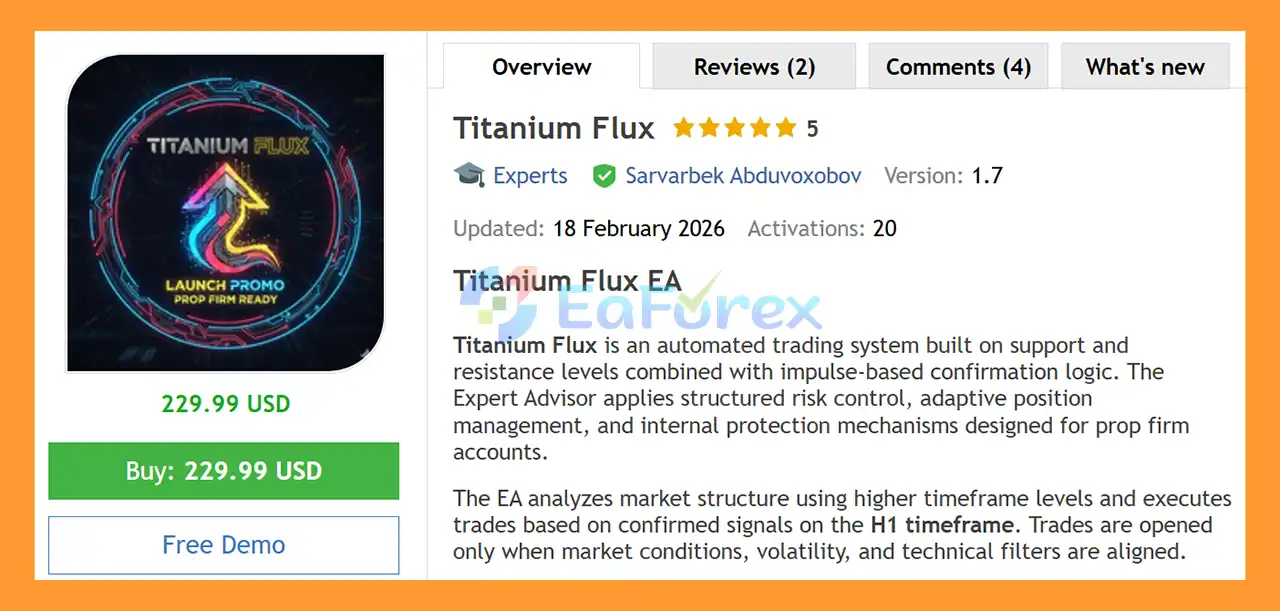
Titanium Flux EA MT5 is a fully automated XAUUSD Expert Advisor for MetaTrader 5 designed around support and resistance levels, impulse confirmation, and multi-timeframe market analysis. The EA focuses on identifying important market structure zones and waiting for confirmation before opening a trade.
Titanium Flux EA MT5 uses higher-timeframe High and Low levels to establish potential support and resistance areas. Once price interacts with these zones, the EA analyzes the H1 timeframe for candle-close confirmation, market impulse, candle body strength, volatility, and additional technical conditions.
The system is designed to automatically identify potential breakouts, reversals, and trend continuation setups while applying predefined risk and position-management rules.
A major focus of Titanium Flux EA MT5 is account protection and risk management, making the system particularly suitable for traders who want structured automated trading and features designed for prop firm challenge and evaluation accounts.
The EA supports both fixed-lot and percentage-based risk management, with several predefined risk profiles ranging from Conservative to Maximum, as well as dedicated Prop Firm Step 1 and Step 2 modes.
Technical Specifications:
- Platform: MetaTrader 5
- Trading Instrument: XAUUSD
- Primary Timeframe: H1
- Trading Type: Fully automated
- Minimum Deposit: $500
- Recommended Deposit: $1,000
- Account Type: Hedging and Netting compatible
- Trading Mode: Automated only
About the Developer
- Author: Sarvarbek Abduvoxobov.
- Experience: Over +3 years of experience on MQL5.
- Notable Products: itanium Flux EA MT5, PropGuardian EA MT5, TickStorm Scalper PRO MT5 and other advisors.
- Flagship Product: Titanium Flux EA MT5 is rated as the best performing product of the year.
>> Delivery time 24h-48h after payment.
>>> Refund if not delivered.
>>> You will receive the latest version without any limitations (ID+Time).
>>Reviewed by Jason Stap <<
Key Features of Titanium Flux EA MT5
Support and Resistance Strategy
Titanium Flux EA MT5 identifies important High and Low levels from higher timeframes and uses them as potential market reaction zones.
Instead of entering trades randomly, the EA evaluates how price interacts with these important levels before preparing a trading signal.
H1 Impulse Confirmation
The primary trading signal is confirmed on the H1 timeframe using several candle and price-action characteristics, including:
- Candle close confirmation
- Impulse strength
- Candle body size
- Market direction
- Volatility conditions
- Technical confirmation filters
This approach is designed to avoid entering a position solely because price has reached a support or resistance level.
Breakout, Reversal and Continuation Detection
The EA can automatically analyze different market scenarios, including:
- Support and resistance breakouts
- Potential reversals
- Trend continuation
- Strong price impulses
- Rejection from important levels
This allows the system to adapt its entry logic to different types of XAUUSD market behavior.
Multi-Timeframe Confirmation
Titanium Flux EA MT5 combines higher-timeframe market levels with H1 signal confirmation.
This multi-timeframe approach helps the EA evaluate the broader market structure before executing a trade.
RSI Filter
An RSI-based filter is included to identify potential overbought and oversold conditions.
The filter provides an additional layer of technical confirmation when evaluating potential entries.
Pin Bar and Candle Rejection Logic
The EA analyzes candle structures, including pin bars and rejection patterns, to help identify situations where price may be reacting strongly from a market level.
ATR Volatility and Impulse Filter
An ATR-based filter evaluates market volatility and impulse conditions.
This helps the EA distinguish between stronger price movements and weaker market conditions before executing a position.
Automatic Risk-Based Lot Calculation
Titanium Flux EA MT5 can automatically calculate position size according to a predefined risk percentage.
The calculation takes into account the actual Stop Loss distance and broker-specific trading conditions rather than relying solely on a fixed pip-based lot calculation.
A manual fixed-lot option is also available for traders who prefer direct control over position size.
Multiple Risk Profiles
The EA includes several predefined risk-management modes:
- Conservative
- Balanced
- Aggressive
- Maximum
- Prop Firm Step 1
- Prop Firm Step 2
- Manual Custom Risk
This gives traders flexibility when configuring the EA for different account objectives and risk tolerances.
Stop Loss and Take Profit Management
Titanium Flux EA MT5 supports both fixed and adaptive Stop Loss and Take Profit configurations.
The system also validates broker-specific trading restrictions, including minimum stop levels and other technical execution requirements.
Break-Even Protection
The Break-Even mechanism can automatically move the Stop Loss after a predefined level of profit has been reached.
This is designed to reduce the risk of allowing a profitable position to return completely into loss.
Trailing Stop
The built-in Trailing Stop can follow price movement after a position develops in the expected direction.
This allows the EA to manage an open trade dynamically rather than relying exclusively on the original exit level.
Maximum Orders Per Signal
The number of orders opened for each trading signal is strictly limited.
This helps prevent excessive order accumulation from a single market setup.
Prop Firm Protection
Titanium Flux EA MT5 includes dedicated account-protection features such as:
- Daily maximum loss limit
- Overall drawdown control
- Profit target protection
- Automatic trading suspension
- Automatic position closing when configured limits are violated
These features are specifically designed to help traders manage automated trading under structured account rules.
How Does Titanium Flux EA MT5 Work?
Titanium Flux EA MT5 follows a structured process before opening a trade.
Step 1: Identify Important Market Levels
The EA first analyzes higher-timeframe price data to identify important High and Low levels that may function as support or resistance.
These levels become potential preparation zones for future trading opportunities.
Step 2: Monitor Price Interaction
When XAUUSD approaches or interacts with an identified market level, the EA begins evaluating the surrounding price action.
The system does not simply open a position because price reaches the level.
Step 3: Confirm the H1 Signal
The EA analyzes the H1 timeframe for confirmation.
The confirmation process can include:
- Candle close
- Candle body size
- Price impulse
- Rejection structure
- RSI conditions
- ATR volatility
- Multi-timeframe alignment
Step 4: Identify the Market Scenario
Once the technical conditions are satisfied, the EA determines whether the setup is consistent with a potential:
- Breakout
- Reversal
- Trend continuation
Step 5: Calculate Position Size
Depending on the selected configuration, the EA calculates the trading lot automatically according to the selected risk percentage or uses the manually defined fixed lot.
The calculation considers the actual Stop Loss distance and broker conditions.
Step 6: Open and Manage the Position
After all required conditions are confirmed, the EA executes the trade automatically.
The position can then be managed using:
- Stop Loss
- Take Profit
- Break-Even
- Trailing Stop
- Group position closing
- Daily loss protection
- Overall drawdown protection
Step 7: Apply Account Protection
If the configured daily loss, overall drawdown, or profit target conditions are reached, the EA can close positions and suspend further trading according to its protection settings.
Why Choose Titanium Flux EA MT5?
Titanium Flux EA MT5 may be suitable for traders looking for an automated XAUUSD trading system that combines technical entry confirmation with structured account protection.
Structured Market Analysis
The strategy is based on identifiable market structure rather than relying on a single indicator. Higher-timeframe support and resistance levels are combined with H1 impulse and candle confirmation.
Multiple Entry Filters
RSI, ATR, candle structure, rejection patterns, and multi-timeframe confirmation provide several layers of technical filtering before a trade is considered.
Flexible Risk Management
Traders can choose between fixed-lot trading and percentage-based risk calculation, with several predefined risk profiles.
Built for Automated Trading
The EA is designed to operate automatically without requiring manual trade execution.
Prop Firm-Oriented Protection
Daily loss limits, overall drawdown controls, and profit-target protection make the EA particularly relevant to traders operating under structured account rules.
However, these features do not guarantee that an account will pass or remain compliant with any particular prop firm. Each firm has its own trading rules, prohibited strategies, drawdown calculations, news restrictions, and execution conditions.
Controlled Position Exposure
The maximum number of orders per signal is limited, helping to prevent uncontrolled order accumulation from a single setup.
Titanium Flux EA MT5 Performance Review
🟢Signal Results
🔺XAUUSD (Gold)- 5 weeks
- Initial Deposit: $200
- Growth Rate: +79%
- Win Rate (% of total): 100%
- Maximum Drawdown: 18%
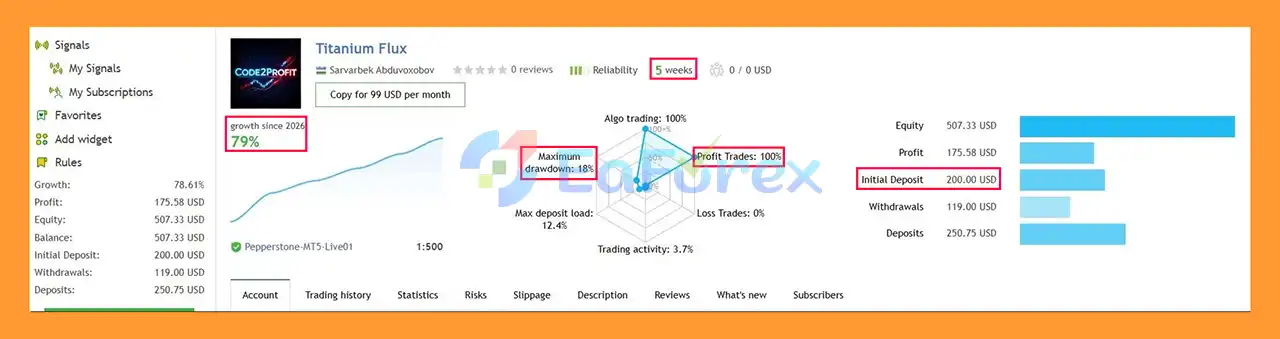
Titanium Flux EA MT5 Signal Results
🟢Backtest Results
- Initial Deposit: $10,000
- Total Net Profit: $47,489.96
- Win Rate (% of total): 92.79%
- Maximum Drawdown: 14.79%
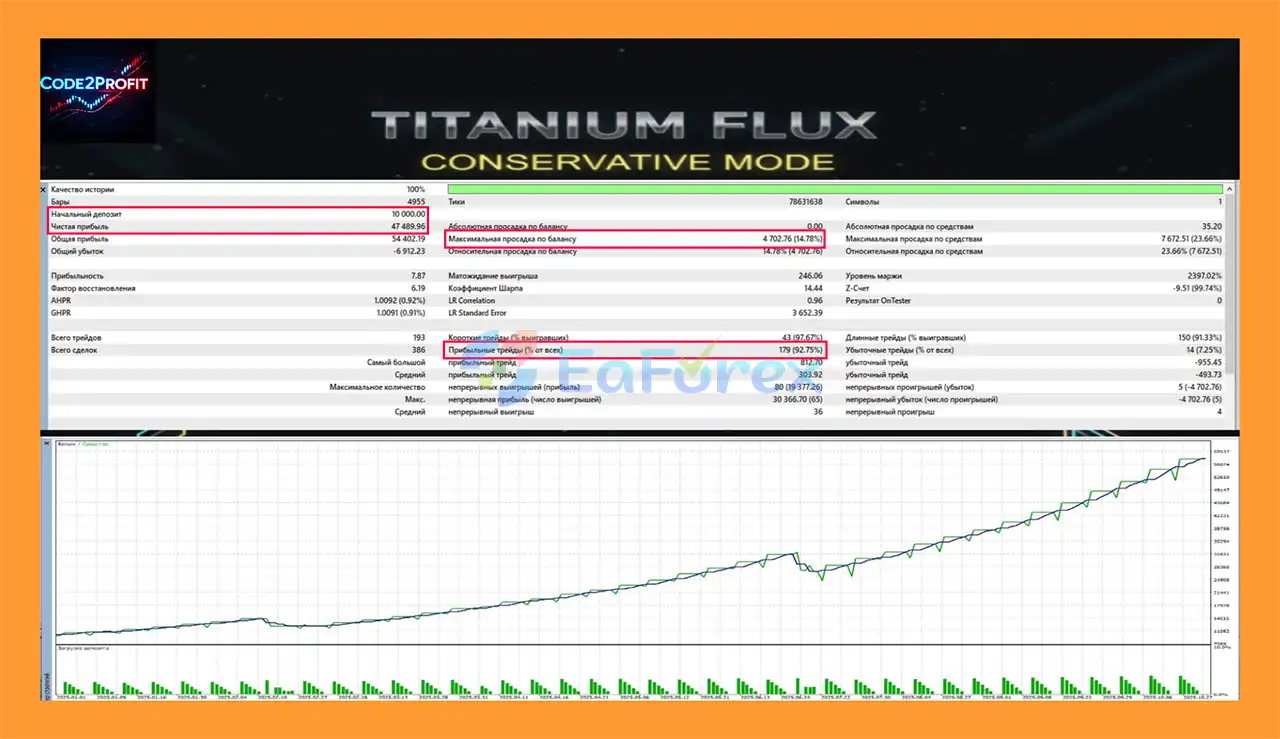
Titanium Flux EA MT5 Backtests
Performance and Risk Management
Risk management is one of the core components of Titanium Flux EA MT5.
The EA supports automatic risk-based lot calculation, allowing position size to be determined according to the selected risk percentage and actual Stop Loss distance.
This is important because the same lot size can represent significantly different levels of account risk depending on the Stop Loss distance, account balance, leverage, contract specifications, and broker conditions.
Available Risk Modes
Titanium Flux EA MT5 provides:
- Conservative – designed for lower predefined risk exposure
- Balanced – designed for a moderate risk configuration
- Aggressive – designed for higher risk exposure
- Maximum – designed for the highest available predefined risk setting
- Prop Firm Step 1 – intended for the first stage of a prop firm evaluation
- Prop Firm Step 2 – intended for the second stage
- Manual – allows users to configure custom risk parameters
The exact behavior of each mode depends on the EA settings and should be tested before live deployment.
Account Protection
The EA includes several protective mechanisms:
- Daily maximum loss control
- Overall drawdown protection
- Automatic trading suspension
- Profit-target protection
- Automatic position closure
- Break-Even
- Trailing Stop
- Broker stop-level validation
- Maximum orders per signal
These mechanisms are designed to limit exposure when predefined account conditions are reached.
Nevertheless, risk management does not eliminate trading risk. XAUUSD can experience rapid price movements, large spreads, slippage, and significant volatility, especially around major economic events.
Historical testing or previous trading performance should not be interpreted as a guarantee of future results.
Weaknesses and Risk Warnings
Despite its extensive filtering and protection features, Titanium Flux EA MT5 has several important limitations that traders should understand.
XAUUSD-Specific Risk
The EA is designed for XAUUSD only. Gold can experience substantial volatility and sudden price movements, which can result in larger-than-expected losses during unfavorable market conditions.
No Strategy Can Eliminate Losses
Support and resistance, RSI, ATR, candle patterns, and multi-timeframe confirmation can help structure trading decisions, but no technical strategy can guarantee profitable trades.
False breakouts, unexpected reversals, market gaps, and abnormal volatility can cause losing positions.
Broker Conditions Matter
Live performance can vary depending on:
- Spread
- Commission
- Slippage
- Execution speed
- Liquidity
- Contract specifications
- Stop-level restrictions
- Leverage
- Broker trading conditions
Therefore, results from one broker may not be replicated on another broker.
Prop Firm Rules Can Differ
Although the EA includes features designed for prop firm accounts, users must independently verify the rules of their chosen prop firm.
Important differences may include:
- Daily drawdown calculation
- Maximum overall drawdown
- News trading restrictions
- Overnight trading rules
- Minimum trading days
- Lot-size restrictions
- Maximum position exposure
- Expert Advisor restrictions
Therefore, prop firm compatibility should always be confirmed before deployment.
Higher Risk Modes Increase Exposure
Aggressive and Maximum risk modes can increase potential gains and losses. Traders should not select a risk profile solely because it has a higher return objective.
Recommended Testing
The EA should be tested on a demo account before being used with real capital.
Users should also forward-test the system under their intended broker conditions and verify that the selected risk settings behave as expected.
Pros and Cons
Pros
- Fully automated XAUUSD trading
- Designed for MetaTrader 5
- H1 primary trading timeframe
- Higher-timeframe support and resistance analysis
- Impulse-based confirmation
- Multi-timeframe filtering
- RSI overbought/oversold filter
- Pin-bar and candle rejection logic
- ATR volatility confirmation
- Breakout, reversal, and trend-continuation detection
- Automatic risk-based lot calculation
- Fixed-lot option
- Multiple predefined risk profiles
- Fixed or adaptive Stop Loss and Take Profit
- Break-Even protection
- Trailing Stop
- Maximum orders per signal
- Daily loss protection
- Overall drawdown control
- Profit-target protection
- Prop firm-oriented risk controls
- Compatible with both hedging and netting accounts
Cons
- XAUUSD only
- Gold volatility can create significant risk
- Performance depends on broker and execution conditions
- No trading strategy can guarantee profits
- Higher risk modes can increase drawdown and losses
- Prop firm compatibility depends on the individual firm’s rules
- Requires proper testing and configuration before live use
- Automated trading remains exposed to unexpected market events
How to Install Titanium Flux EA MT5
Installing Titanium Flux EA MT5 on MetaTrader 5 is straightforward.
Step 1: Open MetaTrader 5
Install and launch MetaTrader 5 on your computer.
Log in to the trading account where you want to test or operate the EA.
Step 2: Open the Data Folder
Inside MetaTrader 5:
File → Open Data Folder
Then navigate to:
MQL5 → Experts
Step 3: Copy the EA File
Copy the Titanium Flux EA MT5 (.ex5) file into the Experts folder.
Step 4: Restart MetaTrader 5
Close and reopen MetaTrader 5, or refresh the Expert Advisors section in the Navigator window.
Titanium Flux EA MT5 should then appear under:
Navigator → Expert Advisors
Step 5: Open an XAUUSD Chart
Open an XAUUSD chart and select the H1 timeframe.
The product is designed for XAUUSD trading, with H1 as its default signal timeframe.
Step 6: Attach the EA
Drag Titanium Flux EA MT5 from the Navigator onto the XAUUSD chart.
Enable:
Algo Trading / Allow Algo Trading
when requested.
Step 7: Configure the Settings
Review the available parameters before starting the EA.
Pay particular attention to:
- Risk mode
- Risk percentage
- Fixed lot size
- Stop Loss
- Take Profit
- Break-Even
- Trailing Stop
- Daily maximum loss
- Overall drawdown
- Profit target
- Maximum orders per signal
- Prop firm protection settings
Step 8: Start With Demo Testing
Before using real money, run the EA on a demo account to verify that entries, position sizing, Stop Loss, Take Profit, and account-protection mechanisms operate correctly with your broker.
For best results, use the same broker conditions, account type, leverage, and settings that you intend to use in live trading.
Important: Titanium Flux EA MT5 is designed to run on a single chart at a time. Avoid attaching multiple copies to the same account unless the product documentation specifically permits it.
Real User Reviews and Feedback
🔺Titanium Flux EA MT5 is highly appreciated by the MQL5 community for bringing stable and reliable profits. Below are 5 star reviews from users:
- Delmas Ollivierre (2026.02.23): “The last release version up the game on more safe trades rather than aggressive trade. set it and forget it set ups. running beautiful on my live account.”
- IO kip (2026.01.15): “Professional developer and high-quality product! I first tested it using the default settings — it was stable and worked without any issues. highly recommended.”
What’s Included in the Download Package?
- Experts:
- Setting (If Any).docx
- Installation Guide.docx
- SetFiles:
- 10K to 100K Low.set
- 10K to 100K Normal.set
- 10K to 100K Aggressive.set
>>> Join VIP Membership Now <<<
Final Thoughts
In summary, Titanium Flux EA MT5 is a specialized XAUUSD Gold Trading Expert Advisor for MetaTrader 5, built around higher-timeframe support and resistance analysis, H1 impulse confirmation, candle structure, RSI, ATR volatility filtering, and multi-timeframe market analysis. The combination of breakout, reversal, and trend-continuation logic provides a structured approach to identifying potential Gold trading opportunities.
A major strength of the system is its emphasis on automated risk management. Titanium Flux supports fixed-lot and percentage-based position sizing, multiple risk profiles, Stop Loss, Take Profit, Break-Even, Trailing Stop, daily loss protection, overall drawdown controls, and maximum-order limitations. Dedicated Prop Firm Step 1 and Step 2 modes also provide additional configuration options, although traders must independently verify compatibility with their specific prop firm’s rules.
The supplied 5-week XAUUSD signal reports +79% growth, a 100% win rate, and 18% maximum drawdown from a $200 initial deposit. The backtest reports $47,489.96 total net profit, a 92.79% win rate, and 14.79% maximum drawdown from an initial $10,000 deposit. These historical and signal results do not guarantee future performance.
Because XAUUSD can experience rapid volatility, spread widening, slippage, and unexpected price movements, actual live performance may differ substantially from historical results. Thorough demo and forward testing under the intended broker conditions, conservative risk settings, and careful evaluation of prop-firm requirements are recommended before live deployment.



















 Unlimited Activations
 Instant delivery
 Easy to install
















 Automatic EA
 EA Best Seller
 Expert Advisor MT4
 Expert Advisor MT5
 HFT EA


Reviews
Clear filtersThere are no reviews yet.