









-
 Unlimited Activations
-
 Instant delivery
-
 Easy to install







 Unlimited Activations
Instant delivery
Easy to install
Unlimited Activations
Instant delivery
Easy to install
 Free Update
 Free Install Support

Fantastic 4 MT5 is an automated gold trading Expert Advisor (EA) designed exclusively for XAUUSD (Gold) on the MetaTrader 5 platform. It combines 11 independent quantitative trading strategies within a single automated trading system, offering multiple approaches to market analysis, trade execution, and position management.
Instead of relying on a single trading method, Fantastic 4 MT5 integrates breakout trading, trend following, scalping, pullback trading, and channel-based strategies. Each strategy has its own entry conditions, order management logic, and risk-control parameters, allowing the system to respond to different gold market conditions.
The EA is designed to operate across all chart timeframes, although individual strategies use specific timeframes internally. For example, some modules analyze H1 breakouts, while others focus on M15 scalping, H4 channel movements, or D1 range expansions.
Fantastic 4 MT5 is marketed as a non-grid and non-martingale trading robot that uses Stop Loss and Take Profit logic. It also provides four predefined risk profiles, allowing traders to enable selected strategies according to their capital allocation preferences.
The system requires an ECN or RAW trading account with competitive spreads, low execution latency, and support for XAUUSD. The developer lists Vantage, BlackBull, and TMGM as recommended broker options, but compatibility and trading conditions should always be verified with the chosen broker.
By combining multiple independent strategies into one EA, Fantastic 4 MT5 aims to diversify trading logic, reduce dependence on a single market condition, and automate gold trading with a structured approach to risk management.
Important: Strategy diversification does not eliminate market risk or guarantee stable equity growth. Actual performance depends on market conditions, execution quality, position sizing, and the behavior of each enabled strategy.
>>> Delivery time 24h-48h after payment.
>>> Refund if not delivered.
>>> You will receive the latest version without any limitations (ID+Time).
>> Reviewed by Jason Stap <<<
Fantastic 4 MT5 Overview
Fantastic 4 MT5 integrates 11 trading modules, labeled Strategy A through Strategy K. Each module follows its own trading logic and operates with dedicated entry and order-management rules.
The available strategies include:
This multi-strategy structure gives traders the flexibility to select a combination of approaches rather than relying exclusively on one trading method.
The EA is designed specifically for gold trading. XAUUSD can experience strong directional movements, rapid reversals, and volatility around economic announcements, making execution quality and risk management particularly important.
A gold-focused trading system can simplify configuration, but it also concentrates market exposure in one instrument.
Several modules identify important price levels, swing highs and lows, or channel boundaries. When price breaks through these areas, the EA can place market or pending orders according to the relevant strategy.
Breakout trading aims to capture directional price movements, but false breakouts and sudden reversals can result in losing trades.
Strategies C and E focus on short-term opportunities in gold. They are designed to capture smaller price movements through frequent or indicator-based entries.
Scalping performance can be especially sensitive to spreads, commissions, slippage, and execution speed. Low-cost trading conditions are therefore important when evaluating these modules.
Strategies A, D, and I focus on trend-related market behavior. Their trading logic is intended to identify directional movements, follow developing trends, or manage positions through pullbacks.
These approaches may perform differently in trending and sideways markets, making it important to test each strategy under a variety of conditions.
According to the supplied product description, Fantastic 4 MT5 uses real Stop Loss and Take Profit logic rather than relying on grid or martingale recovery techniques.
Stop Loss and Take Profit orders provide a framework for managing individual positions. However, stop execution can be affected by slippage, gaps, and broker conditions, while a Take Profit target does not guarantee that a trade will always close at the intended price.
The EA provides four suggested configurations: Low Risk, Medium Risk, High Risk, and Very High Risk. Each profile enables a different combination of strategies and specifies a recommended lot-to-capital ratio.
This structure helps traders customize strategy participation, but the labels should not be interpreted as guarantees of low drawdown or safety.
Although Fantastic 4 MT5 can be attached to any timeframe according to the developer, its strategies use different internal chart periods, ranging from M5 scans to H1, H4, and D1 analysis.
Traders should follow the installation documentation to ensure that the EA correctly accesses the required market data and that its timeframe settings are compatible with the installed version.
The EA is designed to manage trade entries, pending orders, Stop Loss levels, Take Profit targets, and other position-management tasks automatically according to each strategy’s rules.
Automation can reduce the need for manual order placement, but it does not remove the need for monitoring, maintenance, and risk oversight.
Fantastic 4 MT5 operates by running multiple trading strategies within one EA. Each strategy evaluates the gold market according to its own logic and can generate trading opportunities independently of the other modules.
The EA monitors XAUUSD price movements and accesses the relevant chart periods required by its enabled strategies.
Depending on the module, analysis may focus on support and resistance, swing highs and lows, price channels, short-term fluctuations, or directional momentum.
Each strategy searches for conditions that satisfy its entry rules. A breakout strategy may wait for price to move beyond a defined level, while a scalping strategy may look for a shorter-term price pattern.
The exact indicators, signal thresholds, and calculation methods depend on the individual module and its configuration.
When an entry condition is met, the EA can open a position or place a pending order, such as Buy Stop or Sell Stop, according to the strategy.
Some modules are designed for relatively frequent trading, while others may wait for larger price expansions and generate fewer signals.
Each strategy uses its own position-management logic. Depending on the module, this may include different Stop Loss distances, Take Profit targets, pending-order expiration periods, or trailing behavior.
Because the modules have different risk characteristics, enabling more strategies can change the overall number of open positions and total account exposure.
The EA manages positions according to the active strategies’ rules. It is designed to execute the trading plan without requiring manual confirmation for every entry or exit.
However, automated management cannot guarantee that all positions will close profitably or that account drawdown will remain within a predetermined range.
The purpose of the 11-strategy structure is to diversify how the EA approaches the gold market. Some strategies target trends, others focus on short-term fluctuations, and others attempt to capture breakouts.
Different strategies may perform differently across market environments. Their combination can improve diversification only if their actual trading behavior and risk exposures are sufficiently distinct.
Fantastic 4 MT5 offers 11 trading modules in one EA, covering several approaches to gold trading. This allows users to configure a portfolio of strategies instead of depending entirely on a single entry method.
The four predefined risk profiles provide different combinations of enabled strategies and recommended lot sizes. Traders can choose a configuration based on their capital, risk tolerance, and testing results.
The developer describes Fantastic 4 MT5 as a system that does not use grid or martingale trading. For traders who want to avoid progressive lot escalation or grid-based recovery methods, this is an important design consideration.
Nevertheless, strategies can still accumulate exposure through multiple positions, particularly when several breakout modules are enabled simultaneously.
The strategy portfolio includes breakout, trend-following, scalping, and pullback approaches. These methods are designed to target different types of price movement, although none can be expected to perform equally well in every market environment.
Fantastic 4 MT5 automates signal evaluation, order placement, and position management on XAUUSD. This can help traders apply predefined rules consistently without manually monitoring every potential setup.
The developer specifies ECN or RAW accounts with low spreads and fast execution. Such conditions may be beneficial for short-term strategies, although commissions and slippage must also be included when evaluating total trading costs.
The predefined risk profiles provide a starting point for allocating capital across selected strategies. However, the recommended lot ratios should be validated through backtesting and forward testing rather than applied automatically.
Best suited for: Traders who understand the risks of automated gold trading, can monitor account exposure, and want to evaluate multiple trading approaches within one MetaTrader 5 Expert Advisor.
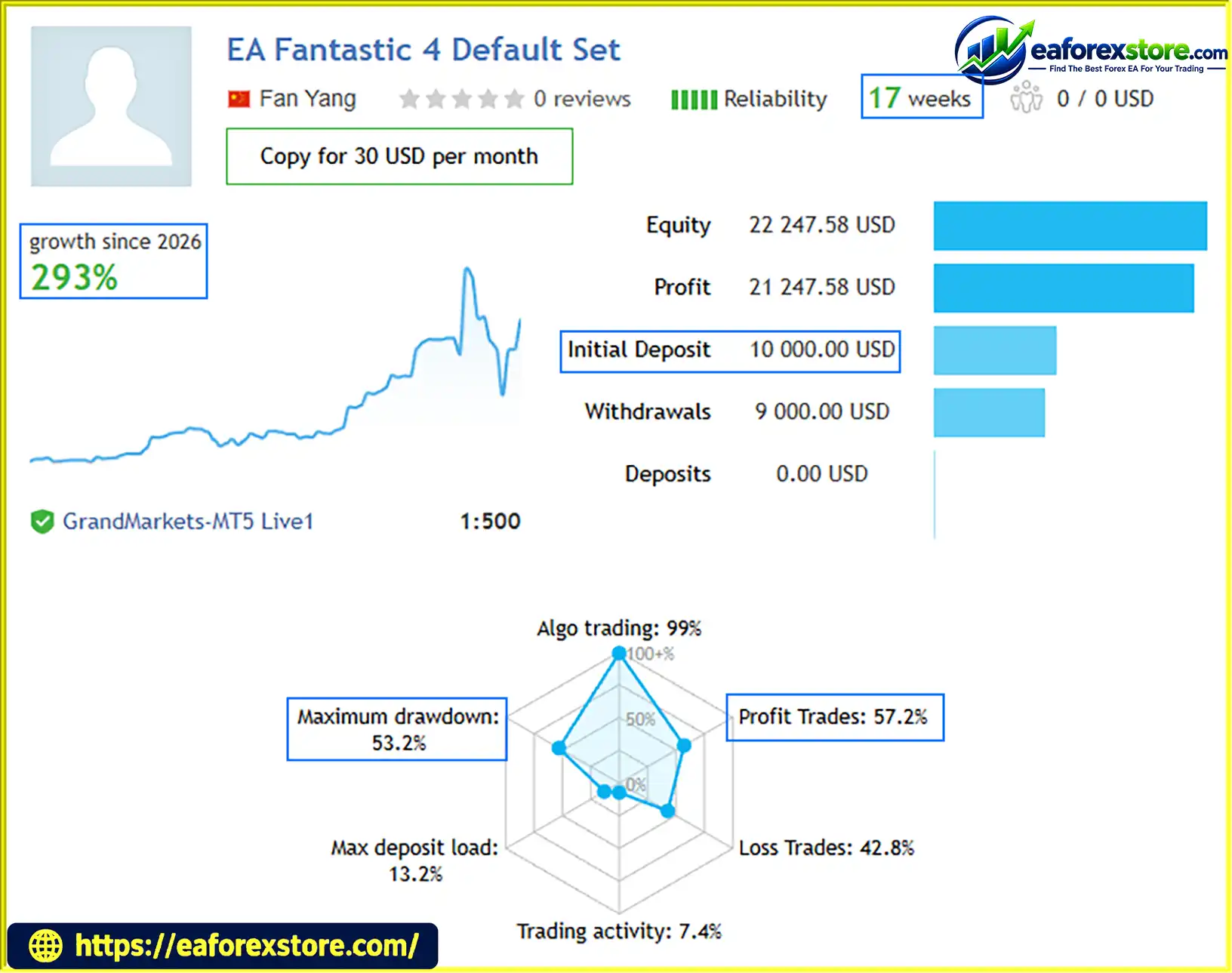
🔺EA Fantastic 4 Defautl Set – 17 consecutive weeks
Fantastic 4 MT5 EA Live Signal
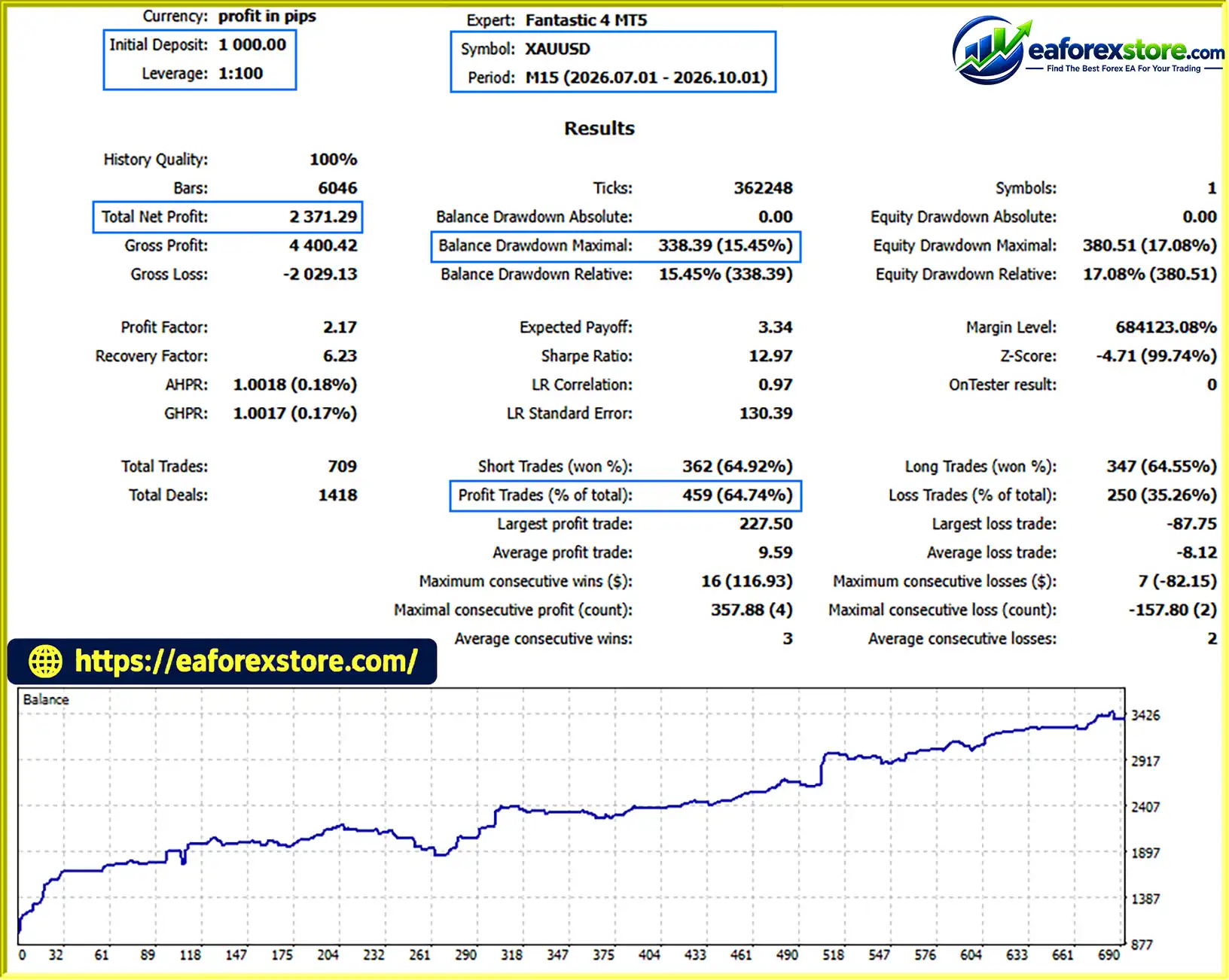
🔺XAUUSD (Gold) – 3 Months
Fantastic 4 MT5 backtets
Fantastic 4 MT5 is designed to diversify trading logic through multiple strategies, but its actual performance will depend on market behavior, strategy settings, execution conditions, and the selected risk profile.
The supplied description refers to historical backtesting and live-market verification, but it does not provide independently verified performance statistics sufficient to establish future profitability or maximum expected drawdown.
The developer provides the following capital allocation guidelines:
| Risk Profile | Enabled Strategies | Suggested Lot-to-Capital Ratio |
|---|---|---|
| Low Risk | D, E | 0.01 lots per $500 |
| Medium Risk | B, D, E, F, K | 0.01 lots per $1,000 |
| High Risk | A, B, C, D, E, F, G, K | 0.01 lots per $1,500 |
| Very High Risk | All strategies, A–K | 0.01 lots per $2,000 |
Important: These are the developer’s stated configurations, not independently validated risk limits. The ratios should be interpreted according to the EA’s actual lot-sizing rules, and traders should confirm whether the ratio applies to each strategy or to the total account allocation.
The naming of the profiles and their capital ratios should not be assumed to represent equivalent levels of risk across brokers or account sizes.
| Parameter | Developer’s Specification |
|---|---|
| Trading platform | MetaTrader 5 |
| Trading instrument | XAUUSD (Gold) |
| Account type | ECN or RAW |
| Timeframe | Any timeframe, according to the developer |
| Maximum spread | Below 25, using the EA’s intended quote units |
| Stops level | Below 30, using the broker’s specified units |
| Execution delay | Below 100 ms |
| Leverage | 1:100 to 1:1000 |
| Initial capital guidance | 0.01–0.02 lots per $500, as stated in the supplied description |
| Recommended brokers | Vantage, BlackBull, TMGM |
Spread and Stop Level values may be expressed differently depending on symbol digits, broker specifications, and platform conventions. Verify the correct units before configuring the EA.
The supplied description also states that Fantastic 4 MT5 does not support three-decimal quotation. Confirm that your broker’s XAUUSD pricing format is compatible before installation.
Running multiple strategies does not necessarily mean that risk is diversified. Several modules may open positions in the same direction or respond to the same market event.
For example, multiple breakout strategies may enter during a sharp gold rally, while a sudden reversal could affect several positions simultaneously.
Traders should monitor:
The product description acknowledges that short-term consecutive losses can occur. This is especially relevant to strategies that use tight stops, trade frequent breakouts, or hold positions through volatile price fluctuations.
A strategy portfolio may recover from some losing periods, but recovery is never guaranteed. A prolonged adverse market environment can affect multiple modules at the same time.
Strategies J and K are described as more aggressive modules that may maintain multiple positions and use wider Stop Loss settings relative to their targets. Strategy K is specifically intended for high-risk configurations.
These modules should be tested individually before being included in a live portfolio. The Very High Risk profile should not be considered appropriate simply because sufficient capital is available.
The recommended leverage range is 1:100 to 1:1000. Higher leverage can reduce the margin required to open a position, but it does not reduce the underlying market risk.
A large gold position can generate substantial losses from a relatively small adverse price movement. Maintain sufficient free margin and avoid using the maximum available leverage simply because the broker permits it.
Before live deployment, traders should:
Historical results do not guarantee future profitability, and backtests may not accurately reproduce real-market execution.
Although Fantastic 4 MT5 offers a diversified set of strategies, several limitations should be considered before purchasing or deploying the EA.
The EA trades XAUUSD exclusively. This simplifies instrument selection but concentrates trading exposure in gold, which can experience sharp price movements due to interest-rate expectations, inflation data, central bank decisions, geopolitical developments, and changes in market sentiment.
Breakout strategies can enter positions when price temporarily moves beyond a key level before reversing. During choppy markets, repeated false breakouts may generate consecutive losses.
Scalping strategies may also struggle when spreads widen or price movements become irregular.
Enabling more modules increases the range of trading logic, but it may also increase the number of simultaneous positions and pending orders. If several strategies respond to the same market movement, losses may be correlated rather than diversified.
Some modules are designed to tolerate greater price fluctuations through wider Stop Loss settings. This can allow trades more room to develop, but it may also increase the potential loss per position if lot size is not adjusted appropriately.
The EA’s performance may differ across brokers because of spreads, commissions, slippage, latency, Stop Level restrictions, contract sizes, and XAUUSD quote formats.
Even a compatible ECN or RAW account cannot eliminate execution risk.
Fantastic 4 MT5 reportedly does not support three-decimal quotation. Users should confirm the symbol’s actual price format and the EA’s compatibility with their broker before trading.
The supplied product description does not include independently verified live-account records, detailed profit statistics, or a verified maximum drawdown figure. Claims about long-term stability and drawdown control should therefore be evaluated through independent testing rather than accepted as guaranteed outcomes.
The Low Risk, Medium Risk, High Risk, and Very High Risk labels indicate the developer’s intended configurations. They do not establish a fixed probability of loss or guarantee a particular drawdown level.
Risk warning: Fantastic 4 MT5 is an automated trading system, not a guaranteed profit solution. Gold trading can involve substantial losses, and leverage may magnify their impact. Always test the EA before live deployment and never risk money you cannot afford to lose.
Follow these general steps to install and configure Fantastic 4 MT5. Product-specific instructions from the developer should take precedence if they differ from this general process.
Purchase or download Fantastic 4 MT5 from its authorized source. Confirm that the package is compatible with MetaTrader 5 and check any activation or licensing requirements.
Install and launch MT5, then sign in to a compatible trading account. A demo account is recommended for initial testing.
If the EA is provided as an .ex5 or .mq5 file:
MQL5 → Experts.If the EA is delivered through the MQL5 Market, follow its official installation and activation process.
Find XAUUSD in the Market Watch window and open its chart. Select the timeframe specified by the developer or required by the product documentation.
Although the EA is described as supporting any timeframe, verify whether the installed version has a preferred chart timeframe or specific initialization requirements.
Drag the EA from the Navigator panel onto the XAUUSD chart. Review its input parameters and confirm that automated trading is enabled.
Choose the intended strategy combination:
These are the configurations supplied by the developer. Confirm the settings in the EA’s input panel and do not assume that the profile names guarantee specific risk outcomes.
Set the lot size according to the EA’s documented parameters and your tested risk limits. Check the account balance, margin requirements, Stop Loss distances, and the combined exposure from all enabled strategies.
Avoid increasing lot sizes simply to accelerate potential returns.
Confirm that your broker offers XAUUSD on an ECN or RAW account and that its spread, Stop Level, latency, leverage, and quote precision meet the EA’s requirements.
The developer lists Vantage, BlackBull, and TMGM as recommended brokers, but you should independently verify current account terms and regional availability.
Enable the platform’s Algo Trading function and grant the EA the permissions it legitimately requires. Check the Experts and Journal tabs for initialization errors or execution issues.
Run a demo forward test using your intended strategy combination and broker. Monitor drawdown, trade frequency, simultaneous positions, spread sensitivity, and margin usage.
Only consider live deployment after understanding the EA’s behavior and confirming that its risks are consistent with your financial circumstances.
🔺Fantastic 4 MT5 is highly appreciated by the MQL5 community for bringing stable and reliable profits. Below are 5 star reviews from users:
>> Join VIP Membership Now <<<
Fantastic 4 MT5 is an 11-in-1 automated gold trading Expert Advisor designed to combine breakout trading, trend following, scalping, and other quantitative strategies into a single MT5 system.
Its primary appeal is the flexibility to activate different strategy combinations and choose from four predefined risk profiles. The system also emphasizes Stop Loss and Take Profit logic while avoiding grid and martingale approaches, according to the developer.
However, the presence of multiple strategies does not guarantee diversification or stable long-term returns. Several modules may be exposed to the same gold market movements, and aggressive strategies can create significant floating losses or margin pressure.
Before using Fantastic 4 MT5 with real capital, verify broker compatibility, test the strategy modules separately, and evaluate the total portfolio’s drawdown under realistic conditions. Pay particular attention to the lot-sizing recommendations, quotation precision, and the risk associated with enabling all strategies simultaneously.
Final verdict: Fantastic 4 MT5 offers a flexible multi-strategy approach to automated XAUUSD trading. It may be worth evaluating for traders who understand algorithmic gold trading and are prepared to test and monitor their configurations carefully. Disciplined capital allocation, realistic expectations, and independent performance verification remain essential.
1. What Is Fantastic 4 MT5 EA?
Fantastic 4 MT5 is an automated trading Expert Advisor designed specifically for XAUUSD (Gold) on the MetaTrader 5 platform. It combines 11 independent trading strategies, including breakout trading, trend following, scalping, and pullback trading, to identify opportunities under different market conditions.
2. Does Fantastic 4 MT5 Use Grid or Martingale Strategies?
No. According to the developer, Fantastic 4 MT5 does not use grid or martingale trading techniques. Instead, it uses Stop Loss and Take Profit logic to manage positions. However, enabling multiple strategies simultaneously can still increase overall market exposure and potential drawdown.
3. Which Trading Platform and Currency Pair Does Fantastic 4 MT5 Support?
Fantastic 4 MT5 is designed for MetaTrader 5 (MT5) and trades XAUUSD (Gold) exclusively. Although it can reportedly be attached to different chart timeframes, its 11 strategies use specific internal timeframes ranging from short-term scans to H1, H4, and D1 analysis.
4. What Are the Main Features of Fantastic 4 MT5 EA?
The key features include 11 independent trading strategies, automated trade execution, Stop Loss and Take Profit management, multi-timeframe analysis, and four configurable risk profiles: Low Risk, Medium Risk, High Risk, and Very High Risk. These features allow traders to customize their strategy combinations based on their trading preferences and tested risk limits.
5. What Are the Recommended Broker Requirements for Fantastic 4 MT5?
The developer recommends an ECN or RAW trading account with competitive spreads, fast execution, and XAUUSD support. Vantage, BlackBull, and TMGM are listed as recommended brokers. The stated requirements include execution latency below 100 ms and leverage between 1:100 and 1:1000. Traders should verify broker compatibility, quotation precision, and current account conditions before installation.
6. What Is the Minimum Capital Required to Use Fantastic 4 MT5?
The supplied description does not establish a universally required minimum deposit. It provides suggested lot-to-capital ratios for different risk profiles, including 0.01 lots per $500 for the Low Risk configuration and 0.01 lots per $1,000 for the Medium Risk configuration. These are developer guidelines, not guaranteed risk limits. Traders should validate position sizing, margin requirements, and potential drawdown through testing before trading live.
7. Is Fantastic 4 MT5 Profitable, and What Are Its Backtest Results?
The supplied product description reports a three-month XAUUSD backtest with a $1,000 initial deposit, $2,371.29 in net profit, a 64.74% win rate, and 15.45% maximum drawdown. It also reports live results over 17 consecutive weeks with a 293% growth rate and 53.2% maximum drawdown. These figures have not been established as independently verified results in the supplied information. Past performance does not guarantee future profitability, and actual outcomes depend on market conditions, broker execution, and risk settings.
8. How Do I Install and Configure Fantastic 4 MT5 EA?
To install Fantastic 4 MT5, obtain the compatible EA file, open MetaTrader 5, and place the file in the MQL5/Experts directory if applicable. Restart or refresh MT5, open an XAUUSD chart, attach the EA, and configure the desired strategy combination and lot size. Verify your broker's compatibility and enable algorithmic trading as required. Before using real funds, conduct backtesting and demo forward testing to evaluate performance, drawdown, execution quality, and margin usage.
In stock
In stock
In stock
In stock
In stock
Out of stock
No account yet?
Create an Account












 Automatic EA
 EA Best Seller
 Expert Advisor MT4
 Expert Advisor MT5
 HFT EA


Reviews
Clear filtersThere are no reviews yet.