









-
 Unlimited Activations
-
 Instant delivery
-
 Easy to install






 Unlimited Activations
Instant delivery
Easy to install
Unlimited Activations
Instant delivery
Easy to install
 Free Update
 Free Install Support

Expert BDT EA MT5 is an automated trading Expert Advisor designed to identify potential triangular arbitrage opportunities by analyzing relationships between multiple financial instruments. It evaluates currency pairs and their interconnected price movements to detect situations where an instrument’s market price deviates from its calculated theoretical value.
Unlike conventional trading robots that rely primarily on technical indicators or predefined chart patterns, Expert BDT EA MT5 focuses on price discrepancies between related instruments. By examining multiple combinations of symbols connected through common currencies, the EA attempts to identify potential trading opportunities when price relationships become temporarily inconsistent.
The system can analyze a wide range of instruments available in the MetaTrader 5 Market Watch, depending on broker support and configuration. These may include forex pairs, cryptocurrencies, stocks, precious metals, and combinations of different asset classes.
With configurable confirmation requirements, Stop Loss (SL), Take Profit (TP), and flexible position-closing options, Expert BDT EA MT5 provides a systematic approach to automated arbitrage-style trading.
>>> Delivery time 24h-48h after payment.
>>> Refund if not delivered.
>>> You will receive the latest version without any limitations (ID+Time).> Reviewed by Jason Stap <<<
Expert BDT EA MT5 Overview
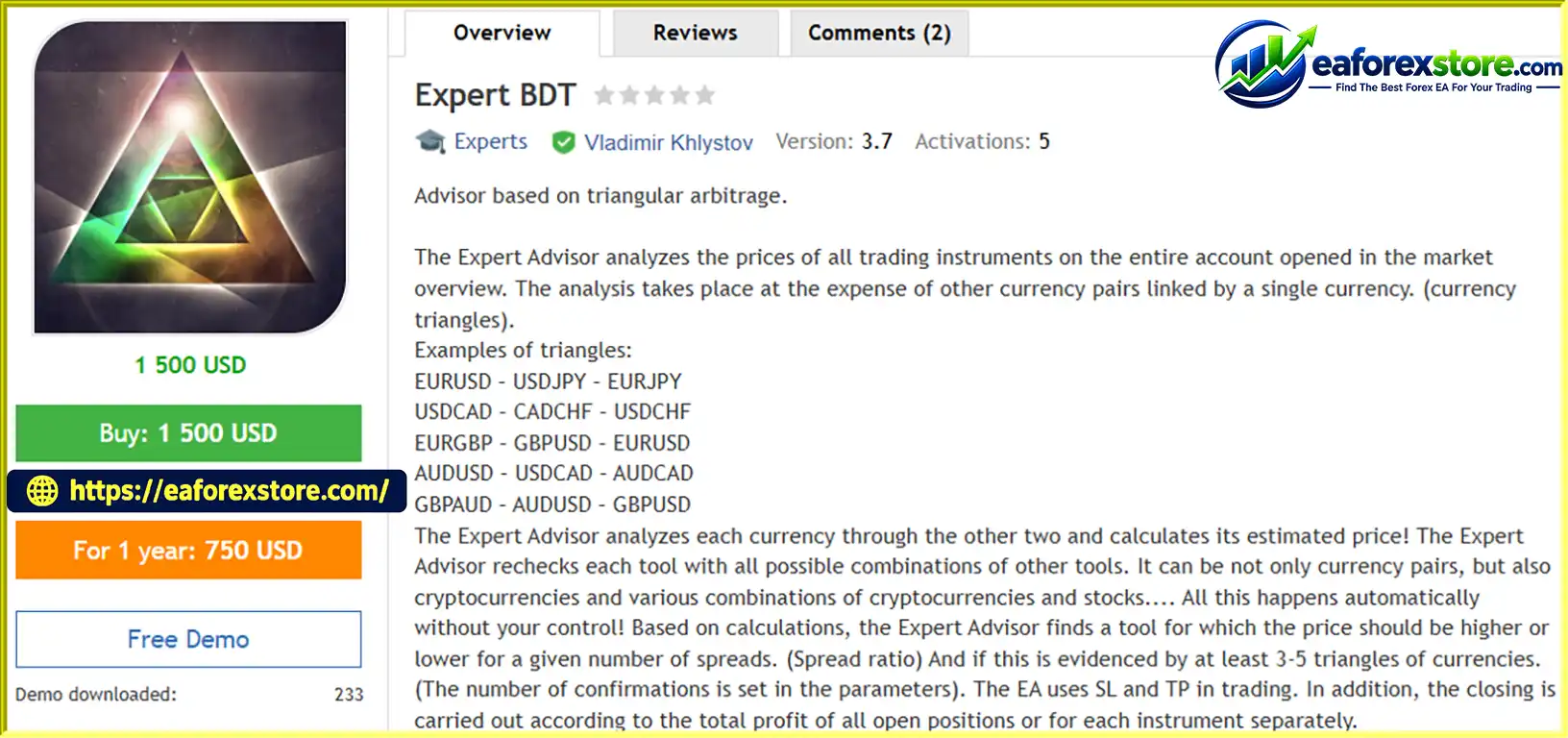
The EA evaluates the relationship between three instruments connected through a common currency structure. It calculates an estimated price for one instrument using the prices of the other two and compares this theoretical value with the current market price.
For example, the following currency triangle can be analyzed:
By examining the relationship between these pairs, the EA attempts to identify potential price discrepancies that may present trading opportunities.
Expert BDT EA MT5 can analyze multiple symbols listed in the MetaTrader 5 Market Watch. It repeatedly checks available instruments against different combinations of related symbols to identify deviations from their calculated prices.
Depending on the selected symbols, broker conditions, and EA settings, the analysis may extend beyond traditional forex pairs to other supported financial markets.
The EA can require a specified number of triangular combinations to confirm a potential price discrepancy before opening a trade.
For example, a trader may configure the system to require confirmation from three to five currency triangles. The exact confirmation threshold can be adjusted through the EA’s parameters.
This feature is designed to filter signals that do not satisfy the selected confirmation criteria. However, multiple confirmations do not guarantee that a trade will be profitable or that the underlying price discrepancy can be captured before it disappears.
Expert BDT EA MT5 uses a configurable spread-related threshold to help identify when an instrument’s market price differs from its calculated theoretical value by a sufficient amount.
The EA looks for situations in which the deviation meets the configured criteria and may indicate a potential trading opportunity.
Actual profitability depends on more than the theoretical discrepancy. Bid-ask spreads, commissions, slippage, execution delays, and liquidity must also be considered.
The EA supports conventional Stop Loss and Take Profit settings to help manage individual trading positions.
These parameters allow traders to define exit levels according to their preferred risk-management approach and trading configuration.
Stop Loss orders cannot guarantee an exact exit price during periods of market gaps or poor liquidity, so actual losses may exceed the intended amount under certain conditions.
Expert BDT EA MT5 supports different approaches to closing open trades:
These options provide flexibility when managing multiple positions generated by related instruments. Traders should carefully configure the closing rules to ensure they understand how individual and combined exposure is handled.
Once configured and attached to a suitable MetaTrader 5 trading environment, the EA performs its price analysis and trading operations automatically according to its programmed logic and selected parameters.
Continuous monitoring of multiple instruments can be resource-intensive, especially when a large number of symbols and triangular combinations are enabled.
The EA follows a systematic process to identify and evaluate potential arbitrage-style opportunities.
Step 1: Monitor Available Trading Instruments
The EA examines the instruments available in the configured Market Watch and uses their prices as inputs for its analysis.
Step 2: Identify Related Instrument Combinations
It searches for groups of instruments linked by common currencies or other supported price relationships.
Examples of currency triangles include:
These combinations allow the EA to compare related market prices and calculate theoretical values.
Step 3: Calculate Theoretical Prices
The EA estimates the expected price of an instrument using the prices of the other instruments in a selected combination.
It then compares the calculated value with the observed market price to determine whether a potential discrepancy exists.
Step 4: Verify the Price Deviation
The EA checks whether the discrepancy meets its configured spread-related threshold and whether the required number of triangular confirmations has been reached.
Step 5: Execute and Manage Trades
When the trading conditions are satisfied, the EA may open a position according to its internal logic and configured parameters. Open positions are then managed using the selected Stop Loss, Take Profit, and profit-based closing rules.
It is important to understand that identifying a theoretical price discrepancy is not the same as executing a profitable arbitrage trade. The opportunity may disappear before the orders are filled, and the actual transaction costs may eliminate the potential advantage.
Expert BDT EA MT5 is designed to work with multiple trading instruments, subject to the broker’s available symbols and the EA’s configuration.
Potentially supported market categories include:
For reliable analysis, traders should verify that all required symbols are available, properly named, and supplied with usable price data. Different brokers may use different symbol suffixes, contract specifications, trading hours, and execution conditions.
The ability to analyze multiple asset classes does not necessarily mean that every combination constitutes a valid triangular arbitrage relationship. Cross-asset relationships may require additional consideration of contract sizes, conversion rates, trading sessions, and other market-specific factors.
One of the main challenges of using Expert BDT EA MT5 is the substantial data and computing resources that may be required for historical testing.
Because the EA can depend on price data from numerous instruments and a large number of possible combinations, a comprehensive historical test may require significant memory, processing capacity, and extensive historical quotes.
Testing the EA with a restricted set of two to four trading instruments may be useful for investigating selected behavior, but such a test does not necessarily represent the performance of the full multi-instrument strategy.
The EA’s supplied instructions also indicate that selected trading symbols and triangular-analysis groups may need to be entered into the initial configuration parameters when testing in the Strategy Tester.
Example configuration:
SymbolTrade=AUDCAD,AUDJPY,EURAUD,EURUSD

SymbolTriangular1=AUDCAD,AUDCHF,AUDJPY,AUDNZD,AUDUSD,CADCHF,CADJPY,CHFJPY

SymbolTriangular2=EURAUD,EURCAD,EURUSD,NZDJPY,NZDUSD,USDJPY,NZDCHF,GBPUSD,EURJPY,USDCHF,USDCAD,EURCHF,EURGBP,EURNZD,EURPLN

SymbolTriangular3=GBPAUD,GBPCAD,GBPNZD,GBPJPY,GBPCHF,NZDCAD,USDPLN,USDMXN,USDZAR,USDRUB,USDCNH,XAUUSD,XAGUSD
These values are examples provided for configuration purposes, not a universal preset. Confirm that the symbols exist at your broker and follow the EA’s actual parameter format before using them.
The developer recommends checking the EA in real-time conditions because of the resource demands associated with extensive historical testing. However, real-time observation alone cannot establish long-term profitability. A more complete evaluation should combine controlled forward testing, execution-quality monitoring, and historical analysis wherever practical.
Expert BDT EA MT5 may be worth evaluating for traders interested in automated, multi-instrument price analysis rather than conventional single-chart trading strategies.
Its main advantages include:
These features may appeal to traders who want to investigate triangular arbitrage concepts using the automation capabilities of MetaTrader 5.
🔺EURUSD
Expert BDT EA MT5
The effectiveness of Expert BDT EA MT5 depends heavily on market conditions, broker execution quality, and the accuracy and timeliness of available price data.
Triangular arbitrage opportunities can be extremely short-lived. Even when the theoretical pricing relationship indicates a discrepancy, a trade may become unprofitable after spreads, commissions, slippage, and execution delays are taken into account.
Before using the EA on a live account, traders should consider the following precautions:
No trading robot can guarantee profits, and arbitrage-style strategies are particularly sensitive to execution quality and transaction costs.
Although Expert BDT EA MT5 offers an interesting approach to multi-instrument analysis, several limitations deserve attention.
High resource requirements: Analyzing many instruments and combinations can consume substantial memory and processing power. Historical testing may be slow or impractical with large symbol lists.
Dependence on price-data quality: Missing, delayed, or inconsistent quotes can affect theoretical price calculations and signal detection.
Execution risk: A price discrepancy may disappear before an order is executed. Slippage and partial fills can also reduce profitability.
Transaction costs: Bid-ask spreads, commissions, swaps, and other fees can eliminate an apparent arbitrage advantage.
Broker limitations: Not every broker offers the same symbols, liquidity, trading hours, or execution conditions. Some instruments may be unavailable or unsuitable for the intended analysis.
Complex exposure: Simultaneous positions in correlated instruments can produce unintended directional exposure, even when the strategy is designed around price relationships.
Limited historical verification: Resource-intensive backtesting can make it difficult to evaluate the strategy across long periods and different market conditions.
No guaranteed performance: The EA’s theoretical calculations and confirmation rules do not guarantee profitable entries, successful arbitrage execution, or consistent returns.
Follow these general steps to install and configure the Expert Advisor in MetaTrader 5:
.ex5 file in the MQL5/Experts directory, following the provider’s installation instructions.Exact parameter names and installation requirements may vary by version. Refer to the provider’s documentation for settings specific to your copy of the EA.
>> Join VIP Membership Now <<<
Expert BDT EA MT5 is an automated trading tool focused on triangular arbitrage analysis and identifying potential pricing discrepancies across related financial instruments. Its multi-symbol approach, configurable confirmation filters, and flexible trade-management options make it an interesting option for traders exploring relationship-based automated strategies.
However, the complexity of multi-instrument analysis, the demands of historical testing, and the importance of fast, reliable execution mean that careful evaluation is essential. A theoretical arbitrage opportunity is not necessarily a profitable trading opportunity once real-world costs and execution constraints are considered.
For traders interested in this approach, the recommended starting point is a properly configured demo account, conservative risk settings, and systematic forward testing under realistic broker conditions.
Important Risk Disclaimer: Expert BDT EA MT5 does not guarantee profits. Forex, cryptocurrency, stock, and other financial markets involve substantial risk, and automated trading can result in losses. Always verify the EA’s behavior, evaluate net performance after transaction costs, and trade only with capital you can afford to lose.
1. What Is Expert BDT EA MT5?
Expert BDT EA MT5 is an automated trading Expert Advisor for MetaTrader 5 that focuses on triangular arbitrage analysis. It compares prices across related financial instruments to identify potential discrepancies between current market prices and calculated theoretical values.
2. How Does Expert BDT EA MT5 Triangular Arbitrage Work?
The EA analyzes groups of three related instruments, such as EURUSD, USDJPY, and EURJPY. It calculates theoretical prices, checks for deviations that meet configured criteria, and may open trades when the required confirmation conditions are satisfied. Actual profitability depends on execution speed, spreads, commissions, and slippage.
3. Which Markets and Trading Instruments Does Expert BDT EA MT5 Support?
Expert BDT EA MT5 can analyze multiple instruments available in MetaTrader 5 Market Watch, depending on broker support and configuration. Potential markets include forex, cryptocurrencies, precious metals, stocks, and other supported assets. Traders should verify symbol availability and compatibility before trading.
4. What Are the Main Features of Expert BDT EA MT5?
Key features include triangular arbitrage analysis, multi-instrument monitoring, configurable confirmation thresholds, spread-based price deviation detection, built-in Stop Loss and Take Profit settings, and flexible position-closing options. The EA can manage individual positions or close trades based on combined profit, depending on its configuration.
5. Can Expert BDT EA MT5 Guarantee Profits From Arbitrage Opportunities?
No. Identifying a theoretical price discrepancy does not guarantee an executable or profitable arbitrage opportunity. Spreads, commissions, slippage, delayed quotes, and order execution times can eliminate potential profits. Traders should evaluate net performance under realistic broker conditions before using real capital.
6. Is Expert BDT EA MT5 Suitable for Backtesting?
Expert BDT EA MT5 can be tested using the MetaTrader 5 Strategy Tester, but comprehensive multi-instrument testing may require substantial computing resources and historical price data. Testing a limited number of symbols may not represent the full strategy. Forward testing and execution-quality monitoring are also recommended.
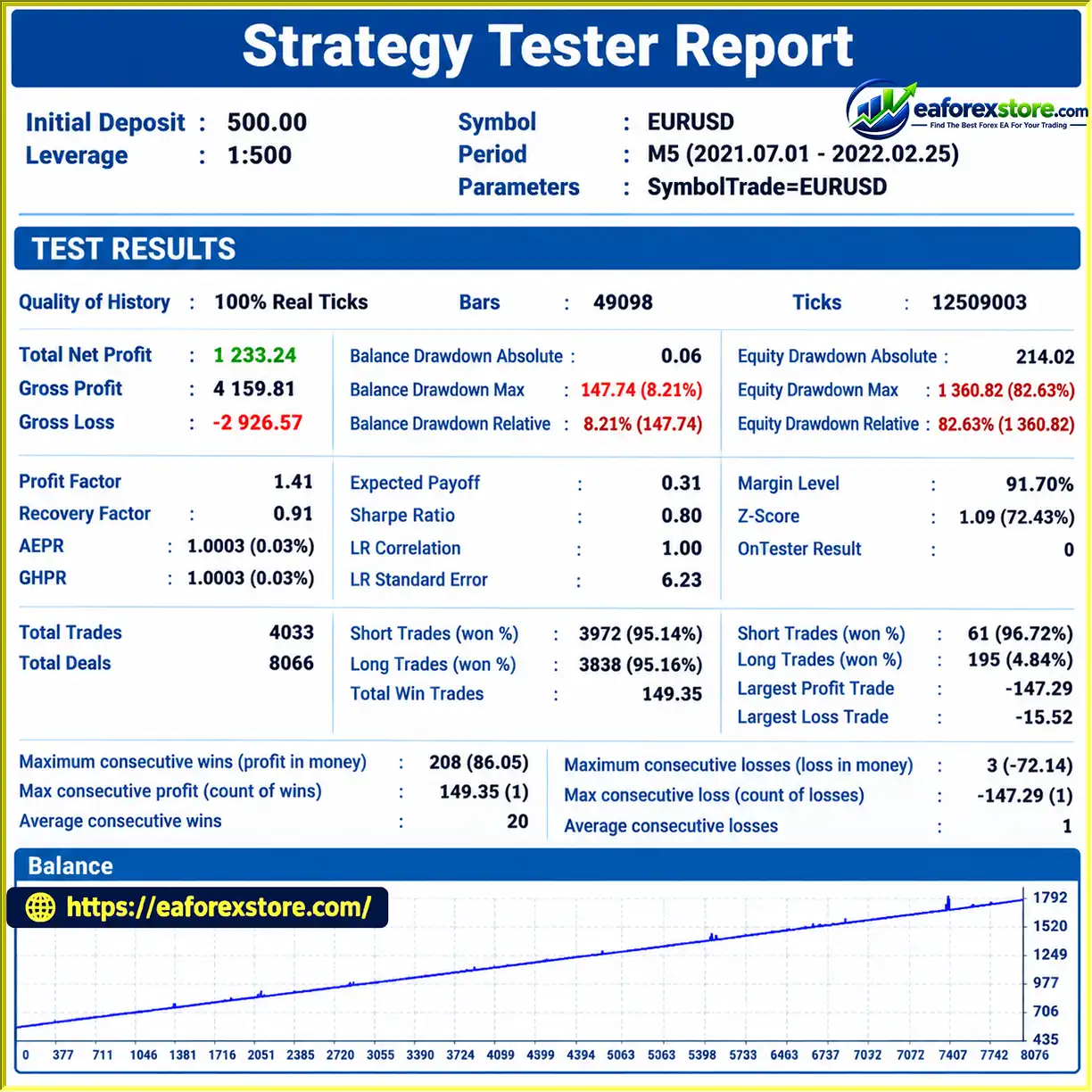
7. What Are the Backtest Results of Expert BDT EA MT5?
According to the provided product description, the reported EURUSD backtest shows a $500 initial deposit, $1,233.24 in total net profit, a 95.16% win rate, and maximum drawdown of 8.21%. These figures have not been independently verified here. The testing period, trading costs, and execution conditions should be confirmed before drawing conclusions about expected performance.
8. How Do I Install Expert BDT EA MT5?
To install Expert BDT EA MT5, copy the .ex5 file into the MQL5/Experts directory, refresh or restart MetaTrader 5, and configure the required trading symbols in Market Watch. Attach the EA to a chart, set the triangular-analysis groups and risk-management parameters, and enable algorithmic trading. Test the configuration on a demo account before deploying it live.
In stock
In stock
In stock
In stock
In stock
Out of stock
No account yet?
Create an Account












 Automatic EA
 EA Best Seller
 Expert Advisor MT4
 Expert Advisor MT5
 HFT EA


Reviews
Clear filtersThere are no reviews yet.