









-
 Unlimited Activations
-
 Instant delivery
-
 Easy to install






 Unlimited Activations
Instant delivery
Easy to install
Unlimited Activations
Instant delivery
Easy to install
 Free Update
 Free Install Support

Osloma FlipPro MT5 is an automated Expert Advisor (EA) developed for MetaTrader 5, specifically designed to trade Gold (XAUUSD). It combines three standalone trading systems within a single EA, allowing each strategy to analyze market conditions across multiple timeframes and identify potential pullback entry opportunities.
Unlike trading robots that rely on a single entry strategy, Osloma FlipPro MT5 uses a multi-strategy approach in which each trading system can independently generate and manage its own trade basket. The EA then applies a structured grid system to manage additional positions and work toward a combined basket exit target.
To address the risks associated with grid trading, Osloma FlipPro includes configurable basket stop-loss and drawdown protection settings. By default, the maximum basket loss is set to $500 per 0.01 lot for each strategy, although traders can adjust this limit according to their account size and risk tolerance.
The EA supports both fixed-lot and AutoLot position sizing, with a simple grid model that does not use martingale or double-sizing techniques. It also supports compatible cent accounts, making it an option for traders who prefer capital-based lot calculations.
With a default maximum of three simultaneous strategy baskets and up to 12 additional grid levels per basket, Osloma FlipPro MT5 offers a structured approach to automated gold trading. However, its multi-basket capability and grid-based position management require careful configuration to prevent excessive exposure during strong market movements.
>>> Delivery time 24h-48h after payment.
>>> Refund if not delivered.
>>> You will receive the latest version without any limitations (ID+Time).Reviewed by Jason Stap <<<
Osloma FlipPro MT5 combines three standalone trading systems within one Expert Advisor. Each strategy evaluates market conditions independently and can generate its own trade basket when a suitable entry signal appears.
This multi-strategy architecture provides opportunities to diversify entry logic within a single EA. However, all three strategies trade the same instrument, XAUUSD, so their exposure may overlap during periods of high gold-market volatility.
Each trading system scans market conditions across multiple timeframes to identify potential trading opportunities. This allows the EA to evaluate price movements beyond the timeframe of the chart to which it is attached.
The EA can be installed on any chart timeframe, as its internal analysis uses multiple timeframes to generate signals. Traders should avoid changing the chart timeframe after installation because doing so can reinitialize the Expert Advisor.
Osloma FlipPro focuses on pullback entries, seeking opportunities when price movements retrace within broader market conditions.
This approach aims to identify potential entry points after a price movement rather than relying exclusively on immediate momentum. Nevertheless, pullbacks can develop into deeper reversals, so entry filtering alone cannot eliminate trading losses.
The EA uses a simple grid system to manage additional positions when price moves against an existing basket and the configured entry conditions are met.
By adding positions at subsequent price levels, the system can change the basket’s average entry price and manage the combined position toward a target exit.
Unlike martingale-based systems, Osloma FlipPro is described as using a grid model without martingale or double-sizing techniques. However, opening additional positions still increases total exposure and can create substantial floating drawdown.
Risk management is a central component of Osloma FlipPro MT5. The EA provides a configurable maximum basket-loss setting for each strategy.
The default maximum basket loss is $500 per 0.01 lot for each basket. Traders can increase or reduce this value through the input settings.
A lower basket-loss limit may restrict losses earlier, while a higher limit allows positions to remain open through larger adverse movements. The actual account-level risk also depends on lot sizing, the number of simultaneous baskets, and the EA’s execution behavior.
Osloma FlipPro supports two lot-sizing methods:
AutoLot can simplify position sizing as account capital changes, but it may also increase potential basket exposure when the calculated lot size rises. Traders should verify the precise calculation rules and the relationship between lot size and basket-loss limits.
The default configuration supports a maximum of 12 grid steps in addition to the original position.
This allows the EA to manage a basket through multiple potential entry levels, depending on market conditions and the configured rules.
A higher number of grid levels can increase the number of open positions and total exposure. Traders should evaluate this setting alongside the maximum basket loss and available margin.
With all three strategies enabled, Osloma FlipPro MT5 can manage up to three baskets simultaneously by default.
The Max Baskets at a Time setting controls the permitted number of concurrent baskets. Reducing this value to one can limit overlapping exposure, while allowing three baskets provides more opportunities for the strategies to operate independently.
Osloma FlipPro can be used with supported cent accounts. Depending on the broker’s account denomination, a balance equivalent to $500 may be displayed as 50,000 cents.
The EA also includes a BufferCapital setting that allows a portion of account capital to be excluded from the AutoLot calculation.
This can help traders configure how much capital is considered when calculating lot size. However, cent-account compatibility and actual position sizing should be verified with the selected broker before live trading.
Osloma FlipPro MT5 follows a multi-stage trading process that combines market analysis, pullback entries, grid-based position management, and basket-level risk controls.
The EA evaluates gold price movements across multiple timeframes using its internal strategy logic. Each of the three trading systems independently searches for potential trading opportunities.
This internal analysis allows the EA to operate on different chart timeframes without requiring traders to manually switch between them.
When a strategy identifies a suitable pullback setup, it can initiate a trade according to its entry conditions.
The purpose of this approach is to identify potential entry points during price retracements. However, no pullback strategy can guarantee that price will resume its previous direction.
If price moves against an open position and the configured grid conditions are satisfied, the EA may open additional positions at subsequent grid levels.
These additional trades change the basket’s average entry price while increasing the total market exposure.
Osloma FlipPro uses a simple grid model without martingale or double-sizing techniques, but the cumulative risk of multiple positions remains important.
The EA manages positions as a combined basket, taking the configured exit objectives and risk-management settings into account.
Basket-level management differs from evaluating every trade independently because the combined profit or loss determines the overall result of the group of positions.
If a basket reaches its configured maximum loss, the EA’s stop-loss or drawdown protection is designed to trigger.
The default limit is $500 per 0.01 lot for each strategy basket. Traders can modify this setting to suit their risk tolerance.
Actual realized losses can differ from the configured threshold because of slippage, gaps, execution delays, and other market conditions.
Each strategy can generate its own basket when its trading conditions are met. If multiple strategies signal opportunities within a similar period, the EA may manage multiple baskets concurrently, subject to the Max Baskets at a Time setting.
This provides flexibility but also makes account-level exposure monitoring essential.
Osloma FlipPro combines three independent trading systems within a single MetaTrader 5 Expert Advisor. This offers a convenient way to run multiple strategy logics without installing three separate robots.
Each strategy can generate its own basket, although their shared focus on XAUUSD means that their risks may be correlated.
The EA is designed specifically for gold, an instrument known for its significant intraday price movements.
Its pullback-based entry logic and grid management framework are intended to capture trading opportunities arising from gold’s changing market conditions.
However, gold’s volatility can also cause rapid losses, especially when multiple positions are open.
One of the key characteristics of Osloma FlipPro is its stated use of a simple grid model without martingale or double-sizing techniques.
This avoids the specific risk of automatically doubling position size after successive entries. Nevertheless, multiple positions can still accumulate significant exposure, even when individual trade sizes remain unchanged.
The ability to adjust basket-loss limits provides traders with greater control over their permitted loss per strategy basket.
This feature is particularly important for grid-based systems, where losses can accumulate across several open positions.
Traders should choose limits that reflect their account equity, available margin, and tolerance for losses rather than relying exclusively on the default settings.
Fixed-lot and AutoLot options provide flexibility for traders with different account sizes and trading preferences.
The BufferCapital parameter also allows users to exclude a portion of capital from the AutoLot calculation, subject to the EA’s implementation.
Traders can configure how many strategy baskets may run simultaneously. Allowing only one basket at a time may reduce overlapping exposure compared with permitting all three baskets to operate concurrently.
This flexibility makes it possible to prioritize more conservative exposure limits or broader strategy participation, depending on individual risk preferences.
Because the EA performs its own multi-timeframe analysis, it can be attached to any chart timeframe.
This provides installation flexibility, although traders should leave the chart timeframe unchanged after setup to avoid reinitializing the EA.
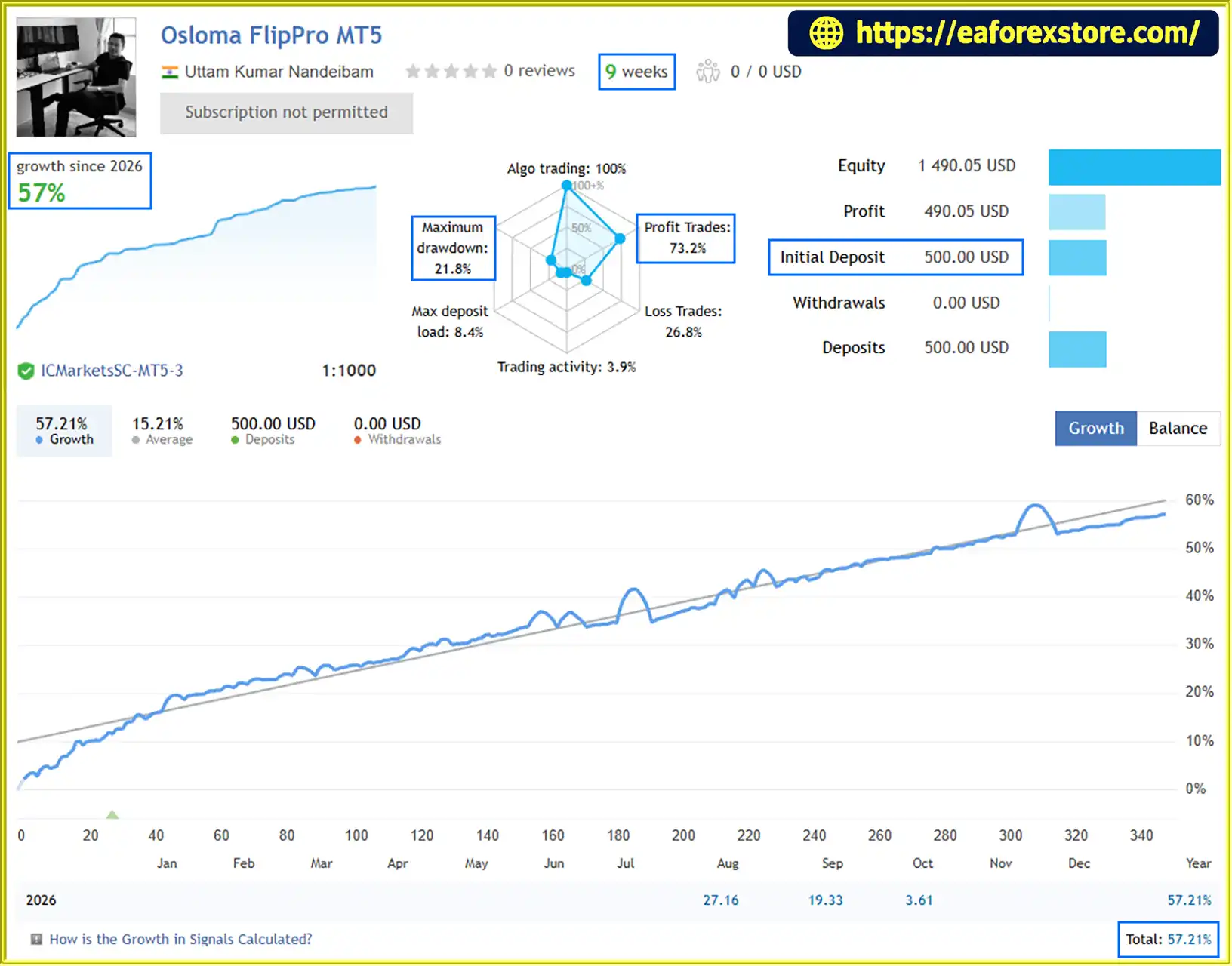
🔺Osloma FlipPro MT5 – 9 consecutive weeks
Osloma FlipPro MT5 Live Signal
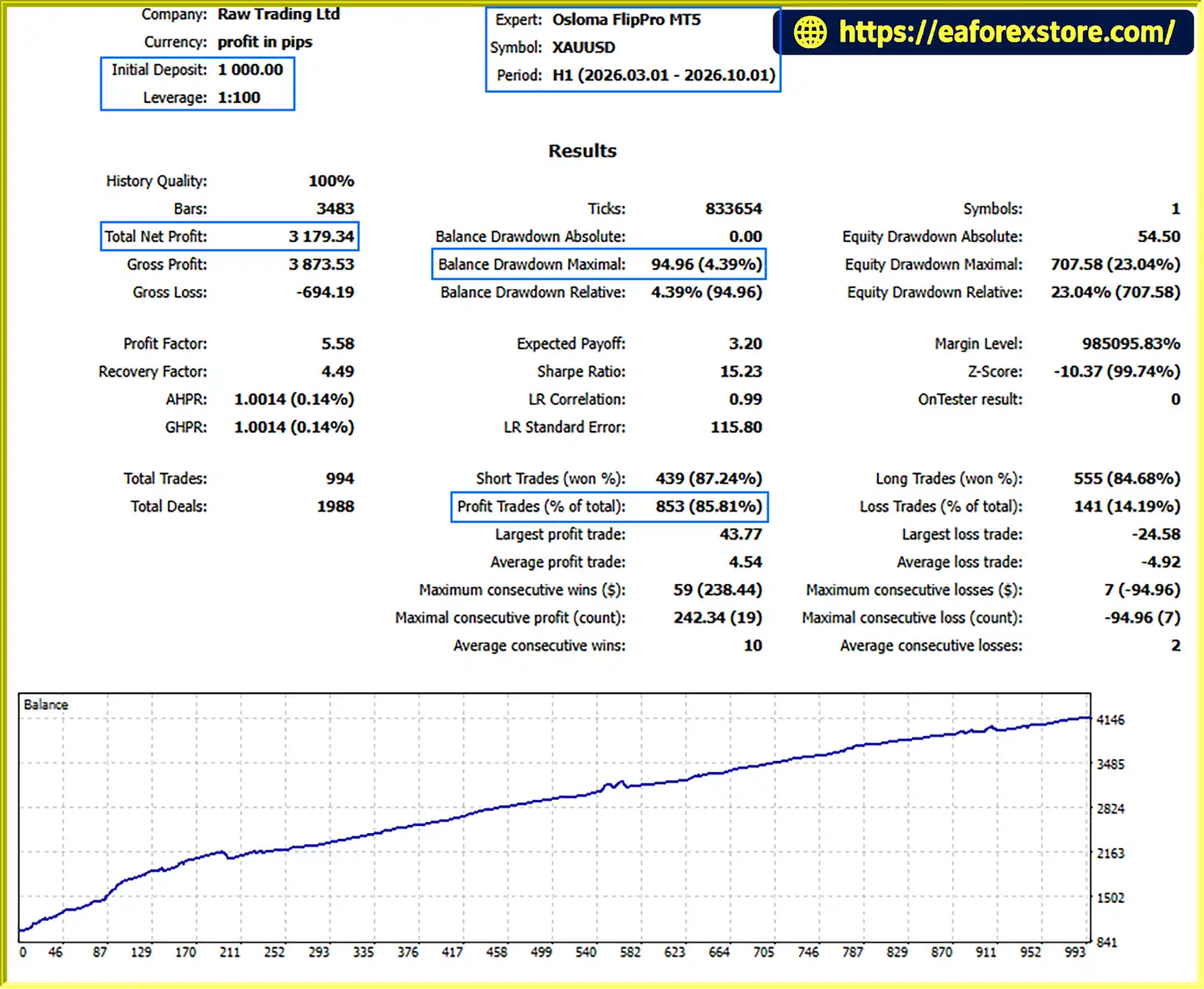
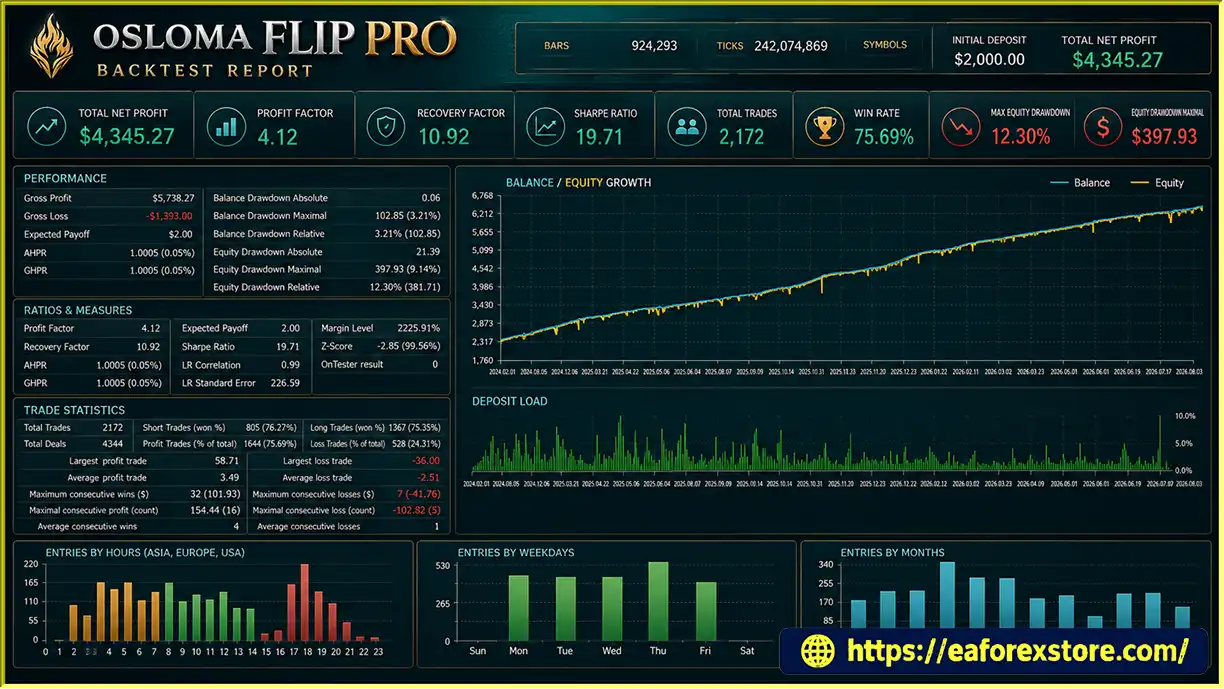
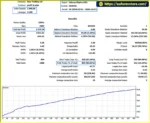
Osloma FlipPro MT5 backtets
The effectiveness of Osloma FlipPro MT5 depends not only on its entry logic but also on position sizing, grid configuration, basket-loss protection, and broker execution conditions.
The supplied product description does not provide independently verified performance statistics, such as long-term profitability, win rate, maximum account drawdown, or risk-adjusted returns. Consequently, the EA should be evaluated through independent testing rather than assumed to be profitable based on its features alone.
| Parameter | Default Setting |
|---|---|
| Trading instrument | Gold (XAUUSD) |
| Platform | MetaTrader 5 |
| Lot method | FixLot |
| Initial lot size | 0.01 |
| Maximum basket loss | $500 per 0.01 lot per strategy basket |
| Maximum grid levels | 12 additional grid steps |
| Simultaneous strategies | Up to 3 baskets |
| Grid model | Simple grid; no martingale or double-sizing |
| Recommended account type | Hedging |
| Recommended broker | Raw Spread / ECN |
| Recommended minimum account size | $2,000 per 0.01 lot |
| Suggested account size | $4,000 per 0.01 lot |
These values reflect the supplied product specifications. Actual requirements may vary with broker conditions, account currency, contract specifications, and the selected EA settings.
The default basket-loss limit of $500 per 0.01 lot is a key parameter to understand before trading.
For example, if the EA permits three baskets to operate simultaneously and each basket has a $500 maximum-loss setting at 0.01 lot, the combined configured basket-loss limits could total $1,500.
This is an illustrative calculation, not a guarantee of maximum account loss. Realized losses may exceed configured limits because of slippage, price gaps, execution problems, or differences in lot-size calculations.
The potential combined exposure becomes especially important when AutoLot is enabled or when several strategies open positions in the same market direction.
The default configuration allows one original position plus up to 12 additional grid steps.
Additional entries can improve the basket’s average entry price, but they also increase cumulative exposure. If gold continues moving against the basket, floating losses and margin requirements may rise rapidly.
A larger grid does not necessarily improve risk-adjusted performance. Traders should evaluate the relationship between grid spacing, position volume, basket-loss limits, and available equity.
Fixed Lot offers more predictable initial position sizing because the configured lot size remains fixed, subject to the EA’s position-management rules.
AutoLot adjusts position size based on its capital-based calculation. This may provide flexibility as account capital changes, but larger calculated positions can increase both potential profits and losses.
The BufferCapital setting can exclude some capital from the AutoLot calculation. Users should verify how the EA applies this parameter and how it interacts with basket-loss limits.
To evaluate Osloma FlipPro MT5 responsibly:
Grid-based trading can experience prolonged drawdowns during strong directional markets. Basket protection is an important control, but it does not eliminate all execution or account-level risks.
Although Osloma FlipPro MT5 offers multiple strategies and configurable risk settings, several limitations deserve attention.
The EA can open additional positions when market movements satisfy its grid conditions. As positions accumulate, the basket’s total exposure and margin requirements can increase.
The absence of martingale or double-sizing techniques does not make grid trading inherently safe.
A $500 basket-loss setting per 0.01 lot can represent a substantial amount of capital for a small trading account.
For example, a $500 basket-loss limit equals 25% of a $2,000 account for one basket. If multiple baskets reach similar losses, the combined impact can be much greater.
Traders should calculate potential account-level drawdown before choosing their lot size and maximum basket count.
Running three independent strategies does not necessarily mean that the overall portfolio is diversified.
All three systems trade XAUUSD, so simultaneous baskets may be affected by the same macroeconomic events and sharp gold-price movements.
Limiting the number of simultaneous baskets can help control overlapping exposure.
A pullback-entry approach may perform differently depending on market structure. A temporary retracement can become a sustained reversal, leaving the basket exposed to further adverse price movements.
No entry method can reliably predict every market transition.
Capital-based lot sizing may increase trading volume as the calculated capital allocation rises. If larger positions are opened, the corresponding basket exposure and potential loss can also increase.
Users should understand the AutoLot formula and confirm how BufferCapital affects the calculation.
Gold trading conditions vary between brokers. Spreads, commissions, execution latency, slippage, margin requirements, and contract specifications can all influence the EA’s results.
A strategy that performs acceptably under one trading environment may behave differently under another.
The supplied information describes the EA’s features and default settings but does not establish its long-term performance or reliability.
Before purchasing or deploying the EA, traders should request verifiable trading records or conduct their own forward testing to evaluate profitability, drawdown, and exposure under realistic conditions.
Risk warning: Osloma FlipPro MT5 is an automated trading tool, not a guaranteed source of income. Gold trading involves substantial financial risk, and grid strategies can experience significant drawdowns. Always use appropriate capital allocation and understand the possibility of losing money.
Follow these steps to install and configure Osloma FlipPro MT5 on MetaTrader 5.
Obtain the Osloma FlipPro MT5 installation file from the official provider or another trusted source.
The file will generally use the .ex5 extension. If the developer supplies source code, it may use the .mq5 extension.
Launch MetaTrader 5 and select:
File → Open Data Folder
Navigate to the MQL5 directory and open the Experts folder.
Copy the Osloma FlipPro EA file into the MQL5/Experts folder.
Return to MetaTrader 5 and refresh the Expert Advisors section in the Navigator panel. Restart the platform if the EA does not appear.
Open the XAUUSD chart provided by your broker.
You may use any chart timeframe because the EA performs multi-timeframe analysis internally. However, the product instructions specify that you should not change the chart timeframe after attaching the EA, as this will reinitialize it.
Drag the EA from the Navigator panel onto the XAUUSD chart.
Review the available input parameters and confirm the configuration before enabling automated trading.
Pay particular attention to the following inputs:
Choose settings that match your account equity, margin availability, and risk tolerance. Do not assume that the default settings are suitable for every account.
The developer recommends a hedging account, a Raw Spread or ECN broker, and a minimum account size of $2,000 per 0.01 lot, with $4,000 per 0.01 lot suggested as an ideal account size.
These are product recommendations rather than guarantees of safety. Confirm your broker’s hedging support, contract specifications, margin requirements, and cent-account compatibility before trading.
Enable the platform’s Algo Trading feature and verify that the EA is operating correctly.
Check the Experts and Journal tabs for initialization errors, order execution messages, or configuration issues.
Run Osloma FlipPro MT5 on a demo account before using real funds.
Monitor basket behavior, grid entries, maximum drawdown, margin utilization, and the interaction between the three strategies. Evaluate performance under different gold-market conditions and avoid changing chart timeframes after installation.
A VPS may help maintain platform uptime, but it cannot eliminate trading risk or guarantee profitable execution.
🔺Osloma FlipPro MT5 is highly appreciated by the MQL5 community for bringing stable and reliable profits. Below are 5 star reviews from users:
Reviews
>>> Join VIP Membership Now <<<
Osloma FlipPro MT5 is a multi-strategy gold trading Expert Advisor that combines three independent trading systems with pullback-based entries, structured grid management, and configurable basket-loss protection.
Its main strengths include flexible lot sizing, adjustable grid levels, support for compatible cent accounts, and the ability to control how many strategy baskets can operate simultaneously. The use of a simple grid model without martingale or double-sizing techniques is also an important distinction, although it does not eliminate the risks associated with accumulating positions.
The most important consideration is the relationship between the EA’s default $500 basket-loss limit per 0.01 lot, its 12 additional grid levels, and its ability to run three baskets concurrently. These settings can create substantial combined exposure, particularly during strong or prolonged gold-price movements.
For traders considering this EA, the most responsible approach is to begin with demo testing, understand every risk-related input, and evaluate the system under realistic broker conditions. Limiting simultaneous baskets and choosing conservative position sizes may help manage exposure, but neither guarantees profitability.
Ultimately, Osloma FlipPro MT5 may be worth evaluating for traders seeking a multi-strategy XAUUSD grid EA, provided they understand its operating rules and are prepared to manage the risks of automated gold trading.
1. What Is Osloma FlipPro MT5?
Osloma FlipPro MT5 is an automated Expert Advisor for MetaTrader 5, specifically designed for Gold (XAUUSD) trading. It combines three independent trading strategies with multi-timeframe analysis, pullback entries, grid-based basket management, and configurable risk controls.
2. How Does Osloma FlipPro MT5 Work?
Osloma FlipPro MT5 analyzes gold price movements across multiple timeframes to identify potential pullback entries. When a strategy generates a signal, the EA can open a trade and manage additional positions through a grid system if market conditions meet its configured rules. It manages positions as a basket and applies basket-level profit and loss settings.
3. Does Osloma FlipPro MT5 Use Martingale?
According to the product description, Osloma FlipPro MT5 uses a simple grid trading model without martingale or double-sizing techniques. However, the EA can open additional positions as price moves against an existing basket, which may increase total exposure, floating drawdown, and margin requirements.
4. What Are the Default Settings of Osloma FlipPro MT5?
The default configuration uses a fixed lot size of 0.01, a maximum basket-loss setting of $500 per 0.01 lot for each strategy basket, and up to 12 additional grid levels. The EA can manage up to three simultaneous baskets by default. Traders can adjust the lot-sizing method, grid levels, basket-loss limit, and maximum number of concurrent baskets.
5. What Are the Backtest and Live Signal Results for Osloma FlipPro MT5?
The supplied results report a seven-month XAUUSD backtest with a $1,000 initial deposit, $3,179.34 in net profit, an 85.81% win rate, and 4.39% maximum drawdown. A separate nine-week live signal report shows a $500 initial deposit, 57% growth, a 73.2% win rate, and 21.8% maximum drawdown. These are reported results, not guarantees of future performance, and should be independently verified before making trading decisions.
6. What Account Size and Broker Conditions Are Recommended for Osloma FlipPro MT5?
The product description recommends a hedging account and a Raw Spread or ECN broker. It lists a minimum account size of $2,000 per 0.01 lot and suggests $4,000 per 0.01 lot. These are developer-provided recommendations rather than guarantees of safety. Traders should also verify broker execution, spreads, commissions, margin requirements, and compatibility with their account type.
7. Can Osloma FlipPro MT5 Run on Different Chart Timeframes?
Yes. Osloma FlipPro MT5 performs its own multi-timeframe market analysis and can be attached to different chart timeframes. However, the supplied instructions advise against changing the chart timeframe after attaching the EA because doing so may reinitialize it. The EA is designed for XAUUSD on MetaTrader 5.
8. How Do You Install Osloma FlipPro MT5 on MetaTrader 5?
Download the EA file and copy it into the MQL5/Experts folder through the MetaTrader 5 Data Folder. Refresh the Expert Advisors list, open an XAUUSD chart, and attach the EA. Configure the lot method, basket-loss limit, grid levels, and maximum simultaneous baskets before enabling Algo Trading. Demo testing is recommended before live deployment.
In stock
In stock
In stock
In stock
In stock
Out of stock
No account yet?
Create an Account












 Automatic EA
 EA Best Seller
 Expert Advisor MT4
 Expert Advisor MT5
 HFT EA


Reviews
Clear filtersThere are no reviews yet.