









-
 Unlimited Activations
-
 Instant delivery
-
 Easy to install






 Unlimited Activations
Instant delivery
Easy to install
Unlimited Activations
Instant delivery
Easy to install
 Free Update
 Free Install Support

OilVector X EA MT5 is an automated Expert Advisor designed specifically for trading WTI Crude Oil on the MetaTrader 5 platform. It uses a daily breakout trading strategy to identify potential opportunities when oil prices move beyond predefined price levels, with a focus on capturing upward momentum during trending market conditions.
Unlike many automated trading robots that require extensive configuration, OilVector X EA MT5 is designed as a plug-and-play trading system. Users can attach the EA to their broker’s supported oil chart, select their preferred risk settings, and allow the algorithm to manage trade execution according to its programmed rules.
One of the system’s key characteristics is its individual trade risk management. Every trade is opened with a stop-loss and a fixed take-profit level, avoiding grid trading, martingale, and other recovery methods that can increase exposure through additional positions. The EA also uses a breakeven management mechanism that moves the stop-loss toward breakeven relatively quickly to help protect trades when momentum changes.
OilVector X EA MT5 includes a built-in on-chart dashboard that displays trading statistics and an equity curve in real time. It also offers a dedicated Prop Firm Mode with configurable daily loss limits, total loss limits, optional daily profit protection, and randomized trade parameters.
The EA is developed for WTI Crude Oil, which may appear under different broker-specific symbols, including XTIUSD, USOUSD, or WTI. Because oil trading conditions vary between brokers, the developer emphasizes the importance of choosing a compatible broker and testing the strategy under realistic conditions.
For traders seeking an automated oil trading strategy with predefined trade exits, built-in monitoring, and configurable risk controls, OilVector X EA MT5 provides a specialized alternative to conventional Forex and gold trading robots.
>>> Delivery time 24h-48h after payment.
>>> Refund if not delivered.
>>> You will receive the latest version without any limitations (ID+Time).Reviewed by Jason Stap <<<
OilVector X EA MT5 is built around daily breakout levels designed to identify potential trading opportunities when WTI Crude Oil moves beyond important price boundaries.
The strategy aims to capture upward momentum during periods when oil develops a sustained trend. Unlike systems that depend on grid recovery or repeated averaging, it follows a breakout-based approach with predefined trade exits.
However, breakout strategies can experience false signals when prices briefly move beyond a level and then reverse. Performance depends on market conditions, execution costs, and the effectiveness of the strategy’s entry and exit rules.
The EA is purpose-built for WTI Crude Oil rather than designed as a universal trading robot for multiple currency pairs.
Depending on the broker, the instrument may be listed as XTIUSD, USOUSD, WTI, or another equivalent symbol. Traders must confirm the correct symbol and contract specifications before installing the EA.
Oil prices can react sharply to inventory reports, supply disruptions, geopolitical developments, and changes in global demand. This creates trading opportunities but also introduces significant volatility and execution risk.
Every trade opened by OilVector X EA MT5 has its own stop-loss and fixed take-profit level from the beginning.
This provides a predefined trade-management structure and helps traders understand the intended exit parameters for individual positions.
The EA does not use grid trading, martingale, or other recovery methods that depend on adding positions to recover losses. Nevertheless, individual stop-loss orders cannot guarantee an exact exit price during gaps, slippage, or extreme market conditions.
OilVector X EA MT5 includes a breakeven mechanism designed to move the stop-loss toward the entry price relatively quickly as a trade develops.
This feature aims to protect trades when momentum shifts and reduce the risk of allowing profitable positions to turn into losses.
Actual outcomes depend on the EA’s breakeven rules, execution conditions, and transaction costs. A trade closed near its entry price may still produce a small net loss after spreads, commissions, and swaps.
The EA provides an on-chart dashboard with trading statistics and a live equity curve.
This allows users to monitor account performance directly within MetaTrader 5 without relying on third-party tracking services such as MyFXBook.
According to the developer, dashboard information is stored persistently, so saved statistics can survive EA removal or terminal restarts. Users should still verify how the dashboard handles account changes, historical data, and state resets.
OilVector X EA MT5 includes a specialized mode for traders operating under proprietary trading firm evaluation rules.
Available controls include configurable daily loss limits, total loss limits, optional daily profit protection, and randomized trade parameters.
These features are intended to help traders manage risk within defined account rules. However, they do not guarantee compliance with every prop firm’s requirements or prevent all rule violations.
Prop Firm Mode allows users to randomize entry, stop-loss, and take-profit parameters within a configurable pip range.
This feature is designed to reduce correlation between accounts running the same EA build.
Its effectiveness depends on the implementation and randomization settings. Traders should test the resulting behavior carefully because changing trade parameters can also affect execution, risk, and profitability.
OilVector X EA MT5 is designed to retain saved dashboard and tracking information after the EA is removed or the trading terminal restarts.
A dedicated Reset State flag is also available for clearing saved prop-firm tracking data when starting a new evaluation.
Before resetting or changing the saved state, users should review the consequences for daily loss tracking, total loss calculations, and other account-level controls.
The EA includes a timer-driven fallback mechanism intended to keep its strategy logic operating even when live ticks are unavailable.
This helps reduce dependence on continuous incoming price updates for time-based operations. It does not eliminate broker connectivity issues, terminal downtime, or execution delays.
OilVector X EA MT5 follows a structured trading process based on daily breakout analysis, individual trade protection, and automated position management.
The EA evaluates its programmed daily breakout levels to identify potential trading opportunities in WTI Crude Oil.
When price action satisfies the strategy’s entry conditions, the system can initiate a trade according to its internal rules.
The precise breakout calculations and entry criteria are part of the EA’s implementation and should be confirmed through the developer’s documentation.
When a valid signal appears, the EA opens a position with an individual stop-loss and fixed take-profit.
This means the trade has predefined exit levels rather than relying on additional grid positions to manage an adverse movement.
The actual financial risk depends on the distance to the stop-loss, position size, contract specifications, and execution conditions.
After entry, OilVector X EA MT5 manages the position according to its programmed trade-management rules.
The EA monitors price movements and applies its breakeven mechanism when the relevant conditions are met.
If the market reaches the take-profit level, the trade can close with a profit before transaction costs. If the stop-loss is triggered, the position closes at the available execution price, which may differ from the requested level during volatile conditions.
The breakeven mechanism aims to move the stop-loss toward the entry price as the trade develops.
This can help protect accumulated gains or reduce downside exposure, although it may also cause trades to exit prematurely before a breakout continues.
The balance between protecting open trades and allowing profitable positions room to develop is an important factor in evaluating the strategy.
The built-in dashboard displays trading statistics and an equity curve, allowing users to monitor the account’s progress directly on the chart.
This can make it easier to observe changes in equity, assess trading activity, and review performance without relying exclusively on external reporting services.
When Prop Firm Mode is enabled, the EA can monitor the configured daily loss ceiling and total loss ceiling.
An optional daily profit limit can help lock in a day’s gains by stopping further trading when the selected threshold is reached.
Randomization settings can also modify entry, stop-loss, and take-profit parameters within the configured range.
Traders should confirm whether the limits are based on balance, equity, or another calculation, and whether they include floating losses, commissions, swaps, and account-specific rules.
OilVector X EA MT5 offers exposure to WTI Crude Oil, providing an alternative to automated systems focused exclusively on Forex currency pairs, gold, or stock indices.
This specialization may appeal to traders who want to explore oil’s breakout behavior and its relationship with supply, demand, and global economic developments.
However, oil can be particularly sensitive to unexpected news, so traders should understand its market characteristics before deploying an automated strategy.
The EA is designed to minimize complicated configuration. Users primarily need to select the appropriate broker symbol, attach the robot to the chart, and configure their risk settings.
Although installation is straightforward, traders should still verify the EA’s inputs, broker compatibility, position-sizing rules, and trading permissions before enabling live execution.
Unlike recovery-based systems that add positions after adverse price movements, OilVector X EA MT5 uses individual stop-loss and take-profit levels.
This provides a more clearly defined trade-exit structure and avoids the specific exposure escalation associated with grid averaging and martingale sizing.
Nevertheless, a sequence of losing breakout trades can still produce meaningful account drawdown.
The dedicated Prop Firm Mode provides several controls that may be useful for traders working under evaluation or funded-account rules.
Daily loss limits, total loss limits, optional profit protection, and trade randomization can help structure automated trading around predefined boundaries.
Users must still confirm that the EA’s calculation methods match their firm’s exact rules, including trailing drawdown, equity-based limits, and restrictions on trading during specific events.
The on-chart dashboard provides a convenient way to view trading statistics and the equity curve directly in MetaTrader 5.
Persistent dashboard data can also reduce the inconvenience of losing saved tracking information after terminal restarts, according to the developer’s description.
The developer identifies Darwinex as its preferred broker for oil trading and lists IC Markets or IC Trading as alternatives.
This recommendation reflects the developer’s stated preference, not a guarantee that these brokers will deliver identical results or the best conditions for every user.
OilVector X EA MT5 is described as broker-sensitive, making it important to verify symbol availability, spread, commissions, swaps, contract specifications, and execution quality before choosing a trading environment.
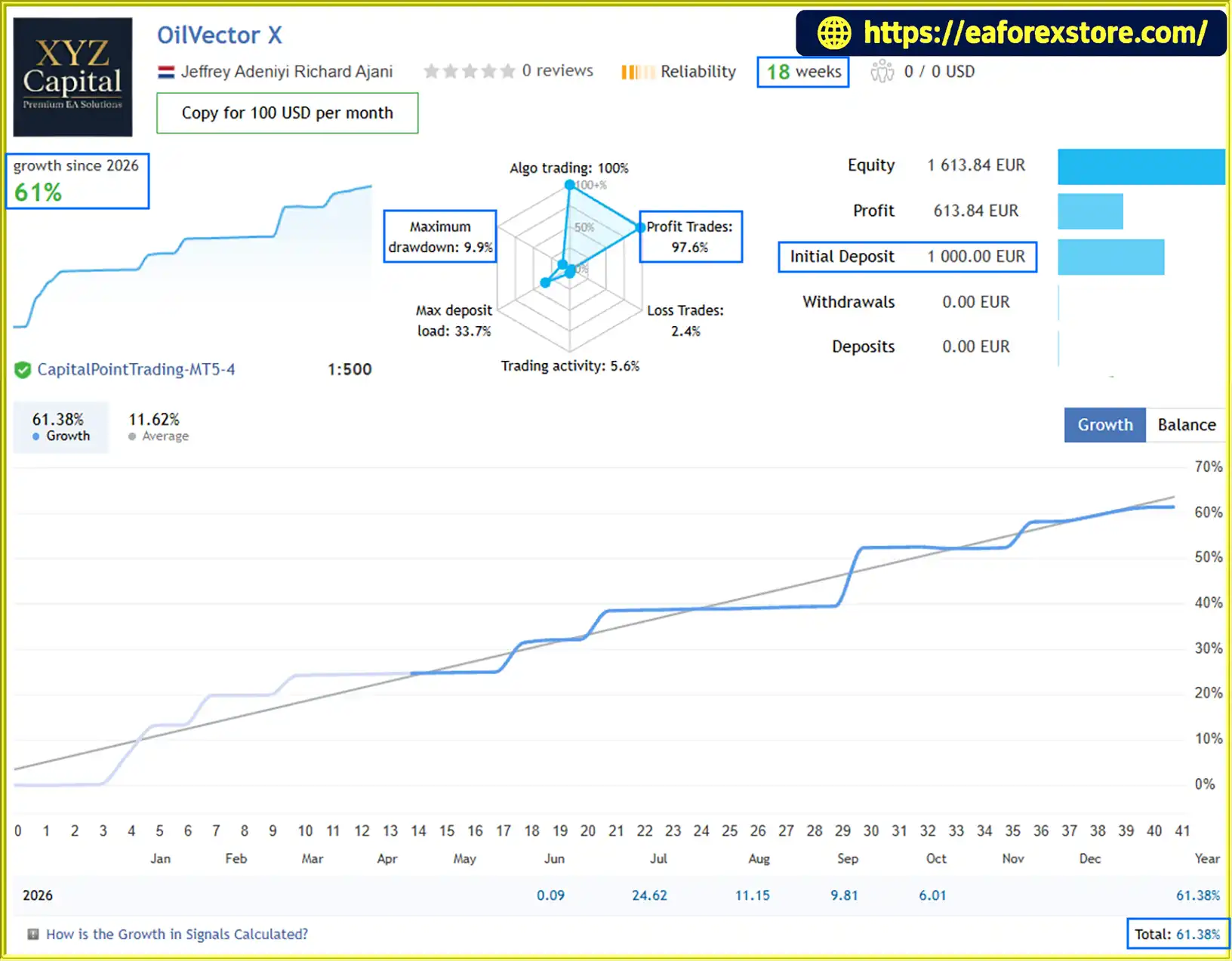
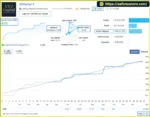
🔺OilVector X – 18 consecutive weeks
OilVector X EA MT5 Signal Results
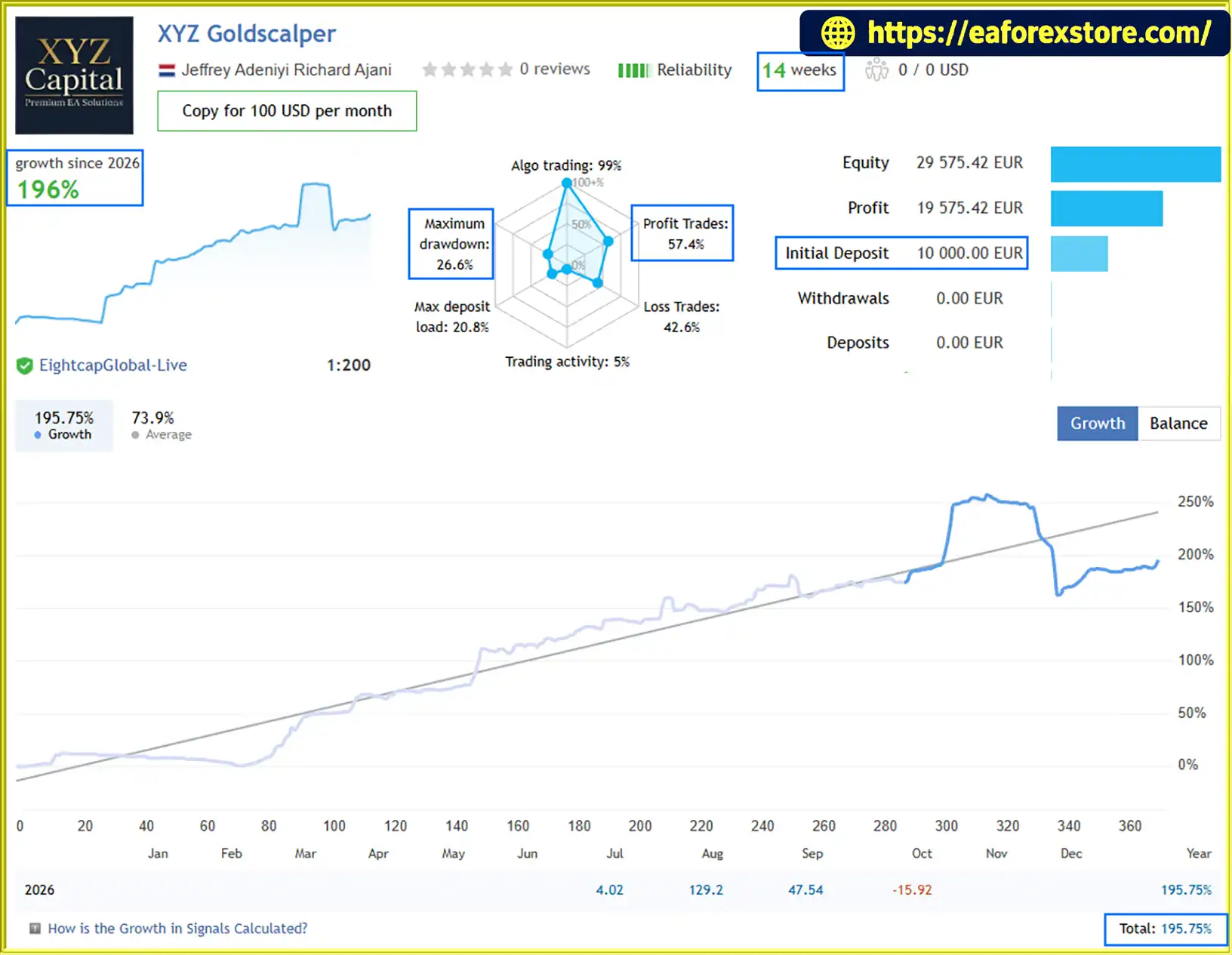
🔺XYZ Goldscalper – 14 consecutive weeks
OilVector X EA Signal Results
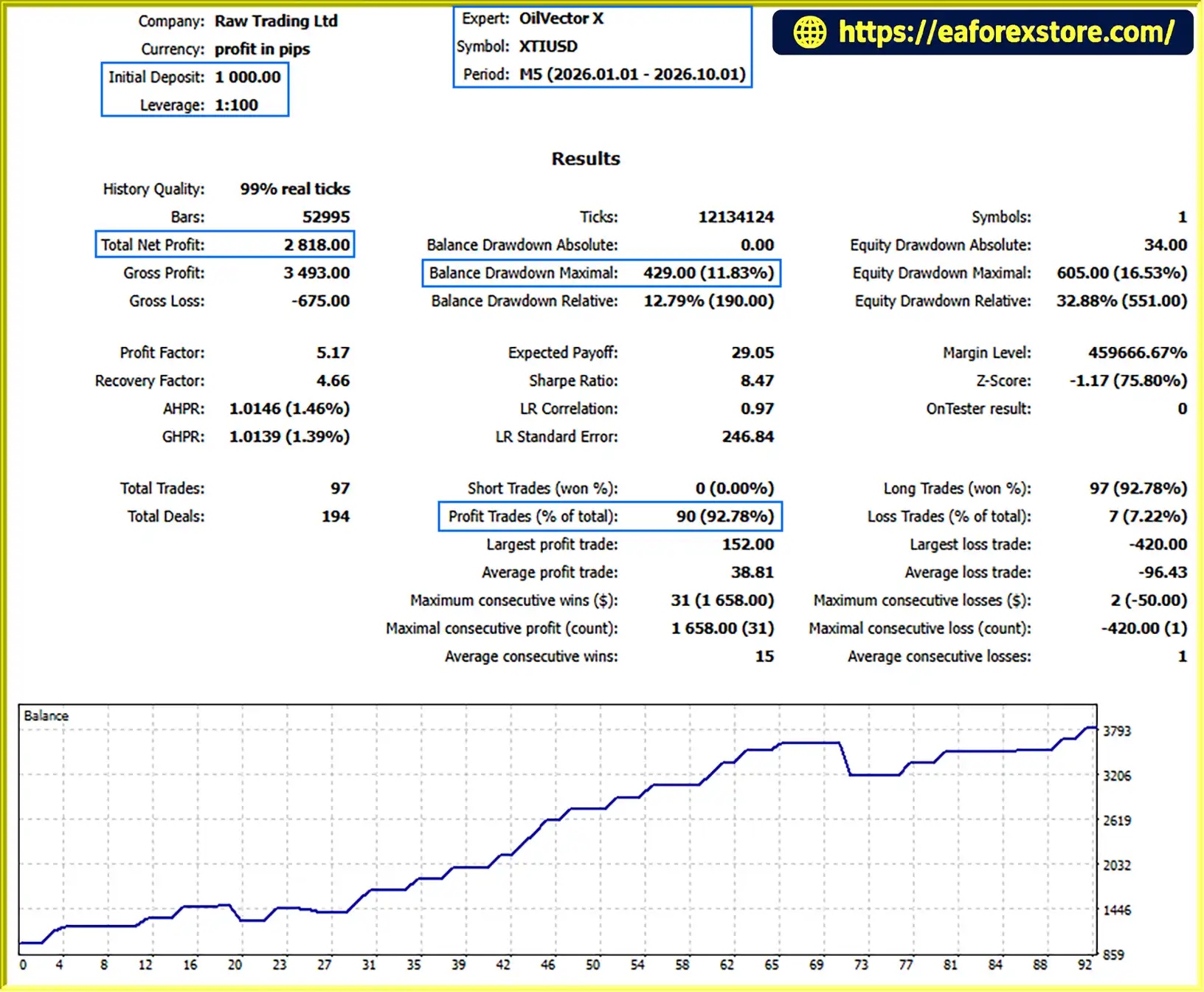
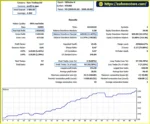
OilVector X EA MT5 Backtets
Risk management is a central consideration when using OilVector X EA MT5. Although the EA includes individual stop-losses, fixed take-profits, breakeven management, and optional prop-firm controls, no automated system can eliminate trading risk.
Each trade is opened with its own stop-loss, providing a predefined exit level if the market moves against the position.
This helps establish the intended risk for an individual trade, but the actual loss depends on the position size, stop-loss distance, contract specifications, and execution price.
Traders should calculate their potential monetary loss before enabling the EA.
The EA uses a fixed take-profit for each trade, allowing positions to close when their predefined target is reached.
This creates a structured exit plan, but the relationship between stop-loss distance and take-profit distance remains important. A strategy can still lose money if its win rate, average reward, or trading costs are unfavorable.
The EA’s breakeven mechanism aims to reduce downside exposure after a trade moves favorably.
However, moving a stop-loss to breakeven does not guarantee a risk-free trade. Transaction costs, gaps, slippage, and execution differences can affect the final result.
Prop Firm Mode includes a configurable Max Daily Loss % setting.
When the selected threshold is breached, the EA is designed to stop opening new trades for the remainder of the day.
Traders should verify whether existing positions are closed or remain open after the threshold is reached, as this distinction can materially affect account risk.
The Max Total Loss % setting measures the permitted loss from the EA’s starting balance, according to the product description.
This can help establish a predefined overall loss boundary. Users should confirm how the starting balance is recorded, whether equity is used, and what happens after terminal restarts or state resets.
The Max Daily Profit % setting allows users to configure an optional daily profit threshold.
When the threshold is reached, the EA can stop further trading to help protect the day’s gains.
This feature may be useful for traders seeking to avoid giving back profits through additional trades, although it does not guarantee that the realized daily result will remain positive.
The EA can randomize entry, stop-loss, and take-profit parameters within a configured pip range.
This is intended to reduce correlation across accounts running the same build, particularly in prop-firm environments.
Users should verify the permitted randomization range and ensure that the resulting trade parameters remain within their intended risk limits.
For more responsible use of OilVector X EA MT5:
Important: OilVector X EA MT5 is not a zero-drawdown system. Breakout strategies can experience losing streaks, and sudden oil-price movements can cause losses beyond expected levels.
Follow these steps to install OilVector X EA MT5 on MetaTrader 5.
Obtain the OilVector X EA MT5 installation file from the official provider or another trusted source.
The file will typically use the .ex5 extension. If source code is provided, it may use .mq5.
Launch MetaTrader 5 and select:
File → Open Data Folder
Open the MQL5 directory, followed by the Experts folder.
Copy the OilVector X EA file into the MQL5/Experts folder.
Return to MetaTrader 5 and refresh the Expert Advisors section in the Navigator panel. Restart the terminal if the EA does not appear.
Open your broker’s WTI Crude Oil chart.
The symbol may be listed as XTIUSD, USOUSD, WTI, or another broker-specific name. Confirm that the instrument corresponds to the oil market supported by the EA.
Because the system is broker-sensitive, do not assume that different symbols have identical contract specifications or trading conditions.
Drag the EA from the Navigator panel onto the oil chart.
The chart timeframe does not determine the strategy’s timing. According to the developer, the EA uses its internal timing logic and a timer-driven fallback.
Select the risk metric or risk settings required by the EA and review the remaining inputs.
Before enabling trading, review the available risk parameters.
If using Prop Firm Mode, configure the daily loss limit, total loss limit, optional daily profit limit, and randomization range as needed.
Verify the EA’s starting-balance tracking and loss-calculation rules, particularly if you are using a prop firm account.
Enable MetaTrader 5’s Algo Trading feature and confirm that the EA is operating correctly.
Check the Experts and Journal tabs for initialization errors, symbol-related problems, or order execution messages.
Run the EA on a demo account before using real funds.
Monitor its trade entries, stop-loss placement, take-profit behavior, breakeven management, and performance under different oil-market conditions.
Use realistic broker data and trading costs to avoid drawing conclusions from overly optimistic test assumptions.
A VPS can help keep MetaTrader 5 running when your personal computer is switched off or disconnected.
Choose a reliable hosting environment with a stable connection to your broker. A VPS supports uptime but does not guarantee profitable trading or eliminate execution risk.
>>> Join VIP Membership Now <<<
OilVector X EA MT5 is an automated WTI Crude Oil trading system built around daily breakout levels, individual trade protection, and structured position management. Its plug-and-play design, built-in dashboard, breakeven functionality, and dedicated Prop Firm Mode make it an option for traders interested in automating oil-market strategies.
One of its defining characteristics is its use of individual stop-loss and fixed take-profit levels without grid, martingale, or recovery-based position averaging. This creates a different risk structure from systems that attempt to recover losses by continuously adding positions.
However, breakout trading is not consistently profitable in every market environment. False breakouts, losing streaks, oil-market volatility, broker-specific trading costs, and execution slippage can all affect results.
Before deploying OilVector X EA MT5 on a live account, traders should verify broker compatibility, conduct realistic backtests, evaluate out-of-sample performance, and test the EA on a demo account. Those considering Prop Firm Mode should also confirm that its risk calculations match their firm’s specific requirements.
Ultimately, OilVector X EA MT5 may be worth evaluating for traders seeking a specialized WTI Crude Oil breakout EA with built-in risk controls and performance monitoring. Its suitability depends on independent testing, realistic risk settings, and the trading conditions available through the selected broker.
1. What Is OilVector X EA MT5?
OilVector X EA MT5 is an automated Expert Advisor for MetaTrader 5, specifically designed for WTI Crude Oil trading. It uses a daily breakout strategy to identify potential trading opportunities and includes individual Stop Loss, fixed Take Profit, breakeven management, and an on-chart performance dashboard.
2. How Does OilVector X EA MT5 Work?
OilVector X EA MT5 monitors predefined daily breakout levels to identify potential entry opportunities in the oil market. When its entry conditions are met, the EA opens a trade with an individual Stop Loss and fixed Take Profit. It then manages the position automatically and may move the Stop Loss toward breakeven when the relevant conditions are satisfied.
3. Does OilVector X EA MT5 Use Martingale or Grid Trading?
No. According to the supplied product description, OilVector X EA MT5 does not use grid trading, martingale, or recovery-based position averaging. Instead, it manages individual trades using predefined Stop Loss and Take Profit levels. However, consecutive losing trades and slippage can still cause significant account drawdown.
4. What Are the Backtest Results for OilVector X EA MT5?
The supplied nine-month XTIUSD backtest reports a $1,000 initial deposit, $2,818.00 in net profit, a 92.78% win rate, and 11.83% maximum drawdown. These figures are historical test results and do not guarantee future profitability. Traders should verify the original report and test the EA under realistic broker conditions before live deployment.
5. What Are the Live Signal Results for OilVector X EA MT5?
The supplied 18-week OilVector X signal report shows a $1,000 initial deposit, 61% growth, a 97.6% win rate, and 9.9% maximum drawdown. The source also includes a separate 14-week signal report labeled XYZ Goldscalper, with a $10,000 initial deposit, 196% growth, a 57.4% win rate, and 26.6% maximum drawdown. The second report should not be attributed to OilVector X without confirming that it belongs to the same EA.
6. Does OilVector X EA MT5 Support Prop Firm Trading?
Yes. OilVector X EA MT5 includes a Prop Firm Mode with configurable daily loss limits, total loss limits, optional daily profit protection, and randomized trade parameters. These features may help traders manage risk, but they do not guarantee compliance with every proprietary trading firm's rules. Users should verify how the EA calculates drawdown and handles open positions when a limit is reached.
7. Which Broker Symbols Are Compatible with OilVector X EA MT5?
OilVector X EA MT5 is designed for WTI Crude Oil, which may appear under broker-specific symbols such as XTIUSD, USOUSD, or WTI. The developer identifies Darwinex as its preferred broker and lists IC Markets and IC Trading as alternatives. Traders should independently confirm symbol compatibility, contract specifications, spreads, commissions, swaps, and execution conditions before trading.
8. How Do You Install OilVector X EA MT5 on MetaTrader 5?
Download the EA file and copy it into the MQL5/Experts folder through the MetaTrader 5 Data Folder. Refresh the Expert Advisors list, open your broker's supported WTI Crude Oil chart, and attach the EA. Configure the risk settings and Prop Firm Mode if required, enable Algo Trading, and check the Experts and Journal tabs for errors. Demo testing is recommended before using real funds.
In stock
In stock
In stock
In stock
In stock
Out of stock
No account yet?
Create an Account












 Automatic EA
 EA Best Seller
 Expert Advisor MT4
 Expert Advisor MT5
 HFT EA


Reviews
Clear filtersThere are no reviews yet.