









-
 Unlimited Activations
-
 Instant delivery
-
 Easy to install





 Unlimited Activations
Instant delivery
Easy to install
Unlimited Activations
Instant delivery
Easy to install
 Free Update
 Free Install Support

Breakouter X6 Portfolio EA MT5 is an automated Expert Advisor designed to trade six markets simultaneously through a coordinated breakout strategy on the MetaTrader 5 platform. The supported instruments are Gold (XAUUSD), USTEC, XAUCHF, XAUJPY, Silver (XAGUSD), and XAGEUR, subject to availability at the user’s broker.
Unlike single-symbol breakout robots, Breakouter X6 Portfolio manages multiple markets from one chart. Its trading logic identifies swing highs and swing lows, prepares pending orders around relevant price structures, and manages entries, Stop Loss, Take Profit, breakeven, and trailing stops across the enabled portfolio.
The EA includes two position-sizing modes: Minimum Broker Lot and Risk per Trade. It also provides flexible broker-symbol mapping, spread filtering, margin checks, trading-session safeguards, and an integrated dashboard displaying portfolio and account information.
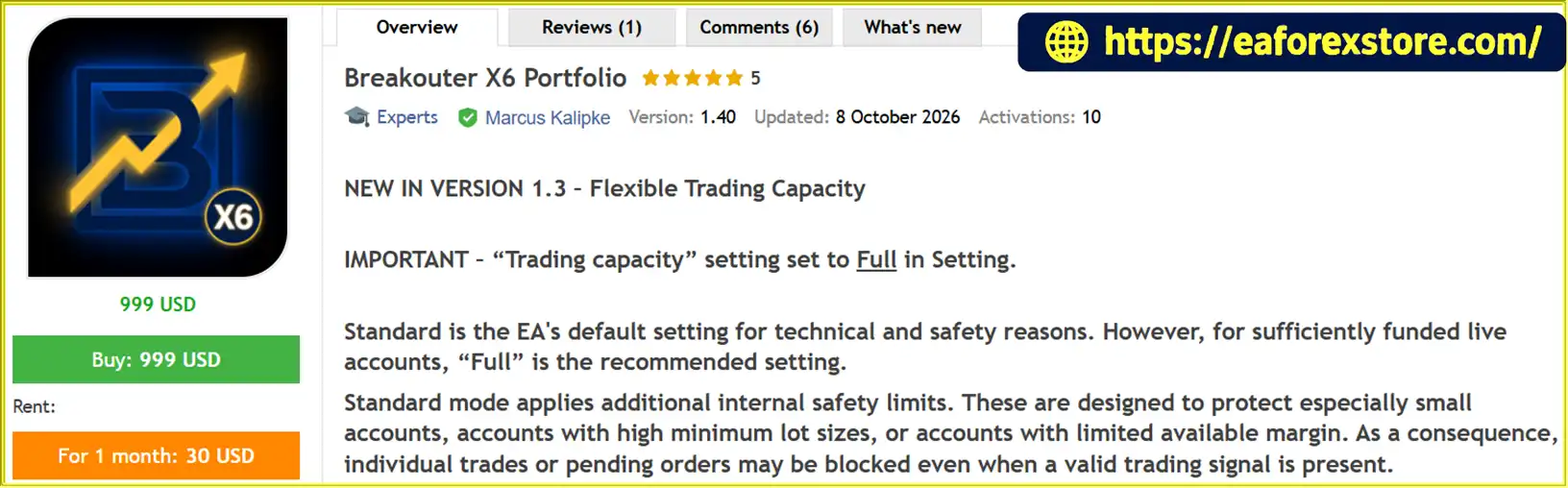
One of its most important configuration choices is the Trading Capacity setting. Standard mode applies additional internal safety limits that may prevent some otherwise valid trades or pending orders from being placed. Full mode is intended to allow the EA to operate at its full programmed trading capacity when the account has sufficient capital and margin. Mandatory broker checks remain active in both modes.
Breakouter X6 Portfolio is designed for traders who want to explore a coordinated multi-market breakout strategy without manually selecting or optimizing individual internal trading modules. However, multiple markets can generate overlapping positions and simultaneous exposure. Its performance therefore depends not only on entry quality but also on available margin, position sizing, broker conditions, and the behavior of the entire portfolio.
The developer provides historical real-tick backtests and a public live-monitoring reference. These results offer useful points for evaluation but should not be treated as guarantees of future performance.
>>> Delivery time 24h-48h after payment.
>>> Refund if not delivered.
>>> You will receive the latest version without any limitations (ID+Time).Reviewed by Jason Stap <<<
Breakouter X6 Portfolio EA MT5 Overview
Breakouter X6 Portfolio is designed to manage six selected instruments through one EA instance:
Each market can be enabled or disabled individually, and broker-specific symbol names can be assigned through the EA inputs.
Trading several markets can create more opportunities than trading a single instrument, but it can also increase the number of pending orders, open positions, and simultaneous risks. Different symbols may also share exposure to similar economic factors, so a six-market portfolio should not automatically be considered fully diversified.
The EA builds its breakout areas around identified swing highs and swing lows. These price structures represent local turning points where the market previously showed a reaction.
Breakouter prepares pending orders near selected structures to participate in potential breakout movements. When price moves beyond a relevant level, a pending order may be activated according to the EA’s rules.
This approach is designed to capture directional movements following a breakout. However, not every breakout leads to a sustained trend. Price may briefly cross a swing level and then reverse, producing a false breakout or losing trade.
Because the EA coordinates several markets and price structures, multiple pending orders may exist at the same time or be activated in succession. This behavior is part of the described portfolio strategy, although the resulting exposure should be monitored carefully.
Breakouter X6 Portfolio offers two trading-capacity modes.
Standard Mode
Standard is the default setting and applies additional internal safety limits. These are intended to provide extra protection for smaller accounts, accounts with high minimum lot requirements, or accounts with limited available margin.
As a consequence, the EA may block certain trades or pending orders even when the underlying strategy identifies a valid signal.
Full Mode
Full mode is intended to allow the EA to use its full programmed trading capacity. According to the developer, this is the preferred setting for sufficiently funded accounts that can support the potential number of simultaneous positions.
Mandatory broker checks for margin, trading volume, stop distances, and order limits remain active in Full mode.
For accounts operating at 1:30 leverage, the developer recommends testing both settings before deciding which is appropriate. Full mode should not be selected simply to increase trading activity. The account must be able to withstand the potential margin requirements and overlapping exposure.
Breakouter offers two position-sizing methods.
Minimum Broker Lot
This mode uses the smallest lot size permitted by the broker for each market. The developer’s primary published reference test uses this setting.
Minimum Broker Lot can simplify position sizing, but it does not create equal monetary risk across all six instruments. Contract size, tick value, minimum volume, and Stop Loss distance can differ substantially between markets.
Risk per Trade
This mode calculates the lot size using a selected percentage risk, the Stop Loss distance, and the relevant symbol specifications.
The selected percentage applies to an individual newly opened trade, according to the supplied description. It does not impose the same percentage as a maximum on total portfolio risk. If multiple positions are open simultaneously, their combined exposure can exceed the risk associated with any one trade.
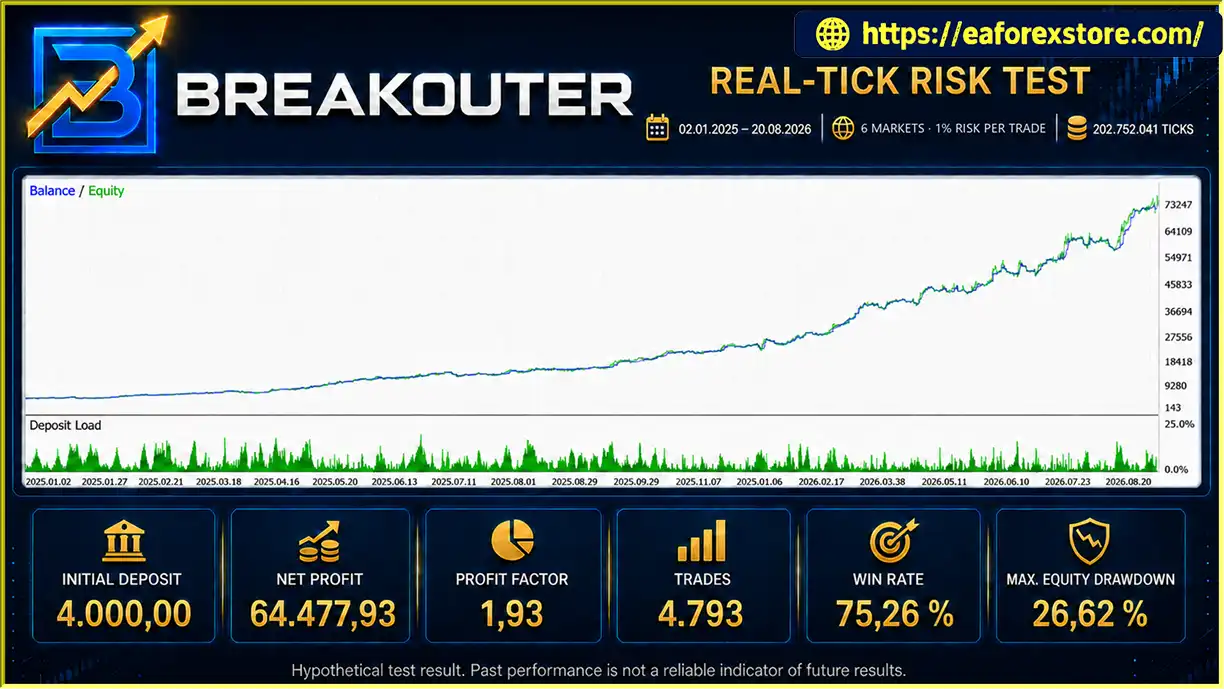
The developer also provides a historical test using 1% risk per trade. This test should be considered separately from the Minimum Broker Lot reference because dynamic sizing and compounding can materially change both profit and drawdown.
Breakouter X6 Portfolio EA MT5 includes automated management for several aspects of order execution and open positions:
These functions are intended to reduce the need for manual intervention and maintain consistent execution of the programmed strategy.
However, stop orders cannot guarantee a specific execution price during gaps or rapid market movements. Traders should also avoid manually modifying or deleting individual orders without understanding how this may affect the EA’s intended sequence.
The EA allows users to assign broker-specific symbols to the six supported markets. For example, USTEC may be listed under a name such as NAS100 or another broker-specific variation.
This flexibility helps accommodate differences in instrument naming across brokers.
Before live use, verify that every enabled symbol corresponds to the intended instrument and has suitable trading hours, contract specifications, price history, and order permissions.
The dashboard is designed to display important information about the trading account and the six-market portfolio, including:
This consolidated view can help traders monitor activity without attaching separate instances of the EA to individual market charts.
The dashboard should be used alongside the MT5 Trade, History, Experts, and Journal tabs when reviewing exposure, order execution, and technical issues.
Breakouter X6 Portfolio EA MT5 includes checks for several technical trading conditions:
These checks are designed to reduce avoidable order errors and prevent some trades from being submitted under unsuitable technical conditions.
They cannot eliminate slippage, gaps, liquidity shortages, rejected orders, or other execution risks.
According to the developer, Breakouter does not require:
The default configuration is included in the EA.
This can simplify installation compared with systems that depend on external services or separate indicators. A stable platform connection is still important because automated trading requires MT5 to be running and connected for continuous operation.
Breakouter X6 Portfolio EA MT5is designed for MetaTrader 5 hedging accounts. The developer explicitly states that netting accounts are not supported.
This requirement is important because hedging and netting accounts handle positions differently. Traders should verify their account mode before installation and testing.
The EA is also designed to run as a single instance per trading account. Running multiple instances on the same account may interfere with the intended portfolio coordination.
Breakouter X6 Portfolio EA MT5 combines swing-level analysis, pending breakout orders, and coordinated portfolio management.
The user enables the desired markets and assigns the corresponding broker symbols. For the complete X6 portfolio, all six instruments must be available and have sufficient price history.
The developer recommends starting the EA on a single XAUUSD M5 chart, from which it manages the enabled portfolio.
The EA identifies local price turning points and uses these structures to prepare potential breakout setups.
These swing levels act as reference points for pending orders. The strategy seeks to participate when price moves beyond a relevant structure.
Based on the identified levels and programmed rules, Breakouter can prepare pending entries around selected swing highs and lows.
Multiple setups may coexist across different markets. Some may be activated quickly, while others may remain pending until price reaches their trigger levels or the EA’s rules cancel or update them.
Before submitting or managing orders, the EA applies relevant safeguards such as spread limits, margin checks, volume restrictions, and minimum stop-distance requirements.
The Trading Capacity setting also influences whether certain trades are permitted. Standard applies additional internal limits, while Full is intended to permit the EA’s full programmed capacity, subject to mandatory broker checks.
Once a pending order is activated, the EA manages the resulting position according to its configured Stop Loss, Take Profit, breakeven, and trailing-stop logic.
As several markets can generate trades simultaneously, the number of open positions and the total portfolio exposure may change rapidly during active breakout conditions.
The dashboard displays account and portfolio information so users can review open positions, pending orders, market status, and trading results.
The overall process can be summarized as:
Identify Swing Levels → Prepare Breakout Orders → Validate Execution → Manage Positions → Monitor Portfolio Exposure
False breakouts remain an inherent risk of the strategy. A series of failed breakouts can create temporary drawdown, and multiple simultaneous positions may amplify the effect on account equity.
The system coordinates six markets through a single instance rather than requiring a separate EA on each chart. This may simplify portfolio management for traders who want to explore multiple breakout opportunities.
However, managing more markets also requires sufficient margin and careful monitoring of combined exposure.
The developer states that the internal trading modules are coordinated and do not require users to select or optimize each module individually.
The main user-facing settings focus on market selection, symbol mapping, position sizing, spread limits, trading capacity, and dashboard display.
This may reduce the number of strategy parameters users need to manage, although the overall system should still be tested thoroughly.
The Standard and Full settings provide different approaches to how much of the EA’s programmed trading capacity may be used.
Standard applies additional internal safety limits, while Full is intended for accounts with enough capital and available margin to support the complete strategy behavior.
The correct choice depends on account size, leverage, minimum lot sizes, and the potential number of simultaneous positions.
Minimum Broker Lot offers a straightforward way to use the broker’s smallest permitted trade volume, while Risk per Trade calculates position size using a selected percentage and Stop Loss distance.
These options give traders flexibility, but the percentage-risk setting should not be confused with a portfolio-wide maximum risk limit.
Spread filtering, margin checks, stop-distance validation, trading-session checks, and volume restrictions are intended to improve order handling and reduce certain avoidable execution errors.
These safeguards are useful operational features but cannot guarantee that every order will execute as expected.
The developer provides a public live-monitoring reference and historical real-tick backtests for both Minimum Broker Lot and 1% Risk per Trade configurations.
These provide starting points for evaluating the system. Traders should independently review the monitoring history, verify that the configuration matches their intended use, and consider the limitations of historical simulations.
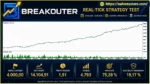
Breakouter X6 Portfolio EA Backtets
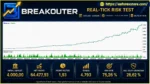
Breakouter X6 Portfolio EA MT5 Backtets
Breakouter X6 Portfolio EA MT5 uses several technical and configuration-based controls to manage trading activity. The key consideration is that the EA operates as a coordinated multi-market portfolio, meaning individual trade risk and total portfolio risk are not the same.
The developer describes Standard as the default mode, with additional internal safety limits that may block some trades or pending orders. Full mode is intended to permit the EA’s full trading capacity when account conditions allow.
For accounts with 1:30 leverage, test both settings and assess free margin, simultaneous pending orders, open positions, and equity drawdown. Full mode is not automatically safer or more profitable simply because it allows more activity.
Minimum Broker Lot uses the smallest permitted volume for each instrument. This is the configuration used in the developer’s primary historical reference test.
Risk per Trade calculates volume based on a selected percentage risk and the relevant Stop Loss distance. The supplied 1% test produced a higher historical net profit than the Minimum Broker Lot test, but also reported higher drawdown.
The 1% setting applies to each newly opened trade, not to the total risk of all open positions. Several simultaneous positions can create a combined exposure significantly larger than 1% of the account.
Breakouter X6 Portfolio EA MT5 strategies can suffer when price briefly crosses a swing level and then reverses. These false breakouts may trigger losing trades, and several markets can experience unsuccessful breakouts during the same period.
Temporary drawdowns and losing streaks should therefore be treated as expected possibilities rather than evidence that the system must be malfunctioning. Equally, the fact that losing phases are normal for breakout systems does not mean every drawdown will recover.
The published reference test used 1:500 leverage and a 4,000 initial deposit. Those conditions should not be assumed equivalent to a 1:30 account.
Lower leverage generally increases the margin required for comparable positions. A portfolio that operates under one broker’s margin conditions may be unable to open the same number of orders under another broker’s rules.
Before live trading, calculate the potential margin required for the complete portfolio, including pending orders that may be activated together. If you disable markets to reduce exposure, remember that the resulting strategy and performance may differ from the six-market reference.
Results may vary because of spreads, commissions, swaps, tick values, contract sizes, trading sessions, minimum lot sizes, slippage, and order execution.
Breakouter’s technical checks can reduce certain order errors but cannot remove these market and broker risks.
The supplied real-tick tests cover the period from January 2, 2025, to August 20, 2026. Although real-tick testing can provide a more detailed historical simulation than simplified price models, it cannot reproduce every live-market condition.
Historical performance should be reviewed alongside forward testing, drawdown analysis, margin usage, and the strategy’s behavior during different market regimes. Past results do not guarantee future performance.
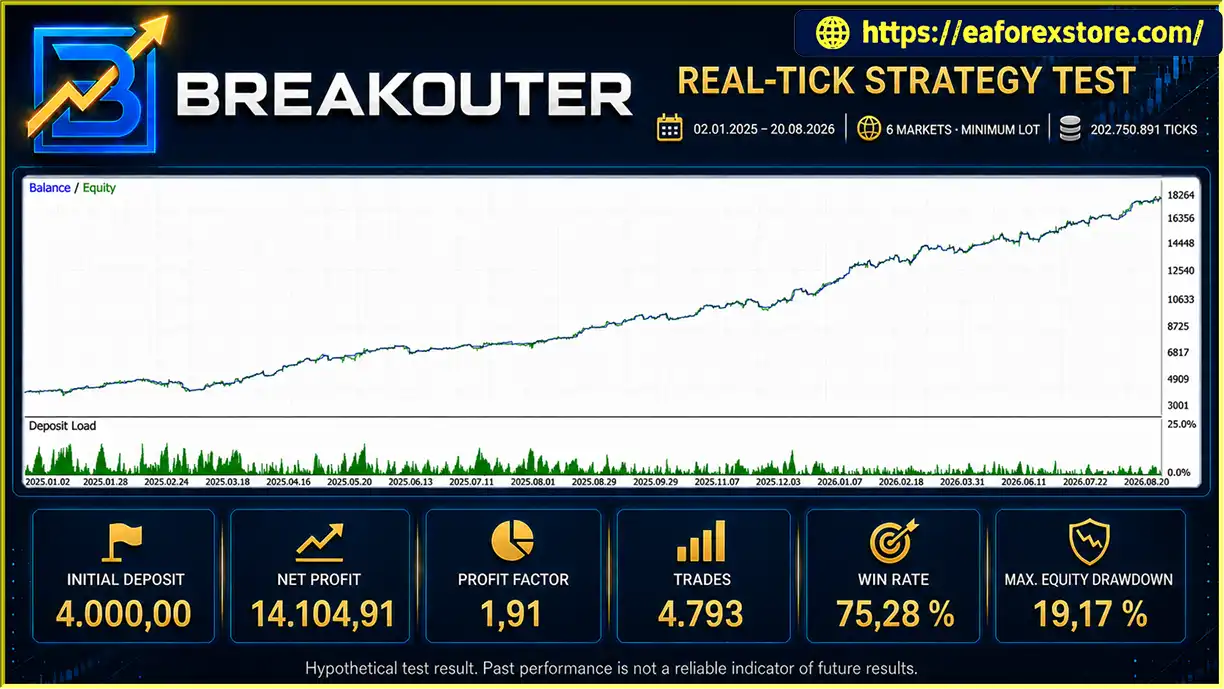
The developer provides two historical MetaTrader 5 Strategy Tester simulations using real ticks across all six markets.
| Metric | Reported result |
|---|---|
| Test period | Jan 2, 2025 – Aug 20, 2026 |
| Initial deposit | 4,000 |
| Leverage | 1:500 |
| Test model | Real ticks |
| Enabled markets | 6 |
| Processed ticks | 202,750,891 |
| Total trades | 4,793 |
| Net profit | 14,104.91 |
| Profit factor | 1.91 |
| Winning trades | 75.28% |
| Maximum relative equity drawdown | 19.17% |
| Metric | Reported result |
|---|---|
| Test period | Jan 2, 2025 – Aug 20, 2026 |
| Initial deposit | 4,000 |
| Leverage | 1:500 |
| Test model | Real ticks |
| Enabled markets | 6 |
| Processed ticks | 202,752,041 |
| Total trades | 4,793 |
| Net profit | 64,477.93 |
| Profit factor | 1.93 |
| Winning trades | 75.26% |
| Maximum relative balance drawdown | 22.92% |
| Maximum relative equity drawdown | 26.62% |
| Minimum margin level | 532.02% |
These figures are reported by the developer and have not been independently verified here. The two configurations should not be compared solely by net profit: the dynamic-risk test reported higher drawdown, and its position sizes could increase as the account balance grew.
The 1% risk setting is not a guarantee that total account risk will remain at 1%. Multiple positions can be open at the same time, so the portfolio’s aggregate exposure may be considerably higher.
The historical results should be treated as hypothetical simulations, not forecasts or promises of future returns.
>>> Join VIP Membership Now <<<
Breakouter X6 Portfolio EA MT5 is a multi-market breakout Expert Advisor designed to coordinate six instruments through one chart. Its swing-based entry logic, pending-order management, flexible position sizing, Standard and Full capacity modes, and integrated portfolio dashboard provide a structured framework for automated breakout trading.
The most important consideration is the relationship between trading capacity and account resources. Standard mode applies additional internal restrictions, while Full mode is intended for sufficiently funded accounts that can support the EA’s complete trading activity. Neither mode eliminates the risks associated with false breakouts, overlapping positions, or changing margin requirements.
The developer’s historical tests show positive results for both Minimum Broker Lot and 1% Risk per Trade configurations, but the dynamic-risk test also reports higher drawdown. These figures should be assessed in the context of the test period, leverage, broker conditions, and the possibility of simultaneous exposure.
Breakouter X6 Portfolio EA MT5 may suit experienced traders seeking a coordinated multi-market breakout system, provided they understand its margin requirements, portfolio risk, and limitations. Demo testing, realistic cost assumptions, and careful monitoring of aggregate exposure are essential before using the EA with real capital.
1. What Is Breakouter X6 Portfolio EA MT5?
Breakouter X6 Portfolio EA MT5 is an automated Expert Advisor designed for MetaTrader 5 that coordinates breakout trading across six markets: XAUUSD, USTEC, XAUCHF, XAUJPY, XAGUSD, and XAGEUR. It uses swing highs and swing lows to identify potential breakout levels, places pending orders, and manages positions using Stop Loss, Take Profit, breakeven, and trailing-stop functions.
2. Which Markets and Timeframes Does Breakouter X6 Portfolio Support?
The EA is designed to trade six instruments: Gold (XAUUSD), a Nasdaq-related index instrument (USTEC), Gold against the Swiss franc (XAUCHF), Gold against the Japanese yen (XAUJPY), Silver against the US dollar (XAGUSD), and Silver against the euro (XAGEUR). The developer recommends attaching the EA to a single XAUUSD chart on the M5 timeframe to manage the enabled portfolio. Symbol availability and naming depend on the broker.
3. What Is the Difference Between Standard and Full Trading Capacity?
Standard mode applies additional internal safety limits that may prevent some trades or pending orders from being placed. Full mode is intended to allow the EA to use its full programmed trading capacity when sufficient capital and margin are available. Mandatory broker checks remain active in both modes. Full mode should not be selected simply to increase trading activity; traders should first evaluate potential simultaneous positions, margin requirements, and total portfolio exposure.
4. What Position-Sizing Methods Does Breakouter X6 Portfolio Offer?
The EA offers two position-sizing modes. Minimum Broker Lot uses the smallest trading volume permitted by the broker for each instrument. Risk per Trade calculates position size using a selected percentage, Stop Loss distance, and relevant symbol specifications. The percentage-risk setting applies to individual trades rather than acting as a portfolio-wide risk limit. Multiple simultaneous positions can therefore create substantially greater combined exposure.
5. What Are the Backtest Results of Breakouter X6 Portfolio EA MT5?
The supplied product description reports two historical real-tick backtests covering January 2, 2025, to August 20, 2026. Both tests used a $4,000 initial deposit, 1:500 leverage, six enabled markets, and 4,793 trades.
Minimum Broker Lot: $14,104.91 net profit, 75.28% winning trades, 1.91 profit factor, and 19.17% maximum relative equity drawdown.
1% Risk per Trade: $64,477.93 net profit, 75.26% winning trades, 1.93 profit factor, 22.92% maximum relative balance drawdown, and 26.62% maximum relative equity drawdown.
These figures are reported by the developer and have not been independently verified here. The two configurations use different position-sizing methods, so their returns and drawdowns should not be compared by profit alone. Historical results do not guarantee future performance.
6. Is Breakouter X6 Portfolio EA MT5 Compatible with Hedging and Netting Accounts?
According to the developer, the EA is designed for MetaTrader 5 hedging accounts, and netting accounts are not supported. A hedging account can maintain separate positions for the same instrument, while a netting account handles exposure differently. Confirm your account mode with your broker before installing the EA. The developer also recommends running only one instance per trading account to preserve coordinated portfolio management.
7. What Risk Management and Broker Safeguards Does Breakouter X6 Portfolio Include?
The EA includes Stop Loss, Take Profit, breakeven, trailing stops, spread filtering, margin checks, trading-session safeguards, and checks for broker volume and stop-distance restrictions. It also supports broker-specific symbol mapping and displays portfolio information through an integrated dashboard. These features can help manage orders and reduce certain technical errors, but they cannot eliminate false breakouts, slippage, price gaps, rejected orders, or losses from overlapping positions.
8. How Do I Install Breakouter X6 Portfolio EA MT5?
Obtain the official EA file and installation instructions from the vendor. Install the file in the appropriate MetaTrader 5 Experts directory, open an XAUUSD chart on M5, and attach the EA. Confirm that your account uses hedging mode, map the six supported instruments to your broker's symbols, and select the position-sizing method and trading-capacity mode. Review spread and margin settings, then backtest the complete portfolio and forward-test on a demo account before considering live trading. Follow the official documentation for version-specific installation instructions.
In stock
In stock
In stock
In stock
In stock
Out of stock
No account yet?
Create an Account












 Automatic EA
 EA Best Seller
 Expert Advisor MT4
 Expert Advisor MT5
 HFT EA


Reviews
Clear filtersThere are no reviews yet.