









-
 Unlimited Activations
-
 Instant delivery
-
 Easy to install




 Unlimited Activations
Instant delivery
Easy to install
Unlimited Activations
Instant delivery
Easy to install
 Free Update
 Free Install Support

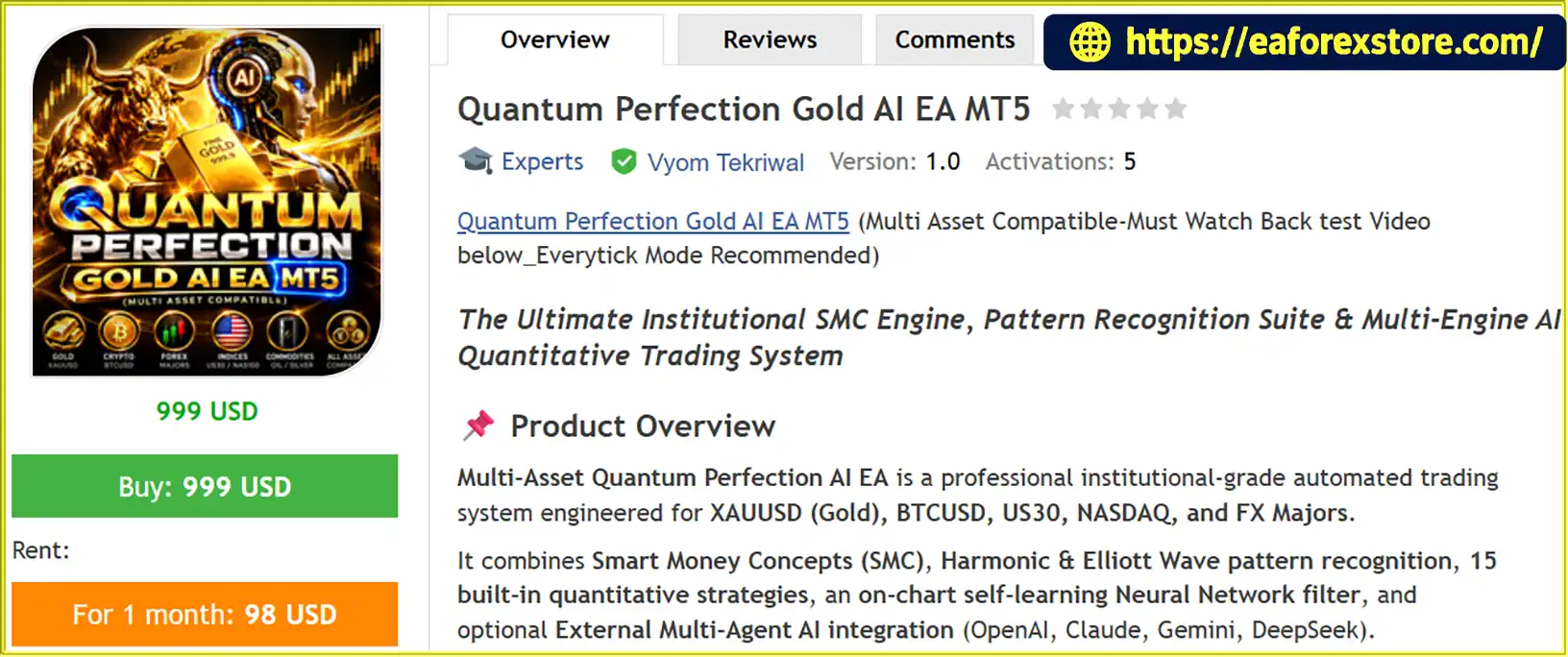
Quantum Perfection Gold AI EA MT5 is an automated Expert Advisor (EA) for MetaTrader 5, designed to analyze and trade multiple financial markets, including Gold (XAUUSD), Bitcoin (BTCUSD), major Forex pairs, US30, and NASDAQ. It combines Smart Money Concepts (SMC), harmonic pattern recognition, Elliott Wave analysis, quantitative trading strategies, and an optional external AI integration layer to evaluate potential trading opportunities.
Unlike an EA built around a single entry method, Quantum Perfection Gold AI EA MT5 offers 15 selectable strategy configurations. These range from short-term momentum and scalping systems to liquidity-sweep setups, VWAP-based strategies, and institutional-style trend-following approaches. Traders can select a strategy according to their preferred trading style, market, and timeframe.
The system also includes an on-chart machine-learning filter based on a perceptron model. According to the supplied product description, this component evaluates potential trade signals and can adjust its behavior using closed-trade outcomes. An optional external AI integration can send market metrics and technical information to supported language-model APIs for additional trade validation.
Another central feature is its visual analytical dashboard, which is designed to display market structure, Order Blocks, Fair Value Gaps, liquidity sweeps, trend information, confluence scores, and account statistics. Risk-management functions include fixed-lot or percentage-based risk settings, Stop Loss, Take Profit, breakeven, trailing stops, daily profit and loss limits, news filtering, and trading-session controls.
Quantum Perfection Gold AI EA MT5 is positioned as a configurable trading framework rather than a single-purpose Gold scalper. Its broad strategy selection may appeal to traders who want to experiment with different algorithmic approaches within one EA. However, the number of strategies, machine-learning features, and optional AI integrations does not independently establish trading performance. Each configuration should be tested under realistic market and execution conditions before live deployment.
>>> Delivery time 24h-48h after payment.
>>> Refund if not delivered.
>>> You will receive the latest version without any limitations (ID+Time).Reviewed by Jason Stap <<<
Quantum Perfection Gold AI EA MT5 Overview
Quantum Perfection Gold AI EA MT5 is designed for several markets, including:
The supplied description lists multiple supported timeframes, from M1 and M5 through M15, M30, H1, and D1. Actual suitability depends on the selected strategy, symbol specifications, broker conditions, and configuration.
This multi-asset approach allows traders to explore different market environments without needing a separate EA for every instrument. Nevertheless, the same settings should not automatically be assumed suitable for Gold, cryptocurrencies, indices, and Forex pairs because their volatility, spreads, trading hours, and contract specifications differ.
One of the main features is the ability to select from 15 strategy configurations through the InpStrategySelection parameter.
| Strategy ID | Strategy name | Main approach |
|---|---|---|
| 0 | Multi-Asset AI SMC Confluence Master | Order Blocks, FVGs, liquidity sweeps, and confluence scoring |
| 1 | Gold M5 Scalp Research Framework | EMA crossover, RSI, ADX, and ATR-based volatility filtering |
| 2 | Gold Momentum Fusion M1/M5 | Higher-timeframe trend, short-term momentum, volume, and VWAP |
| 3 | Dual Supertrend Gold Scalper | Dual Supertrend, VWAP, RSI, and directional movement |
| 4 | VWAP + EMA Momentum Breakout | EMA alignment, VWAP breakout, and candle-strength checks |
| 5 | SMC Liquidity Sweep + FVG Momentum | Liquidity sweeps, displacement candles, and FVG mitigation |
| 6 | 9 SMA + Volume + Rejection Scalper | Moving-average reactions, volume, and rejection candles |
| 7 | XAU Momentum Sniper AI | M5 trend, M1 momentum, and SMC entry analysis |
| 8 | Purple Cloud & SuperTrend Fusion | Gaussian Channel, EMA cloud, and ATR Supertrend |
| 9 | 3D Volume Delta Order Block Retest | Order Block retests and volume-delta confirmation |
| 10 | Institutional Sentiment & Liquidity Flow | Sentiment divergence and absorption-candle analysis |
| 11 | Dual VWAP & EMA Trend Scalper | VWAP, EMA alignment, and trend-continuation entries |
| 12 | Claude AI 4-Pillar Confluence Matrix | Trend, momentum, volume, and volatility scoring |
| 13 | FRAMA Channel & 200 EMA Scalper | Fractal Adaptive Moving Average and long-term EMA filtering |
| 14 | Hedge Fund VWAP Microstructure | VWAP deviation and liquidity-retest concepts |
The developer highlights Strategy 7, XAU Momentum Sniper AI, and Strategy 0, Multi-Asset AI SMC Confluence Master, as recommended options.
Each strategy uses a different combination of market filters and entry logic. Rather than assuming that one configuration is universally best, traders should test strategies individually and compare their drawdown, trade frequency, average trade outcome, and sensitivity to market conditions.
The EA’s visual analytical engine is designed to identify several market-structure concepts commonly used in technical trading.
Order Blocks and Breaker Blocks: These zones are intended to highlight areas where price may react to previously identified market structure.
Fair Value Gaps (FVGs): The EA maps three-candle price imbalances that traders may use to evaluate potential retracement or continuation opportunities.
Liquidity Sweeps: The system looks for price movements around buy-side and sell-side liquidity areas, including potential stop runs and false breakouts.
Break of Structure (BOS) and Change of Character (CHoCH): These concepts help describe potential changes in market structure and directional behavior.
Fibonacci Optimal Trade Entry (OTE): The supplied specification describes Premium/Discount analysis and an OTE region around the 0.618–0.786 Fibonacci retracement area.
These tools can provide a structured framework for analyzing price behavior. However, SMC terminology is not standardized across all trading systems, and automatically identified zones do not guarantee that price will react as expected.
Quantum Perfection Gold AI EA MT5 is designed to recognize several harmonic patterns, including Gartley, Bat, Butterfly, Crab, and ABCD formations. It also incorporates Elliott Wave structures, including the five-wave impulse pattern and three-wave corrective pattern.
Potential Reversal Zones (PRZs) can be used to identify areas where a pattern may suggest a possible change in price direction.
Pattern recognition can be sensitive to swing selection, market noise, and the rules used to confirm a formation. Traders should therefore evaluate how the EA identifies and validates patterns in actual charts instead of assuming that every detected formation produces a reliable entry.
The supplied feature list includes several tools for assessing broader market direction and trading activity:
These components are designed to help evaluate trend direction, potential support and resistance areas, session behavior, and momentum.
The value of each component depends on the strategy selected and how its signals are combined. More indicators do not necessarily mean better trading results, particularly if several indicators provide overlapping information.
Quantum Perfection Gold AI EA MT5 includes an internal perceptron-based machine-learning filter. According to the supplied description, it evaluates potential trade signals and assigns a probability-style score within a configurable range of approximately 0.50 to 0.95.
The system is also described as learning from closed-trade outcomes. This feature is intended to help the EA adapt its signal filtering based on observed results.
However, a probability score should not automatically be interpreted as a statistically calibrated probability of winning. The reliability of the filter depends on its training process, data quality, implementation, and validation methodology. Traders should seek documented evidence of out-of-sample performance before relying on its scores as a measure of trade quality.
The EA can operate using its built-in strategy logic and internal filter without requiring external AI integration, according to the supplied description.
Users can optionally enable InpAIEnabled to connect the EA to external language-model services, including:
The described workflow sends JSON-formatted market information, including OHLC metrics, indicator states, and SMC structures, to an external API. The returned assessment is then intended to act as a secondary filter for technical trade setups.
This integration may provide another layer of signal evaluation, but external AI output can be inconsistent, delayed, unavailable, or affected by API changes. The model’s assessment is not a guarantee of market direction. API availability, usage costs, credentials, network connectivity, and current model compatibility should be verified before enabling the feature.
Quantum Perfection Gold AI EA MT5 supports two execution approaches, according to the supplied specification.
Market execution can be useful when immediate entry is required, while limit orders may suit strategies that wait for price to return to a predefined area. Neither method guarantees the intended entry price, and pending orders may remain unfilled or execute under changing market conditions.
The EA provides several configurable risk-management functions intended to control exposure:
The recovery sequence deserves particular attention. Recovery-style position sizing or trade sequences can increase exposure after losses, depending on their implementation. Traders should understand the maximum permitted levels, lot progression, total exposure, and behavior when the account reaches its loss limit.
Risk controls reduce neither the possibility of losses nor the need to monitor account exposure. Their actual behavior should be verified in the EA’s settings and documentation.
The on-chart dashboard is designed to display information such as:
The dashboard can make the system’s operation easier to monitor, but displayed scores and classifications should be understood as outputs of the EA rather than independent confirmation that a trade is safe.
The supplied product description states that the EA includes margin pre-checks and safer Stop Loss modification handling intended to reduce common execution errors, including MT5 errors 10019 and 10016.
These checks may improve order handling when implemented correctly, but they cannot eliminate every broker rejection or execution problem. Margin availability, stop-distance restrictions, trading permissions, market status, and broker-specific contract rules can still affect order placement and modification.
Quantum Perfection Gold AI EA MT5 combines technical analysis, configurable strategy logic, optional machine-learning filtering, and automated trade management.
The trader chooses a supported instrument, timeframe, and strategy configuration. For example, the developer recommends testing XAU Momentum Sniper AI on M1 or M5, while the broader strategy selection offers different approaches for other market conditions.
The best configuration depends on the instrument, trading costs, volatility, and the user’s risk tolerance.
The EA evaluates relevant technical inputs according to the selected strategy. These may include SMC zones, liquidity sweeps, Fair Value Gaps, moving averages, VWAP, volume, momentum, volatility, or harmonic patterns.
The combination of filters varies by strategy, so not every component necessarily participates in every trade.
When enabled and applicable, the internal perceptron filter evaluates the candidate signal and produces a score used in the trading decision.
The developer describes the filter as learning from closed trades. Traders should verify how this learning operates, whether it persists between sessions, and how the model is evaluated for overfitting.
If InpAIEnabled is activated and the relevant service is configured, the EA can submit market data to a supported external AI provider for a secondary assessment.
The returned verdict is intended to help determine whether a technical setup meets the additional filtering requirements. This stage introduces dependencies on API credentials, connectivity, service availability, and any associated usage fees.
If the configured entry rules and filters are satisfied, the EA can place a market order or use a limit-order approach, depending on the selected execution mode.
The EA’s margin and order-validation checks are intended to reduce avoidable execution errors, although the broker ultimately determines whether an order is accepted.
The EA applies the configured Stop Loss, Take Profit, breakeven, trailing-stop, recovery, and daily-limit rules as applicable.
Traders should pay particular attention to the interaction between recovery logic, position limits, and daily loss protection. The precise behavior of each setting should be confirmed in the official documentation and tested before live deployment.
The 15 selectable strategies cover different approaches, including scalping, momentum, trend following, VWAP analysis, and SMC-based trading. This gives traders a way to compare multiple configurations within one product.
The main consideration is that each strategy needs independent testing. A large strategy selection is useful for experimentation but does not establish that every strategy is profitable.
The internal perceptron filter and optional external AI integration are designed to provide additional checks beyond conventional indicator rules.
These features may be useful to traders interested in algorithmic signal filtering, provided they understand the limitations of machine-learning scores and external model responses.
SMC zones, Fair Value Gaps, liquidity sweeps, trend information, and the dashboard can help users understand the technical context associated with potential entries.
This may be particularly useful for traders who want visibility into the EA’s analytical framework rather than a completely opaque trading system.
Market orders, limit orders, lot-sizing choices, breakeven, trailing stops, daily loss limits, and session filters provide several ways to configure execution and exposure.
Careful configuration remains essential, especially when using recovery-style logic or high-frequency strategies.
The EA’s external AI functionality is optional, according to the supplied description. This means traders can begin with the built-in strategy and internal filter rather than immediately depending on external APIs.
Those who enable external AI should account for service availability, latency, data-sharing implications, API costs, and the possibility of inconsistent model responses.
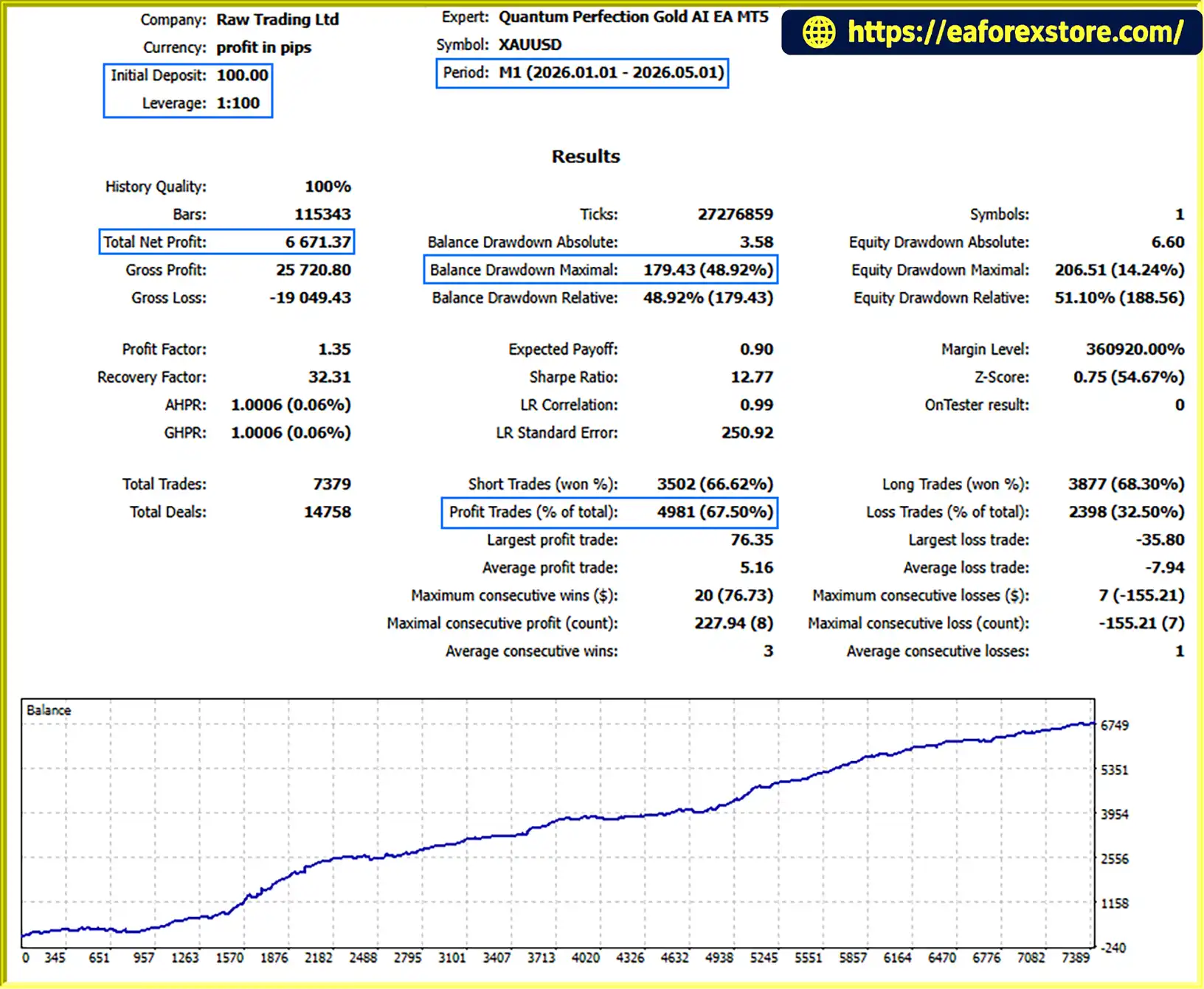
Quantum Perfection Gold AI EA MT5 Backtets
Quantum Perfection Gold AI EA MT5 includes several mechanisms intended to support disciplined automated trading. However, no indicator combination, neural-network filter, or external AI service can remove the inherent risks of financial markets.
Position sizing: Fixed-lot and percentage-based risk settings provide different approaches to exposure management. Traders should verify the exact percentage-risk calculation, including how the EA treats Stop Loss distance, tick value, and contract size.
Recovery sequence: The controlled recovery feature includes a maximum-level concept, but recovery logic can increase account exposure following losses. Review its sizing rules and worst-case exposure before enabling it.
Daily profit and loss limits: These controls can restrict trading after configured thresholds are reached. Confirm how the EA calculates daily results, whether floating PnL is included, and how it handles existing positions when a limit activates.
Breakeven and trailing stops: These features can adjust protective levels as a trade moves favorably. They do not guarantee a profitable exit, and stop orders can be affected by slippage or rapid market movement.
News and session filters: These features aim to avoid selected periods or trading sessions. Their effectiveness depends on correct settings, data availability, and the events covered by the filter.
One-position-at-a-time control: The supplied description states that the EA includes concurrency guards intended to enforce a single open position. Verify how this behaves across symbols, strategy instances, and multiple charts before relying on it as a portfolio-wide limit.
External AI reliability: AI providers may experience service interruptions, latency, model changes, or API errors. Test the EA’s behavior when a request fails or an external service is unavailable, and confirm whether it blocks trading, falls back to internal logic, or handles the failure another way.
Backtesting and overfitting: Historical results may be sensitive to the selected timeframe, market period, spread, commission, slippage assumptions, and strategy parameters. Machine-learning components require particular care to avoid evaluating a model on data that was also used to tune it.
Broker compatibility: Margin rules, minimum lot sizes, execution mode, stop distances, spreads, and contract specifications vary. Test the EA on the intended broker and account type before using real funds.
The supplied product description does not include independently verified performance statistics. Therefore, win rate, profitability, expected drawdown, and suitability for a particular account size should not be assumed without credible test results.
Follow these general steps to install and configure the EA on MetaTrader 5.
InpStrategySelection according to the strategy you want to test. The developer highlights Strategy 7, XAU Momentum Sniper AI, and Strategy 0, Multi-Asset AI SMC Confluence Master, as recommended starting points.InpAIEnabled, follow the current official instructions for API credentials, supported endpoints, and MT5 WebRequest permissions. The supplied setup notes specifically list https://api.openai.com and https://api.anthropic.com. Verify current endpoint and model requirements before use; do not share API keys publicly.The supplied specification lists the following as general starting guidance:
These figures are the developer’s recommendations, not a guarantee that the EA can operate safely with a particular deposit or leverage. Minimum balance requirements depend on lot size, margin, stop distance, strategy behavior, and broker specifications. A VPS may improve uptime and connectivity but cannot guarantee execution quality or profitable results.
>>> Join VIP Membership Now <<<
Quantum Perfection Gold AI EA MT5 is a configurable automated trading system that combines 15 strategy options, technical market analysis, SMC and pattern recognition, an internal machine-learning filter, and optional external AI validation. Its visual dashboard and broad risk-management settings are intended to give traders multiple ways to analyze markets and manage automated execution.
The main attraction is the breadth of its strategy framework and the ability to use external AI as an optional secondary filter. At the same time, this flexibility creates additional complexity. Traders need to understand the selected strategy, the behavior of recovery logic, the reliability of external integrations, and the impact of trading costs before relying on the EA.
Rather than choosing a strategy based only on its name or advertised AI capabilities, test each configuration separately. Compare out-of-sample results, maximum drawdown, average trade outcome, exposure, and performance under different market conditions. For external AI features, also test how the EA behaves during API failures or delayed responses.
Quantum Perfection Gold AI EA MT5 may appeal to traders seeking a multi-strategy algorithmic framework with optional AI-assisted filtering, but its real-world suitability must be established through careful testing, transparent performance evaluation, and disciplined risk management.
1. What Is Quantum Perfection Gold AI EA MT5?
Quantum Perfection Gold AI EA MT5 is an automated trading robot for MetaTrader 5 that offers 15 selectable trading strategies. It combines technical indicators, Smart Money Concepts (SMC), harmonic pattern recognition, Elliott Wave analysis, an internal perceptron-based machine-learning filter, and optional external AI integration. The EA also includes automated trade management and a visual dashboard for monitoring market conditions and account statistics.
2. Which Markets and Timeframes Does Quantum Perfection Gold AI EA MT5 Support?
According to the supplied product description, the EA supports Gold (XAUUSD), Bitcoin (BTCUSD), EURUSD, GBPUSD, US30, and NASDAQ/NAS100, subject to broker availability. Listed timeframes include M1, M5, M15, M30, H1, and D1. The appropriate timeframe depends on the selected strategy, market conditions, and broker specifications.
3. How Many Trading Strategies Does Quantum Perfection Gold AI EA MT5 Offer?
The EA provides 15 selectable strategy configurations through the InpStrategySelection parameter. These include Gold scalping, momentum trading, Supertrend strategies, VWAP breakouts, liquidity sweeps, Order Block retests, and multi-asset SMC analysis. The developer recommends exploring Strategy 7, XAU Momentum Sniper AI, and Strategy 0, Multi-Asset AI SMC Confluence Master. Each configuration should be evaluated independently before live trading.
4. Does Quantum Perfection Gold AI EA MT5 Use Artificial Intelligence?
Yes. The supplied specifications describe an internal perceptron-based machine-learning filter that evaluates potential trade signals and may adapt using closed-trade outcomes. The EA also offers optional external AI integration with supported services, including OpenAI, Anthropic Claude, Google Gemini, and DeepSeek. External integration may require API credentials, an internet connection, and additional usage fees. AI scores and model assessments should not be interpreted as guarantees of trading success.
5. What Risk Management Features Does Quantum Perfection Gold AI EA MT5 Include?
The EA includes fixed-lot and percentage-based position sizing, Stop Loss, Take Profit, breakeven, trailing stops, daily profit targets, daily loss limits, news filtering, and trading-session controls. It also offers a recovery sequence with configurable maximum levels. Because recovery logic may increase exposure after losses, traders should carefully review its position-sizing rules and potential cumulative risk before enabling it.
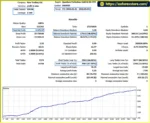
6. What Are the Backtest Results for Quantum Perfection Gold AI EA MT5?
The supplied backtest figures report the following results for XAUUSD over four months:
Initial deposit: $100
Total net profit: $6,671.37
Win rate: 67.50%
Maximum drawdown: 48.92%
These figures are reported results and have not been independently verified. The supplied information does not specify the exact testing dates, trading costs, or strategy configuration. A reported drawdown of 48.92% indicates substantial historical equity risk, and the results do not guarantee future profitability.
7. What Is the Minimum Deposit for Quantum Perfection Gold AI EA MT5?
The developer suggests a minimum balance of $100 for a standard account or $10 for a cent account. These are suggested starting amounts, not guarantees of suitability. The actual capital required depends on the chosen strategy, lot size, Stop Loss distance, leverage, margin requirements, broker conditions, and recovery settings. Traders should assess potential losses and test the EA on a demo account before committing real funds.
8. How Do You Install Quantum Perfection Gold AI EA MT5 on MT5?
To install the EA, obtain the .ex5 file from the authorized source and place it in the appropriate MetaTrader 5 Experts directory. Restart MT5 or refresh the Navigator panel, attach the EA to a suitable chart, and enable Algo Trading. Next, select a strategy and configure position sizing, protective stops, daily limits, and trading filters. If using external AI, follow the official instructions for API credentials and WebRequest permissions. Backtest and forward-test the configuration on a demo account before considering live deployment.
In stock
In stock
In stock
In stock
In stock
Out of stock
No account yet?
Create an Account












 Automatic EA
 EA Best Seller
 Expert Advisor MT4
 Expert Advisor MT5
 HFT EA


Reviews
Clear filtersThere are no reviews yet.