









-
 Unlimited Activations
-
 Instant delivery
-
 Easy to install






 Unlimited Activations
Instant delivery
Easy to install
Unlimited Activations
Instant delivery
Easy to install
 Free Update
 Free Install Support

Easy Mony EA MT5 is a fully automated Expert Advisor (EA) developed for the MetaTrader 5 trading platform. It is designed to monitor market conditions, identify potential trading opportunities, execute BUY and SELL orders, and manage open positions according to its programmed trading logic and user-defined settings.
The EA provides configurable timeframe analysis, swing selection, confirmation bars, entry buffers, position sizing, Stop Loss management, and trailing-stop parameters. Its settings include support for M30, H1, and H4 analysis, allowing traders to configure the timeframes used by the strategy rather than relying exclusively on a single chart period.
Easy Mony EA MT5 also offers balance-based lot calculation, fixed-lot configuration, customizable execution settings, and compatibility with the MetaTrader 5 Strategy Tester for backtesting and optimization.
According to the developer’s instructions, a raw-spread trading account is strongly recommended. Broker conditions, including spreads, commissions, slippage, and execution quality, can significantly influence the EA’s actual trading performance.
With its automated execution and adjustable parameters, Easy Mony EA MT5 aims to provide a straightforward trading solution for users who prefer systematic trade execution with less manual intervention. However, automated trading does not guarantee profitability, and the results depend on the strategy, configuration, broker conditions, and market environment.
>>> Delivery time 24h-48h after payment.
>>> Refund if not delivered.
>>> You will receive the latest version without any limitations (ID+Time).Reviewed by Jason Stap <<<
Easy Mony EA MT5 Overview
Easy Mony EA MT5 is designed to automate the main stages of trade execution, from monitoring market conditions to entering and managing positions.
Once configured and enabled, the EA can execute its programmed BUY and SELL logic without requiring the trader to manually confirm every eligible entry.
The EA includes settings for M30, H1, and H4 timeframe analysis. Traders can enable the supported timeframes or configure the system to use a selected timeframe instead.
This flexibility allows users to customize the strategy’s analysis according to their preferences. The exact effect of each timeframe setting depends on how the EA’s underlying trading logic processes market data.
Easy Mony EA MT5 includes swing-related parameters such as:
ALL_CONFIRMED_WICKS mode in the supplied configuration.These settings allow traders to customize swing selection and confirmation behavior. Their impact on trade frequency, entry timing, and performance should be evaluated through testing rather than assumed.
The EA supports fixed-lot trading and balance-based lot calculation.
The supplied settings use LOT_BY_BALANCE, with a balance amount per lot of 20 and a lot value of 0.01. Traders should verify the precise relationship between these inputs using the EA’s documentation, because the resulting position size depends on the implementation of its lot calculation.
Correct position sizing is essential for controlling exposure. A larger trading volume can increase both potential profits and potential losses.
Easy Mony EA MT5 includes configurable Stop Loss and trailing-stop parameters intended to manage trade exits and protect open positions as prices move.
The supplied configuration specifies an initial Stop Loss of 50 points, a trailing distance of 50 points, and a trailing activation threshold of 1 point of profit.
These are configurable point-based values, not guaranteed monetary loss limits. The actual financial impact depends on the instrument, contract specifications, lot size, broker execution, and slippage.
The EA provides additional settings for managing trading behavior, including:
The supplied configuration sets InpOnePositionAtATime = false, meaning users should not assume that the EA will restrict itself to a single open position. Traders should verify how simultaneous positions and exposure are managed before live deployment.
Easy Mony EA MT5 can be tested using the MetaTrader 5 Strategy Tester.
Backtesting allows traders to examine historical trade behavior, compare configurations, and evaluate factors such as profitability, drawdown, trade frequency, and the effect of different parameters.
Historical testing is useful for strategy evaluation, but it cannot guarantee that similar results will occur in live markets.
The developer specifically recommends using a raw account.
This recommendation makes broker costs particularly important when evaluating the EA. Raw-spread accounts may charge separate commissions, so traders should compare the combined cost of spreads and commissions rather than looking at spread alone.
Execution speed, slippage, liquidity, and the broker’s trading conditions can also affect the final results.
Easy Mony EA MT5 follows its programmed trading logic to monitor market conditions, identify eligible entries, and manage trades according to the active settings.
The EA uses its configured timeframe and swing-related parameters to evaluate the market according to its internal strategy.
Depending on the selected configuration, this may involve M30, H1, and H4 analysis, swing confirmation, and the evaluation of relevant price levels.
When the required conditions are detected, the EA can initiate a BUY or SELL order according to its programmed rules.
Entry behavior depends on the selected settings, confirmation logic, and applicable market conditions.
The EA applies the selected money management mode to determine the trading volume.
With balance-based sizing, the resulting lot size depends on the configured balance parameters and the EA’s calculation method. Traders should verify the calculation and resulting exposure before enabling live trading.
After entering a trade, the EA can apply its configured Stop Loss and trailing-stop behavior. The trailing mechanism follows the EA’s programmed rules and the selected activation and distance parameters.
Users should verify the actual exit behavior in the Strategy Tester and on a demo account.
As long as the EA is active, MetaTrader 5 is running and connected, and automated trading permissions remain enabled, the system can continue processing eligible trading opportunities.
The general workflow is:
Analyze → Confirm → Enter → Manage → Exit
The EA automates trade execution, but traders remain responsible for configuration, exposure monitoring, and decisions about when to use the system.
Easy Mony EA MT5 is designed to reduce the need for constant manual chart monitoring. It can execute eligible trades according to its programmed rules, helping traders maintain a systematic approach to market participation.
The available timeframe, swing-selection, confirmation, and lookback parameters allow users to adjust the trading configuration instead of relying entirely on fixed defaults.
This flexibility is useful for traders who want to evaluate different configurations through systematic testing.
Fixed-lot and balance-based money management provide different ways to determine trading volume. Traders can choose the approach that best fits their account and risk objectives, provided they understand the resulting exposure.
Configurable Stop Loss and trailing-stop settings give traders control over important aspects of position management. These tools can support a disciplined trading plan, although they cannot prevent every loss or guarantee a particular exit price.
Compatibility with the MetaTrader 5 Strategy Tester allows users to review historical behavior and compare parameter combinations before committing capital.
Testing can help identify weaknesses and unsuitable configurations, especially when realistic trading costs are included.
The basic setup process involves attaching the EA to a chart, configuring the parameters, and enabling Algo Trading. This makes the initial workflow relatively straightforward, although the underlying settings still require careful review.
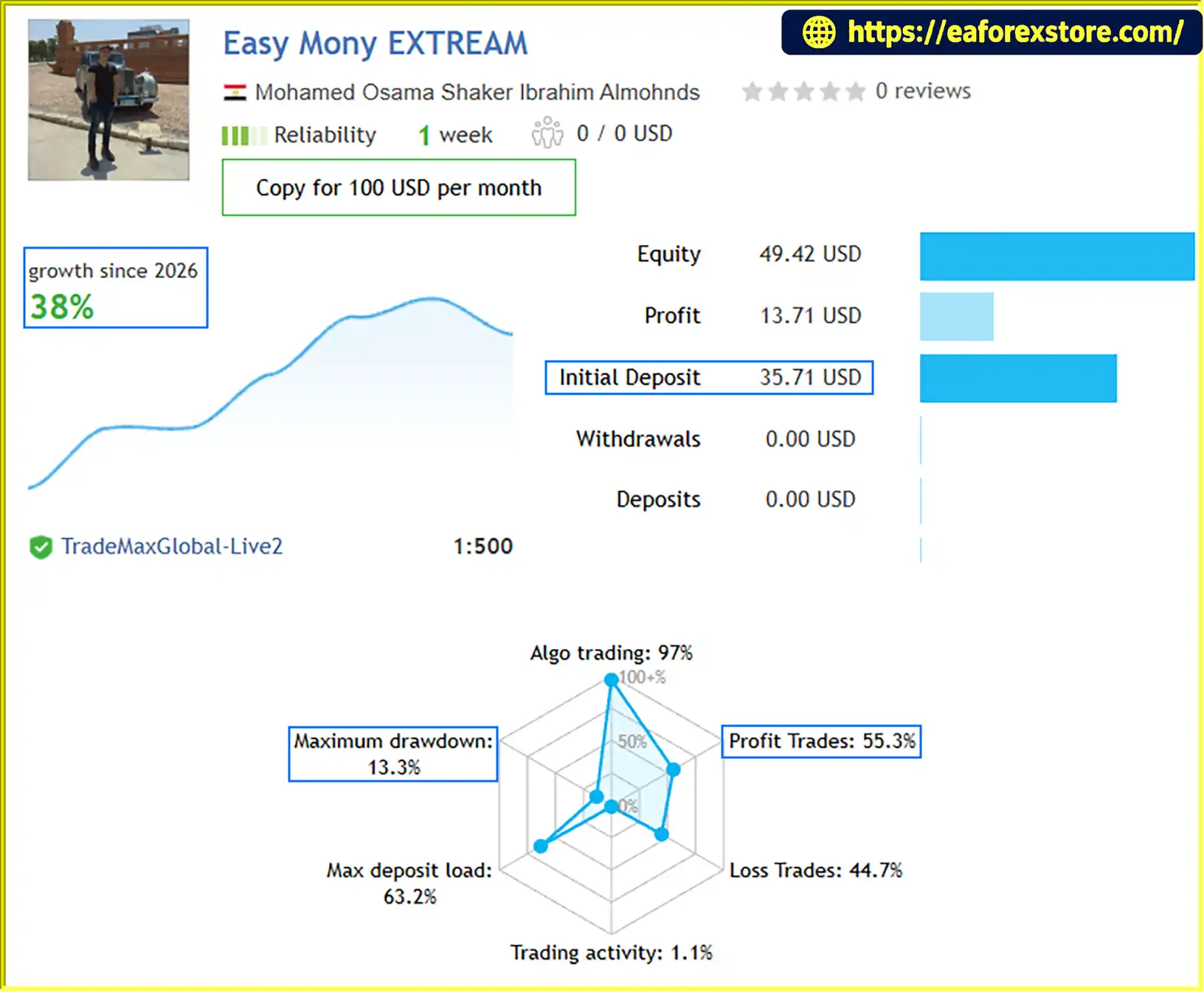
🔺Easy Mony EXTREAM – 1 consecutive weeks
Easy Mony EA MT5 Live Signal Reuslts
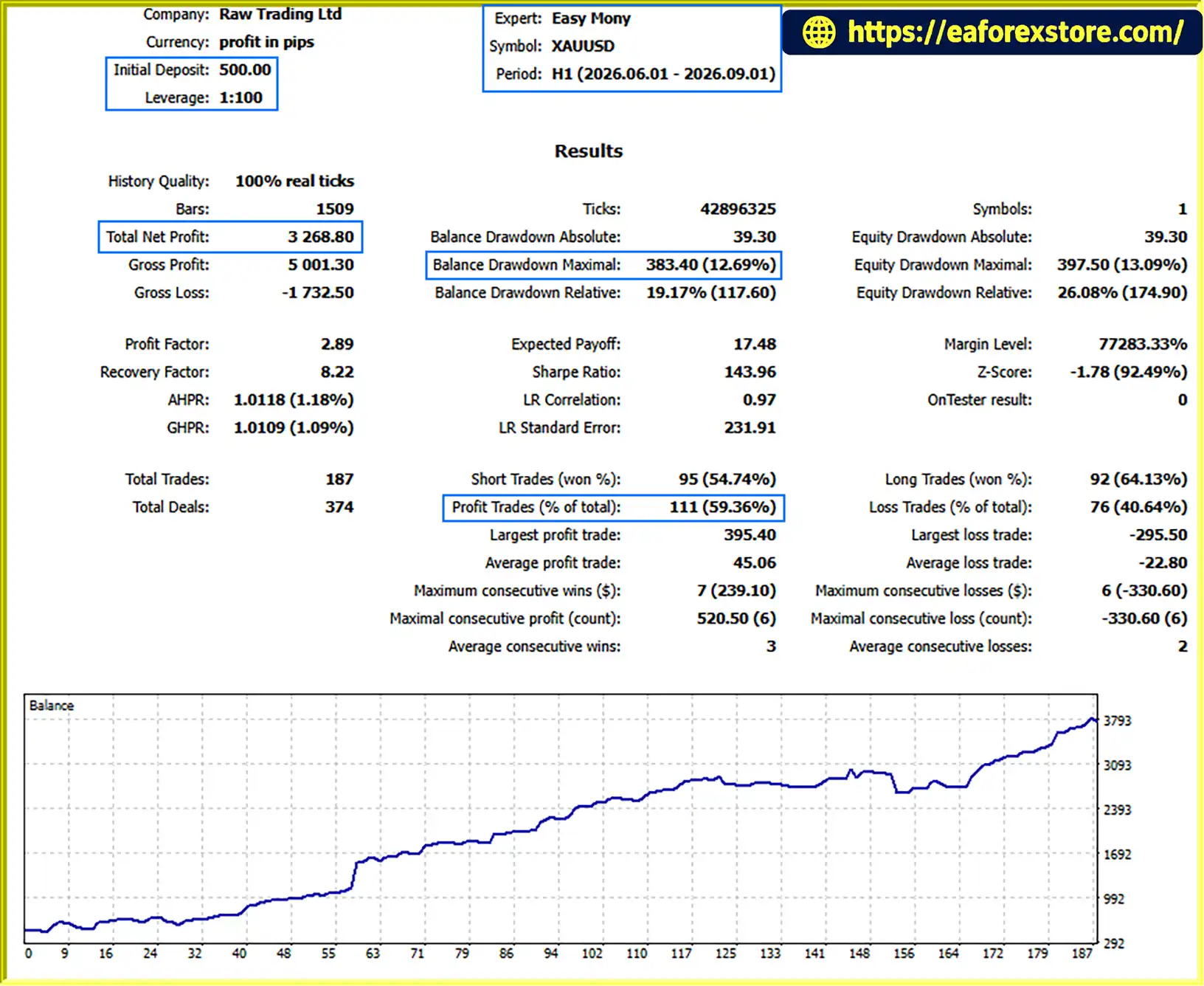
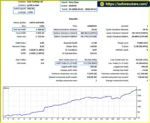
Easy Mony EA MT5 backtets
Risk management is essential when operating Easy Mony EA MT5. The EA provides configurable position sizing and trade-management parameters, but these features should not be treated as a guarantee against losses.
Initial Stop Loss: The supplied configuration uses an initial Stop Loss of 50 points. Traders should verify how points are defined for their selected symbol and calculate the corresponding monetary risk based on lot size and contract specifications.
Trailing-Stop Management: The supplied settings use a trailing distance of 50 points and a starting threshold of 1 point of profit. Actual behavior depends on the EA’s implementation, execution conditions, and price movement. A trailing stop does not guarantee that a trade will close at the intended level.
Position Sizing: The EA supports fixed-lot and balance-based lot calculation. Traders should verify the resulting volume, particularly when using balance-based sizing, and ensure that exposure remains appropriate for their account.
Multiple Positions: The supplied configuration sets InpOnePositionAtATime = false. This means the strategy may be permitted to hold multiple positions, depending on its trading logic. Users should assess combined exposure rather than evaluating each trade in isolation.
Broker Costs: Raw spreads do not necessarily mean low total trading costs. Commissions, slippage, execution delays, and other broker-specific conditions should be included in backtesting and live performance evaluations.
Timeframe and Swing Settings: Changes to confirmation bars, swing lookback, selected timeframes, and levels per direction can affect the EA’s behavior. Avoid assuming that a particular configuration is optimal without sufficient testing.
Automated Trading Requirements: MetaTrader 5 must remain running and connected for ongoing execution. Users should ensure that Algo Trading is enabled and that the EA has the required permissions.
Market Risk: Sudden price movements, gaps, changing liquidity, and execution problems can result in losses beyond the amount anticipated from a nominal Stop Loss setting.
Before using Easy Mony EA MT5 on a live account, test it with realistic spreads, commissions, and slippage. Review maximum equity drawdown, total exposure, losing streaks, and the effect of different settings. Begin with a demo account and use conservative position sizes until the EA’s behavior is well understood.
Follow these general steps to install and configure Easy Mony EA MT5.
InpUseM30, InpUseH1, and InpUseH4. If you prefer a single selected timeframe, check the setting that controls whether InpTimeframe replaces the individual timeframe options.SwingSelectionMode, InpConfirmationBars, InpSwingLookback, and the number of levels per direction. Use the supplied defaults as a starting point rather than assuming they are suitable for every instrument.InpOnePositionAtATime, InpDeviationPoints, StopDurationSeconds, and the magic number. Ensure that the settings match your intended trading behavior.For exact parameter definitions and installation requirements, consult the documentation supplied with Easy Mony EA MT5.
>>> Join VIP Membership Now <<<
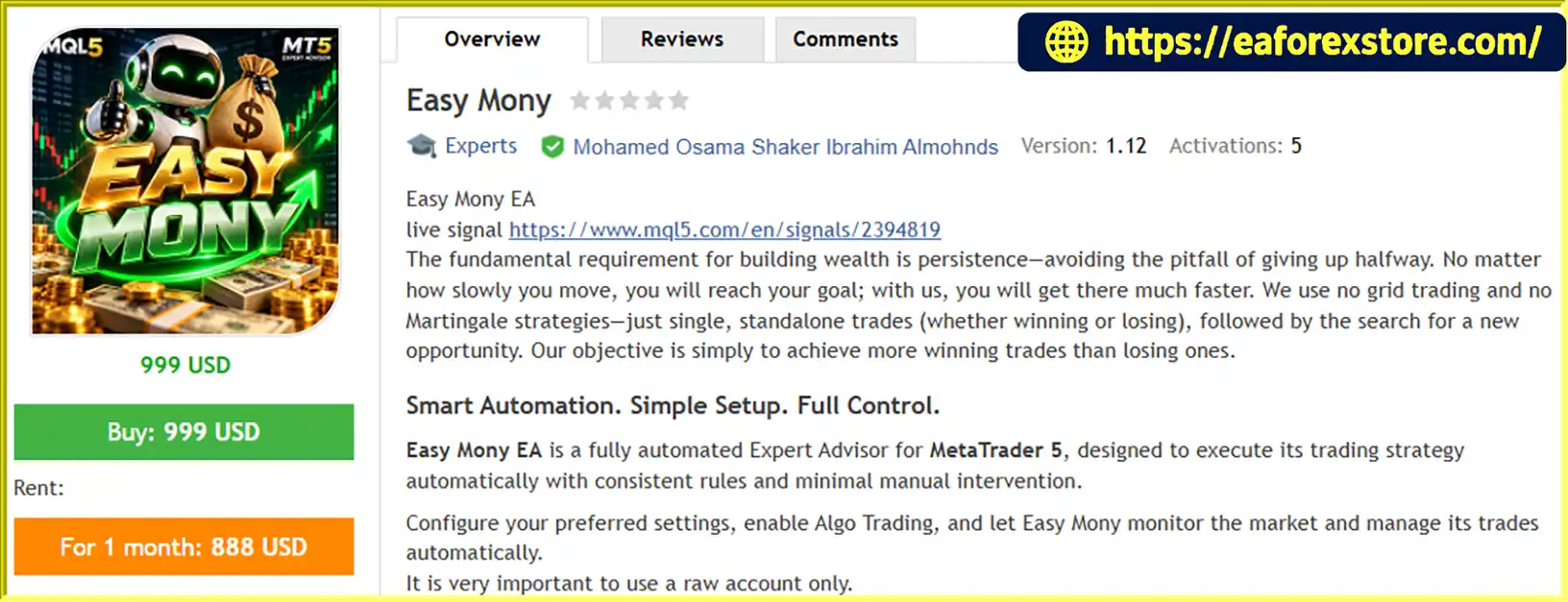
Easy Mony EA MT5 is an automated trading solution for MetaTrader 5 that combines configurable timeframe analysis, swing-related settings, flexible position sizing, and automated Stop Loss and trailing-stop management.
Its main strengths are the ability to customize the trading configuration, automate eligible BUY and SELL entries, and evaluate settings through the MetaTrader 5 Strategy Tester. The balance-based lot calculation and adjustable execution parameters also provide flexibility for traders who want to adapt the EA to their account and trading preferences.
However, the supplied information does not establish verified profitability, and the recommended settings should not be considered universally optimal. Position sizing, the possibility of multiple simultaneous trades, broker costs, and the behavior of the EA’s underlying strategy all deserve careful evaluation.
For a more disciplined starting point, use the recommended raw-spread account conditions, verify the lot calculation, understand the Stop Loss and trailing logic, and test the EA with realistic trading costs before using real capital.
Easy Mony EA MT5 offers automated execution and customizable trading controls, but long-term results depend on careful configuration, realistic testing, and responsible risk management.
1. What Is Easy Mony EA MT5?
Easy Mony EA MT5 is an automated Expert Advisor designed for the MetaTrader 5 platform. It executes BUY and SELL orders according to its programmed trading logic and configurable settings. The EA includes timeframe analysis, swing selection, confirmation parameters, position sizing, Stop Loss, and trailing-stop management.
2. Which Timeframes Does Easy Mony EA MT5 Support?
Easy Mony EA MT5 provides configurable M30, H1, and H4 timeframe analysis. It also includes an InpTimeframe setting that may be used to select a specific timeframe, depending on the active configuration. Traders should review the EA's documentation to understand how these settings interact.
3. Does Easy Mony EA MT5 Support Automatic BUY and SELL Trading?
Yes. Easy Mony EA MT5 is designed to identify potential trading opportunities and execute BUY or SELL orders automatically when its programmed entry conditions are satisfied. Actual trading activity depends on the selected parameters, market conditions, broker execution, and MetaTrader 5 settings.
4. What Money Management Options Does Easy Mony EA MT5 Offer?
The EA supports fixed-lot trading and balance-based lot calculation. The supplied configuration uses LOT_BY_BALANCE, with a balance amount per lot of 20 and a lot value of 0.01. Traders should verify the precise calculation method and resulting position size before enabling automated trading on a live account.
5. Does Easy Mony EA MT5 Include Stop Loss and Trailing Stop?
Yes. Easy Mony EA MT5 provides configurable Stop Loss and trailing-stop parameters. The supplied settings specify an initial Stop Loss of 50 points, a trailing distance of 50 points, and a trailing activation threshold of 1 point of profit. These settings do not guarantee a specific monetary loss limit or execution price because results depend on the instrument, position size, and broker conditions.
6. What Are the Reported Backtest and Live Signal Results for Easy Mony EA MT5?
The supplied product information reports the following results:
Backtest: XAUUSD over 3 months, with a $500 initial deposit, $3,268.80 reported total net profit, a 59.36% win rate, and 12.69% maximum drawdown.
Live signal: Easy Mony EXTREAM, with a $35.71 initial deposit, +38% reported growth, a 55.3% win rate, and 13.3% maximum drawdown over a stated period of “1 consecutive weeks.”
These figures are reported results from the supplied description and have not been independently verified. The live signal's reporting period should be clarified before publication, and both sets of results should be evaluated using the original reports and relevant trading conditions.
7. Does Easy Mony EA MT5 Require a Raw-Spread Account?
The developer strongly recommends a raw-spread trading account. However, traders should compare total trading costs, including spreads, commissions, slippage, and execution quality. A raw-spread account does not automatically guarantee better performance, and actual results may vary between brokers.
8. How Do You Install Easy Mony EA MT5 on MetaTrader 5?
To install Easy Mony EA MT5, obtain the EA file from the authorized source, place it in the appropriate MetaTrader 5 Experts directory, and refresh the Navigator panel or restart MT5 if necessary. Attach the EA to the intended chart, configure the timeframe and risk settings, verify position sizing and Stop Loss behavior, and test the strategy using the MT5 Strategy Tester and a demo account before live trading. Keep MetaTrader 5 running and Algo Trading enabled for ongoing automated execution.
In stock
In stock
In stock
In stock
In stock
Out of stock
No account yet?
Create an Account












 Automatic EA
 EA Best Seller
 Expert Advisor MT4
 Expert Advisor MT5
 HFT EA


Reviews
Clear filtersThere are no reviews yet.