









-
 Unlimited Activations
-
 Instant delivery
-
 Easy to install





 Unlimited Activations
Instant delivery
Easy to install
Unlimited Activations
Instant delivery
Easy to install
 Free Update
 Free Install Support

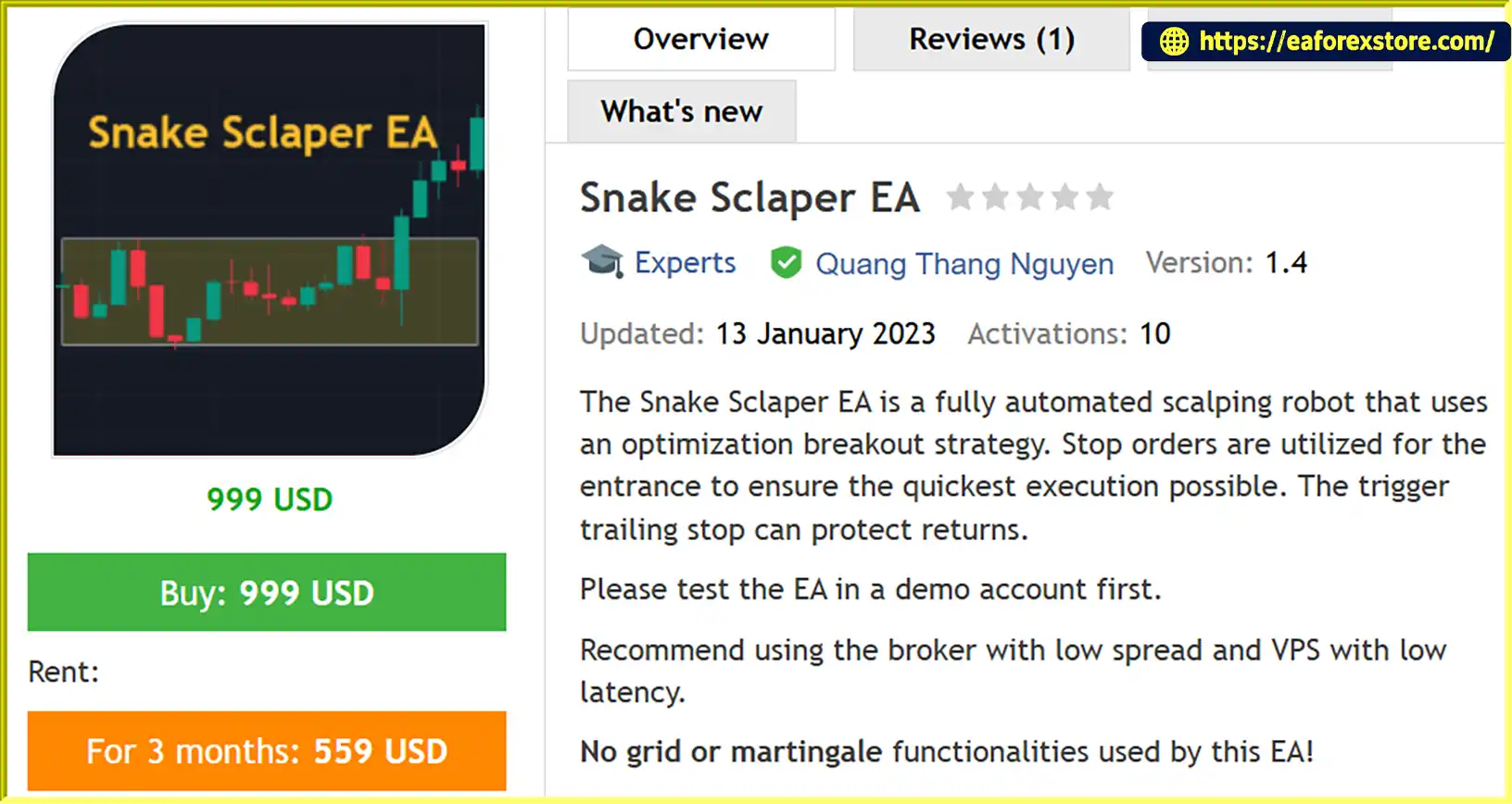
Snake Scalper EA MT5 is a fully automated Expert Advisor designed for scalping and breakout trading on the MetaTrader 5 platform. It uses an optimization-based breakout strategy with pending stop orders to enter the market when predefined price conditions are met.
Instead of relying solely on immediate market orders, Snake Sclaper EA MT5 places pending orders at configured price levels, allowing the trading system to respond automatically when a potential breakout occurs. Its Trigger Trailing Stop (TLS) functionality provides an additional trade management mechanism designed to help protect open profits as the market moves in a favorable direction.
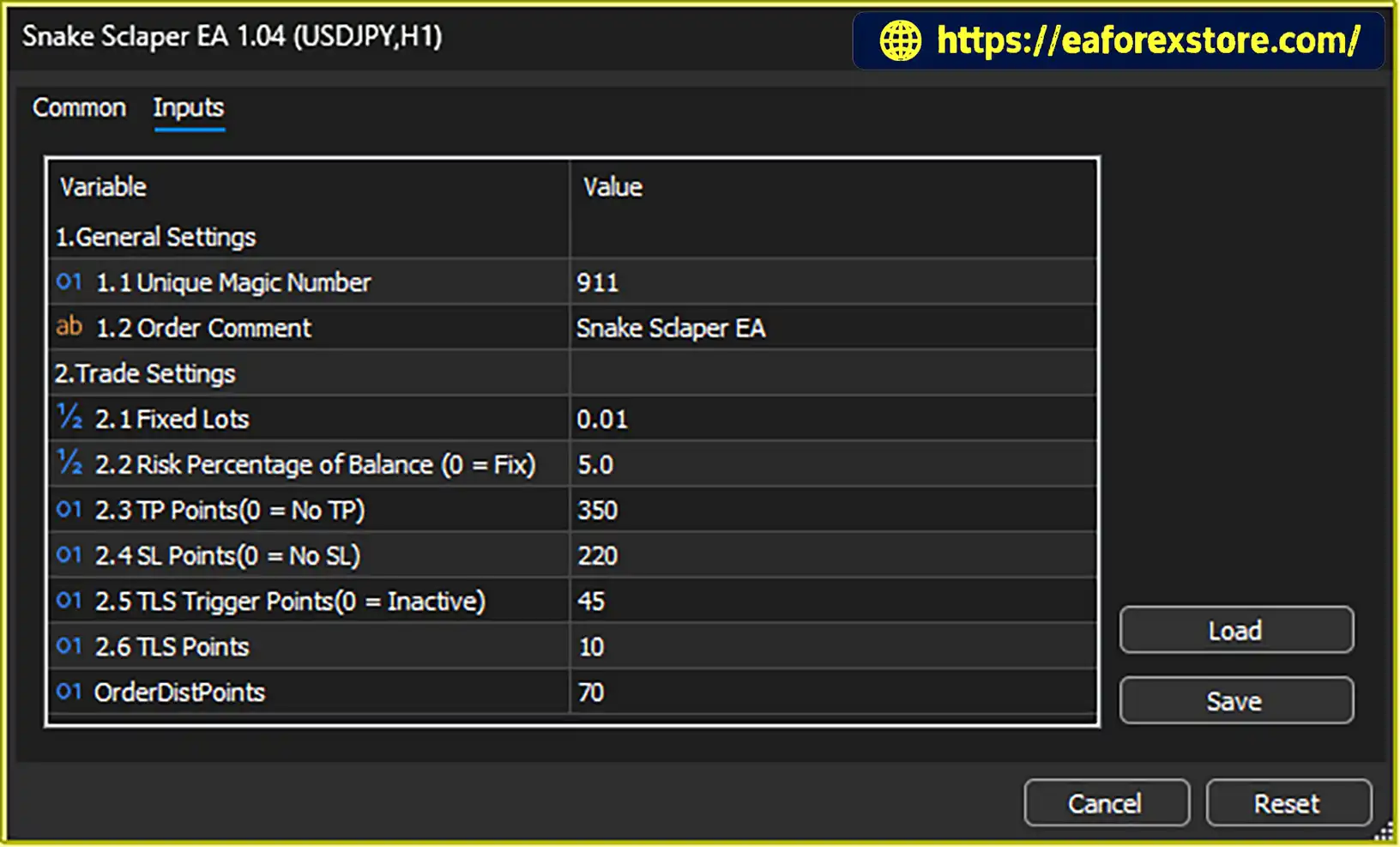
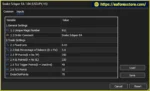
The EA supports adjustable trading parameters, including fixed lot sizing, risk percentage, Take Profit, Stop Loss, trailing stop activation levels and pending order distance. These options allow traders to adapt the configuration to their preferred trading approach and the characteristics of their selected currency pairs.
Snake Sclaper EA MT5 is recommended for EURUSD, USDJPY and GBPUSD on the H1 timeframe. It is designed to operate automatically with configurable inputs and supports pending-order trading across compatible market environments.
The EA does not use grid or martingale trading strategies, according to its product specifications. However, trading performance still depends on market conditions, broker execution, spread, slippage and the selected parameters.
For optimal testing conditions, users should consider an ECN broker with low spreads and a low-latency VPS. Before using Snake Sclaper EA MT5 on a live account, thoroughly test the EA on a demo account and validate the settings using historical data.
>>> Delivery time 24h-48h after payment.
>>> Refund if not delivered.
>>> You will receive the latest version without any limitations (ID+Time).Reviewed by Jason Stap <<<
Snake Sclaper EA MT5 Overview
Snake Sclaper EA MT5 automates its configured breakout trading logic, from pending order placement to trade management. Once the EA is installed and configured, it can operate without requiring manual confirmation for every trading decision.
The EA uses pending stop orders to enter trades when the market reaches predefined price levels. This approach is intended to capture potential breakout movements while avoiding entries that depend solely on immediate market execution.
Actual entry prices may vary because of gaps, slippage and broker execution conditions.
The Trigger Trailing Stop function helps manage open positions by activating trailing protection after a configured trigger distance is reached. Traders can adjust the trigger points and trailing distance to suit their strategy.
The effectiveness of this feature depends on the selected parameters and the market’s price movement.
The EA supports two primary position-sizing methods:
A risk percentage of zero is specified as the fixed-lot mode in the provided settings.
Configure Stop Loss and Take Profit in points to define planned trade exit levels. According to the available inputs, setting the corresponding value to zero disables that particular feature.
Disabling Stop Loss can expose an account to substantial losses, so protective exit settings should be carefully evaluated before trading.
The Order Distance Points parameter allows users to configure the distance used by the pending-order entry logic. This setting can influence how close to or far from the current price an order is placed.
The appropriate distance depends on the currency pair, volatility, spread and intended breakout behavior.
Snake Sclaper EA MT5is recommended for three major currency pairs:
The recommended timeframe is H1. Traders should verify the appropriate settings for each pair rather than assuming that identical parameters will produce equivalent results across all instruments.
The EA includes a Unique Magic Number and Order Comment setting to help identify and distinguish its trades. When running multiple instances on separate charts, each instance should use a different magic number to reduce the risk of trade-management conflicts.
According to the product specifications, Snake Sclaper EA MT5 does not use grid or martingale functionality. It is therefore not designed around repeatedly adding positions to recover losses or progressively increasing position sizes through a martingale sequence.
This does not eliminate trading risk, and individual trades can still incur losses.
Snake Sclaper EA MT5 follows a pending-order breakout approach. Its main objective is to automate trade entries and position management according to the parameters configured by the user.
Step 1: Monitor the Selected Currency Pair
Attach the EA to an H1 chart for a supported pair, such as EURUSD, USDJPY or GBPUSD. The EA monitors market prices and evaluates the conditions required by its configured trading logic.
Step 2: Calculate the Pending Order Levels
Using its breakout logic and configured Order Distance Points, the EA determines where pending stop orders should be placed. The exact calculation depends on the EA’s internal implementation and selected settings.
Step 3: Place Pending Stop Orders
When the required conditions are satisfied, the EA places pending orders at the calculated levels. If the market reaches an order’s trigger price, the broker may execute the order according to the available liquidity and execution conditions.
Step 4: Manage Position Size
The EA applies the selected lot-sizing method. Users can choose a fixed lot size or configure risk-percentage sizing, subject to the EA’s supported calculation rules.
Step 5: Apply Stop Loss and Take Profit
If enabled, the EA manages positions using the configured Stop Loss and Take Profit levels. These settings establish planned exit points but cannot guarantee execution at the exact requested price.
Step 6: Activate the Trigger Trailing Stop
Once the configured TLS trigger condition is reached, the trailing mechanism can adjust the protective stop according to the TLS Points setting. This is intended to help protect accumulated gains while allowing the position to continue moving favorably.
Step 7: Continue Automated Monitoring
The EA continues monitoring market conditions and managing its configured pending orders and positions while the trading terminal remains online and the required permissions are enabled.
The final outcome depends on the trading configuration, market volatility, execution quality, spread and other broker-specific conditions.
Snake Sclaper EA MT5 is designed to automate pending-order breakout entries, reducing the need to monitor charts manually and place every order yourself.
The EA provides adjustable inputs for lot size, risk percentage, Stop Loss, Take Profit, trailing stop activation and order distance. These settings offer users control over important aspects of trade execution and management.
The Trigger Trailing Stop feature provides an additional way to manage open positions after the market moves in a favorable direction. Traders can evaluate different trigger and trailing distances during backtesting.
With EURUSD, USDJPY and GBPUSD as recommended instruments, the EA can be evaluated across several major forex markets. Each pair should be tested independently to determine whether the selected parameters are suitable.
The EA does not rely on grid or martingale functionality according to the provided product information. This may appeal to traders who prefer a breakout approach without systematic position accumulation for loss recovery.
The EA operates within MetaTrader 5 and can be configured on separate charts for different currency pairs. Unique magic numbers help distinguish the trades managed by each instance.
The recommended testing approach uses the H1 timeframe and historical data beginning in 2018, with Every Tick or Every Tick Based on Real Ticks modeling where available. This gives traders a basis for evaluating historical behavior before demo or live deployment.
Snake Sclaper EA MT5 may suit traders looking for an automated pending-order breakout system with adjustable trade management. It should not be treated as a guaranteed-profit scalper, and its suitability should be established through independent testing.
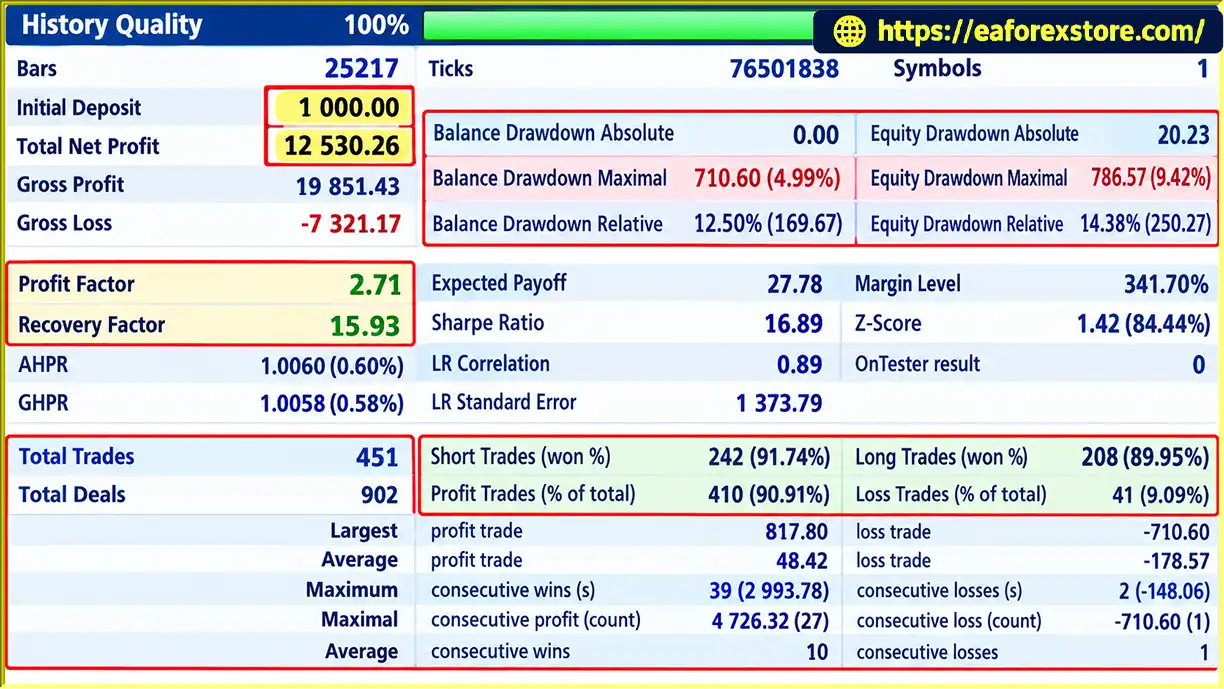
Snake Sclaper EA MT5 backtets
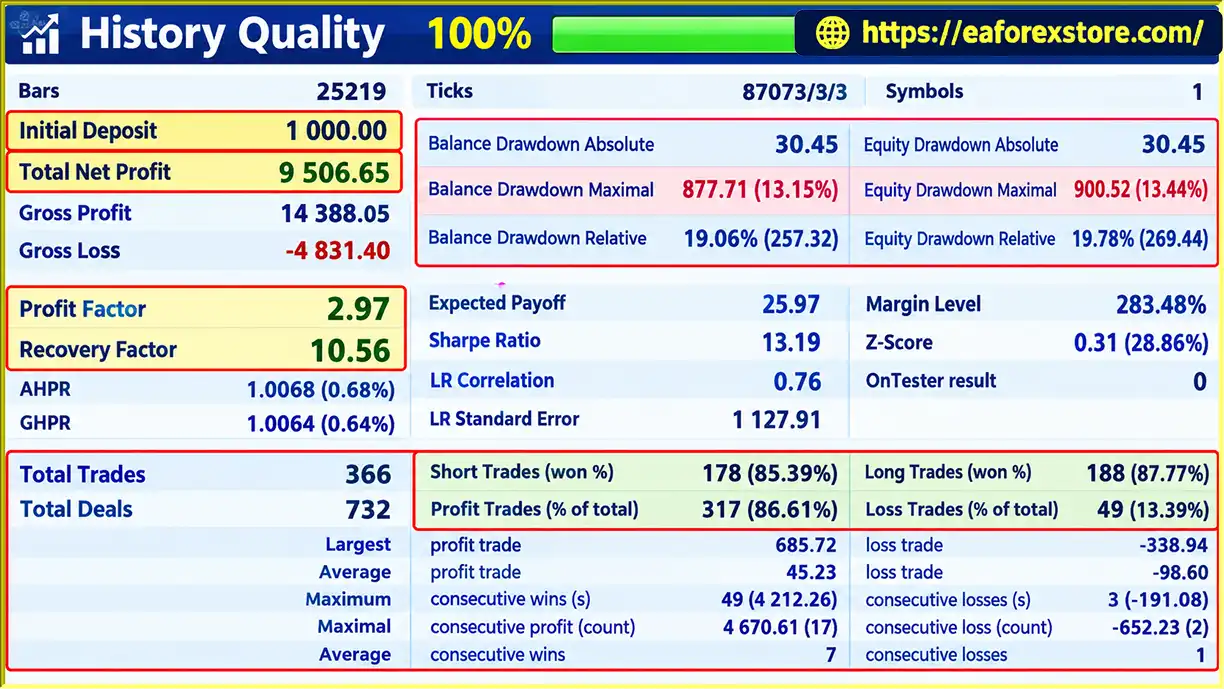
Snake Sclaper EA backtets
Effective risk management is essential when using an automated scalping EA. Snake Sclaper EA MT5 provides several configurable trade management inputs, but users remain responsible for choosing appropriate settings and monitoring account exposure.
Choose between fixed-lot sizing and the available risk-percentage option. Fixed lots provide a consistent nominal trade size, while percentage-based sizing can adjust position size according to the configured risk calculation.
Before live trading, verify how the EA calculates risk and whether the selected percentage accounts for Stop Loss distance, tick value and contract specifications.
Configure Stop Loss Points to establish a planned exit level for each trade. A value of zero disables Stop Loss according to the documented settings.
Using the EA without a Stop Loss may expose the account to substantial losses, particularly during fast market movements or unexpected price gaps.
Take Profit Points define the planned profit target when the feature is enabled. Test the selected target against realistic spreads, commissions and slippage to determine whether the trading setup remains viable after transaction costs.
TLS Trigger Points determine when trailing protection becomes active, while TLS Points define the configured trailing distance. These settings should be tested together because an excessively tight trailing distance may close positions prematurely, while a wider distance may allow more profit to be given back.
The order distance should be appropriate for the volatility and spread characteristics of each currency pair. Orders placed too close to the market may be more vulnerable to spread fluctuations or false breakouts.
Assign a unique magic number to each EA instance when running the robot on multiple charts. This helps the EA distinguish its own trades from those belonging to other instances or strategies.
A low-spread ECN broker and a low-latency VPS are recommended in the product specifications. However, actual execution quality also depends on liquidity, commission, server stability and broker policies.
The available product information does not specify a dedicated alert system. Users should check the EA’s documentation and MT5 logs for supported notifications and error messages.
Before live deployment:
No automated risk control can guarantee a maximum loss under all market and execution conditions.
Follow these steps to install and configure Snake Scalper EA MT5 on MetaTrader 5.
setting
Obtain Snake Sclaper EA MT5 from the official product source or authorized MetaTrader Market listing. Use the correct version for MetaTrader 5.
Launch MT5 and log in to your trading account. A demo account is recommended for initial setup and testing.
If the EA is purchased through the MetaTrader Market, locate it in your purchased products and follow the platform’s installation process.
If you receive a compatible .ex5 file separately, open File → Open Data Folder → MQL5 → Experts, copy the file into the appropriate folder and restart MT5 or refresh the Navigator panel.
Open separate H1 charts for the following currency pairs:
Confirm that each instrument is available through your broker and that the symbol specifications match the intended setup.
Drag Snake Scalper EA MT5 from the Navigator panel onto each chart. Enable the required automated-trading permissions and verify that the EA is running correctly.
Set a different magic number for each EA instance. This helps distinguish the orders managed by the EURUSD, USDJPY and GBPUSD instances.
Review the following parameters:
Parameter names and available options may vary slightly by version, so confirm their exact behavior in the EA’s documentation.
Open the MT5 Strategy Tester and select Snake Scalper EA MT5. Use H1 as the starting timeframe and evaluate the recommended currency pairs individually.
The supplied recommendations specify historical testing from 2018 onward and suggest Every Tick or Every Tick Based on Real Ticks modeling, where supported by the available historical data.
Review net profit, maximum drawdown, profit factor, trade frequency and the impact of trading costs. Avoid selecting settings based solely on the highest historical profit.
Run the EA on a demo account to verify pending-order placement, position sizing, Stop Loss, Take Profit and trailing stop behavior under live market conditions.
For continuous automated trading, consider a reliable VPS located close to your broker’s trading server. Monitor connectivity and MT5 logs to identify potential execution errors or interruptions.
Recommended starting configuration: H1 timeframe, EURUSD/USDJPY/GBPUSD, unique magic numbers, conservative position sizing, enabled Stop Loss and thorough demo testing. The suggested minimum deposit of $100 is a product recommendation, not a guarantee that this balance is sufficient for every broker, lot size or risk configuration.
>>> Join VIP Membership Now <<<
Snake Sclaper EA MT5 is an automated forex scalping and breakout Expert Advisor designed to place pending stop orders and manage trades using configurable parameters. Its main features include fixed-lot and percentage-based position sizing, Stop Loss, Take Profit and Trigger Trailing Stop functionality.
The EA is recommended for EURUSD, USDJPY and GBPUSD on the H1 timeframe, with historical testing from 2018 and realistic tick-based modeling where available. Its no-grid and no-martingale design may appeal to traders who prefer a breakout approach without systematic loss-recovery entries.
However, successful automated trading depends on more than the entry method. Spread, commission, execution latency, slippage, parameter selection and changing market conditions can all influence performance. The recommended $100 minimum deposit should also be evaluated against the actual lot size, Stop Loss distance and broker margin requirements.
For a responsible evaluation, begin with historical backtesting, compare settings across the recommended pairs, validate the trailing stop and pending-order logic, and forward-test on a demo account. A low-spread broker and reliable VPS can support execution quality but cannot guarantee positive results.
If you are looking for an MT5 Expert Advisor that automates pending-order breakout trading with configurable position sizing and trailing stop management, Snake Scalper EA MT5 is a system worth evaluating through independent testing.
Risk Disclaimer: Forex trading involves substantial financial risk. Past performance and backtest results do not guarantee future returns. Snake Scalper EA MT5 does not guarantee profits, and the absence of grid or martingale functionality does not eliminate the possibility of significant losses. Always test the EA on a demo account, use appropriate risk controls and trade only with capital you can afford to lose.
1. What Is Snake Scalper EA MT5?
Snake Scalper EA MT5 is a fully automated Expert Advisor for MetaTrader 5 that uses a pending-order breakout strategy. It places pending stop orders at predefined price levels and manages trades using configurable Stop Loss, Take Profit, and Trigger Trailing Stop settings.
2. Which Currency Pairs and Timeframes Does Snake Scalper EA MT5 Support?
Snake Scalper EA MT5 is recommended for EURUSD, USDJPY, and GBPUSD on the H1 timeframe. Traders should backtest each currency pair independently because market volatility, spreads, and optimal trading parameters can vary between instruments.
3. How Does the Breakout Strategy Work in Snake Scalper EA MT5?
The EA monitors market prices, calculates pending-order levels based on its breakout logic and configured order distance, and places pending stop orders when the required conditions are met. Trades may be triggered when the market reaches these levels, depending on broker execution and market conditions.
4. Does Snake Scalper EA MT5 Have a Trailing Stop Feature?
Yes. Snake Scalper EA MT5 includes a Trigger Trailing Stop (TLS) function. Users can configure the TLS Trigger Points to determine when trailing protection activates and TLS Points to set the trailing distance. The feature is designed to help protect open profits, although its effectiveness depends on market conditions and parameter settings.
5. Does Snake Scalper EA MT5 Use Grid or Martingale Trading?
No. According to the product specifications, Snake Scalper EA MT5 does not use grid or martingale strategies. However, this does not eliminate trading risk, and the EA can still experience losing trades and drawdowns.
6. What Are the Backtest Results of Snake Scalper EA MT5?
The product description reports two backtest result sets, both with an initial deposit of $1,000. The first reports $12,530.26 in net profit, a 90.91% win rate, and 4.99% maximum drawdown. The second reports $9,506.65 in net profit, an 86.61% win rate, and 13.15% maximum drawdown. These figures should be independently verified using the original reports, as historical performance does not guarantee future results.
7. What Are the Recommended Settings for Snake Scalper EA MT5?
The recommended starting point is the H1 timeframe on EURUSD, USDJPY, or GBPUSD. Users can configure fixed lot sizing or risk-percentage sizing, Stop Loss, Take Profit, pending-order distance, and trailing stop parameters. The product description suggests a minimum deposit of $100, but the appropriate balance depends on broker margin requirements, lot size, and risk settings.
8. How Do I Install and Test Snake Scalper EA MT5 on MetaTrader 5?
Install Snake Scalper EA MT5 through the MetaTrader Market or place the compatible .ex5 file in the MQL5/Experts folder. Attach the EA to the recommended H1 charts, configure the parameters, and assign a unique magic number to each instance. Before live trading, backtest each pair using realistic tick data where available and forward-test the EA on a demo account. A low-spread broker and reliable VPS are recommended for automated operation.
Risk Disclaimer: Forex trading involves substantial financial risk. Snake Scalper EA MT5 does not guarantee profits, and actual results may differ from backtests because of spreads, commissions, slippage, execution latency, and changing market conditions. Always test the EA on a demo account before using real funds.
In stock
In stock
In stock
In stock
In stock
Out of stock
No account yet?
Create an Account












 Automatic EA
 EA Best Seller
 Expert Advisor MT4
 Expert Advisor MT5
 HFT EA


Reviews
Clear filtersThere are no reviews yet.