









-
 Unlimited Activations
-
 Instant delivery
-
 Easy to install






 Unlimited Activations
Instant delivery
Easy to install
Unlimited Activations
Instant delivery
Easy to install
 Free Update
 Free Install Support

PigGold EA MT5 is an automated Expert Advisor developed for Gold (XAUUSD) trading on the MetaTrader 5 platform. It combines multi-indicator confirmation with configurable trade execution, flexible lot sizing, and several risk management tools to help traders implement a structured trading strategy.
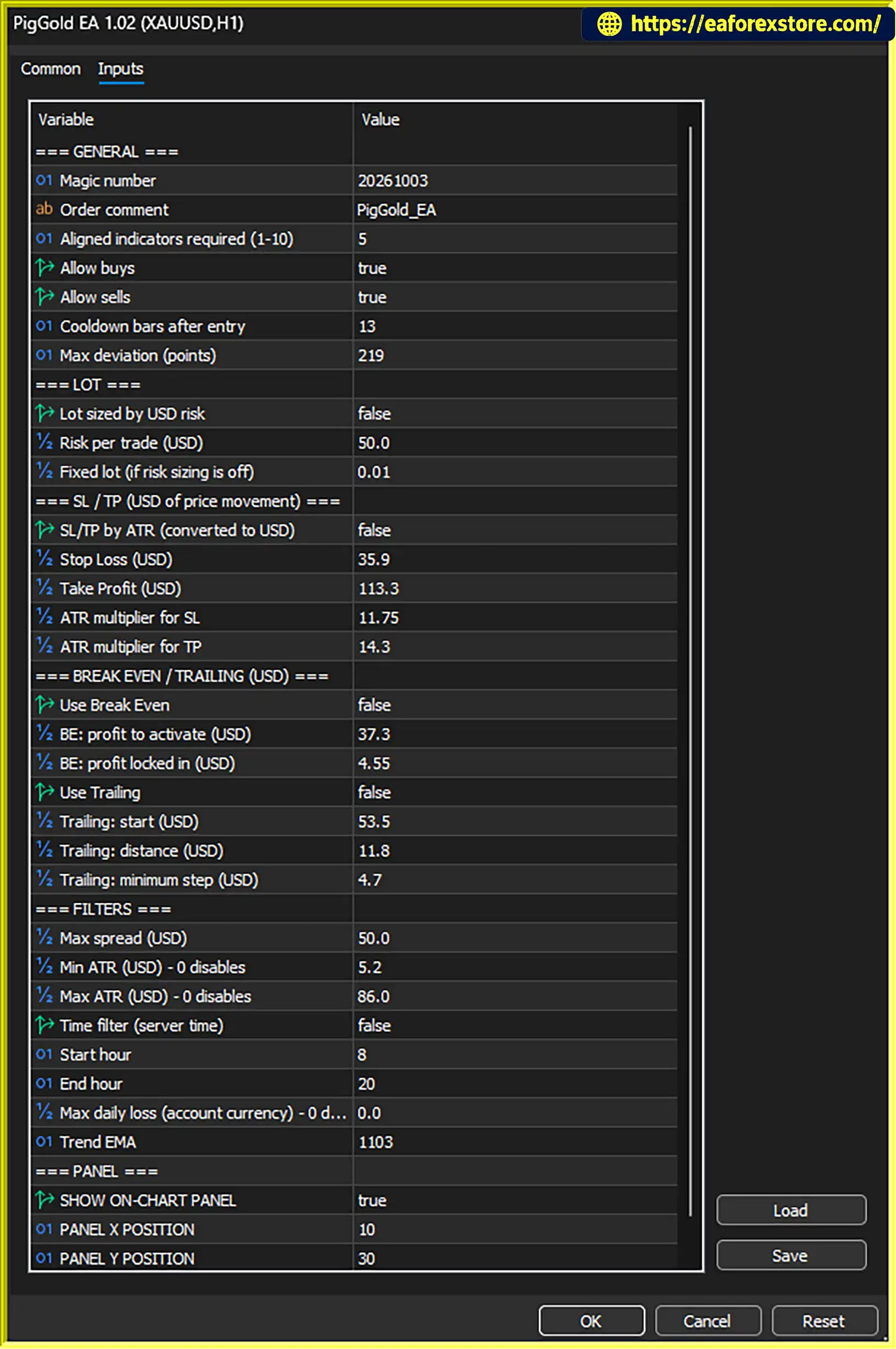
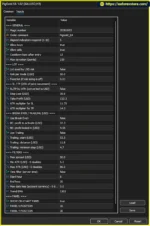
The EA allows users to adjust how many indicators must agree before an entry is considered. Separate buy and sell permissions provide additional control over trade direction, while configurable cooldown periods and maximum price deviation settings help manage trade frequency and execution conditions.
For trade management, PigGold EA MT5 supports fixed-distance and Average True Range (ATR)-based Stop Loss and Take Profit settings. Optional break-even and trailing stop features provide additional exit management, while spread filters, ATR volatility limits, trading-hour restrictions, and a daily loss limit help traders define when the EA should operate.
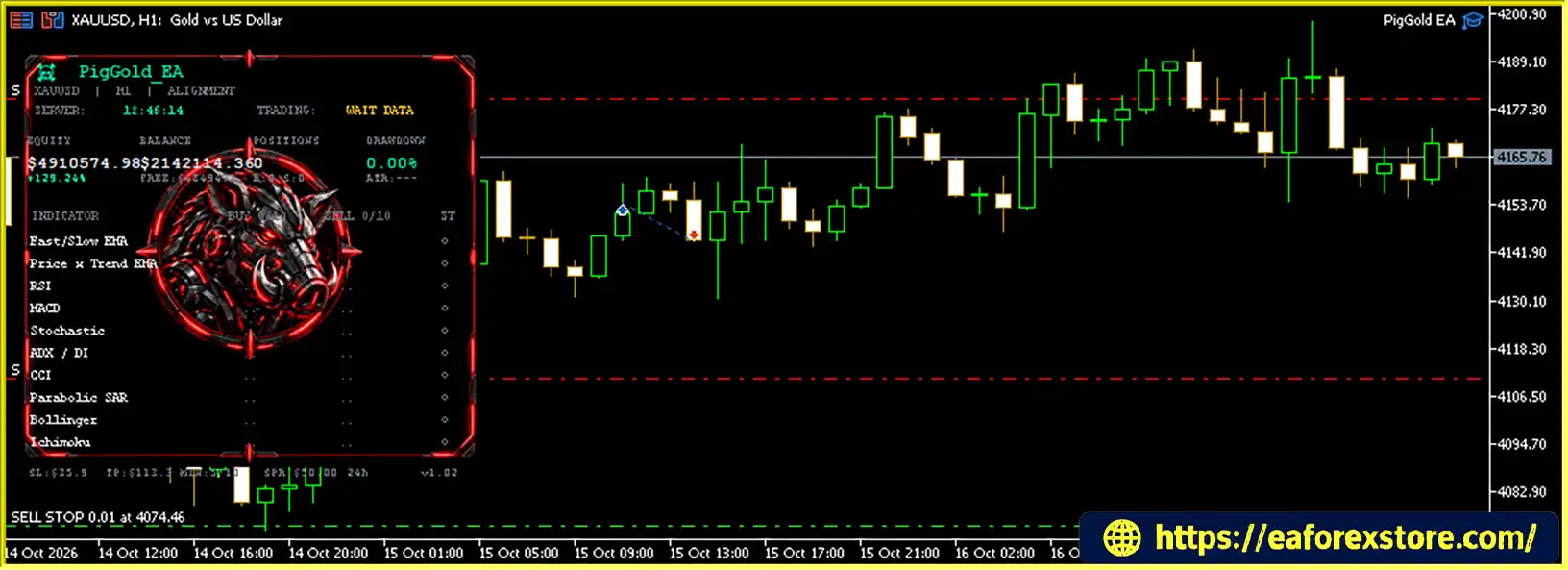
An on-chart information panel displays trading-related information and can be repositioned for convenience. With its adjustable entry conditions and layered filters, PigGold EA MT5 offers traders several ways to customize an automated Gold trading setup.
PigGold EA MT5 review
PigGold EA MT5 uses an indicator alignment requirement to determine when a trade can be considered. Traders can adjust the minimum number of indicators that must agree before an entry signal is accepted.
A higher confirmation requirement generally makes the entry conditions more selective, potentially reducing the number of trading opportunities. A lower requirement may allow more signals but can also increase exposure to weaker setups.
This adjustable approach lets traders choose an entry configuration that suits their preferred balance between trading frequency and signal confirmation.
The EA includes separate permissions for buy and sell trades. Traders can allow both directions or disable one side to match their market outlook or trading plan.
This functionality can be useful when testing directional strategies or when a trader wants the EA to operate only in a specific direction under selected market conditions.
A configurable cooldown measured in bars also helps control how frequently the EA can enter new trades after an entry.
PigGold EA MT5 supports fixed lot trading and optional position sizing based on a specified dollar risk amount per trade.
Fixed lot sizing allows traders to choose a consistent trading volume, while dollar risk sizing provides another way to align position size with a defined monetary risk target.
However, the actual loss from a trade depends on the stop-loss distance, lot size, Gold contract specifications, execution price, and broker conditions. A dollar risk setting should therefore be verified through demo testing rather than assumed to guarantee an exact maximum loss.
The EA provides two approaches to configuring Stop Loss (SL) and Take Profit (TP):
Fixed distances offer a consistent price-based approach, while ATR-based distances can adapt to changing market conditions.
Neither method guarantees a profitable trade. Traders should evaluate the selected exit settings against historical data and live demo conditions before deploying the EA on a funded account.
The break-even function can adjust trade protection after price moves by a configured amount. When enabled and triggered, it can move the stop loss toward the entry price according to the EA’s settings.
This feature may help reduce the risk of a previously favorable trade turning into a larger loss. However, a break-even stop does not guarantee a zero-loss outcome because commissions, swaps, spread, and execution slippage may affect the final result.
Important: Break-even protection remains inactive unless it is explicitly enabled.
PigGold EA MT5 also supports an optional trailing stop. Once enabled and triggered, the trailing stop follows favorable price movement according to the configured trailing distance and minimum step.
This can help protect part of an unrealized gain while allowing a trade to continue if the market moves in the intended direction.
Trailing stops can also close trades during normal price fluctuations, so the distance and step settings should be tested on XAUUSD under different market conditions.
Gold trading conditions can change considerably throughout the trading day. PigGold EA MT5 includes filters intended to avoid certain unfavorable conditions.
These filters give traders additional control over the conditions in which the EA is allowed to open trades. Their effectiveness depends on the chosen thresholds, broker pricing, and market behavior.
The EA includes a configurable trading-hour window based on server time. When the time filter is enabled, traders can restrict trading to selected hours.
This can help align the EA with a preferred trading session or avoid periods when execution conditions are less suitable.
Because broker server time may differ from local time, users should confirm the server’s clock and any daylight-saving adjustments before configuring the schedule.
PigGold EA MT5 provides an optional daily loss limit intended to restrict further trading after a specified loss threshold has been reached.
This feature can form part of a broader risk management plan, but traders should verify precisely how the limit is calculated and what actions the EA takes when it is triggered. The daily loss setting should not be assumed to guarantee a maximum account loss under every execution condition.
The daily loss limit is optional and must be enabled to become active.
A configurable Exponential Moving Average (EMA) setting supports the EA’s trend-related entry logic. Traders can evaluate the effect of this setting when testing different configurations.
The on-chart panel displays trading information and can be repositioned on the chart for convenient viewing. This provides a more accessible way to monitor the EA while it operates in MetaTrader 5.
PigGold EA MT5 follows a configurable process for identifying and managing potential Gold trades.
Step 1: Evaluate indicator alignment
The EA evaluates its entry conditions and checks whether the required number of indicators agree. The trend EMA setting also supports its entry logic.
Step 2: Apply trading permissions and filters
Before opening a trade, the EA can apply the enabled buy/sell permissions and applicable filters, including spread, ATR volatility, trading hours, and the daily loss limit.
Step 3: Determine position size
The EA uses the selected fixed lot or optional dollar risk sizing method to determine trade volume.
Step 4: Place and manage the trade
When an entry is accepted, the EA applies the configured Stop Loss and Take Profit approach. These can use fixed distances or ATR-based multipliers.
Step 5: Manage open positions
If enabled, break-even and trailing stop functions manage stop-loss levels as price moves. The on-chart panel provides trading information for monitoring.
The final behavior depends on the selected inputs, broker conditions, and the way each optional feature is configured.
PigGold EA MT5 may appeal to traders who want adjustable entry conditions and multiple trade management options within one MetaTrader 5 Expert Advisor.
These features provide configuration flexibility, but they do not establish that the EA is profitable. Performance should be evaluated using verified testing results and realistic trading conditions.
PigGold EA MT5 Backtets
PigGold EA MT5 offers several configurable controls, but traders need to distinguish between settings that are available and protections that are currently active.
Break-even, trailing stop, the trading-hour filter, and the daily loss limit are optional. Entering values for these settings does not necessarily mean the corresponding features are active.
Before trading, review the EA inputs and confirm that every intended protection is enabled.
Stop Loss and Take Profit distances describe price movement, not a fixed monetary result. The financial outcome depends on trading volume, contract specifications, entry and exit prices, and transaction costs.
For Gold, even a relatively small price movement can produce a significant account impact when the position size is too large.
A demo trial using the intended broker and XAUUSD symbol is recommended before live deployment. Check the following:
Backtesting can help evaluate historical behavior, but it cannot guarantee future results or fully reproduce live execution.
Follow these general steps to install and test PigGold EA MT5 in MetaTrader 5.
setting
.ex5 file in the MQL5/Experts folder. If the provider supplies source code in .mq5 format, follow the appropriate compilation instructions.Exact installation requirements may vary depending on the file supplied by the developer and the broker’s symbol specifications.
>>> Join VIP Membership Now <<<
PigGold EA MT5 is a configurable Gold trading Expert Advisor for MetaTrader 5, combining multi-indicator entry confirmation, flexible position sizing, fixed or ATR-based exits, and optional trade protection features.
Its spread and volatility filters, trading-hour controls, daily loss limit, and on-chart panel provide several ways to tailor the EA to a particular trading plan. At the same time, these tools require careful setup and validation. Optional controls should not be treated as active unless they have been enabled and tested.
Before using PigGold EA MT5 on a live account, verify its behavior on your broker’s XAUUSD symbol, test the selected risk settings, and evaluate performance across different market conditions. No trading robot can guarantee profits or eliminate the risk of loss.
1. What Is PigGold EA MT5?
PigGold EA MT5 is an automated Expert Advisor designed for trading Gold (XAUUSD) on the MetaTrader 5 platform. It combines multi-indicator confirmation, configurable entry conditions, flexible lot sizing, and several trade management tools to help traders automate their Gold trading strategy.
2. How Does PigGold EA MT5 Work?
PigGold EA MT5 evaluates indicator alignment and its configurable trend EMA conditions to identify potential trading opportunities. Before entering a trade, it can apply enabled filters such as spread limits, ATR volatility thresholds, trading-hour restrictions, and separate buy or sell permissions. It then manages trades using the selected Stop Loss, Take Profit, and optional break-even or trailing stop settings.
3. Which Trading Instrument and Platform Does PigGold EA MT5 Support?
PigGold EA MT5 is designed for Gold (XAUUSD) trading on MetaTrader 5 (MT5). Before using the EA, confirm that your broker offers a compatible XAUUSD symbol and check its contract specifications, minimum lot size, spread, and execution conditions.
4. Does PigGold EA MT5 Support Automatic Lot Sizing?
Yes. PigGold EA MT5 supports fixed lot sizing and an optional dollar risk-based position sizing method. Fixed lots allow traders to specify a trading volume, while dollar risk sizing provides another way to configure position size around a monetary risk target. However, actual losses may differ from the selected amount because of stop-loss distance, slippage, spreads, commissions, and broker conditions. Test the sizing settings on a demo account before trading live.
5. Does PigGold EA MT5 Use a Fixed Stop Loss or an ATR-Based Stop Loss?
PigGold EA MT5 supports both fixed-distance and ATR-based Stop Loss and Take Profit settings. Fixed-distance settings use predefined price distances, while ATR-based settings adjust exit distances according to Average True Range, a measure of market volatility. Traders can test both approaches to determine which configuration better suits their strategy and trading conditions.
6. Does PigGold EA MT5 Have Built-In Risk Management Features?
Yes. PigGold EA MT5 offers several risk management and trade control options, including spread filtering, ATR volatility limits, trading-hour restrictions, configurable position sizing, optional break-even protection, a trailing stop, and a daily loss limit. Some features are optional and must be enabled in the EA settings. These controls can help structure a risk management plan, but they cannot eliminate trading risk or guarantee a maximum loss under every market condition.
7. What Are the Backtest Results of PigGold EA MT5?
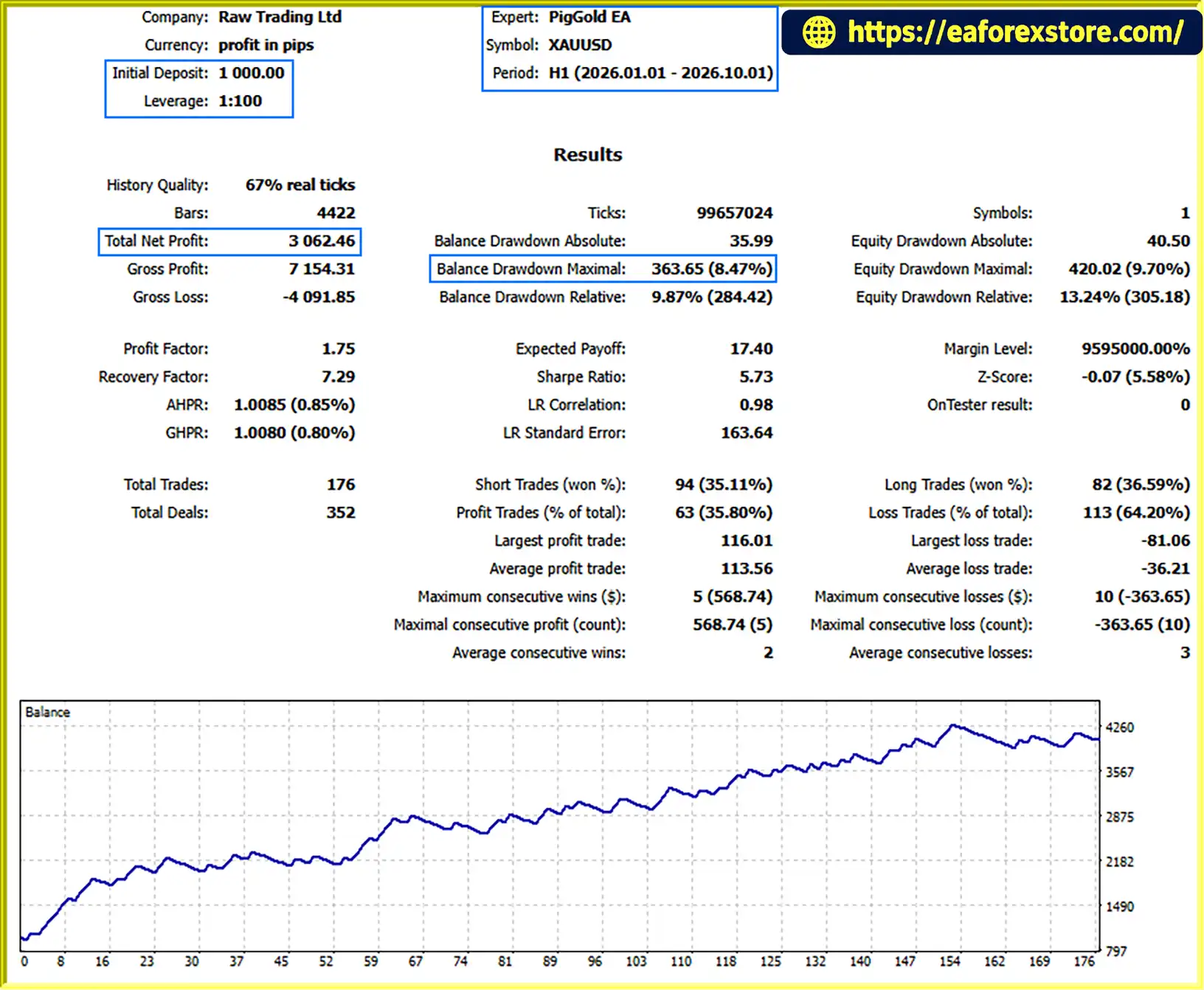
The provided backtest summary reports the following results for XAUUSD over nine months:
Initial Deposit: $1,000
Total Net Profit: $3,062.46
Win Rate: 35.80%
Maximum Drawdown: 8.47%
These figures should be treated as reported test results rather than independently verified performance. Before relying on them, review the complete Strategy Tester report, testing period, modeling quality, trading costs, and risk settings. Historical backtest performance does not guarantee future profits, and a relatively low win rate does not by itself establish whether a strategy is profitable or unprofitable.
8. Is PigGold EA MT5 Suitable for Beginners, and How Can I Install It?
PigGold EA MT5 may be suitable for traders who are willing to learn how to configure and test an automated trading system. However, its indicator confirmation settings, position sizing, exit methods, and optional risk controls require careful setup.
To install it, copy the supplied .ex5 file into the MQL5/Experts folder in your MetaTrader 5 data directory, refresh the Expert Advisors list, and attach PigGold EA MT5 to a compatible XAUUSD chart. Review the input settings, enable only the protections you intend to use, and test the EA in Strategy Tester and on a demo account before considering live trading.
In stock
In stock
In stock
In stock
In stock
Out of stock
No account yet?
Create an Account












 Automatic EA
 EA Best Seller
 Expert Advisor MT4
 Expert Advisor MT5
 HFT EA


Reviews
Clear filtersThere are no reviews yet.