









-
 Unlimited Activations
-
 Instant delivery
-
 Easy to install






 Unlimited Activations
Instant delivery
Easy to install
Unlimited Activations
Instant delivery
Easy to install
 Free Update
 Free Install Support

Hybrid Gold Mystic EA MT5 is an automated Expert Advisor developed for Gold (XAUUSD) trading on the MetaTrader 5 platform. It focuses on configurable risk management, automatic position sizing, optional equity drawdown protection, and an on-chart dashboard for monitoring trading activity.
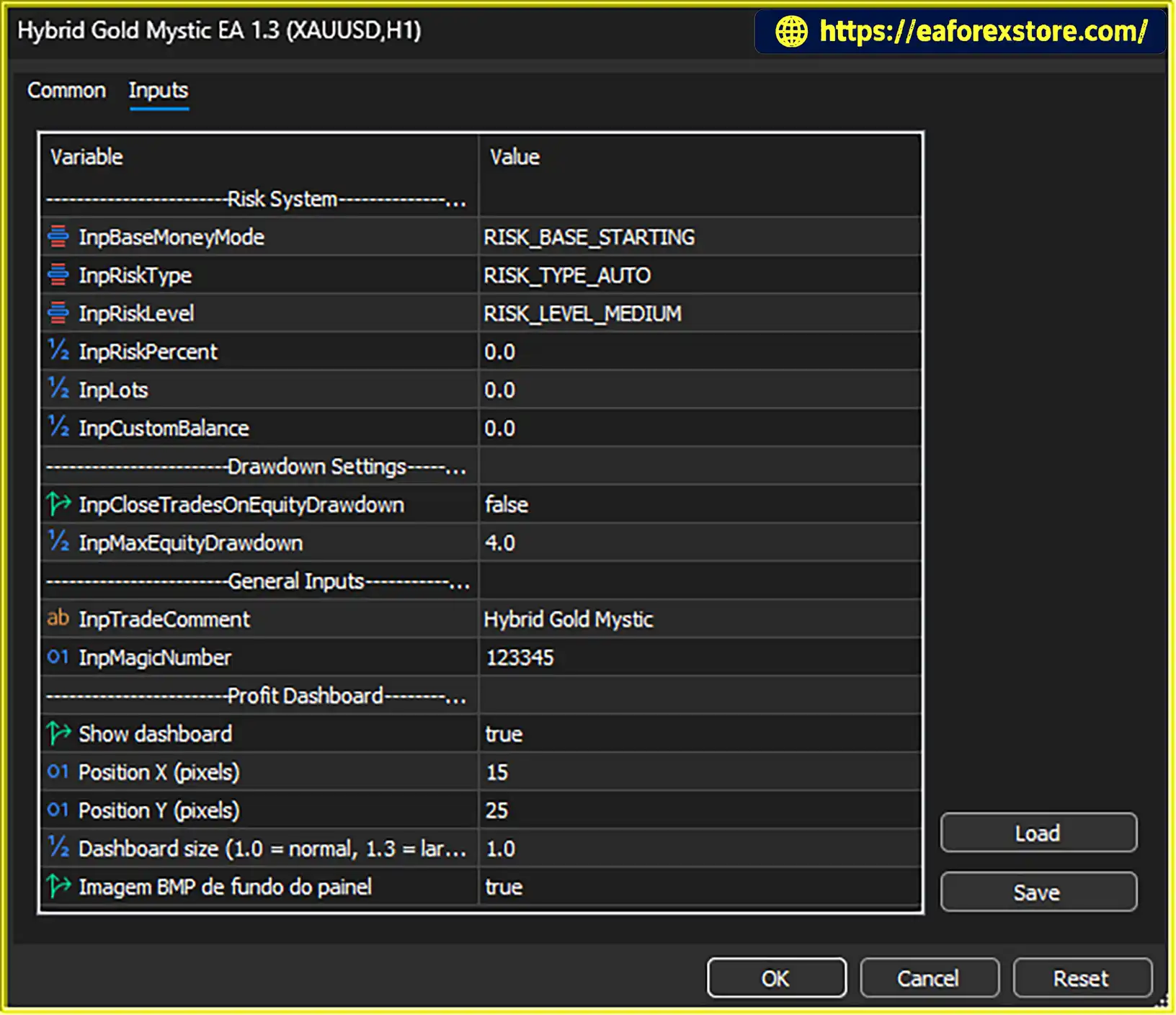
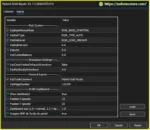
The EA includes an automatic risk system that calculates position size using its built-in risk management logic. Traders can select a risk profile and choose whether the calculation references the starting account balance or a custom balance. Manual risk percentage and fixed lot inputs are also available, although their effect on position sizing may depend on the selected risk mode.
For additional account protection, Hybrid Gold Mystic EA MT5 provides an optional equity drawdown control that can close trades when a configured threshold is reached. This protection must be enabled to operate, and traders should confirm how the threshold is measured before relying on it.
The EA also uses a trade comment and Magic Number to identify its orders, helping users distinguish its activity from manual trades and other Expert Advisors. An adjustable on-chart dashboard displays trading information and can be customized to suit the chart layout.
With its configurable risk settings and monitoring tools, Hybrid Gold Mystic EA MT5 offers traders a way to automate Gold trading while maintaining control over selected account management parameters.
Hybrid Gold Mystic EA MT5 reviews
Hybrid Gold Mystic EA MT5 includes a built-in risk management system that determines position size according to the selected risk configuration.
Instead of relying exclusively on a manually entered lot size, traders can use the EA’s automatic risk mode to let its internal logic calculate trading volume.
The actual position size depends on the chosen risk profile, capital reference, and the EA’s internal calculation method. Since the exact formula has not been provided, traders should verify the resulting lot sizes through demo testing before using the EA on a live account.
The EA provides several risk levels that allow traders to select a preferred automatic position-sizing profile.
A more conservative profile may be appropriate for traders seeking lower exposure, while a more aggressive profile may result in larger positions. The precise relationship between each setting and the resulting trade volume depends on the EA’s internal logic.
Choosing a risk profile should involve more than selecting a preferred level of activity. Traders should also consider their account size, tolerance for losses, broker conditions, and the potential volatility of Gold.
Hybrid Gold Mystic EA MT5 allows the risk engine to reference either the starting balance or a custom balance.
This flexibility can help traders align position sizing with a particular capital allocation or risk plan.
Before trading, confirm which reference mode is active and ensure that the selected amount matches the intended account configuration.
In addition to automatic risk calculation, the EA provides manual risk percentage and fixed lot inputs.
These settings offer additional configuration options for traders who prefer more direct control over position sizing. However, the presence of these inputs does not necessarily mean they override automatic risk mode.
Traders should establish which setting takes priority under their selected configuration and verify the actual order volume in a demo account.
The EA includes an equity drawdown protection feature that can close trades when a configured drawdown threshold is reached.
This control is intended to help traders respond to adverse account conditions by defining a threshold at which the EA should take action.
However, the protection operates only when its corresponding switch is enabled. The threshold’s unit and calculation method should also be confirmed, including whether it is measured as a percentage, a monetary amount, or another value.
Equity drawdown protection should not be treated as a guaranteed maximum-loss limit. Fast market movements, slippage, execution delays, and other trading costs can affect the final outcome.
Hybrid Gold Mystic EA MT5 uses a trade comment and Magic Number to identify orders associated with the EA.
These identifiers can help traders distinguish automated trades from manual positions and orders generated by other Expert Advisors. They can also make it easier to review activity in the MetaTrader 5 terminal and account history.
When running multiple instances of the EA, traders should check the Magic Number configuration and use distinct identifiers where appropriate to reduce the risk of order-management conflicts.
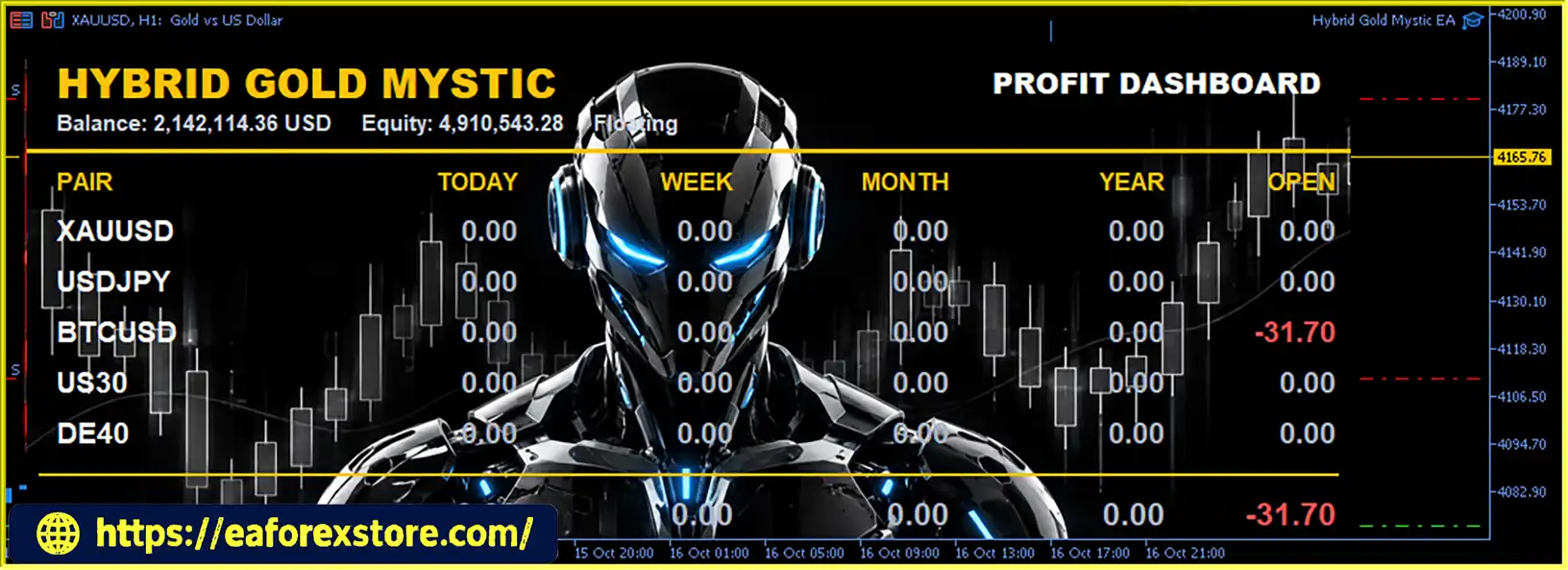
The EA features an on-chart dashboard that presents trading-related information for convenient monitoring.
The dashboard can be enabled or disabled through the available settings, allowing traders to decide whether they want the panel displayed while the EA operates.
A visible dashboard can make it easier to review the information provided by the EA without constantly switching between different terminal windows.
Hybrid Gold Mystic EA MT5 allows users to customize the dashboard’s position and size. A background image option is also available.
These layout controls help traders position the panel where it is easiest to read without unnecessarily covering important price action.
The dashboard is a monitoring aid rather than a guarantee of trading performance. Its usefulness depends on the information displayed and how the trader incorporates that information into account supervision.
Hybrid Gold Mystic EA MT5 combines automated Gold trading with configurable position sizing and account monitoring controls.
Step 1: Configure the risk system
The trader selects the automatic risk profile and chooses the capital reference used by the risk engine. Manual risk percentage and fixed lot inputs are also available, depending on the intended configuration.
Step 2: Confirm position-sizing behavior
Before live deployment, the trader verifies how the selected settings affect the volume of actual orders. This is especially important because the exact automatic risk formula has not been specified.
Step 3: Configure equity drawdown protection
The trader decides whether to enable the equity drawdown protection switch and sets the desired threshold. The threshold’s unit and calculation method should be verified before use.
Step 4: Identify the EA’s trades
The configured trade comment and Magic Number help identify orders generated by the EA within the trading account.
Step 5: Monitor trading information
The on-chart dashboard provides access to the trading information made available by the EA. Users can adjust its position and size or disable it according to their preferences.
The EA’s actual trading behavior and risk exposure depend on its internal strategy, selected settings, broker execution, and account conditions.
Hybrid Gold Mystic EA MT5 may suit traders who want automated Gold trading with configurable risk settings and straightforward trade identification.
These features provide configuration flexibility, but they do not independently establish the EA’s profitability or the effectiveness of its risk management under live market conditions.
Hybrid Gold Mystic EA MT5 backtets
Although Hybrid Gold Mystic EA MT5 includes several risk-related controls, traders should understand how each setting works before activating the EA on a real account.
Automatic position sizing does not guarantee that every trade will lose no more than a predetermined amount.
The resulting loss can depend on the entry price, exit price, trading volume, Gold contract specifications, spread, commissions, swaps, and slippage. Traders should verify the EA’s risk calculation and actual order volume before relying on it.
The EA includes automatic risk calculation, manual risk percentage, and fixed lot inputs. Their interaction should be checked rather than assumed.
Test different configurations on a demo account and compare the selected inputs with the actual trade volumes generated by the EA.
The equity drawdown threshold does not close trades through this mechanism when the protection switch is disabled.
Before relying on this feature, confirm:
If the developer has not documented these details, request clarification and test the behavior on a demo account.
When running several EA instances or other automated systems on the same account, review their Magic Number settings and order-management behavior.
Unique identifiers can help separate trade activity, but traders should still verify how each EA manages its orders.
A demo trial on the intended broker and XAUUSD symbol is recommended. During testing, check position sizing, capital reference behavior, drawdown protection, trade identification, and dashboard information.
Backtesting and demo testing can reveal configuration problems, but neither guarantees future profitability or eliminates the risk of losses.
Follow these general steps to install the Expert Advisor in MetaTrader 5.
setting
.ex5 file into the MQL5/Experts directory. If the provider supplies an .mq5 source file, follow the appropriate compilation instructions.Exact installation requirements may vary depending on the file provided by the developer.
>>> Join VIP Membership Now <<<
Hybrid Gold Mystic EA MT5 is an automated Gold trading Expert Advisor for MetaTrader 5 that emphasizes configurable risk profiles, automatic position sizing, capital reference options, and optional equity drawdown protection.
Its trade identification settings and customizable on-chart dashboard also help users organize and monitor automated trading activity.
The main consideration is understanding how the automatic risk engine calculates position size and how the equity drawdown threshold operates. These details should be verified before the EA is used on a live account. Traders should also confirm the interaction between automatic risk mode and the manual sizing inputs.
For a more informed decision, test Hybrid Gold Mystic EA MT5 on a demo account, evaluate its behavior under different market conditions, and review independently verified performance data if available. As with any automated trading system, profits are not guaranteed and losses remain possible.
1. What Is Hybrid Gold Mystic EA MT5?
Hybrid Gold Mystic EA MT5 is an automated Expert Advisor designed for trading Gold (XAUUSD) on the MetaTrader 5 platform. It features configurable risk profiles, automatic position sizing, optional equity drawdown protection, trade identification settings, and a customizable on-chart dashboard to help traders manage and monitor automated trading activity.
2. How Does Hybrid Gold Mystic EA MT5 Work?
Hybrid Gold Mystic EA MT5 uses its built-in risk management logic to calculate position size according to the selected risk profile and capital reference. Traders can configure starting balance or custom balance modes, review manual risk percentage and fixed lot inputs, and optionally enable equity drawdown protection. The EA also uses a trade comment and Magic Number to identify its orders. Its actual trading behavior depends on the EA's internal strategy, selected settings, and broker conditions.
3. Which Trading Instrument and Platform Does Hybrid Gold Mystic EA MT5 Support?
Hybrid Gold Mystic EA MT5 is developed for Gold (XAUUSD) trading on MetaTrader 5 (MT5). Before installation, check that your broker offers a compatible XAUUSD symbol and review its contract specifications, minimum lot size, margin requirements, and trading conditions.
4. Does Hybrid Gold Mystic EA MT5 Support Automatic Lot Sizing?
Yes. Hybrid Gold Mystic EA MT5 includes an automatic risk system that calculates trading volume using its selected risk profile and capital reference. It also provides manual risk percentage and fixed lot inputs. Because the exact calculation formula and the interaction between these settings have not been fully documented, traders should verify the resulting order volumes on a demo account before using the EA with real funds.
5. Does Hybrid Gold Mystic EA MT5 Have Equity Drawdown Protection?
Yes. Hybrid Gold Mystic EA MT5 offers an optional equity drawdown protection feature that can close trades when a configured threshold is reached. However, the protection must be enabled to operate. Traders should confirm whether the threshold is measured as a percentage, a monetary amount, or another value, and understand which account or equity measurements trigger the action. This feature cannot guarantee a maximum loss under all market and execution conditions.
6. What Is the Purpose of the Magic Number in Hybrid Gold Mystic EA MT5?
The Magic Number helps identify orders generated by Hybrid Gold Mystic EA MT5 in MetaTrader 5. Together with the trade comment, it can help traders distinguish the EA's activity from manual trades or positions managed by other Expert Advisors. When running multiple EA instances, review their Magic Number settings and order-management behavior to reduce the risk of conflicts.
7. What Are the Backtest Results of Hybrid Gold Mystic EA MT5?
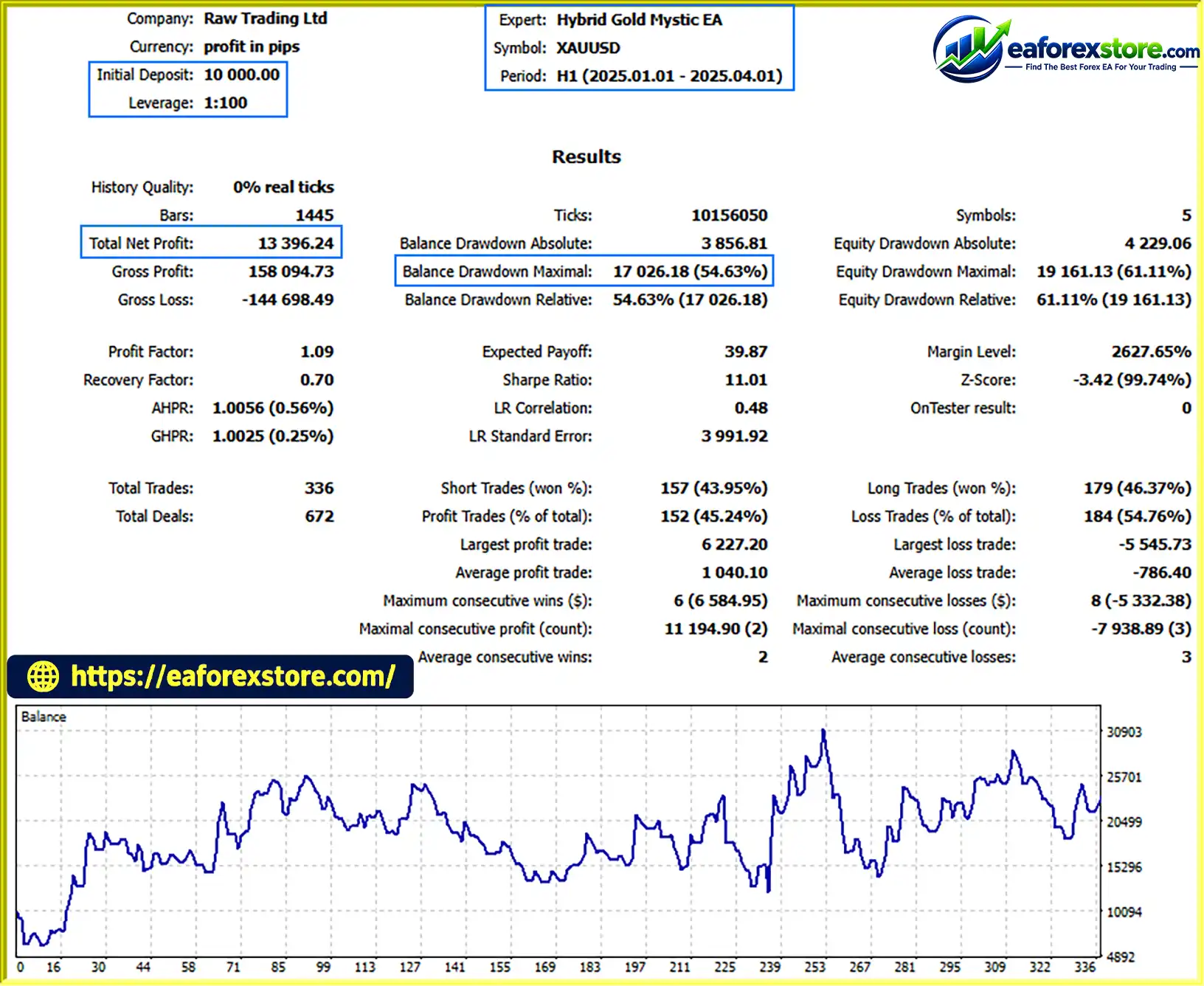
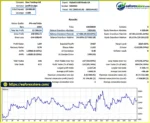
The provided product information lists a three-month XAUUSD backtest with the following reported figures:
Initial Deposit: $10,000
Total Net Profit: $12,396.245
Win Rate: 45.24%
Maximum Drawdown: 54.63%
These figures have not been independently verified in the available product information. The reported maximum drawdown of 54.63% is substantial and indicates potentially significant risk to account capital if the figure is accurate. Traders should review the complete Strategy Tester report, including the testing period, modeling quality, trading costs, and equity curve, before drawing conclusions. Historical results do not guarantee future performance.
8. Is Hybrid Gold Mystic EA MT5 Suitable for Beginners, and How Can I Install It?
Hybrid Gold Mystic EA MT5 may be considered by beginners who are willing to learn automated trading and understand position sizing and drawdown risk. However, users should first learn how its automatic risk system works and verify the equity protection settings.
In stock
In stock
In stock
In stock
In stock
Out of stock
No account yet?
Create an Account












 Automatic EA
 EA Best Seller
 Expert Advisor MT4
 Expert Advisor MT5
 HFT EA


Reviews
Clear filtersThere are no reviews yet.