









-
 Unlimited Activations
-
 Instant delivery
-
 Easy to install






 Unlimited Activations
Instant delivery
Easy to install
Unlimited Activations
Instant delivery
Easy to install
 Free Update
 Free Install Support

GoldFortune EA MT5 is an automated Expert Advisor designed for Gold (XAUUSD) trading on the MetaTrader 5 platform. It combines an adaptive M1 trading model, multi-timeframe trend analysis, recovery basket management, and a manual trading control panel in one integrated system.
The EA analyzes closed one-minute candles to evaluate price efficiency, turning frequency, velocity, volatility, candle body and wick characteristics, and the position of price within its recent range. It compares current market conditions with similar historical patterns to estimate whether a profit target or recovery distance is more likely to be reached first.
To refine its trading direction, GoldFortune EA MT5 incorporates market structure information from M5, M15, and H4 timeframes. Its automatic entry model uses this information alongside recent M1 price action to determine potential BUY or SELL opportunities.
One of its defining features is its recovery basket system. When price moves against an existing basket by a predefined distance, the EA can add recovery entries and calculate a volume-weighted average entry price. It then synchronizes a common take-profit target for a single-direction basket. On hedging accounts, it can also use regime-directed recovery that manages both BUY and SELL positions under specific market conditions.
In addition to automated trading, the EA provides manual BUY and SELL orders, pending Limit and Stop orders, adjustable order volume, and a Close All control. Its status panel displays information about the strategy and allows users to manage selected trading functions directly from the chart.
GoldFortune EA MT5 does not require external indicators or WebRequest access, according to the supplied product description. However, its recovery-based strategy carries significant risk because its automatic basket positions do not use a broker-side stop loss. Traders should thoroughly test its behavior, margin requirements, and potential drawdown before using it with real funds.
>>> Delivery time 24h-48h after payment.
>>> Refund if not delivered.
>>> You will receive the latest version without any limitations (ID+Time).Reviewed by Jason Stap <<<
GoldFortune EA MT5 Overview
GoldFortune EA MT5 uses closed M1 candle data to evaluate short-term market behavior and identify potential trading opportunities.
Its analysis considers several characteristics:
The model estimates whether the profit target or recovery distance is more likely to be reached first. Recent M1 price action is then used to confirm candidate signals.
This approach is designed to make decisions using a combination of historical pattern analysis and current market behavior. Its predictive accuracy, however, depends on market conditions and should be independently evaluated through testing.
Although the signal engine uses closed M1 data, the EA also evaluates M5, M15, and H4 market structure to refine trade direction.
The multi-timeframe approach is designed to combine short-term entry timing with broader market context.
The EA uses these inputs to adjust its final BUY or SELL decision. This can help prevent entries from relying entirely on short-term candle patterns, although multi-timeframe analysis cannot eliminate false signals or adverse price movements.
The EA includes a recovery system that can add positions when price moves against an existing single-direction basket.
The main recovery features include:
The supplied default recovery distance is 200 symbol points, and the maximum number of managed basket entries is set to 80.
Recovery entries may help a basket reach its combined target after a price retracement. However, adding positions increases total exposure and can produce substantial floating losses if the market continues moving in the opposite direction.
The source-volume approach is not a guarantee of low risk, especially when many positions accumulate or account margin becomes constrained.
When a basket contains multiple entries, GoldFortune EA MT5 calculates the volume-weighted average entry price and synchronizes a common take-profit target.
The supplied default basket target is 100 symbol points from the weighted-average entry price after recovery entries exist.
This approach allows the EA to manage the basket as a group rather than treating each entry as an entirely independent trade.
For a single-direction basket, the EA uses broker-side take-profit synchronization during live trading, according to the supplied description. Mixed BUY and SELL baskets on hedging accounts may depend on a software-side basket profit exit instead.
This distinction is important because software-side exits depend on the EA continuing to operate correctly.
When a confirmed market regime invalidates the original basket direction, the EA can use regime-directed recovery on a hedging account.
This functionality may create a mixed basket containing both BUY and SELL positions. The EA can manage a software-side basket profit target and rotate a profitable cluster when the combined closed cluster remains positive.
This advanced mode is intended to respond to changes in market direction, but it also introduces additional complexity. A mixed basket can be difficult to manage during prolonged volatility and may rely on software-side exit logic rather than individual broker-side take-profit orders.
A hedging account is recommended for the complete two-way recovery functionality. Netting accounts can support the automatic model and same-direction recovery, but they cannot hold simultaneous BUY and SELL positions on the same symbol.
GoldFortune EA MT5 includes a chart-based control panel that combines automated trading with manual order management.
Its controls include:
The panel offers flexibility for users who want to combine automated entries with manual trade management. However, manual positions can become part of the recovery basket depending on the order type and settings, so users should understand the management rules before placing trades.
The EA includes a spread filter and a one-bar post-exit cooldown.
The spread filter is intended to restrict new automatic entries when trading costs exceed the configured threshold. The cooldown delays another automatic entry after an exit, helping reduce immediate repeated entries.
These features can support more disciplined execution, but they cannot eliminate slippage, spread expansion, or losses caused by sudden market movements.
The EA provides an optional time filter based on Thailand time (UTC+7).
The documented blocked periods are:
During these windows, new automatic entries are suspended and managed pending orders are removed, while existing baskets continue to be managed.
Users should verify that the time filter matches their intended trading schedule. It should not be assumed to be an economic-news filter.
The EA is designed to restore its managed basket and pending-order state when it is reattached or MetaTrader 5 is restarted.
This functionality can help maintain continuity during routine platform restarts. However, mixed baskets may depend on the EA’s software-side exit logic, so continuous platform or VPS operation remains important while positions are open.
GoldFortune EA MT5 follows a multi-stage process to analyze market conditions, generate trading signals, manage recovery entries, and close positions according to its basket rules.
The EA evaluates completed M1 candles using measurements such as price efficiency, turning frequency, velocity, volatility, candle body and wick bias, and recent-range position.
Using closed candles helps the model base its analysis on completed price data rather than relying solely on an unfinished candle.
The EA compares the current M1 structure with similar historical patterns.
Its model estimates whether the configured profit target or recovery distance is more likely to be reached first. This estimate contributes to the candidate signal, but it should not be interpreted as a guaranteed outcome or a verified win probability.
The candidate signal is checked against recent M1 price action and market structure from M5, M15, and H4.
The final BUY or SELL direction is adjusted using these timeframes to incorporate both short-term price behavior and broader market conditions.
When the signal satisfies the EA’s rules, the automatic strategy opens an initial position using the configured starting lot.
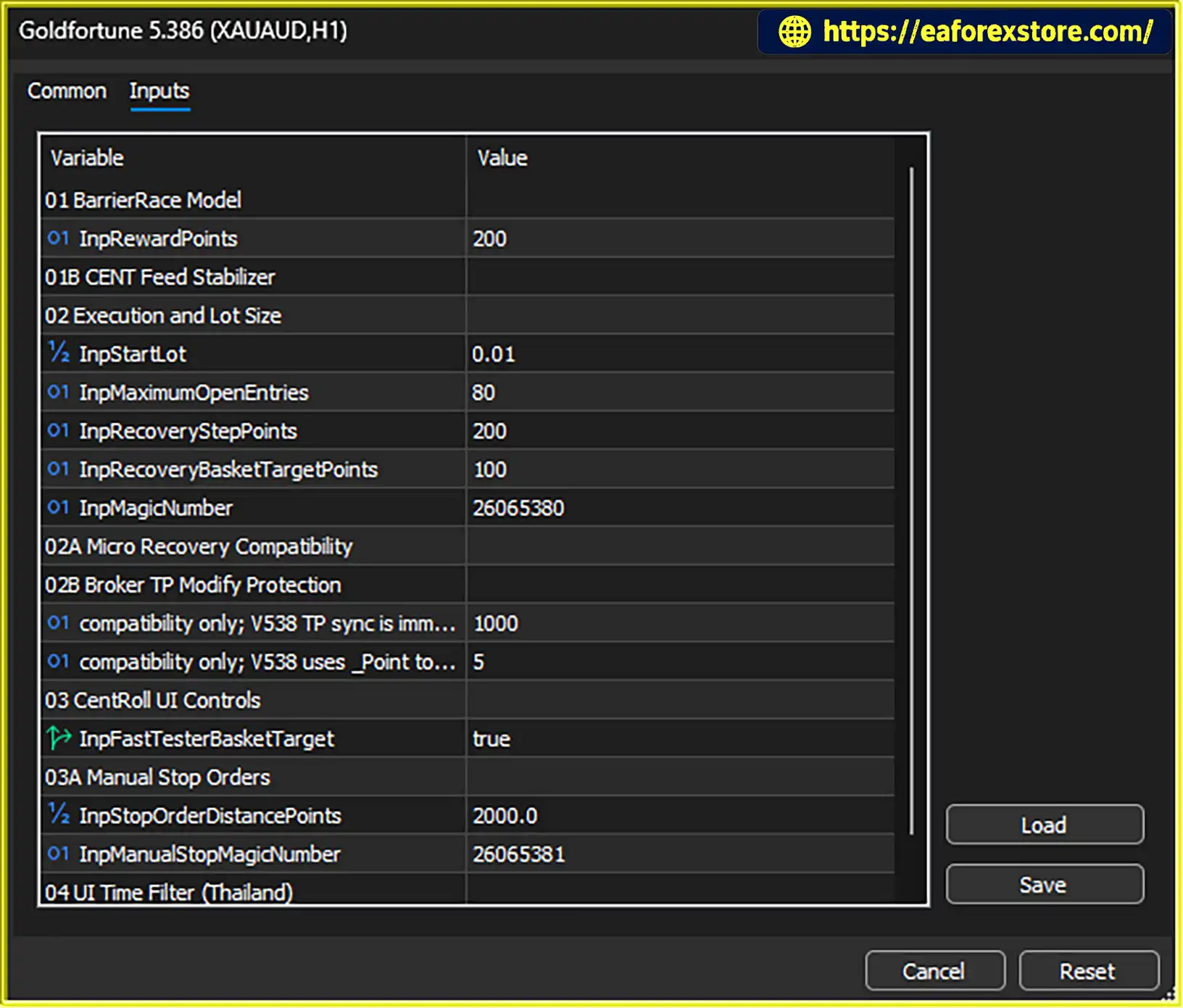
The supplied default settings include:
InpStartLot = 0.01InpRewardPoints = 200The initial target is defined in symbol points rather than a fixed monetary amount. The actual price distance depends on the broker’s symbol specification.
If price moves against a single-direction basket by the configured recovery distance, the EA can add another recovery entry.
The default recovery step is 200 symbol points. Recovery entries normally use the basket source volume rather than a progressive lot multiplier, subject to broker volume rules, order caps, adaptive basket limits, and the maximum number of entries.
The default maximum is 80 managed basket entries. This is a configuration limit, not a recommendation to use all 80 entries in live trading.
When multiple entries exist, the EA calculates the volume-weighted average entry price and synchronizes a common take-profit target.
The default basket target is 100 symbol points from the weighted-average price.
For a single-direction basket, the EA uses broker-side take-profit synchronization during live trading, according to the supplied description.
On hedging accounts, a confirmed change in market regime can activate two-way recovery logic.
The EA may create a mixed BUY and SELL basket, manage a software-side basket profit target, and rotate a profitable cluster only when the combined closed cluster remains positive.
This functionality introduces additional risk because mixed baskets can rely on the EA’s continued operation to execute the intended profit exit.
Users can also place manual market orders and pending Limit or Stop orders through the chart panel.
Manual market and Limit positions use the strategy Magic Number and may become part of the managed basket. Manual Stop orders use a separate Magic Number and remain independent of the automatic recovery basket.
The EA is designed to restore managed basket and pending-order state after reattachment or a MetaTrader restart. Traders should still keep the platform or VPS running continuously while positions are open.
GoldFortune EA MT5 provides automatic market analysis and entry logic alongside a manual trading panel.
This combination allows users to operate the automated strategy while retaining access to manual market orders and pending-order controls.
The integrated panel can simplify trade management, but users should understand which manual positions become part of the recovery basket and which remain independent.
The EA combines closed M1 pattern analysis with M5, M15, and H4 market structure.
This design aims to balance short-term entry timing with broader directional context. It may appeal to traders who want a rules-based strategy that considers multiple timeframes without requiring separate external indicators.
However, multi-timeframe analysis does not guarantee more accurate signals or positive trading results.
The recovery mechanism adds positions at configured price intervals and calculates a volume-weighted average entry price.
This can allow the basket to reach a common target following a favorable retracement. The strategy is nevertheless vulnerable to prolonged adverse trends, rising margin usage, and large floating losses.
The absence of a broker-side stop loss on the EA’s automatic basket positions is a particularly important consideration.
The chart panel supports market orders, Limit orders, Stop orders, order-volume adjustments, pending-order cancellation, and a Close All confirmation process.
This functionality may be useful for traders who want manual control without switching between multiple panels or tools.
Because different order types follow different Magic Number and basket-management rules, careful configuration is essential.
The EA supports automatic entries and same-direction basket recovery on netting accounts, while the full two-way regime-recovery functionality requires a hedging account.
This distinction allows traders to understand which features are compatible with their broker’s account model before deployment.
According to the supplied product description, the EA uses its internal model and market data without requiring external indicators or WebRequest access.
This may simplify the initial setup compared with systems that depend on separate indicator files or external web services.
Users still need sufficient M1 historical data for the model to initialize correctly.
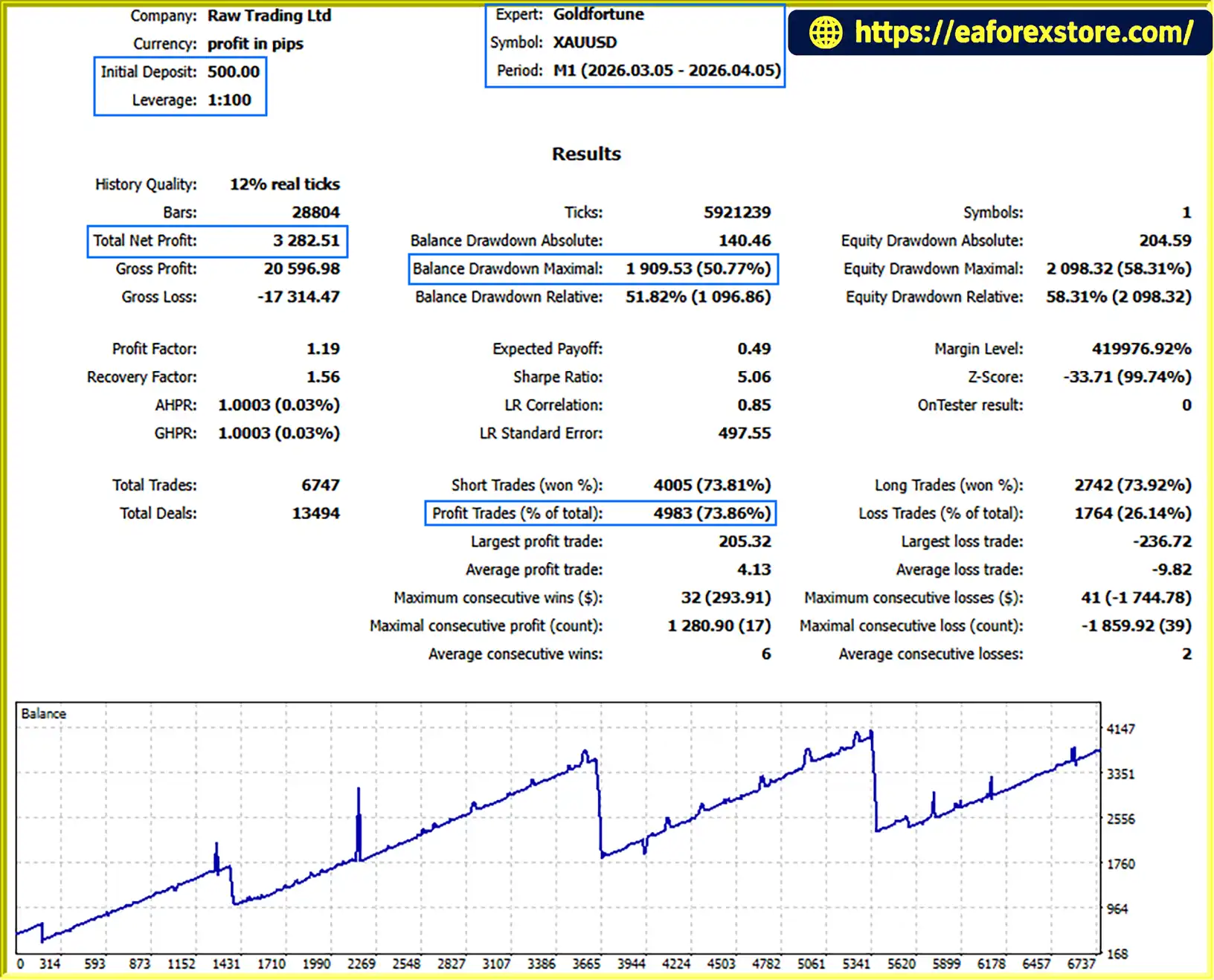
GoldFortune EA MT5 Backtets
Risk management is especially important for GoldFortune EA MT5 because its automatic recovery basket does not use a broker-side stop loss.
The ability to add positions can help a basket recover after a retracement, but it can also increase exposure during a sustained adverse market movement.
The default starting lot is 0.01, and the maximum number of managed basket entries is 80.
Users should set the starting lot according to account equity, leverage, XAUUSD contract specifications, and their acceptable risk.
Reducing InpStartLot lowers the volume of the first and subsequent source-sized recovery entries. Reducing InpMaximumOpenEntries limits the number of entries but may also stop the recovery sequence before the basket reaches its intended exit.
The maximum entry setting should not be interpreted as a safe exposure limit for every account.
The supplied default parameters are:
InpRecoveryStepPoints = 200InpRecoveryBasketTargetPoints = 100InpRewardPoints = 200These values are measured in symbol points, not fixed dollar amounts.
For example, 2,000 points represents a price distance of 20.00 when the symbol’s _Point value is 0.01, but 2.000 when _Point is 0.001. Users must verify their broker’s symbol specification before evaluating the real distance represented by each setting.
The supplied documentation explicitly states that the automatic strategy does not use a broker-side stop loss on its managed basket positions.
The EA may continue adding recovery entries when price moves against the basket, subject to entry limits, volume caps, and available margin. This can lead to substantial floating drawdown and increased margin usage during a strong or prolonged market move.
A recovery basket should therefore not be treated as a capital-protection mechanism. Traders should evaluate worst-case exposure and establish whether the strategy is appropriate for their account before live deployment.
Manual BUY STOP and SELL STOP orders use a separate Magic Number and have their own documented settings:
These manual Stop positions remain independent from the automatic recovery basket, according to the supplied description.
However, they remain exposed to gaps, slippage, spread expansion, and broker execution conditions.
The EA’s spread filter is intended to restrict new automatic entries during unfavorable spread conditions.
The optional Thailand time filter suspends new automatic entries during its configured blocked windows and removes managed pending orders during those periods. Existing baskets continue to be managed.
These features can limit some forms of exposure but do not guarantee avoidance of major market events or sudden price changes.
When ADOPT is enabled, the EA can include eligible current-symbol positions with Magic Number 0 in its basket management.
Adopted positions may receive the basket take-profit treatment, while a user-defined stop loss on an adopted Magic Number 0 position is preserved, according to the supplied description.
This feature should be used cautiously because it can change the management of positions opened manually or by other systems. Adoption is blocked when the applicable positions contain mixed BUY and SELL sides.
The EA restores its managed state after reattachment or a MetaTrader restart. However, a mixed basket can depend on a software-side profit exit rather than individual broker-side take-profit levels.
Keeping MetaTrader 5 or a VPS running continuously while positions are open is therefore important. A platform interruption may affect software-managed exit behavior.
Important risk warning: GoldFortune EA MT5 cannot guarantee profits or eliminate losses. Its recovery system may produce substantial floating drawdown, and margin requirements can rise as additional entries accumulate. Test the EA using realistic tick data and a demo account, and verify its behavior on the intended broker before risking real capital.
Follow these steps to install and configure GoldFortune EA MT5 on MetaTrader 5.
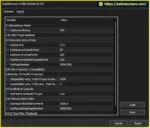
setting
Obtain the official EA package and locate the supplied .ex5 file.
MQL5 → Experts.Open your broker’s Gold chart, usually labeled XAUUSD.
An M1 chart is recommended because the EA’s signal engine is based on closed M1 data. The model also uses its internal M5, M15, and H4 timeframes regardless of the visible chart timeframe.
Attach GoldFortune EA MT5 to the XAUUSD chart and enable Algo Trading in MetaTrader 5.
Allow algorithmic trading in the EA settings as required by the official installation instructions.
Set InpStartLot according to account size, leverage, symbol contract specifications, and acceptable risk.
The supplied default is 0.01 lots. Confirm the broker’s minimum lot, maximum lot, and volume step before using the EA.
Check the following default settings:
InpRewardPoints = 200InpRecoveryStepPoints = 200InpRecoveryBasketTargetPoints = 100InpMaximumOpenEntries = 80Consider reducing the maximum number of entries while testing. Verify the point value of your broker’s XAUUSD symbol and understand the potential floating loss before enabling recovery trading.
The supplied settings include:
InpMagicNumber = 26065380InpManualStopMagicNumber = 26065381Keep these Magic Numbers unique from unrelated Expert Advisors and ensure that the manual Stop-order Magic Number remains separate from the strategy Magic Number and reserved strategy identifiers.
The EA requires sufficient closed M1 history for its pattern model to initialize.
If the dashboard displays MODEL_WARMING, allow MetaTrader 5 to download the required historical data and confirm that the model has finished initializing before expecting automatic entries.
Review the manual order lot, adoption option, and optional Thailand time filter.
Understand that manual market orders and Limit orders can become part of the managed basket, while manual Stop orders use a separate Magic Number and remain independent of the automatic recovery basket.
Use the Close All confirmation procedure carefully and verify which positions and pending orders are controlled by the panel.
The supplied documentation recommends using one instance on the same symbol and account unless multiple instances have been specifically configured and tested to avoid overlapping trade management.
This reduces the risk of conflicting order management and unintended basket interactions.
Use the MetaTrader 5 Strategy Tester with Every tick based on real ticks where suitable data is available.
Review net profit, maximum equity drawdown, margin usage, total entries, and the behavior of recovery baskets during prolonged adverse movements. Then conduct demo testing on the intended broker.
A hedging account is recommended if you intend to use the full two-way regime-recovery feature.
Installation note: Keep MetaTrader 5 or a VPS running continuously while positions are open, particularly when mixed baskets rely on software-side profit exits. Verify all parameters and risk controls before using real funds.
>>> Join VIP Membership Now <<<
GoldFortune EA MT5 is an automated Gold trading system that combines adaptive M1 pattern analysis, multi-timeframe trend filtering, recovery basket management, and a manual trading panel.
Its main advantages are the integration of automated and manual order controls, historical pattern analysis, weighted-average basket take-profit management, and support for different account types. The EA also provides configurable recovery settings, spread filtering, an optional time filter, and state restoration after restarts.
However, its recovery strategy requires particular caution. The automatic basket positions do not use a broker-side stop loss, and the EA can continue adding entries as price moves against the basket. During prolonged adverse trends, this can result in substantial floating drawdown and margin usage.
The default maximum of 80 managed entries should not be interpreted as a recommended operating level. Traders should evaluate the strategy using conservative settings, realistic historical tick data, and demo trading before considering live deployment.
Overall, GoldFortune EA MT5 may interest traders who want an integrated automated trading system with recovery functionality and manual controls. Its suitability depends on the trader’s understanding of basket risk, broker specifications, account type, and the potential consequences of software-managed exits.
Independent testing and disciplined risk management are essential. No automated trading system can guarantee profits or eliminate the risk of loss.
1. What Is Gold Fortune Buy Sell Stop EA MT5?
Gold Fortune Buy Sell Stop EA MT5 is an automated Expert Advisor designed primarily for Gold (XAUUSD) trading on MetaTrader 5. It combines adaptive M1 price analysis, multi-timeframe market structure, recovery basket management, and a manual trading panel to automate entries and manage trading positions.
2. How Does Gold Fortune Buy Sell Stop EA MT5 Work?
The EA analyzes closed M1 candles and compares current market conditions with similar historical patterns. It also evaluates market structure on M5, M15, and H4 timeframes to refine potential BUY or SELL signals. When price moves against an open basket by a configured distance, the EA can add recovery entries and calculate a volume-weighted average entry price to manage the basket's take-profit target.
3. What Are the Recommended Settings for Gold Fortune Buy Sell Stop EA MT5?
The supplied default settings include:
Starting Lot: 0.01
Reward Points: 200
Recovery Step: 200 points
Recovery Basket Target: 100 points
Maximum Basket Entries: 80
These settings should be treated as configuration defaults, not recommendations for safe live trading. The actual price distances depend on the broker's XAUUSD point specification. Traders should test conservative settings and evaluate potential exposure before enabling recovery trading.
4. Does Gold Fortune Buy Sell Stop EA MT5 Use a Grid or Recovery Strategy?
Yes. The EA includes a recovery basket system that can add positions when the market moves against an existing basket. It normally uses the basket's source volume rather than a progressive lot multiplier and calculates a common take-profit level based on the volume-weighted average entry price. However, recovery trading can accumulate floating losses and consume substantial margin during prolonged adverse market movements.
5. Does Gold Fortune Buy Sell Stop EA MT5 Have a Stop Loss?
According to the supplied product description, the EA's automatic basket positions do not use a broker-side stop loss. The recovery system may continue adding entries within its configured limits when price moves against the basket. This creates a significant risk of large floating drawdown and margin pressure. Traders should understand this limitation and test worst-case scenarios before considering live deployment.
6. Is Gold Fortune Buy Sell Stop EA MT5 Compatible with Hedging and Netting Accounts?
The EA supports automatic entries and same-direction recovery on both account types, but its full two-way regime-recovery functionality requires a hedging account. A hedging account can hold simultaneous BUY and SELL positions on the same symbol, while a netting account combines positions into a single net position. Traders should confirm their broker's account type before using the advanced recovery features.
7. What Are the Backtest Results of Gold Fortune Buy Sell Stop EA MT5?
The supplied one-month backtest reports the following figures:
Initial Deposit: $500
Total Net Profit: $3,282.51
Win Rate: 73.86%
Maximum Drawdown: 50.77%
Although the reported net profit and win rate may appear attractive, the 50.77% maximum drawdown indicates substantial historical risk. These figures do not guarantee future performance. Review the original Strategy Tester report, trading costs, testing conditions, and whether the drawdown is based on account balance or equity.
8. Is Gold Fortune Buy Sell Stop EA MT5 Suitable for Beginners?
The EA may appeal to traders seeking automated Gold trading with manual order controls, but its recovery system requires careful risk management. The absence of a broker-side stop loss on automatic basket positions and the reported maximum drawdown make it important to understand margin requirements and cumulative exposure. Beginners should start with a demo account, test the EA using realistic tick data, and avoid risking money they cannot afford to lose.
In stock
In stock
In stock
In stock
In stock
Out of stock
No account yet?
Create an Account












 Automatic EA
 EA Best Seller
 Expert Advisor MT4
 Expert Advisor MT5
 HFT EA


Reviews
Clear filtersThere are no reviews yet.