









-
 Unlimited Activations
-
 Instant delivery
-
 Easy to install







 Unlimited Activations
Instant delivery
Easy to install
Unlimited Activations
Instant delivery
Easy to install
 Free Update
 Free Install Support

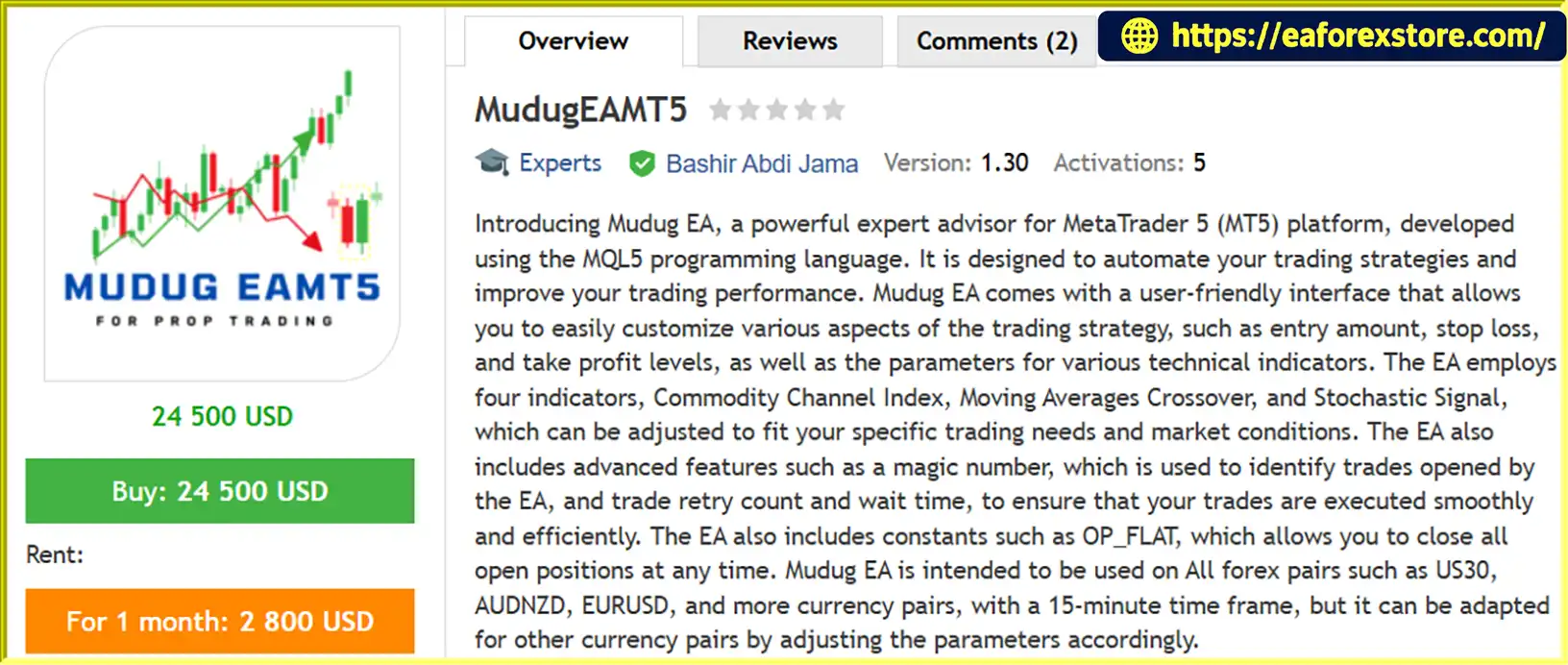
Mudug EA MT5 is an automated trading Expert Advisor (EA) developed for the MetaTrader 5 (MT5) platform using the MQL5 programming language. Designed to simplify forex trading, this trading robot uses a combination of technical indicators to analyze market conditions and identify potential trading opportunities with minimal manual intervention.
Mudug EA MT5 features a customizable trading interface that allows users to adjust essential parameters, including entry settings, stop loss (SL), take profit (TP), and indicator configurations. Its strategy incorporates the Commodity Channel Index (CCI), Moving Average Crossover, and Stochastic Signal to help evaluate market momentum, potential trend changes, and possible entry signals.
Designed primarily for the M15 (15-minute) timeframe, Mudug EA MT5 can be configured for various forex pairs and other supported trading instruments, depending on broker specifications and parameter settings. Example symbols include EURUSD, AUDNZD, and US30, subject to compatibility with the broker and the EA’s configuration.
With configurable risk parameters, trade identification through a magic number, execution retry settings, and built-in stop loss and take profit functionality, Mudug EA MT5 provides a flexible solution for traders interested in automated forex trading on MetaTrader 5.
>>> Delivery time 24h-48h after payment.
>>> Refund if not delivered.
>>> You will receive the latest version without any limitations (ID+Time).Reviewed by Jason Stap <<<
Mudug EA MT5 Overview
Mudug EA MT5 automates its configured trading strategy, helping reduce the need for constant manual chart monitoring. Once installed and configured correctly, the EA can evaluate trading conditions and manage trade execution according to its programmed rules.
The EA combines several technical indicators to evaluate market conditions and identify potential entry opportunities.
The indicator parameters can be adjusted to suit different trading instruments, market conditions, and trading preferences. However, the effectiveness of these settings should be verified through backtesting and demo trading.
Mudug EA MT5 supports configurable stop loss and take profit levels, allowing traders to define trade exit parameters according to their risk tolerance and trading objectives.
The EA also includes built-in SL and TP functionality designed to provide an additional layer of trade protection when manually configured levels are not specified. Traders should verify how these internal protection mechanisms operate under different market conditions before using the EA on a live account.
The EA provides adjustable settings for important trading variables, including entry parameters, indicator values, stop loss, and take profit. This flexibility allows users to test different configurations rather than relying on a single fixed setup.
Mudug EA MT5 uses a magic number to identify trades associated with the EA. This helps distinguish its positions from manually opened trades or positions managed by other automated strategies.
The EA includes configurable trade retry counts and waiting intervals. These settings are intended to help manage certain unsuccessful trade execution attempts, depending on the broker’s response and prevailing market conditions.
Retry functionality does not guarantee successful execution, particularly during periods of high volatility, poor liquidity, or connectivity problems.
Mudug EA MT5 includes an OP_FLAT constant described as a function for closing open positions. Traders should consult the supplied documentation to understand its exact operation, scope, and activation method before relying on it to manage live trades.
Mudug EA MT5 is intended for use across various forex pairs and potentially other instruments supported by the EA and broker. EURUSD and AUDNZD are examples of forex pairs, while US30 is an index-related trading instrument whose availability depends on the broker.
Although M15 is the recommended starting timeframe, alternative symbols and timeframes should be tested individually before deployment.
Mudug EA MT5 follows a configurable, indicator-based trading approach designed to automate parts of the trading process. Its general workflow can be understood through the following stages.
Step 1: Analyze Market Conditions
The EA evaluates price data and its configured technical indicators, including CCI, Moving Average Crossover, and Stochastic Signal, to assess market momentum and potential trading conditions.
Step 2: Evaluate Potential Entry Signals
Based on its programmed rules and indicator settings, the EA determines whether market conditions meet its entry criteria. The exact signal combinations, thresholds, and confirmation rules depend on the EA’s implementation and configuration.
Step 3: Execute Trades
When the required conditions are satisfied, the EA attempts to place trades through the connected MetaTrader 5 trading account. Actual execution depends on broker availability, trading permissions, spreads, liquidity, and other market factors.
Step 4: Apply Trade Protection Settings
The EA uses its configured or applicable built-in stop loss and take profit mechanisms to define trade exit levels. Traders should confirm which protection settings take priority and whether the EA relies on broker-side orders or internal management.
Step 5: Manage Trade Identification and Execution Attempts
The magic number helps identify EA-associated trades, while retry counts and waiting intervals control certain repeated execution attempts. The OP_FLAT functionality is described as providing a way to close open positions, subject to its documented behavior.
This automated workflow can reduce repetitive manual tasks, but it does not eliminate trading risk or guarantee profitable results.
Mudug EA MT5 may appeal to traders looking for a configurable automated trading solution with multiple technical indicators and built-in trade management options.
Automated Trading Convenience: The EA can monitor trading conditions and execute its programmed strategy without requiring traders to manually place every trade.
Indicator-Based Analysis: By combining CCI, Moving Average Crossover, and Stochastic Signal, Mudug EA MT5 offers multiple technical inputs for evaluating potential market opportunities.
Flexible Strategy Configuration: Adjustable entry parameters, indicator settings, and SL/TP levels allow traders to test different configurations for supported instruments.
Trade Management Features: Magic number identification and execution retry settings provide additional control over how the EA interacts with the trading account.
Built-In Protection Options: The described internal stop loss and take profit mechanisms may provide additional protection when configured and functioning as intended. They should not be interpreted as guarantees against losses or slippage.
Suitable for Different Experience Levels: Its configurable interface may be useful to both newer traders learning automated trading and experienced users who want to evaluate an indicator-based EA. Beginners should first understand leverage, margin, drawdown, and position sizing before using real funds.
Mudug EA MT5 Backtets
Risk management is an essential consideration when using Mudug EA MT5 or any other automated trading system. Although the EA includes stop loss and take profit features, market conditions can change rapidly, and losses remain possible.
The supplied description does not specify a complete set of built-in notifications, such as push alerts, email messages, or sound alerts. Traders should check the EA documentation to determine which notification features are available.
For practical monitoring, review the MetaTrader 5 Experts and Journal logs for execution errors, rejected orders, connection issues, and other operational messages.
No stop loss, retry mechanism, or monitoring feature can eliminate all risks associated with forex and CFD trading.
Follow these steps to install and configure Mudug EA MT5 on MetaTrader 5.
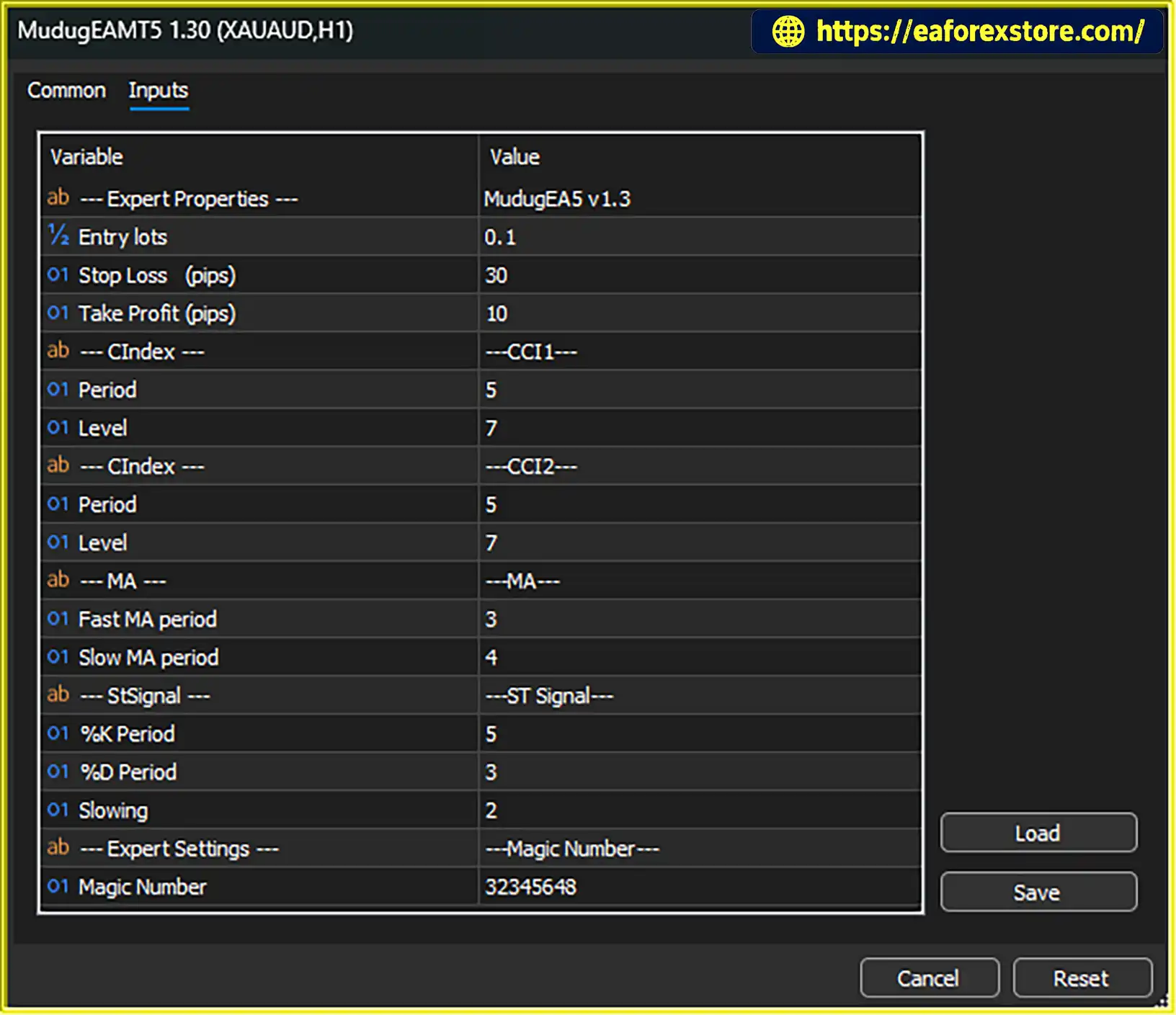
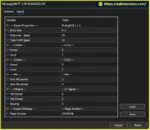
setting
Step 1: Download the EA File
Obtain the Mudug EA MT5 files from the relevant provider. Confirm that the package is compatible with MetaTrader 5 and includes any required documentation or supporting files.
Step 2: Open MetaTrader 5
Launch MetaTrader 5 on your computer and log in to your trading account, preferably a demo account for initial testing.
Step 3: Open the Data Folder
In MetaTrader 5, select File → Open Data Folder. Navigate to the MQL5 directory and open the Experts folder.
Step 4: Copy the EA File
Copy the supplied Mudug EA file, typically an .ex5 file or its provided source file if applicable, into the MQL5/Experts directory. Follow the provider’s instructions if additional files are required.
Step 5: Refresh the Navigator
Return to MetaTrader 5. In the Navigator panel, right-click Expert Advisors and select Refresh, or restart the platform if necessary.
Step 6: Open the Trading Chart
Open the chart for your chosen trading instrument. Start with a supported symbol and the recommended M15 timeframe, provided these match the EA’s documentation.
Step 7: Attach Mudug EA MT5
Drag the EA from the Navigator panel onto the chart. Review its settings and enable algorithmic trading as required by your MetaTrader 5 configuration.
Step 8: Configure Trading Parameters
Review the available settings, including entry parameters, indicator values, stop loss, take profit, magic number, and execution retry options. Use the supplied documentation to understand each parameter before making adjustments.
Step 9: Test on a Demo Account
Run historical backtests using the MT5 Strategy Tester, then conduct forward testing on a demo account. Evaluate trade frequency, net profit, drawdown, execution behavior, and performance across different market conditions.
Step 10: Consider Live Trading Only After Testing
If the results meet your requirements, consider moving to a live account with conservative position sizing. Continue monitoring performance and never risk money you cannot afford to lose.
>>> Join VIP Membership Now <<<
Mudug EA MT5 is a configurable Expert Advisor for MetaTrader 5 that combines several technical indicators with automated execution and trade management settings. Its use of CCI, Moving Average Crossover, and Stochastic Signal provides a structured approach to evaluating potential trading opportunities, while adjustable parameters allow traders to experiment with different configurations.
The EA’s support for trade identification, execution retries, and described built-in stop loss and take profit mechanisms may be useful for traders seeking greater automation. However, these features do not establish that the strategy will remain profitable under all market conditions.
Before using Mudug EA MT5 on a live account, traders should verify its functionality, test its settings with historical data, and complete forward testing on a demo account. Assessing drawdown, execution quality, and risk-adjusted performance is more important than focusing on potential returns alone.
Overall, Mudug EA MT5 may be worth evaluating for traders interested in automated forex trading on MT5, provided they understand the associated risks and apply disciplined money management. Past performance, even when demonstrated through backtesting, does not guarantee future results.
1. What is Mudug EA MT5?
Mudug EA MT5 is an automated Expert Advisor for the MetaTrader 5 platform, developed using MQL5. It uses a combination of technical indicators, including the Commodity Channel Index (CCI), Moving Average Crossover, and Stochastic Signal, to evaluate market conditions and identify potential trading opportunities.
2. Which timeframe and trading instruments does Mudug EA MT5 support?
The recommended timeframe is M15 (15-minute). Example trading instruments include EURUSD, AUDNZD, and US30, subject to broker compatibility and the EA's configuration. Traders should test each symbol individually because trading conditions and performance can vary across instruments.
3. How does Mudug EA MT5 work?
Mudug EA MT5 analyzes market data using CCI, Moving Average Crossover, and Stochastic Signal. When its programmed entry conditions are satisfied, it attempts to execute trades and manage them using configured Stop Loss and Take Profit settings. The EA also includes trade identification and execution retry parameters. The exact entry rules and indicator thresholds depend on its internal implementation and settings.
4. Does Mudug EA MT5 include risk management features?
Yes. The EA provides configurable Stop Loss and Take Profit settings, along with described built-in SL/TP functionality. It also uses a magic number to identify its trades and includes execution retry settings. Users should verify how the protection mechanisms work, choose conservative position sizes, and test the EA before risking real money. These features cannot eliminate trading losses.
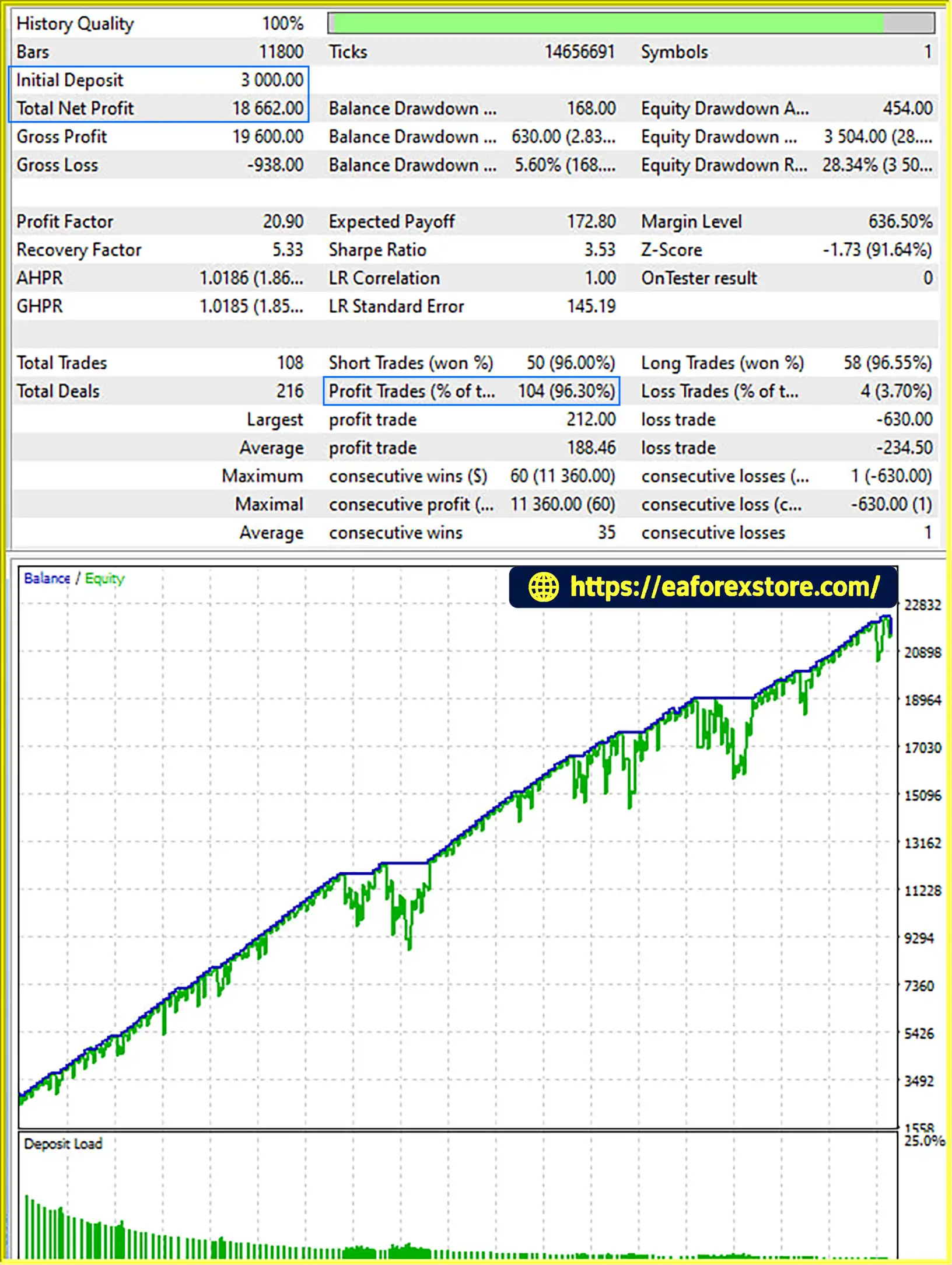
5. What are the reported backtest results for Mudug EA MT5?
According to the supplied product description, Mudug EA MT5 has the following reported backtest results:
Initial Deposit: $3,000
Total Net Profit: $18,662.00
Win Rate: 96.30%
Maximum Drawdown: 2.83%
These figures are reported results from the supplied description and have not been independently verified here. The testing period, broker conditions, transaction costs, and complete test settings should be checked before using these figures to evaluate the EA's potential performance.
6. Can Mudug EA MT5 trade multiple instruments?
The EA is described as configurable for various supported trading instruments, including forex pairs such as EURUSD and AUDNZD and potentially index-related instruments such as US30. Actual compatibility depends on the broker, symbol specifications, and EA settings. Test each instrument separately before running the EA on multiple charts or markets.
7. What is the OP_FLAT function in Mudug EA MT5?
The supplied description identifies OP_FLAT as a constant associated with closing open positions. However, its exact operation, activation method, and scope are not fully explained. Consult the EA's documentation or test the function in a demo environment before relying on it to close live positions.
8. Is Mudug EA MT5 suitable for beginners, and does it guarantee profits?
Mudug EA MT5 may appeal to traders interested in automated indicator-based trading, but beginners should first understand leverage, margin, position sizing, and drawdown. Backtest the EA and conduct demo forward testing under realistic trading conditions before considering live use. Profits are not guaranteed, and historical or simulated performance does not ensure future results. Spreads, commissions, slippage, volatility, and broker execution can all affect actual outcomes.
In stock
In stock
In stock
In stock
In stock
Out of stock
No account yet?
Create an Account












 Automatic EA
 EA Best Seller
 Expert Advisor MT4
 Expert Advisor MT5
 HFT EA


Reviews
Clear filtersThere are no reviews yet.