









-
 Unlimited Activations
-
 Instant delivery
-
 Easy to install






 Unlimited Activations
Instant delivery
Easy to install
Unlimited Activations
Instant delivery
Easy to install
 Free Update
 Free Install Support

CoreBreak EA MT5 is an automated Expert Advisor (EA) for the MetaTrader 5 (MT5) platform, designed around a short-term breakout trading strategy. It analyzes recent price movements to identify potential breakout levels and uses pending orders to enter trades when the market reaches predefined prices.
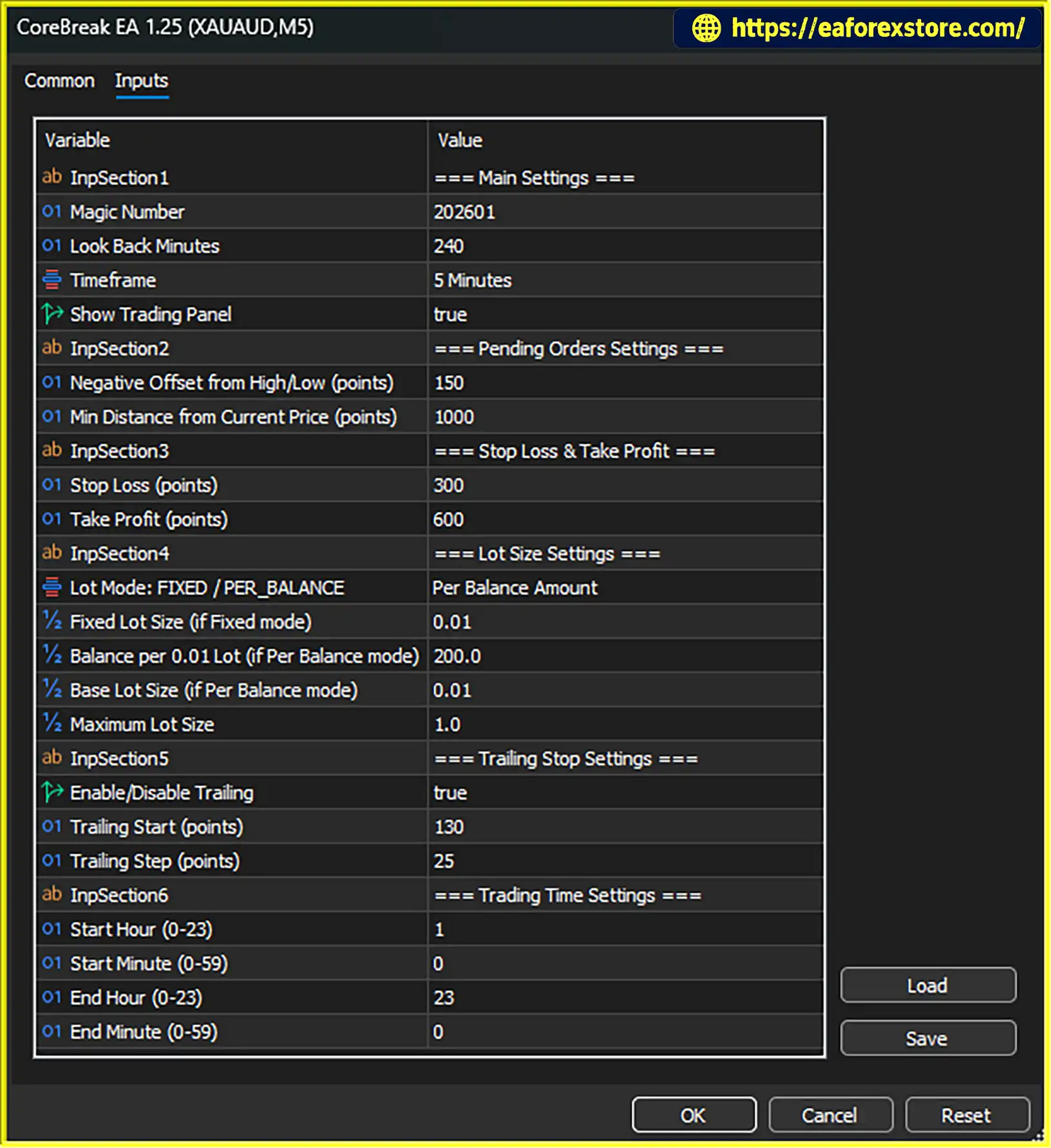
The EA features configurable lookback settings, pending-order offsets, minimum entry distances, stop-loss and take-profit levels, trailing-stop management, and flexible lot sizing. Traders can choose between fixed-lot trading and balance-based position sizing, with a maximum lot limit to restrict trading volume. A configurable trading window also helps control when new orders may be placed.
CoreBreak EA MT5 is designed for traders who prefer a rules-based approach to breakout trading rather than relying entirely on manual entries. Its adjustable parameters allow users to experiment with different breakout distances, exit levels, and position-sizing methods.
However, breakout strategies can experience false signals, particularly when the market moves sideways or volatility changes quickly. Since verified backtest or live trading results have not been provided in the supplied information, traders should evaluate the EA independently before using it on a live account.
CoreBreak EA MT5 reviews
CoreBreak EA MT5 examines historical price data over a configurable lookback window to identify recent highs and lows that may serve as breakout levels.
The lookback period influences how the EA identifies potential entry zones. A shorter window may respond more quickly to recent price movements, while a longer window may focus on levels established over a broader period.
The appropriate setting depends on the instrument, timeframe, and prevailing market conditions.
Instead of entering every trade immediately at the current market price, the EA uses pending orders positioned at specified offsets from detected highs and lows.
This allows traders to define where a potential breakout entry should occur. When price reaches an eligible order level, the order may be triggered according to the broker’s execution conditions.
Pending orders can provide a structured entry method, but they do not guarantee that a breakout will continue in the expected direction.
CoreBreak EA MT5 includes a minimum-distance setting that keeps pending orders away from the current market price.
This filter can help prevent orders from being placed too close to the current price, where minor fluctuations may trigger entries prematurely.
The distance should be calibrated for the instrument being traded. A setting that works for one market may be unsuitable for another because volatility, spread, and price-point conventions can differ.
Each trade uses a configured stop loss (SL) and take profit (TP). According to the supplied description, the take-profit distance is larger than the stop-loss distance.
These predefined levels establish a planned exit framework for each position. Traders can assess the relationship between potential profit and planned risk when configuring the EA.
Nevertheless, a stop loss cannot guarantee an exact exit price, and a larger take-profit target does not mean the target will be reached more frequently.
The EA includes a trailing-stop function that activates after price moves a specified distance in favor of an open trade. The stop then follows price according to the configured step.
Trailing stops may help protect part of an unrealized profit when the market moves favorably. However, they can also close positions before a larger price movement develops, and they do not eliminate losses.
CoreBreak EA MT5 supports two primary position-sizing methods:
A maximum lot-size setting can restrict the volume from growing beyond a predefined limit. This can be useful for establishing an upper boundary, although it does not replace careful risk management.
Traders should verify how the balance-based calculation works and how much money could be lost if the stop loss is triggered.
The EA includes a trading-window setting that controls when new orders may be placed.
Restricting entries to selected hours can help traders test the strategy during particular market sessions. However, the supplied description does not establish that the EA automatically identifies the best trading session or avoids every period of high volatility.
Users should confirm the time zone used by the EA and test the schedule against their broker’s server time.
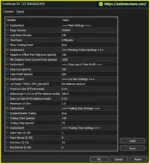
The EA’s settings are organized around key functions, including general configuration, pending orders, exits, lot sizing, trailing stops, and trading hours.
This structure can make the main inputs easier to review and adjust during strategy testing.
CoreBreak EA MT5 follows a configurable breakout process based on historical price levels and pending-order execution.
Step 1: Analyze Recent Price Data
The EA scans a selected lookback window to identify recent highs and lows. These levels become reference points for potential breakout trades.
Step 2: Calculate Pending-Order Levels
Using the detected price levels and configured offsets, the EA determines where pending orders should be placed.
Step 3: Apply the Minimum-Distance Filter
Before placing orders, the EA checks the configured minimum distance from the current market price. Orders that do not meet the required distance may be excluded.
Step 4: Wait for a Breakout
If market price reaches a pending-order level, the order may be activated. A breakout can lead to continued movement, but it can also reverse quickly and become a false breakout.
Step 5: Manage the Open Position
After a trade opens, the EA uses its stop-loss and take-profit settings to define planned exits. If trailing-stop functionality is enabled, the stop can follow favorable price movement according to the configured start distance and step.
Step 6: Apply Position Sizing and Trading Hours
The EA calculates volume using the selected fixed-lot or balance-based method, subject to the maximum lot limit. Its trading-window rules control when new orders may be placed.
The exact order-expiration behavior, handling of opposite signals, and full trade-management logic should be confirmed in the official product documentation.
The EA identifies recent highs and lows and prepares pending orders around those levels, reducing the need to monitor every potential entry manually.
Lookback, offset, and minimum-distance settings allow traders to test different breakout configurations rather than relying on a single fixed setup.
Stop-loss and take-profit levels provide a structured exit framework, while optional trailing stops offer another way to manage open positions.
Fixed-lot trading provides a consistent nominal volume, while balance-based sizing can adjust volume as the account balance changes.
The lot cap helps establish an upper limit on trading volume when using balance-based sizing.
The trading window allows users to restrict when new orders may be placed, supporting a more structured testing and trading routine.
The adjustable inputs make CoreBreak EA MT5 suitable for traders who want to evaluate how different lookback periods, entry offsets, stop-loss distances, and lot-sizing methods affect performance.
CoreBreak EA MT5 backtets
Although CoreBreak EA MT5 includes predefined exits and configurable position sizing, automated breakout trading still carries substantial risk.
Price may trigger a pending order and then reverse instead of continuing in the breakout direction. Several consecutive losing trades can occur, particularly during choppy or range-bound markets.
Test the strategy across different market conditions rather than evaluating it only during strong trends.
The stop-loss distance should be appropriate for the instrument’s volatility and the intended position size. A stop that is too tight may be triggered by normal price fluctuations, while a very wide stop may increase the potential loss per trade.
Remember that actual execution can differ from the planned stop-loss price because of slippage and market gaps.
When the EA increases lot size as the account balance grows, the monetary value of a loss can also increase. A maximum lot cap limits volume but does not prevent drawdown.
Check the balance step, base lot, maximum lot, and potential loss per trade before enabling this method.
The EA uses point-based distances for relevant settings. Point size and price formatting can differ across instruments and brokers.
Confirm how the EA interprets points for the selected symbol, especially if you intend to use the same configuration on multiple markets.
Offsets and minimum-distance filters influence where orders are placed. Values that are too small may expose the strategy to market noise, while values that are too large may reduce trading opportunities or delay entries.
Test these parameters using realistic spreads and the intended timeframe.
Verify the EA’s time zone, broker server time, and selected trading window. Incorrect time settings can cause orders to be placed outside the intended period.
Use the MT5 Strategy Tester to assess net profitability after costs, maximum drawdown, win rate, average win and loss, and the frequency of consecutive losses. Follow this with demo forward testing to observe real-time order placement and execution.
Do not assume that a successful historical test guarantees future results.
Step 1: Download the EA
Obtain CoreBreak EA MT5 from the official vendor or an authorized source. Confirm that the file is compatible with MetaTrader 5.
Step 2: Open MetaTrader 5
Launch MT5 and log in to your trading account.
Step 3: Install the EA File
Select File → Open Data Folder in MT5. Navigate to MQL5 → Experts and copy the EA file into the folder.
Step 4: Refresh the Navigator
Return to MT5 and refresh the Expert Advisors section in the Navigator, or restart the platform if necessary.
Step 5: Open the Appropriate Chart
Open the chart for the instrument you intend to trade. Confirm the recommended symbol and timeframe in the official documentation because these details are not specified in the supplied description.
Step 6: Configure the EA Inputs
Review the lookback window, pending-order offsets, minimum distance, stop loss, take profit, trailing-stop parameters, lot-sizing method, maximum lot, and trading window.
Verify all point-based values against the instrument’s price format and your broker’s specifications.
Step 7: Enable Automated Trading
Enable algorithmic trading in MT5 and attach CoreBreak EA MT5 to the intended chart. Check that the EA has the necessary permissions.
Step 8: Test Before Live Trading
Run a historical backtest, then conduct demo forward testing. Confirm that pending orders are placed at the expected levels and that stop loss, take profit, trailing stop, lot sizing, and trading-hour restrictions behave correctly.
Only consider live deployment after you understand the strategy’s behavior and have established an appropriate risk limit.
>>> Join VIP Membership Now <<<
CoreBreak EA MT5 is an automated short-term breakout Expert Advisor for MetaTrader 5. Its core features include configurable lookback periods, pending-order entries, minimum-distance filtering, predefined stop-loss and take-profit levels, trailing-stop management, and flexible lot sizing.
The EA may appeal to traders who prefer price-breakout strategies and want control over order placement and position management. Its balance-based lot sizing and maximum lot limit also provide options for adjusting trading volume as account conditions change.
However, breakout strategies can struggle in choppy markets, and no verified performance data has been supplied to establish the EA’s profitability. Traders should carefully test the entry logic, execution behavior, and risk settings before committing real capital.
Risk Disclaimer: Trading forex, gold, and other financial instruments involves substantial risk and may result in the loss of some or all invested capital. This article is for informational and educational purposes only and does not constitute financial advice. Past performance does not guarantee future results. Always conduct independent research, test automated systems thoroughly, and trade according to your financial situation and risk tolerance.
1. What is CoreBreak EA MT5?
CoreBreak EA MT5 is an automated Expert Advisor for MetaTrader 5 that uses a short-term breakout strategy. It analyzes recent price highs and lows to identify potential breakout levels and places pending orders according to configurable entry settings.
2. How does CoreBreak EA MT5 work?
The EA analyzes historical price data over a selected lookback period, calculates pending-order levels using configured offsets, and applies a minimum-entry-distance filter. When the market reaches an eligible pending order, a trade may open. The EA then manages the position using its stop-loss, take-profit, and optional trailing-stop settings.
3. What are the main features of CoreBreak EA MT5?
Its main features include configurable breakout lookback periods, pending-order entries, minimum-distance filtering, stop-loss and take-profit settings, automated trailing stops, fixed-lot and balance-based position sizing, a maximum lot limit, and configurable trading hours.
4. What are the reported backtest results for CoreBreak EA MT5?
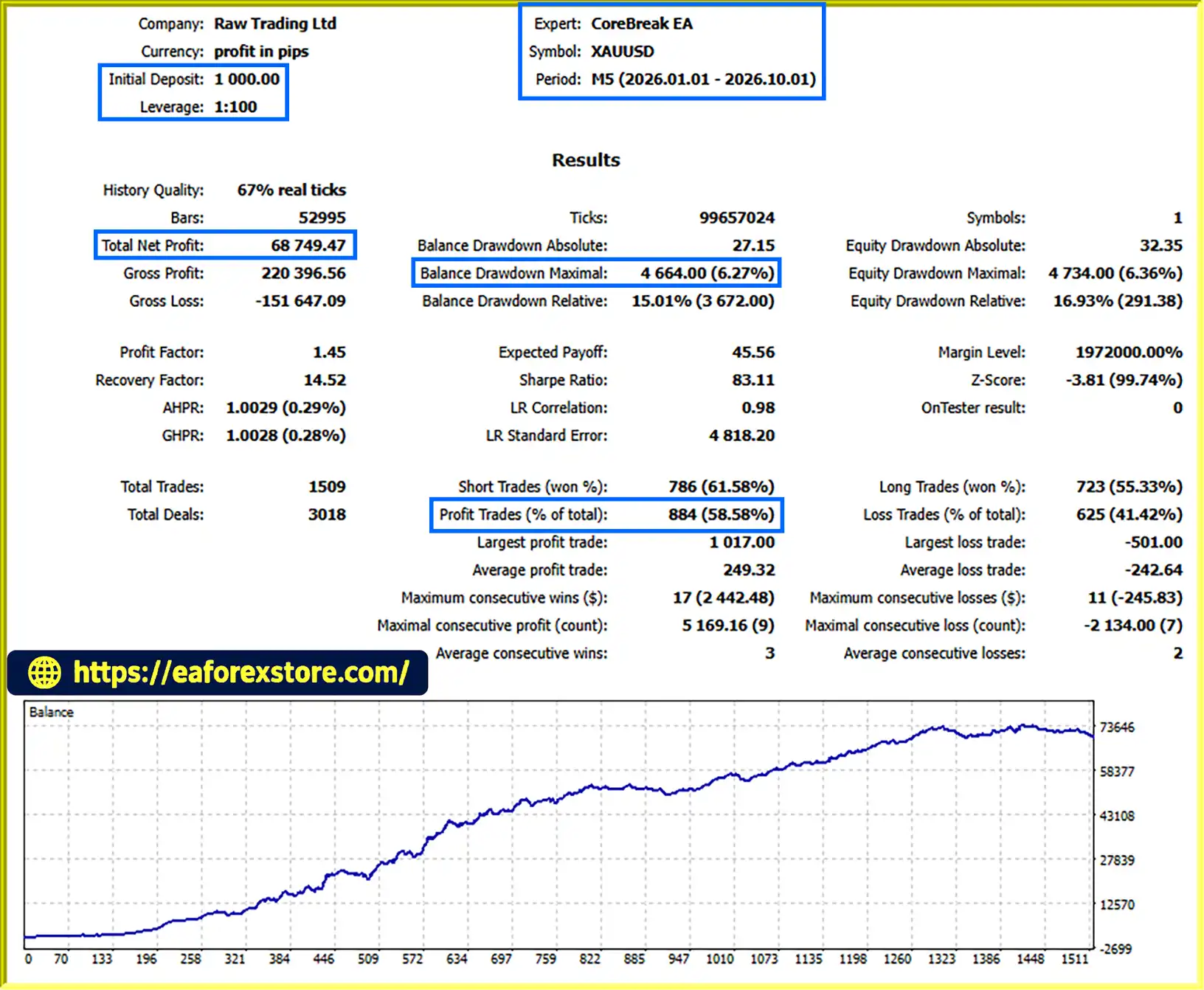
According to the supplied product description, the reported XAUUSD backtest over nine months showed the following results:
Initial deposit: $1,000
Total net profit: $68,749.47
Win rate: 58.58%
Maximum drawdown: 6.27%
These figures are reported historical results and have not been independently verified here. Actual performance may differ because of spreads, commissions, slippage, execution conditions, and changing market behavior. Past performance does not guarantee future results.
5. Does CoreBreak EA MT5 support different lot-sizing methods?
Yes. CoreBreak EA MT5 supports fixed-lot sizing, which uses a predetermined trading volume, and balance-based sizing, which adjusts volume according to the account balance and configured parameters. A maximum lot-size limit can restrict the calculated volume. Traders should verify the settings and potential monetary loss per trade before using either method.
6. Can I customize the entry and exit settings?
Yes. Users can adjust the breakout lookback period, pending-order offsets, minimum entry distance, stop-loss and take-profit levels, trailing-stop settings, lot-sizing parameters, maximum lot size, and trading window. The product package also lists XAUUSD presets for M5 and M15 configurations, including a fixed-lot 0.01 preset.
7. What are the risks of using CoreBreak EA MT5?
The EA can experience false breakouts, particularly in sideways or volatile markets. Consecutive losing trades, unsuitable stop-loss distances, increasing lot sizes, slippage, and incorrect point conversions can affect results. Traders should backtest and demo-test the EA under realistic conditions and avoid assuming that a reported backtest guarantees future profitability.
8. How do I install CoreBreak EA MT5 on MetaTrader 5?
Download the EA file and open File → Open Data Folder in MT5. Copy the file into MQL5 → Experts, refresh the Navigator, and attach the EA to the intended chart. Configure the trading parameters, confirm the symbol and timeframe requirements, and enable algorithmic trading. Test pending-order placement, position sizing, stop-loss, take-profit, trailing-stop, and trading-hour behavior in the Strategy Tester and on a demo account before considering live trading.
In stock
In stock
In stock
In stock
In stock
Out of stock
No account yet?
Create an Account












 Automatic EA
 EA Best Seller
 Expert Advisor MT4
 Expert Advisor MT5
 HFT EA


Reviews
Clear filtersThere are no reviews yet.