









-
 Unlimited Activations
-
 Instant delivery
-
 Easy to install




 Unlimited Activations
Instant delivery
Easy to install
Unlimited Activations
Instant delivery
Easy to install
 Free Update
 Free Install Support

Gold Scalper Advanced Pro EA MT5 is an automated Expert Advisor (EA) designed for Gold (XAUUSD) trading on the MetaTrader 5 (MT5) platform. It combines configurable lot sizing, risk-management settings, an economic news filter, pending-order controls, and a daily drawdown feature intended to support traders who operate under funded-account rules.
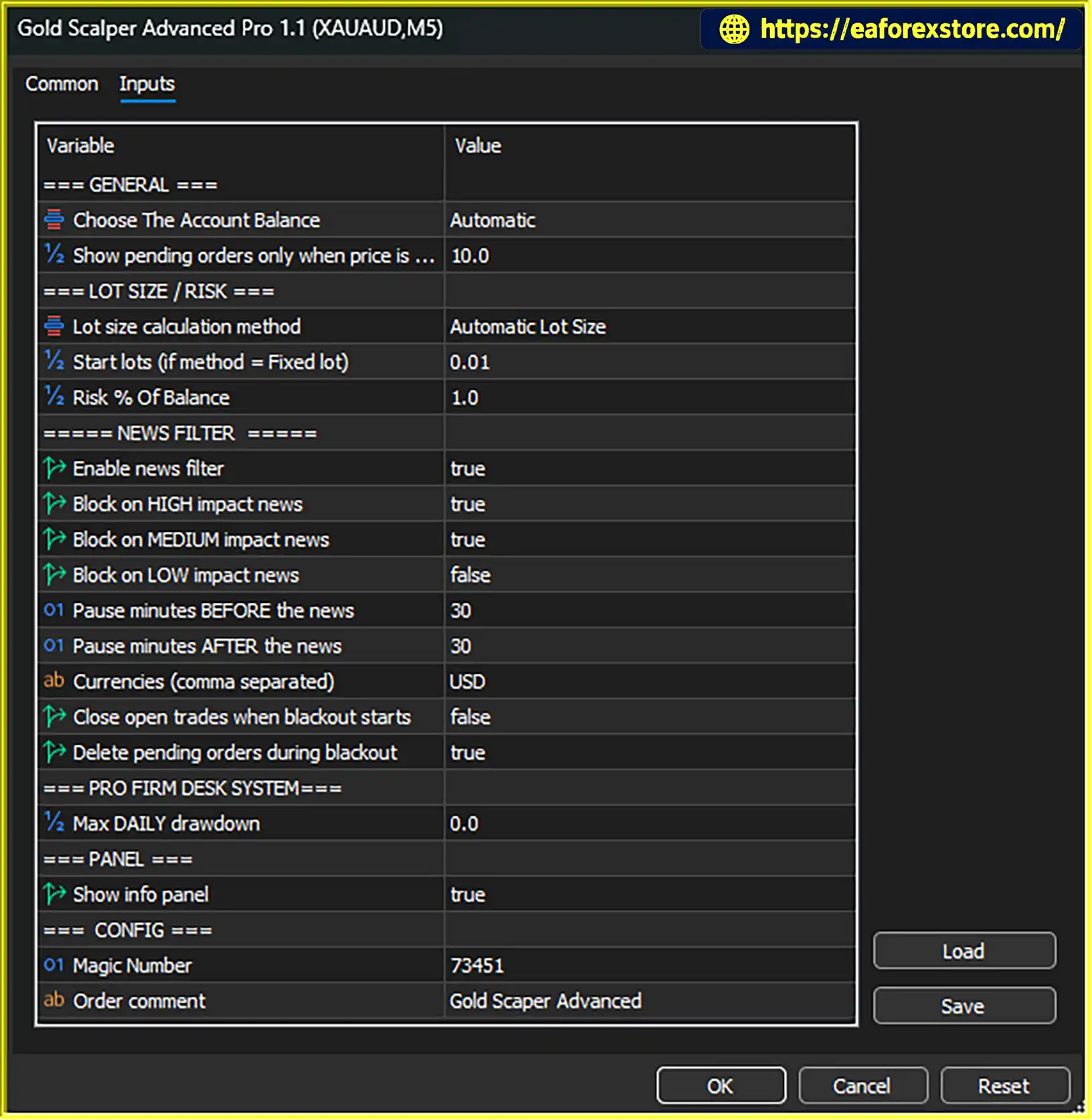
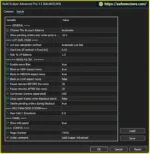
The EA allows users to choose between automatic position sizing based on account balance and a fixed-lot mode. Its news filter can be configured according to economic-event impact levels and selected currencies, with adjustable periods before and after scheduled announcements.
Additional features include optional pending-order deletion during news blackouts, the ability to close open positions when a blackout begins, and a chart panel displaying trading information.
These controls can help traders organize their trading activity around economic announcements and predefined account limits. However, the available product description does not fully explain the EA’s underlying entry and exit strategy. Its profitability and suitability should therefore be assessed through independent testing rather than inferred from its feature list.
Gold Scalper Advanced Pro EA MT5 supports automatic position sizing based on a specified risk percentage of the account balance.
This feature adjusts trading volume according to the account balance and the selected risk setting. When configured appropriately, percentage-based sizing can help traders apply a consistent position-sizing framework.
However, the actual monetary loss may differ from the intended risk because of slippage, market gaps, spread changes, and execution conditions.
Traders can disable automatic sizing and use a fixed starting lot instead. This option is suitable for users who prefer to maintain a consistent nominal trading volume.
The fixed-lot setting should be selected according to account size, instrument specifications, and the potential loss at the stop-loss level. A fixed lot does not automatically mean fixed monetary risk.
The EA includes an economic-calendar filter that allows traders to control which event impact levels can restrict trading.
Depending on the configuration, users can block high-impact, medium-impact, or low-impact events. This flexibility allows traders to determine how strictly the EA should respond to scheduled economic announcements.
For gold traders, US dollar-related events may be particularly relevant because announcements can coincide with rapid price movements and changing spreads.
The news filter supports selected currencies, with the US dollar identified as the main focus for gold trading. Additional currencies can be included according to the EA’s available settings.
Correct currency selection helps ensure that the filter monitors the intended events. Traders should confirm the supported economic-calendar source, currency codes, and data-update behavior in the official documentation.
Gold Scalper Advanced Pro EA MT5 allows users to configure how long trading should be restricted before and after an economic announcement.
A longer blackout can reduce exposure to scheduled event volatility but may also prevent the EA from taking otherwise eligible trades. A shorter blackout may allow more trading activity while providing less separation from the announcement.
The appropriate configuration depends on the trading strategy, instrument, and the events being monitored.
The EA can optionally delete pending orders when a news blackout begins.
This feature is designed to reduce the chance of a pending order being triggered during a sudden price spike around an economic announcement.
However, order deletion may depend on timing and broker execution. An order could be triggered before the EA processes the blackout, so this feature should not be treated as complete protection against news-related losses.
Traders can choose whether open trades should be closed when a news blackout begins.
If enabled, this setting can reduce exposure to selected scheduled announcements. If disabled, existing positions may remain open during the blackout even when new trading activity is restricted.
Closing positions automatically can also realize a loss or exit a trade before a potential favorable move. Users should understand the precise behavior before enabling this option.
The EA includes a daily drawdown control intended to help traders manage trading activity according to predefined loss limits.
This may be useful for users working with proprietary trading firms or other accounts that enforce daily loss rules. However, the feature’s effectiveness depends on its configuration and how the EA measures daily drawdown.
Traders should confirm whether the calculation uses balance, equity, closed losses, floating losses, or another method. They should also verify whether the control blocks new entries, closes existing trades, or performs both actions.
The EA provides a chart panel for displaying trading information. This can help users monitor relevant information without navigating through multiple platform windows.
The exact metrics displayed depend on the EA’s implementation and should be confirmed from the product interface or documentation.
Gold Scalper Advanced Pro EA MT5 combines position-sizing options, news-event restrictions, pending-order management, and daily drawdown controls.
Step 1: Configure Position Sizing
The trader selects automatic balance-based sizing or fixed-lot mode and enters the relevant volume or risk parameters.
Step 2: Set the News Filter
The user selects which event impact levels and currencies should trigger a trading blackout. For gold, US dollar-related announcements may be an important consideration.
Step 3: Define the Blackout Window
The trader sets the number of minutes before and after an event during which trading should be restricted.
Step 4: Choose Order-Handling Rules
The EA can be configured to delete pending orders when a blackout begins. Users can also decide whether open positions should be closed at the start of the restricted period.
Step 5: Configure Daily Drawdown Protection
The trader enters an appropriate daily drawdown limit and verifies how the EA measures losses and responds when the threshold is reached.
Step 6: Monitor the EA
The chart panel provides trading information for monitoring. Users should also review the MT5 terminal, trade history, and account equity to confirm that the EA behaves as expected.
Important: The supplied product description does not fully explain how the EA identifies its initial trading entries, places stop losses, or determines profit targets. These aspects should be verified through the official documentation and Strategy Tester before live use.
The configurable economic news filter gives traders control over which event impact levels and currencies can restrict trading. This can be useful when developing a strategy that avoids selected announcement periods.
Automatic balance-based sizing and fixed-lot trading provide two approaches to controlling position volume.
The option to delete pending orders during a news blackout can help reduce exposure to scheduled event volatility.
Traders can decide whether open trades should be closed when a blackout begins, allowing them to define how existing exposure is managed around news.
The daily drawdown control provides an additional tool for users who need to monitor trading losses against predefined account rules.
The chart panel helps users review displayed trading information directly within MetaTrader 5.
The EA offers multiple controls for news impact levels, currencies, blackout durations, position sizing, and order handling. This can be useful for traders who prefer to customize their trading environment rather than use a completely fixed configuration.
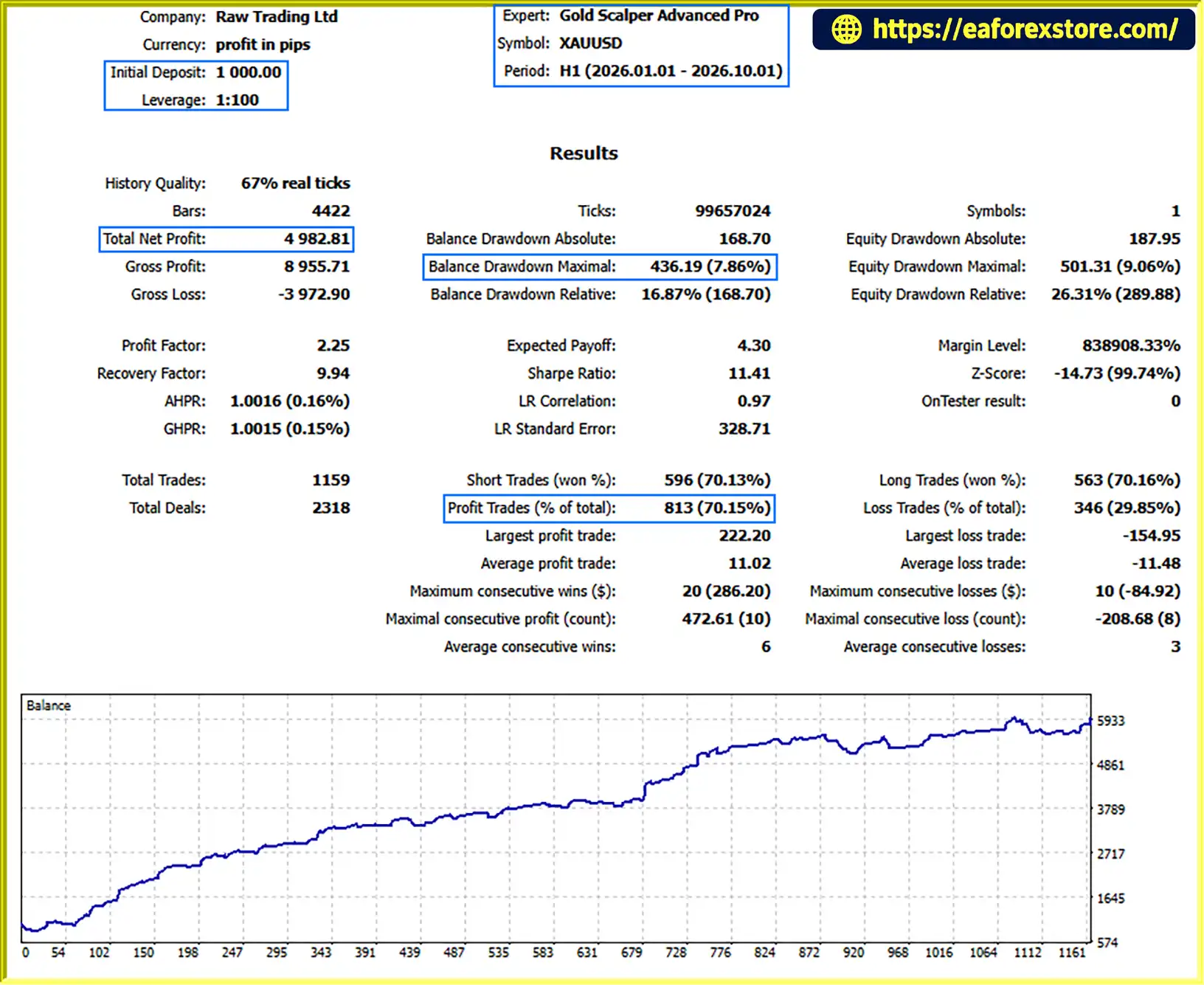
Gold Scalper Advanced Pro EA MT5 backtets
Although Gold Scalper Advanced Pro EA MT5 includes several risk-related settings, no combination of automated controls can eliminate the risks of gold trading.
A high risk percentage can cause substantial equity losses during a series of losing trades. Start with a conservative setting and test its effect on drawdown and recovery periods.
Do not assume that the selected percentage is a guaranteed maximum loss per trade.
News filtering depends on the availability and accuracy of economic-calendar data. Delayed updates, missing events, connectivity issues, or unexpected announcements can leave the EA exposed to sudden price movements.
Confirm how the EA handles unavailable calendar data and whether trading is blocked or allowed when the news feed cannot be accessed.
A news blackout may prevent new trades without closing existing positions. If the close-open-trades option is disabled, an open position can remain exposed to an announcement.
Review both settings and test their behavior rather than assuming that a blackout automatically closes every trade.
Pending-order deletion can reduce exposure to scheduled news, but it cannot guarantee that all orders will be removed before a price spike. An order may already have triggered, or the EA may be unable to process the change immediately.
Confirm how the daily drawdown limit is calculated and when it resets. If the limit is disabled or configured incorrectly, it may not provide the intended protection.
For funded accounts, compare the EA’s behavior with the firm’s official rules, including how floating losses, commissions, swaps, and daily reset times are handled.
Gold spreads can widen during economic releases and volatile market conditions. Slippage may also cause trades to execute at prices different from those requested.
These factors can increase the realized loss or reduce the expected return, even when risk and news settings are configured correctly.
Step 1: Download the EA
Obtain Gold Scalper Advanced Pro EA MT5 from the official vendor or an authorized source. Confirm that the file is compatible with MetaTrader 5.
Step 2: Open MetaTrader 5
Launch MT5 and log in to your trading account.
Step 3: Install the EA
Select File → Open Data Folder in MT5. Navigate to MQL5 → Experts and copy the EA file into that directory.
Step 4: Refresh the Navigator
Return to MT5 and refresh the Expert Advisors section in the Navigator, or restart the platform if required.
Step 5: Open the Recommended Gold Chart
Open the XAUUSD chart and confirm the recommended timeframe in the official documentation. The supplied product description does not specify a timeframe.
Step 6: Configure the Settings
Review the lot-sizing method, risk percentage, fixed lot, news impact levels, currency list, blackout periods, pending-order deletion, open-position closing, and daily drawdown limit.
Check the EA’s economic-calendar requirements and ensure that the configured time zone and daily reset rules match your intended trading schedule.
Step 7: Enable Automated Trading
Enable algorithmic trading in MT5 and attach the EA to the appropriate chart. Confirm that the EA has the permissions and data access required for its functions.
Step 8: Test Before Live Trading
Run a Strategy Tester backtest where supported, then conduct demo forward testing. Pay particular attention to economic-event filtering, pending-order deletion, open-position handling, and drawdown calculations.
Do not rely on the EA for funded-account compliance until its behavior has been tested against the account provider’s rules.
>>> Join VIP Membership Now <<<
Gold Scalper Advanced Pro EA MT5 combines flexible position sizing, configurable economic news filtering, pending-order management, optional open-position closing, and a daily drawdown feature in one MetaTrader 5 Expert Advisor.
Its news controls may appeal to gold traders who want to restrict trading around selected economic announcements, while its position-sizing options provide flexibility in managing trading volume. The daily drawdown feature may also be useful for users who need a structured approach to account-loss limits.
However, news filtering and drawdown controls are not substitutes for a verified trading strategy. The underlying entry logic and independently verified performance remain important considerations before choosing the EA.
Before using Gold Scalper Advanced Pro EA MT5 with real capital, test its settings thoroughly, verify the economic-calendar behavior, and confirm that its drawdown controls operate as expected. No feature list can replace realistic performance testing and disciplined risk management.
Risk Disclaimer: Trading gold and other financial instruments involves substantial risk and may result in the loss of some or all invested capital. This article is for informational and educational purposes only and does not constitute financial advice. Past performance does not guarantee future results. Always conduct independent research, test automated systems thoroughly, and trade according to your financial situation and risk tolerance.
1. What is Gold Scalper Advanced Pro EA MT5?
Gold Scalper Advanced Pro EA MT5 is an automated Expert Advisor designed for Gold (XAUUSD) trading on MetaTrader 5. It includes configurable lot sizing, economic news filtering, pending-order management, daily drawdown controls, and an on-chart information panel.
2. How does Gold Scalper Advanced Pro EA MT5 manage trading risk?
The EA supports automatic lot sizing based on account balance and a fixed-lot mode. It also provides a daily drawdown feature intended to help users manage losses against predefined limits. Traders should verify how the risk and drawdown calculations work because these settings cannot guarantee a maximum realized loss or prevent all losses.
3. Does Gold Scalper Advanced Pro EA MT5 have an economic news filter?
Yes. The EA allows users to configure news filtering by event impact level and selected currencies. Traders can choose high-, medium-, or low-impact events and adjust the blackout periods before and after announcements. The effectiveness of this feature depends on correct settings and the availability and accuracy of economic-calendar data.
4. Can Gold Scalper Advanced Pro EA MT5 delete pending orders during news?
Yes. The EA can optionally delete pending orders when a news blackout begins. This is intended to reduce the chance of orders being triggered during sudden price movements around scheduled announcements. However, an order may trigger before deletion is processed, so this feature does not eliminate news-related trading risk.
5. Can the EA close open positions during a news blackout?
Yes. Users can enable an option to close open positions when a news blackout begins. If this option is disabled, existing positions may remain open during the restricted period. Traders should test this behavior carefully because automatic closing can realize losses or exit trades before a potentially favorable price movement.
6. What are the reported backtest results for Gold Scalper Advanced Pro EA MT5?
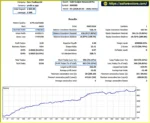
According to the supplied product description, the reported XAUUSD backtest over nine months produced the following results:
Initial deposit: $1,000
Total net profit: $4,982.81
Win rate: 70.15%
Maximum drawdown: 7.86%
These figures are reported historical results and have not been independently verified here. Actual performance may differ due to market conditions, spreads, commissions, slippage, and execution quality. Past performance does not guarantee future results.
7. Is Gold Scalper Advanced Pro EA MT5 suitable for funded trading accounts?
The EA includes a daily drawdown control intended to support traders operating under funded-account rules. However, suitability depends on how the EA calculates daily drawdown, handles floating losses, accounts for commissions and swaps, and responds when a limit is reached. Traders should verify these details and test the EA against their funding provider's specific rules before relying on it.
8. How do I install Gold Scalper Advanced Pro EA MT5?
Download the EA file, open File → Open Data Folder in MetaTrader 5, and copy the file into MQL5 → Experts. Refresh the Navigator, open the recommended XAUUSD chart, attach the EA, and configure its risk, news-filter, order-management, and drawdown settings. Enable algorithmic trading and conduct backtesting and demo forward testing before using real funds.
In stock
In stock
In stock
In stock
In stock
Out of stock
No account yet?
Create an Account












 Automatic EA
 EA Best Seller
 Expert Advisor MT4
 Expert Advisor MT5
 HFT EA


Reviews
Clear filtersThere are no reviews yet.