









-
 Unlimited Activations
-
 Instant delivery
-
 Easy to install






 Unlimited Activations
Instant delivery
Easy to install
Unlimited Activations
Instant delivery
Easy to install
 Free Update
 Free Install Support

Crypto Master EA MT4 is a fully automated Bitcoin trading Expert Advisor developed for the MetaTrader 4 (MT4) platform. Specifically designed for trading BTCUSD (Bitcoin against the US Dollar), this automated crypto trading system combines pending order execution, intelligent trade management, money management, and drawdown protection to provide a structured approach to cryptocurrency trading.
Bitcoin is well known for its high volatility, rapid price fluctuations, and unique market behavior. Crypto Master EA MT4 is designed to monitor market conditions continuously and identify potential trading opportunities based on its predefined trading logic.
The EA can automatically place BUY STOP and SELL STOP pending orders when the required conditions are satisfied. Once an order is triggered, the system manages the resulting position using its internal calculations and configured trade management rules.
With integrated Stop Loss, Take Profit, Trailing Stop, and drawdown protection functionality, Crypto Master EA MT4 provides traders with an automated framework for managing Bitcoin trading positions.
The EA is designed for traders who want to automate their BTCUSD trading strategy without constantly monitoring the market manually.
>>> Delivery time 24h-48h after payment.
>>> Refund if not delivered.
>>> You will receive the latest version without any limitations (ID+Time).Reviewed by Jason Stap <<<
Crypto Master EA MT4 automates the trading process, including pending order placement, position management, and trade exits.
Once properly configured and connected to the trading platform, the EA operates according to its programmed trading logic without requiring constant manual intervention.
The EA is designed specifically for the Bitcoin market.
Unlike multi-instrument trading systems,Crypto Master EA MT4 focuses on BTCUSD and is intended to work with the market characteristics of Bitcoin, including its volatility and rapid price movements.
Crypto Master EA MT4 uses BUY STOP and SELL STOP pending orders to prepare for potential market movements.
This approach allows the EA to evaluate trading conditions and place orders according to its predefined strategy rather than relying entirely on immediate market execution.
Once a pending order becomes an active position, the EA automatically manages the trade using its internal calculations and trading rules.
The system is designed to handle position management and exit decisions according to its configured parameters.
Crypto Master EA MT4 includes a money management system that allows traders to configure position sizing according to their account balance, capital allocation, and risk preferences.
Appropriate position sizing is especially important when trading Bitcoin because of its significant price fluctuations.
The EA supports Stop Loss and Take Profit functionality to define trade protection and exit conditions.
These features provide a structured approach to managing individual trading positions.
The integrated Trailing Stop system adjusts trade management as price moves in a favorable direction.
Its purpose is to help protect accumulated gains while allowing a position to remain open when market conditions meet the configured requirements.
Crypto Master EA MT5 includes a Drawdown Protection Panel that allows traders to define account drawdown thresholds.
When enabled and configured appropriately, the protection system can help monitor account equity and manage trading activity around predefined risk limits.
The MT5 version of Crypto Master EA MT4 is designed for the MetaTrader 5 trading platform.
It provides traders with access to the MT4 environment, including its charting tools, strategy testing capabilities, and automated trading functionality.
Crypto Master EA MT4 follows a structured automated trading process designed to identify and manage potential Bitcoin trading opportunities.
The EA continuously monitors the BTCUSD market on the recommended M15 timeframe.
It evaluates market conditions according to its internal trading logic to identify potential trading opportunities.
When the required conditions are satisfied, the EA prepares a potential trading setup.
Depending on the market conditions and its trading rules, the EA can prepare either a BUY STOP or a SELL STOP pending order.
The EA automatically places the appropriate pending order according to its predefined calculations.
Pending orders allow the system to prepare for potential price movements without requiring immediate market entry.
When the market reaches the pending order’s activation price, the order becomes an active trading position.
The EA then manages the position using its configured trading rules, including Stop Loss, Take Profit, and Trailing Stop functionality.
The Drawdown Protection Panel provides an additional layer of risk monitoring.
Traders can configure protection thresholds according to their account requirements and trading preferences.
This functionality may be particularly relevant for traders who operate accounts with predefined equity or drawdown restrictions.
Crypto Master EA MT4 is specifically developed for BTCUSD trading.
Its dedicated focus on Bitcoin provides a structured framework for traders interested in automating their cryptocurrency trading activities.
The EA automates pending order placement, position management, and trade exits.
This allows traders to reduce the need for constant chart monitoring while maintaining oversight of their trading accounts.
The system follows predefined trading rules and automated execution procedures.
This can help traders maintain a consistent trading approach rather than making every trading decision manually.
Stop Loss, Take Profit, Trailing Stop, and drawdown protection functionality provide multiple tools for managing trading exposure.
These features can help traders implement a more structured risk management framework.
The configurable money management system allows traders to adjust position sizing according to their individual trading preferences and account conditions.
This flexibility is useful when evaluating different account sizes and risk profiles.
Crypto Master EA MT4 may be used on personal trading accounts or accounts with specific risk requirements.
The Drawdown Protection Panel can help traders monitor account equity and predefined drawdown limits.
However, traders should always verify that the EA’s behavior is compatible with their broker’s trading conditions and any applicable account rules.
🔺BTCUSD
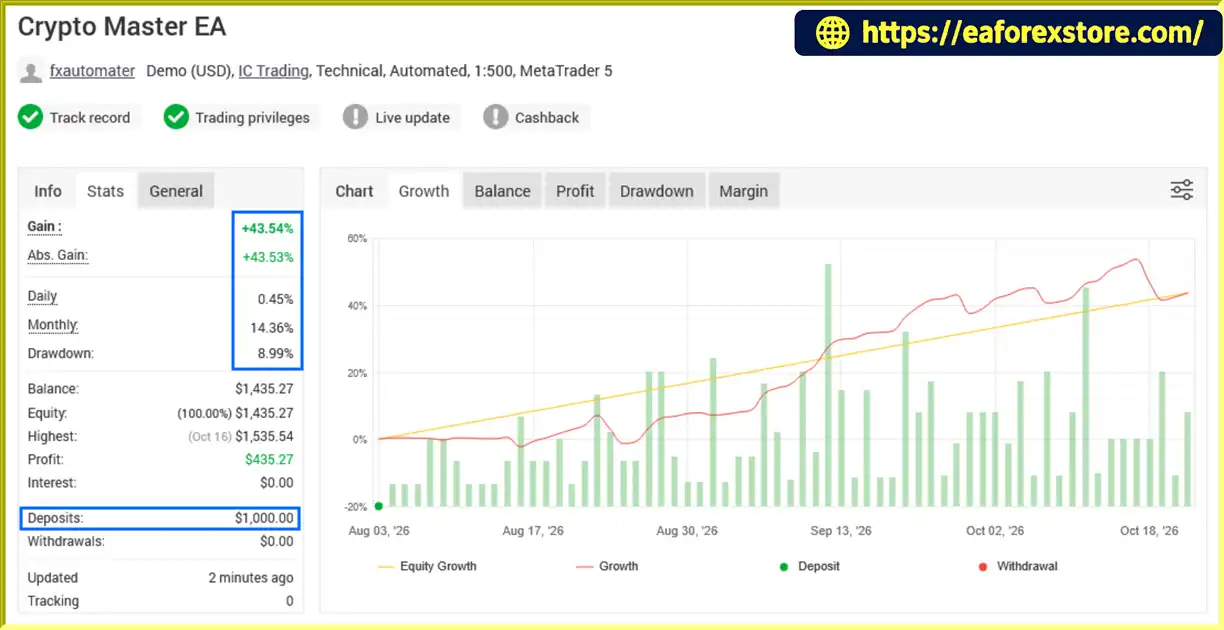
Crypto Master EA MT4 MyFxBook
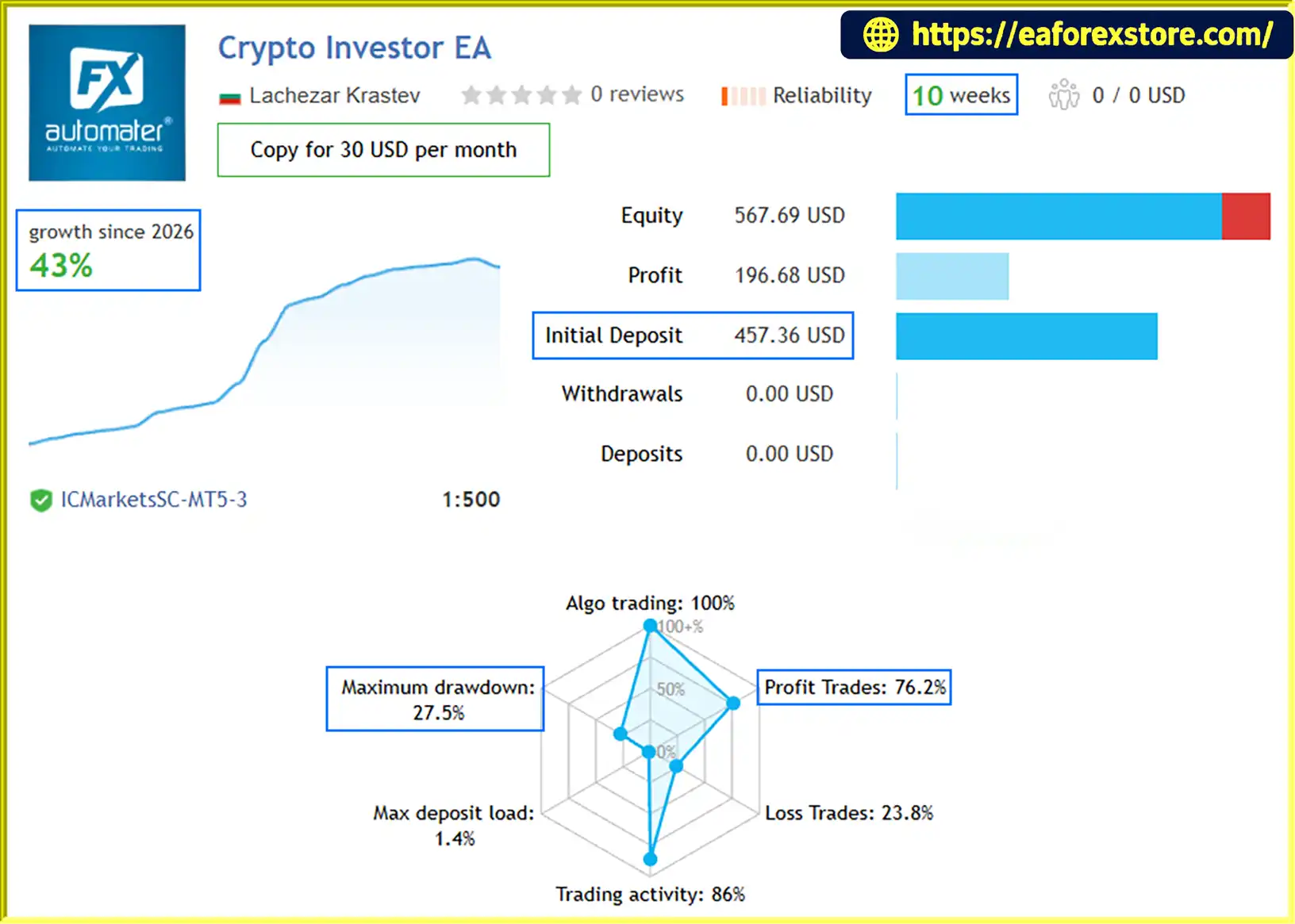
🔺Crypto Master EA– 10 consecutive weeks
Crypto Master EA MT4 Live Account Results
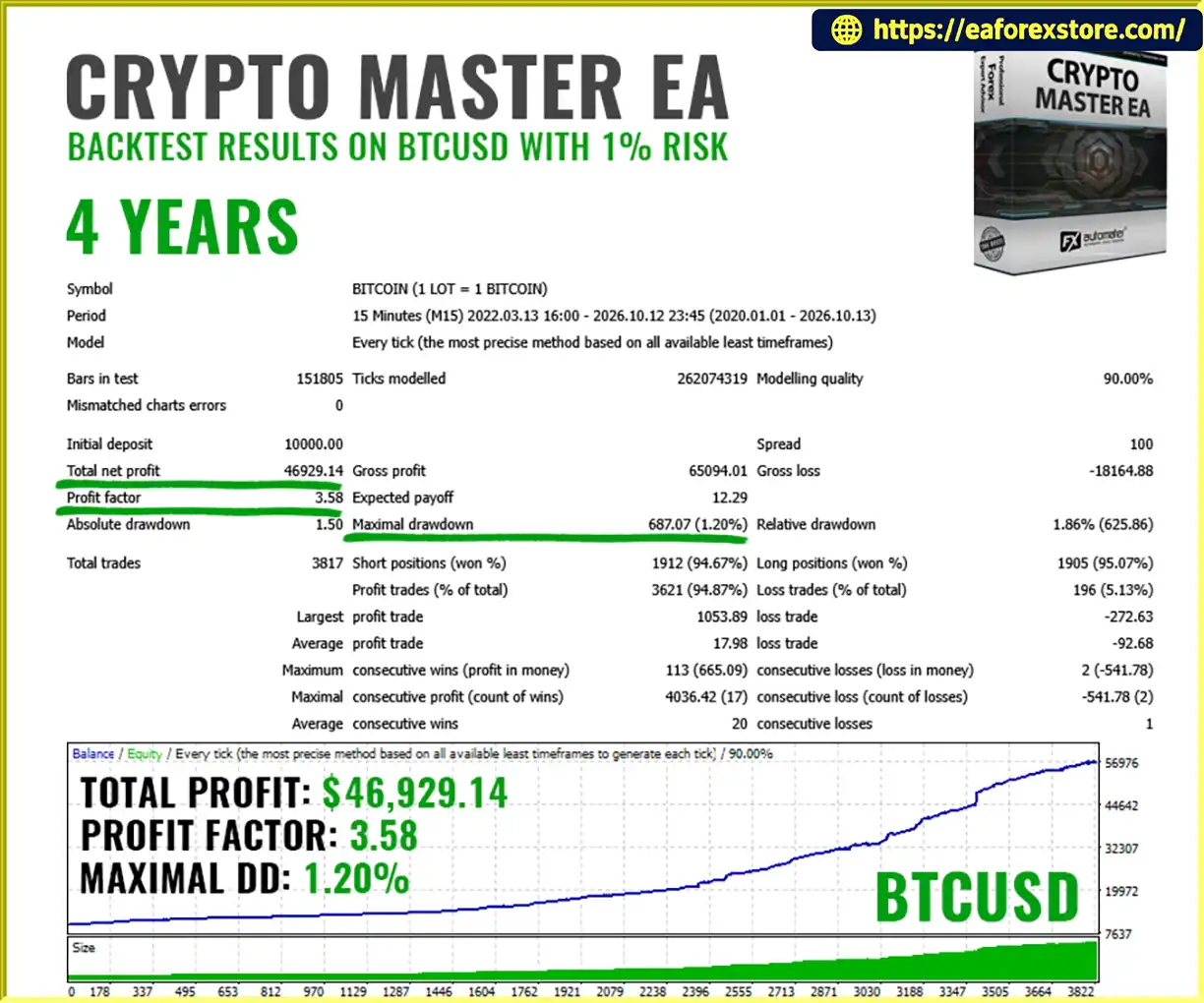
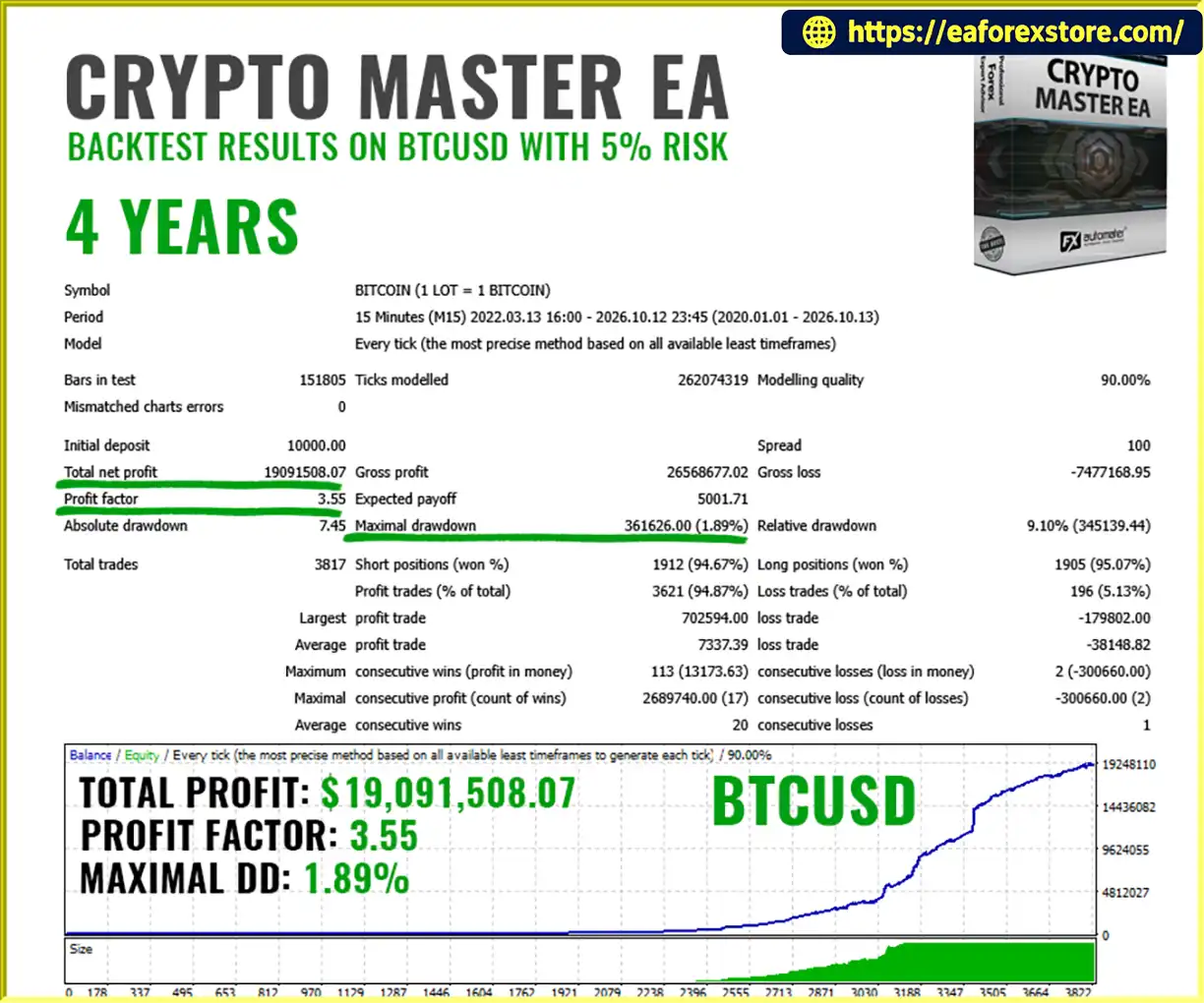
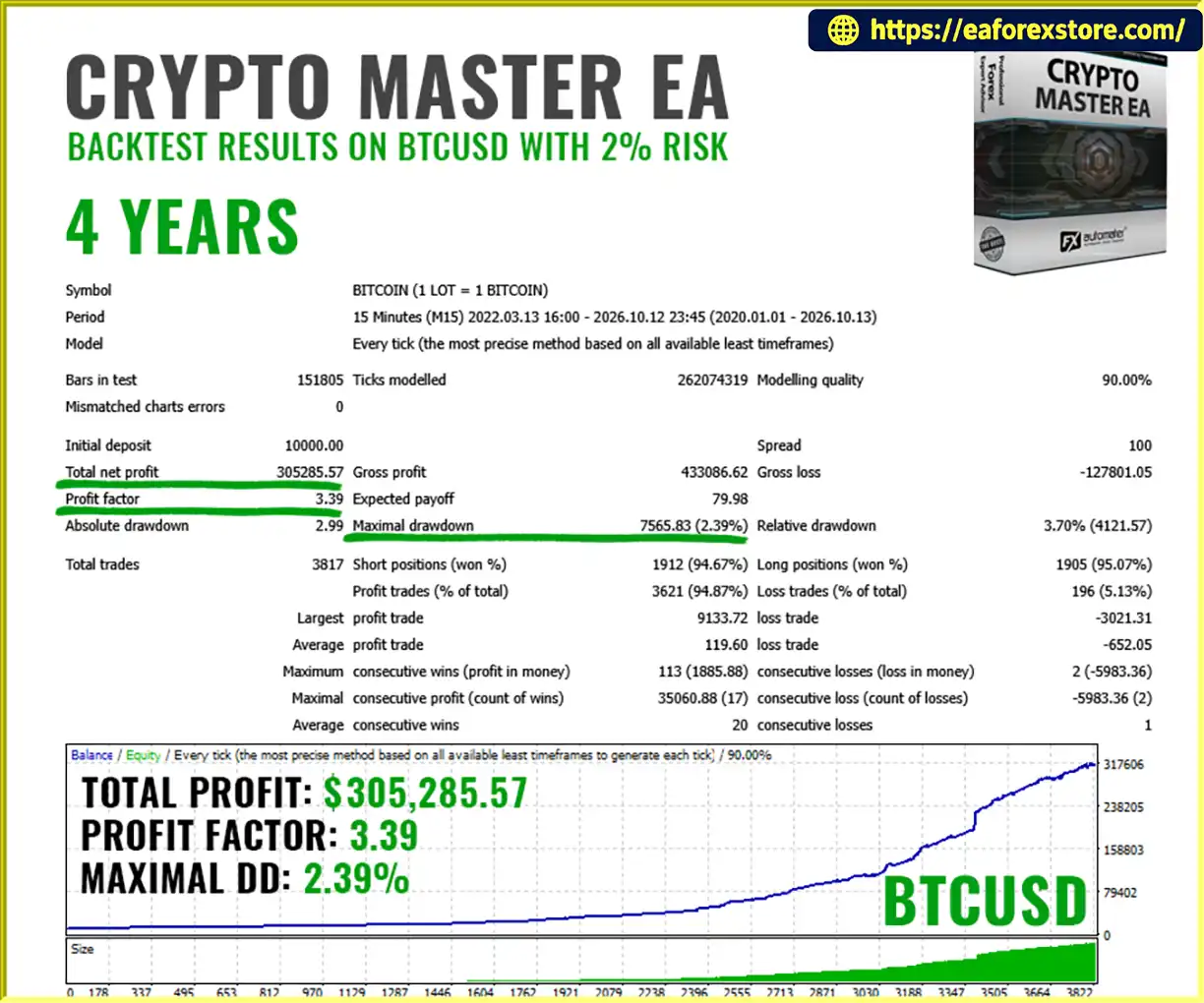
🔺BTCUSD pair – 4Years
Crypto Master EA backtets
🔺BTCUSD pair – 4Years
Crypto Master MT4 backtets
Risk management is essential when trading Bitcoin because of its high volatility and potentially rapid price movements.
Crypto Master EA MT4 includes several features designed to help traders manage risk and monitor their trading activity.
The EA provides configurable money management functionality to help determine appropriate trading volumes.
Traders should select position sizes based on their account equity, trading conditions, and personal risk tolerance.
Using a larger position size can significantly increase potential losses.
The EA supports Stop Loss functionality to define a protective exit level for each trade.
A Stop Loss can help limit losses under normal execution conditions, although the final execution price may differ during periods of high volatility or market gaps.
Take Profit functionality allows traders to define potential profit targets according to the EA’s trading parameters.
This provides a structured approach to trade exits.
The Trailing Stop system adjusts the stop level as a trade develops.
Its purpose is to help protect accumulated gains when the market moves favorably.
However, trailing stops cannot guarantee a specific profit or prevent all losses.
The integrated Drawdown Protection Panel allows traders to configure drawdown thresholds.
This feature may be useful for monitoring account equity and managing trading activity around predefined risk limits.
Traders using prop firm accounts should verify the EA’s drawdown calculation method and confirm that it matches the firm’s specific rules.
Alert functionality: The EA’s Drawdown Protection Panel provides account risk monitoring. Specific push notifications, email alerts, or sound alerts should only be considered available if they are explicitly supported by the installed version.
Follow these steps to install and configure Crypto Master EA MT4 on your MetaTrader 4 platform.
Download the Crypto Master EA MT4 file provided by the developer.
The EA is typically supplied as an .ex4 or .mq4 file.
MQL4 directory.Experts folder.Copy the Crypto Master EA MT4 file into:
MQL4/Experts/
If the EA includes additional indicators, libraries, or supporting files, install them in their corresponding folders according to the developer’s instructions.
Return to MetaTrader 4
In the Navigator panel:
Alternatively, restart the MT4 platform.
The EA should now appear in the Expert Advisors list.
Make sure the symbol matches the instrument supported by your broker.
Drag Crypto Master EA MT4 onto the BTCUSD M15 chart.
Review the available settings and configure the EA according to your trading preferences.
Recommended configuration:
Enable the Algo Trading button in MetaTrader 4.
Check the EA’s status on the chart to confirm that automated trading is enabled.
Ensure that the platform is connected to the broker’s trading server.
Before using a real account:
A VPS is recommended for traders who require continuous automated operation.
>>> Join VIP Membership Now <<<
Crypto Master EA MT4 is an automated Bitcoin trading Expert Advisor designed to provide a structured approach to BTCUSD trading through pending order execution, automated position management, money management, and drawdown protection.
Its combination of BUY STOP and SELL STOP orders, Stop Loss, Take Profit, Trailing Stop, and configurable drawdown controls offers a range of tools for traders interested in automated cryptocurrency trading.
The EA is designed for the MetaTrader 4 platform and is recommended for BTCUSD trading on the M15 timeframe.
For traders who prefer systematic execution and automated trade management, Crypto Master EA MT4 provides a framework for evaluating and implementing a predefined Bitcoin trading strategy.
However, Bitcoin remains a highly volatile financial instrument. No Expert Advisor can guarantee profits, eliminate trading risk, or ensure that a particular drawdown limit will never be exceeded.
Traders should begin with a demo account, evaluate the EA using realistic trading conditions, and select conservative money management settings before considering live trading.
Crypto Master EA MT4 – Automated Bitcoin Trading with Structure, Control and Precision.
1. What Is Crypto Master EA MT4?
Crypto Master EA MT4 is a fully automated Bitcoin trading Expert Advisor designed for MetaTrader 4. It focuses on BTCUSD trading and uses BUY STOP and SELL STOP pending orders to identify potential trading opportunities. The EA also includes automated trade management, Stop Loss, Take Profit, Trailing Stop, money management, and drawdown protection features.
2. Which Cryptocurrency and Timeframe Does Crypto Master EA MT4 Support?
Crypto Master EA MT4 is specifically designed for BTCUSD (Bitcoin against the US Dollar). The recommended trading timeframe is M15 (15-minute chart). Before using the EA, traders should verify that their broker supports BTCUSD on MetaTrader 4 and check the symbol specifications, spreads, commissions, and trading hours.
3. How Does Crypto Master EA MT4 Work?
Crypto Master EA MT4 monitors BTCUSD market conditions and evaluates potential trading opportunities using its programmed trading logic. When the required conditions are met, it places a BUY STOP or SELL STOP pending order. Once the order is triggered, the EA manages the position using its configured Stop Loss, Take Profit, Trailing Stop, and trade management rules.
4. Does Crypto Master EA MT4 Include Stop Loss and Drawdown Protection?
Yes. The EA supports Stop Loss and Take Profit functionality, a dynamic Trailing Stop, and a Drawdown Protection Panel. These features help traders establish trade exit levels and monitor account risk according to configured parameters. However, extreme volatility, slippage, and execution delays can cause actual losses to exceed expected levels, so drawdown protection cannot guarantee capital preservation.
5. Can Beginners Use Crypto Master EA MT4 Without Programming Knowledge?
Yes. Crypto Master EA MT4 is designed to automate trade execution and position management without requiring users to write code. Beginners can install it on MetaTrader 4, configure the available settings, and monitor its activity through the trading platform. However, understanding position sizing, Bitcoin volatility, and drawdown limits is important before using the EA on a live account.
6. Is Crypto Master EA MT4 Suitable for Prop Firm Accounts?
Crypto Master EA MT4 includes drawdown monitoring functionality that may help traders manage account equity against predefined risk thresholds. However, compatibility with a prop firm depends on the firm's rules, including permitted instruments, automated trading policies, daily loss limits, and maximum drawdown calculations. Always verify these requirements and test the EA's behavior before using it on a funded account.
7. What Are the Backtest Results of Crypto Master EA MT4?
The published product information reports several BTCUSD performance tests, including a four-year backtest with a reported 94.87% win rate and maximum drawdown of 2.39%. Other displayed results include a Myfxbook-reported gain of 43.54% and a separate 10-week result with a reported maximum drawdown of 27.5%. These figures come from different reported tests or accounts and should not be directly compared without reviewing their underlying records. Historical results do not guarantee future profitability.
8. How Do I Install Crypto Master EA MT4 on MetaTrader 4?
To install Crypto Master EA MT4, open MT4 and select File → Open Data Folder → MQL4 → Experts. Copy the EA's .ex4 file into the Experts folder, refresh the Expert Advisors list, and attach the EA to your broker's BTCUSD chart on the recommended M15 timeframe. Configure the money management and drawdown protection settings, enable automated trading, and test the EA on a demo account before live deployment. A reliable VPS is recommended for continuous operation.
In stock
In stock
In stock
In stock
In stock
Out of stock
No account yet?
Create an Account












 Automatic EA
 EA Best Seller
 Expert Advisor MT4
 Expert Advisor MT5
 HFT EA


Reviews
Clear filtersThere are no reviews yet.