









-
 Unlimited Activations
-
 Instant delivery
-
 Easy to install



 Unlimited Activations
Instant delivery
Easy to install
Unlimited Activations
Instant delivery
Easy to install
 Free Update
 Free Install Support

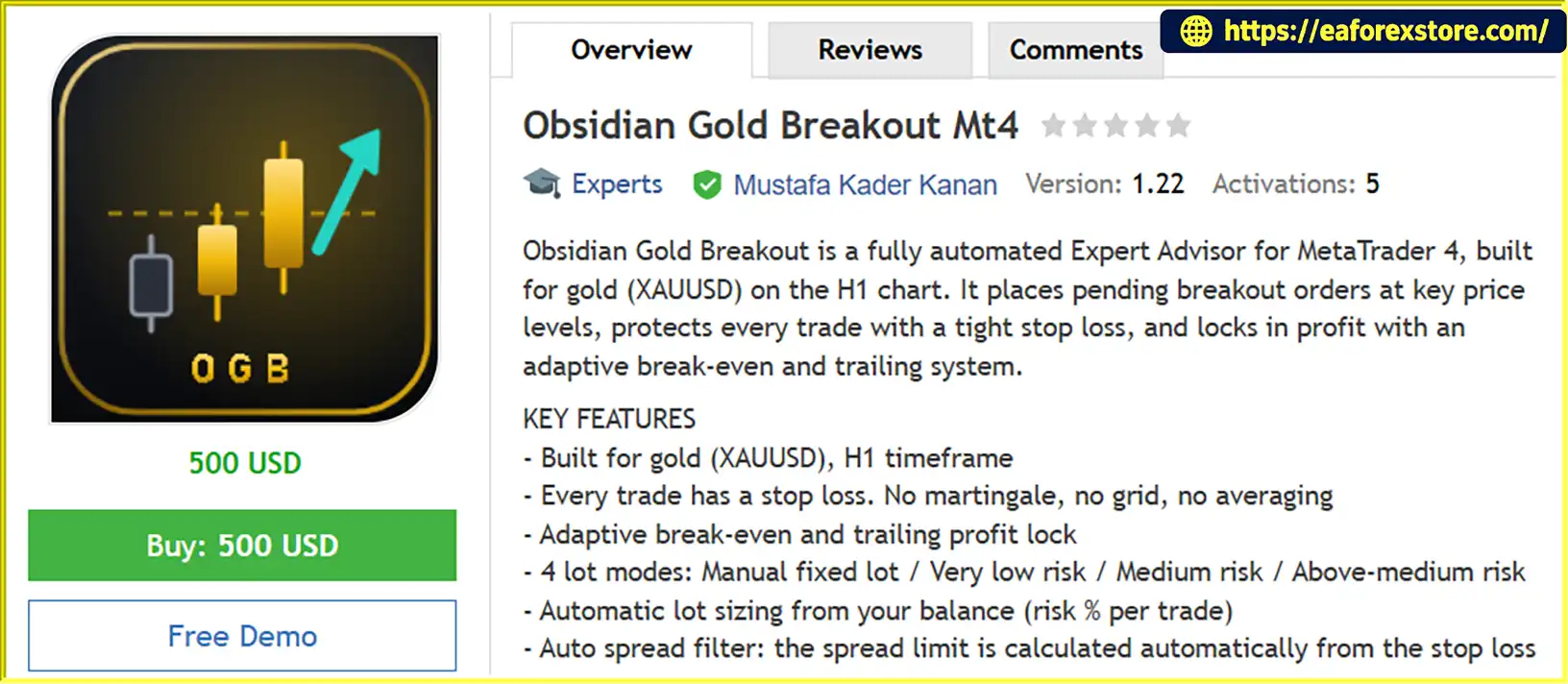
Obsidian Gold Breakout Mt4 is a fully automated Gold Trading Expert Advisor developed for the MetaTrader 4 (MT4) platform. Designed specifically for XAUUSD on the H1 timeframe, this EA uses a pending-order breakout strategy to identify potential trading opportunities around key price levels.
The system automatically places pending breakout orders according to its trading logic and manages each position using a protective Stop Loss, adaptive break-even functionality, and a trailing profit-lock mechanism.
Obsidian Gold Breakout MT4 combines automated trade execution with flexible money management, spread filtering, and pre-trade safety checks. Its multiple lot modes allow traders to select a position-sizing approach that matches their preferred risk level, while the integrated on-chart dashboard provides detailed account information and trading performance statistics.
Unlike trading systems that rely on martingale, grid trading, or averaging strategies, Obsidian Gold Breakout MT4 is designed to operate without these techniques. Every trade is protected by a Stop Loss according to the EA’s trading rules.
With its focus on structured breakout trading, configurable risk settings, and comprehensive performance monitoring, Obsidian Gold Breakout MT4 is designed for traders seeking an automated approach to Gold trading on MetaTrader 4.
>>> Delivery time 24h-48h after payment.
>>> Refund if not delivered.
>>> You will receive the latest version without any limitations (ID+Time).Reviewed by Jason Stap <<<
Obsidian Gold Breakout Mt4 Overview
Obsidian Gold Breakout MT4 is designed specifically for XAUUSD trading on the H1 chart.
The EA automatically places pending breakout orders at key price levels according to its programmed trading rules. This allows it to prepare for potential price movements without requiring constant manual order placement.
Every trade is designed to include a Stop Loss to define its initial risk parameters.
The EA does not use martingale, grid trading, or averaging strategies. This provides a more structured approach to trade management without relying on progressively increasing exposure to recover previous losses.
The adaptive break-even mechanism is designed to adjust trade protection when the position reaches the conditions defined by the EA.
Its purpose is to help reduce the risk of an open trade by moving the Stop Loss toward the entry price when the applicable rules are satisfied.
Moving a Stop Loss to break-even does not guarantee an exit at exactly the entry price because spreads, commissions, and slippage may affect execution.
The trailing system adjusts the protective stop as a trade develops favorably.
This functionality is designed to help protect accumulated gains while allowing a profitable position to remain open when market conditions permit.
Obsidian Gold Breakout MT4 offers four position-sizing modes to accommodate different trading preferences.
The actual monetary risk depends on the Stop Loss distance, account balance, broker contract specifications, and execution conditions.
In risk-based modes, the EA calculates position size according to the configured percentage of account balance per trade.
This helps align trading volume with the selected risk setting instead of relying entirely on a manually specified lot size.
Risk-based lot sizing does not eliminate the possibility of losses exceeding the intended amount under adverse execution conditions.
The EA supports an automatic spread-filter mode.
When Max Spread is set to 0, the system uses its automatic mode, calculating the spread threshold from the Stop Loss according to its internal rules.
Traders can also specify a manual maximum spread in points when their broker’s Gold spread requires a different threshold.
Before placing an order, the EA checks relevant trading conditions, including:
These checks are designed to help avoid order placement when the applicable requirements are not satisfied.
The integrated dashboard provides a detailed overview of account conditions and trading performance.
Depending on the displayed panel, information includes:
This information helps traders monitor the EA’s activity without relying exclusively on external reporting tools.
Obsidian Gold Breakout MT4 includes three visual themes:
Additional chart customization options include chart style, gradient background, grid visibility, account panel, statistics panel, and panel position.
Obsidian Gold Breakout MT4 follows an automated process designed to identify and manage potential Gold breakout opportunities.
The EA operates on the recommended one-hour timeframe and evaluates market conditions according to its programmed trading logic.
The H1 timeframe provides a broader view of price movement than lower intraday timeframes, although it does not eliminate false breakouts or market risk.
The EA identifies key price levels used by its pending-order breakout strategy.
When the relevant setup conditions are met, the system prepares the appropriate pending order.
The exact price-level calculation and entry criteria depend on the EA’s internal implementation.
The EA places pending breakout orders according to its trading rules.
This allows the system to prepare for potential price movements while waiting for the market to reach the relevant activation level.
Before placing an order, the EA checks applicable spread, margin, stop-level, and market-session conditions.
The EA determines the order volume according to the selected lot mode.
In Manual mode, it uses the configured fixed lot size. In risk-based modes, the lot size is calculated using the selected risk percentage and the EA’s position-sizing logic.
Traders should verify the lot-size calculation against their broker’s contract specifications before trading live.
Each trade is opened with a Stop Loss according to the EA’s rules.
As the position develops, the adaptive break-even and trailing profit-lock mechanisms can adjust the protective stop when their configured conditions are satisfied.
These mechanisms are intended to manage exposure and protect favorable price movements.
The on-chart dashboard displays account metrics, trading statistics, equity changes, and recent trades.
Traders can use this information to evaluate the EA’s performance and review whether the selected risk configuration remains appropriate for their account.
Obsidian Gold Breakout MT4 focuses on XAUUSD, one of the most actively traded precious-metal instruments.
Its dedicated H1 breakout approach provides a structured framework for traders who want to automate Gold trading rather than manage every order manually.
The EA does not rely on martingale, grid trading, or averaging strategies.
This means its approach does not depend on progressively increasing trade exposure or accumulating additional positions through those techniques.
However, the absence of these strategies does not guarantee low drawdown or prevent consecutive losses.
Four lot modes provide flexibility for traders with different capital levels and risk preferences.
The risk-based modes offer default risk settings of 0.5%, 1.5%, and 3.0%, while Manual mode allows traders to specify a fixed lot size.
Selecting a suitable risk level is important when trading Gold, where price movements can be substantial.
The combination of Stop Loss, break-even functionality, and trailing profit-lock management is designed to help structure trade protection throughout a position’s lifecycle.
These tools may help manage exposure, but they cannot guarantee profits or prevent all losses.
The automatic spread-filter option reduces the need to manually determine a fixed spread threshold.
Traders can also use a manual setting when their broker’s XAUUSD trading conditions require a specific maximum spread.
The EA’s dashboard combines account monitoring and trading statistics in one interface.
Metrics such as profit factor, drawdown, win rate, Sharpe ratio, and equity curve can help traders assess performance beyond headline net profit alone.
Three visual themes and multiple chart-display options allow traders to customize the interface to their preferences.
This makes it easier to monitor account information and trading statistics within the MT4 chart.
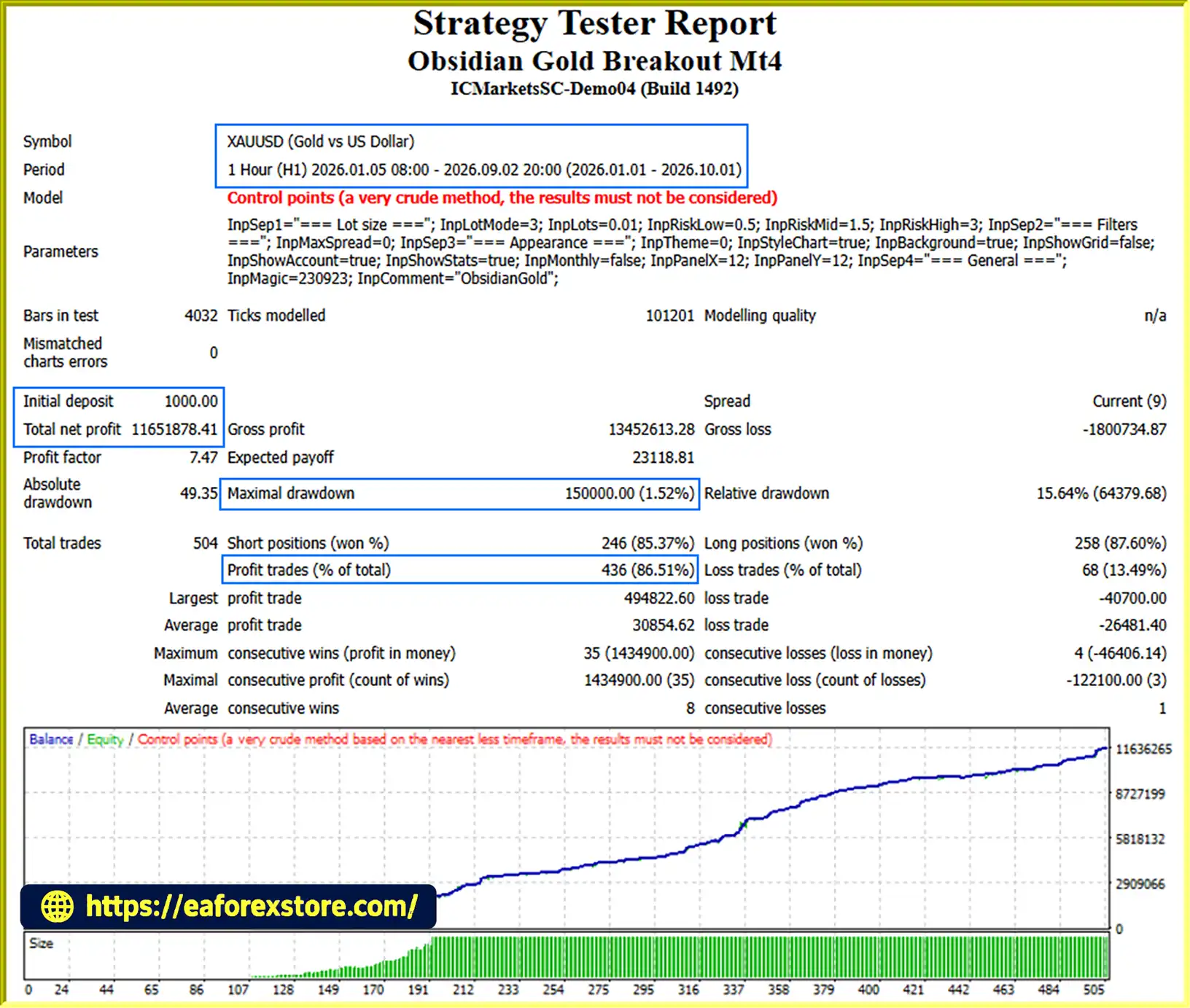
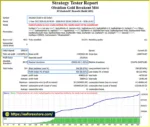
🔺XAUUSD (Gold) pair – 9 months
Obsidian Gold Breakout Mt4 backtets
Risk management is essential when trading Gold, particularly when using automated strategies that can execute orders without manual confirmation.
Obsidian Gold Breakout MT4 incorporates several features designed to help traders manage position sizing and monitor account performance.
The EA offers three default risk-based configurations:
These percentages represent the EA’s default risk settings, not guaranteed maximum loss limits.
Actual losses may differ because of slippage, gaps, spread changes, and broker execution conditions.
The 3.0% setting carries materially greater exposure than the 0.5% setting and may lead to larger equity fluctuations.
Every trade is designed to include a Stop Loss.
This establishes an initial protective exit level, helping define the intended risk before the trade is managed further.
A Stop Loss cannot guarantee execution at the exact specified price during fast markets or adverse liquidity conditions.
The break-even system is designed to move trade protection toward the entry price after the EA’s required conditions are met.
This can help reduce exposure on trades that move favorably, but transaction costs may still result in a net loss even when a position closes near its entry price.
The trailing system adjusts protective stops according to the EA’s internal rules.
Its purpose is to help retain part of a favorable price movement, although a trailing stop does not guarantee that all open profits will be realized.
The EA checks spread and available margin before placing orders.
These checks can help prevent trading under certain unfavorable conditions, but they cannot eliminate execution risk or guarantee that sufficient margin will remain available throughout a trade.
The EA includes market-session checks as part of its order-placement process.
Traders should confirm that their broker’s Gold trading hours and trading conditions are compatible with the EA’s operation.
The dashboard displays account equity, floating P/L, daily results, drawdown, and other trading statistics.
These metrics help traders monitor the account and review whether the EA’s performance remains within their own risk limits.
Alert note: The supplied feature list confirms an on-chart dashboard and account statistics, but does not specify push notifications, email alerts, or sound alerts. These notification types should not be advertised unless confirmed in the installed EA version.
Follow these steps to install and configure Obsidian Gold Breakout MT4 on MetaTrader 4.
Download the Obsidian Gold Breakout MT4 file from the developer.
The EA is typically provided as an .ex4 or .mq4 file.
MQL4 directory.Experts folder.Copy the EA file into:
MQL4/Experts/
If the developer supplies additional indicators or libraries, install them in the appropriate directories according to the accompanying instructions.
Return to MT4.
In the Navigator panel:
You can also restart MetaTrader 4 to reload the EA.
Confirm that the selected symbol matches the instrument supported by the EA.
Drag Obsidian Gold Breakout MT4 from the Navigator panel onto the XAUUSD H1 chart.
Review the available settings and select your preferred configuration.
Recommended starting configuration:
The 0.5% setting is the lowest of the three supplied default risk modes, but it does not make trading risk-free.
Enable the AutoTrading button in MT4.
Make sure the EA is permitted to trade and check its on-chart status for any configuration or execution errors.
Before using a live account:
A VPS is recommended for traders who require continuous automated operation.
>>> Join VIP Membership Now <<<
Obsidian Gold Breakout MT4 is an automated Gold trading Expert Advisor designed for traders who want to implement a structured XAUUSD breakout strategy on MetaTrader 4.
Its combination of pending breakout orders, Stop Loss protection, adaptive break-even, trailing profit lock, and flexible money management provides a systematic approach to automated trade execution.
The EA also includes automatic spread filtering, pre-trade safety checks, and a detailed performance dashboard that displays important account and trading statistics.
With four lot modes and three customizable chart themes, Obsidian Gold Breakout MT4 offers flexibility in both risk configuration and interface presentation.
The supplied backtest figures indicate promising historical results under the reported testing conditions. However, historical performance should never be treated as a guarantee of future profitability or low drawdown.
Traders should begin with a demo account, verify the broker’s trading conditions, and choose a risk setting that matches their financial circumstances and risk tolerance.
Obsidian Gold Breakout MT4 – Automated Gold Breakout Trading with Adaptive Protection and Professional Performance Monitoring..
1. What Is Obsidian Gold Breakout MT4?
Obsidian Gold Breakout MT4 is a fully automated Gold Trading Expert Advisor (EA) designed for MetaTrader 4. It specializes in XAUUSD trading on the H1 timeframe and uses a pending-order breakout strategy to identify potential trading opportunities around key price levels. The EA automatically places orders, manages trades, and applies risk management features, including Stop Loss protection, adaptive break-even, and trailing profit lock.
2. Which Trading Pair and Timeframe Does Obsidian Gold Breakout MT4 Support?
Obsidian Gold Breakout MT4 is specifically designed for XAUUSD (Gold) on the H1 timeframe. It monitors market conditions and places pending breakout orders according to its programmed trading rules. Traders should ensure their broker supports the appropriate Gold symbol and provides compatible trading conditions, including acceptable spreads, contract specifications, and market hours.
3. Does Obsidian Gold Breakout MT4 Use Martingale or Grid Trading?
No. Obsidian Gold Breakout MT4 is designed to operate without martingale, grid trading, or averaging strategies. Instead, it uses pending breakout orders and structured trade management with a Stop Loss on every trade. This avoids relying on progressively increasing exposure to recover previous losses. However, the absence of martingale and grid trading does not eliminate trading risk or guarantee low drawdown.
4. What Risk Management Features Does Obsidian Gold Breakout MT4 Include?
The EA includes several features designed to help manage trading risk, including Stop Loss protection, adaptive break-even, trailing profit lock, automatic lot sizing, spread filtering, and pre-trade checks for available margin, broker stop-level requirements, and market sessions. Its dashboard also displays account equity, floating profit and loss, drawdown, and other performance statistics. These features help structure trade management but cannot guarantee profits or prevent all losses.
5. What Lot Sizes and Risk Settings Are Available in Obsidian Gold Breakout MT4?
Obsidian Gold Breakout MT4 offers four lot-sizing modes:
Manual Fixed Lot: Uses a lot size selected by the trader.
Very Low Risk: Default risk setting of 0.5% per trade.
Medium Risk: Default risk setting of 1.5% per trade.
Above-Medium Risk: Default risk setting of 3.0% per trade.
The risk-based modes calculate position size according to the selected risk setting and the EA's position-sizing logic. Actual losses may differ from the intended risk because of slippage, gaps, spread changes, and broker execution conditions. Traders should choose a setting appropriate for their account and verify the calculations before live trading.
6. What Are the Backtest Results of Obsidian Gold Breakout MT4?
The supplied backtest report for XAUUSD over nine months lists the following historical results:
Initial Deposit: $1,000
Total Net Profit: 11,651,878.41, as reported
Win Rate: 86.51%
Maximum Drawdown: 1.52%
These figures reflect the reported testing conditions and should be independently verified against the original report, account currency, testing period, broker specifications, and historical data. Backtest performance does not guarantee similar results in live trading, where spreads, commissions, slippage, and market conditions can affect performance.
7. Is Obsidian Gold Breakout MT4 Suitable for Beginners?
Obsidian Gold Breakout MT4 may suit beginners who want to automate Gold trading without manually placing every order. Its automated execution, flexible lot modes, and on-chart performance dashboard make it easier to monitor trading activity. However, users should understand basic Forex and Gold trading concepts, configure the risk settings carefully, and test the EA on a demo account before using real money. Automated trading still requires monitoring and an understanding of potential losses.
8. How Do You Install and Run Obsidian Gold Breakout MT4?
To install Obsidian Gold Breakout MT4, download the EA file and copy it into the MQL4/Experts/ folder in your MetaTrader 4 data directory. Refresh the Expert Advisors list or restart MT4, open an XAUUSD chart on the H1 timeframe, and attach the EA to the chart. Configure the lot mode, spread filter, and other available settings, then enable AutoTrading. Before trading live, test the EA on historical data and a demo account. A VPS can help maintain continuous operation when required.
In stock
In stock
In stock
In stock
In stock
Out of stock
No account yet?
Create an Account












 Automatic EA
 EA Best Seller
 Expert Advisor MT4
 Expert Advisor MT5
 HFT EA


Reviews
Clear filtersThere are no reviews yet.