









-
 Unlimited Activations
-
 Instant delivery
-
 Easy to install





 Unlimited Activations
Instant delivery
Easy to install
Unlimited Activations
Instant delivery
Easy to install
 Free Update
 Free Install Support

Golden Eclipse MT4 is an automated Gold Trading Expert Advisor designed for MetaTrader 5 (MT5) and MetaTrader 4 (MT4). Specially developed for the XAUUSD (Gold) market, this advanced grid trading EA adapts its trading distances and exit parameters to changing market volatility.
Unlike traditional grid systems that rely on fixed pip distances, Golden Eclipse MT4 measures daily market volatility to dynamically adjust grid spacing, trailing start levels, and trailing distances. This adaptive approach allows the EA to respond to different gold market conditions, widening its trading intervals during periods of high volatility and tightening them when market activity decreases.
The EA also incorporates a daily market regime filter that classifies market conditions as bullish, ranging, or bearish. Based on this classification, it determines when to initiate new buy or sell baskets while continuing to manage existing positions.
With configurable risk controls, basket stop-loss protection, margin checks, trading schedules, and an optional economic calendar news filter on MT5, Golden Eclipse MT4 provides a flexible framework for automated XAUUSD grid trading.
>>> Delivery time 24h-48h after payment.
>>> Refund if not delivered.
>>> You will receive the latest version without any limitations (ID+Time).Reviewed by Jason Stap <<<
Golden Eclipse MT4 uses daily volatility measurements to adjust its grid trading parameters dynamically. Instead of relying on permanently fixed distances, the EA scales its step distance, trailing start, and trailing distance according to market volatility.
This design aims to make the grid more responsive to changing XAUUSD price behavior.
The built-in market regime filter classifies the daily market environment into three conditions:
Existing baskets continue to be managed regardless of the current regime classification. This directional filtering helps define when the EA may initiate new trading baskets.
The EA adjusts its trailing start and trailing distance using volatility-based multipliers. These parameters help determine when basket trailing management begins and how the exit level follows favorable price movement.
By adapting exit distances to market conditions, Golden Eclipse MT4 aims to balance profit capture with the changing price fluctuations of gold.
Traders can customize the initial lot size, maximum number of positions per side, lot pattern, and other grid parameters. The default maximum is 10 positions per side, allowing the maximum number of grid positions to be defined in advance.
The MT5 version includes an optional live-trading news filter that uses the MetaTrader economic calendar to pause the opening of new baskets around important economic releases.
Users can configure the relevant currency, news importance, and pause duration. The feature is disabled by default and is not available in the MT4 version or during Strategy Tester backtests.
Golden Eclipse MT4 includes several configurable safeguards designed to manage exposure and trading activity:
These controls help establish clear trading boundaries, although they cannot eliminate market risk or guarantee that losses will remain within expected limits during all market conditions.
Golden Eclipse MT4 is available for MetaTrader 4 and MetaTrader 5, providing access to its core volatility-adaptive grid trading logic across both platforms.
The MT5 version is designed for hedging accounts. On netting accounts, it operates in single-position mode without averaging. The economic calendar news filter is available only in the MT5 live-trading version.
Golden Eclipse MT4 combines volatility analysis, daily market classification, grid position management, and basket exit controls in an automated trading process.
The EA evaluates daily volatility to determine suitable distances for grid entries and trailing exits. When volatility increases, the relevant distances expand. When volatility decreases, they contract according to the configured multipliers.
The EA classifies the daily market as an uptrend, ranging market, or downtrend. It uses this classification to determine which direction is permitted for new baskets.
New buy baskets are allowed in uptrends and ranging markets, while new sell baskets are allowed only in downtrends.
When the entry conditions and trading restrictions permit, the EA opens a basket of positions. Additional positions may be opened according to the configured grid logic, position limits, and risk controls.
The EA continuously manages existing baskets, including those that remain open after market conditions change.
The EA applies volatility-scaled trailing parameters to manage basket exits. These settings determine when trailing management begins and how the trailing distance adapts to the measured volatility.
Before placing new orders, the EA checks applicable restrictions, including spread limits, available free margin, maximum position counts, and trading schedules.
If the floating loss on one side reaches the default basket stop threshold of 8% of account balance, that side is closed. Averaging also pauses while a strong trend is running against the basket.
On MT5 live accounts, the optional economic calendar filter can pause new basket entries around important news releases. Configurable trading hours, trading days, and no-entry dates provide additional control over when new positions may be opened.
One of the main challenges of gold grid trading is that XAUUSD volatility can change significantly across different market environments. Golden Eclipse MT4 addresses this challenge by linking its grid and trailing parameters to daily volatility rather than relying exclusively on fixed distances.
The daily regime filter helps control the direction of new basket entries. By applying different entry permissions to bullish, ranging, and bearish markets, the EA adds a market-classification layer to its grid trading strategy.
The configurable maximum number of positions per side makes it possible to establish an upper limit on grid position count. This provides greater visibility into the intended structure of the trading basket.
However, a position limit alone does not cap monetary losses because exposure also depends on lot sizing, price movement, execution, and account conditions.
The EA combines basket loss thresholds, margin checks, adverse-trend averaging pauses, and trading restrictions. These features give users several parameters to configure before deploying the strategy on a live account.
Users can adjust trading direction, magic number, maximum spread, slippage, volatility multipliers, market regime settings, lot pattern, basket stop, time exit, and other inputs.
This flexibility allows the EA to be evaluated under different broker conditions and trading preferences.
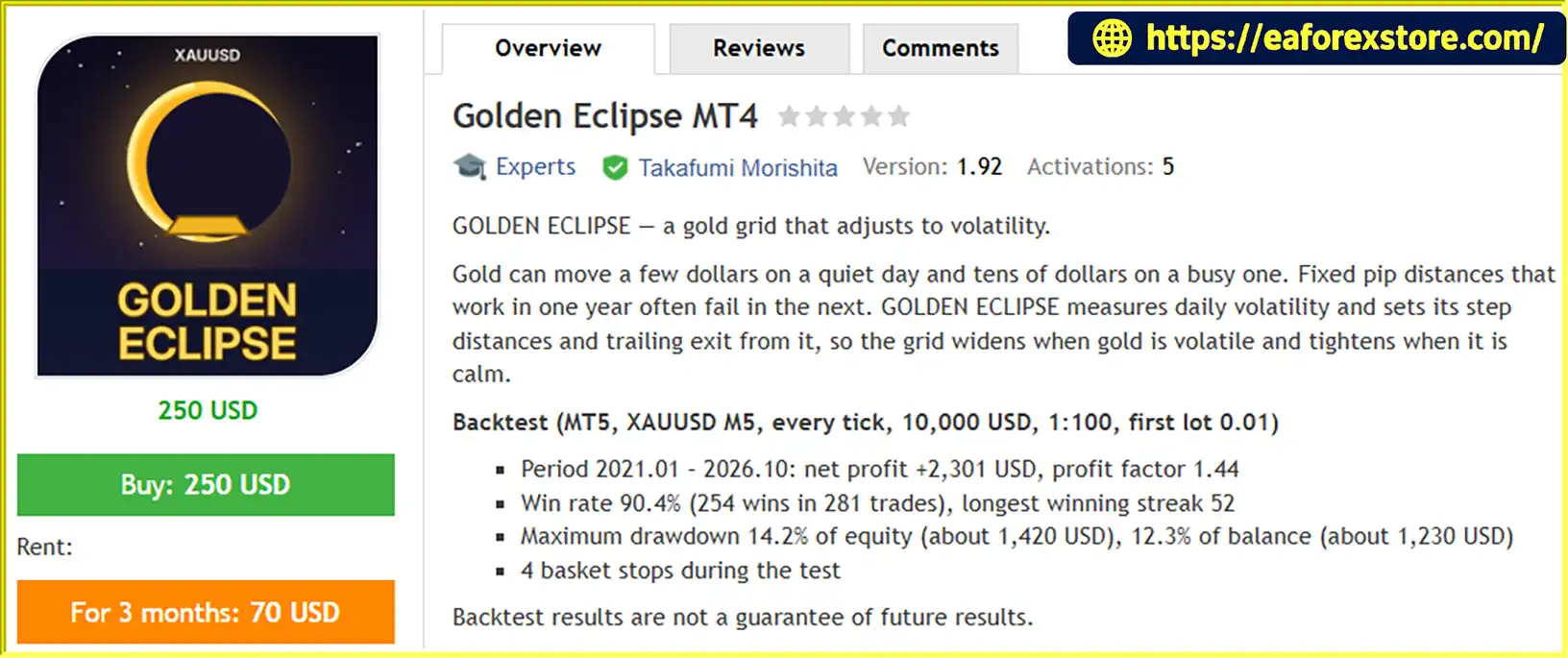
The supplied MT5 backtest covers January 2021 through October 2026, with a reported net profit of $2,301 and a profit factor of 1.44 on a $10,000 initial deposit.
The reported 90.4% win rate should be considered alongside the 14.2% maximum equity drawdown. A high win rate does not necessarily indicate low risk, particularly for grid strategies that may hold losing positions for extended periods.
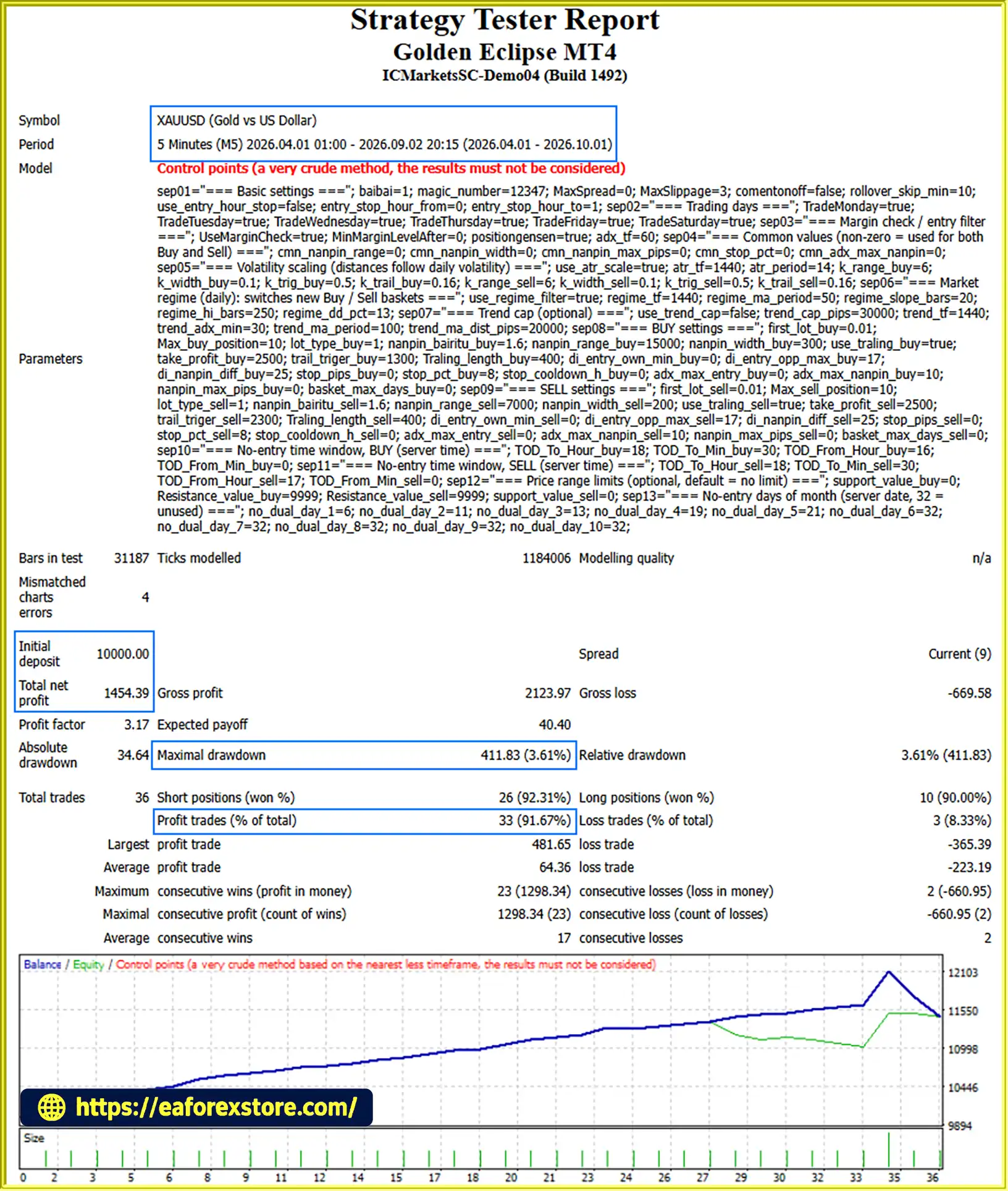
🔺XAUUSD (Gold) pair – 6 months
Golden Eclipse MT4 backtets
Risk management is an important part of Golden Eclipse MT4 because grid strategies can accumulate exposure when prices move against an existing basket.
The default basket stop closes positions on one side when their floating loss reaches 8% of account balance. This mechanism is designed to limit continued exposure from a losing basket.
The threshold is not a guarantee of an exact maximum realized loss. Gaps, slippage, spread changes, and execution delays can cause actual results to differ from the configured level.
The default maximum is 10 positions per side. Users should evaluate the combined exposure of the initial position and subsequent grid entries before selecting their lot size and account balance.
When a strong trend develops against an open basket, the EA pauses averaging. This helps prevent the strategy from continually adding positions under the specified adverse-trend conditions.
Existing positions may nevertheless continue to experience substantial floating losses.
The EA checks available free margin before submitting an order. If insufficient free margin is available, the order is skipped.
This check helps avoid certain orders that cannot be supported by available margin, but it does not eliminate the possibility of margin calls or stop-outs on existing positions.
Configurable spread and slippage limits, trading schedules, and no-entry periods help restrict trading under selected conditions.
Gold trading costs vary considerably between brokers, so users should test the EA with their intended broker and account type.
The MT5 version can pause new basket entries around selected economic news events. This is particularly relevant to gold, which can experience rapid price movements around major economic announcements.
The filter is optional, disabled by default, and unavailable in the Strategy Tester. It should not be treated as a guarantee against news-related losses.
Important risk warning: Grid trading can keep losing positions open for extended periods and may close a basket at a loss when its stop threshold is reached. Use appropriate position sizing and only risk capital you can afford to lose.
Follow these steps to install and configure Golden Eclipse MT4 on MetaTrader 4 or MetaTrader 5.
Obtain the Golden Eclipse MT4 installation file for your intended platform. Use the MT4 version for MetaTrader 4 or the MT5 version for MetaTrader 5.
Launch your trading platform and select File → Open Data Folder.
For MetaTrader 5, open the MQL5 → Experts directory.
For MetaTrader 4, open the MQL4 → Experts directory.
Copy the EA file into the appropriate Experts folder.
Return to MetaTrader and refresh the Expert Advisors section in the Navigator window. If the EA does not appear, restart the platform.
Open your broker’s Gold trading symbol, usually XAUUSD or GOLD, including any recognized broker-specific suffix. Select the M5 timeframe as the recommended starting configuration.
Drag Golden Eclipse MT4 onto the chart. Enable algorithmic or automated trading and configure the EA’s permissions as required by your platform.
Review the initial lot size, maximum positions per side, basket stop, volatility multipliers, market regime filter, spread limit, slippage, and trading schedule.
The suggested starting lot is 0.01 per $10,000 of account equity or balance as a guide, not a guarantee of suitability. Assess the complete exposure and risk of the strategy before trading.
If using MT5, select a compatible hedging account if you intend to use the full averaging functionality.
Use the Strategy Tester to evaluate the EA with historical XAUUSD data, realistic trading costs, and suitable execution assumptions.
After backtesting, consider testing on a demo account under your broker’s actual spread and execution conditions before considering live deployment.
A reliable Virtual Private Server (VPS) is recommended if the EA needs to run continuously. Monitor platform connectivity, automated trading status, margin usage, and open baskets regularly.
>>> Join VIP Membership Now <<<
Golden Eclipse MT4 is a volatility-adaptive Gold Grid Trading Expert Advisor designed to respond to changing XAUUSD market conditions through dynamic grid distances, daily market regime classification, and volatility-scaled trailing exits.
Its combination of configurable position limits, basket stop-loss protection, adverse-trend averaging pauses, margin checks, and trading-time restrictions provides a structured framework for automated gold trading on MetaTrader 4 and MetaTrader 5.
The supplied MT5 backtest reports a net profit of $2,301, a profit factor of 1.44, and a 90.4% win rate over the period from January 2021 to October 2026. However, the reported maximum equity drawdown of 14.2% highlights the importance of understanding the strategy’s risk profile rather than evaluating performance by win rate alone.
For traders considering an automated XAUUSD grid strategy, Golden Eclipse MT4 offers a configurable approach to volatility-based trade spacing and basket management. Before using it on a live account, verify broker compatibility, test realistic trading costs, select conservative position sizing, and evaluate how the EA behaves during prolonged gold trends and high-volatility events.
Disclaimer: Golden Eclipse MT4 is a trading software tool, not a guarantee of profit. Forex and gold trading involve substantial risk, and you may lose some or all of your trading capital. Backtest results are historical simulations and do not guarantee future performance. Always conduct independent testing and use only money you can afford to lose.
1. What Is Golden Eclipse MT4?
Golden Eclipse MT4 is an automated Gold Trading Expert Advisor designed for MetaTrader 4 and MetaTrader 5. It specializes in XAUUSD grid trading and uses daily volatility measurements to adjust grid spacing, trailing start levels, and trailing distances. The EA also incorporates a daily market regime filter, configurable position limits, basket stop-loss protection, and additional risk management controls to help automate trading decisions.
2. How Does Golden Eclipse MT4 Adapt to Gold Market Volatility?
Golden Eclipse MT4 measures daily market volatility and uses the results to adjust its grid and trailing parameters. When volatility increases, the EA can widen grid spacing and trailing distances. When volatility decreases, these distances can contract according to the configured multipliers. This adaptive approach aims to make the trading system more responsive to changing XAUUSD conditions than a grid strategy that uses fixed distances. However, volatility adaptation does not eliminate market risk or guarantee profitable trades.
3. Does Golden Eclipse MT4 Use a Market Trend Filter?
Yes. Golden Eclipse MT4 includes a daily market regime filter that classifies conditions as bullish, ranging, or bearish. According to the supplied specifications, the EA permits new buy baskets during uptrends and ranging markets, while new sell baskets are permitted during downtrends. Existing baskets continue to be managed even when the market regime changes. This filtering helps determine the direction of new entries, but it cannot guarantee that the market will continue moving in the expected direction.
4. What Risk Management Features Does Golden Eclipse MT4 Offer?
Golden Eclipse MT4 includes basket stop-loss protection, configurable maximum position limits, adverse-trend averaging pauses, free-margin checks, spread and slippage settings, and trading-time restrictions. The default basket stop closes positions on one side when the floating loss reaches 8% of account balance, while the default maximum is 10 positions per side. These settings help establish trading boundaries, but they do not guarantee an exact maximum realized loss because slippage, gaps, execution delays, and changing market conditions can affect results.
5. Does Golden Eclipse MT4 Support MT4 and MT5?
Yes. Golden Eclipse is available for both MetaTrader 4 and MetaTrader 5, although some features differ by platform. The MT5 version supports an optional economic calendar news filter during live trading, while the MT4 version does not include this feature. The MT5 version is designed for hedging accounts; on netting accounts, it operates in single-position mode without averaging. Traders should confirm platform compatibility, account type, and broker specifications before installation.
6. Does Golden Eclipse MT4 Have a News Filter?
The MT5 version includes an optional economic calendar filter that can pause the opening of new trading baskets around selected economic releases. Users can configure the relevant currency, news importance, and pause duration. The filter is disabled by default and is unavailable in the MT4 version and during Strategy Tester backtests. It can help restrict new entries around scheduled announcements, but it does not guarantee protection against sudden market movements or losses on existing positions.
7. What Are the Backtest Results of Golden Eclipse MT4?
The supplied six-month XAUUSD backtest report lists the following results:
Initial Deposit: $10,000
Total Net Profit: $1,454.39
Win Rate: 91.67%
Maximum Drawdown: 3.61%
A separate MT5 backtest summary covering January 2021 through October 2026 reports $2,301 in net profit, a profit factor of 1.44, a 90.4% win rate, and 14.2% maximum equity drawdown on a $10,000 initial deposit. These figures refer to different reported testing periods or configurations and should not be combined as if they represent one test. Results should be verified against the original reports, and historical performance does not guarantee future profitability.
8. How Do You Install Golden Eclipse MT4?
To install Golden Eclipse, download the correct version for your trading platform and open File → Open Data Folder in MetaTrader. Copy the EA file into the appropriate MQL4/Experts/ or MQL5/Experts/ directory, refresh the Expert Advisors list, and open your broker's supported Gold chart. Attach the EA, configure lot sizing, maximum positions, basket stop-loss, volatility parameters, and trading schedules, then enable automated trading. Before using a live account, backtest the strategy and forward-test it on a demo account. For MT5 users who require averaging functionality, verify that the account supports hedging.
In stock
In stock
In stock
In stock
In stock
Out of stock
No account yet?
Create an Account












 Automatic EA
 EA Best Seller
 Expert Advisor MT4
 Expert Advisor MT5
 HFT EA


Reviews
Clear filtersThere are no reviews yet.