









-
 Unlimited Activations
-
 Instant delivery
-
 Easy to install






 Unlimited Activations
Instant delivery
Easy to install
Unlimited Activations
Instant delivery
Easy to install
 Free Update
 Free Install Support

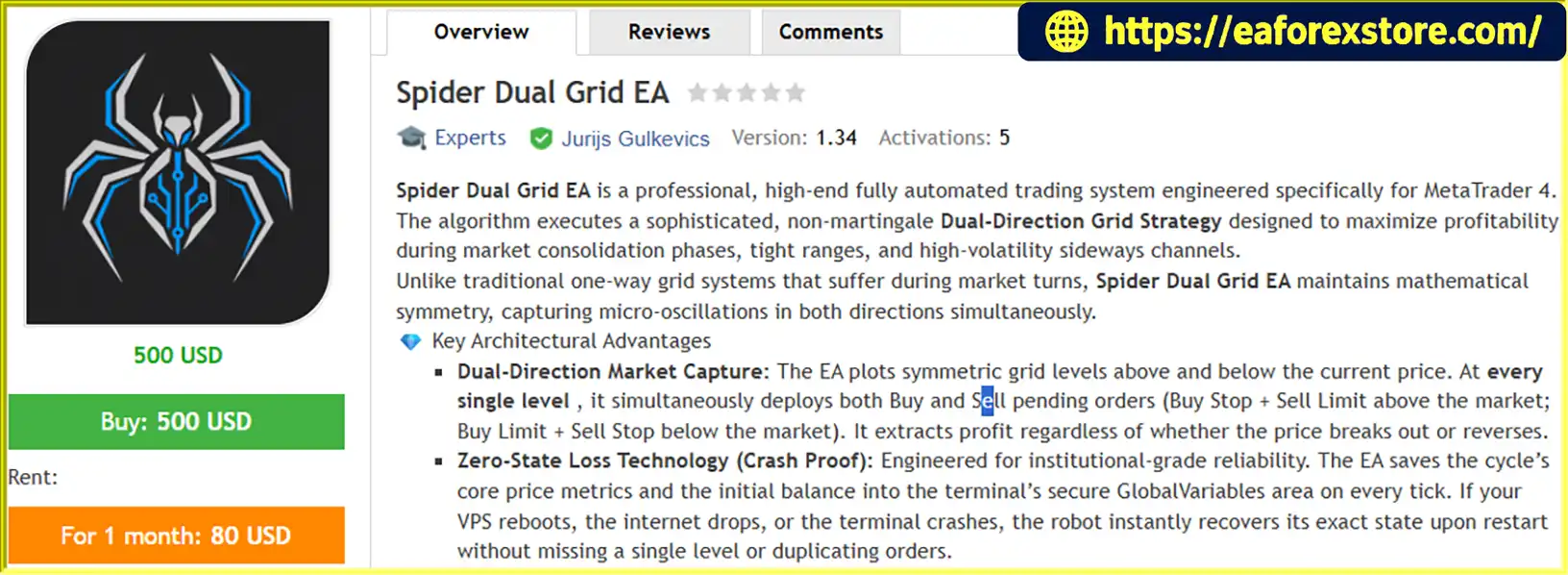
Spider Dual Grid EA MT4 is a fully automated Forex trading Expert Advisor (EA) designed for the MetaTrader 4 platform. Powered by a non-martingale dual-direction grid strategy, this advanced trading system is built to identify and capitalize on price fluctuations in ranging markets, sideways channels, and consolidation phases.
Unlike conventional grid trading robots that focus on a single direction, Spider Dual Grid EA MT4 uses a symmetrical grid structure to place pending orders above and below the current market price. This approach allows the EA to respond to both upward and downward price movements while seeking to capture short-term market opportunities.
Designed with fixed lot sizing, automated order management, and persistent trading-state recovery, Spider Dual Grid EA aims to provide a structured and consistent trading process without relying on progressive lot multipliers.
The EA also supports multi-chart operation, allowing traders to deploy independent trading cycles across multiple currency pairs using unique MagicNumbers.
Whether you are an experienced Forex trader or exploring automated trading solutions, Spider Dual Grid EA MT4 offers a systematic approach to grid-based trading with configurable parameters and automated execution.
>>> Delivery time 24h-48h after payment.
>>> Refund if not delivered.
>>> You will receive the latest version without any limitations (ID+Time).Reviewed by Jason Stap <<<
Spider Dual Grid EA MT4 Overview
Spider Dual Grid EA MT4 establishes symmetrical grid levels above and below a reference price. At each level, the system can place corresponding pending orders, including Buy Stop, Buy Limit, Sell Stop, and Sell Limit orders, according to its grid logic.
This dual-direction structure is designed to respond to both price breakouts and reversals, creating opportunities to capture short-term price fluctuations in different market conditions.
However, simultaneous order placement does not guarantee profits in every market environment, particularly during sustained directional trends.
Risk control is a core component of Spider Dual Grid EA MT4. The EA uses a user-defined fixed lot size rather than automatically increasing position sizes after losses.
By avoiding geometric lot multipliers, the system eliminates the specific risk escalation associated with traditional martingale sizing. Nevertheless, multiple open positions can still accumulate substantial exposure, and losses may increase as the market moves against the overall portfolio.
Once configured and activated, Spider Dual Grid EA MT4 can manage its trading operations automatically, including pending order placement, individual trade take-profit settings, grid-level management, and cycle-based profit targets.
This automation reduces the need for continuous manual order placement and helps traders follow a predefined trading framework.
The EA is designed to save essential trading-cycle information, including reference price metrics and the initial cycle balance, using MetaTrader 4 terminal Global Variables.
This mechanism helps the system restore its internal trading state after a terminal restart, VPS reboot, or temporary connection interruption.
Recovery reliability depends on the implementation, terminal data persistence, broker execution, and whether the relevant trading environment remains available. It should not be interpreted as a guarantee against every possible technical failure or duplicated order.
Spider Dual Grid EA MT4 supports deployment across multiple charts, with each instance identified by a unique MagicNumber.
This enables traders to configure separate grid cycles for different currency pairs and manage each pair’s target profit independently, provided that the EA’s order-management logic and account configuration support this setup.
Running multiple instances can increase diversification opportunities, but it can also increase total account exposure and correlated risk.
The EA provides adjustable settings to help traders adapt the grid structure and trading objectives to different instruments and market conditions.
Key parameters include GridStep, TakeProfit, LotSize, ProfitPercent, GridLevels, and MagicNumber.
Spider Dual Grid EA MT4 follows a structured automated trading process.
Step 1: Establish the Reference Price
After initialization, the EA identifies a reference price that serves as the starting point for its grid structure.
Step 2: Build Symmetrical Grid Levels
The system calculates multiple price levels above and below the reference price according to the configured GridStep and GridLevels settings.
Step 3: Place Pending Orders
Depending on its execution rules, the EA places Buy Stop and Sell Limit orders above the market, as well as Buy Limit and Sell Stop orders below the market.
These orders are designed to respond to different price movements as the market reaches the predefined grid levels.
Step 4: Manage Individual Trades
When a pending order is activated, the EA manages the resulting position according to its trading logic and configured TakeProfit value.
Individual positions may close when their respective take-profit conditions are satisfied, subject to execution prices, spreads, slippage, and broker trading rules.
Step 5: Monitor the Cycle Profit Target
The EA tracks the trading cycle against the configured ProfitPercent target, calculated using the initial balance of the cycle according to the system’s implementation.
When the target condition is reached, the EA is intended to close the relevant cycle’s trades and reset its grid for a new trading cycle. Traders should verify how the EA handles pending orders, floating losses, commissions, swaps, and partial execution when a cycle is reset.
Step 6: Restore the Trading State When Necessary
If the MT4 terminal or VPS restarts, the EA uses its saved state information to recover the previous cycle and continue managing the grid.
This feature is designed to improve operational continuity, although successful recovery should always be verified during testing.
Spider Dual Grid EA MT4 offers a dual-direction approach to grid trading instead of relying exclusively on one-sided order placement. This structure is intended to capture opportunities created by price oscillations in both directions.
The fixed lot sizing model avoids automatically increasing trade volume after losing positions. This makes the lot-sizing approach easier to understand and configure, although it does not eliminate the risk of large floating losses.
Traders can adjust grid spacing, take-profit distances, position sizes, grid depth, and cycle profit targets to suit their strategy and risk tolerance.
Automated order management and persistent trading-state recovery are designed to reduce manual intervention and support continued operation in a properly configured MT4 environment.
With unique MagicNumbers and compatible order-management logic, the EA can operate on several currency pairs simultaneously. This provides flexibility for traders who want to evaluate different instruments within a single MT4 terminal.
The EA’s configurable parameters make it suitable for backtesting, forward testing, and demo-account evaluation before any live deployment.
No trading strategy guarantees profits. Actual performance depends on market conditions, execution quality, broker costs, and risk settings.
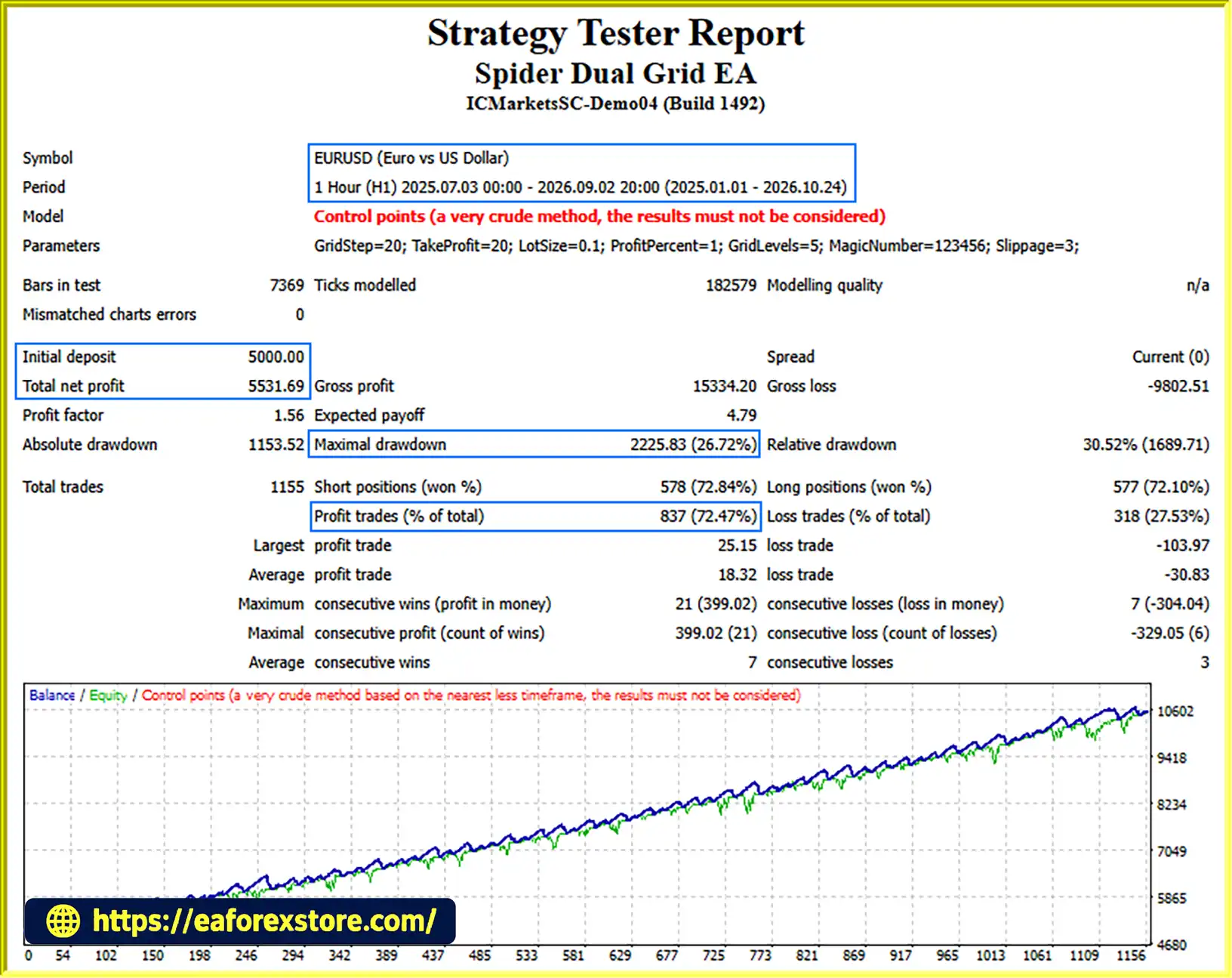
🔺EURUSD (Gold) pair – 23 months
Spider Dual Grid EA MT4 Backtets
Although Spider Dual Grid EA MT4 uses a non-martingale approach, grid trading carries significant risks that traders should understand before using the system on a live account.
Set LotSize according to your account equity, available margin, and maximum acceptable loss. Avoid selecting a position size solely on the basis of historical profits or a high win rate.
The GridLevels setting controls the intended number of grid levels deployed in each direction. A larger grid may create more trading opportunities, but it can also increase the number of open positions and the margin required.
Evaluate the worst-case exposure if the market moves strongly in one direction without reversing.
GridStep determines the distance between grid levels. If the spacing is too narrow, the EA may accumulate positions rapidly, increasing transaction costs and margin usage. Wider spacing may reduce order frequency but can change the strategy’s opportunity profile.
Use a broker with competitive spreads, transparent commissions, reliable execution, and trading conditions compatible with the EA. High spreads, slippage, swaps, and commissions can significantly reduce net profitability.
A dual-direction grid is not immune to prolonged market trends, gaps, or sudden volatility. Multiple positions can remain exposed while the market moves away from the grid’s reference price.
A cycle profit target does not automatically guarantee a maximum loss limit. Confirm whether the EA provides separate equity protection, drawdown limits, emergency stop conditions, or margin-based safeguards.
A stable VPS and reliable internet connection can help maintain continuous operation. However, traders should monitor terminal connectivity, order execution, margin levels, and the EA’s recovery behavior after restarts.
Where supported, configure broker-side stop-losses or other independent safeguards rather than relying exclusively on the EA’s internal logic.
Important Risk Warning: Forex and CFD trading involve substantial financial risk. A non-martingale strategy can still experience significant drawdowns or account losses. Test the EA on historical data and a demo account before considering live trading, and never risk funds you cannot afford to lose.
Follow these steps to install and configure Spider Dual Grid EA MT4 on your MetaTrader 4 platform.
Obtain the Spider Dual Grid EA MT4 file from the official or authorized provider. The main EA file typically uses the .ex4 or .mq4 extension.
Launch MetaTrader 4 and navigate to:
File → Open Data Folder
Open the following directory:
MQL4 → Experts
Copy the Spider Dual Grid EA file into the Experts folder.
If the provider supplies additional indicators or libraries, install them in their appropriate folders according to the supplied documentation.
Return to MT4 and open the Navigator panel. Right-click Expert Advisors and select Refresh.
Alternatively, restart the terminal to load the EA.
Open a chart for a supported currency pair, such as EUR/GBP, AUD/NZD, or EUR/USD.
Select the recommended M15 or H1 timeframe as a starting point for testing.
Drag Spider Dual Grid EA MT4 from the Navigator panel onto the chart.
In the EA settings, review the trading permissions and configure the parameters according to your testing plan.
Check the EA’s documentation for exact parameter definitions, supported order types, and broker-specific requirements.
Enable AutoTrading in MT4 and confirm that the EA is permitted to trade in its settings.
Check the smiley or status indicator on the chart, along with the Experts and Journal tabs, to identify configuration errors or execution problems.
Run a historical backtest where supported, followed by forward testing on a demo account.
Evaluate net profit after costs, maximum drawdown, floating exposure, margin usage, trade frequency, and performance during strong trends.
Only consider live deployment after you understand the EA’s behavior and have established suitable risk limits.
>> Join VIP Membership Now <<<
Spider Dual Grid EA MT4 is an automated Forex trading system built around a symmetrical, non-martingale grid strategy for MetaTrader 4. Its main design features include dual-direction pending orders, fixed lot sizing, configurable grid levels, cycle-based profit targets, multi-chart support, and persistent trading-state recovery.
The system is designed to seek opportunities in ranging and consolidating markets, particularly on currency pairs with competitive trading costs. However, its performance can deteriorate during prolonged directional trends, sharp market gaps, or periods of elevated spreads and volatility.
For traders evaluating a Forex grid trading EA, the most important step is to verify its actual execution logic, test it under different market conditions, and understand its maximum potential exposure before deploying real capital.
Start with conservative settings, use a demo account, and evaluate risk-adjusted performance rather than focusing exclusively on profit targets or win rates.
Spider Dual Grid EA MT4 provides a configurable framework for automated grid trading, but disciplined risk management and independent performance verification remain essential for responsible use.
1. What Is Spider Dual Grid EA MT4?
Spider Dual Grid EA MT4 is an automated Forex trading Expert Advisor designed for the MetaTrader 4 platform. It uses a dual-direction grid strategy to place pending buy and sell orders at predefined price levels above and below a reference price. The EA aims to capture price fluctuations in ranging and consolidating markets while using fixed lot sizing instead of Martingale multipliers.
2. Does Spider Dual Grid EA MT4 Use Martingale?
No, Spider Dual Grid EA MT4 is designed to use a non-Martingale trading approach with fixed lot sizes. It does not automatically multiply position sizes after losing trades. However, multiple grid positions can accumulate as the market moves, potentially increasing total exposure, floating losses, and margin requirements. Proper lot sizing and grid configuration remain essential for risk management.
3. How Does the Dual Grid Trading Strategy Work?
Spider Dual Grid EA MT4 establishes symmetrical grid levels above and below a reference price. Depending on its trading logic, it places Buy Stop, Buy Limit, Sell Stop, and Sell Limit pending orders at predefined levels. When market prices reach these levels, orders may activate and be managed using configured take-profit settings and cycle-based profit targets. The strategy aims to capture short-term price movements in both directions, but it may face significant challenges during prolonged market trends.
4. Which Currency Pairs Are Suitable for Spider Dual Grid EA MT4?
Spider Dual Grid EA MT4 supports multi-chart deployment, allowing traders to configure separate trading cycles for different currency pairs. Pairs with relatively stable spreads, sufficient liquidity, and suitable ranging behavior may be worth evaluating. Examples include EUR/USD, EUR/GBP, and AUD/NZD. However, no currency pair is guaranteed to perform well with a grid strategy. Backtesting and demo forward testing are recommended for each pair and broker.
5. Is Spider Dual Grid EA MT4 Profitable? What Are Its Backtest Results?
According to the provided backtest results, Spider Dual Grid EA MT4 generated the following performance over a 23-month testing period on EUR/USD:
Initial deposit: $5,000
Reported net profit: $5,531.69
Win rate: 72.47%
Maximum drawdown: 26.72%
These figures represent historical backtest results and do not guarantee future profitability. The reported drawdown is also an important consideration when evaluating the strategy's risk. Actual results may differ due to spreads, commissions, swaps, slippage, broker conditions, and changing market behavior.
6. What Risk Management Features Does Spider Dual Grid EA MT4 Offer?
Spider Dual Grid EA MT4 provides configurable fixed lot sizing, grid spacing, grid depth, individual trade take-profit settings, and cycle-based profit targets. These parameters allow traders to adjust trading frequency and exposure according to their strategy. However, a cycle profit target is not necessarily a maximum loss limit. Before live trading, verify whether the EA supports independent drawdown protection, emergency position closure, or other account-level safeguards.
7. Can Spider Dual Grid EA MT4 Run on Multiple Currency Pairs Simultaneously?
Yes, Spider Dual Grid EA MT4 is designed to support multiple chart instances across different currency pairs. Each instance can use a unique MagicNumber to identify and manage its orders independently. This allows traders to configure separate grid cycles and profit targets for different instruments. Nevertheless, running several instances simultaneously can increase total margin usage and correlated market exposure, so the combined account risk should be monitored carefully.
8. How Do I Install Spider Dual Grid EA MT4?
To install Spider Dual Grid EA MT4, obtain the EA file from the authorized provider and copy it into the MQL4/Experts folder in your MetaTrader 4 Data Folder. Refresh the Expert Advisors list in the Navigator panel, open a supported currency pair chart, and attach the EA. Configure GridStep, TakeProfit, LotSize, ProfitPercent, GridLevels, and MagicNumber before enabling automated trading. Always test the EA on historical data and a demo account before using real money.
In stock
In stock
In stock
In stock
In stock
Out of stock
No account yet?
Create an Account












 Automatic EA
 EA Best Seller
 Expert Advisor MT4
 Expert Advisor MT5
 HFT EA


Reviews
Clear filtersThere are no reviews yet.