









-
 Unlimited Activations
-
 Instant delivery
-
 Easy to install






 Unlimited Activations
Instant delivery
Easy to install
Unlimited Activations
Instant delivery
Easy to install
 Free Update
 Free Install Support

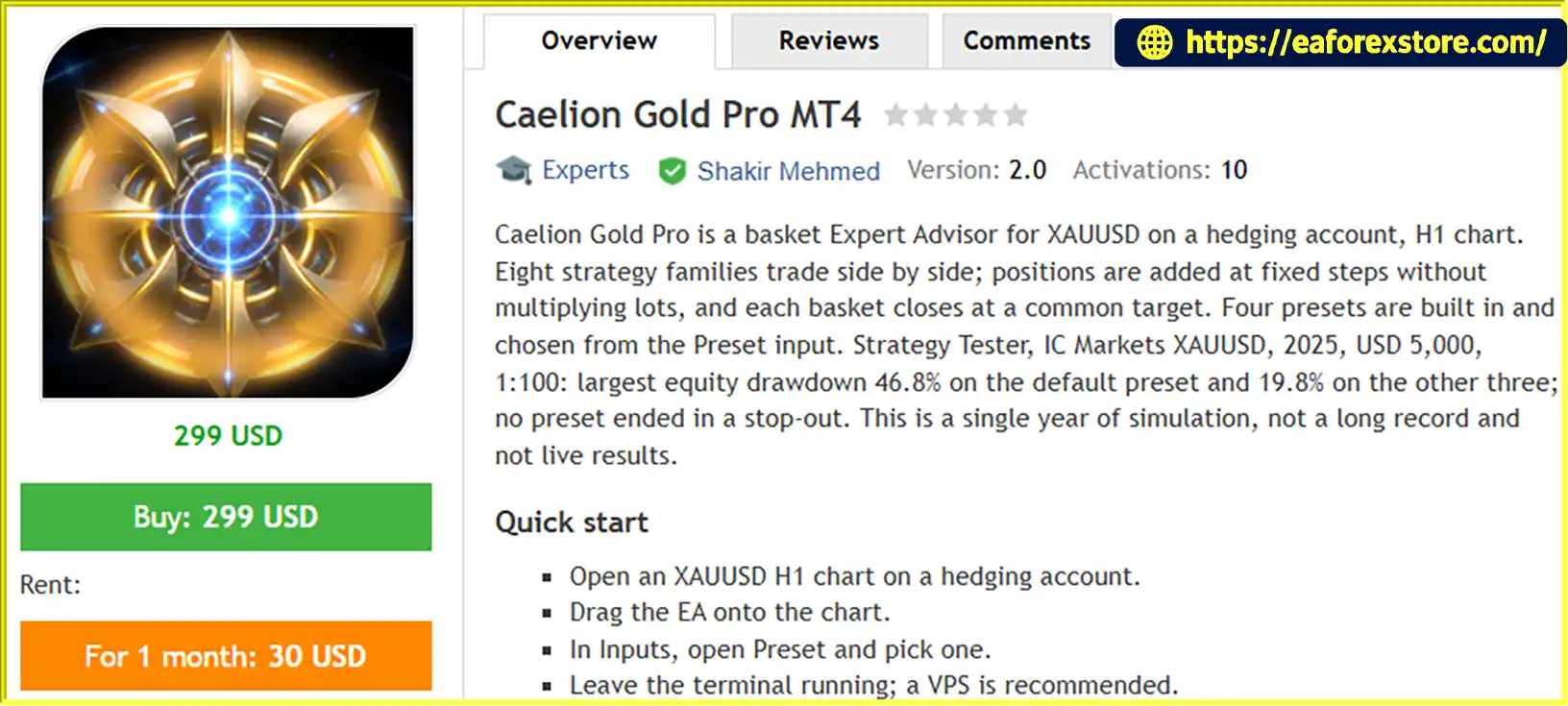
Caelion Gold Pro MT4 is an automated basket trading Expert Advisor designed specifically for XAUUSD (Gold) on MetaTrader 4. Operating on an H1 chart and requiring a hedging account, this EA combines eight independent strategy families within a single automated trading framework.
Each strategy family uses its own signal timeframe, trading schedule, and trading direction. The system evaluates momentum readings from closed candles and opens trades when its entry conditions are satisfied. By avoiding signals based on forming candles, Caelion Gold Pro is designed to make entry decisions using completed price data.
The EA uses a basket-based trading approach. When market prices move against an open basket, it can add positions of the same lot size at predefined price intervals. The positions are then managed toward a common basket profit target.
Unlike traditional martingale systems, Caelion Gold Pro MT4 does not multiply lot sizes as additional positions are opened. However, total market exposure can still increase as a basket accumulates positions, making effective risk management essential.
The EA includes five configuration choices: Max Profit, Shield, Aggressive, Balanced, and Custom. These presets are built directly into the EA and can be selected from the Preset input without downloading separate preset files.
Caelion Gold Pro MT4 also incorporates broker-clock detection, a scheduled no-add window around the daily gold trading break, and a basket-level stop intended to act as an additional safety measure.
>>> Delivery time 24h-48h after payment.
>>> Refund if not delivered.
>>> You will receive the latest version without any limitations (ID+Time).Reviewed by Jason Stap <<<
Caelion Gold Pro MT4 Overview
Caelion Gold Pro MT4 combines eight strategy families that operate side by side within one EA.
Each family has its own signal timeframe, trading hours, and directional bias. According to the supplied specifications, six families trade in the buy direction and two trade in the sell direction.
This structure allows multiple strategy components to seek trading opportunities under their respective conditions. However, operating several strategy families simultaneously does not guarantee diversification or prevent correlated losses.
Each strategy family evaluates two separate momentum readings derived from closed candles.
A new position is opened only when the required conditions agree at the opening of a new bar. The system does not use a forming candle for its entry decisions.
This approach is designed to establish a consistent entry process based on completed market data. Actual signal quality and trading performance depend on the strategy rules and prevailing gold market conditions.
When the price moves against an existing basket, Caelion Gold Pro can add positions at predefined price intervals.
Additional positions use the same lot size rather than progressively increasing volume through martingale multipliers.
The EA then manages the basket toward a shared profit target. This can help organize multiple positions around a common exit objective, but it also means that total exposure and floating losses can increase while the market moves against the basket.
Caelion Gold Pro MT4 includes five preset choices in the Preset input:
The presets are integrated into the EA, so separate .set files are not required to select the four built-in configurations.
The preset names describe their intended configurations, not guaranteed risk levels or future outcomes. The reported 2025 MT4 results show a substantially larger equity drawdown for Max Profit than for the other three tested presets.
The EA is designed to detect the broker’s clock and account for the applicable time zone and daylight-saving adjustments.
This functionality helps align the EA’s trading schedule with the intended strategy hours, regardless of the user’s country.
However, historical testing with custom or third-party data may require manual clock configuration if the simulated server-time and daylight-saving behavior differ from the live broker environment.
Caelion Gold Pro MT4 includes a no-add window from 21:00 to 01:00 on the strategy clock.
During this period, existing baskets retain their exit and stop-management behavior, but the EA does not add new grid levels.
This feature is designed to limit additional basket exposure around the daily gold trading break, when liquidity and trading conditions may be less favorable.
It does not necessarily close existing positions or eliminate the risk associated with open baskets.
The EA includes a basket stop set at 55% of balance, according to the supplied product specifications.
This setting is intended to act as a broad safety net if a basket develops an unfavorable loss.
The stop did not trigger in the reported 2025 test. However, it should not be interpreted as a guarantee that the maximum realized loss cannot exceed the configured level. Gaps, slippage, rejected orders, and other execution problems can affect actual results.
The EA’s individual inputs are described in the user guide, helping traders understand and configure the system’s available settings.
The Custom preset can be used when manual parameter adjustments are required. Saved .set files are relevant to Custom configurations rather than necessary for selecting the built-in presets.
Caelion Gold Pro MT4 uses multiple strategy families and basket-based position management to automate gold trading.
Open an XAUUSD chart on the H1 timeframe in MetaTrader 4.
Ensure that the trading account supports hedging and that the broker’s gold symbol, contract specifications, margin requirements, and trading hours are compatible with the EA.
Open the EA’s Inputs tab and choose one of the available configurations:
The selected preset determines the corresponding strategy configuration. If you choose Custom, configure the individual inputs according to your testing plan.
The eight strategy families operate with their own signal timeframes and trading schedules.
Each family evaluates two momentum readings from completed candles. When the required readings agree at the opening of a new bar, the family can initiate a trade according to its configured direction and entry rules.
If price moves against an open basket, the EA can add positions at fixed price steps.
Each added position uses the same lot size, avoiding the geometric lot-size increases associated with martingale systems.
Nevertheless, multiple positions can accumulate as the market moves against the basket, increasing total exposure, margin requirements, and floating drawdown.
The EA manages the positions in a basket toward a shared profit target.
When the basket’s exit conditions are met, the EA closes the relevant positions according to its programmed logic.
Actual results depend on execution prices, commissions, spreads, swaps, and the EA’s handling of partial fills or rejected orders.
The system follows its configured strategy schedule and the no-add window from 21:00 to 01:00 on the strategy clock.
During the no-add period, existing baskets continue to receive exit and stop management, but additional grid levels are not opened.
The basket-level stop provides an additional protective mechanism, but traders should continue monitoring equity, free margin, floating losses, and total position exposure.
The EA’s preset choice and historical drawdown figures should be considered part of a broader risk assessment rather than a guarantee of future results.
Caelion Gold Pro combines eight strategy families within a single trading system. Each family has its own signal timeframe, trading hours, and directional bias, offering a multi-component approach to automated gold trading.
The EA adds positions using the same lot size instead of increasing lot sizes geometrically after adverse price movements.
This avoids one specific source of risk escalation associated with martingale strategies. It does not eliminate the risk of accumulating large exposure through multiple open positions.
The built-in Max Profit, Shield, Aggressive, Balanced, and Custom choices allow traders to select a configuration directly from the EA settings.
This makes preset selection straightforward and removes the need to load separate preset files for the four standard configurations.
Automatic broker-clock detection and the scheduled no-add window are designed to help align the EA’s activity with its intended trading schedule.
These features are particularly relevant to gold trading, where daily breaks and changes in liquidity can affect execution conditions.
The EA uses a shared basket profit target to manage related positions collectively.
For traders who understand grid averaging, this provides a structured way to manage multiple same-size positions under a common exit objective.
The supplied 2025 MT4 results compare Max Profit with the other three protected presets, highlighting differences in reported equity drawdown.
This provides a useful starting point for investigating how preset selection influences the balance between historical profitability and risk.
Traders who prefer to modify individual inputs can select Custom and configure the available parameters manually.
Any adjustments should be tested systematically, as changes to grid spacing, position sizing, or basket protection can materially alter the strategy’s exposure.
🔺XAUUSD (Gold) pair – 6 months
Caelion Gold Pro MT4 Backtets
Caelion Gold Pro MT4 uses fixed-step basket averaging without martingale multipliers. While this avoids progressive lot-size multiplication, the strategy can still accumulate substantial exposure when prices move persistently against open baskets.
The reported 2025 MT4 backtest recorded the following largest equity drawdowns:
These figures are specific to the reported test environment and period. They do not establish the maximum drawdown that may occur in future trading.
A drawdown of 46.8% represents a substantial decline in account equity and should not be considered a minor risk simply because the test did not end in a stop-out.
The EA’s basket stop is set at 55% of balance according to the supplied specifications.
Although the stop did not trigger in the 2025 test, traders should verify exactly how the threshold is calculated, when the EA activates it, and how positions are closed.
Execution gaps, slippage, rejected orders, and insufficient liquidity can cause realized losses to differ from the configured threshold.
Each new grid position increases the number of active trades in the basket.
Even though position sizes are not multiplied, total exposure can rise significantly as more positions are added. Traders should evaluate the maximum number of positions, margin consumption, and the consequences of prolonged one-directional price movements.
The no-add period from 21:00 to 01:00 on the strategy clock prevents new grid levels from being added during that interval.
Existing baskets remain exposed to market movements, and their exits and stop management continue according to the EA’s logic.
This feature should not be confused with a complete trading shutdown or a guarantee of protection during the daily gold break.
The EA is intended for XAUUSD on a hedging account. Confirm that your broker supports the required account behavior and that its gold symbol and trading specifications match the EA’s requirements.
For Strategy Tester runs using custom or third-party historical data, the supplied instructions recommend setting:
0 (manual).3 (US).These settings were used in the developer’s reported 2025 tests. Verify the strategy clock and review the Journal for warnings after the first test run.
A VPS or an always-on MT4 terminal is recommended because the EA manages exits through its own logic.
According to the supplied specifications, broker-side stop-loss and take-profit orders are not attached to positions. Consequently, the terminal must remain available for the EA to manage exits as intended.
A terminal outage, connection failure, or EA malfunction may leave positions without their expected management. A VPS can reduce some operational interruptions but cannot eliminate all technical risks.
Before using real funds, test the EA with the intended broker’s spread, commission, swap charges, contract specifications, and leverage.
Use a demo account to investigate basket accumulation, equity drawdown, margin requirements, and how the selected preset behaves in different market conditions.
Important Risk Warning: Grid averaging can produce large floating and realized losses even when lot sizes remain fixed. The account may lose a substantial portion or all of its trading capital. Historical backtests are not live results and do not guarantee future performance.
Follow these steps to install and configure Caelion Gold Pro MT4 on MetaTrader 4.
Download Caelion Gold Pro MT4 from the official or authorized product provider.
Follow the supplied installation instructions and verify that the file is compatible with your MT4 terminal.
Launch MetaTrader 4 and select:
File → Open Data Folder
Navigate to:
MQL4 → Experts
Copy the EA file into the Experts folder.
Return to MT4, open the Navigator panel, right-click Expert Advisors, and select Refresh. Restart the terminal if necessary.
Select your broker’s gold instrument, typically XAUUSD, and open the H1 chart.
Confirm that your trading account supports hedging and that the instrument’s specifications are compatible with the EA.
Drag the EA from the Navigator panel onto the XAUUSD H1 chart.
Review the EA’s Common and Inputs tabs and enable the necessary automated-trading permissions.
Open the Inputs tab and locate Preset, the first input in the settings list.
Choose one of the five available options:
The built-in presets are integrated into the EA, so no separate preset file is required to select them.
If you select Custom, adjust the individual inputs according to the user guide and your testing plan.
Saved .set files are relevant when restoring Custom settings. Verify the meaning and permitted range of every parameter before changing it.
When backtesting with custom or third-party historical data, verify that the simulated server clock and daylight-saving settings match the intended strategy schedule.
The developer’s recommended settings for reproducing the supplied 2025 test conditions are:
InpClockMode = 0InpSessionDSTMode = 3After the first run, check the MT4 Journal for warnings about the daily gold break or strategy clock.
Use the MT4 Strategy Tester to evaluate the selected preset.
The supplied reference test used a $5,000 initial balance, 1:100 leverage, IC Markets XAUUSD, and historical data covering 2025.
For your own assessment, use your broker’s trading specifications and realistic spread, commission, and swap assumptions. Evaluate the equity curve, maximum drawdown, floating losses, margin usage, and basket behavior.
The EA requires an active terminal to manage exits according to its internal logic.
A reliable VPS or an always-on computer is recommended. Monitor connectivity, order execution, margin levels, and the Journal for technical warnings.
Do not begin live trading until you understand the selected preset’s potential drawdown and the risks of basket averaging.
>> Join VIP Membership Now <<<
Caelion Gold Pro MT4 is a multi-strategy basket Expert Advisor designed for automated XAUUSD trading on MetaTrader 4. Its architecture combines eight strategy families, closed-candle momentum signals, fixed-step grid averaging, five built-in presets, and a shared basket profit target.
The system avoids martingale lot multipliers, but that does not eliminate the risk associated with adding positions as the market moves against a basket. Its 2025 MT4 backtest highlights an important difference between configurations: the default Max Profit preset recorded 46.8% largest equity drawdown, while Shield, Aggressive, and Balanced each recorded 19.8% in the same reported test.
These results are historical simulations rather than live trading performance, and the evidence provided covers only one year of MT4 testing. The reported drawdown figures should therefore be treated as observations from that specific test, not as limits on future losses.
For traders considering an automated gold basket strategy, the most important steps are to understand how positions accumulate, evaluate margin requirements, verify broker and clock compatibility, and test the chosen preset on a demo account.
Caelion Gold Pro MT4 offers configurable basket trading for gold, but disciplined risk management and a clear understanding of grid exposure remain essential.
1. What Is Caelion Gold Pro MT4 and How Does It Work?
Caelion Gold Pro MT4 is an automated basket trading Expert Advisor designed specifically for XAUUSD (Gold) on MetaTrader 4. It combines eight strategy families that use momentum readings from closed candles to identify potential trading opportunities. The EA can add positions at predefined price intervals when the market moves against an open basket and manage those positions toward a common basket profit target. Its performance depends on market conditions, broker execution, and the selected configuration.
2. Does Caelion Gold Pro MT4 Use Martingale or Grid Trading?
Caelion Gold Pro MT4 uses fixed-step grid averaging, but according to the supplied specifications, it does not multiply lot sizes as additional positions are opened. Instead, each added position uses the same lot size. This avoids the geometric lot-size increases associated with traditional Martingale strategies. However, the number of open positions and total market exposure can still grow significantly when prices move against a basket, potentially resulting in substantial floating losses and margin pressure.
3. Which Trading Account and Timeframe Are Required for Caelion Gold Pro MT4?
Caelion Gold Pro MT4 is designed for XAUUSD trading on the H1 timeframe and requires a hedging account. Before installation, confirm that your broker supports hedging and that its gold symbol, contract specifications, margin requirements, and trading hours are compatible with the EA. Using a different account type or instrument configuration may affect compatibility and trading behavior.
4. What Presets Are Available in Caelion Gold Pro MT4?
Caelion Gold Pro MT4 provides five built-in presets that can be selected through the Preset input:
Max Profit: The default configuration, associated with the highest reported net profit in the developer's testing.
Shield: A configuration intended to emphasize protection.
Aggressive: An alternative configuration for a more aggressive trading approach.
Balanced: A different balance of trading settings.
Custom: Allows manual adjustment of individual parameters.
The four standard configurations are integrated into the EA, so separate preset files are not required to select them. Preset names do not guarantee a particular risk level or future outcome. Compare their historical drawdowns and basket behavior before choosing a configuration.
5. What Are the Backtest Results of Caelion Gold Pro MT4?
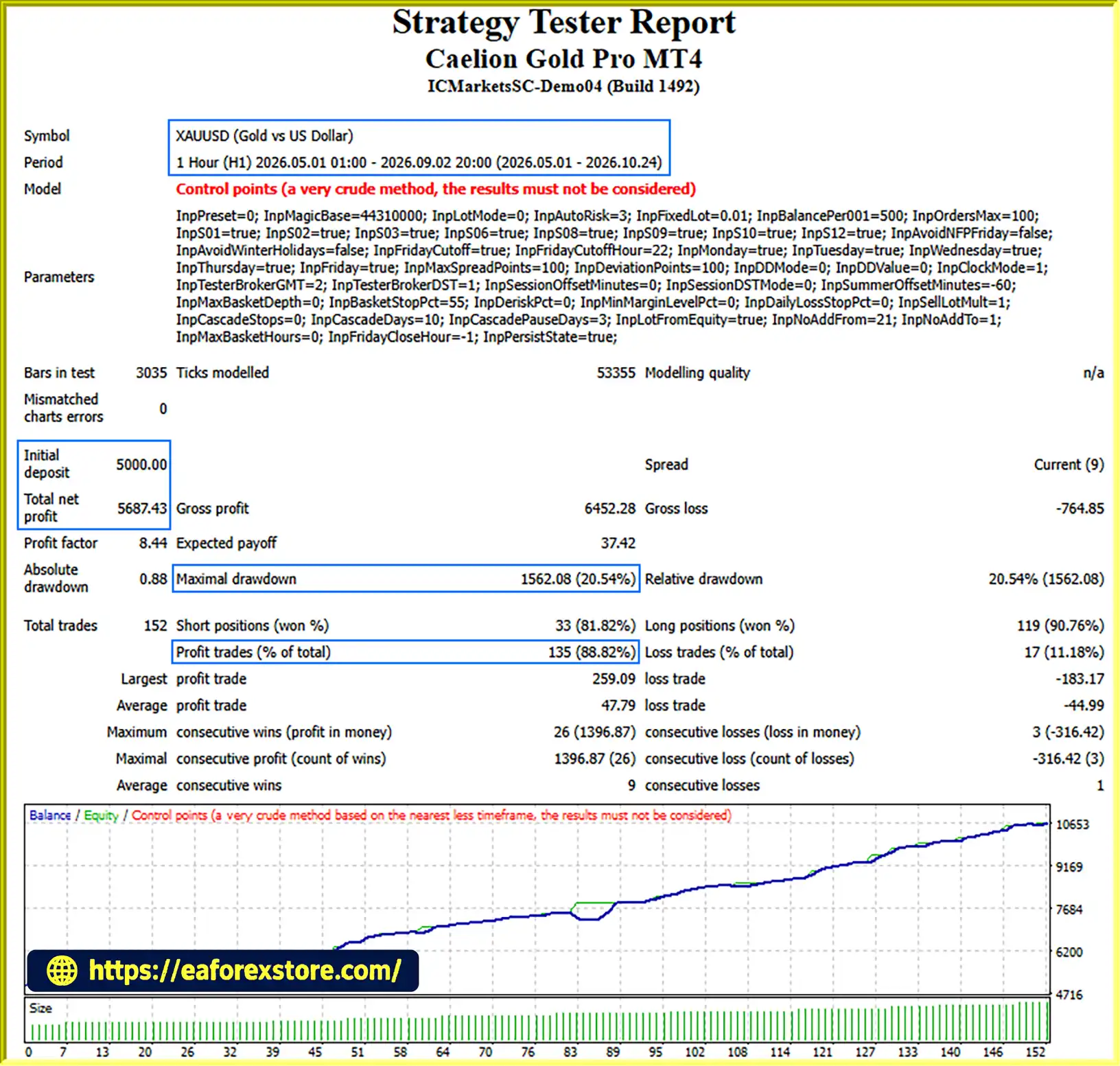
According to the supplied product information, Caelion Gold Pro MT4 was tested on XAUUSD over approximately six months with a $5,000 initial deposit. The reported results were $5,687.43 in net profit, an 88.82% win rate, and 20.54% maximum drawdown.
The supplied 2025 MT4 comparison also reported the following largest equity drawdowns: 46.8% for Max Profit and 19.8% each for Shield, Aggressive, and Balanced. These figures should be treated as vendor-provided historical results rather than independently verified performance. Review the original reports, testing period, spread, commission, leverage, floating losses, and modeling quality before drawing conclusions. Backtest results do not guarantee future profitability.
6. How Does Caelion Gold Pro MT4 Manage Risk During Grid Trading?
The EA uses fixed lot sizes for additional grid positions, a common basket profit target, a scheduled no-add window, and a basket-level stop specified at 55% of balance. The no-add window runs from 21:00 to 01:00 on the strategy clock, during which new grid levels are not added while existing basket management continues. These features provide configured controls, but they do not eliminate risk. Traders should verify how the basket stop is calculated and triggered, monitor margin usage and floating drawdown, and understand that gaps or slippage can cause actual losses to differ from expected levels.
7. Does Caelion Gold Pro MT4 Require a VPS?
A VPS or another reliable, continuously running computer is recommended. According to the supplied specifications, the EA manages position exits through its internal logic rather than attaching broker-side stop-loss and take-profit orders to positions. If MT4 disconnects, shuts down, or encounters an EA malfunction, expected trade management may be interrupted. A VPS can help maintain terminal availability, but it cannot eliminate broker outages, network failures, or execution risks. Regularly monitor the platform's Experts and Journal logs.
8. How Do I Install and Test Caelion Gold Pro MT4 Before Live Trading?
To install Caelion Gold Pro MT4, open MetaTrader 4 and select File → Open Data Folder → MQL4 → Experts. Copy the EA file into the Experts folder, refresh the Navigator panel, and attach the EA to an XAUUSD H1 chart. Confirm that the account supports hedging, choose a preset, and review the settings before enabling automated trading. Run a Strategy Tester backtest using realistic trading costs, then conduct forward testing on a demo account. Evaluate maximum equity drawdown, floating losses, basket accumulation, margin requirements, and performance under different market conditions before considering live trading.
In stock
In stock
In stock
In stock
In stock
Out of stock
No account yet?
Create an Account












 Automatic EA
 EA Best Seller
 Expert Advisor MT4
 Expert Advisor MT5
 HFT EA


Reviews
Clear filtersThere are no reviews yet.