









-
 Unlimited Activations
-
 Instant delivery
-
 Easy to install

 Unlimited Activations
Instant delivery
Easy to install
Unlimited Activations
Instant delivery
Easy to install
 Free Update
 Free Install Support

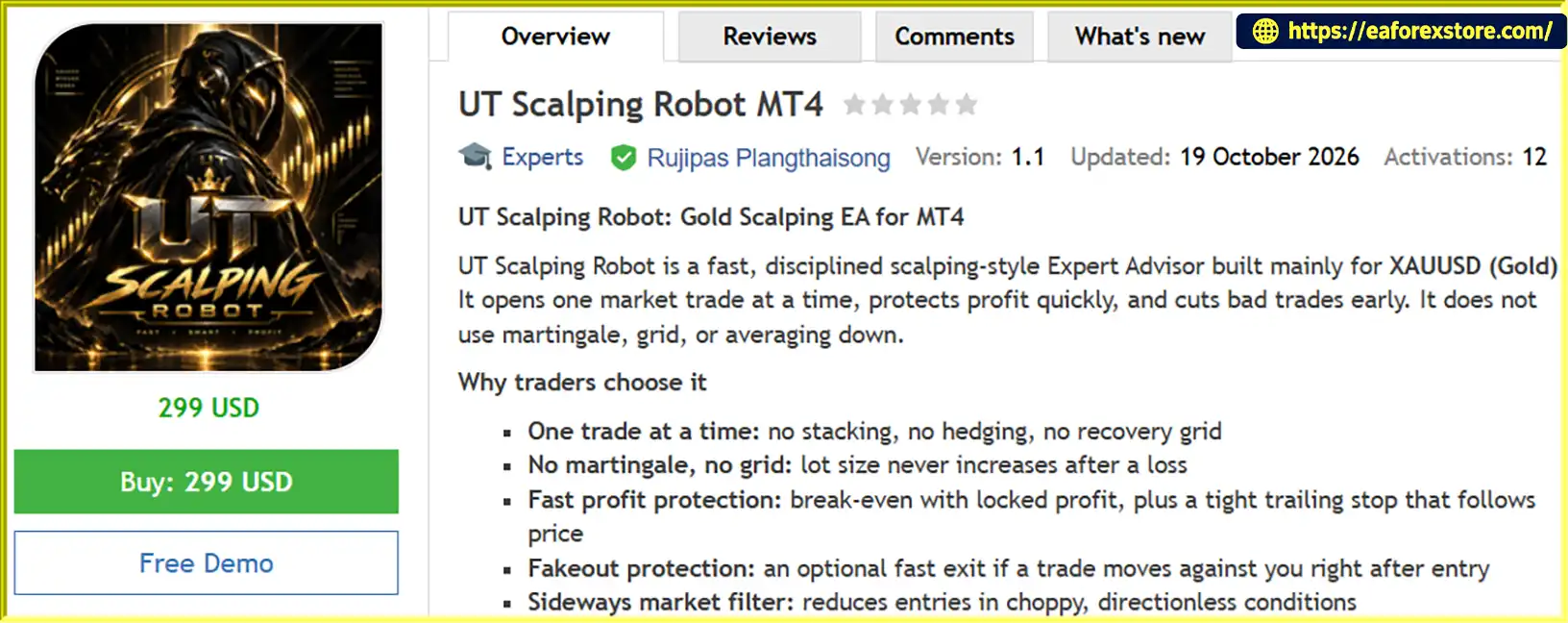
UT Scalping Robot MT4 is a fast, disciplined, and fully automated scalping Expert Advisor (EA) designed primarily for trading XAUUSD (Gold) on the MetaTrader 4 (MT4) platform. Developed for traders who seek precise market entries and efficient trade management, this Gold Scalping EA combines responsive signal detection with advanced risk management and profit protection mechanisms.
Unlike aggressive automated trading systems, UT Scalping Robot MT4 follows a controlled trading approach by opening only one market position at a time. It does not use martingale, grid trading, or averaging-down strategies. Instead, the EA focuses on identifying potential trading opportunities, protecting profits quickly, and cutting losing trades before they develop into larger drawdowns.
The robot features an intelligent signal engine, break-even protection, dynamic trailing stops, fakeout detection, and a sideways market filter. Additional spread, time, and account protection settings allow traders to customize the EA according to their trading preferences and broker conditions.
Whether you are looking for an automated Gold trading solution or a disciplined scalping system for MetaTrader 4, UT Scalping Robot MT4 offers a flexible trading framework designed to support consistent execution and controlled risk exposure.
>>> Delivery time 24h-48h after payment.
>>> Refund if not delivered.
>>> You will receive the latest version without any limitations (ID+Time).Reviewed by Jason Stap <<<
UT Scalping Robot MT4 Overview
UT Scalping Robot MT4 is designed to identify short-term trading opportunities in the Gold market. Its adjustable signal sensitivity and calculation period allow traders to customize how quickly the robot responds to market movements.
The EA is primarily optimized for XAUUSD, making it suitable for traders interested in automated Gold scalping on MT4.
The EA maintains a disciplined trading structure by opening only one market position at a time.
This approach helps prevent excessive trade stacking and avoids the complexity of managing multiple overlapping positions. It also provides greater control over trading exposure and account risk.
Unlike many high-risk scalping robots, UT Scalping Robot MT4 does not increase lot sizes after losing trades.
It does not use:
The lot size follows the selected money management settings rather than automatically increasing to recover previous losses.
The EA includes an intelligent break-even function that moves the stop loss toward the entry price after a predefined profit threshold is reached.
Traders can also configure a profit-locking distance to secure a portion of the unrealized profit.
This feature helps reduce the risk of a profitable trade turning into a full loss when the market reverses.
UT Scalping Robot MT4 uses a configurable trailing stop to follow favorable price movements.
Traders can adjust:
This allows the EA to protect profits while giving trades room to continue moving in the desired direction.
Short-term Gold price movements can produce false signals and sudden reversals.
The optional fakeout protection feature monitors trades immediately after entry. If the market moves against a position beyond a predefined adverse distance within a specified time window, the EA can close the trade early.
This mechanism is designed to reduce exposure to unfavorable entry conditions and rapid market reversals.
The built-in sideways market filter helps identify choppy and directionless market conditions.
By evaluating configurable market strength, timeframe, period, and efficiency parameters, the EA can reduce trading activity when the market lacks sufficient directional movement.
This filter is particularly useful for scalping strategies that depend on short-term price momentum.
UT Scalping Robot MT4 includes broker-adaptive order handling features designed to improve compatibility with different MT4 trading environments.
These include:
These execution safeguards help the EA handle different broker conditions more efficiently.
The EA provides multiple position-sizing methods to accommodate different account sizes and trading preferences.
Available options include:
These options allow traders to customize position sizing while maintaining greater control over their trading exposure.
UT Scalping Robot MT4 operates through an automated trading process that combines signal detection, market filtering, trade execution, and position management.
The EA evaluates market data using its internal signal engine.
Traders can adjust the signal sensitivity, calculation period, candle smoothing, and historical bars used during the initialization process.
These settings determine how the robot processes market information and responds to potential trading opportunities.
Before opening a trade, the EA checks the configured trading conditions.
These may include:
If the market does not meet the required conditions, the EA can skip the trading opportunity.
When the signal engine detects a potential opportunity, the EA determines whether the signal meets the selected trading direction.
Traders can choose between:
The EA can also be configured to close an existing position and reverse direction when an opposite signal appears.
Before executing a trade, UT Scalping Robot MT4 calculates the appropriate lot size based on the selected money management method.
The EA applies the configured lot limits and checks available free margin before sending an order.
After a position is opened, the robot manages it automatically using the configured stop loss, break-even, trailing stop, and fakeout protection settings.
The EA continuously monitors the trade and adjusts its management according to market movements and the selected parameters.
The EA monitors account-level protection settings, including daily loss and maximum total drawdown limits.
If a configured limit is reached, the EA can stop opening new trades. Traders can also enable the optional close-all function to close open positions when a protection limit is triggered.
This provides an additional layer of risk control beyond individual trade management.
Choosing the right Gold Scalping EA requires more than just finding a robot that opens trades quickly. A reliable automated trading system should also provide transparent trading logic, flexible risk settings, and effective trade management.
UT Scalping Robot MT4 is designed around these principles.
A Disciplined Trading Approach
The one-trade-at-a-time structure helps prevent excessive exposure caused by multiple overlapping positions.
No Aggressive Recovery Strategies
The EA does not use martingale, grid trading, or averaging down. Traders can maintain their selected lot-sizing approach without automatic lot multiplication after losses.
Designed for Gold Scalping
XAUUSD is the primary trading instrument, allowing traders to focus on Gold’s short-term price movements.
Advanced Profit Protection
Break-even, profit locking, and dynamic trailing stop functions help manage trades as they move into profit.
Flexible Trading Control
Buy-only, sell-only, and both-direction modes allow traders to customize the EA according to their preferred market conditions.
Comprehensive Account Protection
Daily loss limits, maximum drawdown controls, free-margin checks, and optional close-all functionality provide additional account-level safeguards.
Broker-Friendly Execution
Automatic filling-mode detection, slippage control, and stop-level-aware order handling help the EA adapt to different broker execution environments.
Customizable Trading Schedule
Traders can define trading weekdays, trading-hour windows, and Friday cut-off times to control when the robot is allowed to open new positions.
Suitable for Automated Trading Environments
The EA can operate on different chart timeframes while handling its signal data internally. A stable VPS is recommended for continuous operation during the trading week.
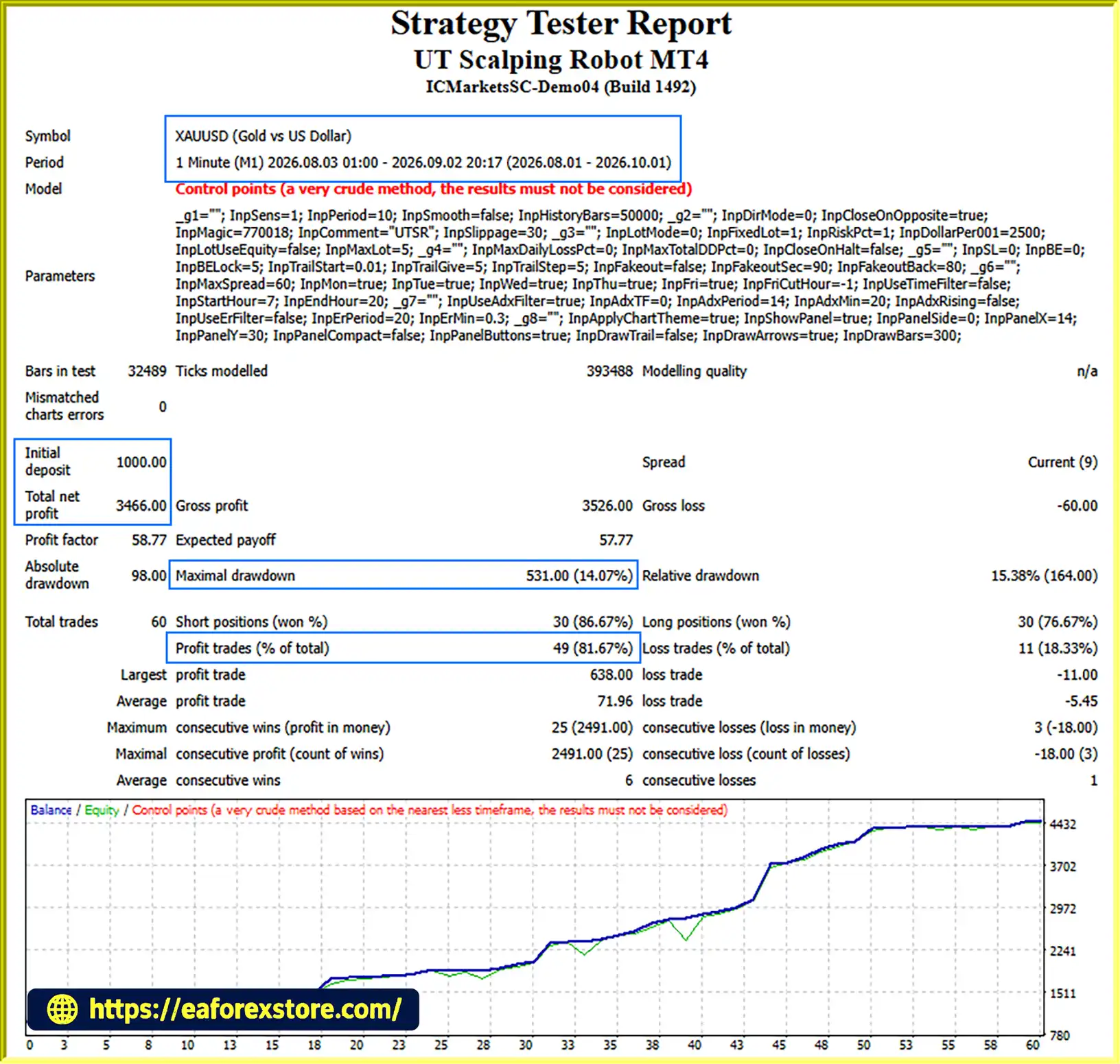
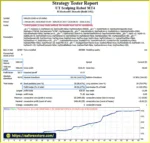
🔺XAUUSD (Gold) pair – 2 months
UT Scalping Robot MT4 backtets
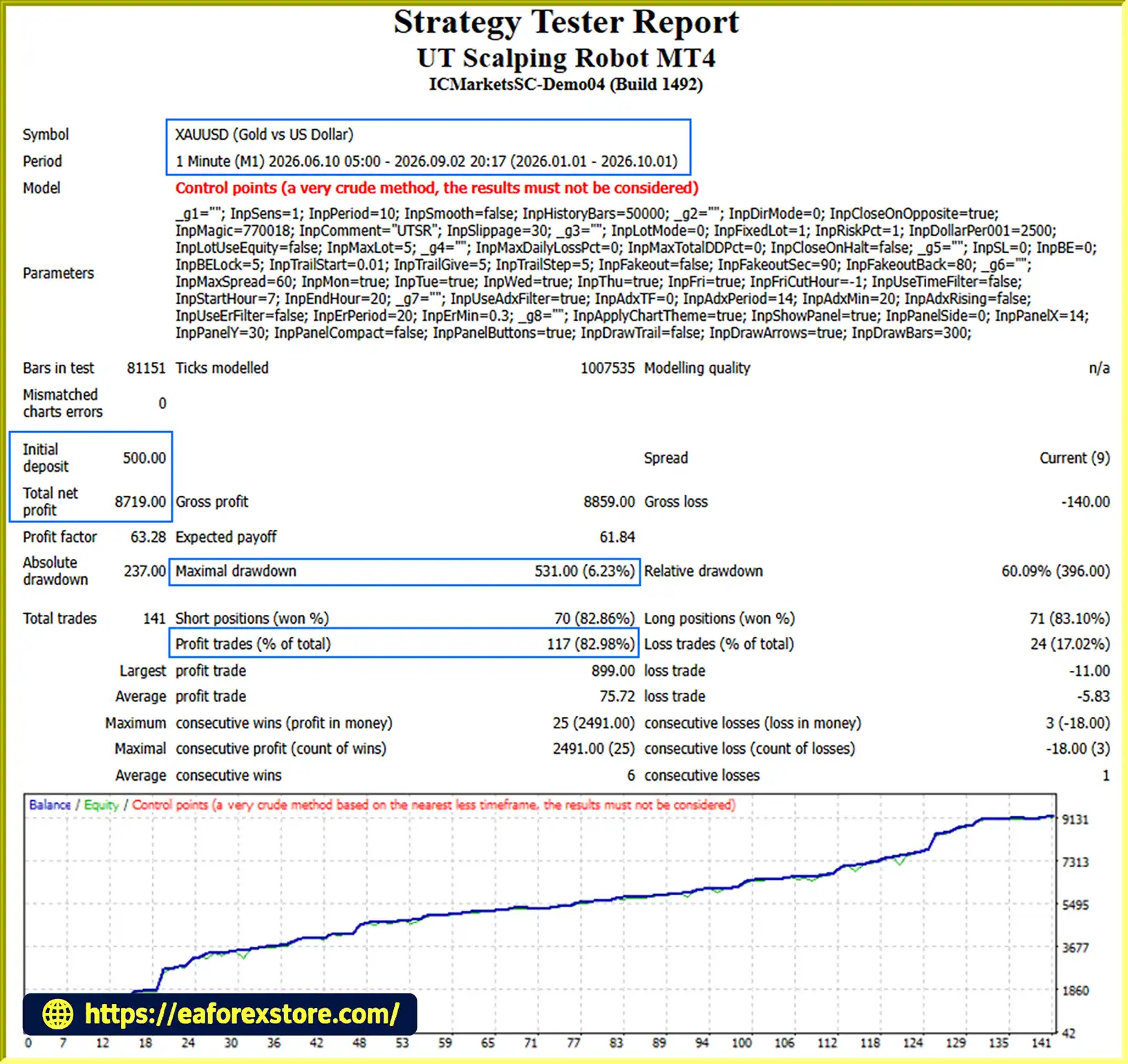
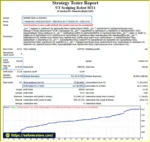
🔺XAUUSD (Gold) pair – 9 months
UT Scalping Robot MT4 EA backtets
Risk management is an essential component of automated Gold trading. UT Scalping Robot MT4 includes several configurable protection mechanisms designed to help traders control exposure and manage unfavorable market conditions.
The EA supports the following trade-level risk management features:
The stop-loss distance and trailing parameters can be configured according to the trader’s preferred risk profile.
For XAUUSD, the EA uses distance values in configurable units, where 1 unit equals 0.01 in Gold price. Traders should verify the required settings against their broker’s symbol specifications.
The daily loss protection allows traders to define a maximum daily loss percentage.
When the configured threshold is reached, the EA can halt further trading activity for the day.
This feature is designed to help prevent continued trading during unfavorable market conditions.
Traders can configure a maximum total drawdown percentage to establish an account-level risk boundary.
If the selected threshold is reached, the EA can stop trading. The optional close-all function can also be enabled to close open positions when the protection limit is triggered.
Before placing a new order, the EA checks whether sufficient free margin is available.
This helps prevent order submissions when the account does not have the required margin.
UT Scalping Robot MT4 includes configurable trading schedule controls:
These settings allow traders to restrict trading during periods that may not match their preferred trading conditions.
Although UT Scalping Robot MT4 includes multiple risk management features, no automated trading system can eliminate market risk.
Stop losses may experience slippage, and sudden price movements, spread widening, or broker execution conditions can affect trading results.
The daily loss and drawdown protection settings should not be considered guaranteed loss limits.
Traders should always use appropriate position sizing, test the EA on a demo account, and avoid risking capital they cannot afford to lose.
Understanding the advantages and limitations of UT Scalping Robot MT4 can help traders determine whether this automated Gold scalping system is suitable for their trading objectives.
Follow these steps to install and configure UT Scalping Robot MT4 on your MetaTrader 4 platform.
Download the UT Scalping Robot MT4 installation file provided by the vendor.
The EA is typically supplied as an .ex4 or .mq4 file.
Launch your MT4 trading platform.
Navigate to:
File → Open Data Folder
This will open the directory containing your MetaTrader 4 installation files.
Open the following folder:
MQL4 → Experts
Copy the UT Scalping Robot MT4 file into this directory.
Restart your MT4 platform or refresh the Expert Advisors section in the Navigator window.
The EA should appear under:
Navigator → Expert Advisors
Open an XAUUSD (Gold) chart.
Drag UT Scalping Robot MT4 onto the chart or double-click the EA name.
Although the robot can be attached to different chart timeframes, XAUUSD is the recommended trading instrument.
Review and customize the input parameters according to your trading preferences.
Recommended configuration considerations:
Ensure that the selected lot size is appropriate for your account balance and risk tolerance.
Enable the AutoTrading button in MT4.
Check the EA settings and ensure that automated trading permissions are enabled.
The EA should now be ready to evaluate market conditions and execute trades according to its configured rules.
Before using UT Scalping Robot MT4 on a live account, test it on a demo account.
Evaluate its behavior under different market conditions, including:
A VPS is recommended for stable operation during the trading week.
>> Join VIP Membership Now <<<
UT Scalping Robot MT4 is a disciplined automated trading solution designed for traders who want to explore short-term opportunities in the XAUUSD (Gold) market.
Its combination of responsive signal detection, one-trade-at-a-time execution, break-even protection, dynamic trailing stops, and account-level risk controls provides a structured approach to automated scalping.
One of its main advantages is its avoidance of martingale, grid trading, and averaging-down strategies. Instead of relying on aggressive recovery techniques, the EA focuses on controlled position sizing, predefined risk parameters, and systematic trade management.
The robot also offers flexible trading filters and money management settings, allowing traders to adapt its behavior to different account sizes and broker conditions.
However, Gold scalping remains a high-risk trading activity. Spread, slippage, volatility, and execution quality can significantly affect the results of any automated strategy.
For the best evaluation, traders should begin with a demo account, select conservative risk settings, and carefully test the EA before moving to live trading.
If you are looking for an MT4 Gold Scalping Expert Advisor with flexible risk management and a disciplined trading structure, UT Scalping Robot MT4 may be a suitable addition to your automated trading toolkit.
Risk Warning: Trading Forex and CFDs, including Gold, involves significant risk and may result in the loss of some or all of your invested capital. Past performance and backtest results do not guarantee future results. Always trade responsibly and use risk settings appropriate for your financial situation.
1. What is UT Scalping Robot MT4?
UT Scalping Robot MT4 is an automated Expert Advisor (EA) designed primarily for scalping XAUUSD (Gold) on the MetaTrader 4 platform. It uses automated trading signals, break-even protection, trailing stops, and risk management tools to manage trades according to predefined settings.
2. Does UT Scalping Robot MT4 use Martingale or Grid Trading?
No, UT Scalping Robot MT4 does not use martingale, grid trading, or averaging-down strategies. It opens only one market position at a time and uses configurable money management settings to control position sizes and trading exposure.
3. What trading platform and currency pair does UT Scalping Robot MT4 support?
UT Scalping Robot MT4 is designed for MetaTrader 4 (MT4), primarily trading XAUUSD (Gold). Although it can be attached to different chart timeframes, traders should test the EA on a demo account to determine suitable settings for their broker.
4. Can beginners use UT Scalping Robot MT4?
Yes, beginners can use UT Scalping Robot MT4 if they understand the basic principles of automated trading and risk management. Users need to configure lot sizes, stop losses, spread limits, and account protection settings correctly. Demo testing is strongly recommended before trading with real money.
5. What risk management features does UT Scalping Robot MT4 offer?
The EA includes stop loss, break-even protection, profit locking, dynamic trailing stops, fakeout protection, daily loss limits, and maximum drawdown controls. It also supports free-margin checks and maximum lot restrictions. These features help manage risk but cannot guarantee profits or prevent all losses.
6. Is UT Scalping Robot MT4 profitable, and what are its backtest results?
The provided backtests report the following results:
2-month backtest: $1,000 initial deposit, $3,466 net profit, 81.67% win rate, and 14.07% maximum drawdown.
9-month backtest: $500 initial deposit, $8,719 net profit, 82.98% win rate, and 6.23% maximum drawdown.
These are historical backtest figures, not guaranteed future results. Actual performance may vary depending on market conditions, broker spreads, slippage, and execution quality.
7. What are the recommended broker settings and operating requirements for UT Scalping Robot MT4?
For better execution, use an MT4 broker that offers competitive XAUUSD spreads, reliable order execution, and suitable trading conditions for scalping. Configure the maximum spread, slippage, trading hours, and stop levels according to your broker's specifications. A stable VPS is recommended for continuous operation.
8. How do I install UT Scalping Robot MT4, and what is included in the package?
To install the EA, copy the provided UT Scalping Robot MT4 .ex4 or .mq4 file into the MQL4 → Experts folder in your MT4 data directory. Restart or refresh MT4, attach the EA to an XAUUSD chart, configure the settings, and enable AutoTrading. The listed download package includes the UT Scalping Robot MT4 Expert Advisor file. According to the product information, delivery takes 24–48 hours after payment, with a refund if the product is not delivered.
In stock
In stock
In stock
In stock
In stock
Out of stock
No account yet?
Create an Account












 Automatic EA
 EA Best Seller
 Expert Advisor MT4
 Expert Advisor MT5
 HFT EA


Reviews
Clear filtersThere are no reviews yet.