









-
 Unlimited Activations
-
 Instant delivery
-
 Easy to install


 Unlimited Activations
Instant delivery
Easy to install
Unlimited Activations
Instant delivery
Easy to install
 Free Update
 Free Install Support

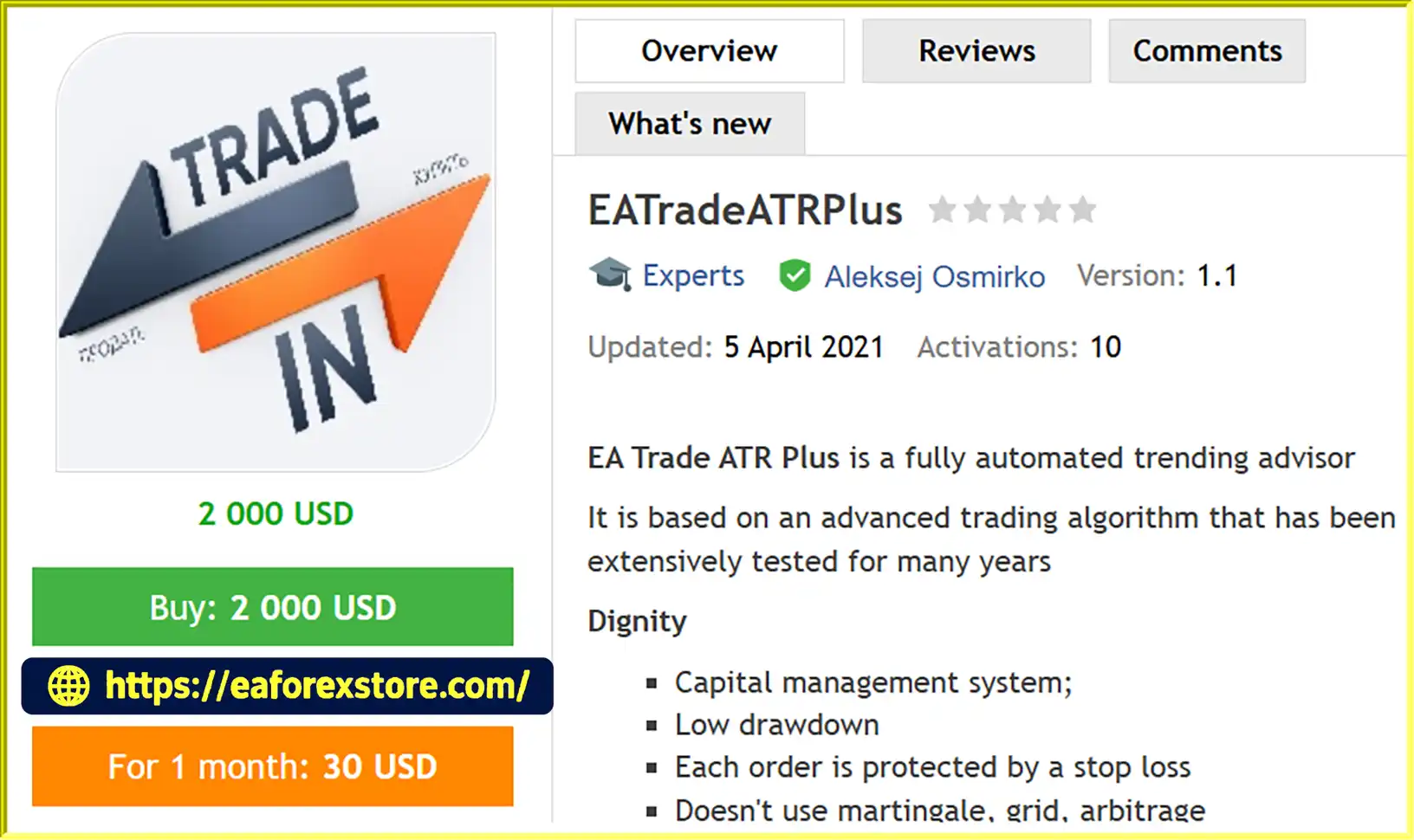
EATradeATRPlus MT4 is an automated Forex trading Expert Advisor (EA) developed for traders who want a systematic approach to trading the EUR/USD currency pair. The Expert Advisor uses an advanced trend-following algorithm combined with the Average True Range (ATR) indicator to support trade management and adapt risk parameters to changing market volatility.
According to its description, the trading algorithm has undergone extensive testing over several years. However, historical testing does not guarantee future profitability, and traders should independently evaluate its performance before using it on a live account.
One of the primary advantages of EATradeATRPlus MT4 is its integrated capital management system. Users can select a fixed trading lot size or enable automatic lot calculation based on their account balance.
With a minimum stated deposit requirement of $100, the EA offers a relatively low entry threshold for traders interested in automated Forex trading.
>>> Delivery time 24h-48h after payment.
>>> Refund if not delivered.
>>> You will receive the latest version without any limitations (ID+Time).Reviewed by Jason Stap <<<
EATradeATRPlus MT4 is designed to automate trading activities on the MetaTrader 4 platform. Once installed and configured, the Expert Advisor can operate according to its built-in trading algorithm without requiring traders to manually execute every order.
This automated approach helps reduce the need for constant chart monitoring and encourages consistent execution of predefined trading rules.
The EA uses a trend-following trading strategy that aims to capture opportunities arising from directional movements in the Forex market.
Rather than depending on manual trading decisions, EATradeATRPlus MT4 follows algorithmic conditions to determine when to execute trades.
As with other trend-following systems, its effectiveness may vary depending on market conditions, particularly during sideways or highly volatile trading periods.
A notable feature of EATradeATRPlus MT4 is its use of the Average True Range (ATR) indicator for trade management.
ATR measures market volatility, allowing traders to configure Stop Loss distances using volatility-based values.
The EA also provides a Take Profit parameter linked to the Stop Loss size, supporting a structured approach to setting trade exit levels.
EATradeATRPlus MT4 includes configurable money management options to accommodate different trading preferences.
Traders can choose between a fixed lot size and automatic lot calculation based on their account balance.
The automatic lot sizing function uses the formula specified by the EA:
Lot Size = Account Balance / (100 × k)
The parameter k controls the automatic lot calculation, while setting k = 0 allows the EA to use the manually specified LOT value.
Traders should carefully configure these settings according to their available margin, account size, and risk tolerance.
EATradeATRPlus MT4 does not rely on Martingale, Grid, or Arbitrage trading techniques.
This is an important distinction for traders looking to avoid strategies that may increase exposure through repeated position sizing or multiple overlapping orders.
However, avoiding these methods does not eliminate trading risk or guarantee a low drawdown.
The Expert Advisor provides settings that allow users to define when the system can begin and stop trading.
Using the st and en parameters, traders can configure a trading window according to their preferred schedule.
This feature offers additional flexibility when managing automated Forex trading activity.
EATradeATRPlus MT4 operates through an automated trading algorithm designed to identify trend-following opportunities on the EUR/USD currency pair.
After being attached to an MT4 chart, the Expert Advisor evaluates market conditions according to its internal trading logic and configured parameters.
The general trading process involves the following steps:
Step 1: Market Analysis
The EA monitors the EUR/USD market and evaluates trading conditions using its built-in trend-following algorithm.
Step 2: Trade Execution
When the algorithm identifies conditions that satisfy its trading rules, the Expert Advisor can automatically open a position.
Step 3: ATR-Based Risk Parameters
The system uses the configured ATR value and the slatr setting to determine the Stop Loss distance.
The tpatr parameter is used to calculate the Take Profit distance relative to the Stop Loss.
Step 4: Position Sizing
Depending on the configuration, the EA applies either a fixed lot size or automatically calculated lot sizing based on account balance.
Step 5: Trade Management
Each order is assigned a Stop Loss, while Take Profit settings provide predefined profit-taking levels.
Step 6: Trading Schedule Control
The EA follows the configured trading start and end hours, providing control over when new trading activity is permitted.
By combining automated execution with volatility-based trade management, EATradeATRPlus MT4 aims to provide a systematic Forex trading experience.
EATradeATRPlus MT4 may appeal to traders looking for an automated EUR/USD trading solution with configurable risk controls.
Its combination of trend-following logic, ATR-based Stop Loss settings, and flexible lot sizing makes it suitable for traders who prefer rules-based strategies over discretionary trading.
One of its distinguishing characteristics is its avoidance of Martingale and Grid trading. Instead of relying on position-recovery techniques, the EA incorporates Stop Loss protection for individual orders.
The ability to configure automatic money management also makes the system adaptable to different account balances, although users must ensure that their settings remain appropriate for their risk tolerance.
Furthermore, the customizable trading schedule gives users more control over when the Expert Advisor operates.
For traders familiar with MetaTrader 4 and automated trading systems, EATradeATRPlus MT4 provides a focused trading tool centered on EUR/USD trend-following opportunities.
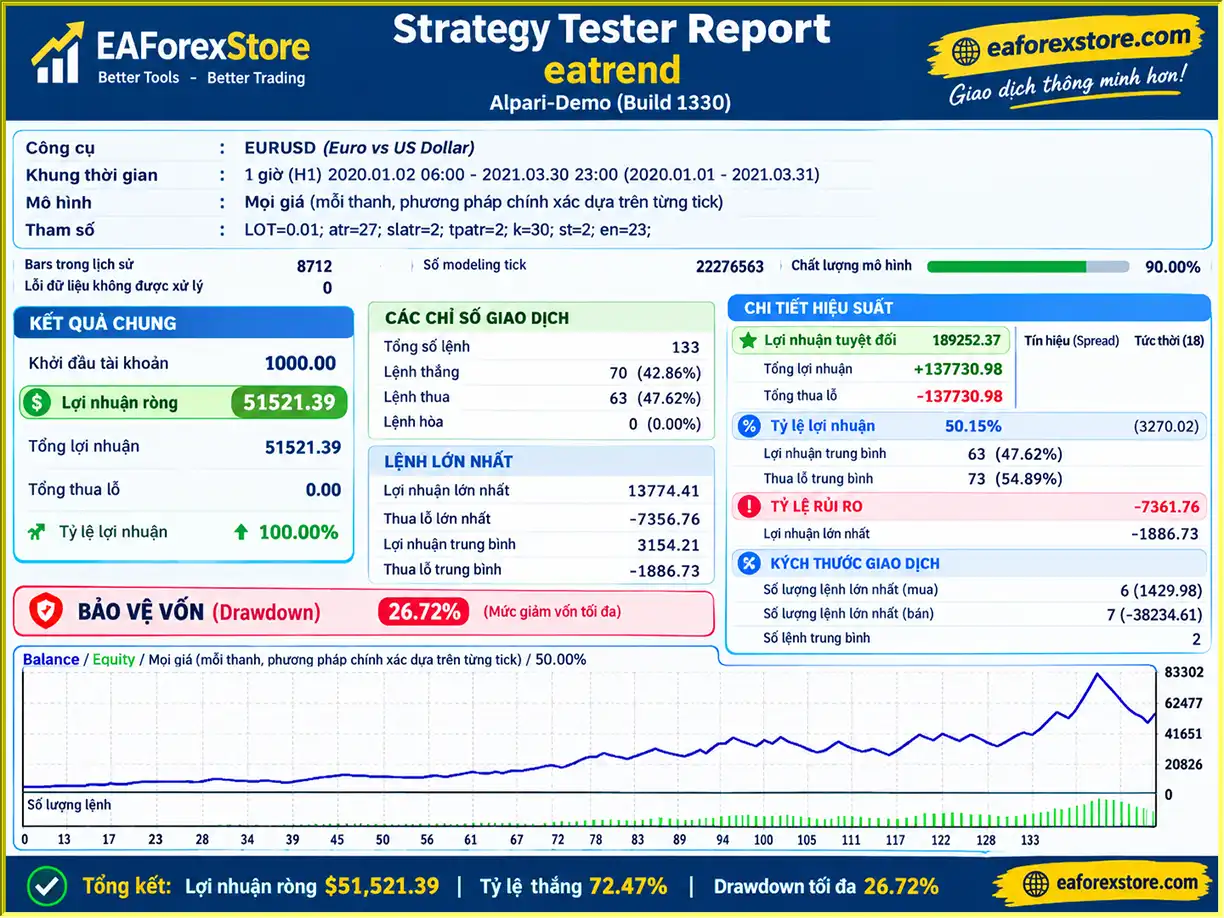
🔺EURUSD pair – 2020 – 2021
EATradeATRPlus MT4 EA Backtets
Risk management is one of the most important considerations when using any automated Forex trading robot.
EATradeATRPlus MT4 includes several features designed to support structured risk control. Nevertheless, Forex trading involves substantial financial risk, and no Expert Advisor can guarantee consistent profits or prevent losses.
Every order opened by EATradeATRPlus MT4 is designed to include a Stop Loss.
The Stop Loss distance is configured using the ATR indicator and the slatr parameter, allowing it to reflect the selected volatility measurement.
However, Stop Loss orders may execute at a different price during periods of slippage, market gaps, or reduced liquidity.
The tpatr parameter determines the Take Profit distance based on the configured Stop Loss size.
This enables traders to customize trade exit levels according to their strategy preferences.
The EA supports automatic lot sizing through the k parameter.
This provides a way to adjust position sizes based on account balance, although it should not be assumed to maintain a fixed percentage of account risk.
The st and en parameters allow traders to set trading start and end hours.
This may help restrict trading activity to selected periods, although the exact time reference should be checked within the EA and broker environment.
Before activating EATradeATRPlus MT4 on a live account, traders should consider the following:
Note: The supplied product information does not confirm a built-in notification or alert system for email, mobile push notifications, or drawdown warnings. These features should not be assumed to be available.
EATradeATRPlus MT4 provides several adjustable input parameters that allow traders to customize lot sizing, volatility settings, profit targets, and trading hours.
| Parameter | Description |
|---|---|
| LOT | Sets the fixed trading lot size when k = 0. |
| atr | Defines the ATR indicator value or setting used by the EA. |
| slatr | Determines the Stop Loss distance based on ATR. |
| tpatr | Determines the Take Profit distance based on the Stop Loss size. |
| k | Controls automatic lot calculation using Balance / (100 × k). |
| st | Specifies the trading start hour. |
| en | Specifies the trading end hour. |
Traders should test different settings in the MT4 Strategy Tester and on a demo account before using real funds.
Installing EATradeATRPlus MT4 follows the standard MetaTrader 4 Expert Advisor installation process.
Download MetaTrader 4 from your Forex broker or another authorized source.
Install the platform and log in using your trading account credentials.
Open MetaTrader 4 and select:
File → Open Data Folder → MQL4 → Experts
Copy the EATradeATRPlus EA file into the Experts folder.
The file will typically have an .ex4 or .mq4 extension.
Restart MetaTrader 4 or refresh the Expert Advisors section in the Navigator panel.
Locate EATradeATRPlus in the list of available Expert Advisors.
Open a chart for the EUR/USD currency pair.
Choose a chart timeframe appropriate for the EA’s intended configuration. The official recommended timeframe was not included in the supplied specifications, so users should verify this before trading.
Drag EATradeATRPlus from the Navigator panel onto the EUR/USD chart.
The Expert Advisor settings window will appear.
Enable the necessary automated trading permissions.
Open the Inputs tab and configure the available settings:
Review each parameter carefully before enabling the EA.
Activate the AutoTrading or Algo Trading function in MetaTrader 4.
Verify that the Expert Advisor is enabled and that the platform does not display any configuration errors.
Before using a live trading account, run backtests and evaluate the EA under demo trading conditions.
Pay particular attention to drawdown, execution quality, trading costs, lot sizing, and risk exposure.
A Virtual Private Server (VPS) is recommended for traders who want MetaTrader 4 to remain operational continuously.
A VPS can reduce interruptions caused by turning off a personal computer or losing a local internet connection, although it cannot prevent all technical failures.
>> Join VIP Membership Now <<<
EATradeATRPlus MT4 is a fully automated Forex Expert Advisor designed for traders interested in EUR/USD trend-following strategies.
Its key features include ATR-based Stop Loss management, configurable Take Profit levels, automatic position sizing, and customizable trading hours.
The absence of Martingale, Grid, and Arbitrage techniques may make it appealing to traders who prefer trading systems with predefined exit rules rather than recovery-based position management.
However, the effectiveness of EATradeATRPlus MT4 ultimately depends on its trading algorithm, market conditions, broker execution, and user configuration.
Although the developer describes the algorithm as extensively tested with low drawdown, independently verified live performance statistics were not supplied.
For traders considering this MT4 Forex robot, the most practical approach is to evaluate its behavior through historical backtesting, forward testing, and careful risk management before committing real capital.
Overall, EATradeATRPlus MT4 offers a focused automated trend-trading solution for MetaTrader 4 users who want configurable ATR-based trade management and an alternative to Martingale or Grid-based Forex robots.
1. What is EATradeATRPlus MT4 and how does it work?
EATradeATRPlus MT4 is an automated Forex trading Expert Advisor (EA) designed specifically for the EUR/USD currency pair on MetaTrader 4. It uses a trend-following algorithm to identify potential trading opportunities and the Average True Range (ATR) indicator to manage Stop Loss and Take Profit levels. Once properly configured, the EA can automatically execute and manage trades without requiring constant manual intervention.
2. Is EATradeATRPlus MT4 profitable?
EATradeATRPlus MT4 has reported promising historical backtesting results. According to the available data, a EUR/USD backtest covering 2020–2021 recorded a 72.47% win rate, $51,521.39 in net profit from a $1,000 initial deposit, and a maximum drawdown of 26.72%. However, these figures are historical backtest results, not independently verified live trading performance. Actual profitability depends on market conditions, broker execution, trading costs, and risk management settings.
3. What is the minimum deposit required for EATradeATRPlus MT4?
The stated minimum deposit for EATradeATRPlus MT4 is $100, making it accessible to traders with relatively small accounts. However, trading with only $100 may limit position-sizing flexibility and increase the impact of spreads, leverage, and market volatility. Traders should carefully evaluate their risk tolerance and test the EA on a demo account before investing real money.
4. Does EATradeATRPlus MT4 use Martingale or Grid trading strategies?
No. EATradeATRPlus MT4 does not use Martingale, Grid, or Arbitrage trading strategies. Instead, this Forex robot follows a trend-based trading approach with ATR-based Stop Loss protection and configurable Take Profit levels. While avoiding Martingale and Grid strategies may appeal to risk-conscious traders, it does not eliminate the possibility of significant losses or account drawdowns.
5. Is EATradeATRPlus MT4 safe for beginners?
EATradeATRPlus MT4 offers several risk management features, including automatic Stop Loss placement, adjustable Take Profit settings, fixed or automatic lot sizing, and customizable trading hours. These features may help beginners implement a more structured trading approach. However, automated Forex trading still involves substantial financial risk. Beginners should understand leverage, drawdown, and position sizing before using the EA on a live account.
6. Which currency pairs and trading platforms does EATradeATRPlus support?
EATradeATRPlus MT4 is specifically designed for the EUR/USD currency pair and operates on the MetaTrader 4 (MT4) trading platform. The available product specifications do not confirm support for other Forex pairs, gold, cryptocurrencies, or MetaTrader 5 (MT5). Traders should also verify the recommended chart timeframe and broker compatibility before activating the Expert Advisor.
7. How do I install and set up EATradeATRPlus MT4?
To install EATradeATRPlus MT4, download the EA file and copy it into the MQL4/Experts folder within your MetaTrader 4 data directory. Restart MT4, open a EUR/USD chart, and attach the Expert Advisor from the Navigator panel. Next, configure the lot size, ATR settings, Stop Loss, Take Profit, and trading hours. Enable AutoTrading and test the EA on a demo account before using real funds. A VPS is recommended for traders who want continuous automated operation.
8. Can EATradeATRPlus MT4 run 24/7 on a VPS?
Yes, EATradeATRPlus MT4 can operate in a VPS-based MetaTrader 4 environment, allowing the trading platform to remain active without keeping your personal computer switched on. The EA also includes customizable trading hours through its st and en parameters, so users can restrict when trading takes place. A reliable Forex VPS may help reduce connectivity interruptions, but it cannot guarantee uninterrupted execution or profitable trading results.
In stock
In stock
In stock
In stock
In stock
Out of stock
No account yet?
Create an Account












 Automatic EA
 EA Best Seller
 Expert Advisor MT4
 Expert Advisor MT5
 HFT EA


Reviews
Clear filtersThere are no reviews yet.