









-
 Unlimited Activations
-
 Instant delivery
-
 Easy to install






 Unlimited Activations
Instant delivery
Easy to install
Unlimited Activations
Instant delivery
Easy to install
 Free Update
 Free Install Support

Goblin Golden Greedy EA MT5 is an automated Gold trading Expert Advisor designed for the MetaTrader 5 platform. Developed primarily for XAUUSD, this trading robot combines multi-timeframe candlestick analysis, automated position sizing, martingale-based recovery options, and daily profit and loss controls into a single trading system.
Unlike basic Expert Advisors that rely on signals from only one chart, Goblin Golden Greedy EA MT5 analyzes five timeframes simultaneously: M1, M5, M15, M30, and H1. Its trading algorithm evaluates bullish and bearish candlestick patterns across these periods and opens positions when a configurable number of timeframes indicate the same market direction.
One of the EA’s signature features is Greedy Goblin Mode, which automatically adjusts lot sizes according to account balance. This allows trading volume to increase proportionally as the account grows, although larger positions also increase potential losses.
The system also includes two martingale trading modes: Reverse and One Way. These options allow the EA to increase position sizes following losing trades while either reversing the trading direction or maintaining the previous direction. Configurable martingale limits and margin checks are intended to restrict certain aspects of this recovery process.
Goblin Golden Greedy EA MT5 is designed with an emphasis on the Asia-Pacific trading session, with adjustable trading hours to accommodate different broker server times. Additional features include daily profit targets, daily loss limits, a real-time trading dashboard, and automatic order validation.
According to the developer, the EA can operate with a minimum account balance of $100 and a default base lot size of 0.01. However, this minimum balance does not guarantee that the account can withstand adverse Gold price movements or martingale-related drawdowns.
With its combination of multi-timeframe analysis, automated execution, customizable position sizing, and integrated risk controls, Goblin Golden Greedy EA MT5 offers a configurable trading solution for traders interested in automated XAUUSD strategies.
>>> Delivery time 24h-48h after payment.
>>> Refund if not delivered.
>>> You will receive the latest version without any limitations (ID+Time).Reviewed by Jason Stap <<<
Goblin Golden Greedy EA MT5 Overview
Goblin Golden Greedy EA MT5 monitors five different chart periods simultaneously:
Each timeframe is evaluated using candlestick direction to determine whether market conditions indicate bullish, bearish, or mixed price movement.
This approach allows the EA to consider short-term and broader market conditions before executing trades.
The robot uses a confluence-based entry system.
Instead of opening a trade based on one timeframe alone, it requires a minimum number of timeframes to agree on the same direction.
Users can choose from four confluence thresholds:
The standard trading approach described by the developer uses a 3/5 threshold.
Higher thresholds provide stricter signal requirements, although they do not necessarily produce more profitable trades.
The EA evaluates candle direction to classify trading conditions into three categories.
Strong Buy: A timeframe demonstrates consecutive bullish candles.
Strong Sell: A timeframe demonstrates consecutive bearish candles.
Moderate: A timeframe contains mixed bullish and bearish candles without a clear directional pattern.
The algorithm combines these classifications across multiple timeframes to determine potential entry opportunities.
Greedy Goblin Mode automatically adjusts trading volume according to account balance.
The developer provides the following examples:
| Account Balance | Calculated Lot Size |
|---|---|
| $100 | 0.01 |
| $200 | 0.02 |
| $300 | 0.03 |
| $500 | 0.05 |
| $1,000 | 0.10 |
| $5,000 | 0.50 |
This functionality is intended to support proportional lot scaling without requiring traders to adjust position sizes manually.
However, it should not be confused with a guaranteed safe risk-per-trade model because actual monetary exposure also depends on Stop Loss distance, Gold contract specifications, and leverage.
Goblin Golden Greedy EA includes two recovery trading modes.
Reverse Mode
Following a Stop Loss, the EA reverses the direction of the next trade.
For example:
BUY → SELL → BUY → SELL
This mode is intended to respond to changing market direction, although repeated reversals can also result in consecutive losses.
One Way Mode
The EA maintains the same trading direction following a losing position.
For example:
BUY → BUY → BUY
or
SELL → SELL → SELL
This approach may be tested under trending market conditions, but it can generate substantial losses when prices move persistently against the selected direction.
The martingale system includes several protective controls.
The developer specifies a default maximum martingale level of four.
Additional safeguards include automatic fallback to the base lot when available margin is insufficient and a reset of the martingale sequence after a successful Take Profit.
These mechanisms help define the recovery sequence but do not remove the possibility of significant losses.
The EA is designed with a focus on trading during the Asia-Pacific market session.
The developer suggests that this session may offer suitable Gold trading conditions for the strategy.
Trading hours are adjustable according to broker server time, allowing users to test different operating schedules.
Goblin Golden Greedy EA MT5 includes configurable daily trading thresholds.
For example, users may set:
The EA is designed to stop initiating trading activity once the configured daily threshold is reached.
Users should verify whether these limits are calculated using realized profit and loss, floating equity changes, or a combination of both.
The robot includes an on-chart dashboard that displays key information, including:
This provides traders with convenient access to the EA’s operating conditions.
The EA includes several technical checks designed to support MT5 order compatibility.
These include margin verification, lot size validation, broker trading-volume restrictions, minimum Stop Loss distances, historical data availability, and input parameter validation.
These checks can reduce certain configuration and execution errors, but they do not guarantee profitability or protection against adverse market conditions.
Goblin Golden Greedy EA MT5 follows an automated trading process that combines candlestick analysis, directional confirmation, position sizing, order execution, and recovery management.
The EA continuously evaluates Gold price action across M1, M5, M15, M30, and H1.
Each timeframe contributes information about current directional market behavior.
The algorithm examines candlestick direction to classify individual timeframes.
Consecutive bullish candles indicate a Strong Buy condition, while consecutive bearish candles indicate a Strong Sell condition.
Mixed candlestick patterns are classified as Moderate.
The number of consecutive candles required is not specified in the supplied product description.
Once the timeframe classifications are complete, the EA counts how many timeframes agree on the same trading direction.
For example, if three of the five monitored timeframes indicate bullish conditions, the system may identify a valid BUY opportunity when the minimum confluence threshold is set to 3.
If the required level of agreement is not reached, the EA waits for additional confirmation.
Before entering a trade, the robot checks whether the current broker server time falls within the configured trading session.
Its default trading philosophy focuses on the Asia-Pacific session, although the exact session hours can be adjusted.
The EA determines the trading volume according to its lot management settings.
When Greedy Goblin Mode is enabled, position size scales proportionally with account balance.
For example, the developer’s calculation assigns 0.01 lot to a $100 balance and 0.10 lot to a $1,000 balance.
When market, session, and order validation conditions are satisfied, Goblin Golden Greedy EA opens a trading position.
The default Take Profit and Stop Loss settings are both 200 points.
Actual price distances depend on the broker’s XAUUSD quote precision and contract specifications.
If a position closes at Stop Loss, the EA can activate its martingale recovery logic.
Depending on the selected mode, the next trade may reverse direction or maintain the previous direction.
The recovery sequence uses increased position sizing according to the EA’s internal calculation.
When a recovery trade reaches Take Profit, the martingale sequence is designed to reset.
The EA then returns to its normal lot-sizing logic for subsequent trading opportunities.
Throughout the trading session, the EA monitors daily profit and loss.
When the configured daily profit target or loss limit is reached, the robot applies its daily trading restriction.
As long as MetaTrader 5 remains active and market conditions satisfy the configured rules, the EA continues evaluating new opportunities.
The system’s behavior depends on trading sessions, market volatility, broker conditions, available margin, and selected risk settings.
Goblin Golden Greedy EA MT5 combines several features that may appeal to traders interested in automated Gold trading.
Multi-Timeframe Decision Making
The EA uses five chart periods rather than relying exclusively on one timeframe.
Adjustable Signal Strictness
Users can select different confluence thresholds to control how many timeframes must agree before trading.
Automated Position Sizing
Greedy Goblin Mode adjusts trading volume as account balance changes.
Two Recovery Trading Approaches
Reverse and One Way martingale modes provide different ways to manage trading direction after a losing position.
Defined Recovery Limits
Maximum martingale levels and margin checks introduce operational restrictions into the recovery process.
Daily Trading Controls
The ability to configure daily profit targets and loss limits gives users additional control over trading activity.
Session-Based Trading
Adjustable trading hours allow users to focus on specific market sessions.
Transparent On-Chart Information
The integrated dashboard displays signal conditions, position sizing, martingale status, and daily trading performance.
MT5 Compatibility Checks
Automatic validation of lot sizes, margin requirements, and broker trading restrictions can help reduce technical order errors.
These features make Goblin Golden Greedy EA MT5 a configurable option for traders who want to experiment with automated Gold trading strategies combining confluence signals and recovery-based position management.
However, traders should recognize that martingale position sizing can create substantial financial exposure, particularly when operating with small account balances.
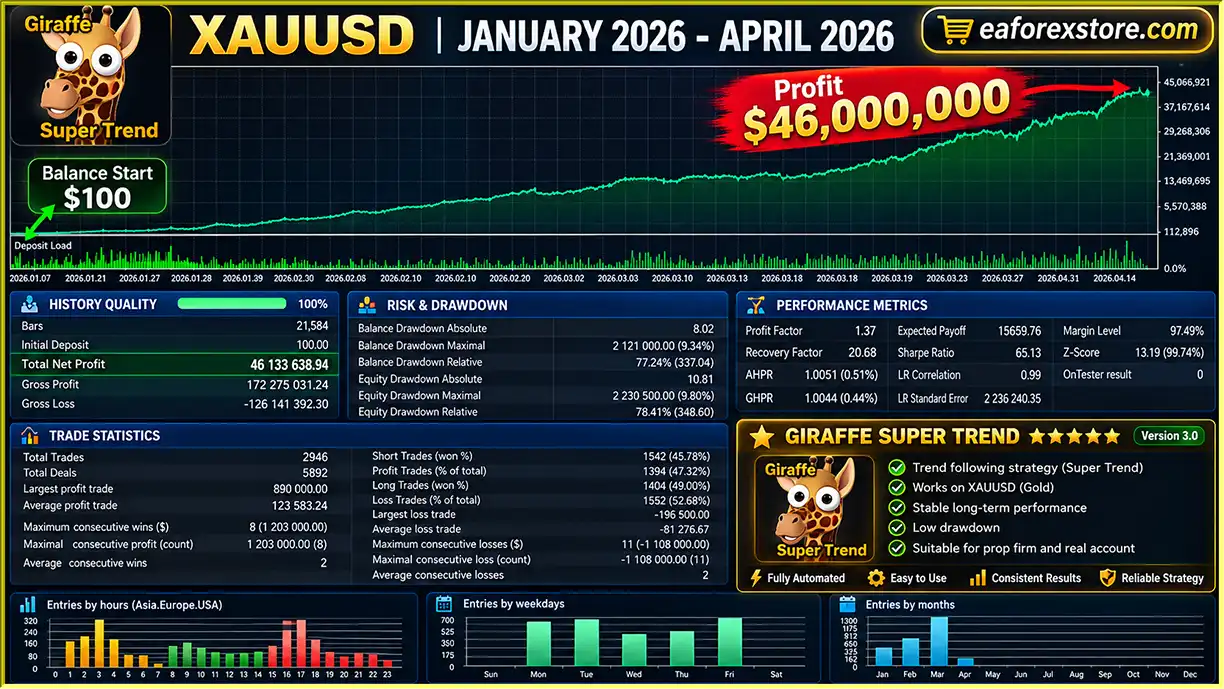
🔺XAUUSD (Gold) pair – January 2026 – April 2026
Goblin Golden Greedy EA MT5 Backtets
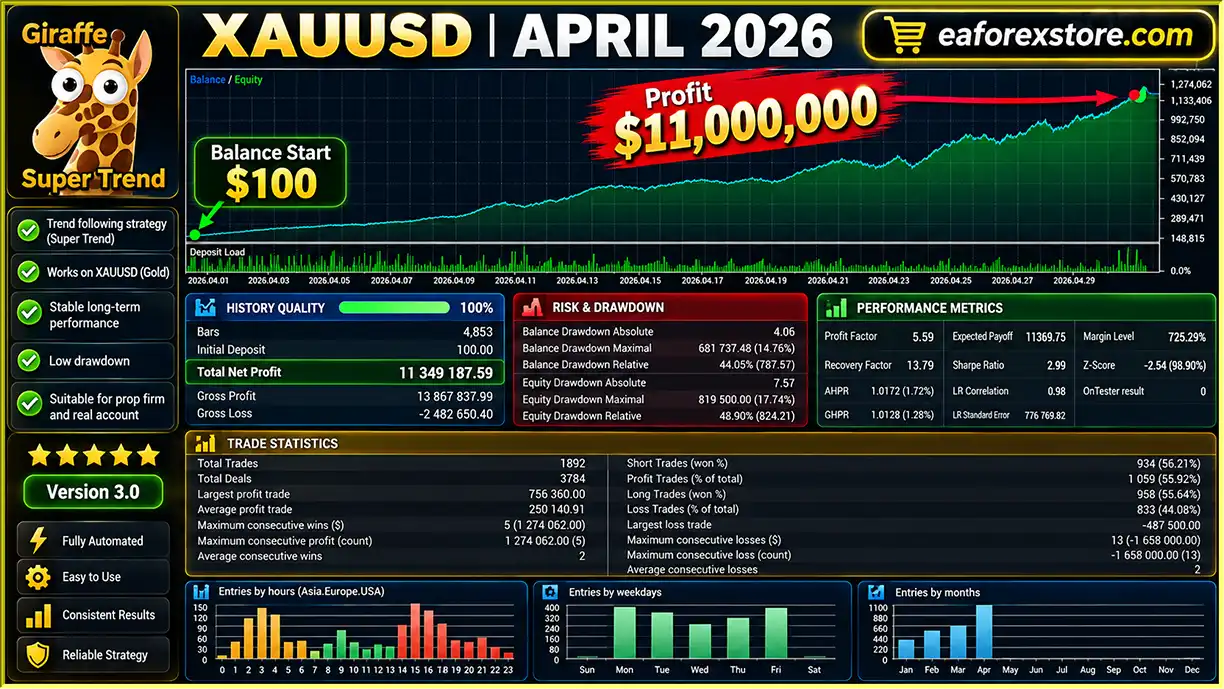
🔺XAUUSD (Gold) pair – April 2026
Goblin Golden Greedy EA Backtets
Risk management is especially important for Goblin Golden Greedy EA MT5 because its trading system includes automatic lot scaling and martingale recovery options.
Although the EA incorporates several protective mechanisms, the combination of increasing position sizes and leveraged Gold trading can result in significant losses.
The EA uses a default Stop Loss of 200 points.
This parameter can be adjusted, and the developer states that Stop Loss protection can also be disabled.
Disabling the Stop Loss may expose positions to uncontrolled adverse price movements and is particularly risky when martingale recovery is enabled.
The default Take Profit value is 200 points.
This setting determines the intended profit target for individual positions.
Traders should verify the monetary value of this distance under their broker’s XAUUSD contract specifications.
When a trade closes at Stop Loss, the EA can increase the position size of the next trade.
Although the developer describes this as Smart Martingale, the strategy retains the fundamental risks associated with loss-recovery position sizing.
A sequence of losing trades can cause exposure to rise rapidly.
The available information does not specify the exact lot multiplier, so the potential position size at each recovery level should be verified before live trading.
The default maximum martingale level is four.
This setting is intended to limit the length of the recovery sequence.
However, even a limited martingale sequence may create substantial drawdowns when individual trades increase in size.
The EA checks available margin before submitting orders.
If the calculated recovery lot exceeds the account’s available margin, the system is described as reverting to the base lot.
This may prevent certain margin-related order rejections, but it does not guarantee protection against margin calls or forced liquidation.
Greedy Goblin Mode increases trading volume proportionally with account balance.
While this may increase potential gains during profitable periods, it can also amplify losses.
The relationship between account balance, lot size, Stop Loss distance, and cumulative exposure should be carefully evaluated.
The EA includes a daily profit target that can restrict further trading activity once the configured level is reached.
For example, a trader may set a daily target of $50.
This is an example setting rather than an assured daily return.
The daily loss limit is designed to stop trading when losses exceed a configured threshold.
For example, users may configure a daily limit of -$5.
However, a daily trading stop does not necessarily guarantee that losses cannot exceed the selected amount.
Open positions, slippage, and execution delays may affect the final loss.
The robot includes several technical safeguards:
These features support order compatibility with MetaTrader 5 trading conditions.
The on-chart dashboard provides real-time information about trading signals, daily profit and loss, martingale levels, and execution errors.
The developer does not confirm dedicated email alerts or mobile push notifications in the supplied specifications.
The developer states that Goblin Golden Greedy EA can operate with a $100 starting balance.
However, a small account may be particularly vulnerable to margin pressure and drawdowns when trading XAUUSD with escalating position sizes.
Traders should evaluate whether the selected Stop Loss, martingale levels, and lot scaling settings are suitable for their available capital.
The presence of daily limits and technical safety checks does not make martingale trading inherently low risk.
Installing Goblin Golden Greedy EA MT5 follows the standard Expert Advisor installation process on MetaTrader 5.
Download and install MetaTrader 5 from a trusted broker.
Open the platform and log in to your trading account.
For initial testing, use a demo account with trading conditions similar to those intended for live use.
In MetaTrader 5, navigate to:
File → Open Data Folder → MQL5 → Experts
This is the standard directory for Expert Advisor files.
Copy the Goblin Golden Greedy EA file, typically provided in EX5 or MQ5 format, into the Experts folder.
Restart MetaTrader 5 or refresh the Expert Advisors section in the Navigator window.
Locate XAUUSD in the Market Watch window.
Open the Gold trading chart.
Although the developer states that the EA may be adaptable to other instruments, XAUUSD is the primary recommended market.
Set the chart timeframe to M1.
The EA uses M1 as its primary timeframe while simultaneously monitoring M5, M15, M30, and H1.
Locate the robot in the Navigator panel under Expert Advisors.
Drag it onto the XAUUSD chart.
Review the EA properties and enable the required algorithmic trading permissions.
The developer provides the following specifications:
| Specification | Details |
|---|---|
| Platform | MetaTrader 5 |
| EA Version | v1.03 |
| Recommended Instrument | XAUUSD |
| Primary Timeframe | M1 |
| Additional Timeframes | M5, M15, M30, H1 |
| Minimum Account Balance | $100 |
| Default Base Lot | 0.01 |
| Default Take Profit | 200 points |
| Default Stop Loss | 200 points |
| Stop Loss Optional | Yes |
| Default Martingale Limit | 4 levels |
| Account Types | Hedging and Netting |
| Magic Number | 55678 |
The $100 minimum is a developer-stated operational requirement rather than a recommended low-risk account size.
Open the Inputs tab and locate the relevant confluence settings.
Choose the minimum number of timeframes that must agree before opening a position.
| Confluence | Description |
|---|---|
| 2/5 | Requires two matching timeframe signals |
| 3/5 | Requires three matching timeframe signals |
| 4/5 | Requires four matching timeframe signals |
| 5/5 | Requires confirmation across all five timeframes |
A stricter confluence threshold may reduce trading frequency, but it does not guarantee greater accuracy.
Review the base lot and Greedy Goblin Mode settings.
With Greedy Goblin Mode enabled, the EA automatically scales trading volume using account balance.
Verify the calculated lot size before allowing the robot to trade.
Select the preferred martingale trading mode:
Reverse Mode: Changes trade direction following a Stop Loss.
One Way Mode: Maintains the previous trading direction during recovery.
Review the maximum martingale level and the recovery lot calculation.
The developer specifies a default maximum of four levels.
Review the default values:
Confirm how these point distances translate into actual XAUUSD price movements and monetary risk.
Keeping Stop Loss protection enabled is generally preferable to allowing unlimited adverse price movement.
Set the trading session according to your broker’s server time.
The EA is designed with an Asia-Pacific session focus, but the exact hours are adjustable.
Set the daily profit target and maximum daily loss according to your testing plan.
For example:
These figures are examples only and may be inappropriate for some account sizes.
Verify whether reaching a daily limit prevents new entries, closes existing positions, or both.
Click the Algo Trading button in MetaTrader 5.
Confirm that the EA is active and that the platform is connected.
Check the Experts and Journal tabs for setup or execution errors.
Use the MetaTrader 5 Strategy Tester to evaluate the EA on historical Gold data.
Pay particular attention to:
Because the EA includes martingale recovery, testing should focus heavily on worst-case loss sequences rather than only final profitability.
Run Goblin Golden Greedy EA MT5 on a demo account before considering live trading.
Monitor confluence signals, lot calculations, martingale behavior, daily trading restrictions, and margin usage.
Observe the system across different Gold market conditions.
If the EA is eventually used on a live account, regularly review its open positions, daily profit and loss, recovery levels, and overall account exposure.
A VPS may help keep MetaTrader 5 operating continuously, although it cannot guarantee profitable trading or eliminate execution risks.
>> Join VIP Membership Now <<<
Goblin Golden Greedy EA MT5 is an automated Gold trading Expert Advisor that combines five-timeframe candlestick analysis, configurable signal confluence, automatic lot scaling, and martingale recovery strategies.
Its most distinctive feature is its multi-timeframe confirmation system, which evaluates M1, M5, M15, M30, and H1 before generating trading signals.
The ability to select different confluence thresholds allows traders to experiment with more or less restrictive entry conditions.
Greedy Goblin Mode adds automated lot scaling based on account balance, while the Reverse and One Way martingale modes provide alternative recovery approaches following losing trades.
The EA also includes daily trading limits, margin verification, broker order validation, and a detailed on-chart dashboard.
However, the use of martingale remains a major risk consideration. Increasing position sizes after losses can cause substantial drawdowns, particularly when combined with leveraged Gold trading and a relatively small starting balance.
Although the developer states that the robot can begin operating with $100, this amount should not be interpreted as sufficient capital for safe or sustainable trading.
The available product description also does not include independently verified live trading results or comprehensive historical performance statistics.
Overall, Goblin Golden Greedy EA MT5 may be worth testing for traders who want to explore automated XAUUSD strategies combining multi-timeframe technical analysis with configurable recovery and money management options.
Before committing real funds, carefully evaluate martingale exposure, test different confluence thresholds, verify daily risk controls, and conduct extensive demo trading under realistic broker conditions.
Risk Disclaimer: Forex, Gold, and leveraged CFD trading involve substantial financial risk. Martingale strategies can rapidly increase position sizes and may result in severe drawdowns, margin calls, or complete account loss. Daily loss limits and Stop Loss settings cannot guarantee capital protection. Historical or simulated performance does not guarantee future profits.
1. What is Goblin Golden Greedy EA MT5 and how does it work?
Goblin Golden Greedy EA MT5 is an automated Gold trading robot designed for the MetaTrader 5 platform. It analyzes candlestick patterns across five timeframes—M1, M5, M15, M30, and H1—to identify potential XAUUSD trading opportunities. The Expert Advisor uses multi-timeframe signal confirmation, automatic lot sizing, and configurable trade management settings to execute buy and sell orders automatically.
2. Is Goblin Golden Greedy EA MT5 profitable?
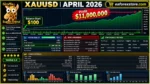
Goblin Golden Greedy EA MT5 has reported exceptionally high historical backtesting results. A January–April 2026 XAUUSD backtest reported $46,133,638.94 in net profit from a $100 initial deposit, with a 52.68% win rate and 9.34% maximum drawdown. However, these extraordinary figures have not been independently verified and should be treated with substantial caution. Backtesting results do not guarantee profitability in live Gold trading.
3. What is the minimum deposit required for Goblin Golden Greedy EA MT5?
The developer states that Goblin Golden Greedy EA MT5 can operate with a minimum account balance of $100 and a default base lot size of 0.01. The EA also features Greedy Goblin Mode, which automatically adjusts lot sizes based on account balance. However, a $100 account may be highly vulnerable to margin calls and significant drawdowns, especially when Martingale recovery strategies are enabled.
4. Does Goblin Golden Greedy EA MT5 use Martingale trading strategies?
Yes. Goblin Golden Greedy EA MT5 includes two Martingale recovery modes: Reverse Mode and One Way Mode. Reverse Mode changes the trading direction after a losing trade, while One Way Mode maintains the previous direction. Both methods can increase position sizes following losses, with a default maximum of four Martingale levels. Although the EA includes margin checks, Martingale trading can significantly increase financial risk.
5. Which currency pairs and timeframes does Goblin Golden Greedy EA MT5 support?
Goblin Golden Greedy EA MT5 is primarily designed for Gold trading on the XAUUSD instrument. Its main operating timeframe is M1, but the algorithm simultaneously analyzes M5, M15, M30, and H1 charts to confirm trading signals. The EA allows users to select confirmation thresholds ranging from 2/5 to 5/5 timeframes, with 3/5 described as the standard configuration. Support for other trading instruments is not established.
6. What is Greedy Goblin Mode in Goblin Golden Greedy EA MT5?
Greedy Goblin Mode is an automatic lot-sizing feature that adjusts trading volume according to account balance. For example, the developer's calculation assigns 0.01 lot to a $100 account, 0.05 lot to a $500 account, and 0.10 lot to a $1,000 account. This feature allows position sizes to scale as account capital changes, but larger trading volumes also increase potential losses and margin exposure.
7. Does Goblin Golden Greedy EA MT5 have daily profit targets and loss limits?
Yes. Goblin Golden Greedy EA MT5 includes configurable daily profit targets and daily loss limits to help manage automated trading activity. For example, traders can set a $50 daily profit target or a -$5 daily loss threshold. The EA is designed to stop initiating new trading activity when these limits are reached. However, execution delays, slippage, and existing open positions may cause actual losses to exceed the configured threshold.
8. How do I install Goblin Golden Greedy EA MT5 on MetaTrader 5?
To install Goblin Golden Greedy EA MT5, copy the compatible Expert Advisor file into the MQL5/Experts folder within your MetaTrader 5 data directory. Restart MT5, open an XAUUSD chart on the M1 timeframe, and attach the EA from the Navigator panel. Configure multi-timeframe confluence, Greedy Goblin Mode, Martingale settings, Stop Loss, Take Profit, and daily trading limits. Enable Algo Trading and test the robot on a demo account before trading live.
In stock
In stock
In stock
In stock
In stock
Out of stock
No account yet?
Create an Account












 Automatic EA
 EA Best Seller
 Expert Advisor MT4
 Expert Advisor MT5
 HFT EA


Reviews
Clear filtersThere are no reviews yet.