





-
 Unlimited Activations
-
 Instant delivery
-
 Easy to install






 Unlimited Activations
Instant delivery
Easy to install
 Free Update
 Free Install Support

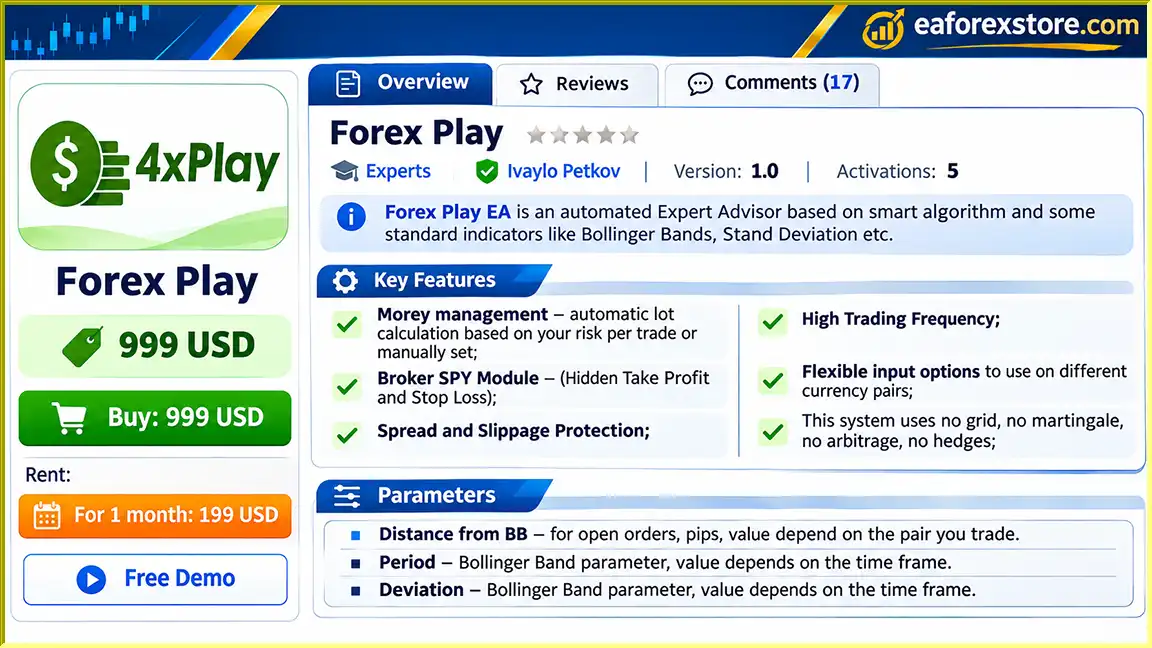
Forex Play EA MT4 is an automated Forex trading Expert Advisor designed for the MetaTrader 4 platform. The trading system combines a proprietary algorithm with widely used technical indicators, including Bollinger Bands and Standard Deviation, to identify potential trading opportunities in the Forex market.
Unlike automated trading systems that rely on grid trading, martingale recovery, arbitrage, or hedging strategies, Forex Play EA MT4 is designed to operate without these methods.
The Expert Advisor offers a combination of high-frequency trading functionality, flexible indicator settings, automatic money management, and advanced order management features.
One of its most distinctive characteristics is the Broker SPY Module, which supports hidden take-profit and stop-loss levels. This feature allows the EA to manage selected trade exit levels internally rather than placing those levels directly on the broker’s server.
Additionally, Forex Play EA includes spread and slippage protection, configurable maximum trading positions, optional trade-entry confirmation, and automated closing conditions.
With customizable parameters for different currency pairs and timeframes, Forex Play EA MT4 provides traders with a flexible environment for automated Forex trading.
>>> Delivery time 24h-48h after payment.
>>> Refund if not delivered.
>>> You will receive the latest version without any limitations (ID+Time).> Reviewed by Jason Stap <<<
Forex Play EA MT4 Overview
Forex Play EA MT4 uses Bollinger Bands as a core component of its trading algorithm.
Bollinger Bands are a technical indicator consisting of a moving average and upper and lower bands that adjust according to market volatility.
The EA uses configurable Bollinger Bands parameters, including period, deviation, price type, shift, and entry distance, to evaluate potential market opportunities.
The Expert Advisor includes an optional Standard Deviation filter that can provide additional confirmation before opening positions.
Standard Deviation measures the dispersion of price movements and can help evaluate market volatility.
The EA also provides a configurable standard deviation range intended to restrict trading during certain strong market conditions.
Forex Play EA supports two position-sizing approaches:
Fixed Lot Trading: Users manually define the trading volume for each position.
Automatic Money Management: The EA calculates trading volume automatically using its configured money management parameters.
This flexibility allows traders to adjust position sizing according to their preferred risk-management approach.
Forex Play EA features a Broker SPY Module designed to manage hidden take-profit and stop-loss levels.
When hidden exit management is enabled, the EA monitors its configured exit conditions internally.
Unlike broker-side stop-loss and take-profit orders, these hidden levels are not necessarily visible as pending exit instructions on the broker’s server.
However, hidden exits depend on the trading platform remaining connected and the EA operating correctly.
The Expert Advisor includes configurable maximum spread and slippage parameters.
These controls are intended to help limit trading under unfavorable execution conditions.
They are especially relevant for strategies that may open trades frequently or target relatively small price movements.
Forex Play EA is designed to support frequent trading activity when its programmed entry conditions are satisfied.
The number of trades executed depends on market conditions, indicator signals, account settings, and broker execution restrictions.
According to the developer, Forex Play EA does not use:
This distinguishes its stated strategy structure from recovery-based trading systems that depend on repeated position increases or grid-based price intervals.
Forex Play EA offers adjustable parameters for different Forex currency pairs.
Traders can modify Bollinger Bands settings, maximum spread, slippage, hidden profit targets, and other trading controls according to the characteristics of the selected instrument.
The EA allows users to limit the number of simultaneous trading positions.
The stated default settings include:
These parameters can help restrict the number of active positions, although they do not guarantee a fixed maximum monetary loss.
Forex Play EA provides several trade management options, including:
These features provide flexibility for defining how positions are managed after entry.
Forex Play EA MT4 operates through a combination of Bollinger Bands signals, optional volatility filters, position management rules, and automatic trade execution.
The Expert Advisor evaluates price movements in relation to the Bollinger Bands indicator.
Its configurable entry-distance parameter helps determine how far price must move relative to the Bollinger Bands before an entry condition can be considered.
The exact entry algorithm has not been fully disclosed.
When additional order checking is enabled, the EA uses Standard Deviation settings to provide an additional trading filter.
The standard deviation range parameter is intended to help restrict trading during certain strong market conditions.
Forex Play EA includes an option to check for a reverse candle before opening a position.
This setting is disabled by default but can be activated when traders want an additional entry condition.
Before executing trades, the Expert Advisor uses its configured spread and slippage parameters to manage execution conditions.
These settings may help reduce exposure to unfavorable transaction costs but cannot eliminate all execution risks.
The EA determines trading volume according to either the fixed-lot setting or automatic money management configuration.
With automatic money management enabled, the system uses its internal calculation rules to determine position size.
When the required trading conditions are satisfied, Forex Play EA can open positions within the configured maximum order limits.
After opening a position, the EA can manage exits using hidden take-profit and stop-loss levels or other enabled closing mechanisms.
By default, the middle Bollinger Bands line closing option is enabled.
The precise sequence and priority of these exit conditions depend on the EA’s internal programming.
Forex Play EA MT4 combines a technical indicator-based trading strategy with automated money management and flexible order controls.
Technical Indicator Integration
The combination of Bollinger Bands and Standard Deviation provides a framework for evaluating price movement and volatility.
Non-Martingale Strategy Design
The absence of traditional martingale and grid trading may appeal to traders who prefer strategies without those specific position-recovery methods.
Hidden Order Management
The Broker SPY Module supports internally managed take-profit and stop-loss levels.
Flexible Money Management
Fixed-lot and automatic lot-sizing options allow traders to choose how trading volume is determined.
Execution Protection
Maximum spread and slippage settings provide additional controls over trading conditions.
Customizable Position Limits
Users can configure maximum total positions and separate limits for buy and sell orders.
Multiple Exit Management Options
The EA supports hidden exit levels, middle Bollinger Bands line exits, opposite-signal exits, and optional trailing stops.
Multi-Pair Flexibility
Adjustable indicator and execution settings make it possible to configure the system for different currency pairs.
These capabilities make Forex Play EA MT4 a configurable automated trading solution, although actual profitability and risk depend on settings, market conditions, and broker execution.
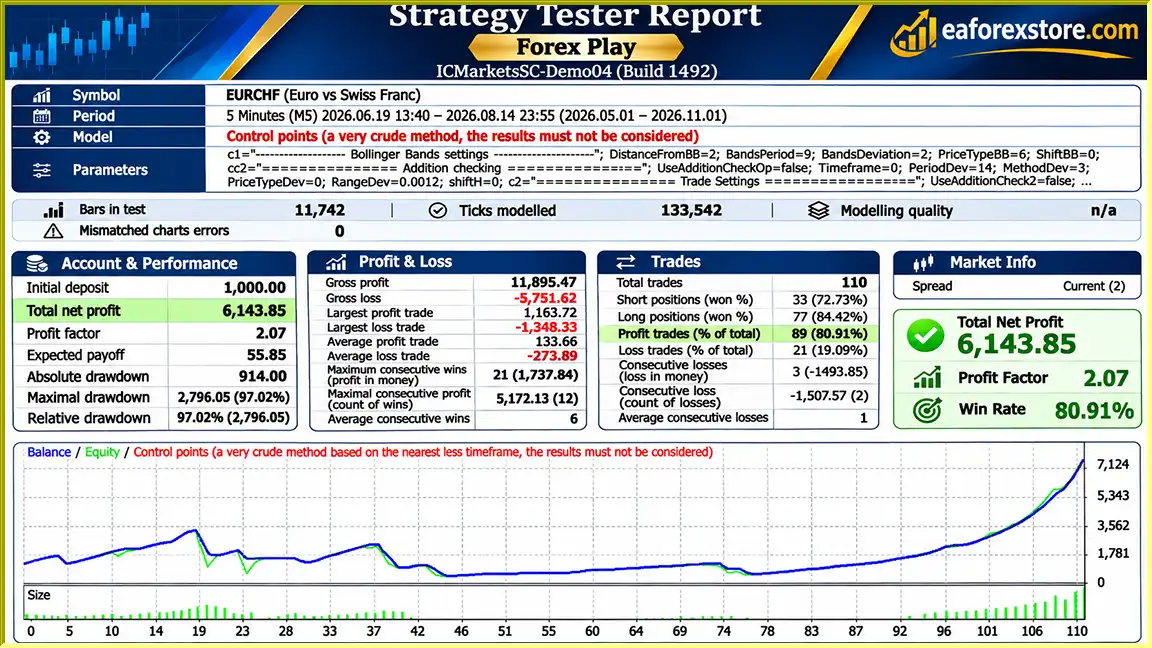
🔺EURCHF – 6months
Forex Play EA MT4 backtets
Risk management is an important component of Forex Play EA MT4, particularly because the system supports frequent trading and multiple simultaneous positions.
Forex Play EA includes both manual and automatic lot-sizing options.
| Parameter | Default Value | Function |
|---|---|---|
| Fix Lots | 0 | Manual lot-size parameter |
| Use MM | True | Enables automatic money management |
| % From Equity | 10 | Percentage-based input used in the EA’s position-sizing logic |
| Max Orders | 10 | Maximum total open positions |
| Max Buy Orders | 5 | Maximum buy positions |
| Max Sell Orders | 5 | Maximum sell positions |
Important: The supplied description does not establish that the 10% equity parameter represents a guaranteed 10% maximum loss per trade. It should be treated as a position-sizing input until the developer’s calculation method is verified.
The default settings include:
| Parameter | Default Value |
|---|---|
| TakeProfit, Pips | 0 |
| StopLoss, Pips | 0 |
| Use Hidden Take Profit | True |
| Use Hidden Stoploss | True |
| Hidden Takeprofit, Pips | Pair-dependent |
Although hidden stop-loss functionality is enabled by default, the provided documentation does not specify a default hidden stop-loss distance.
If the visible StopLoss parameter is set to zero and no broker-side protective order is active, positions may depend entirely on the EA’s internal exit management.
A platform crash, internet disconnection, VPS failure, or trading-server interruption may prevent the EA from closing positions at the intended hidden levels.
Forex Play EA includes configurable Maximum Spread and Slippage parameters.
These settings are intended to reduce trading under unsuitable execution conditions.
However, they cannot guarantee a particular execution price or prevent slippage during rapid market movements.
The standard deviation range setting is intended to restrict trading during certain strong market conditions.
Its effectiveness depends on the configured thresholds and underlying market behavior.
The default maximum of 10 simultaneous positions can create significant combined exposure.
Traders should evaluate the aggregate risk of all open positions rather than treating each trade independently.
Risk Warning: Hidden stop losses, automatic lot sizing, and position limits do not guarantee capital protection. Forex trading can result in substantial losses, particularly when multiple positions are open simultaneously.
Installing Forex Play EA MT4 involves adding the Expert Advisor to MetaTrader 4, selecting a trading instrument, and configuring the indicator and risk-management settings.
Obtain the Expert Advisor installation file from the product provider.
Ensure that the file is compatible with MetaTrader 4.
Launch MetaTrader 4 and sign in to your Forex trading account.
Choose a broker offering reliable execution and suitable spread conditions.
If the EA is supplied as an EX4 file:
Open the chart of the currency pair you intend to trade.
Forex Play EA supports customizable parameters for different instruments, so the selected chart and timeframe should be evaluated before live operation.
Locate Forex Play EA in the Navigator panel.
Drag the Expert Advisor onto the trading chart.
| Parameter | Value / Recommendation |
|---|---|
| Distance From BB for Open Orders | Depends on currency pair |
| BB Period | Depends on timeframe |
| BB Deviation | Depends on timeframe |
| BB Price Type | Close |
| BB Shift | 0 |
These settings control how the EA evaluates price movements relative to Bollinger Bands.
| Parameter | Default Value |
|---|---|
| Use Additional Checking for Open Orders | False |
| Timeframe for Additional Checking | Current |
| StdDev Period | 20 |
| MA Method | Simple |
| Applied Price | Weighted Price |
| Range of Standard Deviation | Depends on timeframe |
| StdDev Shift | 0 |
| Use Checking of Reverse Candle for Signal | False |
| Parameter | Default Value |
|---|---|
| Max Orders | 10 |
| Max Buy Orders | 5 |
| Max Sell Orders | 5 |
| Maximum Spread | Depends on currency pair |
| Slippage, Pips | Depends on currency pair |
| Parameter | Default Value |
|---|---|
| TakeProfit, Pips | 0 |
| StopLoss, Pips | 0 |
| Use Hidden Take Profit | True |
| Hidden Takeprofit, Pips | Depends on currency pair |
| Use Hidden Stoploss | True |
| Hidden Stoploss Distance | Not specified |
| Use Close by Opposite Signal | False |
| Use Close by MA Cross | True |
| Trailing Stop | False |
When the MA Cross closing option is enabled, the EA is configured to close trades according to its middle Bollinger Bands line exit condition.
Before enabling live trading, verify the actual hidden stop-loss distance and ensure the EA’s exit behavior is understood.
| Parameter | Default Value |
|---|---|
| Fix Lots | 0 |
| Use MM | True |
| % From Equity | 10 |
For initial testing, consider using conservative fixed lot sizes until the automatic money management formula is fully understood.
Enable automated trading in MetaTrader 4.
Confirm that the EA is properly initialized and check the Experts and Journal tabs for configuration or execution errors.
Run the EA on a demo account and evaluate its behavior under realistic trading conditions.
Pay particular attention to:
>> Join VIP Membership Now <<<
Forex Play EA MT4 is a configurable automated Forex trading robot that combines Bollinger Bands, Standard Deviation analysis, high-frequency trading functionality, and multiple trade management options.
Its non-martingale and non-grid design, hidden take-profit and stop-loss functionality, customizable execution filters, and automatic money management features distinguish it from simpler indicator-based Expert Advisors.
The ability to configure the system for different currency pairs provides additional flexibility, while its maximum position limits and optional entry filters allow users to adjust trading behavior.
However, hidden stop-loss management introduces operational risks, particularly if MetaTrader disconnects or the EA stops running. The automatic money management settings and allowance for multiple simultaneous trades also require careful risk assessment.
Furthermore, no independently verified profitability statistics or detailed proprietary trading rules are included in the supplied product description.
Forex Play EA MT4 may be worth evaluating for traders interested in automated Bollinger Bands strategies with customizable position management and execution controls.
Before live trading, users should test the EA thoroughly, confirm its hidden risk-management functionality, and adopt position sizes appropriate to their financial circumstances.
Disclaimer: Forex trading involves substantial financial risk. Automated trading systems cannot guarantee profits, prevent drawdowns, or eliminate execution losses. This article is for informational purposes only and does not constitute investment advice.
1. What is Forex Play EA MT4, and how does it work?
Forex Play EA MT4 is an automated Forex trading robot designed for the MetaTrader 4 platform. It combines Bollinger Bands, Standard Deviation indicators, and a proprietary trading algorithm to identify potential market opportunities. The Expert Advisor automatically executes and manages trades based on configurable technical indicators, risk management parameters, and market conditions.
2. Does Forex Play EA MT4 use Martingale or Grid trading strategies?
No. According to the developer, Forex Play EA MT4 operates without Martingale, Grid, Arbitrage, or Hedging strategies. Instead, it uses technical indicator signals and configurable position management rules to execute trades. Its non-martingale approach avoids traditional lot-doubling recovery methods, although trading losses and drawdowns are still possible.
3. What is the Broker SPY Module in Forex Play EA MT4?
The Broker SPY Module is a distinctive feature of Forex Play EA MT4 that supports hidden Take Profit and Stop Loss levels. Instead of placing all exit instructions directly on the broker's server, the EA can manage selected exit conditions internally. However, hidden stop-loss protection depends on MetaTrader 4 remaining connected and the Expert Advisor operating correctly.
4. What are the recommended settings for Forex Play EA MT4?
Forex Play EA MT4 provides customizable settings for different currency pairs and timeframes. Its default configuration includes a maximum of 10 simultaneous trades, with up to 5 buy orders and 5 sell orders. Automatic money management is enabled by default, with a 10% equity-based input. Bollinger Bands parameters, Standard Deviation filters, spread limits, slippage settings, and hidden TP/SL distances should be adjusted according to the selected trading instrument.
5. Is Forex Play EA MT4 profitable, and what are its backtest results?
The supplied Forex Play EA MT4 backtest report shows an initial deposit of $1,000, a reported net profit of approximately $6,143.85, and an 80.91% win rate over six months of EURCHF trading. However, these promotional results have not been independently verified and do not guarantee future profitability. Actual trading performance depends on market volatility, broker execution, trading settings, and risk management.
6. Which currency pairs and timeframes are supported by Forex Play EA MT4?
Forex Play EA MT4 is designed to support different Forex currency pairs and chart timeframes through adjustable trading parameters. Users can configure Bollinger Bands periods, deviations, entry distances, spread limits, and other settings for their chosen instruments. However, the developer does not specify one universally recommended currency pair or timeframe, so individual backtesting and demo testing are essential.
7. How does Forex Play EA MT4 manage trading risks and position sizes?
Forex Play EA MT4 includes fixed-lot trading, automatic money management, maximum order limits, spread protection, and slippage controls. Traders can enable hidden Stop Loss and Take Profit levels, trailing stops, and automated position-closing conditions. The default maximum is 10 simultaneous positions. These features provide trading controls but cannot guarantee capital protection or prevent substantial losses.
8. How do I install and configure Forex Play EA MT4 on MetaTrader 4?
To install Forex Play EA MT4, download the Expert Advisor file and open MetaTrader 4. Navigate to File → Open Data Folder → MQL4 → Experts, then copy the Forex Play EX4 file into the Experts folder. Restart or refresh MetaTrader 4, select your preferred currency pair and timeframe, and attach the EA to the chart. Configure Bollinger Bands, Standard Deviation, money management, spread, slippage, and hidden TP/SL settings. Enable AutoTrading and test the EA on a demo account before using real funds.
In stock
In stock
In stock
In stock
In stock
Out of stock
No account yet?
Create an Account












 Automatic EA
 EA Best Seller
 Expert Advisor MT4
 Expert Advisor MT5
 HFT EA



Reviews
Clear filtersThere are no reviews yet.