





-
 Unlimited Activations
-
 Instant delivery
-
 Easy to install







 Unlimited Activations
Instant delivery
Easy to install
 Free Update
 Free Install Support

Trippy EA MT4 is an automated Forex trading Expert Advisor developed for the MetaTrader 4 platform. The system uses a breakout reversal trading strategy that analyzes historical price movements, currency pair volatility, and significant price levels to identify potential trading opportunities.
Unlike conventional breakout trading robots that enter positions in the direction of a price breakout, Trippy EA MT4 is designed to open trades in the opposite direction of a detected breakout, anticipating a potential market reversal.
The Expert Advisor examines price dynamics and volatility over approximately the previous month to determine relevant market levels. It then monitors price movements around these levels and executes trades when its programmed conditions are satisfied.
The developer recommends the EURUSD currency pair on the H1 timeframe, with a minimum trading deposit of $3,000.
Trippy EA MT4 is designed for straightforward installation, offering default settings, automatic quote precision detection, spread control, and stop-loss functionality on every trade.
The EA also supports 24-hour trading and is designed to remain active during major financial news releases.
For traders interested in automated EURUSD trading strategies based on breakout reversals and historical volatility analysis, Trippy EA MT4 offers a specialized algorithmic trading solution.
>>> Delivery time 24h-48h after payment.
>>> Refund if not delivered.
>>> You will receive the latest version without any limitations (ID+Time).> Reviewed by Jason Stap <<<
Trippy EA MT4 Overview
Trippy EA MT4 employs a counter-breakout trading approach.
Instead of following a price breakout, the EA identifies significant market levels and seeks potential reversal opportunities when price moves beyond those levels.
This approach is based on the possibility that certain breakouts may fail and prices may return toward their previous trading ranges.
The Expert Advisor analyzes approximately one month of historical price behavior and currency pair volatility.
This information is used to identify current trading levels and monitor potential breakout conditions.
By incorporating historical volatility, the EA attempts to adapt its analysis to recent market behavior.
The recommended trading configuration is:
The H1 timeframe allows the EA to evaluate hourly price movements rather than relying exclusively on very short-term market fluctuations.
Trippy EA MT4 automatically monitors market conditions and executes trades according to its programmed strategy.
Once installed and enabled, the EA can operate without requiring manual order placement for every trading opportunity.
The Expert Advisor includes a configurable Max_Spread parameter.
This setting prevents new positions from being opened when the spread exceeds the specified maximum threshold.
The developer recommends a Max_Spread setting between 10 and 25 points.
According to the developer, Trippy EA applies a stop-loss level to every trade.
This provides a predefined exit mechanism for limiting individual position exposure under normal market conditions.
However, stop-loss orders cannot guarantee execution at the exact specified price during market gaps or periods of extreme volatility.
Trippy EA supports continuous trading throughout the trading day.
The EA also includes customizable trading hours, allowing users to define when new trading activity should be permitted.
The developer states that Trippy EA does not need to be stopped during major financial news releases.
This allows the EA to remain active during scheduled economic announcements, although market volatility and execution risks may increase during these events.
The Expert Advisor automatically identifies the number of decimal places used in broker price quotations.
This functionality simplifies configuration across brokers with different quote formats.
Trippy EA is designed to support different order execution types and broker environments.
The developer recommends an ECN account and indicates compatibility with brokers using New York close trading conditions.
Trippy EA MT4 operates by evaluating historical price movements, identifying important market levels, and monitoring price breakouts for potential reversal trades.
The EA examines price dynamics and volatility over approximately the previous month.
This analysis provides the foundation for identifying significant trading levels.
Based on recent historical market behavior, the Expert Advisor determines relevant price levels.
These levels serve as reference points for its breakout monitoring process.
The EA monitors price movements around its calculated levels.
When price breaks through a monitored level, the system evaluates the event according to its programmed trading conditions.
Rather than entering in the breakout direction, Trippy EA is designed to open positions opposite to the detected price breakout.
The strategy seeks potential reversals or failed breakouts.
Before opening a position, the EA checks the current spread against the Max_Spread setting.
If the spread exceeds the permitted value, the EA is designed to avoid opening a new trade.
Each trade is managed with a stop-loss level according to the developer’s description.
The exact stop-loss calculation method and exit conditions are not fully disclosed in the available documentation.
After opening a position, the Expert Advisor continues managing the trade according to its internal algorithm.
The system can operate throughout the trading day, provided MetaTrader 4 remains active and the relevant trading conditions are satisfied.
Trippy EA MT4 provides a specialized approach to automated Forex trading, combining historical volatility analysis with a breakout reversal strategy.
Distinctive Counter-Breakout Strategy
Unlike conventional breakout-following systems, Trippy EA is designed to identify opportunities in the opposite direction of a detected breakout.
Historical Market Analysis
The EA evaluates approximately one month of price dynamics and volatility to establish relevant market levels.
Simple Configuration
The developer describes the system as ready to operate using its default settings, reducing the amount of initial configuration required.
Built-In Stop Loss
Every trade is intended to include stop-loss protection, providing a defined loss-exit mechanism under normal execution conditions.
Spread Control
The Max_Spread parameter restricts new orders when transaction costs exceed the configured threshold.
Flexible Trading Hours
Users can configure the trading schedule or allow the EA to operate continuously during available market hours.
Broker Compatibility
The system supports different execution types and automatically detects quote precision.
No Mandatory News Shutdown
The developer states that the EA can remain active during financial news releases, eliminating the need for mandatory manual suspension.
These features make Trippy EA MT4 an option for traders interested in systematic breakout reversal trading. Nevertheless, its actual effectiveness depends on market conditions and should be independently evaluated.
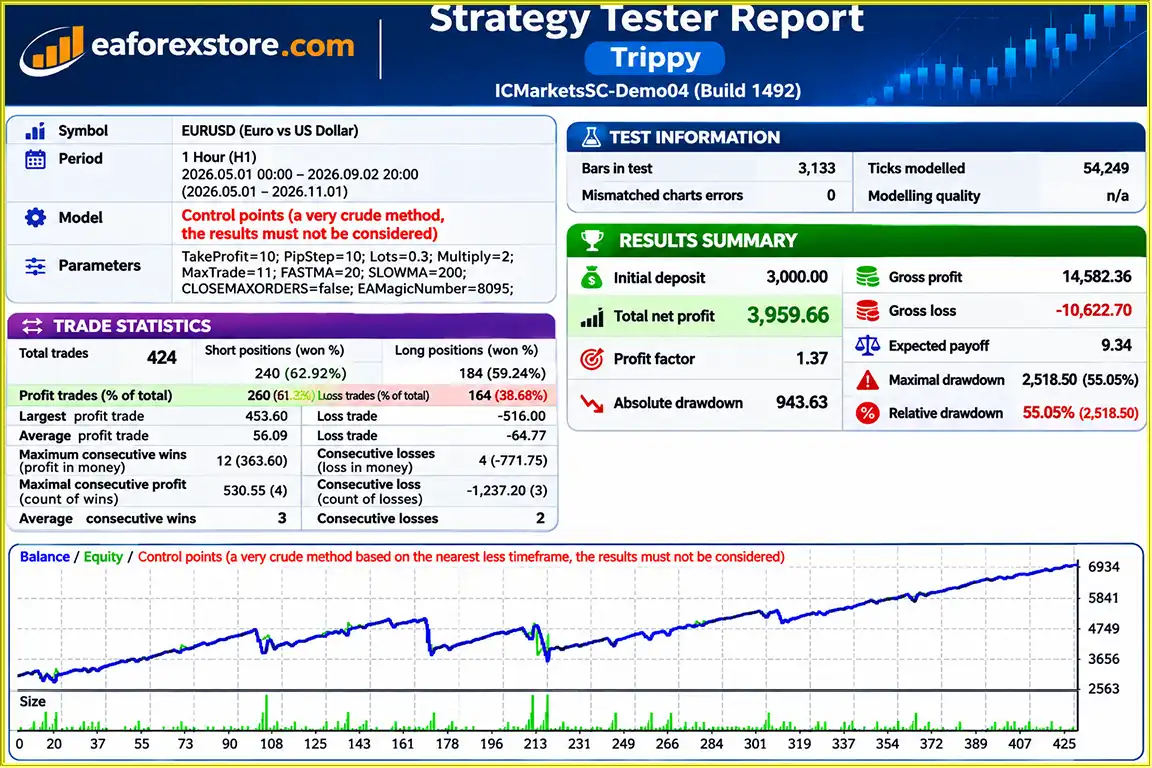
🔺EURUSD – 6 Mmonths
Trippy EA MT4 backtets
Risk management is an important consideration when using Trippy EA MT4, especially because counter-breakout strategies can experience losses when strong market trends continue beyond expected reversal levels.
| Parameter | Recommended Value |
|---|---|
| Trading Platform | MetaTrader 4 |
| Recommended Currency Pair | EURUSD |
| Timeframe | H1 |
| Minimum Deposit | $3,000 |
| Trading Hours | 24 Hours |
| Recommended Account Type | ECN |
| Broker Conditions | NY Close |
| Slippage | 0–3 pips |
| Max_Spread | 10–25 points |
| Stop Loss | Applied to Every Trade |
These requirements reflect the developer’s recommendations and do not guarantee profitable trading performance.
The EA is designed to use a stop loss on every position.
Stop-loss orders can help limit trading losses by triggering a trade exit once a specified price level is reached.
However, losses may exceed the intended stop-loss amount during market gaps, rapid price changes, or unfavorable execution.
The Max_Spread parameter specifies the maximum permitted spread for opening new trades.
The developer recommends a value between 10 and 25 points.
This feature may help avoid opening positions during periods of unusually high transaction costs.
It does not guarantee a favorable spread when an existing trade is closed.
The Slippage parameter allows users to configure acceptable execution deviation.
The recommended range is 0 to 3 pips.
The actual interpretation and enforcement of this parameter can depend on broker execution type and MetaTrader order-processing behavior.
A breakout reversal strategy can perform poorly when prices continue moving strongly in the breakout direction.
Traders should recognize that not every breakout fails and that markets may sustain directional trends longer than expected.
The developer describes Trippy EA as a low-drawdown trading system and claims that it does not retain losing positions.
However, these claims cannot be independently confirmed from the supplied description.
The presence of a stop loss does not eliminate drawdowns, and a system can still experience consecutive losses.
Although the developer states that the EA does not require suspension during news events, major announcements can cause:
Risk Warning: Forex trading involves substantial financial risk. A stop-loss feature and developer-reported low drawdown do not guarantee capital protection or consistent profitability.
Installing Trippy EA MT4 requires the MetaTrader 4 platform, a compatible trading account, and the Expert Advisor installation file.
Obtain the Expert Advisor from the official product provider or authorized distribution channel.
Make sure the installation file is compatible with MetaTrader 4.
Launch MetaTrader 4 and log in to your Forex trading account.
The developer recommends an ECN account with New York close broker conditions.
If the EA is supplied as an EX4 file:
If the EA is distributed through the MetaTrader marketplace, follow its official installation procedure.
Locate EURUSD in the Market Watch window.
Open the currency pair chart and select the H1 timeframe.
Find Trippy EA in the Navigator panel and attach it to the EURUSD H1 chart.
Open the Expert Advisor input settings to review the available parameters.
| Parameter | Description / Recommendation |
|---|---|
| Trade | Group of trading settings |
| Magic | Unique identifier for EA orders |
| Slippage | Recommended 0–3 pips |
| Max_Spread | Recommended 10–25 points |
| MarketWatch | Set true for brokers with market execution |
| TimeTrade | Group of trading time settings |
| OpenHour | Trading start hour |
| OpenMinute | Trading start minute |
| CloseHour | Trading end hour |
| CloseMinute | Trading end minute |
Set Max_Spread according to your broker’s EURUSD trading conditions.
The developer recommends values between 10 and 25 points.
For brokers using market execution, enable MarketWatch as instructed by the developer.
Trippy EA supports 24-hour trading during available Forex market sessions.
If you want to restrict its operating schedule, adjust the OpenHour, OpenMinute, CloseHour, and CloseMinute parameters.
The exact values needed for unrestricted operation should be verified in the EA’s documentation.
Enable automated trading in MetaTrader 4.
Confirm that the EA is properly initialized and review the Experts and Journal tabs for errors.
Run Trippy EA on a demo account before using real funds.
Evaluate:
>> Join VIP Membership Now <<<
Trippy EA MT4 is an automated Forex trading robot designed around a breakout reversal strategy, historical volatility analysis, and important price-level detection.
Its recommended EURUSD H1 setup, 24-hour trading capability, spread protection, and stop-loss functionality make it a specialized option for traders interested in counter-breakout trading systems.
The Expert Advisor also offers straightforward installation, flexible execution settings, automatic quote precision detection, and configurable trading hours.
However, traders should carefully assess the risks associated with reversal strategies, particularly when markets experience persistent trends or unexpected volatility.
The developer’s claims of low drawdown and favorable losing-trade management should be treated as unverified until supported by reliable trading records.
With a recommended minimum deposit of $3,000, Trippy EA is better evaluated through thorough demo testing and realistic risk assessment rather than assumptions about guaranteed performance.
For traders exploring automated EURUSD breakout reversal strategies, Trippy EA MT4 may be worth evaluating on a demo account before considering live trading.
Disclaimer: Forex trading involves significant financial risk. Automated Expert Advisors cannot guarantee profits or eliminate losses. This article is provided for informational purposes only and does not constitute investment advice.
1. What is Trippy EA MT4, and how does it work?
Trippy EA MT4 is an automated Forex trading robot designed for the MetaTrader 4 platform. It uses a breakout reversal trading strategy that analyzes historical price movements, currency pair volatility, and significant market levels over approximately one month. Unlike traditional breakout trading robots, Trippy EA opens trades in the opposite direction of detected breakouts, aiming to identify potential price reversals.
2. What are the recommended settings for Trippy EA MT4?
The developer recommends using Trippy EA MT4 on the EURUSD currency pair with the H1 (1-hour) timeframe. Suggested settings include Max_Spread between 10 and 25 points, Slippage between 0 and 3 pips, and a minimum deposit of $3,000. An ECN account with New York close broker conditions is preferred. The EA also supports configurable trading hours and market execution settings.
3. What is the minimum deposit required to use Trippy EA MT4?
According to the developer, Trippy EA MT4 requires a minimum trading deposit of $3,000. This amount is intended to provide sufficient account capital for the Expert Advisor's automated trading strategy. However, the actual capital needed depends on broker leverage, position sizes, margin requirements, and market conditions. A $3,000 deposit does not guarantee protection against trading losses.
4. Is Trippy EA MT4 profitable, and what are its backtest results?
The supplied Trippy EA MT4 backtest report for EURUSD covers seven years and claims a 61,32% win rate, 55.05% maximum drawdown, and approximately $$3.959,66 in net profit from a $3,000 initial deposit. However, these extraordinary results have not been independently verified and should not be considered reliable evidence of future profitability. Traders should conduct independent backtesting and forward testing before using real capital.
5. Does Trippy EA MT4 use Stop Loss and spread protection?
Yes. According to the developer, Trippy EA MT4 applies a Stop Loss to every trade and includes a configurable Max_Spread parameter. The spread filter prevents new positions from opening when trading spreads exceed the specified limit. These features can help manage trading exposure and transaction costs, but they cannot completely eliminate losses, slippage, or execution risks during volatile market conditions.
6. Can Trippy EA MT4 trade during major economic news events?
Yes. The developer states that Trippy EA MT4 can remain active during major financial news releases without requiring traders to manually stop the Expert Advisor. It is designed to support 24-hour trading during available Forex market sessions. However, major economic announcements can cause sharp price movements, wider spreads, and significant slippage, so traders should evaluate its performance during high-impact news events.
7. Which Forex brokers and account types are compatible with Trippy EA MT4?
Trippy EA MT4 is designed to work with different Forex brokers and order execution types. The developer recommends using an ECN account with New York close trading conditions. The Expert Advisor automatically detects broker quote precision and includes a MarketWatch parameter for brokers using market execution. Traders should select a broker offering reliable execution, competitive EURUSD spreads, and suitable trading conditions.
8. How do I install and configure Trippy EA MT4 on MetaTrader 4?
To install Trippy EA MT4, download the Expert Advisor file and open MetaTrader 4. Navigate to File → Open Data Folder → MQL4 → Experts, then copy the Trippy EX4 file into the Experts folder. Restart or refresh MetaTrader 4, open the EURUSD chart, and select the H1 timeframe. Attach Trippy EA, configure Max_Spread, Slippage, MarketWatch, and trading hours, then enable AutoTrading. Test the Expert Advisor on a demo account before deploying it on a live trading account.
In stock
In stock
In stock
In stock
In stock
Out of stock
No account yet?
Create an Account












 Automatic EA
 EA Best Seller
 Expert Advisor MT4
 Expert Advisor MT5
 HFT EA



Reviews
Clear filtersThere are no reviews yet.