





-
 Unlimited Activations
-
 Instant delivery
-
 Easy to install









 Unlimited Activations
Instant delivery
Easy to install
 Free Update
 Free Install Support

Meravith EA MT5 is an advanced multi-timeframe Forex trading Expert Advisor developed for MetaTrader 5. Designed to analyze market structure across 21 timeframes, from M1 to the monthly chart, this automated trading system identifies opportunities when price conditions align with its internal trading logic.
Unlike conventional Forex robots that depend on a handful of technical indicators, Meravith EA MT5 uses its proprietary market structure analysis to evaluate trading conditions across multiple timeframes without requiring external indicators or third-party servers.
The Expert Advisor supports all 28 major and cross Forex currency pairs, allowing traders to diversify trading opportunities across multiple markets using one account. Each pair operates from its own M5 chart, while shared settings and currency-based lot allocation help coordinate account exposure.
Meravith EA MT5 follows a selective trading approach. Rather than executing frequent trades, it waits for qualified market conditions and opens positions with predefined take-profit targets and, by default, protective stop-loss orders.
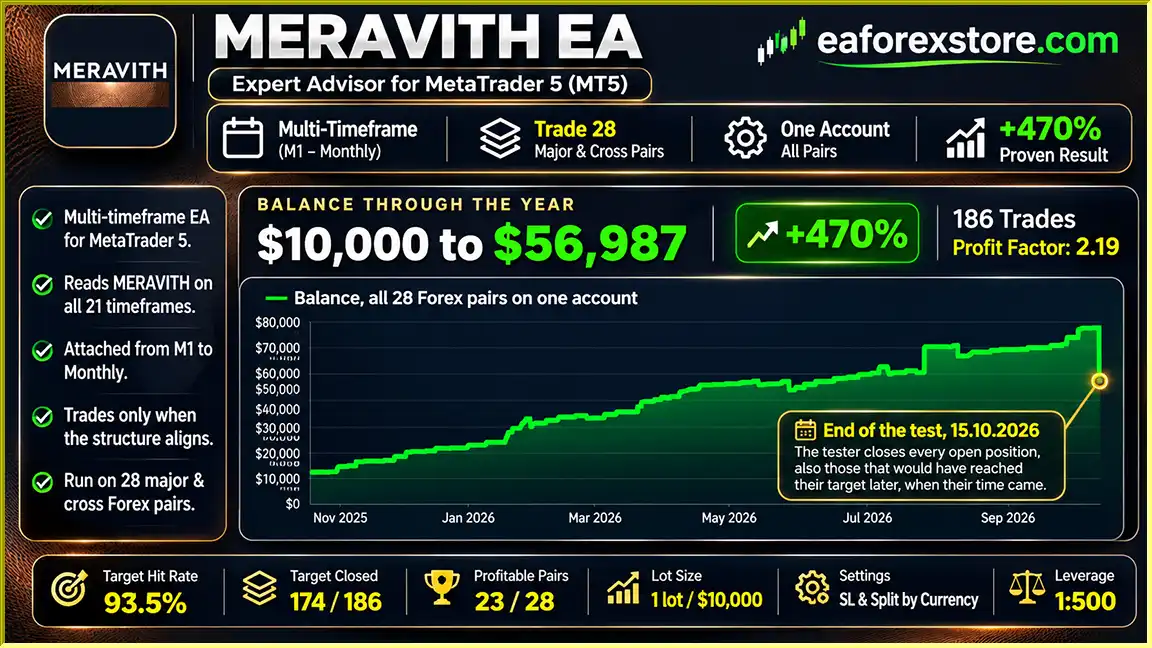
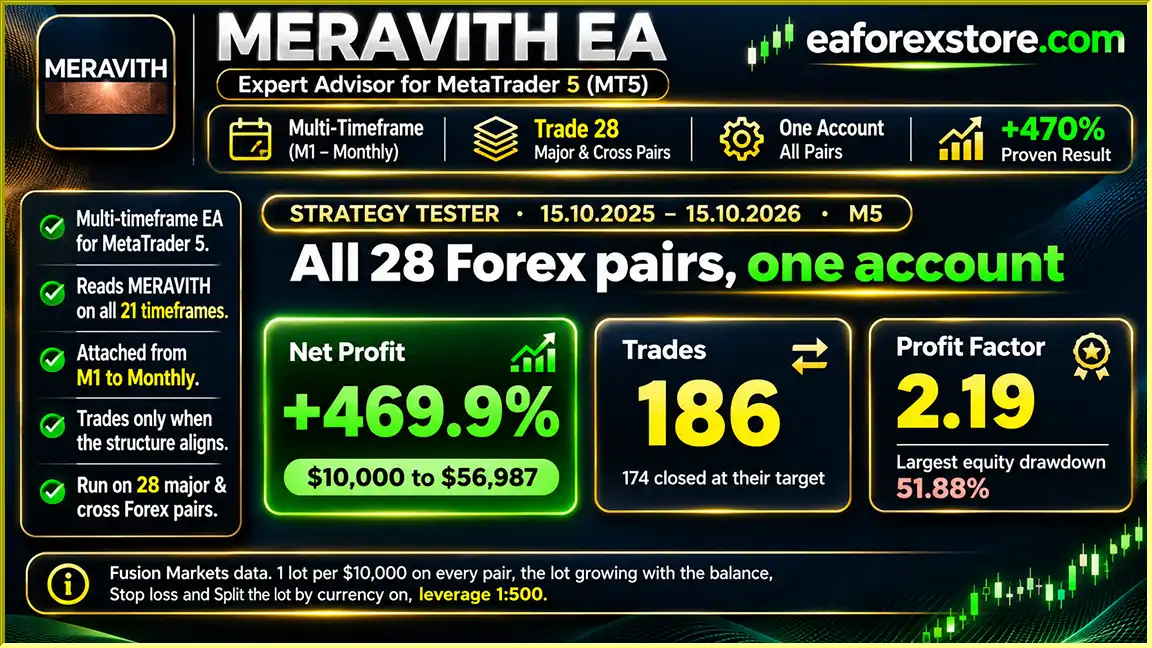
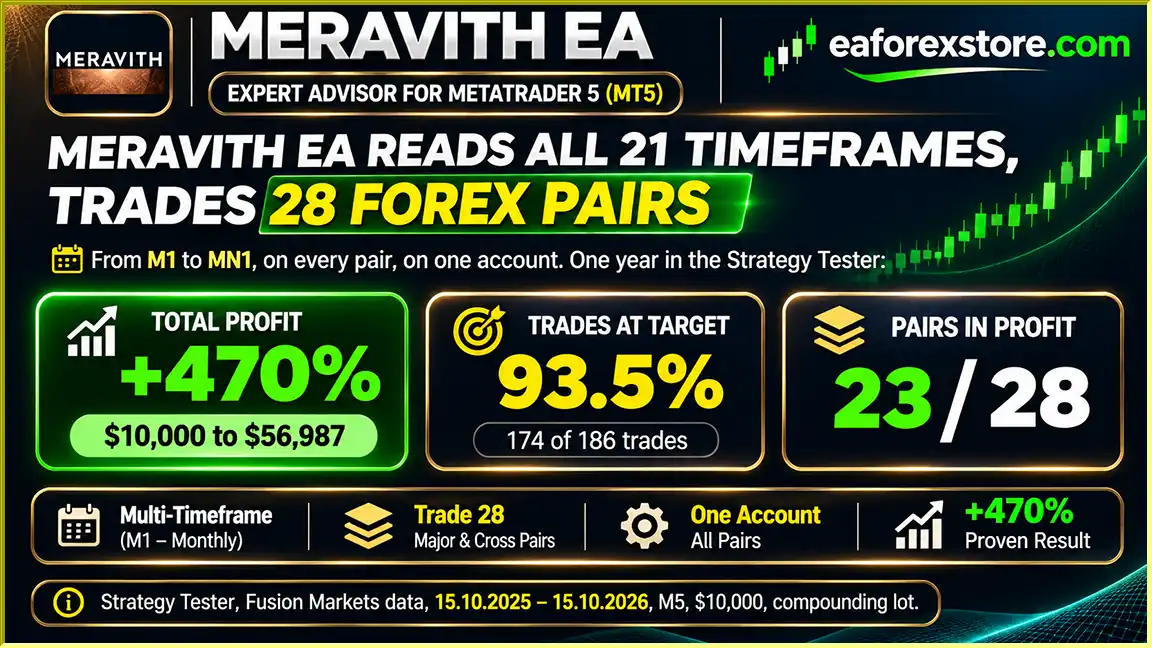
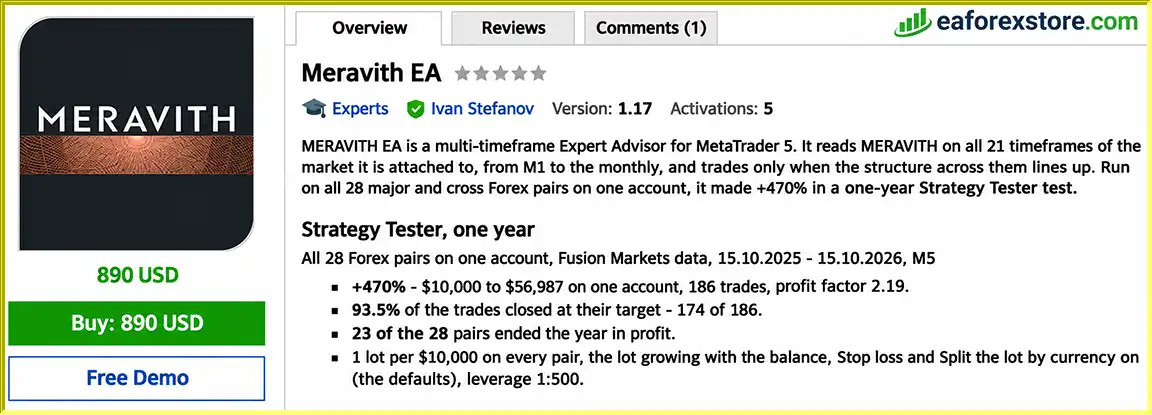
According to developer-reported MetaTrader 5 Strategy Tester results, a 28-pair portfolio generated approximately 470% simulated growth over one year, with a profit factor of 2.19 and 186 executed trades. However, the same test experienced a substantial maximum equity drawdown of 51.9%.
With balance-based position sizing, optional compounding, currency exposure management, and account protection settings, Meravith EA MT5 provides a structured solution for traders interested in multi-currency automated Forex trading.
>>> Delivery time 24h-48h after payment.
>>> Refund if not delivered.
>>> You will receive the latest version without any limitations (ID+Time).Reviewed by Jason Stap <<<
Meravith EA MT5 Overview
Analyzes market structure across 21 timeframes, from M1 through the monthly timeframe, to identify trading opportunities based on multi-timeframe alignment.
Supports all 28 major and cross Forex pairs, providing broader market coverage than single-symbol Expert Advisors.
Opens trades only when its internal market structure conditions are satisfied, rather than continuously trading every market movement.
Does not use grid recovery, Martingale lot multiplication, or averaging down losing positions.
Places a take-profit target with every order, allowing positions to close automatically when the specified objective is reached.
Includes stop-loss orders by default, with the option to disable this function through the EA settings.
Calculates position volume according to a configurable lot allocation for every specified amount of account balance.
Automatically adjusts trade volume as the account balance changes when the Compound parameter is enabled.
Includes a currency-based lot allocation mechanism that reduces the initial position size when related currency exposure already exists.
Can construct higher-timeframe candles using New York closing times, reducing differences caused by broker server time zones.
Checks available margin before executing trades and skips orders when the account cannot support the required position.
Includes a configurable account protection parameter designed to close positions when a specified account decline condition is reached.
Displays market information, open positions, entry prices, profit targets, and current trading results directly on the chart.
Meravith EA MT5 follows a systematic trading process based on price structure analysis, multi-timeframe confirmation, and predefined trade management.
Step 1: Analyzing Market Structure
The Expert Advisor evaluates its internal MERAVITH structure across 21 market timeframes, ranging from M1 to the monthly chart.
This analysis is performed using price history available within MetaTrader 5.
Step 2: Identifying Trading Alignment
The EA waits until the required market structure conditions align across its analytical framework.
When conditions do not satisfy the strategy’s requirements, the system remains inactive.
Step 3: Opening Qualified Positions
Once a valid signal appears, Meravith opens a position according to its internal trading rules.
Every order includes a predefined take-profit target and, under the default configuration, a stop-loss level.
Step 4: Calculating Position Volume
The EA determines trade volume using the configured Lots and BaseBalance parameters.
When compounding is enabled, position size changes with account balance.
Step 5: Managing Currency Exposure
If several currency pairs already have positions involving the same currencies, the EA can reduce the initial lot size of new trades.
This helps distribute exposure across correlated currency instruments.
Step 6: Monitoring Active Positions
The system tracks open trades and allows them to close according to their programmed exit conditions.
Additional positions on the same pair are opened only when new independent trading signals occur, not as a recovery response to adverse price movement.
Step 7: Evaluating Account Margin
Before executing new positions, the EA checks whether sufficient free margin is available.
Orders are skipped when the required margin cannot be supported.
This process allows Meravith EA MT5 to combine selective trade entries with automated portfolio-level position management.
Meravith EA MT5 offers a distinctive approach to automated Forex trading by combining extensive multi-timeframe analysis with a coordinated multi-currency trading structure.
One of its main characteristics is the ability to examine price behavior across 21 timeframes without requiring additional technical indicators.
The EA applies the same trading logic to all 28 supported Forex pairs, eliminating the need for separate indicator configurations for individual instruments.
Another important benefit is its selective trading frequency. Each currency pair may generate relatively few opportunities during the year, but operating across multiple pairs increases the number of potential signals available to the overall account.
In the developer’s historical comparison, EURUSD alone generated seven trades over one year, while the combined 28-pair setup executed 186 trades during the same period.
The Expert Advisor also avoids Martingale and grid-based recovery techniques. Instead, positions are opened only when qualifying signals occur.
Its currency-based lot distribution provides an additional mechanism for managing exposure when different trading pairs share the same underlying currencies.
For traders seeking an automated MT5 Forex robot with broad market coverage, multi-timeframe analysis, and configurable account risk controls, Meravith EA offers a specialized algorithmic trading framework.
However, its historical results demonstrate that substantial floating drawdowns can still occur even without Martingale or grid recovery.
Meravith MT5 Backtets
Meravith EA MT5 Backtets
Meravith EA Backtets
Risk management plays an important role in Meravith EA MT5 because trading multiple currency pairs can create overlapping exposure and significant account equity fluctuations.
The Lots parameter determines the trading volume allocated for every specified amount of account balance.
The default configuration uses 0.1 lots per $10,000 of balance.
When Compound is enabled, position volume adjusts according to account balance changes.
Although compounding can increase returns during profitable periods, it can also amplify losses as position sizes grow.
The Split the Lot by Currency feature reduces the initial trade volume when other open positions share currencies on the relevant side of their trades.
This mechanism is designed to limit overlapping currency exposure but cannot eliminate correlation risk.
Stop-loss orders are enabled by default.
The function can be disabled, but doing so removes an important protective mechanism.
The EA includes a configurable parameter for closing all positions when the account reaches a specified percentage decline.
The developer lists a default value of 90%.
Such a high threshold should not be interpreted as conservative protection, and actual losses may exceed intended thresholds during adverse execution conditions.
The Expert Advisor evaluates available margin before placing new positions.
If insufficient margin is available, the EA skips the corresponding trading opportunity.
Although the system distributes trading opportunities across multiple pairs, many Forex instruments share common currencies.
Strong movements in USD, EUR, GBP, or other major currencies can affect multiple positions simultaneously.
The developer reports a maximum equity drawdown of 51.9% in the highest-risk one-year backtest.
This was floating drawdown rather than a realized closed-trade loss at the reported point, but it represented a substantial decline in account equity and available financial capacity.
The integrated chart panel displays information about active positions and trading results.
Important: Dedicated email alerts, mobile push notifications, and external notification features are not confirmed in the supplied specifications.
The developer reports a one-year MetaTrader 5 Strategy Tester evaluation covering October 15, 2025, through October 15, 2026.
The test used Fusion Markets historical data, 28 Forex currency pairs, and an account leverage of 1:500.
| Performance Metric | Developer-Reported Result |
|---|---|
| Initial Deposit | $10,000 |
| Final Balance | $56,987 |
| Total Return | Approximately +470% |
| Total Trades | 186 |
| Profit Factor | 2.19 |
| Trades Reaching Target | 174 |
| Reported Target Hit Rate | 93.5% |
| Profitable Currency Pairs | 23 of 28 |
| Maximum Equity Drawdown | 51.9% |
| Maximum Simultaneous Positions | 8 |
| Initial Lot Allocation | 1 Lot per $10,000 |
| Leverage | 1:500 |
| Historical Data | Fusion Markets |
The developer also provides alternative position-sizing results from the same one-year test.
| Lot Allocation per $10,000 | Reported Return | Maximum Equity Drawdown |
|---|---|---|
| 1.00 | +470% | 51.9% |
| 0.25 | +50% | 12.5% |
| 0.125 | +21% | 6.5% |
| 0.083 | +13% | 4.4% |
| 0.0625 | +10% | 3.2% |
| 0.05 | +8% | 2.5% |
All configurations reportedly generated the same 186 trades, with the difference primarily related to trade volume and its effect on account growth and drawdown.
These results are developer-reported simulations and have not been independently verified. Historical drawdowns are not maximum future loss limits.
Step 1: Install MetaTrader 5
Download and install MetaTrader 5 from your preferred Forex broker.
Step 2: Install Meravith EA
Open MetaTrader 5 and navigate to:
File → Open Data Folder → MQL5 → Experts
Copy the supplied Meravith EA file into the Experts folder.
Step 3: Refresh the Expert Advisor List
Restart MetaTrader 5 or refresh the Expert Advisors section in the Navigator window.
Step 4: Open the Supported Forex Charts
Open M5 charts for the major and cross currency pairs you intend to trade.
For the complete portfolio setup, the developer recommends all 28 supported Forex pairs.
Step 5: Attach the EA to Each Chart
Apply Meravith EA MT5 to every selected currency-pair chart.
Use the same Magic Number across the charts so the EA can coordinate its currency-based lot allocation.
Step 6: Configure Lot Sizing
Set the Lots and BaseBalance parameters according to account size and acceptable exposure.
Review the historical drawdown comparison before choosing a lot setting.
Step 7: Enable Currency Exposure Management
Keep Split the Lot by Currency enabled if you want the EA to apply its default currency exposure allocation logic.
Step 8: Configure Stop-Loss and Account Protection
Verify the stop-loss setting and review the account-level protection threshold.
Step 9: Enable Automated Trading
Activate Algo Trading in MetaTrader 5.
Allow the EA to load the required historical market data across its timeframes.
Step 10: Perform Backtesting
Use MetaTrader 5 Strategy Tester with your broker’s historical data.
The developer recommends evaluating at least one full year because individual currency pairs generate relatively few trading signals.
Step 11: Run Demo Testing
Evaluate real-time execution, open-position exposure, margin requirements, and trading behavior before using real capital.
Step 12: Maintain Continuous Operation
Keep MetaTrader 5 running with a stable internet connection.
A reliable VPS is recommended for uninterrupted automated trading.
| Parameter | Developer Recommendation |
|---|---|
| Platform | MetaTrader 5 |
| Trading Markets | 28 Major and Cross Forex Pairs |
| Chart Timeframe | M5 |
| Analytical Timeframes | 21, M1 to Monthly |
| Trading Style | Multi-Timeframe Market Structure |
| Martingale | Not Used |
| Grid Trading | Not Used |
| Averaging Down | Not Used |
| Default Lots | 0.1 |
| BaseBalance | $10,000 |
| Compound | Enabled |
| Stop Loss | Enabled |
| Take Profit | Included |
| Currency Lot Splitting | Enabled |
| Daily Candle Setting | New York Close |
| Account Protection Default | 90% |
| Account Type | Hedging or Netting |
| Historical Test Deposit | $10,000 |
| Test Leverage | 1:500 |
| Lower Leverage Example | 1:30 with 0.25 Lots or Less per $10,000 |
| VPS | Recommended |
>>> Join VIP Membership Now <<<
Meravith EA MT5 is a multi-timeframe Forex trading robot designed to identify selective market opportunities across 28 major and cross currency pairs.
Its core trading framework analyzes price structure across 21 timeframes, providing a broad analytical foundation without requiring external indicators or third-party services.
The absence of Martingale, grid recovery, and averaging down distinguishes Meravith from many recovery-based automated trading systems.
Balance-based lot sizing, configurable compounding, currency exposure distribution, and predefined trade exits provide flexibility for different trading preferences.
The developer’s one-year historical test reports strong simulated growth, including approximately 470% total return and a profit factor of 2.19.
However, the reported 51.9% maximum equity drawdown at the highest tested allocation demonstrates that substantial risk remains, even when positions include stop losses and the system avoids Martingale.
For traders searching for a multi-currency, multi-timeframe Forex EA for MetaTrader 5, Meravith offers an automated trading framework that can be evaluated through independent backtesting and demo trading.
Meravith EA MT5 – 21-Timeframe Forex Analysis, 28-Currency-Pair Trading, and Automated Risk-Based Position Management.
Risk Disclaimer: Forex trading involves substantial financial risk. Multi-currency exposure, leverage, and compounding can result in significant account drawdowns or capital loss. The performance statistics presented are developer-reported historical Strategy Tester results and do not guarantee future profitability. Stop-loss orders and account protection settings cannot guarantee maximum realized losses. Always perform independent testing with your broker’s data and use appropriate risk settings before live trading.
1. What is Meravith EA MT5, and how does it work?
Meravith EA MT5 is an automated Forex trading robot designed for the MetaTrader 5 platform. It uses proprietary market structure analysis across 21 timeframes, from M1 to the monthly chart, to identify potential trading opportunities. The Expert Advisor automatically executes trades when its multi-timeframe conditions align and manages positions using predefined take-profit targets, stop-loss protection, and configurable money management settings.
2. Is Meravith EA MT5 profitable, and what are its backtest results?
According to the developer's one-year backtest from October 15, 2025, to October 15, 2026, Meravith EA MT5 generated approximately 470% simulated account growth, increasing an initial $10,000 balance to $56,987. The test recorded 186 trades, a profit factor of 2.19, and a 93.5% target hit rate. However, maximum equity drawdown reached 51.9%. These results have not been independently verified and do not guarantee future profitability.
3. Which Forex currency pairs and timeframes does Meravith EA MT5 support?
Meravith EA MT5 supports all 28 major and cross Forex currency pairs. Although the EA analyzes market structure across 21 timeframes, from M1 to the monthly chart, the recommended operating timeframe is M5. To trade multiple currency pairs, users must attach the Expert Advisor to a separate M5 chart for each selected pair. The EA can coordinate currency exposure across these charts using shared settings.
4. Does Meravith EA MT5 use Martingale, Grid Trading, or averaging strategies?
No. Meravith EA MT5 does not use Martingale, Grid Trading, or averaging down losing positions. Instead, it opens trades only when its internal market structure conditions are satisfied. Additional positions on the same currency pair require independent trading signals rather than unfavorable price movements. This approach avoids recovery-based lot multiplication, although significant trading losses and drawdowns remain possible.
5. What is the minimum deposit required to trade with Meravith EA MT5?
The supplied specifications do not establish an official minimum deposit for Meravith EA MT5. However, the developer's backtests used an initial balance of $10,000, with a default position-sizing configuration of 0.1 lots per $10,000. Traders can adjust the Lots and BaseBalance parameters according to their account size, leverage, and risk tolerance. Lower lot allocations may reduce exposure but do not eliminate trading risk.
6. What risk management features does Meravith EA MT5 offer?
Meravith EA MT5 includes automatic stop-loss and take-profit management, balance-based lot sizing, optional compounding, free margin checks, and account-level equity protection. Its Split the Lot by Currency feature also reduces initial position sizes when existing trades create overlapping currency exposure. Stop losses are enabled by default, while the account protection setting is configurable. These tools help manage risk but cannot guarantee capital preservation.
7. Can Meravith EA MT5 trade multiple currency pairs automatically from one account?
Yes. Meravith EA MT5 can manage trading opportunities across 28 Forex currency pairs within a single MetaTrader 5 account. Each currency pair requires its own M5 chart with the EA attached. By using the same Magic Number and enabling currency-based lot distribution, the system can coordinate position sizing across related instruments. This allows traders to diversify trading opportunities while monitoring combined currency exposure.
8. How do I install Meravith EA MT5, and what is included in the download?
To install Meravith EA MT5, copy the supplied Meravith.ex5 file into the MetaTrader 5 MQL5/Experts folder. Restart MT5, open M5 charts for your preferred Forex currency pairs, and attach the Expert Advisor to each chart. Configure the same Magic Number, review lot sizing, compounding, stop-loss, and account protection settings, then enable Algo Trading. The product listing states that delivery takes 24–48 hours after payment and includes the latest version without ID or time limitations.
In stock
In stock
In stock
In stock
In stock
Out of stock
No account yet?
Create an Account












 Automatic EA
 EA Best Seller
 Expert Advisor MT4
 Expert Advisor MT5
 HFT EA



Reviews
Clear filtersThere are no reviews yet.