Product Overview
Adaptive Alpha Trend Pro MT5 is an advanced trend-following indicator for MetaTrader 5 (MT5) that combines the AlphaTrend engine, multi-timeframe trend confirmation, 22 classic candlestick patterns, and automatic statistical optimization. Designed to help traders identify potential market opportunities, this indicator adapts its parameters to recent market conditions instead of relying entirely on a fixed configuration.
The indicator uses the Average True Range (ATR) and either the Money Flow Index (MFI), based on tick volume, or the Relative Strength Index (RSI) to evaluate market momentum and volatility. It generates BUY and SELL signals based on trend direction and configurable confirmation rules, while displaying ATR-based Stop Loss (SL) and Take Profit (TP) zones directly on the chart.
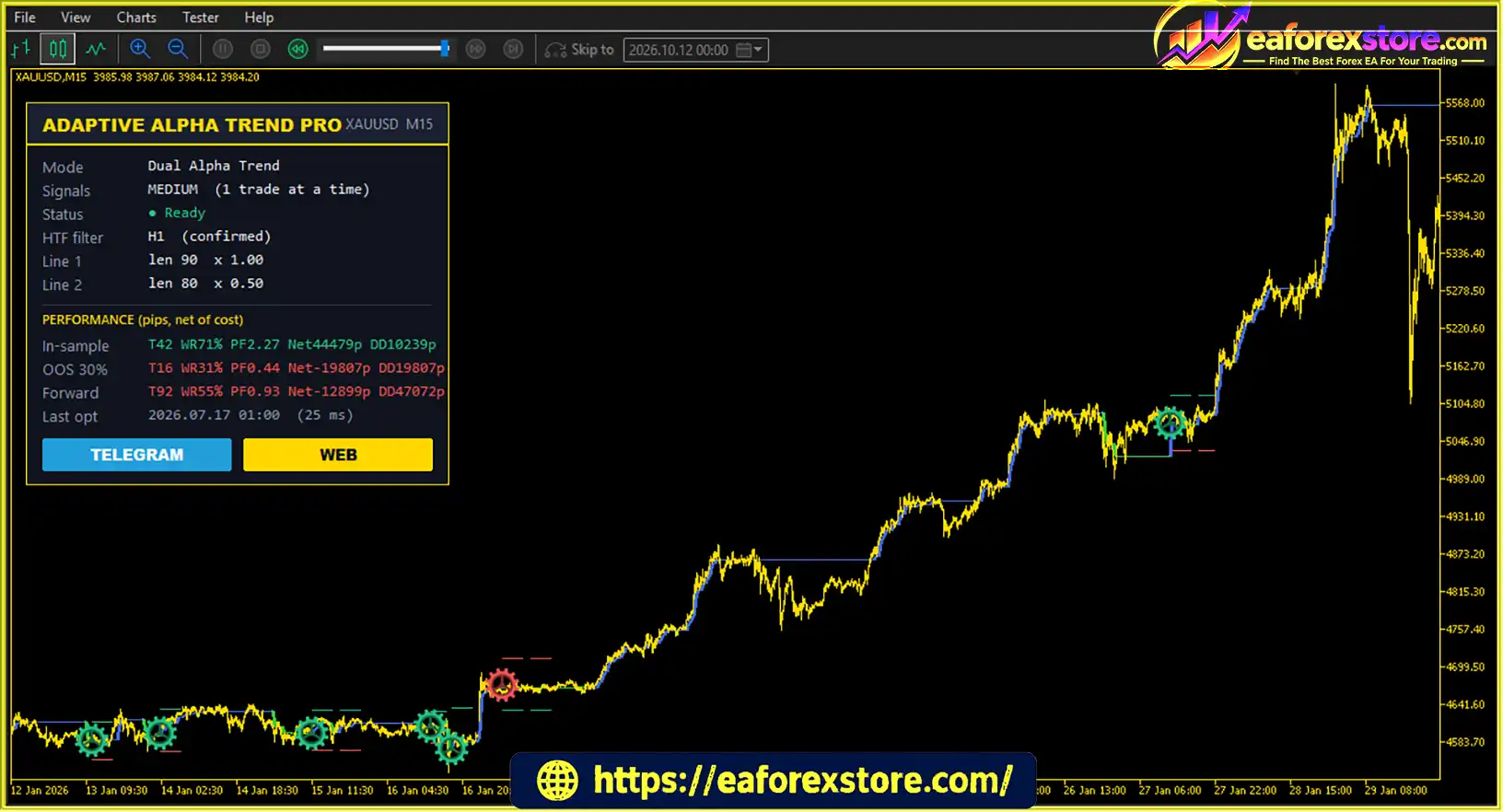
One of the key advantages of Adaptive Alpha Trend Pro MT5 is its automatic parameter optimizer. It tests different AlphaTrend lengths, multipliers, and eligible configuration combinations using recent historical data. Traders can select optimization objectives such as Profit Factor, Net Profit, Win Rate, Recovery, or minimum drawdown. The performance dashboard also separates results into In-Sample, Out-of-Sample (OOS), and Forward categories, helping users evaluate how a configuration performs across different data periods.
With two trading modes, flexible signal frequency settings, scheduled re-optimization, and a no-repaint design based on confirmed candle closes, Adaptive Alpha Trend Pro MT5 provides a comprehensive analytical framework for traders seeking a more systematic approach to technical analysis.
>> Join our Channel Telegram <<<
Key Features of Adaptive Alpha Trend Pro MT5
Adaptive AlphaTrend Engine
The core AlphaTrend engine combines ATR-based volatility analysis with a momentum filter to determine the prevailing market direction. Depending on momentum conditions, the trend line follows a volatility-adjusted price level calculated from the high or low of the candle.
The indicator compares the current AlphaTrend line with its value two bars earlier to determine the trend direction. This approach helps traders identify potential bullish and bearish market conditions while accounting for changes in volatility.
Multi-Timeframe Trend Confirmation
Adaptive Alpha Trend Pro MT5 uses two AlphaTrend lines simultaneously. The first operates on the current chart timeframe and generates trading signals, while the second uses a higher timeframe to establish the broader market regime.
BUY signals require bullish higher-timeframe confirmation, whereas SELL signals require bearish confirmation. This additional filter helps traders focus on opportunities that align with the broader trend rather than relying exclusively on short-term price movements.
22 Candlestick Pattern Recognition
The Candlestick plus Alpha mode recognizes 22 classic bullish and bearish candlestick formations. These include:
- Bullish and bearish engulfing patterns
- Hammer and Shooting Star
- Morning Star and Evening Star
- Three White Soldiers and Three Black Crows
- Harami patterns
- Tweezer patterns
- Doji patterns
- Marubozu patterns
- Three Inside patterns
Bullish patterns are considered only when the higher-timeframe trend is bullish, while bearish patterns require a bearish market regime. An optional confirmation bar provides an additional condition before a signal is accepted.
Automatic Statistical Optimization
The built-in optimizer evaluates multiple parameter combinations using recent historical market data. Depending on the selected trading mode, it can test AlphaTrend lengths, ATR multipliers, higher-timeframe settings, and eligible candlestick combinations.
Traders can optimize for Profit Factor, Net Profit, Win Rate, Recovery, or minimum drawdown. A minimum trade requirement helps reject configurations supported by too few historical trades.
In-Sample, Out-of-Sample, and Forward Statistics
The performance dashboard separates results into three categories:
- In-Sample: Performance on historical data used during optimization.
- Out-of-Sample (OOS): Performance on a separate portion of historical data not used to select the optimized settings.
- Forward: Results from signals generated after the indicator is attached to a chart or the Strategy Tester begins.
This separation makes it easier to assess whether a configuration performs consistently beyond the historical data used to select its parameters.
ATR-Based Stop Loss and Take Profit
The indicator calculates Stop Loss and Take Profit levels using configurable ATR multipliers. This allows trade management distances to respond to changing market volatility rather than relying exclusively on fixed point-based targets.
Entry prices, SL levels, TP levels, and their respective distances can be displayed directly on the chart to support more structured trade planning.
Scheduled Re-Optimization
Adaptive Alpha Trend Pro MT5 can re-optimize its parameters daily, weekly, or monthly. This feature allows traders to reassess their indicator settings as market conditions evolve without depending permanently on a single historical configuration.
No-Repaint Design
Signals are calculated after the relevant candles close. When confirmed higher-timeframe mode is enabled, the indicator also uses fully closed higher-timeframe bars. The Freeze History feature helps prevent previously displayed signals from changing when new optimized settings are selected.
Expert Advisor Integration
The indicator provides accessible buffers for an Expert Advisor to retrieve AlphaTrend values, BUY and SELL signals, Stop Loss, Take Profit, and market regime information through the MT5 iCustom function. This makes it suitable for traders who want to incorporate its analytical outputs into a compatible automated trading system.
Adaptive Alpha Trend Pro MT5 Review
- Adaptive Alpha Trend Pro MT5 uses a dynamic approach instead of relying on conventional indicators with fixed parameters. Its main objective is to adapt to changing market conditions through continuous optimization.
- The optimizer regularly evaluates recent market data and selects the most suitable AlphaTrend configuration based on the user's chosen optimization objective. This helps the indicator adjust its settings as market behavior changes.
- The system combines AlphaTrend signals with higher-timeframe confirmation to establish a clearer directional framework. The chart timeframe generates the primary signal, while the higher timeframe provides additional trend confirmation.
- This multi-timeframe approach can help filter out some counter-trend conditions and improve signal alignment with the broader market direction. However, optimization and trend confirmation do not guarantee accurate signals or profitable trading results.
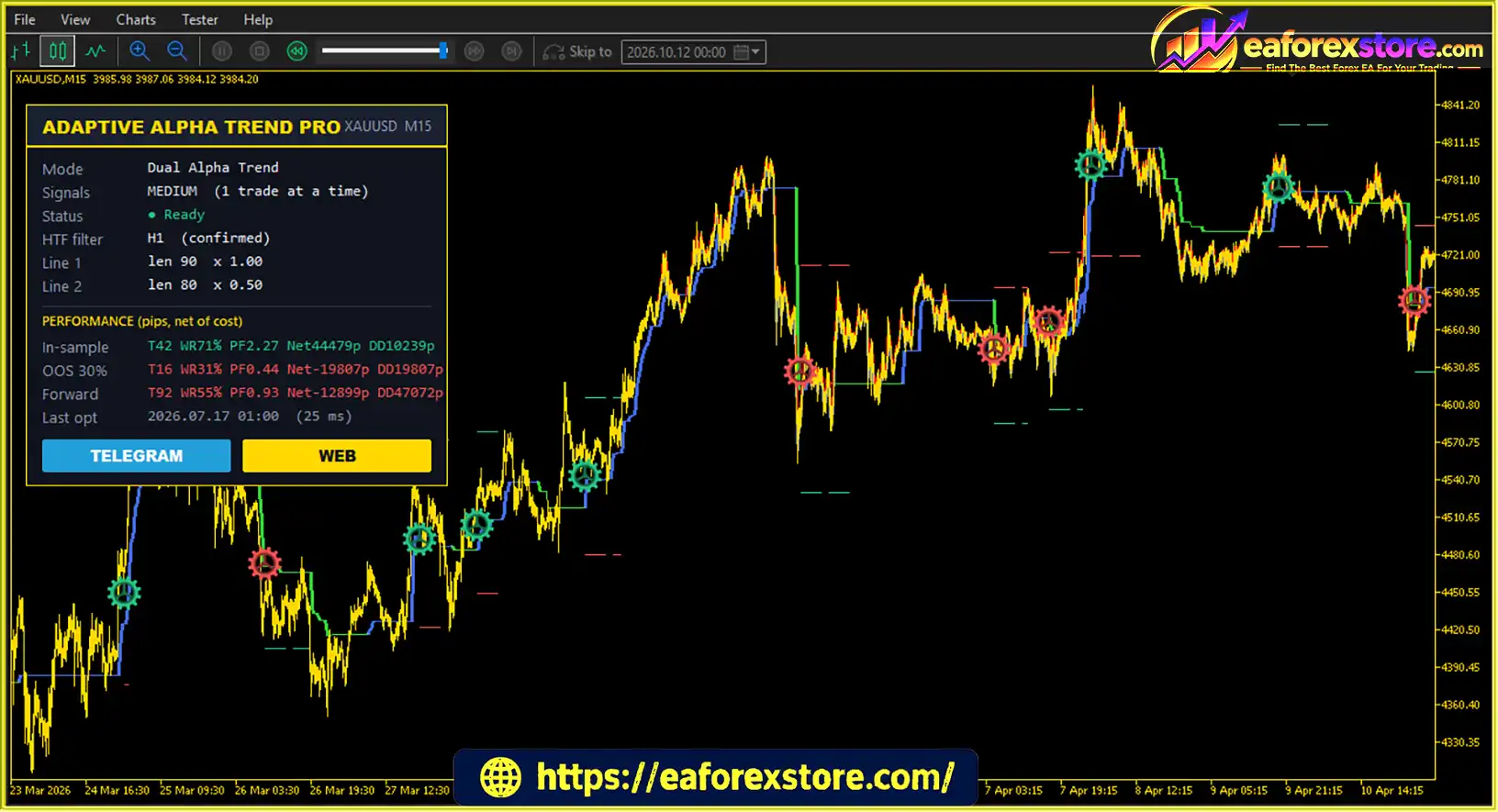
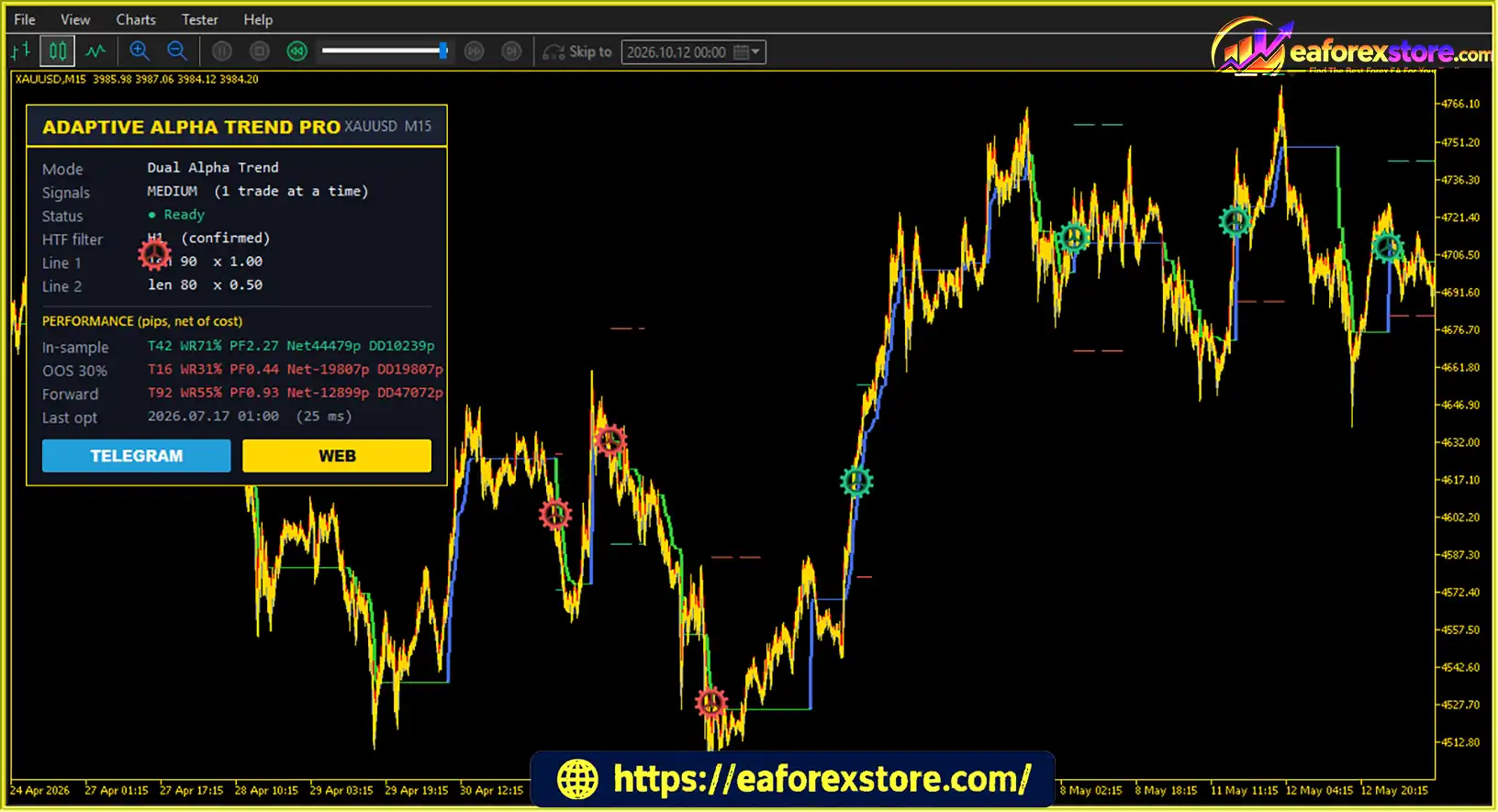
How Does Adaptive Alpha Trend Pro MT5 Work?
Adaptive Alpha Trend Pro MT5 combines trend analysis, momentum filtering, candlestick recognition, and statistical optimization to identify potential trading opportunities.
First, the AlphaTrend engine evaluates price movement, ATR volatility, and the selected momentum filter. The resulting trend line helps identify whether the market is displaying bullish or bearish conditions.
Second, the higher-timeframe AlphaTrend line acts as a directional filter. This means a potential BUY signal must satisfy the bullish regime requirement, while a potential SELL signal must meet the bearish regime requirement.
Third, the indicator applies one of its two signal-generation methods. Dual Alpha Trend mode looks for agreement between the two AlphaTrend lines. Candlestick plus Alpha mode uses recognized candlestick patterns as entry triggers within the higher-timeframe trend direction.
The automatic optimizer then evaluates eligible configurations against the selected performance objective. Depending on the optimization schedule and settings, the indicator can reassess its parameters as new market data becomes available.
Finally, the indicator displays potential entries and ATR-based Stop Loss and Take Profit zones. Its statistical dashboard tracks historical and forward signal performance, allowing traders to evaluate the system rather than judging it solely by individual chart signals.
It is important to understand that the indicator is primarily an analytical tool. Its simulated trades and performance statistics do not automatically represent live broker execution, and the indicator's signals do not guarantee profitable trades.
Why Choose Adaptive Alpha Trend Pro MT5?
Adaptive Alpha Trend Pro MT5 is designed for traders who want more than a conventional trend indicator with fixed settings. Its combination of adaptive optimization, multi-timeframe confirmation, and candlestick analysis offers several practical advantages.
Adaptive market analysis: The optimizer evaluates multiple configurations using recent historical data, helping traders investigate settings that better reflect current market behavior.
Multiple signal-generation methods: Dual Alpha Trend mode focuses on trend alignment, while Candlestick plus Alpha mode combines the higher-timeframe trend with classic candlestick formations.
Flexible signal frequency: LOW, MEDIUM, HIGH, and CUSTOM settings allow traders to adjust how selectively the indicator generates signals and continuation entries.
Structured risk planning: ATR-based Stop Loss and Take Profit levels provide volatility-adjusted reference points for trade management.
More informative performance evaluation: In-Sample, OOS, and Forward statistics help traders distinguish optimization results from performance measured on separate historical data or subsequently generated signals.
Configurable optimization objectives: Traders can prioritize different metrics, including Profit Factor, Net Profit, Win Rate, Recovery, or minimum drawdown, depending on their evaluation criteria.
Automation compatibility: Accessible indicator buffers allow compatible Expert Advisors to retrieve important signal and trade-management values through iCustom.
For traders who value systematic analysis and configurable signal logic, Adaptive Alpha Trend Pro MT5 offers a flexible framework for evaluating market trends and potential entries. However, its effectiveness still depends on market conditions, configuration choices, execution costs, and risk management.
Adaptive Alpha Trend Pro MT5 Trading Strategy
Adaptive Alpha Trend Pro MT5 supports two primary trading approaches: Dual Alpha Trend and Candlestick plus Alpha. Both methods use trend direction and confirmation rules to help identify potential entries.
Strategy 1: Dual Alpha Trend
This approach uses the current-timeframe AlphaTrend line as the primary signal line and the higher-timeframe line as a market regime filter.
BUY Entry Rules
- Wait for the higher-timeframe AlphaTrend line to indicate a bullish trend.
- Check the current-timeframe AlphaTrend line for a bullish direction change or an aligned BUY condition.
- Wait for the signal candle to close.
- Confirm that price action remains consistent with the bullish setup.
- Consider entering a BUY position only after the required conditions are satisfied.
- Set a Stop Loss using the indicator's ATR-based level or a suitable structural support level.
- Determine the Take Profit target using the displayed ATR-based level or a predefined risk-to-reward plan.
SELL Entry Rules
- Wait for the higher-timeframe AlphaTrend line to indicate a bearish trend.
- Check the current-timeframe AlphaTrend line for a bearish direction change or an aligned SELL condition.
- Wait for the signal candle to close.
- Confirm that price action remains consistent with the bearish setup.
- Consider entering a SELL position only after the required conditions are satisfied.
- Set a Stop Loss using the indicator's ATR-based level or a suitable structural resistance level.
- Determine the Take Profit target using the displayed ATR-based level or a predefined risk-to-reward plan.
The signal frequency setting controls how aggressively this strategy generates opportunities. LOW is more selective, MEDIUM provides the default balance, HIGH permits additional continuation entries, and CUSTOM allows individual control over entry, filtering, and re-entry conditions.
Strategy 2: Candlestick plus Alpha
This strategy uses the higher-timeframe AlphaTrend line to identify the broader market direction and candlestick patterns to trigger potential entries.
BUY Setup
- Confirm that the higher-timeframe AlphaTrend direction is bullish.
- Look for a recognized bullish pattern, such as Bullish Engulfing, Hammer, Morning Star, or Three White Soldiers.
- Enable and wait for the additional confirmation bar if required by your settings.
- Consider a BUY entry after the relevant candle closes and the complete signal conditions are satisfied.
- Use the ATR-based Stop Loss and Take Profit zones to establish a structured trade plan.
SELL Setup
- Confirm that the higher-timeframe AlphaTrend direction is bearish.
- Look for a recognized bearish pattern, such as Bearish Engulfing, Shooting Star, Evening Star, or Three Black Crows.
- Enable and wait for the additional confirmation bar if required by your settings.
- Consider a SELL entry after the relevant candle closes and the complete signal conditions are satisfied.
- Use the ATR-based Stop Loss and Take Profit zones to establish a structured trade plan.
Understanding Stop Loss and Take Profit
The default configuration uses a Stop Loss of 5 ATR and a Take Profit of 3 ATR. This creates an asymmetric risk-to-reward profile in which the planned loss distance is larger than the planned profit distance.
Before trading with these settings, users should evaluate whether the resulting win rate and drawdown characteristics are appropriate for their strategy. Alternative ATR multipliers may be tested, but optimization should be followed by out-of-sample evaluation and forward testing.
A practical approach is to begin with the MEDIUM signal frequency, evaluate both trading modes separately, and test the selected configuration on a demo account before considering live trading.
Weaknesses and Risk Warnings
Although Adaptive Alpha Trend Pro MT5 offers advanced analytical features, traders should understand its limitations before using it in live markets.
Historical Optimization Can Overfit
The optimizer selects parameters based on historical market behavior. A configuration that performs exceptionally well on the optimization sample may fail when market volatility, trend strength, or price structure changes.
OOS Performance Does Not Guarantee Future Results
Out-of-sample testing provides an additional assessment of a configuration, but it cannot eliminate market uncertainty. Forward results may also be based on a limited observation period and may not represent performance across different market conditions.
Asymmetric Risk-to-Reward Profile
The default Stop Loss of 5 ATR and Take Profit of 3 ATR produces a planned risk-to-reward ratio of approximately 1.67:1, before costs and execution effects.
Under these assumptions, the theoretical break-even win rate is approximately 62.5% before trading costs. Actual results may require a higher win rate after accounting for spreads, commissions, slippage, and other execution factors.
Higher Signal Frequency Can Increase Noise
HIGH frequency mode permits additional continuation entries, which may increase trading activity but can also introduce more false signals. LOW mode is more selective, while MEDIUM offers the default balance between selectivity and activity.
Market-Specific Settings
Optimized parameters may not transfer effectively between different symbols, timeframes, or market conditions. Settings selected for one instrument should be independently evaluated before being applied elsewhere.
Re-Optimization May Change Signal Behavior
When the optimizer selects a new configuration, subsequent signals may differ from those generated using earlier settings. Freeze History is designed to help preserve previously displayed signals, but users should understand how optimization and historical signal handling work in their selected configuration.
Trading Costs and Execution Differences
Spread and commission settings can be incorporated into simulated performance calculations. However, actual execution may also be affected by slippage, latency, liquidity, broker conditions, and price gaps. Backtest results may therefore differ significantly from live trading outcomes.
Financial Risk Warning
Adaptive Alpha Trend Pro MT5 is a technical analysis indicator, not a guarantee of trading success. Forex and CFD trading involve substantial risk, and losses can exceed expectations. Always evaluate the strategy carefully, use appropriate position sizing, and avoid risking money you cannot afford to lose.
Pros and Cons of Adaptive Alpha Trend Pro MT5
Pros
- Combines the AlphaTrend engine with ATR-based volatility analysis and momentum filtering.
- Uses higher-timeframe confirmation to help align signals with the broader market direction.
- Supports two distinct signal-generation modes: Dual Alpha Trend and Candlestick plus Alpha.
- Recognizes 22 classic bullish and bearish candlestick patterns.
- Automatically evaluates parameter combinations against configurable statistical objectives.
- Supports daily, weekly, and monthly re-optimization schedules.
- Displays ATR-based Stop Loss and Take Profit zones on the chart.
- Separates performance into In-Sample, Out-of-Sample, and Forward statistics.
- Uses closed-candle signal calculations and offers Freeze History functionality.
- Provides indicator buffers for integration with compatible MT5 Expert Advisors.
Cons
- Optimized settings may overfit historical data and perform differently in live markets.
- The default 5 ATR Stop Loss and 3 ATR Take Profit configuration has an asymmetric risk-to-reward profile.
- HIGH signal frequency can produce more opportunities but may also increase false signals.
- Different symbols and timeframes may require separate optimization and validation.
- Statistical performance depends on data quality, test settings, trading costs, and the selected objective.
- Forward testing may require substantial time before enough observations are available.
- The indicator requires traders to understand its configuration options and performance metrics to interpret results correctly.
- It cannot eliminate market risk or guarantee profitable trades.
Overall, Adaptive Alpha Trend Pro MT5 is best suited to traders who value configurable trend analysis, statistical evaluation, and systematic signal filtering. Its complexity may be less suitable for users seeking a completely hands-off solution without testing or monitoring.
How to Install Adaptive Alpha Trend Pro MT5
Follow these steps to install Adaptive Alpha Trend Pro MT5 on MetaTrader 5.
Step 1: Download the Indicator
Download the Adaptive Alpha Trend Pro MT5 indicator files from the official product source. Depending on the package, the main file may use the .ex5 or .mq5 extension.
Step 2: Open the MT5 Data Folder
Launch MetaTrader 5 and select File → Open Data Folder from the top menu.
Step 3: Locate the Indicators Directory
Navigate to:
MQL5 → Indicators
Copy the supplied indicator files into this directory. If the package includes supporting files or libraries, follow the developer's installation instructions for those components.
Step 4: Compile the Indicator if Necessary
If the download includes an editable .mq5 source file rather than a compiled .ex5 file, open it in MetaEditor and compile it. Resolve any compilation errors before proceeding.
If only a compiled .ex5 file is provided, compilation is generally unnecessary.
Step 5: Refresh the Navigator
Return to MetaTrader 5. In the Navigator panel, right-click Indicators and select Refresh. Alternatively, restart the trading platform.
Step 6: Attach the Indicator to a Chart
Open the chart for your preferred trading instrument and timeframe. Find Adaptive Alpha Trend Pro MT5 in the Navigator panel and drag it onto the chart.
Step 7: Configure the Indicator Settings
Review the available settings, including:
- AlphaTrend length and ATR multiplier
- MFI or RSI momentum filtering
- Higher-timeframe confirmation
- Dual Alpha Trend or Candlestick plus Alpha mode
- Signal frequency
- Candlestick confirmation options
- Optimization objective and minimum trade requirement
- Re-optimization schedule
- ATR-based Stop Loss and Take Profit
- Spread and commission assumptions
- In-Sample, OOS, and Forward evaluation settings
- Available options may depend on the specific version of the indicator.
Step 8: Review Signals and Performance Statistics
Confirm that the AlphaTrend lines, BUY and SELL signals, risk zones, and performance dashboard are displayed correctly. Review the optimization results and check that the selected configuration has sufficient trade observations.
Step 9: Backtest and Forward-Test
Before using the indicator for live trading, test its settings on historical data and evaluate the OOS results. Then run the indicator on a demo account to observe forward signals under current market conditions.
If you intend to integrate it with an Expert Advisor, verify that the EA reads the correct indicator buffers and handles entry signals, Stop Loss, Take Profit, and position management as intended.
Important: The exact installation requirements may vary by package version. Always follow the supplied developer documentation, and do not assume that installing the indicator automatically executes trades. Automated execution requires a compatible Expert Advisor or a separate trading implementation.
What’s Included in the Download Package?
- Indicator:
- Adaptive Alpha Trend Pro MT5.ex5
- Adaptive_Alpha_Trend_Pro_MT5_Inputs_Guide.pdf
- Adaptive_Alpha_Trend_Pro_MT5_Product_Overview.pdf
>> Join VIP Membership Now <<<
Final Thoughts
Adaptive Alpha Trend Pro MT5 is a feature-rich MetaTrader 5 indicator that combines trend-following analysis, multi-timeframe confirmation, 22 candlestick patterns, and automatic statistical optimization. Its two trading modes provide flexibility for traders who prefer trend alignment or candlestick-based entries within a broader market regime.
The ATR-based Stop Loss and Take Profit zones help establish structured trade plans, while the In-Sample, Out-of-Sample, and Forward dashboard provides a more comprehensive way to assess signal performance. Scheduled re-optimization and configurable statistical objectives also allow traders to investigate how different settings respond to changing market conditions.
However, automatic optimization is not a substitute for robust testing. Historical results can be misleading, the default risk-to-reward profile requires careful evaluation, and live trading outcomes may differ from simulated performance. Traders should validate their settings on separate historical data, monitor forward results, and apply disciplined position sizing.
In conclusion, Adaptive Alpha Trend Pro MT5 is worth evaluating for traders seeking an adaptive trend-following indicator with configurable signals and statistical analysis. Its greatest value lies in combining multiple analytical tools within one MT5 indicator, provided users understand its limitations and test their chosen configuration before risking real capital.