









-
 Unlimited Activations
-
 Instant delivery
-
 Easy to install


 Unlimited Activations
Instant delivery
Easy to install
Unlimited Activations
Instant delivery
Easy to install
 Free Update
 Free Install Support

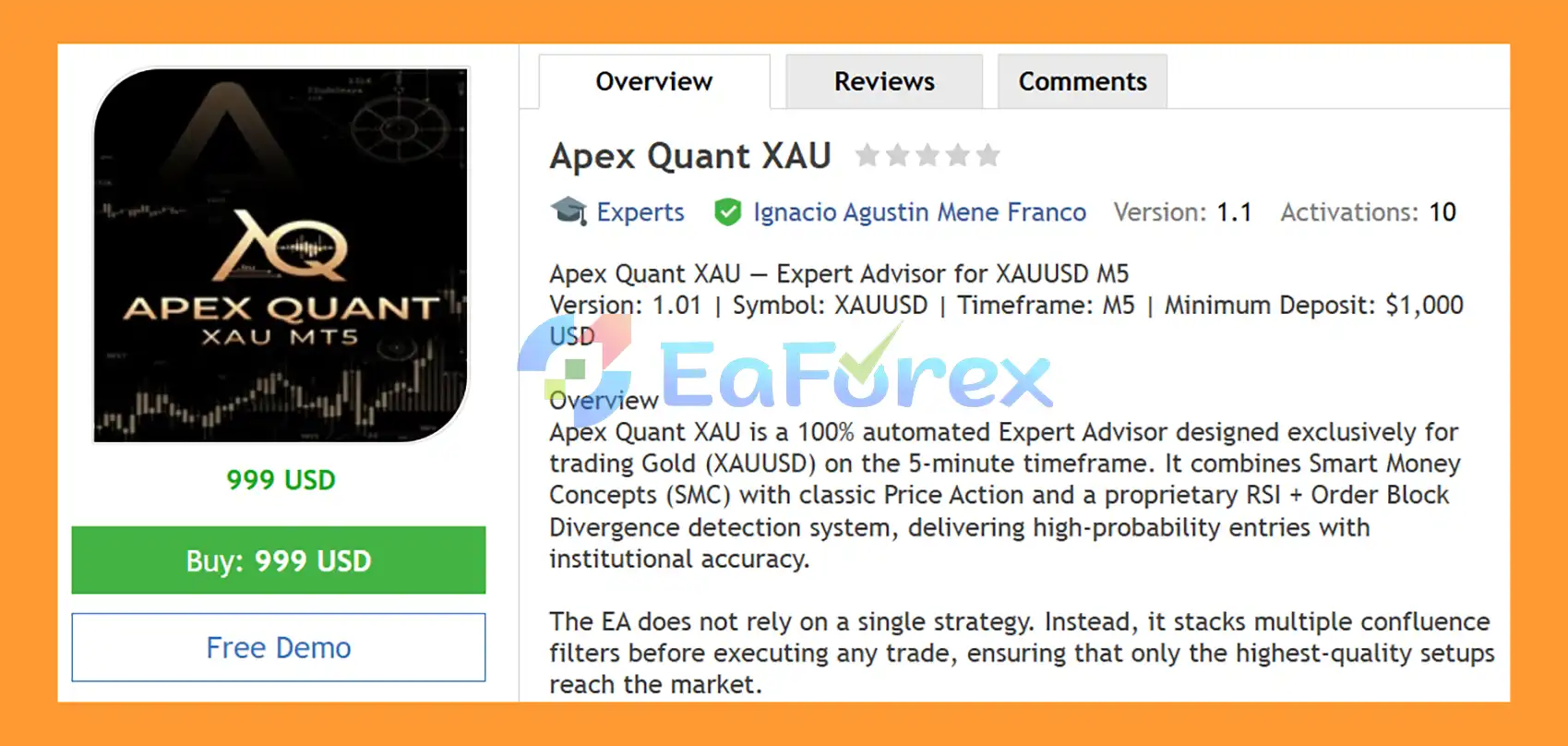
Apex Quant XAU EA MT5 is a fully automated Expert Advisor for MetaTrader 5, designed exclusively for trading Gold (XAUUSD) on the M5 timeframe. The system combines Smart Money Concepts (SMC), Price Action, RSI Divergence, Order Blocks, and an 8/21 EMA trend filter to identify potential trading opportunities through multiple layers of market confirmation.
Instead of depending on a single indicator or strategy, Apex Quant XAU EA MT5 uses a multi-layer confluence architecture. Market structure, liquidity behavior, momentum divergence, institutional-style zones, price action, and trend direction are evaluated before a trade can qualify.
The EA also includes an automated risk engine with percentage-based position sizing, dynamic equity sizing, daily loss protection, margin controls, trailing stop, break-even, spread filtering, and optional session restrictions.
Apex Quant XAU EA MT5 is intended for traders looking for an automated XAUUSD M5 trading system that combines structured market analysis with configurable risk management.
>> Delivery time 24h-48h after payment.
>>> Refund if not delivered.
>>> You will receive the latest version without any limitations (ID+Time).>>Reviewed by Jason Stap <<
Apex Quant XAU EA MT5 Overview
🔺Gold (XAUUSD) – over many years
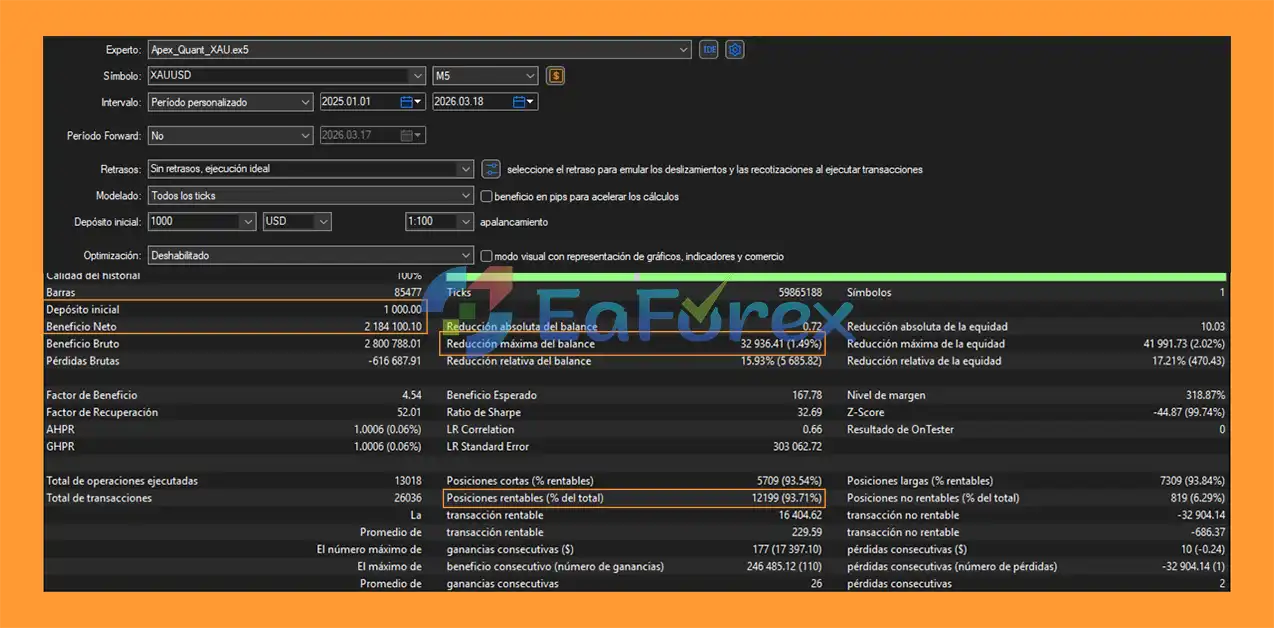
Apex Quant XAU EA MT5 Backtets
Apex Quant XAU EA MT5 includes three position-sizing modes:
| Risk Mode | Description |
|---|---|
| Fixed Lot | Uses a predefined lot size |
| Fixed % Risk | Calculates position size according to the selected percentage of account balance |
| Dynamic Equity | Adjusts position sizing according to account equity |
The default configuration specifies 1% risk per trade, although the actual risk should always be evaluated based on broker specifications, stop-loss distance, symbol contract size, and account currency.
The EA can automatically stop opening new trades when the configured daily loss threshold is reached.
The default parameter is:
Max Daily Loss: 10%
This is a trading-control mechanism, not a guarantee that the account cannot lose more than the configured amount, since market gaps, slippage, and execution conditions can affect actual results.
Apex Quant XAU EA MT5 provides controls for:
The default maximum number of simultaneous open positions is 5.
The trailing-stop function can automatically adjust the Stop Loss as a profitable trade moves in the intended direction.
This is designed to help manage open positions without requiring manual intervention.
Once the configured break-even trigger is reached, the EA can move the Stop Loss toward the entry price.
This allows the system to reduce open-position risk after sufficient favorable movement.
| Parameter | Default Value | Description |
|---|---|---|
| TurboMode | True | Increases trading aggressiveness and applies the configured lot multiplier |
| RiskMode | % Fixed | Fixed Lot, % Risk, or Dynamic Equity |
| RiskPercent | 1.0% | Percentage of balance used for risk calculation |
| StopLossPips | 20 | Base Stop Loss distance |
| TakeProfitPips | 60 | Base Take Profit distance |
| MinRiskReward | 1.2 | Minimum R required for a trade |
| UseRSIDivergence | True | Enables RSI divergence analysis |
| UseOrderBlocks | True | Enables Order Block detection |
| UseTrailingStop | True | Enables automatic trailing stop |
| UseBreakEven | True | Enables break-even management |
| MaxDailyLossPercent | 10% | Daily loss threshold |
| Max Open Positions | 5 | Maximum simultaneous positions |
Actual trading behavior can change significantly when these parameters are modified.
Turbo Mode is designed for a more aggressive trading configuration.
When enabled, the EA can increase its market search and position-sizing aggressiveness through the configured lot multiplier and expanded signal logic.
Turbo Mode is intended for situations where traders want the system to respond more actively to stronger Gold movements.
However, increased aggressiveness can also increase:
For this reason, Turbo Mode should be thoroughly forward-tested before being used with significant live capital.
Apex Quant XAU EA MT5 applies a dark navy-blue chart theme and displays important market information directly on the XAUUSD chart.
The interface can visualize:
Directional labels identify detected liquidity sweep areas.
FVG areas are displayed as rectangles to make potential imbalance zones easier to identify visually.
Bullish and bearish Order Blocks are displayed using different visual colors:
Pin Bar formations can be marked directly on the chart with directional arrows.
The panel provides information such as:
This allows traders to monitor the EA’s analytical environment without manually inspecting every indicator.
| Parameter | Recommendation |
|---|---|
| Platform | MetaTrader 5 |
| Symbol | XAUUSD |
| Timeframe | M5 |
| Minimum Deposit | $1,000 |
| Recommended Deposit | $3,000 |
| Risk | 1% per trade as a starting reference |
| Broker Type | Low-spread ECN/STP preferred |
| XAUUSD Spread | Below 20 pips preferred |
| Leverage | 1:100 or higher recommended |
| VPS | Highly recommended |
| Trading Style | Automated Gold trading / Scalping / Intraday |
The recommended $1,000 minimum and $3,000 preferred capital levels are configuration guidance rather than guarantees of suitable risk for every trader.
XAUUSD can experience rapid price movements during major economic events, market openings, unexpected news, and periods of elevated volatility.
The M5 timeframe can be strongly affected by spread, slippage, latency, execution speed, and broker liquidity.
Liquidity Sweeps, Fair Value Gaps, and Order Blocks are analytical concepts rather than guaranteed reversal zones. Price can move through these areas without producing the expected reaction.
Divergence can remain active for an extended period while price continues moving in the original direction.
A multi-layer confirmation system can filter certain setups, but it cannot guarantee that every trade will be profitable.
Higher aggressiveness can increase exposure and potential drawdown. Traders should evaluate Turbo Mode separately from standard configurations.
The EA can stop opening new positions when its threshold is reached, but existing positions, slippage, gaps, and execution conditions can cause actual account losses to differ from the configured limit.
| Pros | Cons |
|---|---|
| Fully automated XAUUSD trading | Exclusively designed for Gold |
| SMC-based market structure | SMC zones can fail |
| Liquidity Sweep detection | M5 execution can be sensitive |
| Fair Value Gap analysis | RSI divergence can produce delayed signals |
| RSI + Order Block confirmation | Gold volatility can increase drawdown |
| Price Action confirmation | Turbo Mode increases exposure |
| 8/21 EMA trend filter | Broker spread and execution matter |
| Three position-sizing modes | Requires careful risk configuration |
| Trailing stop and break-even | No system guarantees profitable results |
| Daily loss and margin controls | — |
| Real-time visual market panel | — |
In summary, Apex Quant XAU EA MT5 combines several widely used market-analysis concepts into a single automated framework for XAUUSD M5 trading. Its architecture brings together Smart Money Concepts, Liquidity Sweeps, Fair Value Gaps, RSI Divergence, Order Blocks, Price Action, and an 8/21 EMA trend filter before a trade is considered.
The EA also provides structured risk controls, including percentage-based position sizing, dynamic equity management, daily loss protection, margin verification, trailing stops, break-even, and spread filtering.
For traders interested in automated Gold trading, the main attraction of Apex Quant XAU is its multi-layer confluence approach rather than dependence on one technical indicator. Nevertheless, XAUUSD remains a volatile market, and the EA’s actual behavior will depend heavily on broker execution, account size, risk settings, and market conditions.
Demo testing, realistic backtesting, and conservative risk configuration should be completed before using Apex Quant XAU EA MT5 with real funds.
1. What is Apex Quant XAU EA MT5?
Apex Quant XAU EA MT5 is a fully automated trading Expert Advisor for MetaTrader 5, specifically designed for XAU/USD (Gold) on the M5 timeframe. It uses Smart Money Concepts, RSI divergence, Order Blocks, and Price Action strategies to identify high-probability trading opportunities.
2. How does Apex Quant XAU EA MT5 work?
The EA works by combining multiple confluence signals such as liquidity sweeps, fair value gaps, RSI divergence, and EMA trend direction. It only opens trades when several institutional-grade conditions align, reducing false signals and improving accuracy.
3. What trading strategy does Apex Quant XAU EA MT5 use?
Apex Quant uses a hybrid strategy based on Smart Money Concepts (SMC), Order Blocks, RSI divergence, and advanced Price Action patterns like Pin Bars and Engulfing candles, all filtered through EMA trend confirmation.
4. Which market and timeframe is Apex Quant XAU EA MT5 optimized for?
This EA is exclusively optimized for XAU/USD (Gold) on the M5 (5-minute) timeframe. It is designed specifically to handle the high volatility and fast movement of the gold market.
5. Is Apex Quant XAU EA MT5 suitable for beginners?
Yes, it is beginner-friendly because it runs fully automatically. However, users are recommended to understand basic Forex concepts, risk management, and how to operate MetaTrader 5 for best results.
6. What risk management features are included in Apex Quant XAU EA MT5?
The EA includes multiple safety systems such as dynamic lot sizing, daily drawdown protection, break-even automation, trailing stop, spread filter, and optional session-based trading control.
7. Does Apex Quant XAU EA MT5 trade automatically?
Yes, the EA is fully automated. Once installed and configured, it handles everything from market analysis and signal detection to trade execution and risk management without manual intervention.
8. What makes Apex Quant XAU EA MT5 different from other Gold EAs?
Unlike basic trading robots, Apex Quant uses a multi-layer institutional strategy combining SMC, RSI divergence, Order Blocks, and Price Action. It only trades when multiple conditions confirm the same direction, improving trade quality.
9. Can Apex Quant XAU EA MT5 be used on multiple accounts or capital sizes?
Yes, it is designed with scalable risk settings, making it suitable for small accounts as well as larger portfolios. Users can adjust risk levels based on their capital and trading preferences.
In stock
In stock
In stock
In stock
In stock
Out of stock
No account yet?
Create an Account












 Automatic EA
 EA Best Seller
 Expert Advisor MT4
 Expert Advisor MT5
 HFT EA


Reviews
Clear filtersThere are no reviews yet.