


Product Overview
Alligator Gold Cyber EA MT5 is an automated Gold Trading Expert Advisor for MetaTrader 5, specifically developed and optimized for trading XAU/USD (Gold) on the H1 timeframe.
The EA combines the Bill Williams Alligator indicator with the Commodity Channel Index (CCI) to identify market direction and confirm momentum before placing trades. Its trading architecture also incorporates a pending-order grid system, dynamic trailing stop, automatic break-even, profit-based closing, spread protection, and configurable money management.
Instead of entering the market immediately, Alligator Gold Cyber EA MT5 waits for both the Alligator trend structure and CCI momentum conditions to align. It then places Buy Stop or Sell Stop pending orders at a configurable distance from the current market price.
Designed specifically for the volatile XAUUSD market, the EA provides automated trend filtering and trade management while allowing traders to customize position sizing, risk percentage, Stop Loss, trading hours, spread limits, and pending-order exposure.
About the Developer
- Author: Ignacio Agustin Mene Franco
- Experience: Over 3 years of experience on MQL5.
- Notable Products: Alligator Gold Cyber EA MT5, Merket Structure Pro EA MT5, Harmonic Pro AI EA MT5, Volumen Scalper GOLD EA MT5, Storm Trader EA MT5, Ichimoku Scalper Gold EA MT4, Level Hard Xauusd, Danesha Xauusd, Power Fusion Xauusd, Level Slow Xauusd EA MT4 and other advisors.
- Flagship Product: Alligator Gold Cyber EA MT5 is rated as the best performing product of the year.
>> Delivery time 24h-48h after payment.
>>> Refund if not delivered.
>>> You will receive the latest version without any limitations (ID+Time).>>Reviewed by Jason Stap <<
Key Features of Alligator Gold Cyber EA MT5
🔹 Bill Williams Alligator Trend Detection
The core of the strategy uses the Bill Williams Alligator, consisting of three lines:
- Jaw
- Teeth
- Lips
The EA identifies three primary market states:
AWAKE BULL
When:
Lips > Teeth > Jaw
and price is positioned above the Alligator lines, the system identifies a bullish market structure.
AWAKE BEAR
When:
Lips < Teeth < Jaw
and price is positioned below the Alligator lines, the system identifies a bearish market structure.
SLEEPING
When the Alligator lines become intertwined, the market is considered less directional. The EA avoids opening new trades during this state to reduce exposure to sideways conditions.
🔹 CCI Momentum Confirmation
The Commodity Channel Index (CCI) is used as a secondary confirmation filter.
The default CCI period is 14.
For bullish confirmation:
- CCI is above 0
- CCI remains below +100
For bearish confirmation:
- CCI is below 0
- CCI remains above -100
The ±100 levels provide an additional momentum and overbought/oversold filter.
🔹 Pending Order Entry
When the Alligator trend and CCI conditions are simultaneously confirmed, the EA can place:
- Buy Stop orders for bullish setups
- Sell Stop orders for bearish setups
The entry distance is controlled by the configurable Delta parameter.
This allows the EA to wait for price confirmation rather than entering immediately at the current market price.
🔹 Grid-Based Pending Order System
Alligator Gold Cyber EA MT5 supports multiple pending orders while maintaining a configurable maximum number of orders in each direction.
This structure allows the system to participate in extended price movements while limiting the number of simultaneously active pending orders.
🔹 Fixed or Risk-Based Lot Sizing
Traders can choose between:
- Fixed Lot Size
- Risk Percentage Based on Balance
The default parameters include a 0.20 fixed lot and an alternative 0.5% risk setting.
🔹 Dynamic Trailing Stop
The EA includes an aggressive trailing-stop mechanism that progressively tightens the protection as a trade moves further into profit.
The trailing step can progressively compress through stages such as:
80% → 60% → 50%
of the configured step.
This mechanism is designed to protect accumulated profit while allowing profitable positions to continue following stronger market trends.
🔹 Automatic Break-Even
When the configured break-even threshold is reached, the EA moves the Stop Loss toward the entry price.
The default break-even activation level is 30 pips.
🔹 Automatic Profit Close
The AutoClose / Profit Close function automatically closes a position when the configured profit target is reached.
The default target is 15 pips per position.
🔹 Maximum Spread Filter
The EA monitors the current market spread before opening trades.
If the spread exceeds the configured maximum, new trades are suspended until market conditions return within the allowed range.
The default maximum spread is 30 pips.
🔹 Trading Time Filter
Alligator Gold Cyber EA MT5 can be configured to operate only during selected trading hours.
The default schedule is:
1:00 AM – 11:00 PM server time
This allows traders to control when the EA is permitted to open new positions.
🔹 Free Margin Validation
Before placing an order, the EA checks available free margin to help prevent orders from being opened when the account does not have sufficient available margin.
🔹 Cyber HUD Dashboard
The EA includes a real-time Cyber HUD dashboard with a distinctive dark and neon visual design.
The dashboard displays:
Account Information
- Balance
- Equity
- Free Margin
- Drawdown %
Trading Information
- Open positions
- Pending orders
- Total lots
- PnL in USD
- PnL in pips
Market Information
- Bid price
- Ask price
- Current spread
Alligator Information
- Jaw value
- Teeth value
- Lips value
- Sleeping/Awake status
- Current trend
CCI Information
- Current CCI value
- Momentum zone
The chart can also automatically adapt to the EA's visual theme, using a carbon-black background with contrasting bullish and bearish candle colors.
How Does Alligator Gold Cyber EA MT5 Work?
Alligator Gold Cyber EA MT5 follows a multi-stage confirmation process before placing pending orders.
Step 1 – Analyze the Alligator
The EA continuously monitors the Bill Williams Alligator lines.
When the Lips, Teeth, and Jaw are intertwined, the Alligator is considered Sleeping, and the EA does not initiate new trades.
When the lines separate and establish a directional structure, the EA identifies an Awake Bull or Awake Bear condition.
Step 2 – Confirm Market Direction
For a bullish setup, the EA looks for:
Lips > Teeth > Jaw + Price Above Alligator
For a bearish setup, the EA looks for:
Lips < Teeth < Jaw + Price Below Alligator
This creates the primary directional filter.
Step 3 – Confirm Momentum With CCI
The EA then checks the CCI indicator.
A bullish setup requires:
CCI > 0 and CCI < +100
A bearish setup requires:
CCI < 0 and CCI > -100
If the CCI condition does not confirm the Alligator structure, the EA does not proceed with the corresponding setup.
Step 4 – Place a Pending Order
When both filters agree, the EA places a pending order rather than immediately entering the market.
- Bullish condition → Buy Stop
- Bearish condition → Sell Stop
The distance between the current price and pending order is controlled by the Delta parameter.
Step 5 – Manage the Position
After a pending order is triggered, the EA manages the position using:
- Stop Loss
- Automatic Profit Close
- Break-Even
- Dynamic Trailing Stop
- Spread protection
- Exposure controls
This creates an automated trading workflow:
Alligator Analysis → Trend Detection → CCI Confirmation → Pending Order → Trade Execution → Break-Even → Dynamic Trailing → Automatic Exit
Why Choose Alligator Gold Cyber EA MT5?
Alligator Gold Cyber EA MT5 is designed for traders looking for an automated XAUUSD trading system on MetaTrader 5 that combines trend identification with momentum confirmation.
Gold-Specific Strategy
The EA is designed specifically for XAU/USD, allowing its parameters and trading logic to be configured around the characteristics of Gold.
Dual-Indicator Confirmation
Instead of relying on a single technical indicator, the system combines the Alligator trend structure with CCI momentum confirmation before placing pending orders.
Avoids Sleeping Alligator Conditions
When the Alligator lines become intertwined, the EA identifies the market as Sleeping and avoids new entries. This is intended to filter out some periods of less-defined directional movement.
Pending-Order Execution
Buy Stop and Sell Stop orders allow the system to wait for price movement through the configured entry level rather than automatically entering at the current market price.
Automated Trade Management
Once a trade is active, the EA can automatically manage Stop Loss, profit targets, break-even, and trailing protection.
Flexible Risk Configuration
Traders can select fixed lot sizing or a percentage-based risk approach, depending on their account-management preferences.
Real-Time Monitoring
The Cyber HUD dashboard provides a convenient overview of account status, exposure, market conditions, Alligator structure, and CCI momentum directly on the MT5 chart.
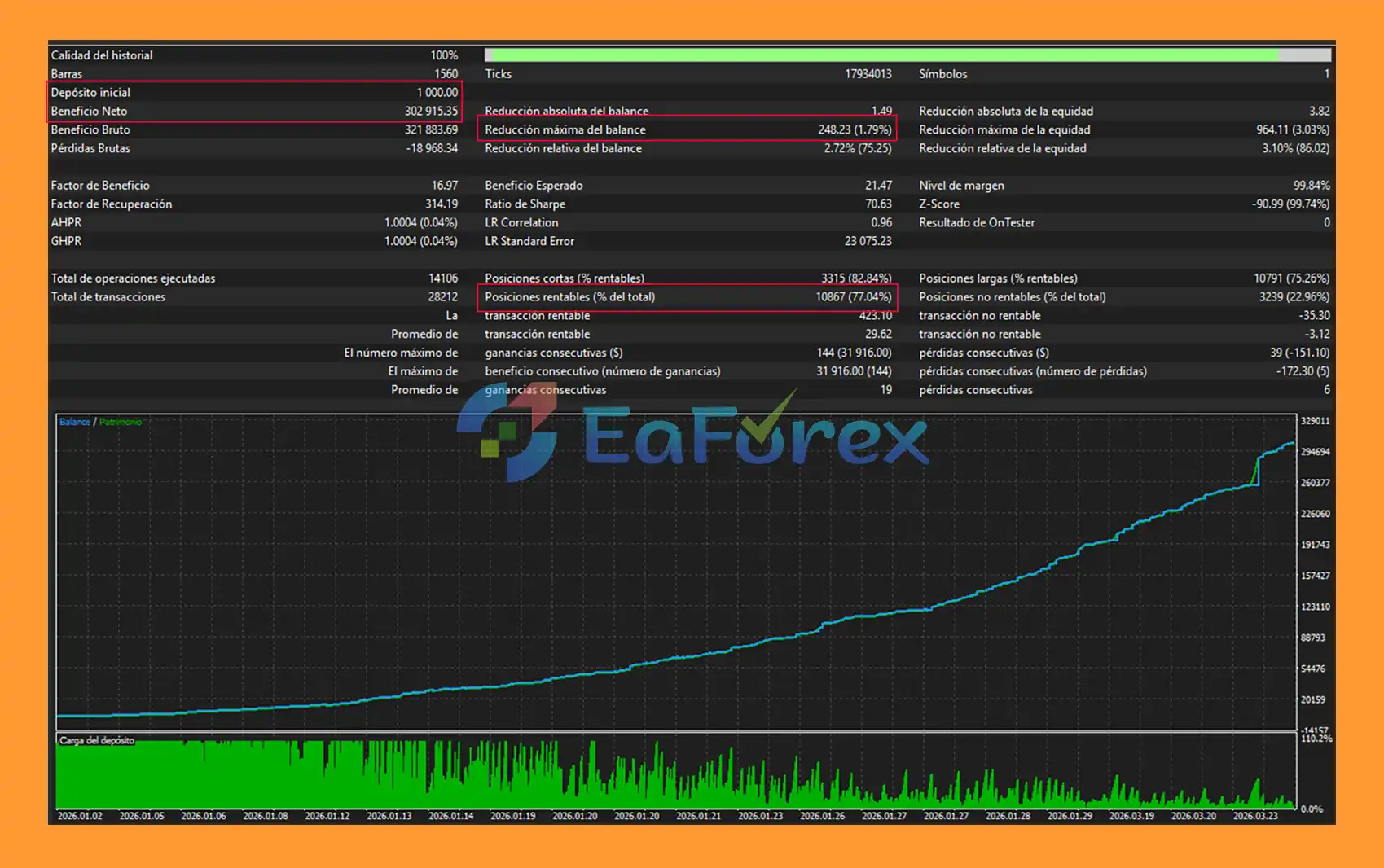
Alligator Gold Cyber EA MT5 Backtest Results
🔺Gold (XAUUSD) – over many years
- Initial Deposit: $1.000
- Total Net Profit: $302.915,35
- Win Rate (% of total): 74,04%
- Maximum Drawdown: 1,79%
Performance and Risk Management
Alligator Gold Cyber EA MT5 provides several configurable controls designed to manage trading exposure and operational risk.
| Parameter | Default Value |
|---|---|
| Magic Number | 345679 |
| Fixed Lot | 0.20 |
| Risk Percent | 0.5% |
| Delta | 3.0 pips |
| Max Distance | 15.0 |
| Stop Loss | 20 pips |
| Maximum Spread | 30 pips |
| Trailing Start | 5 pips |
| Break-Even | 30 pips |
| Profit Close | 15 pips |
| CCI Period | 14 |
| Alligator Jaw | 13 / 8 |
| Trading Hours | 1:00 AM – 11:00 PM |
Stop Loss
The EA uses a configurable fixed Stop Loss calculated from the position's entry price. The default setting is 20 pips.
Profit Target
The automatic profit-close function can close positions when the configured target is reached. The default setting is 15 pips.
Trailing Start
The trailing mechanism starts after the position reaches the configured profit threshold, with the default activation level set to 5 pips.
Break-Even
The default break-even level is 30 pips. Once reached, the EA can move the Stop Loss toward the entry price.
Pending Order Limits
The maximum number of simultaneous pending orders per direction can be configured to help control total exposure.
Spread Protection
The default maximum spread is 30 pips. If the current spread exceeds this threshold, the EA suspends new trading activity.
Free Margin Check
The EA validates available free margin before placing orders, adding an additional account-level control against excessive margin usage.
Risk-Based Position Sizing
The alternative 0.5% risk setting allows position sizing to be calculated based on account balance rather than always using a fixed lot size.
Actual risk can vary depending on broker specifications, contract size, leverage, spread, slippage, and execution conditions.
Weaknesses and Risk Warnings
Despite its multiple filters and risk-management functions, Alligator Gold Cyber EA MT5 does not eliminate trading risk.
Grid Exposure
The pending-order grid structure can result in multiple trades being activated during a strong market movement. This may increase total exposure and margin requirements.
Gold Volatility
XAU/USD can experience rapid price movements, particularly around major economic releases and periods of increased market volatility. Slippage and execution differences may occur during such conditions.
Indicator Lag
The Alligator and CCI are technical indicators derived from historical price data. They may not respond immediately to sudden changes in market direction.
False Signals
Even when the Alligator and CCI agree, a trade can move against the position. Technical confirmation does not guarantee a profitable outcome.
Fixed Lot Risk
The default 0.20 lot setting may be too aggressive or too conservative depending on account size and broker specifications. Traders should evaluate position size carefully before using a live account.
Spread and Execution Conditions
The EA includes a spread filter, but actual trading costs can vary between brokers and account types. ECN or Raw Spread accounts may provide different execution conditions from standard accounts.
Trailing Stop Limitations
A trailing stop can protect floating profit, but it cannot guarantee an exact exit price during fast market movements or gaps.
Historical Results Are Not Guaranteed
Backtests and historical performance, if available, should not be interpreted as guarantees of future results. Live performance can differ because of spread, commissions, slippage, liquidity, execution speed, broker conditions, and market behavior.
Always test the EA on a demo account before deploying it on a live account. Never risk more capital than you can afford to lose.
Pros and Cons
Pros
- Designed specifically for XAU/USD Gold
- Built for MetaTrader 5
- Optimized for the H1 timeframe
- Combines Bill Williams Alligator and CCI
- Uses dual-condition trend and momentum confirmation
- Identifies Bullish, Bearish, and Sleeping Alligator states
- Avoids new entries when the Alligator is sleeping
- Uses Buy Stop and Sell Stop pending orders
- Includes a grid-based pending-order structure
- Fixed lot or risk-percentage position sizing
- Configurable Stop Loss
- Automatic profit-close function
- Dynamic trailing stop
- Aggressive trailing mode
- Automatic break-even
- Maximum spread protection
- Free margin validation
- Configurable trading hours
- Real-time Cyber HUD dashboard
- Displays account, market, Alligator, and CCI information
Cons
- Grid trading can increase total exposure
- XAU/USD can be highly volatile
- Indicator-based signals can produce false entries
- Fixed-lot settings require careful account management
- Multiple activated orders may increase margin requirements
- Slippage can affect live execution
- Broker conditions can influence results
- Requires appropriate spread and execution conditions
- Historical or backtested performance cannot guarantee future results
- Careful parameter configuration is required for live trading
How to Install Alligator Gold Cyber EA MT5
Step 1 – Download the EA
Download the Alligator Gold Cyber EA MT5 package and locate the EA file, normally provided in .ex5 format.
Step 2 – Open MetaTrader 5
Launch the MetaTrader 5 trading platform.
Step 3 – Open the Data Folder
Inside MT5, select:
File → Open Data Folder → MQL5 → Experts
Copy the Alligator Gold Cyber EA file into the Experts folder.
Step 4 – Refresh MetaTrader 5
Restart MT5 or right-click Expert Advisors in the Navigator panel and select Refresh.
Step 5 – Open the XAU/USD Chart
Open an XAU/USD (Gold) chart and set the timeframe to:
H1
Step 6 – Attach the EA
Locate Alligator Gold Cyber EA MT5 under Expert Advisors and drag it onto the XAU/USD H1 chart.
Step 7 – Enable Algo Trading
Make sure Algo Trading / AutoTrading is enabled in MetaTrader 5.
Step 8 – Configure the Parameters
Review the settings before starting automated trading, including:
- Fixed Lot
- Risk Percent
- Delta
- Maximum Distance
- Stop Loss
- Maximum Spread
- Trailing Start
- Break-Even
- Profit Close
- CCI Period
- Trading Hours
- Maximum pending orders
Adjust these parameters according to your account size, broker conditions, leverage, and risk tolerance.
Step 9 – Verify the Dashboard
After activation, check the Cyber HUD panel to verify:
- Account Balance
- Equity
- Free Margin
- Drawdown
- Current Spread
- Alligator Status
- Alligator Trend
- CCI Value
- Open Positions
- Pending Orders
Step 10 – Use a VPS for Continuous Trading
For uninterrupted automated trading, a reliable 24/7 VPS is recommended. This helps keep MetaTrader 5 connected even when your personal computer is switched off or disconnected from the internet.
Technical Requirements
- Platform: MetaTrader 5
- Trading Pair: XAU/USD
- Timeframe: H1
- Account Type: Any account type
- Recommended Account: ECN / Raw Spread
- Recommended Capital: Determined according to the selected lot and risk settings
Important: Always perform forward testing on a demo account before using Alligator Gold Cyber EA MT5 with real money. Broker conditions, Gold contract specifications, spread, leverage, and execution can materially affect live trading results.
What’s Included in the Download Package?
- Setting (If Any).docx
- Installation Guide.docx
Final Thoughts
In summary, Alligator Gold Cyber EA MT5 is an automated XAUUSD Gold Expert Advisor for MetaTrader 5 that combines the Bill Williams Alligator indicator with CCI momentum confirmation to identify potential bullish and bearish market conditions on the H1 timeframe. Its pending-order approach uses Buy Stop and Sell Stop entries to seek additional price confirmation before execution.
The EA provides a comprehensive set of automated trade-management features, including Stop Loss, automatic profit closing, break-even protection, dynamic trailing stops, spread filtering, free-margin validation, trading-hour controls, and configurable pending-order limits. The Cyber HUD dashboard also provides real-time information about account conditions, market data, Alligator structure, CCI momentum, open positions, and pending orders.
The reported multi-year XAUUSD backtest generated $302,915.35 net profit from a $1,000 initial deposit, a 74.04% win rate, and 1.79% maximum drawdown. These figures represent historical backtest performance and should not be considered a guarantee of future results. Live performance can vary due to market conditions, spreads, commissions, slippage, liquidity, broker specifications, leverage, and execution quality.
One important consideration is the EA's grid-based pending-order structure. Multiple orders can become active during extended price movements, potentially increasing total exposure and margin requirements. In addition, Alligator and CCI are indicator-based systems and may produce delayed or false signals, particularly during sudden Gold price movements or rapidly changing market conditions.
For traders looking for a trend-and-momentum-based XAUUSD MT5 EA with automated pending orders and extensive trade-management controls, Alligator Gold Cyber EA MT5 provides a structured framework for automated Gold trading. Thorough Strategy Tester analysis and demo forward testing are recommended before live deployment, especially when using fixed lots, multiple pending orders, or higher-risk settings.



