









-
 Unlimited Activations
-
 Instant delivery
-
 Easy to install





 Unlimited Activations
Instant delivery
Easy to install
Unlimited Activations
Instant delivery
Easy to install
 Free Update
 Free Install Support

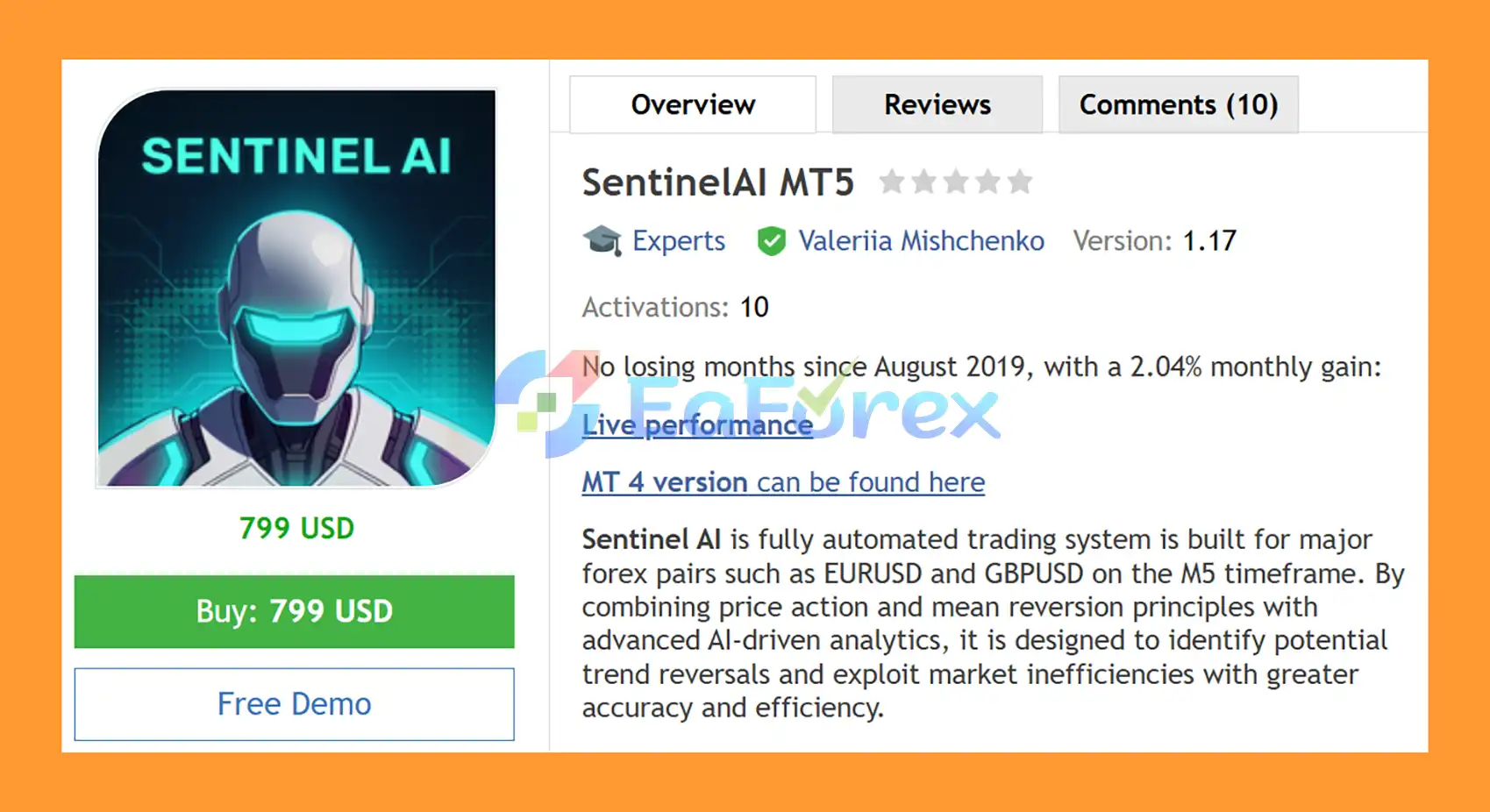
SentinelAI MT5 is a fully automated Forex Expert Advisor (EA) for MetaTrader 5, designed specifically for EURUSD and GBPUSD on the M5 timeframe. The system combines price action, mean reversion, momentum, trend analysis, volatility filtering, and AI-driven forecasting to identify potential trading opportunities and filter out lower-quality setups.
Instead of relying on a single technical indicator, SentinelAI MT5 uses multiple layers of market analysis. Its Deep Learning trend, momentum, and volatility filters evaluate market conditions, while Artificial Intelligence forecasts are used to filter trades with lower potential.
The EA also includes an advanced News Filter, Stock Market Crash Filter, Neural Network Filter, portfolio-management features, flexible money-management options, and a built-in statistics panel with self-diagnostic functionality.
A major advantage is its One Chart Setup, allowing the EA to manage multiple supported currency pairs from a single M5 chart. This makes SentinelAI MT5 practical for traders who want automated multi-pair Forex trading without attaching the EA separately to every symbol.
>>> Join our Channel Telegram <<
>> Delivery time 24h-48h after payment.
>>> Refund if not delivered.
>>> You will receive the latest version without any limitations (ID+Time).>>Reviewed by Jason Stap <<
SentinelAI MT5 Overview
SentinelAI MT5 uses artificial intelligence and machine-learning components to analyze market conditions and filter potential trades.
Multiple market-condition filters evaluate trend direction, momentum, and volatility before allowing trading signals to pass through the system.
AI forecasts can be used to reject lower-potential trading opportunities and focus the EA on setups that satisfy its predefined conditions.
The EA includes a machine-learning filter based on a Perceptron neural network, providing another layer of signal validation.
SentinelAI MT5 combines price-action concepts with mean-reversion principles, aiming to identify situations where price may move away from and potentially return toward its expected trading range.
The EA supports:
Both pairs can be managed from a centralized setup.
Only one M5 chart is required, with EURUSD recommended. The EA can manage the configured symbols from this single chart.
The integrated news system can:
SentinelAI MT5 can monitor an S&P 500-related broker symbol such as US500 or SPX500 and use historical volatility conditions to restrict trading when unusually high market volatility is detected.
The EA can automatically detect GMT-related time settings, reducing the need for manual broker-time adjustments.
Available lot-sizing methods include:
The EA also supports maximum lot limits, lot rounding, automatic volume splitting, and margin-based controls.
Portfolio Mode helps coordinate multiple EA instances or set files on the same account so that different systems do not unnecessarily open initial trades simultaneously.
Multiple drawdown controls are available, including:
The EA provides extensive controls for managing averaging/grid positions, including configurable trade distance, maximum grid trades, custom multipliers, smart distance, grid starting levels, and basket-management options.
The built-in panel provides information about the EA’s operation and trading statistics, while the self-diagnostic system can help monitor the current trading environment.
SentinelAI MT5 follows a multi-layer automated analysis process rather than opening trades from a single signal.
The EA evaluates the current market using trend, momentum, volatility, and price-action conditions. Its Deep Learning filters are designed to identify whether the current environment is suitable for the strategy.
The strategy looks for market situations where price behavior may provide an opportunity for a potential reversal or reversion toward a more balanced level.
AI forecasting tools can be enabled to filter potential trades. The EA supports external forecast-based filtering through:
These options are available for live trading when enabled.
The optional Perceptron-based Neural Network Filter adds another machine-learning layer to the decision process.
Before opening new trades, SentinelAI MT5 can check upcoming economic events and stock-market volatility. Depending on the selected settings, the EA can suspend trading, close positions, or restrict specific types of orders.
When all required conditions are satisfied, the EA can open an initial position according to the configured symbol, trading direction, lot-sizing method, spread limits, and trading schedule.
If the market moves against the initial position, the EA can manage additional averaging/grid trades according to the configured:
This allows users to define how additional positions should be handled.
Take-profit settings can be configured separately for the initial position and grid positions. Weighted TakeProfit can also adjust the basket target according to the total open volume.
Throughout the trading process, the EA can monitor margin, floating drawdown, daily drawdown, maximum open lots, symbol exposure, and other account-level restrictions.
SentinelAI MT5 is designed for traders looking for a multi-layer AI Forex EA for MetaTrader 5 rather than a basic indicator-based robot.
Its architecture combines several components into one automated system:
The One Chart Setup is also useful for traders who want to manage EURUSD and GBPUSD from a single M5 chart instead of running multiple EA instances.
For continuous automated operation, the developer recommends running SentinelAI MT5 on a VPS with a reliable ECN-style broker environment.
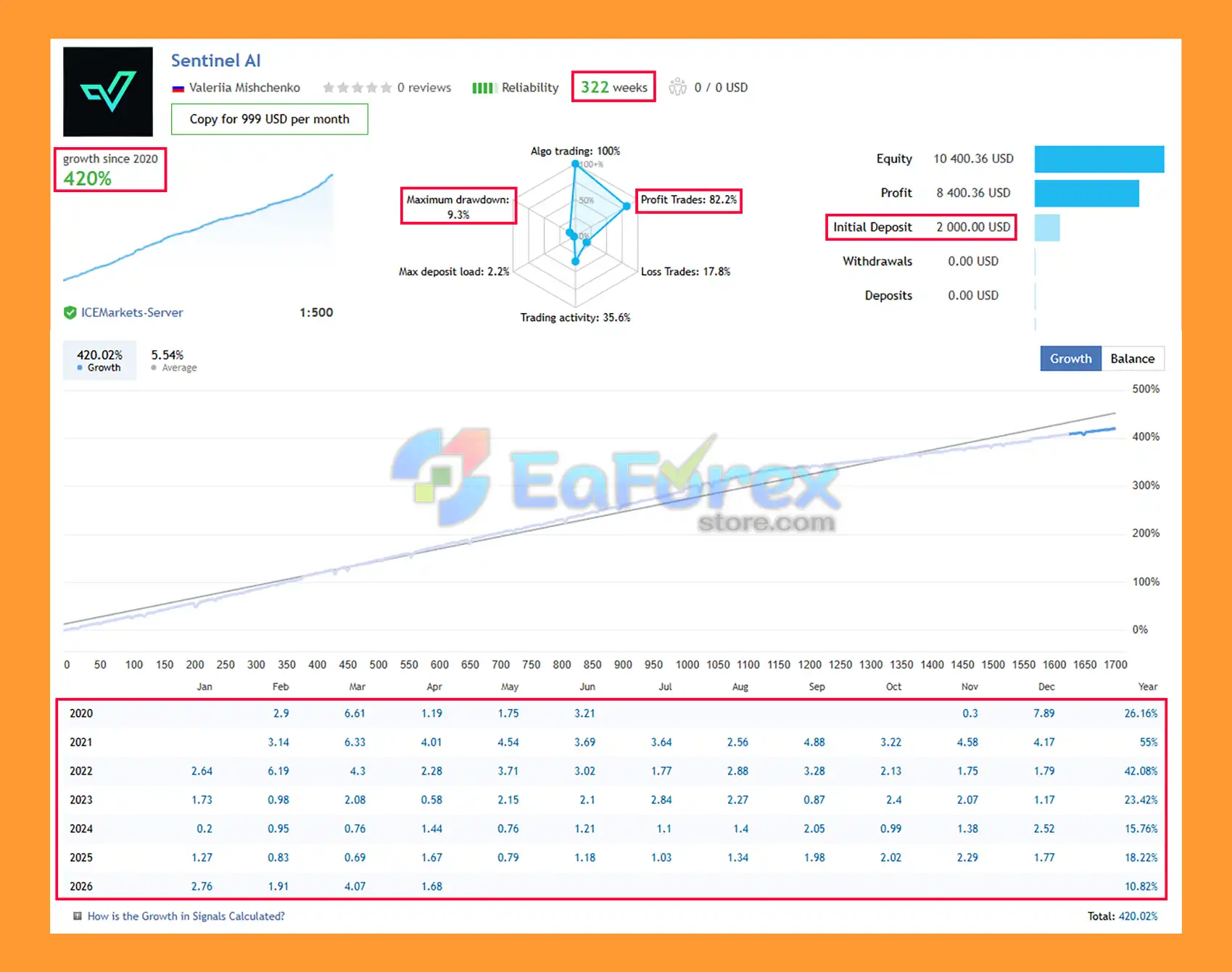
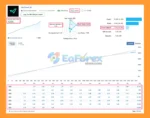
🔺GBPUSD & EURUSD pairs– 322 consecutive weeks of trading.
SentinelAI MT5 Signal Results
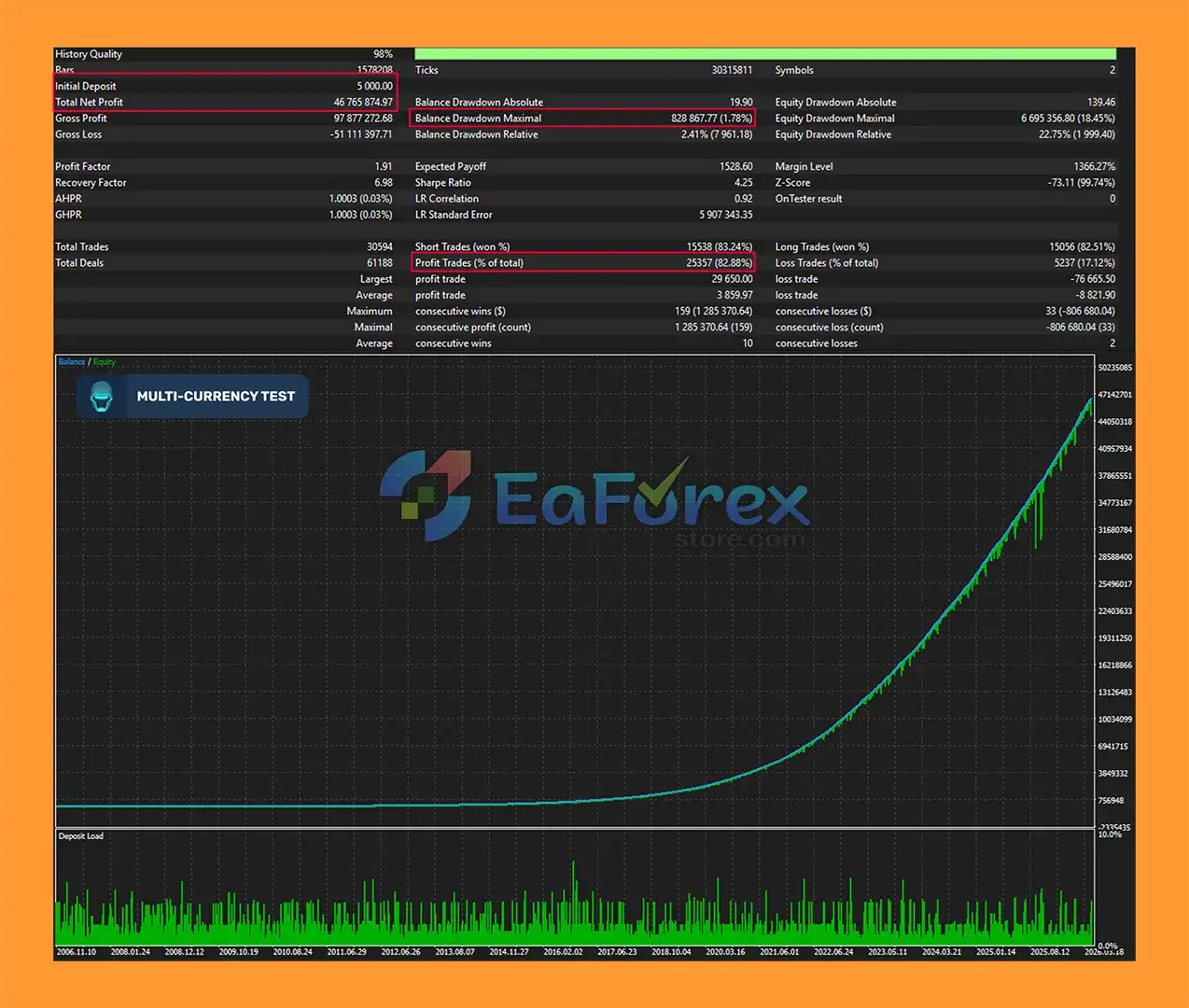
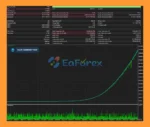
🔺EURUSD – over many years
SentinelAI MT5 backtets
SentinelAI MT5 provides a broad selection of risk-management controls, allowing users to configure the EA according to their account size, leverage, and preferred risk level.
Users can select from:
The EA also supports a Maximum Lot per Order, lot rounding, and volume-splitting functionality.
The Check Margin for All Grid Levels option can evaluate whether sufficient free margin is available for the configured grid structure. If the available margin is insufficient, the EA can reduce the initial lot size.
Users can define maximum floating drawdown limits in percentage or monetary terms. Separate drawdown limits can also be configured for individual symbols.
Depending on the selected Max Drawdown Action, the EA can:
The EA includes daily drawdown controls based on FTMO-style calculation rules, with configurable percentage and monetary limits.
Additional controls include:
SentinelAI MT5 provides configurable:
These settings allow traders to customize how individual trades and complete baskets are managed.
The supplied requirements indicate that leverage can materially affect available free margin. With 1:30 leverage, the developer recommends using only low-risk settings on accounts below approximately $6,000. With 1:100 leverage, the supplied guidance indicates that significant-risk settings may be used on a $1,000 account.
These figures should be treated as configuration guidance rather than a guarantee of safe trading. Actual margin requirements depend on the broker, contract specifications, symbol, position size, and market conditions.
Despite its extensive filtering and risk-management features, SentinelAI MT5 is still an automated trading system and carries significant market risk.
The EA includes grid/averaging functionality. If the market continues moving against an open basket, additional positions may increase total exposure and floating drawdown.
Higher leverage can reduce the margin required to open positions, but it can also allow larger exposure relative to account equity. Incorrect lot sizing can therefore increase account risk substantially.
Backtest results should not be interpreted as guaranteed future performance. Differences in spread, commissions, slippage, execution speed, liquidity, broker conditions, and historical data can cause live results to differ from Strategy Tester results.
The News Filter and Stock Market Crash Filter are designed to reduce exposure during selected high-risk conditions, but no filter can eliminate market risk completely. Unexpected events, gaps, extreme volatility, or delayed news data can still affect execution.
Because SentinelAI MT5 is designed for continuous automated operation, a stable VPS is strongly recommended. Interruptions in the terminal, internet connection, or VPS service may affect EA operation.
Although the EA is described as not highly sensitive to spread and slippage, the developer still recommends using a quality ECN broker. Broker-specific symbol names, execution rules, spreads, contract sizes, and trading conditions can affect performance.
The ChatGPT and Gemini forecast filters are optional. Their operation may depend on the availability and correct configuration of the required external services and connectivity.
EURUSD and GBPUSD can share USD exposure and may sometimes move in similar directions. Trading multiple pairs simultaneously can therefore increase correlated exposure.
SentinelAI MT5 provides a very large number of parameters. While this offers flexibility, inappropriate settings can negatively affect trading behavior. Users should understand the selected configuration before running the EA on a live account.
Always test SentinelAI MT5 on a demo account first and use conservative risk settings until the strategy has been evaluated under your broker’s actual trading conditions.
Copy the SentinelAI MT5 EA file into the MetaTrader 5 Experts directory:
File → Open Data Folder → MQL5 → Experts
Restart MetaTrader 5 or refresh the Navigator window.
Open an EURUSD M5 chart. The developer recommends attaching the EA to only one M5 chart, with EURUSD being the recommended chart.
Do not attach multiple SentinelAI instances unless you are intentionally configuring Portfolio Mode or another supported multi-instance setup.
Enter the symbols you want to trade in the Symbols separated by comma parameter.
For brokers using suffixes, such as:
make sure the symbol names in the EA settings match your broker’s exact symbol names.
Choose the preferred Lot-sizing Method:
Set the maximum lot, spread, slippage, and margin parameters according to your account and broker.
Review and configure:
Avoid using aggressive settings before testing the system thoroughly.
Set the desired:
The EA also provides automatic GMT detection and manual GMT/DST settings for testing environments.
If using the News Filter and time-detection features, the EA requires access to the specified external services.
Add the required URLs to Tools → Options → Expert Advisors → Allow WebRequest for listed URL in MetaTrader 5.
Use the URLs supplied by the EA developer exactly as provided in the product documentation.
The News Filter can then be configured according to your preferred event types and waiting periods.
If desired, enable:
These options should be tested carefully before being used in live trading.
Attach SentinelAI MT5 to the EURUSD M5 chart and make sure Algo Trading is enabled in MetaTrader 5.
Check that the EA panel indicates that the system is operating correctly.
For continuous automated trading, install MetaTrader 5 on a reliable VPS and keep the terminal running continuously.
Before using a live account, run the EA on a demo account to verify:
For initial testing, use:
Platform: MetaTrader 5
Chart: EURUSD M5
Additional Symbol: GBPUSD
Broker: ECN/RAW or low-spread environment
Execution: Stable VPS
Testing: Demo account first
Risk: Conservative settings initially
The developer specifically recommends conducting backtests using GMT+2 with US DST, as this offset is stated to be used by many brokers. For live trading, automatic GMT detection or the appropriate manual GMT/DST configuration should be verified against your broker’s server time.
In summary, SentinelAI MT5 is a feature-rich AI-powered Forex Expert Advisor for MetaTrader 5, designed for EURUSD and GBPUSD on the M5 timeframe. Its multi-layer approach combines price action, mean reversion, momentum, trend and volatility analysis, Deep Learning filters, Neural Network validation, and optional AI forecasting to evaluate potential trading opportunities.
The EA also provides extensive risk-management and portfolio tools, including News and Stock Market Crash Filters, drawdown protection, flexible money management, margin controls, basket management, and One Chart multi-pair trading. However, its grid and averaging functionality can increase market exposure when positions move against the strategy, making appropriate lot sizing and risk settings particularly important.
The reported 322-week signal results of +420% growth with 9.3% maximum drawdown, together with the multi-year EURUSD backtest showing $46.77 million net profit, 82.88% win rate, and 1.78% maximum drawdown, are historical results and should not be considered guarantees of future performance. Actual results may differ due to market conditions, spreads, commissions, slippage, execution quality, broker specifications, leverage, and EA configuration.
For traders seeking a multi-pair AI Forex EA with advanced filtering and extensive risk-management options, SentinelAI MT5 offers a comprehensive automated trading framework. Thorough backtesting and demo forward testing are recommended before live deployment, particularly when using grid features, higher-risk settings, or external AI forecast filters.
1. What is SentinelAI MT5?
SentinelAI MT5 is a fully automated Expert Advisor for MetaTrader 5 designed to trade major forex pairs such as EURUSD and GBPUSD. It uses AI-driven analytics, price action, and mean reversion logic to detect high-probability trading opportunities.
2. How does SentinelAI MT5 work?
The EA works by combining price action analysis with neural network-based forecasting. It identifies overextended market conditions and potential reversal zones, then executes trades when AI filters confirm favorable conditions.
3. What makes SentinelAI MT5 different from other EAs?
Unlike traditional EAs, SentinelAI MT5 uses deep learning filters, news awareness, and multi-layer risk control. It is designed to avoid low-quality trades and unstable market conditions using AI-based decision systems.
4. Which markets and timeframe does SentinelAI MT5 trade?
The EA is optimized for EURUSD and GBPUSD forex pairs. It primarily operates on the M5 timeframe but uses multi-layer analysis across different market conditions.
5. Does SentinelAI MT5 use artificial intelligence?
Yes, it uses AI-based systems including neural network forecasting and machine learning filters to analyze trend direction, volatility, and market inefficiencies before executing trades.
6. What risk management features does SentinelAI MT5 include?
It includes dynamic lot sizing, drawdown protection, margin safety checks, spread and slippage filters, session controls, and portfolio risk management across multiple symbols.
7. Does SentinelAI MT5 use news filtering?
Yes, it includes an advanced news filter that blocks trading during high-impact economic events to avoid unpredictable volatility and market spikes.
8. What are the performance results of SentinelAI MT5?
Backtests and live signals show strong performance, including over 82% win rate, up to 420% growth in signal testing, and controlled drawdowns under 10% in long-term trading.
In stock
In stock
In stock
In stock
In stock
Out of stock
No account yet?
Create an Account












 Automatic EA
 EA Best Seller
 Expert Advisor MT4
 Expert Advisor MT5
 HFT EA


Reviews
Clear filtersThere are no reviews yet.