

Product Overview
News Catcher Pro MT5 is an automated Forex Expert Advisor designed around a mean-reversion trading strategy that takes advantage of intraday seasonal volatility patterns surrounding high-impact economic news events.
Unlike high-frequency Expert Advisors that open trades throughout the day, News Catcher Pro MT5 is designed to trade selectively. The EA enters the market at a specific time shortly before a scheduled high-impact news event, seeking to capitalize on recurring volatility and price behavior associated with major economic announcements.
The system combines a dedicated News Filter, price-channel analysis, ATR-based volatility calculations, automated GMT detection, and advanced risk-management controls to manage trades systematically.
News Catcher Pro MT5 supports multiple currency pairs while requiring only one M5 chart for operation. This makes the EA relatively simple to deploy despite its multicurrency trading capabilities.
The system is designed for traders who prefer a low-frequency, event-driven Forex strategy rather than continuous market exposure.
About the Developer
• Author: Valeriia Mishchenko
• Experience: Over +3 years of experience on MQL5.
• Notable Products: News Catcher Pro MT5, Night Hunter Pro MT5, Evening Scalper Pro MT5, Waka Waka EA MT5, Perceptrader AI MT5, Golden Pickaxe MT5 and others.
• Flagship Product: News Catcher Pro MT5 is rated as the best performing product of the year.
>> Delivery time 24h-48h after payment.
>>> Refund if not delivered.
>>> You will receive the latest version without any limitations (ID+Time).>> Reviewed by Jason Stap <<<
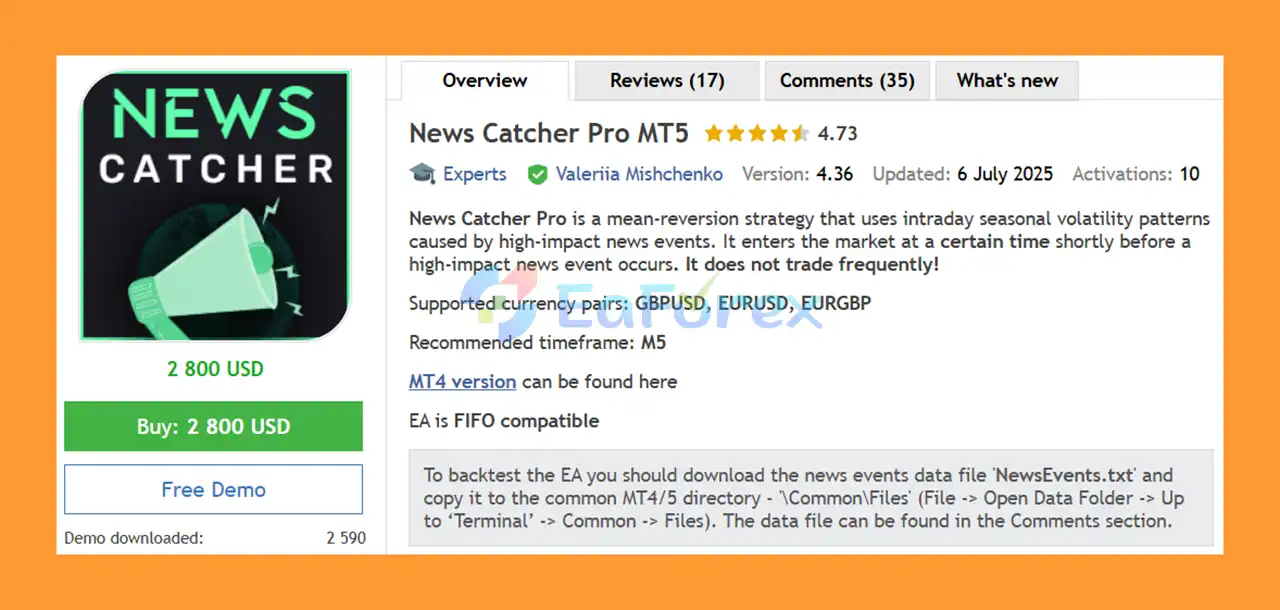
Key Features of News Catcher Pro MT5
News-Based Mean Reversion Strategy
News Catcher Pro MT5 focuses on mean-reversion opportunities created by intraday volatility patterns around high-impact economic events.
Low-Frequency Trading
The EA does not trade frequently. Instead, it waits for specific market conditions and scheduled high-impact news events before considering a trade.
One Chart Setup
Only one chart is required to operate the EA across all supported symbols. An M5 EURUSD chart is recommended.
Multiple Currency Pair Support
The EA can trade multiple Forex pairs from a single chart, allowing traders to monitor and trade several markets without attaching the EA separately to every symbol.
Advanced News Filter
The integrated News Filter identifies relevant high-impact economic events and controls trading around them. The News Filter can also be used within the MetaTrader 5 Strategy Tester.
Automatic GMT Detection
News Catcher Pro MT5 includes automatic GMT detection to help synchronize economic-event timing with the broker's server time.
Self-Diagnostic System
The built-in self-diagnostic functionality helps monitor the EA's operational conditions and can assist in identifying configuration or execution-related issues.
Flexible Lot Sizing
The EA supports several position-sizing methods, including:
- Fixed Lots
- Dynamic Lots
- Maximum Risk Per Trade
- Predefined risk presets
This gives traders greater flexibility when adjusting their risk according to account size and trading objectives.
Drawdown Protection
The system includes maximum floating drawdown controls that can automatically close open positions when a predefined drawdown threshold is reached.
Spread and Slippage Protection
Traders can configure maximum spread and maximum slippage parameters to help control execution quality.
Currency Exposure Management
News Catcher Pro MT5 includes controls for limiting the number of simultaneously traded symbols and managing exposure to the same underlying currencies.
How Does News Catcher Pro MT5 Work?
News Catcher Pro MT5 is based on the idea that certain high-impact economic events can create recurring intraday volatility patterns.
Instead of continuously scanning the market for conventional trend or scalping signals, the EA focuses on specific periods surrounding major scheduled news events.
The general trading process can be described as follows:
Monitor the Economic Calendar
The EA uses its News Filter to identify relevant high-impact economic events.
Identify the Trading Window
When an eligible event approaches, the EA determines whether the current time falls within its configured trading window.
The Minutes Before/After Event setting controls the permitted trading period around the event.
Analyze Market Conditions
The EA evaluates market behavior using its internal strategy components, including price-channel calculations and ATR-based volatility measurements.
Search for Mean-Reversion Opportunities
When the required conditions are satisfied, the EA can open a trade based on its mean-reversion logic.
Manage the Position
Once a position is open, the EA can apply volatility-based Take Profit and Stop Loss parameters, position time limits, spread controls, and other risk-management rules.
Control Overall Account Risk
The system can limit the number of simultaneous positions, currency exposure, maximum lot size, and overall floating drawdown.
This creates a structured, event-driven trading process rather than continuous market participation.
Why Choose News Catcher Pro MT5?
News Catcher Pro MT5 may be an interesting choice for traders who prefer a selective and event-driven approach to automated Forex trading.
One of its key advantages is its low trading frequency. The EA does not attempt to trade every market movement. Instead, it focuses on specific periods associated with high-impact news events.
Another advantage is its multicurrency capability. Traders only need to attach the EA to one M5 chart, while the system can monitor the configured currency pairs.
The EA also provides a broad selection of risk-management controls, allowing users to customize position sizing, drawdown limits, spread restrictions, margin requirements, and currency exposure.
News Catcher Pro MT5 may be suitable for:
- Forex traders interested in news-based strategies
- Traders looking for a low-frequency Expert Advisor
- Traders who prefer mean-reversion systems
- MT5 users trading multiple currency pairs
- Traders seeking automated economic-news filtering
- Traders who require configurable risk-management tools
- Users operating automated strategies through a VPS
News Catcher Pro MT5 Performance Results
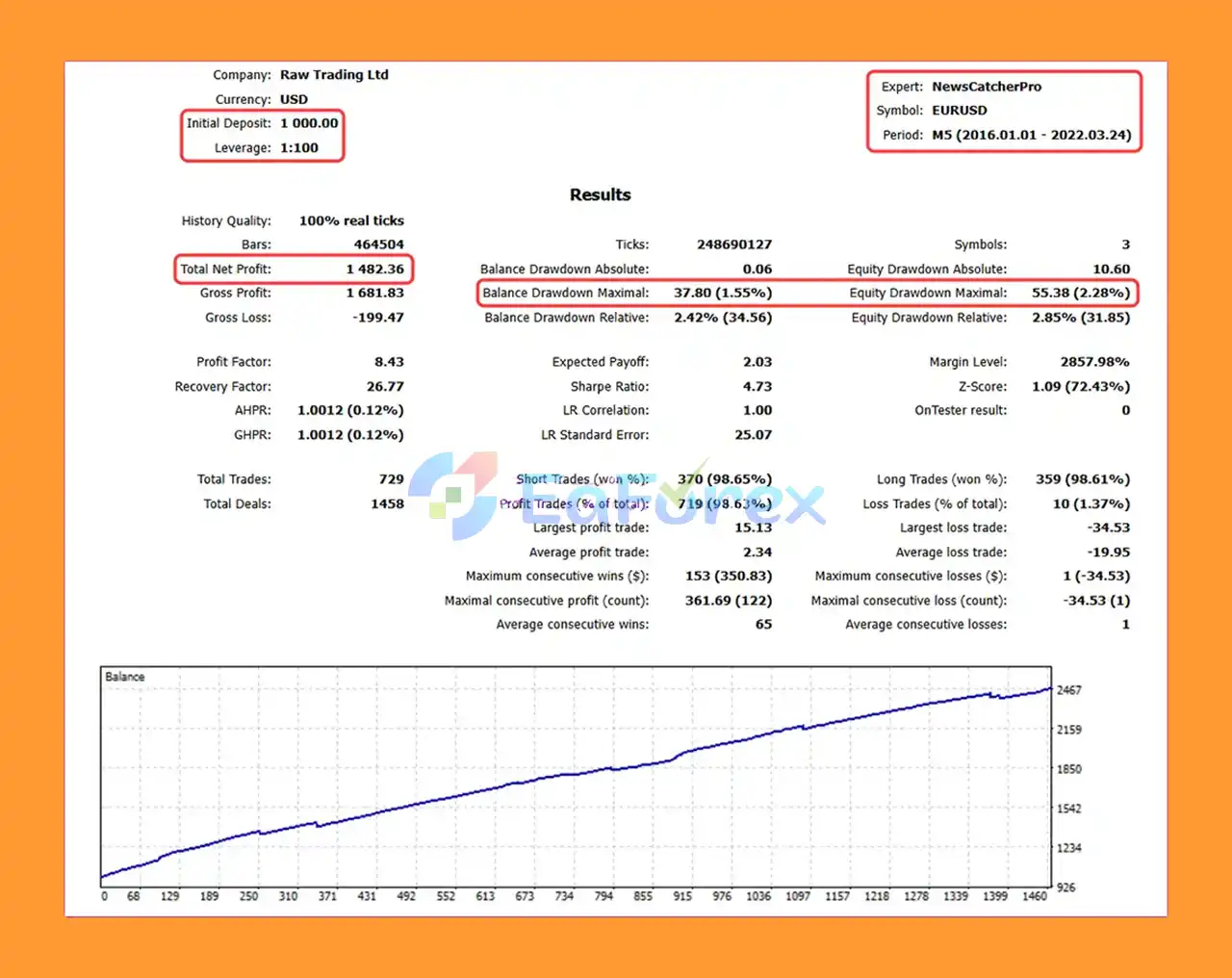
🔺Backtest Results (2016–2022)
- Initial Deposit: $1,000
- Net Profit: $1,482.36
- Balance Drawdown: 1.55%
- Equity Drawdown: 2.28%
- Win Rate: 98.63%
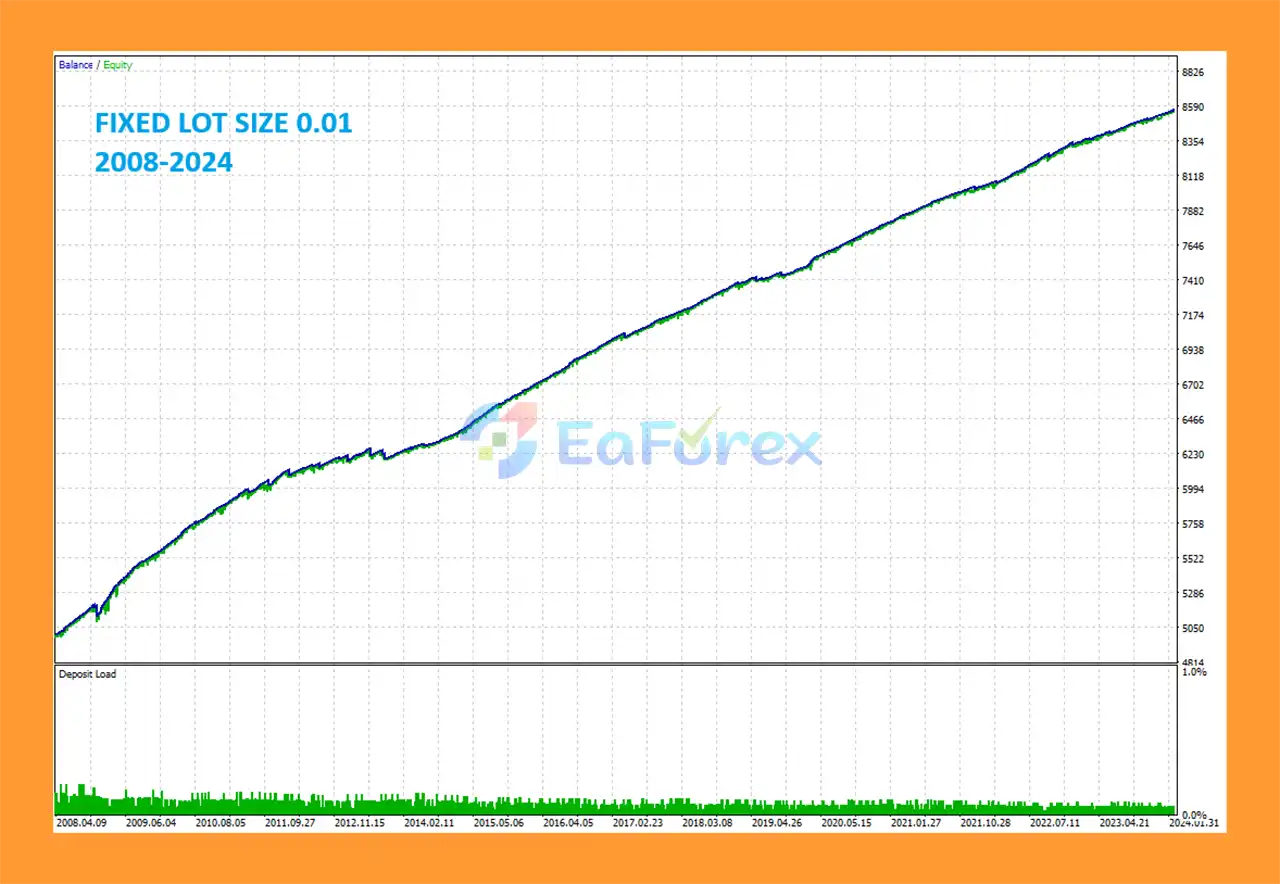
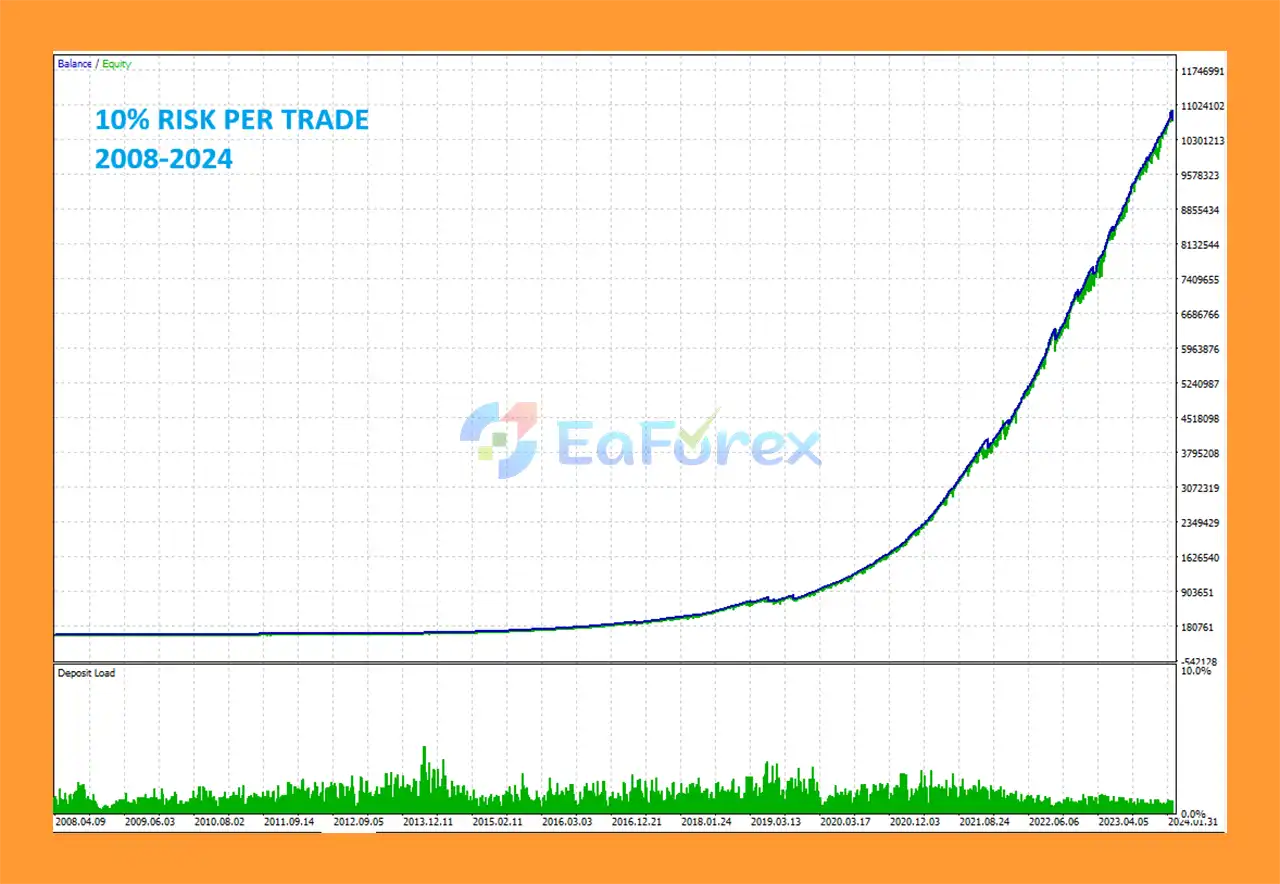
Performance and Risk Management
News Catcher Pro MT5 is designed with several mechanisms intended to help manage trading risk and exposure.
The available controls include:
Lot-Sizing Methods
Traders can choose from multiple position-sizing approaches:
- Fixed Lots – uses a predefined fixed lot size.
- Dynamic Lots – calculates position size according to the configured balance/equity relationship.
- Max Risk Per Trade – calculates the lot size based on a specified percentage risk per trade.
- Risk Presets – predefined settings that automatically calculate risk.
Maximum Lot
The Maximum Lot parameter limits the largest position size the EA is allowed to open.
Maximum Spread
The EA can apply a maximum spread restriction to help control trade-closing conditions during unfavorable market liquidity.
Maximum Slippage
For non-ECN accounts, the maximum slippage parameter can be configured to help limit execution deviation.
Maximum Symbols at a Time
This setting controls the maximum number of symbols that can have open positions simultaneously.
Maximum Net Number of Currencies
The EA can limit exposure to the same underlying currencies rather than simply counting individual currency pairs.
Minimum Free Margin
If the account's Free Margin percentage falls below the configured threshold, the EA will not place new pending orders and can cancel existing ones.
Maximum Floating Drawdown
If floating drawdown exceeds the predefined percentage or monetary limit, the EA can automatically close open positions.
Maximum Drawdown Action
Traders can specify the action that should occur after the configured maximum drawdown level is reached.
These features allow News Catcher Pro MT5 to be configured for different risk profiles, although traders should always test their chosen settings before using real capital.
Recommended Setup
Recommended Chart
Timeframe: M5
Recommended Symbol: EURUSD
The EA should be attached to only one M5 chart. It can then manage the configured currency pairs from that single chart.
Supported Currency Pairs
The trading symbols are specified through the Symbols separated by comma parameter.
If the broker uses a symbol suffix, such as EURUSD.a, the suffix must be included in the symbol list.
The developer recommends using only the supported/recommended currency pairs and notes that separate .set files are not required because the settings are stored internally in the EA.
VPS Requirement
For continuous automated operation, News Catcher Pro MT5 should run on a VPS continuously.
A reliable ECN broker is also preferable for automated event-driven trading.
Weaknesses and Risk Warnings
News Catcher Pro MT5 is designed to trade around high-impact economic events, which can create both opportunities and significant risks.
News releases can produce extremely fast price movements, widening spreads, slippage, liquidity gaps, and unpredictable market reactions. Even sophisticated news filters cannot guarantee that an economic event will produce the expected price behavior.
Important risks include:
- News trading can involve significant market volatility.
- Spreads may increase substantially around major economic announcements.
- Slippage can negatively affect execution prices.
- Liquidity can decrease during extreme market conditions.
- Actual results may differ from backtest results.
- Broker execution quality can materially affect performance.
- Mean-reversion strategies can experience losses when prices continue trending instead of reverting.
- Automated trading requires reliable VPS and internet connectivity.
- Incorrect GMT or DST settings can affect news-event timing.
- Excessive leverage can significantly increase losses.
- Hedging account support is required.
- No Expert Advisor can guarantee profits or eliminate drawdown.
Because the strategy specifically operates around economic news, traders should pay particular attention to broker execution, spread behavior, slippage, and account leverage.
Pros and Cons
Pros
- News-based mean-reversion strategy
- Designed for selective, low-frequency trading
- Trades around high-impact economic events
- One-chart setup
- Multicurrency support
- Advanced News Filter
- News Filter compatible with Strategy Tester
- Automatic GMT detection
- Self-diagnostic system
- Flexible lot-sizing methods
- Maximum drawdown protection
- Maximum spread control
- Slippage control
- Currency exposure management
- Maximum lot limitation
- Free-margin protection
- Friday trading cutoff
- New Year holiday filter
- Fully automated trade management
Cons
- Requires a hedging MT5 account
- Designed to run continuously on a VPS
- News trading can experience high volatility
- Spreads may widen around major announcements
- Slippage can affect live performance
- Incorrect GMT/DST configuration can cause timing problems
- Mean-reversion strategies can struggle during sustained directional moves
- Broker execution quality is important
- Not suitable for traders seeking frequent daily trades
- No guarantee of future profitability
How to Install News Catcher Pro MT5
Installing News Catcher Pro MT5 requires a few important configuration steps because the EA relies on economic-news data and GMT detection.
Step 1: Install the EA
Copy the News Catcher Pro MT5 Expert Advisor file into the appropriate MQL5 → Experts folder of your MetaTrader 5 installation.
Restart MetaTrader 5 or refresh the Expert Advisors section in the Navigator.
Step 2: Open an M5 Chart
Open an M5 chart in MetaTrader 5.
The developer recommends using EURUSD as the chart symbol.
Step 3: Attach the EA to Only One Chart
Attach News Catcher Pro MT5 to only one M5 chart.
You do not need to attach the EA separately to every currency pair because the EA can manage multiple symbols from the single chart.
Step 4: Configure the Symbols
Enter the desired supported currency pairs in the Symbols separated by comma parameter.
If your broker uses suffixes, make sure the suffix is included.
For example:
EURUSD.a
rather than:
EURUSD
when that is the actual symbol name used by your broker.
Step 5: Configure Risk Settings
Review the lot-sizing method and adjust:
- Fixed Lot
- Dynamic Lot
- Maximum Lot
- Maximum Risk Per Trade
- Maximum Symbols at a Time
- Maximum Net Number of Currencies
- Minimum Free Margin %
- Maximum Floating Drawdown %
Use conservative settings when testing the EA.
Step 6: Configure the News Filter
Enable News Filter Enabled and configure the Minutes Before/After Event according to the desired trading window.
Step 7: Allow Web Requests
For the News Filter and automatic GMT detection to work correctly, allow WebRequest access to the required URLs in MetaTrader 5.
Add the following addresses under:
Tools → Options → Expert Advisors → Allow WebRequest for listed URL
http://timesrv.onlinehttp://valerytools.comhttp://valeryservice.com
Make sure the URLs are entered without spaces.
Step 8: Check GMT and DST Settings
The EA supports automatic GMT detection.
If automatic GMT detection needs to be disabled, the Disable Automatic GMT Detection option can be enabled. The GMT/DST Test/Manual parameters can then be used to configure the required offsets manually.
Step 9: Use a Hedging Account
News Catcher Pro MT5 requires a hedging account.
Confirm that your MT5 broker account supports hedging before deploying the EA.
Step 10: Run the EA on a VPS
For reliable automated operation, run News Catcher Pro MT5 continuously on a VPS.
Before using real funds, test the complete setup on a demo account and verify that the news filter, GMT detection, symbols, and trading rules work correctly.
Real User Reviews and Feedback
🔺News Catcher Pro MT5 is highly appreciated by the MQL5 community for bringing stable and reliable profits. Below are 5 star reviews from users:

What’s Included in the Download Package?
🔺 Experts:
- Installation Guide.docx
- Setting (If Any).docx
🔺 Presets:
- NCP_Default.set
- NCP_Trail_ProfLimit.set
- NCP_Trail_ProfLimit_AddTrades_Hedging.set
>>> Join VIP Membership Now <<<
Final Thoughts
News Catcher Pro MT5 is a specialized Expert Advisor built around a news-based mean-reversion strategy rather than conventional high-frequency or continuous Forex trading.
Its main concept is to identify recurring intraday volatility patterns around high-impact economic news events and selectively enter the market shortly before relevant events.
The EA combines this strategy with an advanced News Filter, automatic GMT detection, price-channel analysis, ATR-based volatility management, multicurrency trading, and comprehensive risk controls.
Another notable feature is its simple deployment structure. Traders only need to attach the EA to one M5 chart, with EURUSD recommended, while the system can manage multiple configured currency pairs.
However, news trading comes with unique risks. Sudden volatility, spread expansion, slippage, liquidity changes, and unexpected market reactions can all affect live results. Proper broker selection, VPS stability, conservative risk settings, and thorough demo testing are therefore essential.
For traders seeking a low-frequency, automated MT5 news trading EA with mean-reversion logic and advanced risk-management features, News Catcher Pro MT5 provides a specialized approach worth evaluating carefully before live deployment.



