









-
 Unlimited Activations
-
 Instant delivery
-
 Easy to install







 Unlimited Activations
Instant delivery
Easy to install
Unlimited Activations
Instant delivery
Easy to install
 Free Update
 Free Install Support

Stability Pro MT5 is an advanced low-risk grid Expert Advisor (EA) for MetaTrader 5, designed to combine controlled grid trading with flexible risk management and recovery mechanisms. The system is built around an SVG (Smart Variable Grid) algorithm, which dynamically analyzes market movements instead of placing grid orders at predetermined fixed distances.
According to the developer, Stability Pro MT5 has been stress-tested across the available historical data of its supported forex pairs, with backtests showing profitable performance across individual months from 2007 onward. While historical results do not guarantee future profitability, the extensive testing provides useful insight into how the strategy has behaved under different market conditions.
The EA is optimized for three currency pairs considered suitable for its grid approach: AUDCAD, AUDNZD, and NZDCAD. It also includes several configurable safety mechanisms designed to limit excessive drawdown and help protect trading accounts during unfavorable market conditions.
With no special set files required and a minimum recommended balance of $200, Stability Pro MT5 aims to provide a relatively simple way to deploy an automated grid strategy while maintaining greater control over risk.
• Author: Wim Schrynemakers
• Experience: Over +11 years of experience on MQL5.
• Notable Products: Stability Pro MT5, Apex Trader MT5, Goldbot One MT5, The Gold Reaper MT5 and others.
• Flagship Product: Stability Pro MT5 is rated as the best performing product of the year.
>> Delivery time 24h-48h after payment.
>>> Refund if not delivered.
>>> You will receive the latest version without any limitations (ID+Time).>> Reviewed by Jason Stap <<<
Stability Pro MT5 uses the Smart Variable Grid (SVG) algorithm to determine where additional grid positions should be placed.
Unlike conventional grid Expert Advisors that typically open new positions after price moves a fixed number of points, the SVG algorithm analyzes market movement and attempts to determine more appropriate locations for additional trades.
The basic concept is to build a grid dynamically according to market conditions rather than relying entirely on fixed-distance orders.
The EA can operate on AUDCAD, AUDNZD, and NZDCAD, while the OneChartSetup feature allows the supported pairs to be controlled from a single EURUSD M5 chart.
Risk management is an important part of the system. Traders can configure different forms of maximum drawdown protection, including:
When unfavorable market conditions occur, the configured Safety SL can close the grid position to prevent the drawdown from becoming significantly larger.
One of the main advantages of Stability Pro MT5 is its focus on combining a grid strategy with multiple layers of risk control.
Traditional grid systems can become dangerous when price moves strongly in one direction because additional positions may accumulate and increase exposure. Stability Pro attempts to address this problem by using a variable grid algorithm and configurable worst-case drawdown protection.
The EA may be worth considering for traders who are specifically interested in:
Another useful feature is the ability to choose different risk levels. Traders can adjust the Auto Lotsize Risk Value, allowing the system to operate more conservatively or aggressively depending on account size and risk tolerance.
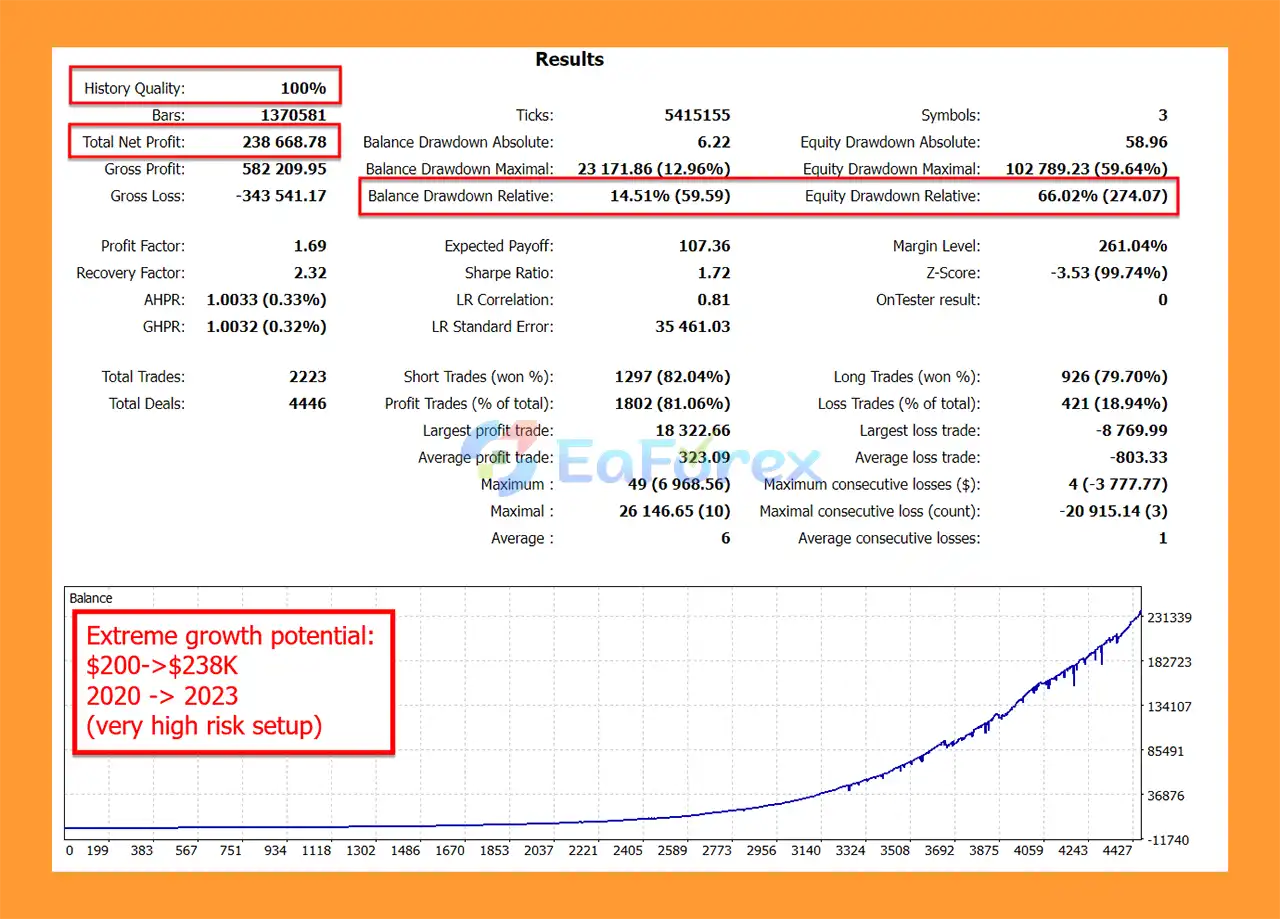
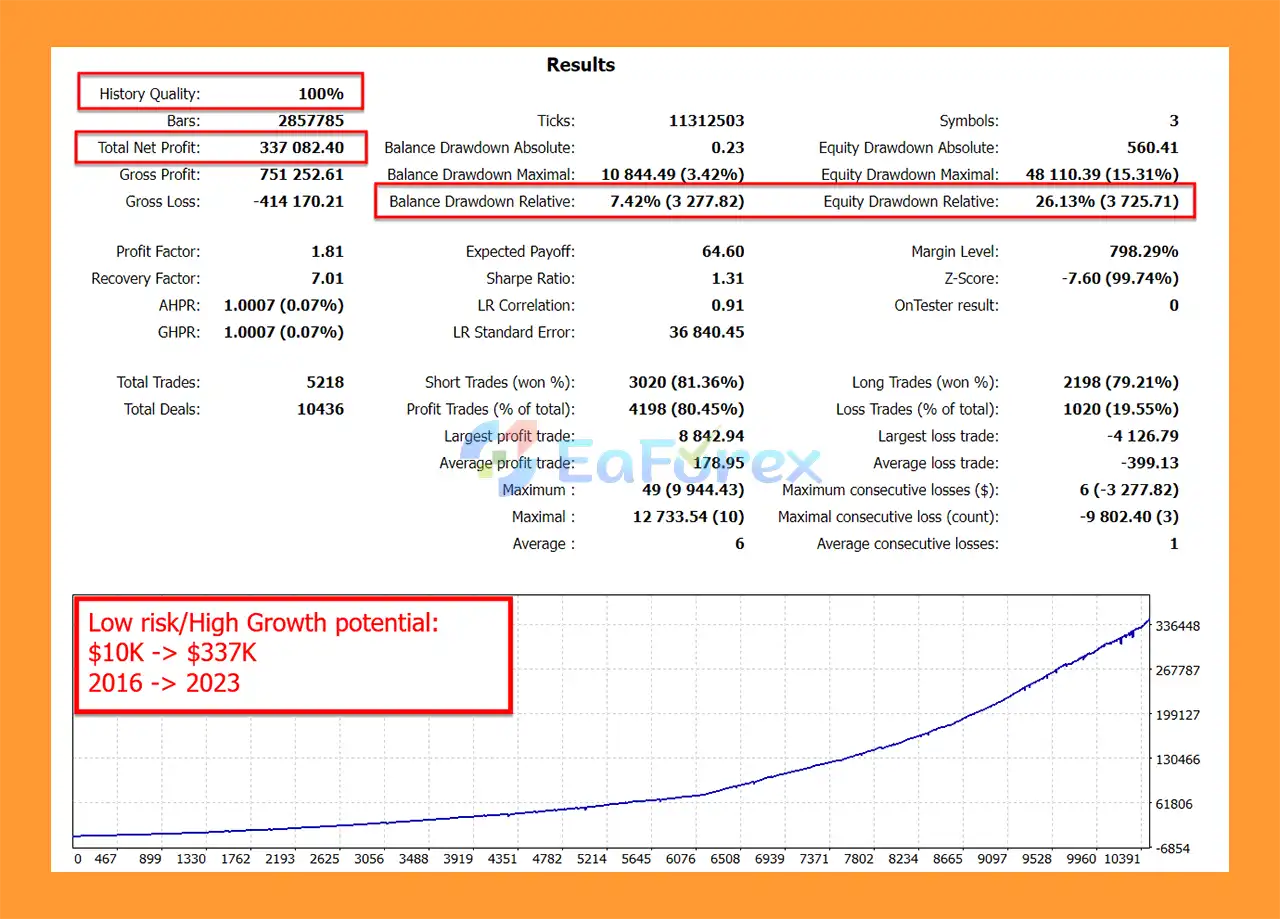
Stability Pro MT5 Backtest Results
Stability Pro MT5 Backtests Results
Stability Pro MT5 places considerable emphasis on risk management and drawdown control.
According to the developer, the EA was stress-tested using historical data from 2007 to the present, and the testing showed profitable results in every month during the tested period. However, backtest performance should always be treated as historical evidence rather than a guarantee of future results.
The EA provides several methods for controlling risk.
The Safety SL can be used as a worst-case protection mechanism. Traders can select a drawdown level at which the EA closes the grid in a loss to prevent further deterioration.
Users can specify a maximum permitted drawdown based on account balance or equity.
A manual monetary drawdown limit can also be configured. The EA can automatically adjust the calculation according to the running lot size.
Stability Pro MT5 supports several lot-sizing approaches. Traders can use a fixed starting lot or allow the EA to calculate position size based on account size.
The Auto Lotsize Risk Value provides additional control over aggressiveness:
These values should not be interpreted as guaranteed risk percentages. Actual exposure depends on account size, broker conditions, market volatility, settings, and the behavior of the grid.
The stated minimum balance is $200, while $500 or more is recommended. Traders should consider using additional capital if they want more room for drawdown and adverse market movements.
Despite its risk-management features, Stability Pro MT5 remains a grid-based Expert Advisor, and grid trading carries inherent risks.
A prolonged directional market can cause multiple positions to accumulate against the prevailing movement. This may result in significant floating drawdown before the market reverses.
Important risks include:
For these reasons, users should test the EA on a demo account before deploying it with real capital. Conservative risk settings are generally more appropriate when first evaluating a grid-based trading system.
Installing Stability Pro MT5 is relatively straightforward.
Install and log in to your MetaTrader 5 trading account with a broker that supports hedging.
In the MetaTrader 5 Expert Advisor settings, add the following website to the allowed URLs:
https://www.worldtimeserver.com/
Make sure the URL is entered correctly without the spaces shown in the original instructions.
Open a EURUSD M5 chart.
Attach Stability Pro MT5 to the EURUSD M5 chart.
Enable the OneChartSetup option so the EA can manage the configured supported pairs from a single chart.
Select the pairs you want the EA to trade, such as:
Choose your preferred:
For initial testing, conservative settings are recommended.
Make sure Algo Trading/AutoTrading is enabled in MetaTrader 5.
The EA can then begin operating according to your selected configuration.
>>> Join VIP Membership Now <<<
Stability Pro MT5 is a feature-rich grid trading Expert Advisor for MetaTrader 5 that focuses on adaptive grid placement, recovery potential, and configurable drawdown protection.
Its Smart Variable Grid (SVG) algorithm differentiates it from conventional fixed-distance grid systems by attempting to adapt grid positioning to market movements. The additional Safety SL, maximum drawdown controls, and flexible lot-sizing options give traders several tools for managing the risks associated with automated grid trading.
The developer’s historical stress tests from 2007 onward are an interesting aspect of the system, but they should not be considered proof of future profitability. Grid trading can perform differently in live markets, particularly during extreme volatility, prolonged trends, spread expansion, or unexpected market events.
For traders interested in automated forex grid strategies, Stability Pro MT5 may be worth evaluating on a demo account first. Start with conservative risk settings, monitor drawdown carefully, and only consider live deployment after understanding how the EA behaves under different market conditions.
Important: Forex and CFD trading involves substantial risk. Never invest more than you can afford to lose, and always evaluate an Expert Advisor independently before using it with real money.
1. What is Stability Pro MT5?
Stability Pro MT5 is a low-risk Forex grid trading Expert Advisor (EA) powered by the Smart Variable Grid (SVG) algorithm. Unlike fixed-distance grid systems, it dynamically adapts positions to price action, offering improved stability, faster drawdown recovery, and sustainable long-term profitability.
2. How does the Smart Variable Grid (SVG) algorithm work?
The SVG algorithm adjusts grid levels based on market volatility and price movement rather than fixed steps. This allows the EA to reduce exposure during unstable periods and maximize profit potential during favorable conditions, making it safer and more adaptive than conventional grid strategies.
3. Is Stability Pro MT5 safe to use?
Yes. Stability Pro MT5 includes multiple built-in safety mechanisms, such as:
Worst-case stop-loss options
Drawdown-based risk controls
Virtual take-profit protection
These features are designed to safeguard your capital while ensuring consistent growth.
4. Which currency pairs does Stability Pro MT5 work best on?
Stability Pro MT5 is specifically optimized for AUDCAD, AUDNZD, and NZDCAD. While it can technically run on other pairs, the recommended three pairs ensure the best stability and performance results.
5. What kind of performance can I expect with Stability Pro MT5?
Long-Term Backtest (2016–2023): $10,000 → $337,000 profit, 7.42% max drawdown.
High-Risk Compounding Backtest (3 years): $200 → $238,668 profit, 14.51% max drawdown.
These results show consistent profitability with controlled risk across different account sizes and strategies.
6. Is Stability Pro MT5 beginner-friendly?
Absolutely. Stability Pro MT5 features OneChartSetup, allowing traders to manage all pairs from a single M5 chart. With pre-configured settings, auto lot-sizing, and an easy installation guide, it’s suitable for both beginners and professional traders who want a plug-and-play yet highly customizable EA.
In stock
In stock
In stock
In stock
In stock
Out of stock
No account yet?
Create an Account












 Automatic EA
 EA Best Seller
 Expert Advisor MT4
 Expert Advisor MT5
 HFT EA


Reviews
Clear filtersThere are no reviews yet.