









-
 Unlimited Activations
-
 Instant delivery
-
 Easy to install






 Unlimited Activations
Instant delivery
Easy to install
Unlimited Activations
Instant delivery
Easy to install
 Free Update
 Free Install Support

Astra EA MT5 is a modular and fully automated Expert Advisor for MetaTrader 5, designed to operate across major Forex pairs and XAUUSD (Gold). The system combines multiple independent trading frameworks with configurable market filters, structured trade management, and integrated risk controls.
Rather than relying on a single entry methodology, Astra EA MT5 combines Grid/Overlap, Support & Resistance, and Breakout strategies to identify different types of market opportunities. These components can work alongside trend, momentum, price-action, and session filters to refine trade execution.
The EA also includes advanced basket-level management, including weighted trailing stops, basket Take Profit, first-order Take Profit, overlap control, daily profit protection, and daily stop thresholds.
Astra EA is designed for traders looking for an automated MT5 trading system that provides multiple strategy components within a single modular trading engine.
>> Delivery time 24h-48h after payment.
>>> Refund if not delivered.
>>> You will receive the latest version without any limitations (ID+Time).>>Reviewed by Jason Stap <<
Astra EA MT5 combines several independent trading approaches:
This multi-strategy structure allows the EA to respond to different market conditions instead of depending exclusively on one type of trading signal.
The Grid/Overlap component uses adaptive step sizing and controlled lot progression while incorporating overlap protection.
The purpose of the overlap controls is to limit excessive exposure when multiple price levels or trading cycles are active simultaneously.
Because grid-based trading can increase the number of open positions, traders should carefully evaluate the maximum exposure generated by their chosen settings.
Astra EA MT5 identifies potential trading areas using support and resistance logic combined with volatility and rejection filters.
Optional candle-pattern confirmation can further refine entries using price-action formations such as:
The Breakout component identifies structural trading ranges and monitors momentum conditions for potential volatility expansion.
When the required breakout conditions are satisfied, the EA can automatically execute a trade without requiring manual intervention.
A configurable Moving Average trend filter can be used to establish directional market bias.
Users can adjust the relevant timeframe and MA period according to their preferred trading configuration.
The built-in RSI filter provides additional momentum confirmation by monitoring overbought and oversold conditions.
This can help condition trade signals before an order is executed.
Astra EA MT5 can use candle-pattern analysis to add an additional confirmation layer to selected trading signals.
This includes recognition of common price-action formations such as engulfing candles and pin bars.
Optional time and session filters allow traders to define specific periods during which the EA is permitted to trade.
This can be useful for avoiding unwanted trading activity outside preferred market sessions.
The EA includes a weighted trailing mechanism that can activate after breakeven.
Instead of managing positions exclusively on an individual basis, the system can evaluate combined positions and trail the basket according to weighted logic.
Astra EA MT5 supports both:
This allows the EA to manage the initial position and the combined trading cycle using separate profit objectives.
Optional daily profit and stop thresholds can be configured to help control daily trading activity.
Magic Number filters allow Astra EA MT5 to identify its own trades and support more organized operation across multiple currency pairs or trading systems.
Astra EA MT5 includes a visually designed galaxy-themed dashboard displaying important account and strategy information, including:
The EA is designed to work with ECN and RAW spread account environments, subject to the broker’s execution conditions and contract specifications.
Astra EA MT5 analyzes market conditions through several independent strategy components and filters.
The exact trading process depends on the active configuration, but the general workflow consists of several stages.
The EA evaluates current price behavior using its selected strategy modules.
Depending on the configuration, Astra EA MT5 can analyze:
Before opening a position, the EA can apply multiple filters to determine whether the market meets the configured trading conditions.
The MA filter can establish the directional bias, while RSI can provide momentum confirmation. Candle patterns and volatility conditions may provide additional entry validation.
When the required conditions are satisfied, Astra EA MT5 automatically executes the appropriate trading strategy.
Depending on market conditions, this can involve a breakout entry, support/resistance setup, or Grid/Overlap cycle.
Once positions are active, the EA automatically manages them according to the selected parameters.
The system can use:
When multiple positions belong to the same trading cycle, Astra EA MT5 can evaluate them collectively rather than treating each position as completely independent.
The basket-aware management system is designed to coordinate exits and help control combined exposure.
Astra EA MT5 is designed for traders who want several automated trading methodologies within one MT5 Expert Advisor.
Its modular structure allows the system to combine grid-based trading, support and resistance analysis, and breakout detection, while additional MA, RSI, price-action, and session filters can be used to refine the trading signals.
Another notable feature is its basket-level trade management. Instead of focusing only on individual orders, Astra EA MT5 can manage groups of positions through basket Take Profit and weighted trailing logic.
The EA also provides a dedicated on-chart dashboard, allowing traders to monitor current P/L, daily performance, active positions, Magic Numbers, and strategy status directly from the trading chart.
For traders operating multiple pairs or automated systems, Magic Number controls and configurable trading parameters can provide additional flexibility.
🔺XAUUSD (Gold) pair.
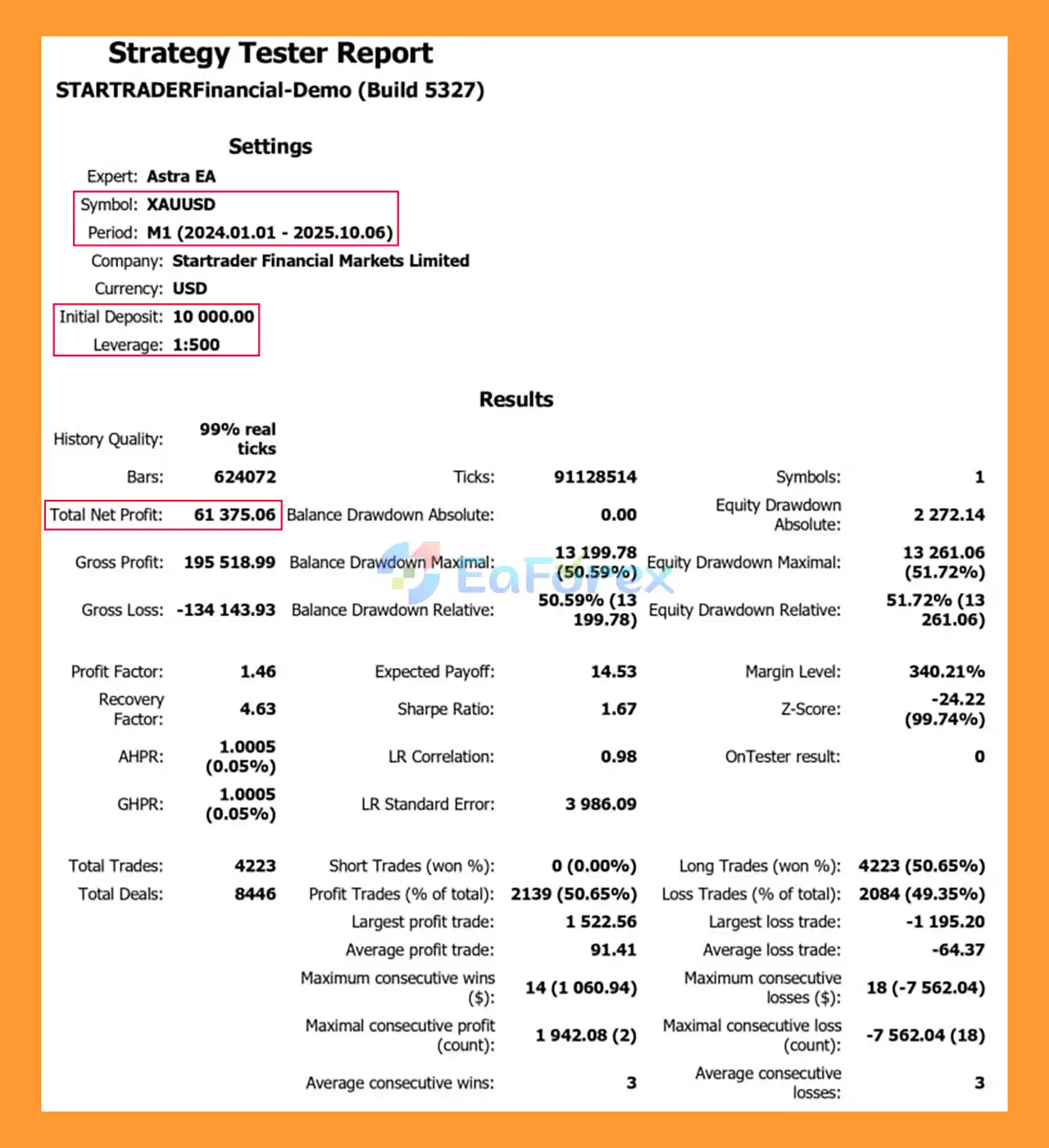
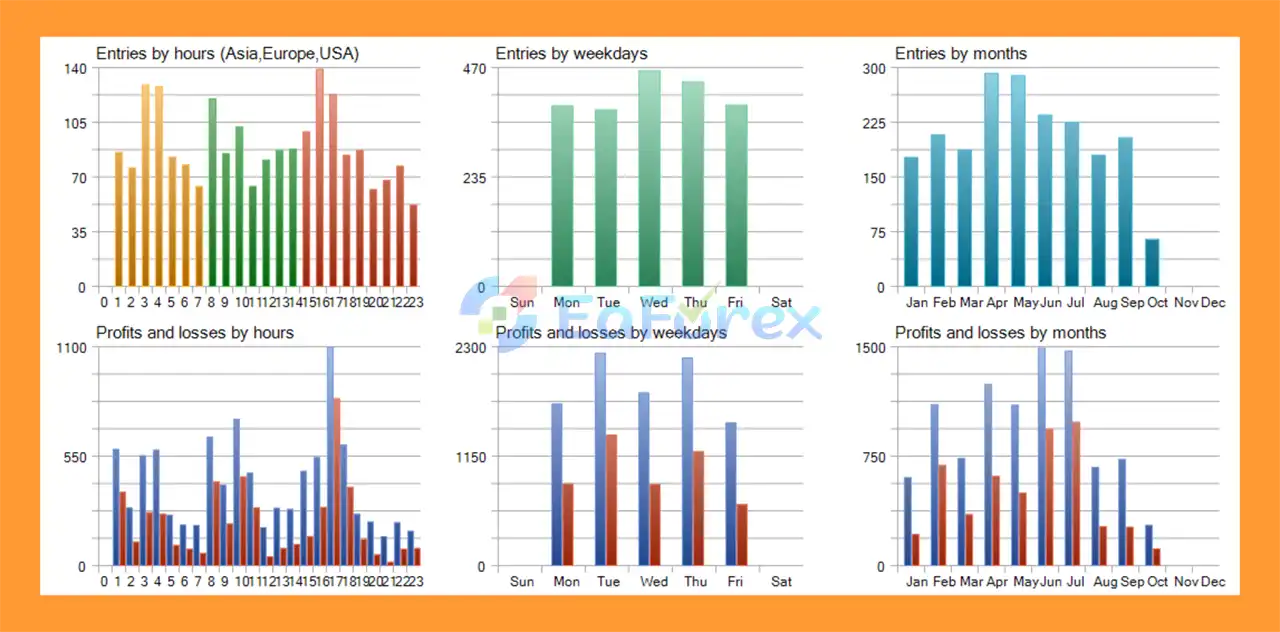
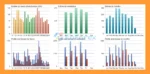
Astra Ea MT5 Backtests
Astra Ea MT5 Backtest
Astra EA MT5 includes several mechanisms designed to manage both individual positions and overall account exposure.
After breakeven conditions are reached, the weighted trailing mechanism can manage combined positions based on basket-level calculations.
This approach is particularly relevant when several positions are open within the same cycle.
Separate profit targets can be used for the first position and the overall basket.
This provides flexibility when managing multi-position trading cycles.
The overlap control system is designed to reduce excessive simultaneous exposure by controlling how multiple trading cycles interact.
This is particularly important for grid-style trading because several positions can potentially accumulate during extended market movements.
Users can configure a daily profit threshold to control trading activity after a desired daily gain has been reached.
A daily stop threshold can also be configured to limit trading after a defined level of daily loss.
The Grid/Overlap engine uses controlled lot progression rather than simply opening unlimited positions at every price movement.
However, traders should understand that any strategy involving multiple positions and lot progression can increase account exposure if the market moves significantly against the active cycle.
The recommended minimum deposit is $1,000 or a micro-account equivalent, with 1:500 or higher leverage suggested by the supplied specifications.
These should be treated as configuration recommendations rather than guarantees of profitability or safety. Higher leverage can increase both potential returns and potential losses.
Astra EA MT5 includes a Grid / Overlap Engine, meaning multiple positions can potentially be opened during a trading cycle.
If the market moves strongly in one direction without returning toward the expected levels, floating losses and margin usage can increase.
Controlled lot progression does not eliminate the risks associated with increasing position size. Traders should evaluate the maximum possible exposure under adverse market conditions.
Breakout strategies can experience false breakouts when price temporarily moves outside a range and then quickly reverses.
High volatility and economic news can increase this behavior.
Historical support and resistance areas do not guarantee future price reactions. Strong market momentum can cause price to move through previously significant levels.
Gold can experience rapid price movements, particularly during major economic announcements and periods of increased market volatility.
If Astra EA is used on XAUUSD, traders should carefully evaluate spread, slippage, margin requirements, and maximum position exposure.
The recommended leverage of 1:500 or higher can significantly increase the account’s available exposure. Leverage does not reduce the underlying trading risk.
Running Astra EA MT5 simultaneously on multiple Forex pairs and XAUUSD can create correlated or overlapping exposure.
The risk should therefore be evaluated at the account level, not only on individual charts.
Historical Strategy Tester results cannot guarantee future live performance. Real trading conditions may differ because of:
Important: Automated trading involves substantial financial risk. Always perform extensive backtesting and demo forward-testing before using Astra EA with real funds.
According to the supplied specifications, the recommended starting configuration is:
| Parameter | Recommendation |
|---|---|
| Minimum Deposit | $1,000 or micro-account equivalent |
| Account Type | ECN, Cent, or Raw Spread |
| Leverage | 1:500 or higher |
| Symbols | Major Forex pairs and XAUUSD |
| Timeframe | Flexible / Any Timeframe |
| Trading Mode | Fully automated |
The recommended settings should be treated as a starting point rather than a guarantee of performance. Traders should optimize parameters according to their broker, account size, spread conditions, and risk tolerance.
Obtain the Astra EA MT5 files and make sure you have the MetaTrader 5-compatible version.
Launch MetaTrader 5 and log into the trading account you intend to use for testing.
For initial evaluation, a demo account is recommended.
In MetaTrader 5, select:
File → Open Data Folder
Then navigate to:
MQL5 → Experts
Copy the Astra EA .ex5 file into this folder.
Return to MetaTrader 5 and refresh the Navigator panel.
Astra EA MT5 should appear under:
Navigator → Expert Advisors
If it does not appear immediately, restart MT5.
Open the desired Forex pair or XAUUSD chart.
Astra EA MT5 is designed to support flexible timeframe configurations, so select the timeframe appropriate for your chosen strategy settings.
Drag Astra EA MT5 from the Navigator window onto the chart.
Make sure Algo Trading / AutoTrading is enabled.
Review the available settings before activating live trading.
Pay particular attention to:
Use conservative parameters when beginning the testing process.
Use the MetaTrader 5 Strategy Tester to evaluate Astra EA MT5 across historical market conditions.
Test both normal and adverse market periods and pay particular attention to:
After historical testing, run AAstra EA MT5 on a demo account to observe its behavior under live market conditions.
Monitor the EA before considering deployment on a real-money account.
If you decide to use Astra EA on a live account, begin with conservative risk parameters and sufficient account margin.
Avoid increasing lot size or leverage simply because a backtest produced strong historical results.
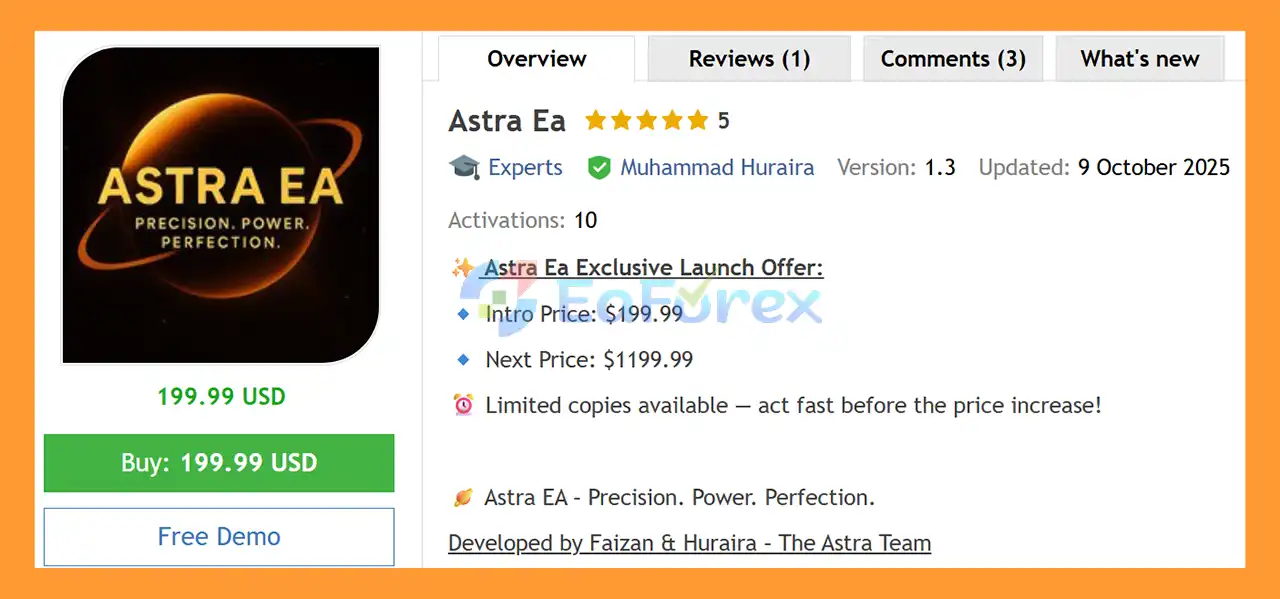
🔺Astra Ea MT5 is highly appreciated by the MQL5 community for bringing stable and reliable profits. Below are 5 star reviews from users:
In summary, Astra EA MT5 is a modular automated trading system that combines Grid/Overlap, Support & Resistance, and Breakout strategies with MA trend filtering, RSI momentum confirmation, price-action analysis, and session controls.
Its basket-oriented management framework provides tools such as weighted trailing, first-order Take Profit, basket Take Profit, overlap control, and daily equity protections. The galaxy-themed dashboard also provides a convenient way to monitor trading activity and strategy status directly from the MT5 chart.
However, the presence of a Grid/Overlap engine and controlled lot progression means that exposure can increase when multiple positions are active. This makes careful risk configuration, sufficient margin, and extensive testing particularly important.
Astra EA MT5 should therefore be evaluated using realistic backtesting, optimization, and demo forward-testing before live deployment. Historical results cannot guarantee future performance, and actual trading outcomes will depend on market conditions, broker execution, spread, slippage, leverage, account size, and the parameters selected by the trader.
1. What is Astra EA MT5?
Astra EA MT5 is a fully automated, modular Expert Advisor designed for the MetaTrader 5 platform. It combines grid trading logic, breakout strategies, and advanced price action filters to deliver structured risk management and adaptive performance on major Forex pairs and XAUUSD.
2. How does Astra EA MT5 work?
Astra EA MT5 operates using price-driven automation. It analyzes live market structure, detects support and resistance zones, confirms breakouts with momentum filters, and manages trades using disciplined exit logic and basket-based trailing systems.
3. What trading strategies does Astra EA MT5 use?
Astra EA MT5 integrates multiple coordinated strategies, including:
Adaptive Grid / Overlap Engine
Breakout Trading Module
Support & Resistance Detection
Price Action Confirmation (engulfing, pin-bar, reversal patterns)
This multi-strategy approach allows the EA to perform in ranging, trending, and volatile markets.
4. Does Astra EA MT5 use martingale or risky lot multiplication?
Astra EA MT5 uses controlled lot progression with overlap protection. While it includes grid-based growth logic, it is designed with structured exposure control to prevent excessive correlated risk.
5. What markets can Astra EA MT5 trade?
Astra EA MT5 is optimized for:
Major Forex currency pairs
XAUUSD (Gold)
It supports multi-pair trading and works across all timeframes.
6. What risk management features are included in Astra EA MT5?
Astra EA MT5 includes several capital protection tools:
Weighted Basket Trailing
Equity & Daily Profit Protection
Optional Stop-Loss Thresholds
MA Trend Filter
RSI Momentum Filter
Magic Number Filters for trade identification
These features help manage drawdowns and maintain disciplined exposure.
7. Is Astra EA MT5 compatible with ECN and RAW accounts?
Yes. Astra EA MT5 is optimized for ECN and RAW spread accounts. It is designed for low-spread, fast-execution environments to ensure precise trade entries and exits.
8. What are the backtest results of Astra EA MT5?
According to the provided backtest on XAUUSD:
Initial Deposit: $10,000
Total Net Profit: $61,375.06
Maximum Drawdown: 50.59%
Backtest results reflect historical data performance and do not guarantee future trading outcomes.
9. Can Astra EA MT5 be customized?
Yes. Traders can configure:
Moving Average Trend Filters
RSI Momentum Settings
Time & Session Controls
Equity protection levels
Strategy coordination parameters
This flexibility allows users to tailor the EA to different risk profiles and trading styles.
10. Is Astra EA MT5 suitable for long-term automated trading?
Astra EA MT5 is designed for disciplined automation with structured risk control. Its combination of grid growth and breakout acceleration strategies makes it suitable for traders seeking scalable performance, provided proper capital management is applied.
In stock
In stock
In stock
In stock
In stock
Out of stock
No account yet?
Create an Account












 Automatic EA
 EA Best Seller
 Expert Advisor MT4
 Expert Advisor MT5
 HFT EA


Reviews
Clear filtersThere are no reviews yet.