Product Overview
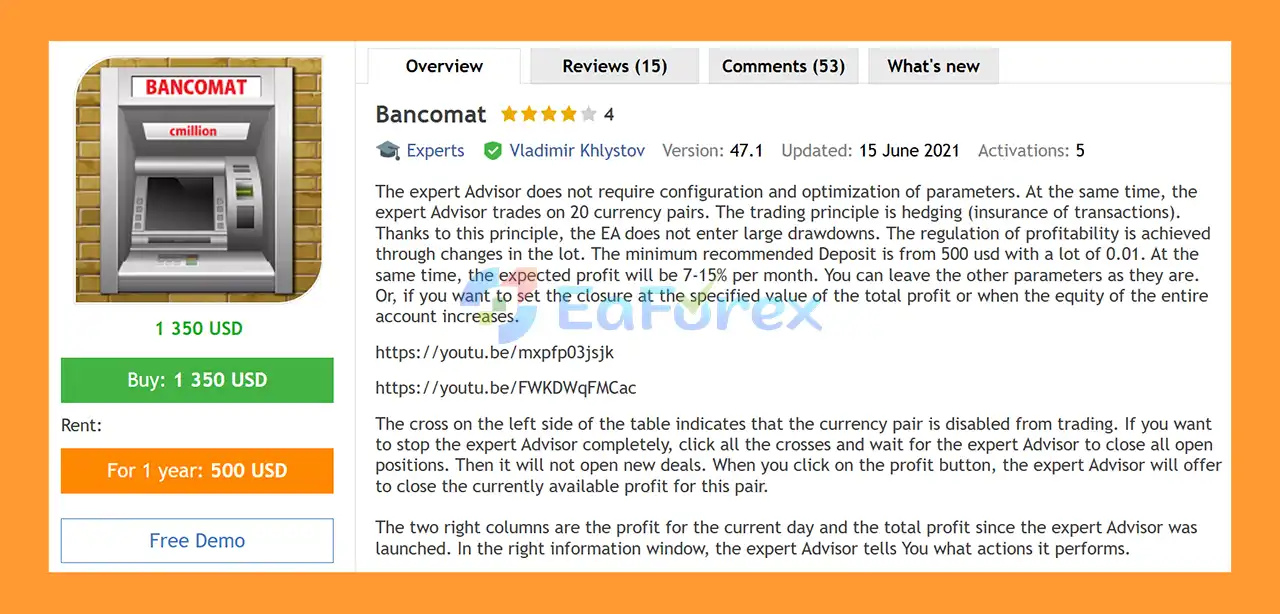
Bancomat EA MT5 is a fully automated Forex Expert Advisor for MetaTrader 5 designed to trade across 20 currency pairs using a hedging-based trading approach. The EA is built around the concept of using additional positions to hedge existing exposure and manage market movements rather than relying on a single-direction trading strategy.
One of the main advantages of Bancomat EA MT5 is its relatively simple setup. The EA is designed to work without extensive parameter optimization, allowing traders to use the default configuration and adjust only the settings that match their account size and trading preferences.
The system uses lot-size management to regulate trading profitability and exposure. The developer recommends starting with a minimum deposit of approximately $500 and a 0.01 lot size, while the stated expected performance target is around 7–15% per month. These figures should be treated as product expectations rather than guaranteed returns, since actual results can vary significantly depending on broker conditions, spreads, execution, account type, leverage, market volatility, and risk settings.
Bancomat EA MT5 also includes a visual control panel that allows users to monitor individual currency pairs, daily profit, total profit, open positions, and the actions currently being performed by the EA.
About the Developer
- Author: Vladimir Khlystov
- Experience: Over +13 years of experience on MQL5.
- Notable Products: Bancomat EA MT5, New Smarthedge EA MT5, Expert BDT MT5, EA Hedging for MT5, Rul Hedge MT4, Hourglass EA MT4 and others.
- Flagship Product: Bancomat EA MT5 is rated as the best performing product of the year.
>> Delivery time 24h-48h after payment.
>>> Refund if not delivered.
>>> You will receive the latest version without any limitations (ID+Time).
>>Reviewed by Jason Stap <<
Key Features of Bancomat EA MT5
Automated Trading on 20 Currency Pairs
Bancomat EA MT5 is designed to operate across 20 different currency pairs, allowing the system to distribute its trading activity across multiple Forex markets.
Multi-pair trading can provide broader market exposure, but it also means that several positions may be active simultaneously. Therefore, total account exposure should always be considered rather than evaluating each currency pair independently.
Hedging-Based Trading Logic
The core concept of Bancomat EA MT5 is hedging, or the use of additional positions to offset or manage existing market exposure.
Instead of relying exclusively on one directional position, the EA can use opposing or correlated positions as part of its trading management process.
The goal of this approach is to control exposure and manage drawdown during unfavorable price movements.
However, hedging does not eliminate risk. Multiple positions can increase margin usage, transaction costs, and overall exposure when market conditions remain unfavorable for an extended period.
Minimal Configuration
Bancomat EA MT5 is designed to work with relatively simple configuration requirements.
Users can generally leave the default parameters unchanged and only adjust important account-management settings such as:
- Lot size
- Maximum number of orders
- Correlation threshold
- Profit closing levels
- Equity profit target
- Maximum loss
- Profit trailing
This makes the EA accessible to traders who prefer an automated system without extensive manual optimization.
Lot-Based Profitability Control
The Lot parameter determines the volume used for trading.
The supplied recommendation is:
- Around $500 deposit: 0.01 lot
- Smaller accounts: use an appropriately reduced trading volume where supported
- Cent accounts and accounts using other base currencies: determine the appropriate lot size through testing
Increasing lot size can increase potential returns, but it also increases the potential loss, margin requirements, and account exposure.
Correlation Filter
The K_Correlation_Open parameter controls the minimum correlation coefficient required before certain positions can be opened.
The developer recommends a value between 0.7 and 0.9.
A higher correlation requirement can make the entry conditions more selective. The parameter should not be set above 1 because a correlation coefficient of 1 represents 100% correlation.
Individual Currency Pair Control
The EA interface provides a control table where each currency pair can be enabled or disabled.
A cross displayed on the left side of the table indicates that the corresponding currency pair is disabled.
This allows users to selectively stop trading on specific pairs without necessarily stopping the entire EA.
Individual Pair Profit Management
The Profit button can be used to request closure of the currently available profit for a specific currency pair.
This provides additional manual control over individual pair exposure while the EA continues to manage the remaining markets.
Daily and Total Profit Monitoring
The interface displays two important performance columns:
- Current-day profit
- Total profit since the EA was launched
This allows traders to monitor the trading activity of individual pairs directly from the EA interface.
Equity-Based Account Closing
The EquityCloseProfit parameter allows the EA to close positions when the account equity has increased by a predefined percentage.
For example, if the setting is configured to 1%, the EA can continue managing positions until the defined equity increase is reached, after which current positions can be closed, including positions that are individually unprofitable.
Total Profit Closing
The SumProfitClose parameter allows traders to define a total profit level for open positions at which positions can be closed.
The default value can remain at 0, allowing the EA to perform its own calculations and manage individual currency pairs separately.
This setting can be useful when many positions are open simultaneously.
Maximum Loss Protection
The LossClose parameter defines a total loss level at which the EA can close all open positions.
The value is entered in the account’s deposit currency and should be specified as a negative number.
For example:
LossClose = -1000
would represent a configured total loss threshold of 1,000 units of the account currency.
Profit Trailing / Rollback Protection
The ProfitClosePercent parameter controls the rollback percentage used to protect accumulated profit.
When set to 0, the EA can close positions immediately when the calculated profit target is reached.
For example, a value of 50% allows the EA to track the achieved profit and close positions after a defined rollback from that profit level.
Maximum Orders Per Currency Pair
The MaxOrders parameter controls the maximum number of open positions for each individual currency pair.
The supplied recommendation is to avoid allowing more than 3 positions per pair.
Importantly, this limit applies separately to each currency pair rather than to the entire account. Therefore, the total number of positions across 20 pairs can still become substantial.
MT4 and MT5 Compatibility
Bancomat EA MT5 is available for both MetaTrader 5 and MetaTrader 4.
The MT5 version is the primary product described here. According to the supplied information, the MT4 version cannot be tested through the MT4 Strategy Tester and is provided separately after purchasing the MT5 Expert Advisor.
How Does Bancomat EA MT5 Work?
Bancomat EA MT5 follows a multi-pair hedging and position-management approach.
Step 1: Monitor Multiple Currency Pairs
The EA continuously monitors its configured currency pairs and evaluates market conditions across the available Forex markets.
Step 2: Evaluate Correlation
Before opening certain positions, the EA uses the K_Correlation_Open setting to evaluate the required correlation conditions.
The correlation filter is intended to help determine whether the market relationship between instruments meets the configured entry requirements.
Step 3: Open and Manage Positions
When the required conditions are satisfied, the EA automatically opens positions according to its trading logic and configured lot size.
The system can use hedging positions as part of its exposure-management approach.
Step 4: Monitor Profit and Equity
After positions are opened, Bancomat EA MT5 continuously monitors:
- Individual pair profit
- Total open-position profit
- Daily profit
- Overall account equity
- Configured profit targets
- Configured loss thresholds
Step 5: Manage Positions According to Profit Rules
The EA can close positions based on several different conditions, including:
- Individual pair profit
- Total position profit
- Equity percentage increase
- Profit rollback
- Maximum configured loss
Step 6: Continue or Stop Trading
If the trader wants to stop a particular currency pair, the pair can be disabled from the control table.
If the trader wants to stop the EA completely, all currency-pair trading controls can be disabled. The EA will then wait for existing positions to be closed according to its management logic and will not open new trades after trading has been disabled.
Why Choose Bancomat EA MT5?
Multi-Pair Forex Trading
Bancomat EA MT5 provides access to a broad range of currency pairs from one automated system instead of requiring a separate EA for each market.
Hedging-Oriented Strategy
The EA uses a hedging-based approach designed to manage positions during changing market conditions.
Simple Configuration
Users do not need to perform extensive parameter optimization before using the default setup. The most important consideration is choosing an appropriate lot size relative to the account balance and risk tolerance.
Detailed Trading Dashboard
The built-in interface provides useful information about:
- Enabled and disabled currency pairs
- Daily profit
- Total profit
- Current trading actions
- Individual pair profit
- Position-management status
Flexible Profit Management
Traders can configure several different exit mechanisms, including total profit, equity growth, profit rollback, and individual pair management.
Account-Level Loss Control
The LossClose parameter provides an additional account-level mechanism for closing positions when a predefined total loss threshold is reached.
Bancomat EA MT5 Backtest Results
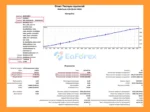
🔺XAUUSD (Gold) pair – 6 years (2020 – 2026)
- Initial Deposit: $1,000
- Total Net Profit: $3.45 million
- Maximum Drawdown: 29.4%
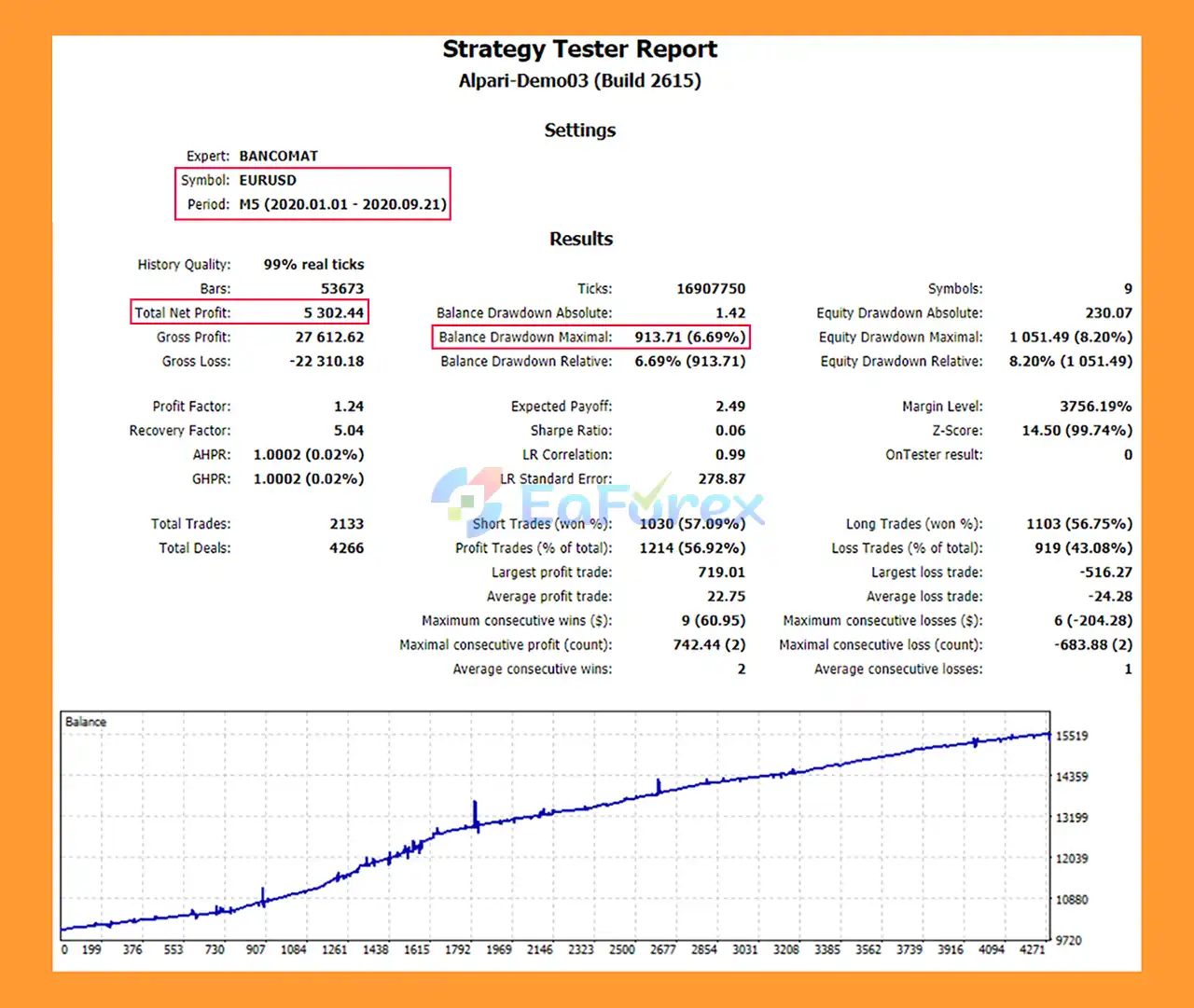
Bancomat EA MT5 Backtest
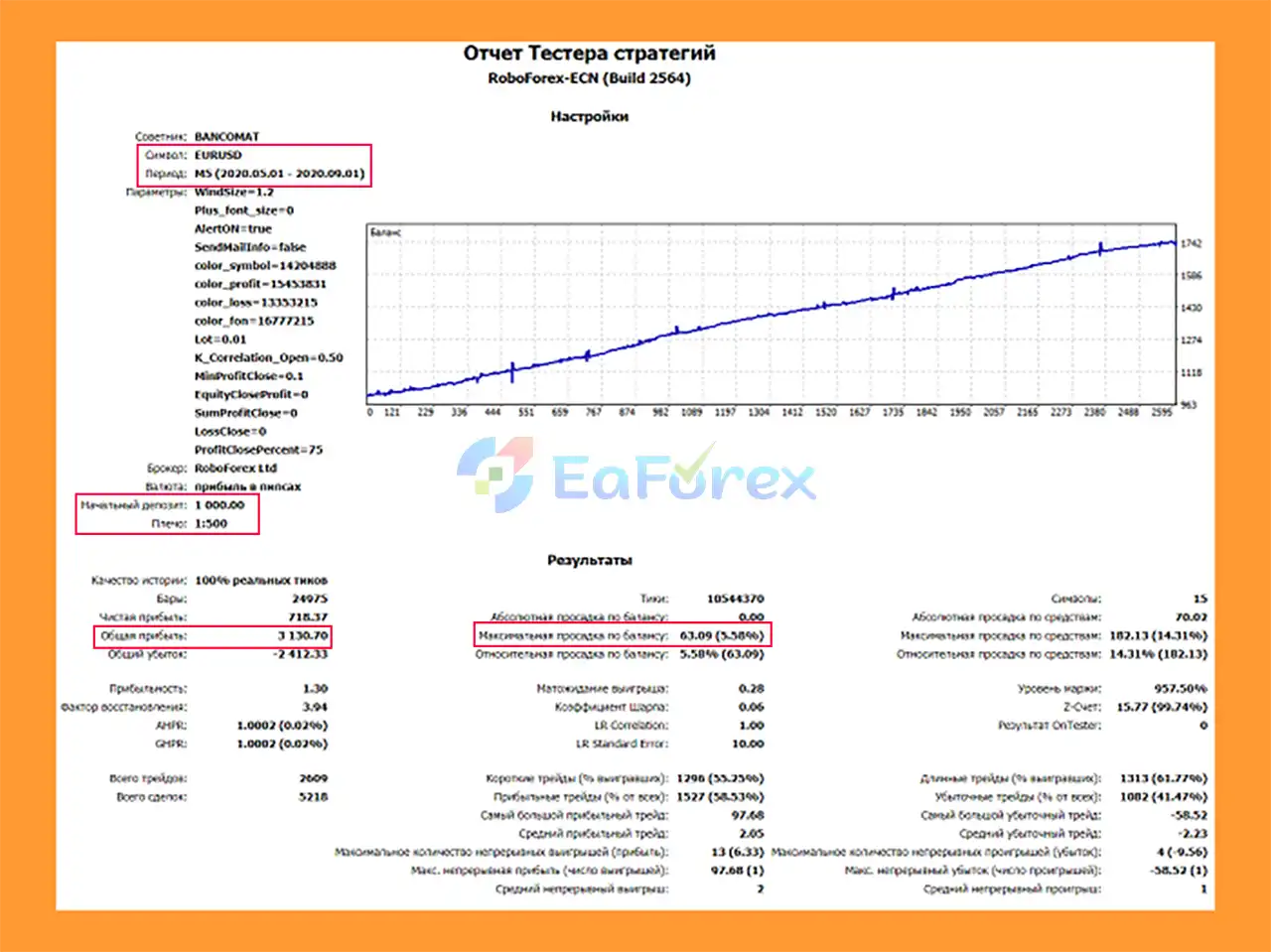
Bancomat MT5 Backtest
Performance and Risk Management
The developer states that Bancomat EA MT5 is designed around relatively controlled drawdown through its hedging-based trading approach and indicates an expected profit range of approximately 7–15% per month under the recommended configuration.
This should not be interpreted as a guaranteed monthly return.
Actual performance can vary depending on:
- Starting balance
- Lot size
- Broker
- Spread
- Commission
- Slippage
- Leverage
- Execution speed
- Market volatility
- Number of active currency pairs
- Maximum order settings
- Account type
- Selected profit and loss parameters
Recommended Starting Configuration
The supplied recommendation is:
- Minimum recommended deposit: $500
- Suggested lot: 0.01
- Recommended maximum orders: 3 per currency pair
- Correlation setting: approximately 0.7–0.9
These are starting recommendations rather than universal requirements.
Important Lot-Size Consideration
Lot size has a direct impact on both potential profitability and risk.
For example, increasing the lot from 0.01 to 0.02 does not simply increase the potential profit; it also increases exposure, margin requirements, and potential losses.
When trading multiple pairs simultaneously, the combined exposure should be evaluated at the account level.
Profit Protection
Bancomat EA MT5 provides several ways to manage accumulated profit:
- MinProfitClose
- EquityCloseProfit
- SumProfitClose
- ProfitClosePercent
These parameters provide flexibility in deciding when profitable and losing positions should be closed as part of the overall basket-management strategy.
Loss Protection
The LossClose setting can be used to define a maximum aggregate loss level.
However, traders should understand that in fast-moving markets, actual execution can differ from the configured level because of spread expansion, slippage, liquidity limitations, or other market conditions.
Weaknesses and Risk Warnings
Hedging Does Not Eliminate Risk
Although hedging can reduce directional exposure in certain situations, it does not make the strategy risk-free.
A prolonged unfavorable market environment can result in multiple open positions, increasing margin usage and transaction costs.
Multi-Pair Trading Creates Aggregate Exposure
Trading 20 currency pairs means that several positions may be open at the same time.
Some currency pairs may also have strong relationships with each other. Therefore, diversification across multiple pairs does not necessarily mean that the account is fully diversified.
Profit Expectations Are Not Guaranteed
The stated 7–15% monthly expected profit is a product expectation and should not be considered a guaranteed return.
Forex markets are unpredictable, and live performance can differ substantially from historical or expected results.
Lot Size Is Critical
Using a larger lot size can increase returns during favorable periods but can also accelerate drawdown during unfavorable periods.
The 0.01-lot recommendation should therefore be considered in relation to account size and broker specifications.
Maximum Orders Apply Per Pair
The MaxOrders setting applies to each currency pair individually, not to the entire account.
For example, a setting of 3 could theoretically allow multiple positions across many pairs simultaneously. Traders should therefore monitor total account exposure rather than focusing only on the limit for one pair.
Broker Conditions Can Affect Results
Live trading results may vary because of:
- Spread
- Commission
- Slippage
- Liquidity
- Execution speed
- Swap charges
- Leverage
- Broker contract specifications
MT4 Tester Limitation
According to the supplied product information, the MT4 version cannot be tested through the MT4 Strategy Tester. Therefore, users should take this limitation into account when evaluating the MT4 version.
Demo Testing Is Recommended
Before using Bancomat EA MT5 with real funds, traders should test the EA on a demo account under the same broker conditions they intend to use for live trading.
Pros and Cons
Pros
- Fully automated Forex trading
- Supports 20 currency pairs
- Hedging-based trading approach
- Minimal configuration required
- Flexible lot-size management
- Correlation-based entry filter
- Individual currency-pair controls
- Daily and total profit monitoring
- Equity-based closing option
- Total profit closing option
- Profit rollback protection
- Configurable total-loss threshold
- Maximum order control for each pair
- Built-in information and monitoring panel
- Compatible with MT5 and MT4
- Suitable for traders who prefer automated basket-style position management
Cons
- Hedging does not eliminate trading risk
- Multiple positions can increase margin usage
- Trading 20 pairs can create significant aggregate exposure
- MaxOrders is calculated per pair rather than for the entire account
- Higher lot sizes increase both potential profit and potential losses
- Stated 7–15% monthly performance is not guaranteed
- Results depend on broker and execution conditions
- MT4 cannot be tested in the MT4 Strategy Tester according to the supplied information
- Requires careful monitoring of total account exposure
- Not suitable for traders looking for a fixed or guaranteed monthly return
How to Install Bancomat EA MT5
Step 1: Install MetaTrader 5
Download and install MetaTrader 5 and log in to your trading account.
For initial testing, a demo account is recommended.
Step 2: Open the MT5 Data Folder
In MetaTrader 5, select:
File → Open Data Folder
Then open:
MQL5 → Experts
Step 3: Copy the EA File
Copy the Bancomat EA MT5 (.ex5) file into the Experts folder.
Step 4: Restart or Refresh MetaTrader 5
Restart MetaTrader 5 or refresh the Navigator panel.
You should find the EA under:
Navigator → Expert Advisors
Step 5: Open a Chart
Open a chart for one of the supported currency pairs.
Since Bancomat EA MT5 manages multiple currency pairs, follow the product’s recommended chart setup and avoid attaching unnecessary duplicate instances of the EA.
Step 6: Attach the EA
Drag Bancomat EA MT5 onto the chart.
Make sure Algo Trading is enabled.
Step 7: Configure the Main Parameters
Review the settings before starting automated trading.
Important parameters include:
- Lot
- K_Correlation_Open
- MinProfitClose
- EquityCloseProfit
- SumProfitClose
- LossClose
- ProfitClosePercent
- MaxOrders
- AlertON
- endMailInfo
For a starting configuration, the supplied recommendation is to use 0.01 lot on an account around $500, while keeping the remaining parameters at their default values unless you have a specific reason to modify them.
Step 8: Test Before Live Trading
Run the EA on a demo account first.
Monitor:
- Number of open positions
- Margin usage
- Individual pair exposure
- Total account exposure
- Daily profit
- Drawdown
- Equity changes
- Profit and loss closing behavior
Only move to live trading after you understand how the EA behaves under your broker’s conditions.
Important: Bancomat EA MT5 is an automated hedging system. Before increasing the lot size or maximum number of positions, carefully evaluate the potential aggregate exposure across all 20 currency pairs.
Real User Reviews and Feedback
🔺Bancomat EA MT5 is highly appreciated by the MQL5 community for bringing stable and reliable profits. Below are 5 star reviews from users:
- Jian Yu (2022.12.01): “This is a perfect EA, at least for the time being tested, hopefully it will bring good results.”
- Gustavo Yuji Igarashi (2021.02.15): “I’ve been using for few weeks only and it looks promising. So far, seems to be a good EA with reasonable risk management. If you use expecting to grow your account gradually then this option would fit for you.”
- Pavlos70 (2020.11.11): “Honestly been such a positive experience so far. I’m only 1 week in and the EA has managed to give me a 5% return so far.”
- Andrei Prokhorov (2020.11.04): “За оперативность и помощь в приобретении и установке автору 5+. Тестировал на демо-счете дает хорошие показатели.”
What’s Included in the Download Package?
- Experts:
- Setting (If Any).docx
- Installation Guide.docx
- SetFiles:
- Bancomat_3.5_Alpari.set
- Bancomat_3.5_RoboForex.set
>>> Join VIP Membership Now <<<
Final Thoughts
In summary, Bancomat EA MT5 is a fully automated multi-currency Forex Expert Advisor for MetaTrader 5, designed around hedging-based position management across up to 20 currency pairs. Rather than relying on a single directional position, the system uses additional positions, correlation filtering, and basket-level profit and loss management to respond to changing market conditions.
One of its main characteristics is its relatively simple configuration. Traders can adjust important parameters such as lot size, maximum orders, correlation requirements, profit targets, equity-based closing, profit rollback, and aggregate loss protection. However, the simplicity of setup should not be confused with low risk. Trading multiple pairs simultaneously can create substantial combined exposure, while hedging can increase margin requirements, transaction costs, and the number of open positions during unfavorable market conditions.
The supplied 6-year XAUUSD backtest reports $3.45 million total net profit from an initial $1,000 deposit, with 29.4% maximum drawdown. This result should be evaluated carefully because the EA is primarily described as a multi-currency Forex system, while the supplied performance test is specifically for XAUUSD. Historical backtest results do not guarantee future performance.
The developer’s stated 7–15% monthly performance expectation should also be treated as a target rather than a guaranteed return. Actual results can vary because of spread, slippage, commissions, leverage, execution, broker conditions, correlation changes, and account settings.
Overall, Bancomat EA MT5 offers a flexible basket-management framework for automated Forex trading. Thorough demo testing, conservative lot sizing, and careful monitoring of total account exposure are recommended before live deployment.

















 Unlimited Activations
 Instant delivery
 Easy to install
















 Automatic EA
 EA Best Seller
 Expert Advisor MT4
 Expert Advisor MT5
 HFT EA


Reviews
Clear filtersThere are no reviews yet.