


Product Overview
True Range Pro MT5 is a fully automated Expert Advisor for MetaTrader 5 designed to trade primarily during the night session and identify potential price-reversion opportunities.
The EA is optimized for EURUSD on the M5 timeframe and uses a combination of modified technical indicators, market analysis, limit-order execution, and configurable position-management logic.
True Range Pro MT5 opens trades using predefined entry conditions and manages positions with hard Stop Loss and Take Profit parameters. When price moves against an open position, the EA can optionally apply a dynamic grid structure to manage additional entries.
The system also includes several account-protection and position-management tools, including Trailing Stop, Drawdown Stop, Active Order, high-spread protection, and dynamic basket Take Profit.
True Range Pro MT5 can be configured with either fixed or automatic position sizing, as well as arithmetic or geometric volume progression. This makes the EA suitable for traders who want greater control over position sizing and basket management.
The default recommended configuration is EURUSD, M5, with an ECN account and appropriate leverage and capital allocation.
Platform: MetaTrader 5
Recommended Symbol: EURUSD
Recommended Timeframe: M5
Trading Style: Night-session / Price Reversion
Recommended Account: ECN
Suggested Capital: $1,000 per 0.01 lot
Recommended Leverage: 1:100 or higher
About the Developer
- Author: Aleksei Ostroborodov
- Experience: Over +8 years of experience on MQL5.
- Notable Products: True Range Pro MT5, True Turbo MT4, True Range Pro MT4, True Turbo MT5 and others.
- Flagship Product: True Range Pro MT5 is rated as the best performing product of the year.
>> Delivery time 24h-48h after payment.
>>> Refund if not delivered.
>>> You will receive the latest version without any limitations (ID+Time).>>Reviewed by Jason Stap <<
Key Features of True Range Pro MT5
Fully Automated Trading
True Range Pro MT5 can operate automatically without requiring manual trade execution.
Once configured correctly, the EA monitors the market, identifies potential trading conditions, opens positions, and manages them according to the selected parameters.
Night-Session Trading
The strategy is designed primarily for the night trading session, where it looks for price-reversion opportunities.
The EA provides configurable Time On and Time Off settings that control the opening window for the first position.
Price Reversion Strategy
True Range Pro MT5 is based on the concept of price reversion, attempting to identify situations where short-term price movement may move back toward a reference level or trading range.
The entry logic uses modified indicator-based conditions to evaluate market behavior.
Machine-Learning-Based Indicator Modifications
The EA uses indicators that have been modified using concepts derived from machine learning and historical market analysis.
These indicators are incorporated into the strategy's entry logic rather than relying solely on conventional fixed indicator settings.
Limit-Order Trading
True Range Pro MT5 can use limit-order-based execution to seek entries at predefined price levels.
Each position can be managed with an individual hard Stop Loss, while basket-level profit management can also be applied.
Dynamic Grid
When price moves against an existing position, the EA can optionally apply a dynamic grid.
The grid distance and position-management parameters can be configured according to the user's preferred risk profile.
Hard Stop Loss
Every position can have a predefined hard Stop Loss.
This provides an additional layer of risk control compared with strategies that rely exclusively on basket-level exits.
Dynamic Basket Take Profit
The EA supports basket-level Take Profit, allowing multiple open positions to be managed collectively.
A second basket Take Profit configuration can also be applied after a specified number of positions are open.
High Spread Protection
True Range Pro includes a configurable maximum spread filter.
When the spread exceeds the defined threshold, the EA can prevent new entries.
This feature is particularly important for automated strategies operating during periods of reduced liquidity.
Flexible Volume Management
The EA supports both:
- Fixed volume
- Relative/automatic volume
Position size can also be increased using either:
- Arithmetic progression
- Geometric progression
This gives traders considerable flexibility when configuring basket exposure.
Trailing Stop
True Range Pro MT5 includes configurable:
- Breakeven Start
- Trailing Start
- Trailing Distance
These settings allow traders to determine when and how the EA begins protecting an open position.
Active Order
The Active Order feature can be activated when the number of open positions reaches a predefined level.
The corresponding Active Take Profit parameter allows users to configure how these positions should be managed.
Drawdown Stop
The EA provides an Equity Stop / Drawdown Stop mechanism that can be configured using either:
- Fixed monetary value
- Percentage of account balance
The value can be configured to control either profit or loss conditions.
Backtesting Support
True Range Pro MT5 has been backtested using historical data covering 2000–2023, with the stated testing methodology using Every Tick and 100% historical data quality.
The strategy was optimized for the 2010–2023 period according to the supplied product information.
Historical backtests should be considered research and testing information rather than a guarantee of future live performance.
How Does True Range Pro MT5 Work?
True Range Pro MT5 combines night-session trading, price-reversion analysis, limit orders, and configurable basket management.
Step 1 – Monitor the Trading Session
The EA monitors the market during the configured trading period.
The Time On and Time Off parameters control the opening window for the first position.
Step 2 – Analyze Market Conditions
The EA evaluates market conditions using its configured pattern indicators, including:
- RSI
- ATR
- ATR Counter
- ATR Factor
These parameters are used to identify potential price conditions suitable for the strategy.
Step 3 – Open the Initial Position
When the required entry conditions are satisfied, True Range Pro can open the first position according to the configured direction:
- Long
- Short
- Long & Short
The EA can operate using either tick-based or bar-based actions.
Step 4 – Manage Position Risk
Each position can be assigned a predefined Stop Loss.
The EA can also use breakeven and trailing-stop functionality to manage profitable positions.
Step 5 – Apply Dynamic Grid if Required
If price moves against the initial position, the optional Grid Back functionality can be used to determine additional entry spacing.
Additional positions can then be managed according to the selected volume-progression method.
Step 6 – Manage the Basket
When multiple positions are open, True Range Pro can manage them as a basket using its configured Basket Take Profit settings.
This allows the system to target a combined profit level rather than relying exclusively on individual position exits.
Step 7 – Apply Active Order Management
When the number of open positions reaches the configured Active Position threshold, the Active Order mechanism can become active.
This provides an additional method for managing positions as the basket grows.
Step 8 – Protect Account Equity
If the configured Equity Stop or Drawdown Stop threshold is reached, the EA can take action according to the selected fixed or percentage-based protection setting.
Why Choose True Range Pro MT5?
True Range Pro MT5 is designed for traders looking for an automated night-session trading system with price-reversion and dynamic basket-management capabilities.
One of its main characteristics is the combination of a night-session trading window with modified technical indicators and configurable limit-order execution.
The EA also offers extensive control over how positions are managed after entry. Traders can choose fixed or relative volume, arithmetic or geometric progression, basket Take Profit, trailing protection, Active Order functionality, and equity-based protection.
Another important feature is its high-spread protection, which can help prevent new trades when market transaction costs become excessive.
The system is primarily optimized for EURUSD M5, making it easier for users to start with the developer's recommended configuration before testing alternative symbols or settings.
True Range Pro MT5 Backtest Results
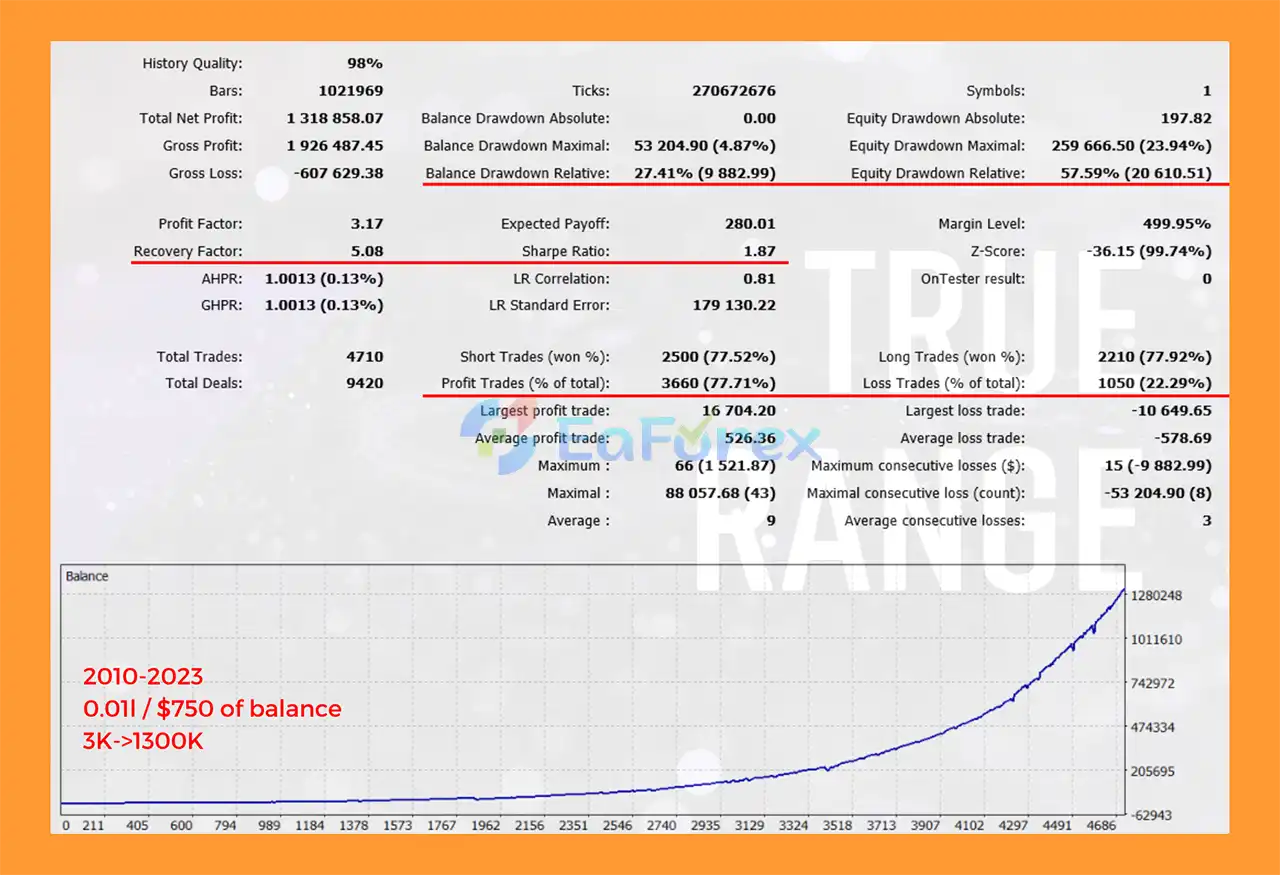
🔺 EURUSD pair – 13 years
- Initial Deposit: $750
- Total Net Profit: $1.32 million
- Win Rate (% of total): 77.71%
- Maximum Drawdown: 4.87%
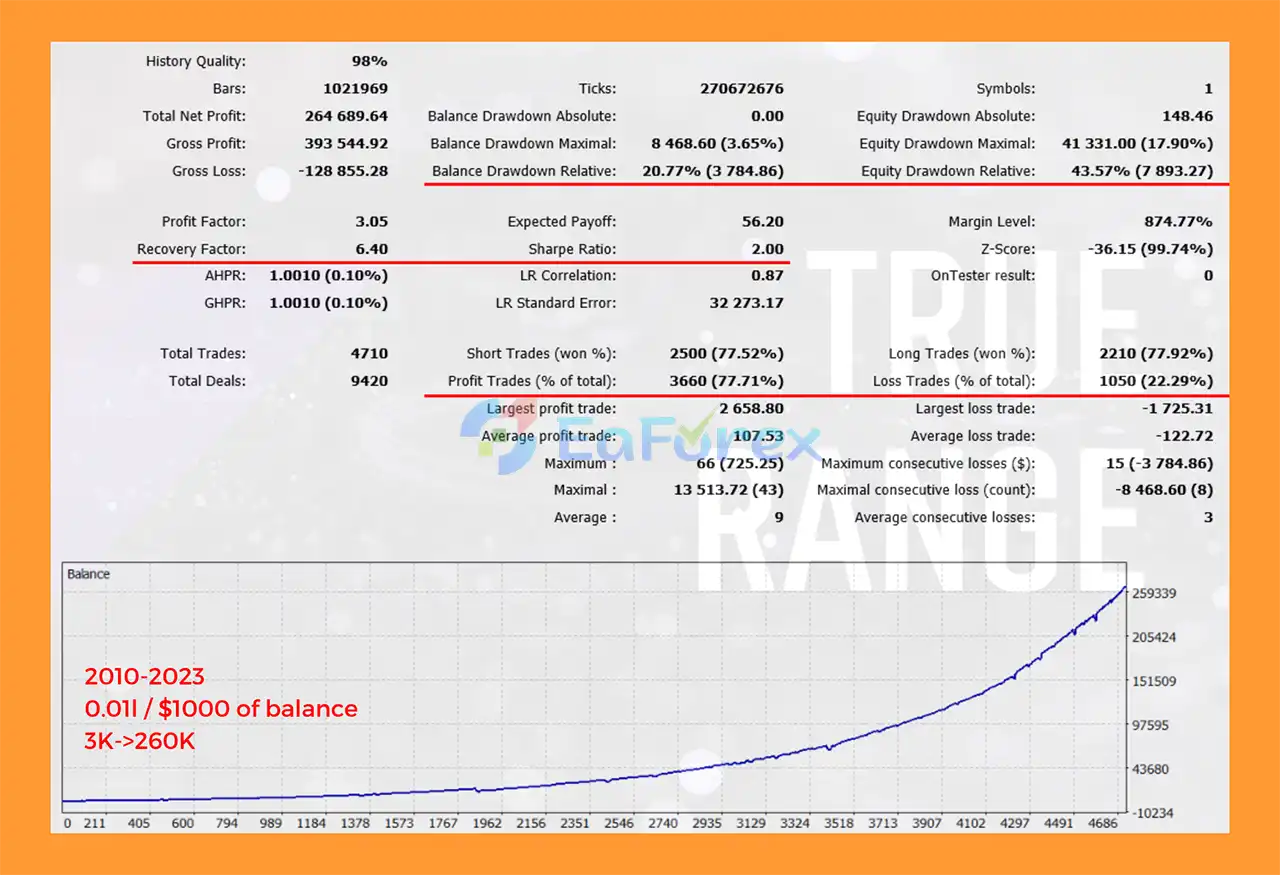
🔺 EURUSD pair – 13 years
- Initial Deposit: $1.000
- Total Net Profit: $264,689.64
- Win Rate (% of total): 77.71%
- Maximum Drawdown: 3.65%
Performance and Risk Management
True Range Pro includes several features designed to help control risk and manage open exposure.
Hard Stop Loss
Each position can use a predefined hard Stop Loss.
This provides an individual loss boundary for open trades, although actual execution can still be affected by slippage and market gaps.
Basket Take Profit
The EA can manage multiple positions using a combined Basket Take Profit.
This is particularly relevant when the dynamic grid is active and several positions are open simultaneously.
Position-Based Basket Target
A second basket Take Profit can be activated after a specified number of positions have been opened.
This allows the profit-management logic to change as the number of positions increases.
Volume Progression
True Range Pro MT5 provides two progression methods:
Arithmetic Progression:
The next position's volume can be calculated by adding a predefined value to the previous volume.
Geometric Progression:
The next position's volume can be calculated by multiplying the previous volume by a predefined factor.
Because geometric progression can increase exposure rapidly, it should be configured with particular caution.
Fixed and Relative Volume
Users can select:
Fixed Volume:
Uses a predefined lot size.
Relative Volume:
Calculates position size in relation to account balance and the configured relative-value parameter.
Trailing and Breakeven
The EA supports:
- Breakeven Start
- Trailing Start
- Trailing Distance
These features can be used to protect profitable positions as price moves favorably.
Equity Stop
The Equity Stop can be configured as either:
- Fixed amount
- Percentage of account balance
This provides an additional portfolio-level risk-control mechanism.
Spread Protection
A maximum spread threshold can be configured to prevent new trades when trading costs become too high.
This is particularly relevant to the EA's night-session trading approach.
Recommended Trading Conditions
According to the supplied product guidelines, the recommended configuration includes:
| Setting | Recommendation |
|---|---|
| Platform | MetaTrader 5 |
| Default Symbol | EURUSD |
| Default Timeframe | M5 |
| Trading Session | Night Session |
| Account Type | ECN |
| Recommended Leverage | 1:100+ |
| Suggested Capital | $1,000 per 0.01 lot |
| Time Zone | GMT+3 / GMT+2 during summer/winter |
| Strategy | Price Reversion |
| Position Management | Dynamic Basket / Optional Grid |
The recommended capital allocation should be treated as a reference rather than a guarantee of appropriate risk. Traders should adjust position sizing according to their account size, broker conditions, leverage, and acceptable drawdown.
Weaknesses and Risk Warnings
True Range Pro MT5 includes multiple risk-management tools, but it should be recognized that the EA uses grid and progressive-volume functionality, which can significantly increase exposure when price moves against the initial position.
Important risks include:
- Dynamic grid trading can accumulate multiple open positions.
- Progressive lot sizing can increase exposure as the grid expands.
- Geometric progression can increase position size particularly quickly.
- Prolonged directional market movements can create significant floating drawdown.
- Basket Take Profit does not eliminate the risk of large temporary or realized losses.
- Night-session trading may encounter wider spreads and lower liquidity.
- High spread conditions can negatively affect entries and exits.
- Slippage may cause live execution to differ from backtest results.
- Economic events can produce unexpected market movements.
- EURUSD behavior can change across different market regimes.
- Results may vary between brokers because of spread, commission, execution, and server conditions.
- Historical backtests do not guarantee future performance.
- Machine-learning-based indicators do not eliminate market uncertainty.
- A recommended capital allocation does not guarantee that the EA will remain within a particular drawdown level.
The EA should therefore be tested carefully on a demo account or low-risk environment before being deployed with significant capital.
Pros and Cons
Pros
- Fully automated MetaTrader 5 Expert Advisor
- Designed primarily for EURUSD
- Optimized for the M5 timeframe
- Night-session trading strategy
- Price-reversion approach
- Limit-order execution
- Hard Stop Loss for individual positions
- Dynamic basket Take Profit
- Optional dynamic grid
- High-spread protection
- Fixed and relative volume options
- Arithmetic volume progression
- Geometric volume progression
- Breakeven functionality
- Trailing Stop
- Active Order feature
- Equity/Drawdown Stop
- Long, Short, or Long & Short direction modes
- Tick or bar-based execution modes
- Configurable RSI and ATR parameters
- Historical backtesting from 2000–2023 according to supplied information
- Optimized for 2010–2023 according to supplied information
- Extensive input customization
Cons
- Grid functionality can increase market exposure
- Progressive volume can significantly increase risk
- Geometric lot progression requires careful configuration
- Night-session trading can be affected by wider spreads
- Performance is sensitive to broker execution conditions
- Primarily optimized for EURUSD M5
- Prolonged price movements against positions can cause substantial drawdown
- Basket management does not eliminate trading risk
- Backtest performance may differ from live results
- Version 6.10 and later are not compatible with previous versions according to the supplied product information
How to Install True Range Pro MT5
Step 1 – Install MetaTrader 5
Download and install MetaTrader 5 from your broker or the official MetaTrader platform provider.
Log in to your trading account and make sure the account supports the required trading conditions.
Step 2 – Install the Expert Advisor
If True Range Pro is provided as an .ex5 file:
- Open MetaTrader 5.
- Select File → Open Data Folder.
- Navigate to MQL5 → Experts.
- Copy the True Range Pro EA file into the Experts folder.
- Restart MetaTrader 5 or refresh the Navigator window.
If you purchased the EA through the MQL5 Marketplace, follow the Marketplace installation process provided by MetaTrader.
Step 3 – Open EURUSD M5
For the recommended configuration, open:
EURUSD → M5
The EA is optimized for this symbol and timeframe according to the supplied product information.
Step 4 – Attach the EA
Open:
Navigator → Expert Advisors
Locate True Range Pro and drag it onto the EURUSD M5 chart.
Step 5 – Configure Common Settings
Review the basic parameters, including:
- Magic Number
- Comment
- Maximum Positions
- Maximum Position Volume
- Maximum Spread
- Trading Direction
You can choose between:
- Long
- Short
- Long & Short
Step 6 – Configure Trading Time
Set the Time On and Time Off parameters according to the broker's server time.
The supplied guidelines recommend:
GMT+3 / GMT+2 during summer/winter.
Always verify your broker's actual server time before configuring the session.
Step 7 – Configure Volume
Select the preferred volume mode:
- Fixed
- Relative
Then configure the appropriate fixed or relative value.
If progression is enabled, select:
- Arithmetic
- Geometric
Use conservative settings when testing progressive volume configurations.
Step 8 – Configure Levels and Risk
Review:
- Basket Take Profit
- Basket Take Profit 2
- Position Stop Loss
- Grid Back
- Equity Stop
- Drawdown parameters
Avoid increasing grid depth or position progression without understanding the potential effect on total account exposure.
Step 9 – Configure Pattern and Trailing Settings
Adjust the available:
- RSI Period
- RSI High Level
- ATR Period
- ATR Counter
- ATR Factor
- Breakeven Start
- Trailing Start
- Trailing Distance
Step 10 – Enable Automated Trading
Make sure Algo Trading is enabled in MetaTrader 5.
Verify that automated trading permissions are also enabled in the EA's settings.
Step 11 – Test Before Live Trading
Before deploying True Range Pro on a live account, use the MT5 Strategy Tester and a demo account to evaluate the EA with your intended broker.
Test the actual:
- Spread
- Commission
- Server time
- Execution
- Slippage
- Leverage
- Account balance
- Position sizing
- Grid configuration
This is particularly important because night-session and grid-based strategies can react differently under different broker conditions.
Real User Reviews and Feedback
🔺True Range Pro MT5 is highly appreciated by the MQL5 community for bringing stable and reliable profits. Below are 5 star reviews from users:
- Matthieux (2022.07.11): “Good results and pretty safe.”
- William Tiberius Patrice Schulz (2022.01.02): “Solid results. Longterm trend/reliability on zulu speaks for itself. Needs room for drawdown.”
- Kittisak Jenner (2021.06.20): “Been using it for a couple of months now. Very stable EA with low DD and around 5-ish percent profit each month.”
What’s Included in the Download Package?
- Setting (If Any).docx
- Installation Guide.docx
Final Thoughts
In summary, True Range Pro MT5 is a specialized automated trading system focused on night-session price reversion, with EURUSD M5 as its default recommended configuration.
The EA combines limit-order execution, hard Stop Loss protection, dynamic basket Take Profit, optional grid management, flexible volume progression, trailing functionality, Active Order management, spread protection, and equity-based drawdown control.
Its extensive input parameters allow experienced traders to customize the strategy's entry conditions, position sizing, grid behavior, and account protection according to their preferred trading environment.
However, the presence of dynamic grid and progressive volume functionality means that risk management should remain a primary consideration. Traders should fully understand how additional positions and lot progression affect total exposure before using the EA on a live account.
True Range Pro should therefore be evaluated using realistic historical testing and forward testing under the intended broker conditions. Past backtest performance is not a guarantee of future results, and automated trading always involves the possibility of substantial loss.



