


Product Overview
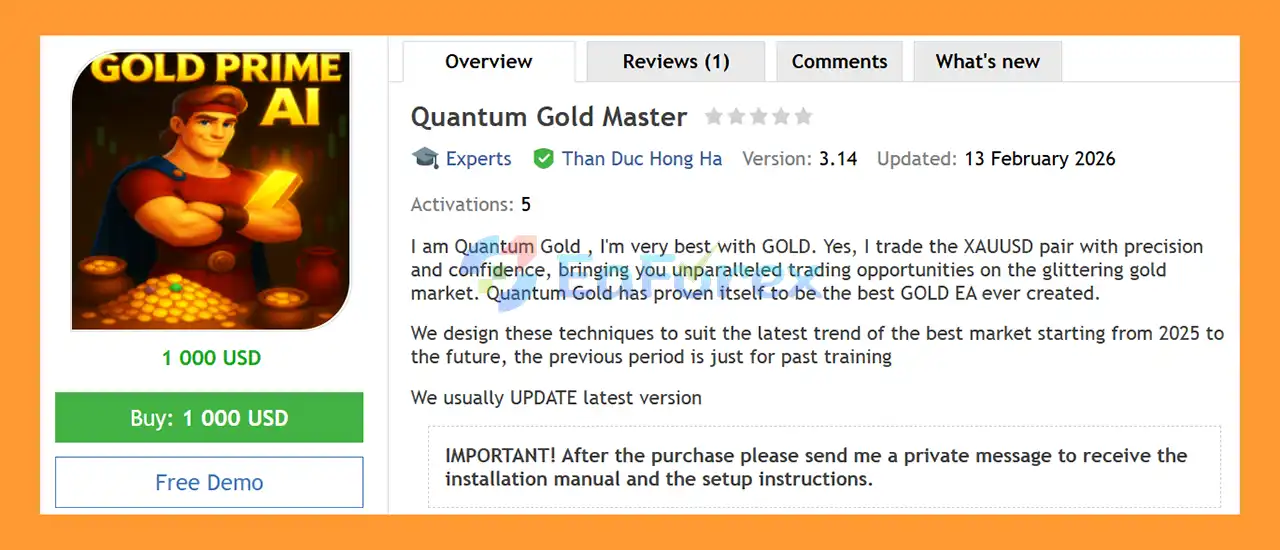
Quantum Gold Master EA MT5 is a fully automated Gold Expert Advisor for MetaTrader 5, developed specifically for XAUUSD (Gold) and optimized for the M5 timeframe. The system uses an artificial-intelligence-based trading approach that combines multiple market-analysis techniques to identify potential Buy and Sell opportunities in the gold market.
Quantum Gold Master EA MT5 analyzes market conditions across multiple timeframes before executing trades on the lower timeframe. Its analysis can include trend direction, support and resistance, market structure, CHOCH, BOS, moving averages, TMA, MACD, price levels, and news conditions.
The EA is designed around current and evolving market conditions, with the developer stating that newer versions are regularly updated to adapt to more recent market behavior.
One of the key characteristics of Quantum Gold Master is its straightforward position management. The supplied configuration uses Stop Loss and Take Profit, without DCA, Martingale, or Grid trading.
The EA also supports single-order trading and includes an optional automatic lot-sizing feature that can adjust position size according to account growth.
About the Developer
- Author: Than Duc Hong Ha.
- Experience: Over +1 years of experience on MQL5.
- Notable Products: Quantum Gold Master MT5, Quantum Gold Master MT4, Quantum Gold Premium MT5 and others.
- Flagship Product: Quantum Gold Master EA MT5 is rated as the best performing product of the year.
>> Delivery time 24h-48h after payment.
>>> Refund if not delivered.
>>> You will receive the latest version without any limitations (ID+Time).>>Reviewed by Jason Stap <<
Key Features of Quantum Gold Master EA MT5
XAUUSD-Focused Trading
Quantum Gold Master EA MT5 is specifically designed for XAUUSD, allowing the trading logic to focus on the unique volatility and price behavior of Gold.
The recommended configuration is:
Symbol: XAUUSD
Timeframe: M5
Artificial Intelligence Trading System
The EA uses an AI-based trading approach that combines multiple market-analysis techniques and historical training concepts to identify potential market opportunities.
Rather than relying on a single technical indicator, Quantum Gold Master evaluates several market factors before generating trading signals.
Multi-Timeframe Market Analysis
The system analyzes market conditions from larger timeframes before refining potential entries on the lower M5 execution timeframe.
This approach can incorporate broader market direction and structure before attempting to identify shorter-term trading opportunities.
Multiple Trading Strategies
According to the supplied product information, Quantum Gold Master EA MT5 currently includes 120 trading strategies.
The system is designed to select or combine appropriate strategies according to the detected market conditions.
Trend Analysis
The EA analyzes potential:
- Uptrends
- Downtrends
- Market direction
- Support and resistance
- High and low price levels
- Trend-line conditions
This provides the system with a broader framework for determining market bias.
Market Structure Analysis
Quantum Gold Master EA MT5 incorporates market-structure concepts such as:
- CHOCH – Change of Character
- BOS – Break of Structure
- Swing highs
- Swing lows
- Support and resistance
These concepts are used as part of the broader signal-generation process.
Technical Indicator Analysis
The supplied strategy description includes several technical indicators and moving-average configurations, including:
- MA5
- MA10
- MA15
- MA20
- TMA
- MACD
These tools can be used to assess trend direction, momentum, and potential entry conditions.
News Analysis
Quantum Gold Master EA MT5 includes configurable news-avoidance settings designed to reduce trading activity around important economic events.
The supplied default parameters include:
- News Avoidance Before: 30 minutes
- News Avoidance After: 4 minutes
This feature is particularly relevant for XAUUSD because Gold can experience substantial volatility around major economic announcements.
Stop Loss and Take Profit
The EA uses Stop Loss and Take Profit for position management.
The developer emphasizes that Stop Loss is an intentional part of the strategy and should not be interpreted as a system malfunction.
No DCA
Quantum Gold Master EA MT5 does not use Dollar-Cost Averaging (DCA) according to the supplied product specifications.
No Martingale
The system does not use a Martingale position-sizing strategy.
This means it is not designed to automatically increase lot size simply to recover previous losing trades.
No Grid
Quantum Gold Master EA MT5 does not use traditional Grid trading.
This can make its position structure easier to evaluate compared with systems that continuously accumulate positions at predefined price intervals.
Single-Order Trading
The EA supports single-order trading, providing a straightforward position structure rather than requiring multiple simultaneous recovery positions.
Automatic Lot Adjustment
The parameter EnableAutoChangeLotSize can be activated to allow the EA to automatically adjust the lot size based on account performance.
According to the supplied example, if the initial balance is used as the reference point and account profit increases by 10%, the lot size can increase proportionally.
For example:
- Initial lot size: 0.10
- Account growth of 10% → lot size may become 0.11
- Account growth of 20% → lot size may become 0.12
The exact behavior should be verified against the current version of the EA and its latest documentation.
How Does Quantum Gold Master EA MT5 Work?
Quantum Gold Master EA MT5 uses a multi-layer market-analysis process to identify potential XAUUSD trading opportunities.
Step 1: Analyze the Broader Market Trend
The EA first evaluates the broader market environment across larger timeframes.
It can analyze whether Gold is generally moving in an upward or downward direction and identify important structural levels.
Step 2: Evaluate Support and Resistance
The system analyzes potential support and resistance zones, as well as relevant price highs and lows.
These areas can help determine where price may react or where a potential breakout or continuation could develop.
Step 3: Analyze Market Structure
Quantum Gold Master incorporates market-structure concepts such as Break of Structure (BOS) and Change of Character (CHOCH).
These concepts can provide information about potential changes in market direction or continuation of an existing trend.
Step 4: Apply Technical Filters
The EA can combine multiple technical inputs, including MA5, MA10, MA15, MA20, TMA, and MACD.
These filters help evaluate trend direction and momentum before a potential order is considered.
Step 5: Check News Conditions
Before opening a trade, the EA can apply the configured news-avoidance rules.
With the supplied settings, trading activity may be restricted around important economic news according to the defined pre-news and post-news periods.
Step 6: Select the Appropriate Strategy
Quantum Gold Master EA MT5 is described as having 120 strategies available for order generation.
The system can use the detected market conditions to determine which trading logic is appropriate for the current environment.
Step 7: Execute the Trade
When the required conditions are satisfied, the EA automatically opens the XAUUSD position.
The trade is managed using the configured Stop Loss and Take Profit parameters.
Step 8: Manage Position Size
If EnableAutoChangeLotSize is activated, the EA can adjust the lot size based on the configured account-growth logic.
Users should carefully test this feature because increasing position size as account equity grows can also increase potential drawdown when the market subsequently moves against the strategy.
Why Choose Quantum Gold Master EA MT5?
Quantum Gold Master EA MT5 is designed for traders who want an automated system focused specifically on Gold (XAUUSD) rather than a multi-symbol Forex EA.
Its primary focus on XAUUSD allows the strategy to be developed around the specific characteristics of the Gold market, while the recommended M5 timeframe provides a more active trading environment.
Another notable feature is the combination of multiple analytical techniques. The system can consider trend direction, support and resistance, BOS, CHOCH, moving averages, TMA, MACD, price levels, and news conditions rather than relying on one indicator alone.
The supplied specifications also state that the EA does not use DCA, Martingale, or Grid methods. This provides a different position-management structure from recovery-based systems that depend on adding positions after losses.
The ability to enable or disable automatic lot adjustment also gives traders control over whether position sizing remains fixed or changes according to account growth.
Finally, the developer states that the EA is regularly updated to reflect newer market conditions, with the focus placed on more recent market behavior rather than relying exclusively on older historical periods.
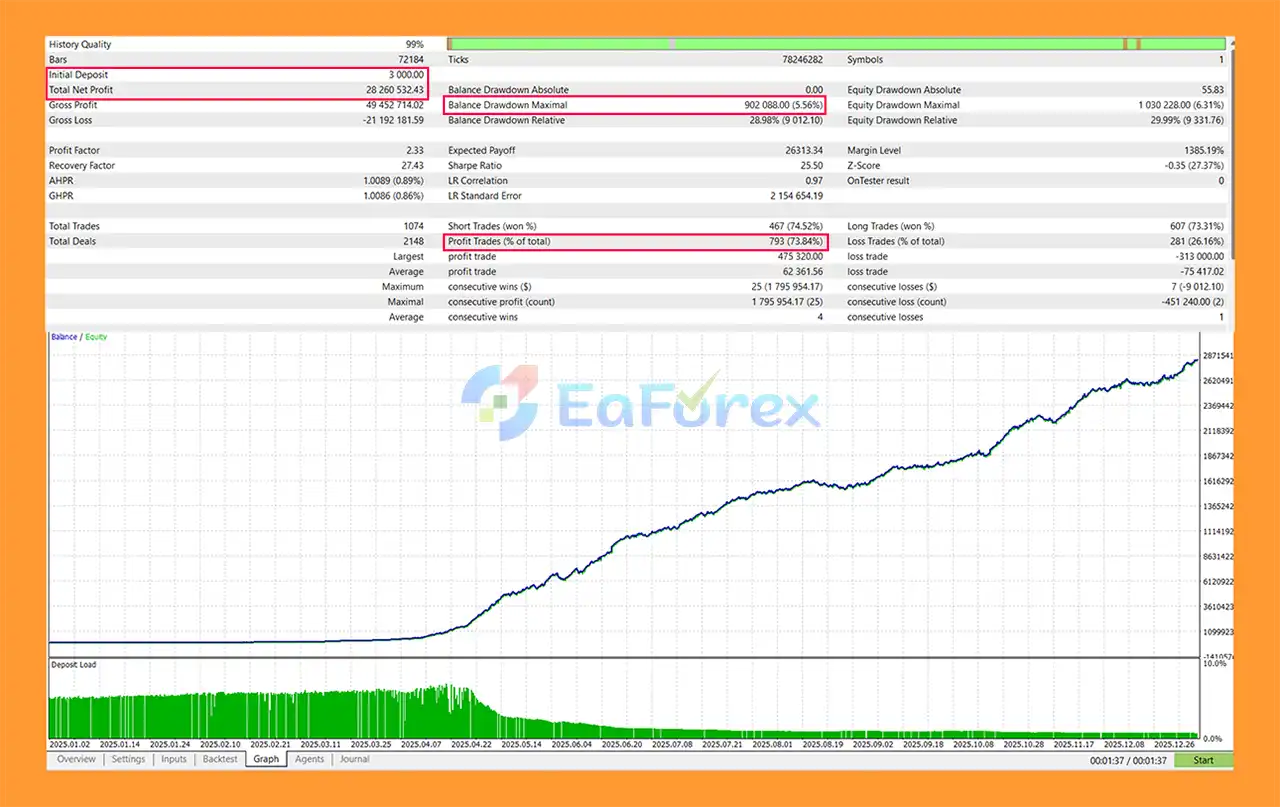
Quantum Gold Master EA MT5 Backtest Results
🔺XAUUSD (Gold) pair
- Initial Deposit: $3,000
- Total Net Profit: $28.26 million
- Win Rate (% of total): 73.84%
- Maximum Drawdown: 5.56%
Performance and Risk Management
Quantum Gold Master EA MT5 uses several mechanisms intended to manage trading risk.
Stop Loss Protection
Stop Loss is an integral part of the trading strategy.
The developer specifically notes that a Stop Loss being triggered should not automatically be interpreted as a malfunction. Losing trades are a normal component of a strategy that uses predefined risk limits.
Take Profit Management
Each position can use a predefined Take Profit level to close a profitable trade according to the strategy's exit conditions.
News Avoidance
The supplied configuration includes:
NewsAvoidanceMinutes = 30
This represents the number of minutes before a relevant news event during which trading may be avoided.
The supplied post-news setting is:
NewsAvoidanceMinutesAfter = 4
These settings are configurable and should be tested according to the broker's news feed and the current EA version.
Automatic Lot Adjustment
The EnableAutoChangeLotSize parameter can be used to automatically adjust lot size as the account grows.
While this can allow position size to scale with account performance, it also introduces additional risk because larger positions can generate larger losses during subsequent drawdown periods.
Traders should therefore evaluate the feature carefully before enabling it on a live account.
No Martingale
The EA does not use Martingale logic according to the supplied specifications.
This means it does not rely on progressively increasing position sizes to recover previous losses.
No Grid
The EA does not use a Grid trading approach, reducing the risk of continuous position accumulation across multiple predefined price levels.
No DCA
The system also avoids DCA-style averaging into losing positions.
This creates a more straightforward relationship between an individual trade's entry, Stop Loss, Take Profit, and resulting outcome.
Important Trading Considerations
The developer notes that Quantum Gold Master EA MT5 should be evaluated over a full trading month rather than only a few days.
There may also be periods when the EA does not open trades for several hours or even several days if its market model identifies unusual or unsuitable price conditions.
A lack of trades should therefore not automatically be interpreted as a technical problem.
For an automated system operating on Gold, traders should evaluate performance over sufficiently long periods and across different market conditions rather than focusing on isolated winning or losing trades.
Weaknesses and Risk Warnings
XAUUSD Can Be Highly Volatile
Gold can move rapidly during major economic releases, geopolitical events, changes in interest-rate expectations, and periods of increased market uncertainty.
Even with Stop Loss protection, sudden price gaps or extreme volatility can result in execution differences.
M5 Trading Is Sensitive to Execution
The recommended M5 timeframe can be more sensitive to:
- Spread
- Slippage
- Commission
- Execution speed
- Broker liquidity
- Market session conditions
Results from one broker may therefore differ from another.
Stop Losses Can Be Triggered
Stop Loss is an intentional component of the strategy. Traders should expect losing trades as part of normal system operation.
A strategy's performance should be assessed over an appropriate sample of trades rather than based on one or two Stop Loss events.
No Trading Does Not Mean Guaranteed Protection
The EA may remain inactive when its model detects market conditions it considers unsuitable. However, this does not guarantee that every adverse market movement will be avoided.
120 Strategies Add Complexity
Having a large number of strategies can provide flexibility, but it can also make the system more complex to evaluate.
Traders should understand how the current version selects or switches between strategies rather than assuming all 120 strategies are active simultaneously.
Automatic Lot Scaling Can Increase Risk
If automatic lot adjustment is enabled, position size can increase as the account grows.
A subsequent drawdown with larger lot sizes can therefore result in larger monetary losses than during the initial phase of trading.
Recent-Market Optimization May Reduce Historical Relevance
The developer states that the system is designed around more recent market conditions beginning from 2025 and that older periods are used primarily for training.
This approach may make recent market behavior more relevant to the strategy, but it also means that performance during older market regimes may not accurately represent how the current version is intended to operate.
Updates Can Change Behavior
Regular EA updates can improve or modify the strategy, but they can also mean that performance from an older version may not be directly comparable with the latest version.
Users should verify the version being tested and avoid assuming that historical results from an earlier release represent the current system.
Minimum Deposit Is Not a Guarantee
The recommended minimum deposit is $500, but this should not be interpreted as a guarantee that the EA will operate safely or profitably with that amount.
The appropriate account size depends on lot size, broker margin requirements, leverage, spread, volatility, and risk tolerance.
Important: Trading XAUUSD involves significant financial risk. Always test the current version on a demo account and evaluate realistic drawdown, execution, and margin requirements before using real funds.
Pros and Cons
Pros
- Fully automated MetaTrader 5 Expert Advisor
- Specialized for XAUUSD Gold
- Recommended M5 timeframe
- AI-based trading approach
- Multiple market-analysis techniques
- Uptrend and downtrend analysis
- Support and resistance analysis
- BOS and CHOCH market-structure concepts
- MA5, MA10, MA15 and MA20 analysis
- TMA and MACD filters
- News-avoidance functionality
- Stop Loss and Take Profit trading
- No DCA
- No Martingale
- No Grid
- Single-order trading support
- Optional automatic lot adjustment
- Designed around more recent market conditions
- Developer states that updates are regularly released
- Can remain inactive during unsuitable market conditions
- Minimum recommended deposit of $500
Cons
- Focused exclusively on XAUUSD
- M5 trading can be sensitive to spread and slippage
- Gold volatility can produce rapid drawdowns
- Stop Losses are expected as part of normal strategy operation
- Periods without trades can last for hours or days
- Automatic lot scaling can increase future exposure
- Multiple strategy components make the system more complex
- Results can vary between brokers
- Older backtests may not represent the latest version
- Regular updates can change trading behavior
- $500 minimum deposit does not guarantee adequate risk capacity
- Historical or backtest performance cannot guarantee future results
Recommended Settings
Based on the supplied specifications, the recommended initial setup is:
| Parameter | Recommended Setting |
|---|---|
| EA | Quantum Gold Master EA MT5 |
| Symbol | XAUUSD |
| Timeframe | M5 |
| Trading Style | Automated |
| Initial Lot Size | 0.10* |
| News Avoidance Before | 30 minutes |
| News Avoidance After | 4 minutes |
| Auto Lot Adjustment | Optional |
| Minimum Deposit | $500 |
| Position Structure | Single Order |
| DCA | No |
| Martingale | No |
| Grid | No |
*The supplied default LOT_SIZE is 0.10, but the appropriate lot size depends heavily on account balance, leverage, broker specifications, and risk tolerance. It should not automatically be used on every $500 account.
How to Install Quantum Gold Master EA MT5
Step 1: Purchase and Obtain the EA
After purchasing Quantum Gold Master EA MT5, contact the developer through private message to receive the installation manual and setup instructions, as specified by the product information.
Step 2: Open MetaTrader 5
Launch MetaTrader 5 and log into the account where you want to install and test the EA.
For initial testing, a demo account is recommended.
Step 3: Open the MT5 Data Folder
In MetaTrader 5, select:
File → Open Data Folder
Navigate to:
MQL5 → Experts
Copy the Quantum Gold Master .ex5 file into the Experts folder.
Step 4: Refresh the Navigator
Return to MT5 and refresh the Navigator panel.
The EA should appear under:
Navigator → Expert Advisors
If necessary, restart MetaTrader 5.
Step 5: Open XAUUSD
Open your broker's XAUUSD trading chart.
Because the EA is specifically designed for Gold, make sure the correct broker symbol is selected. Some brokers may use variations such as XAUUSD, GOLD, or another symbol name.
Step 6: Select the M5 Timeframe
Set the chart timeframe to:
M5 – 5 Minutes
This is the recommended timeframe for Quantum Gold Master.
Step 7: Attach the EA
Drag Quantum Gold Master EA MT5 from the Navigator window onto the XAUUSD M5 chart.
Make sure automated trading is enabled.
Step 8: Configure the Parameters
Review the EA settings carefully, including:
- LOT_SIZE
- NewsAvoidanceMinutes
- NewsAvoidanceMinutesAfter
- EnableAutoChangeLotSize
- Stop Loss
- Take Profit
- Other parameters supplied in the current version
Start with the developer's recommended settings before making changes.
Step 9: Check the Lot Size
Pay particular attention to the LOT_SIZE parameter.
The supplied default is 0.10, while the recommended minimum account size is $500.
However, lot size should always be evaluated relative to your actual account balance, leverage, broker margin requirements, and acceptable drawdown.
Step 10: Enable Auto Lot Size Only After Testing
If you want the EA to automatically increase lot size as account performance improves, enable:
EnableAutoChangeLotSize = true
However, this feature should first be tested on a demo account because increasing lot size can also increase future drawdown.
Step 11: Test the EA
Use the MetaTrader 5 Strategy Tester and demo trading to evaluate the EA.
Because the developer recommends judging profitability over a full trading month, avoid drawing conclusions from only a few days of results.
Monitor:
- Profit
- Drawdown
- Stop Loss frequency
- Take Profit frequency
- Number of trades
- No-trade periods
- Spread
- Slippage
- News behavior
- Lot-size changes
- Margin usage
Step 12: Consider VPS Hosting
For continuous automated operation, a VPS is recommended to reduce interruptions caused by computer shutdowns, internet outages, or platform disconnections.
What’s Included in the Download Package?
- Setting (If Any).docx
- Installation Guide.docx
Final Thoughts
In summary, Quantum Gold Master EA MT5 is a specialized XAUUSD M5 Expert Advisor that combines an AI-based trading approach with multiple market-analysis techniques, including trend direction, support and resistance, CHOCH, BOS, moving averages, TMA, MACD, price levels, and news filtering.
The system is designed to trade Gold using Stop Loss and Take Profit without DCA, Martingale, or Grid logic. It also supports single-order trading and optional automatic lot adjustment based on account growth.
One of the more distinctive aspects of the EA is its multi-strategy architecture, with the developer stating that the current version includes 120 strategies. The system may also remain inactive when market conditions are considered unsuitable, meaning periods without trades can be part of its normal operation.
The developer also states that newer versions are regularly updated with a focus on more recent market conditions. Therefore, traders should always identify the exact EA version being tested and avoid assuming that historical results from older releases will necessarily reflect the latest version.
For anyone considering Quantum Gold Master EA MT5, the most important step is to test the current version under realistic XAUUSD M5 conditions, paying close attention to drawdown, Stop Loss frequency, spread, slippage, margin usage, and automatic lot-sizing behavior. Historical performance and stated strategy characteristics should be treated as reference information rather than a guarantee of future profitability.



