









-
 Unlimited Activations
-
 Instant delivery
-
 Easy to install








 Unlimited Activations
Instant delivery
Easy to install
Unlimited Activations
Instant delivery
Easy to install
 Free Update
 Free Install Support

UniversalTrader EA MT5 is a fully automated trend-following Expert Advisor for MetaTrader 5, developed as part of the RPTrade Pro Solutions system range. The EA combines a built-in SuperTrend indicator with Parabolic SAR to identify trading opportunities, manage open positions, and dynamically control Stop Loss, Trailing Stop, and Break-Even levels.
UniversalTrader EA MT5 is designed to be accessible to both experienced traders and beginners. It can operate across different timeframes and currency pairs, allowing traders to configure the system according to their preferred market and trading style.
The core strategy follows market trends rather than attempting to predict every short-term price movement. The built-in SuperTrend indicator is primarily responsible for identifying potential trade direction, while Parabolic SAR is used for position management, including Stop Loss, Trailing Stop, and Break-Even functions.
The EA can use traditional Take Profit, Stop Loss, and Trailing Stop settings, while also offering the option to operate without fixed SL/TP settings when configured as a directional trading switch.
UniversalTrader EA MT5 does not use hedging or averaging. The standard operating logic allows one trade to finish before another trade is opened, helping maintain a straightforward position-management structure.
>> Delivery time 24h-48h after payment.
>>> Refund if not delivered.
>>> You will receive the latest version without any limitations (ID+Time).>>Reviewed by Jason Stap <<
UniversalTrader EA MT5 is fundamentally a trend-following EA.
The system uses a built-in SuperTrend indicator to identify potential market direction and generate trading signals.
Rather than continuously opening multiple positions, the EA is designed to follow established directional movements and manage the position until an exit condition occurs.
The SuperTrend system is used as the primary signal-generation component.
Its parameters can be adjusted through the EA settings, including:
This provides flexibility when optimizing the EA for different instruments and market conditions.
UniversalTrader EA MT5 integrates Parabolic SAR (PSAR) for position management.
PSAR can be used to:
Users can enable PSAR-based Stop Loss and Trailing Stop or use fixed Stop Loss and Trailing Stop values instead.
The EA supports traditional risk and exit-management tools:
These parameters can be configured according to the trader’s preferred strategy.
The EA can also be configured to operate without fixed SL/TP settings, depending on the selected trading logic.
UniversalTrader EA MT5 does not rely on hedging or averaging as its core trading method.
This means the strategy does not intentionally build a basket of opposing positions or average into losing trades.
Under the standard operating mode, a trade must finish before the next trade can begin.
This provides a relatively simple position structure and prevents the EA from continuously stacking new trades while an existing position remains open.
Trades can be closed by the arrival of a new opposite trading signal.
For example, depending on the configuration, an existing Buy position may be closed when the strategy generates a confirmed Sell signal.
This allows the EA to remain aligned with changing market direction.
The ResetOrder parameter controls how the EA responds to consecutive trading signals.
When enabled, the EA does not necessarily need to wait for an opposite signal before opening a new position.
When disabled, the EA follows alternating-direction logic, meaning that after a Sell trade, the next trade must be a Buy, and vice versa.
The StopCrossReverse setting allows the EA to react when price crosses the SuperTrend line in the opposite direction.
When enabled, the EA can stop the current trade when the SuperTrend reversal condition is detected.
This provides an additional exit mechanism for changing market conditions.
UniversalTrader EA MT5 can be configured for different timeframes.
The GlobalTimeFrame parameter determines the primary timeframe used by the EA, while the TF parameter determines the timeframe used by its indicators.
This allows the indicator timeframe to differ from the EA’s main operating timeframe.
The EA supports two different execution modes through the CompletedBars setting.
When enabled, the EA trades only at the opening of a new bar, corresponding to an Open Price style of operation.
When disabled, the EA can evaluate market conditions on every tick.
This flexibility allows traders to choose between bar-based and tick-based execution depending on their testing and optimization approach.
UniversalTrader EA MT5 includes a MaximumPercentageAtRisk parameter that can calculate position size according to the selected account risk.
For example, the supplied documentation describes a 1% risk configuration on a €1,000/$1,000 equity account as approximately 0.01 lot under the relevant settings.
Actual lot sizing can vary depending on the instrument, Stop Loss distance, broker specifications, and account conditions.
Users can enable or disable automated lot management.
The EA provides different lot-management approaches, including:
The DecreaseLotAfterLoss parameter can determine how many consecutive losses must occur before the EA reduces its trading lot under the relevant management mode.
UniversalTrader EA MT5 includes configurable trading schedules.
Users can define:
This can help traders restrict automated trading to specific market sessions.
The EA allows individual trading days to be enabled or disabled.
This gives users control over whether the system should operate on selected weekdays or trade throughout the week.
The MaxVolumePosition parameter limits the maximum volume allowed for one position.
This provides an additional layer of exposure control when using automated lot management.
The built-in Break-Even function can move the Stop Loss after a position reaches a predefined profit level.
The relevant parameters include:
This allows traders to define when Break-Even becomes active and whether additional pips should be added beyond the original entry price.
The FiveDigits parameter allows the EA to be configured for five-digit accounts.
The supplied documentation recommends using the appropriate setting according to the broker’s pricing format.
The IsMicroAccount setting controls the minimum lot size.
When enabled, the minimum lot size is set to 0.01.
When disabled, the minimum lot size is set to 0.1.
This can be useful when configuring the EA for different account types.
UniversalTrader EA MT5 follows a relatively straightforward trend-following process.
The EA uses its built-in SuperTrend indicator to identify potential market direction.
The indicator can be configured to operate on a selected timeframe through the EA settings.
Before entering a trade, the EA can apply additional conditions, including:
The ChannelHeight parameter is particularly relevant in ranging markets because it defines a CCI channel area where trades can be filtered.
Once the required conditions are satisfied, the EA generates a Buy or Sell signal.
Depending on the CompletedBars configuration, signals can be evaluated on every tick or only when a new bar opens.
The EA calculates the trading volume according to the selected lot-management settings.
The position can be based on:
After entering the market, the EA uses its configured exit mechanisms to manage the position.
These can include:
The trade can be closed when one of the configured exit conditions is triggered.
Depending on the selected settings, the position may close through TP, SL, Trailing Stop, Break-Even, PSAR, SuperTrend reversal, or an opposite trading signal.
Under the standard operating logic, the EA waits for the current trade to end before opening another position.
This creates a relatively structured sequence of:
Signal → Entry → Position Management → Exit → Next Signal
UniversalTrader EA MT5 is based on a clear trend-following concept using SuperTrend for entries and Parabolic SAR for position management.
The EA can work with different currency pairs, giving traders flexibility when selecting their preferred instruments.
The system is designed to operate across different timeframes, allowing users to configure the EA according to their trading strategy.
Traders can combine fixed TP/SL, Trailing Stop, Break-Even, PSAR, and opposite-signal exits.
The EA does not depend on hedging or averaging as part of its core trading approach.
Risk-based lot calculation and several lot-management options allow users to control trading volume according to their account and risk preferences.
The ability to select trading days and specific trading hours gives users additional control over when the EA is allowed to open trades.
Although optimization is recommended before serious testing or live deployment, the system is designed so that users do not need to manually execute trades or constantly monitor the market.
🔺USDJPY
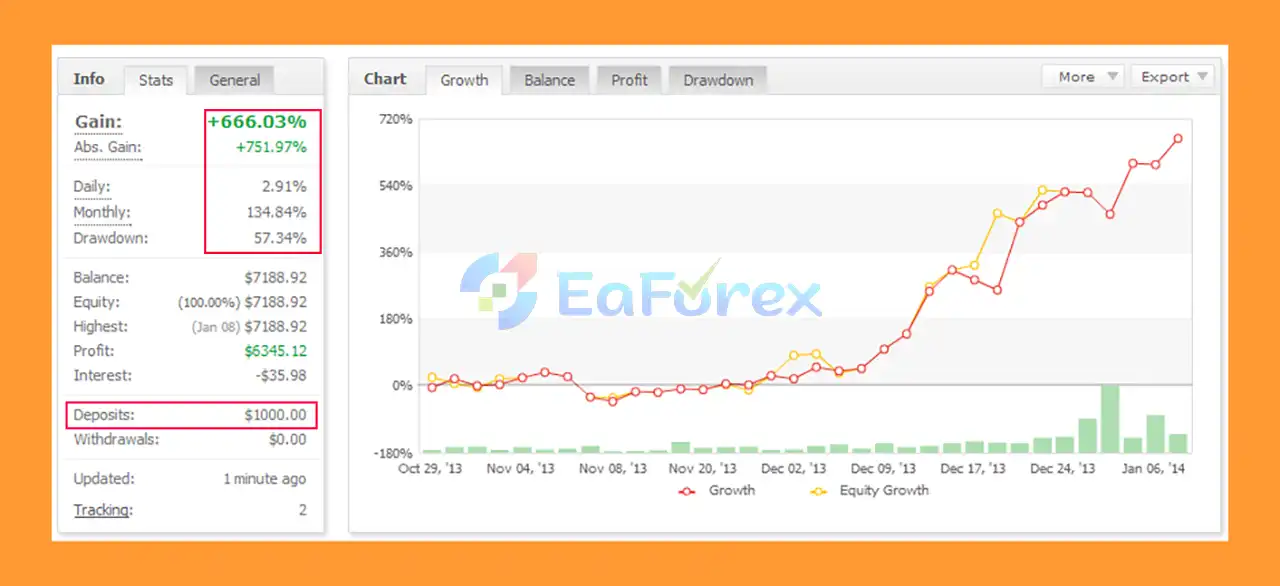
UniversalTrader EA MT5 Myfxbooks
🔺 USDJPY pair – 9 months
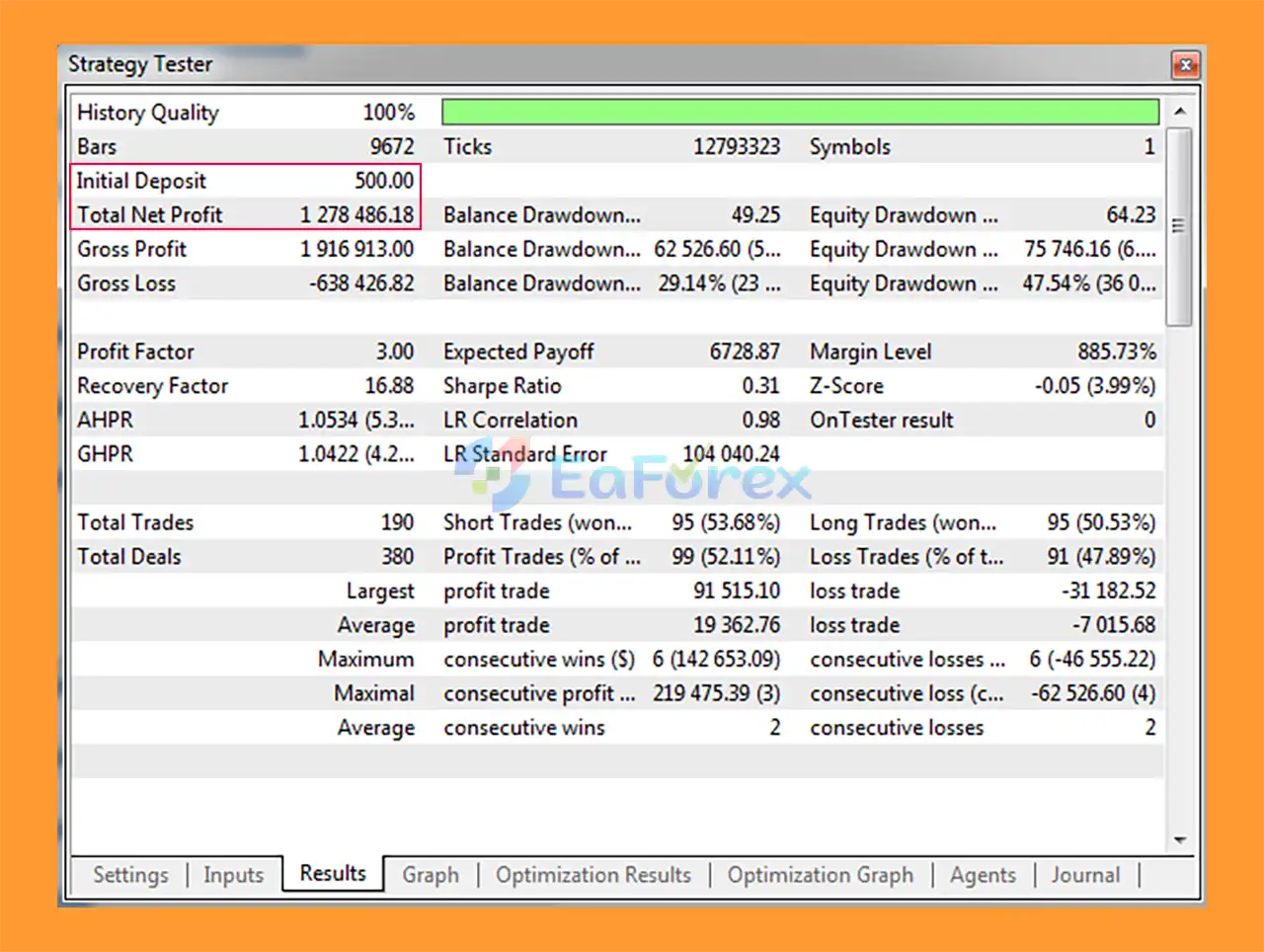
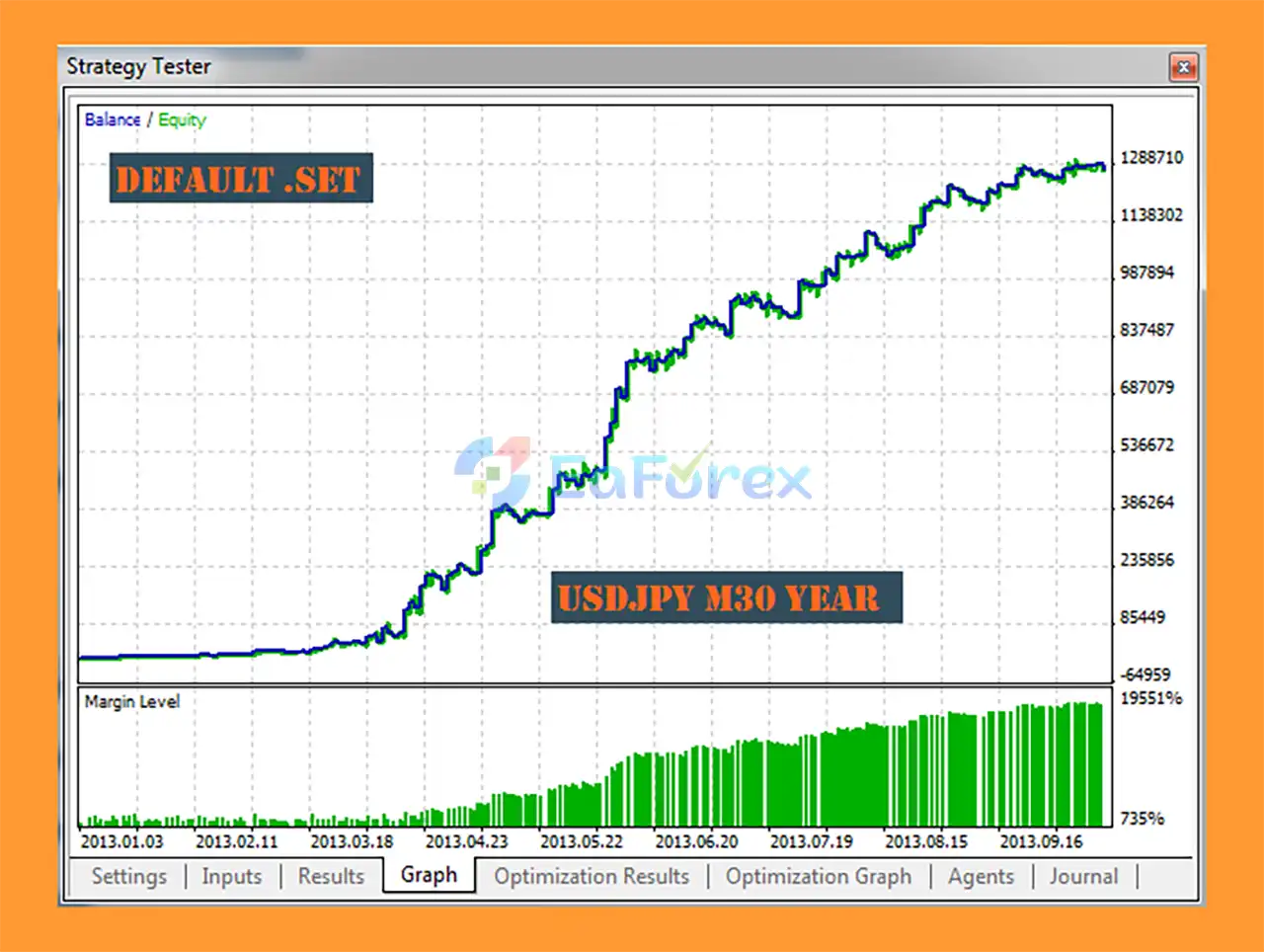
UniversalTrader EA MT5 Backtest
UniversalTrader EA Backtest
UniversalTrader EA MT5 provides several tools for managing trading risk, but its actual performance depends heavily on the selected instrument, timeframe, broker conditions, and optimization settings.
The EA should be optimized before testing, particularly because the system can be configured across different currency pairs and timeframes.
The MaximumPercentageAtRisk parameter can calculate lot size according to a defined percentage of account equity.
This provides a more structured approach than using the same fixed lot on every account size.
However, percentage-based risk does not eliminate losses. A sequence of losing trades can still reduce account equity.
Traders can also use fixed lot settings and establish a maximum lot size per trade.
This can help prevent the EA from exceeding a predefined trading volume.
The EA includes optional lot-management mechanisms that can reduce trading volume after a specified number of consecutive losses.
This is designed to reduce exposure following unfavorable trading sequences.
Stop Loss and Trailing Stop can be configured using either fixed values or, where enabled, Parabolic SAR-based management.
Break-Even can move the Stop Loss once the trade reaches a predefined profit level.
This can help protect an open position after it has moved favorably, although it can also result in premature exits in volatile or ranging markets.
Users can restrict trading to specific periods and decide whether existing positions should:
The supplied documentation specifically states that the EA must be optimized before testing.
Because UniversalTrader can be used across different markets and timeframes, settings that perform well on one symbol or timeframe may not produce the same behavior elsewhere.
Backtest results should therefore be treated as historical analysis rather than a guarantee of future performance.
UniversalTrader EA MT5 is primarily a trend-following system.
During prolonged sideways or choppy markets, trend-following signals can produce false entries and repeated small losses.
The built-in channel-height filter is intended to help address this type of condition, but it cannot eliminate false signals completely.
The EA is designed to be optimized before testing.
This means users should not assume that one universal parameter configuration will produce the same results across every currency pair and timeframe.
Although the EA can work with different pairs, each currency pair has its own:
Consequently, settings optimized for EURUSD may not be appropriate for GBPJPY, XAUUSD, or another instrument.
Automatic lot calculation can make position sizing more consistent with account equity, but it does not guarantee that losses will remain within expectations.
The actual risk can be affected by slippage, spread, execution, gaps, and broker specifications.
Trailing Stop and Break-Even mechanisms can protect profits, but they can also close trades prematurely when price temporarily moves against the position before continuing in the original direction.
The absence of hedging and averaging can simplify the strategy structure, but every individual trade remains exposed to market risk.
Real trading conditions can differ from historical tests because of:
Demo testing under the intended broker conditions is strongly recommended before live deployment.
Install and launch MetaTrader 5, then log in to the trading account where you want to test UniversalTrader EA MT5.
For initial testing, a demo account is recommended.
From the MetaTrader 5 menu, select:
File → Open Data Folder
Then navigate to:
MQL5 → Experts
Copy the UniversalTrader EA MT5 (.ex5) file into the Experts folder.
Restart MetaTrader 5 or refresh the Navigator panel.
You should find the EA under:
Navigator → Expert Advisors
Open the currency pair and timeframe you want to test.
UniversalTrader EA MT5 is designed to work across different pairs and timeframes, so select the market and timeframe appropriate for your intended configuration.
Drag UniversalTrader EA MT5 from the Navigator onto the selected chart.
Make sure Algo Trading is enabled.
Before running the EA, review the main parameters, including:
According to the product documentation, UniversalTrader EA MT5 should be optimized before testing.
Test the EA with the selected currency pair and timeframe rather than assuming that settings optimized for another market will work equally well.
When backtesting, pay attention to the selected execution mode:
After optimization, run the EA on a demo account.
Monitor:
Only consider live deployment after the EA has been properly tested under the intended broker and account conditions.
Important: Optimization results are not guarantees of future performance. Parameters should be validated through forward testing before using real capital.
🔺 UniversalTrader EA MT5 is highly appreciated by the MQL5 community for bringing stable and reliable profits. Below are 5 star reviews from users:
In summary, UniversalTrader EA MT5 is a flexible trend-following Expert Advisor for MetaTrader 5, built around the SuperTrend indicator for directional signals and Parabolic SAR for Stop Loss, Trailing Stop, and Break-Even management. Its ability to operate across different currency pairs and timeframes gives traders considerable flexibility when developing and testing configurations.
A key characteristic of UniversalTrader is its relatively straightforward exposure structure. The EA does not rely on hedging or averaging and normally manages one position at a time, with exits controlled through Stop Loss, Take Profit, Trailing Stop, Break-Even, PSAR, or opposite trading signals. Risk-based lot sizing, maximum volume controls, trading schedules, and optional lot reduction after losing sequences provide additional tools for managing exposure.
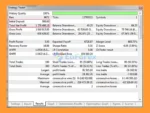
The supplied MyFxBook result for USDJPY reports +666.03% total gain, with an average monthly profit of 134.84% and 57.34% maximum drawdown from a $1,000 initial deposit. The 9-month USDJPY backtest reports $1.28 million net profit and 51.36% maximum drawdown from an initial $500. These results represent historical performance and do not guarantee future results. The relatively high reported drawdown is particularly important when evaluating the return figures.
Because UniversalTrader requires optimization and trend-following systems can struggle during prolonged ranging or choppy markets, traders should evaluate settings separately for each instrument and timeframe. Spread, slippage, execution, leverage, and broker conditions can also materially affect live results.
Overall, UniversalTrader EA MT5 offers a configurable framework for automated trend trading without hedging or averaging. Thorough optimization, forward testing, realistic trading costs, and conservative risk management are recommended before live deployment.
1. What is UniversalTrader EA MT5?
UniversalTrader EA MT5 is a fully automated trend-following Expert Advisor developed for the MetaTrader 5 platform. It combines SuperTrend, Parabolic SAR, and CCI indicators to deliver structured, rule-based trading across multiple currency pairs and timeframes.
2. What trading strategy does UniversalTrader EA MT5 use?
The EA applies a trend-following strategy using:
SuperTrend for entry signals
Parabolic SAR for Stop Loss and trailing management
CCI channel filter to avoid ranging market conditions
This structured combination helps identify high-probability trades while reducing false signals.
3. Does UniversalTrader EA MT5 use grid or martingale systems?
No. UniversalTrader EA MT5 does not use grid trading, martingale, hedging, or averaging strategies. It follows a single-trade logic, meaning one position must close before another is opened.
4. Can UniversalTrader EA MT5 trade on any currency pair?
Yes. The EA is designed to operate on any currency pair and any timeframe, making it a flexible solution for Forex traders.
5. How does UniversalTrader EA MT5 manage risk?
The EA includes:
Dynamic lot sizing based on percentage risk
Fixed lot option
BreakEven automation
Trailing Stop management
Loss reduction system after consecutive losses
These features allow traders to customize capital protection and exposure.
6. Is UniversalTrader EA MT5 suitable for beginners?
Yes. The EA offers a simple configuration interface and full automation. Beginners can use default settings, while advanced traders can optimize parameters for specific pairs or timeframes.
7. Can I control trading sessions and days?
Yes. UniversalTrader EA MT5 includes weekday and time filters, allowing traders to enable or disable trading during specific sessions or days of the week.
8. What execution modes are available?
The EA supports two execution modes:
Trade on every tick (higher precision)
Trade on completed bars (open price mode for faster backtesting)
This flexibility makes it suitable for both live trading and strategy testing.
9. What are the verified performance results?
According to published performance data:
USDJPY (MyFxBook verified)
Initial Deposit: $1,000
Total Gain: +666.03%
Average Daily Profit: 2.91%
Maximum Drawdown: 57.34%
Backtest (USDJPY – 9 months)
Initial Deposit: $500
Total Net Profit: $1.28 million
Maximum Drawdown: 51.36%
Actual results may vary depending on broker conditions and optimization settings.
In stock
In stock
In stock
In stock
In stock
Out of stock
No account yet?
Create an Account












 Automatic EA
 EA Best Seller
 Expert Advisor MT4
 Expert Advisor MT5
 HFT EA


Reviews
Clear filtersThere are no reviews yet.