
Product Overview
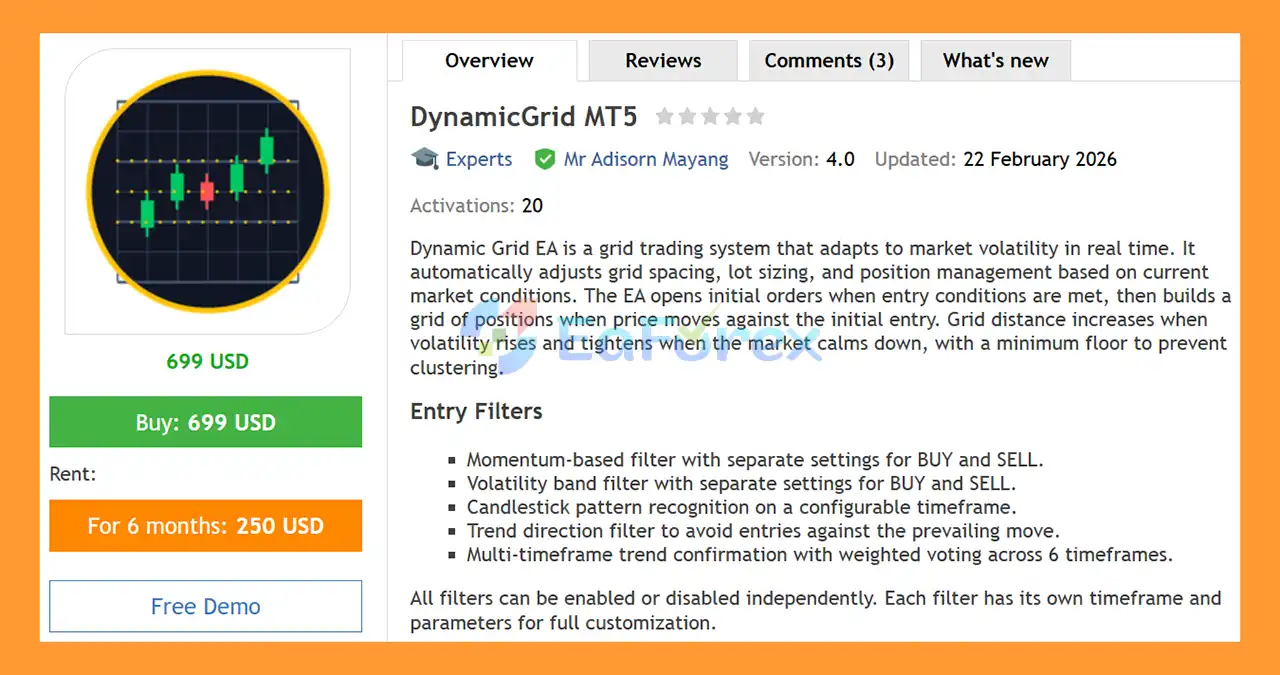
DynamicGrid MT5 is an advanced adaptive grid trading Expert Advisor for MetaTrader 5, designed to automatically adjust its trading behavior according to changing market volatility.
Unlike a traditional fixed-distance grid system, DynamicGrid uses real-time volatility analysis to dynamically adjust grid spacing, lot sizing, and position management. The system can widen grid distances when market volatility increases and tighten them when market conditions become calmer, while maintaining a configurable minimum distance to help prevent excessive position clustering.
The EA begins by opening an initial position when its entry conditions are satisfied. If price subsequently moves against the initial position, DynamicGrid can build additional positions according to its configured grid logic.
To improve entry selection, the system includes multiple configurable filters covering momentum, volatility, candlestick patterns, trend direction, and multi-timeframe confirmation.
DynamicGrid MT5 supports a wide range of markets, including Forex, Gold, Indices, and Cryptocurrencies, and works across all available timeframes.
It is compatible with both Hedging and Netting account types.
About the Developer
- Author: Mr Adisorn Mayang
- Experience: Over +2 years of experience on MQL5.
- Notable Products: DynamicGrid MT5, DynamicGrid MT4, Grid Close System MT5 and other advisors
- Flagship Product: DynamicGrid MT5 is rated as the best performing product of the year.
>> Delivery time 24h-48h after payment.
>>> Refund if not delivered.
>>> You will receive the latest version without any limitations (ID+Time).>>Reviewed by Jason Stap <<
Key Features of DynamicGrid MT5
Adaptive Grid Spacing
DynamicGrid MT5 automatically adjusts its grid distance according to current market volatility.
- Wider grid spacing during higher volatility
- Tighter spacing during calmer conditions
- Configurable volatility multiplier
- Minimum grid-distance floor
- Supports volatility analysis on different timeframes
This adaptive approach is designed to make the grid structure more responsive to changing market conditions than a conventional fixed-distance grid.
Multi-Layer Entry Filters
DynamicGrid MT5 includes several independent filters that can be enabled or disabled according to the user's configuration.
Available filters include:
- Momentum filter
- Volatility band filter
- Candlestick pattern recognition
- Trend direction filter
- Multi-timeframe trend confirmation
Each filter can have its own timeframe and parameters, providing extensive customization options.
Six-Timeframe Trend Voting
The multi-timeframe trend confirmation system uses weighted voting across six timeframes.
This allows the EA to evaluate broader market direction before opening new positions and can be configured according to the trader's preferred trading environment.
Seven Lot Scaling Modes
DynamicGrid provides seven different lot-sizing modes, ranging from conservative fixed-lot configurations to progressive scaling based on grid depth.
A configurable maximum lot cap can also be applied to help limit position size.
Abnormal Volatility Protection
When the EA detects an abnormal price spike, the grid can automatically pause new grid entries.
This feature is designed to prevent the system from aggressively adding positions during unusually fast market movements.
How Does DynamicGrid MT5 Work?
DynamicGrid MT5 follows a structured multi-stage process.
Market Analysis
The EA continuously evaluates the selected trading instrument using its configured market filters.
Depending on the setup, this can include:
- Momentum
- Volatility
- Candlestick patterns
- Trend direction
- Multi-timeframe trend confirmation
Initial Entry
When the required entry conditions are satisfied, DynamicGrid opens the initial BUY or SELL position.
The system can use separate configurations for BUY and SELL conditions, allowing traders to fine-tune each direction independently.
Grid Expansion
If the market moves against the initial position, the EA can add additional positions according to its grid parameters.
Instead of using a permanently fixed grid distance, DynamicGrid calculates grid spacing based on market volatility.
Dynamic Grid Adjustment
When volatility increases, grid spacing can expand. When market conditions become calmer, the distance can tighten, subject to the configured minimum grid-distance floor.
This helps the grid structure respond to changing market conditions.
Lot Management
The EA uses one of its seven available lot-scaling modes to determine position size.
A maximum lot limit can be applied to prevent position sizes from exceeding the configured cap.
Position Exit
DynamicGrid MT5 provides four different position-closing methods:
- Trailing Stop
- Profit Lock per Side
- Combined Profit Lock
- Dynamic Take Profit
The selected exit method determines how the EA attempts to close individual positions or the overall basket.
Why Choose DynamicGrid MT5?
DynamicGrid MT5 is designed for traders who want a flexible and volatility-aware grid trading system rather than a simple fixed-distance grid.
One of its defining features is its ability to adjust grid spacing according to market conditions. This allows the system to use different distances during periods of high and low volatility.
The EA also provides extensive control over entry conditions. Traders can independently enable or disable the momentum, volatility, candlestick, trend, and multi-timeframe filters.
Another important feature is the variety of lot management and position-closing methods. This allows DynamicGrid to be configured for different trading styles and risk preferences.
The system also includes several protective mechanisms, including:
- Drawdown reduction
- Progressive hedging
- Daily profit targets
- Loss limits
- Spread control
- Trading-hour restrictions
- Weekend protection
- Economic calendar filtering
- Cooldown protection
DynamicGrid can therefore be configured across a broad range of trading environments, from Forex and Gold to Indices and Crypto.
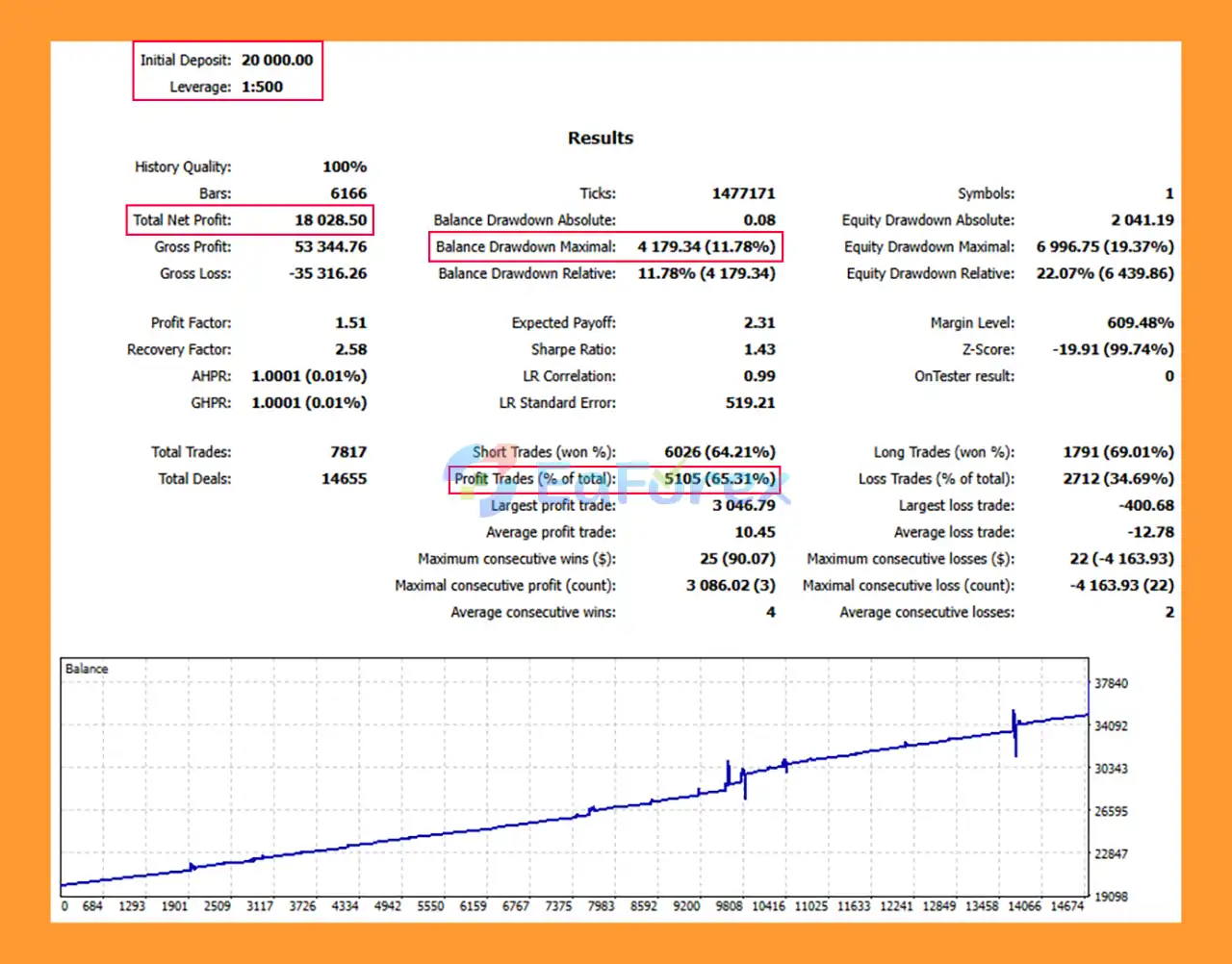
DynamicGrid MT5 Backtest Results
- Initial Deposit: $20,000
- Total Net Profit: $18,028.50
- Win Rate (% of total): 65.31%
- Maximum Drawdown: 11.78%
Performance and Risk Management
Because DynamicGrid MT5 is a grid-based trading system, risk management is a particularly important part of its operation.
Drawdown Reduction
The EA includes a drawdown-reduction mechanism designed to offset losing positions against profitable positions.
This can help manage an open portfolio when multiple positions are active.
Progressive Hedging
DynamicGrid MT5 can use progressive hedging in up to four steps.
The hedge levels are configurable and can be triggered when account or portfolio drawdown reaches predefined thresholds.
Daily Profit Target
A configurable daily profit target can automatically stop new trading activity once the target is reached.
This feature can help prevent the system from continuing to trade after a predefined daily objective has been achieved.
Loss Limit
Users can define a maximum loss limit using either:
- Fixed monetary amount
- Portfolio percentage
When the configured limit is reached, trading can be restricted according to the EA's settings.
Spread Control
DynamicGrid MT5 includes spread-management functionality with:
- Automatic spread profiling
- Fixed maximum spread
This allows traders to prevent new entries when transaction costs become unfavorable.
Trading Hours
Trading can be restricted to specific start and stop times.
This allows users to avoid selected market sessions or periods where liquidity and trading conditions may be less suitable.
Weekend Protection
The EA includes weekend protection that can prevent new entries before the Friday market close.
This is designed to reduce exposure to weekend gaps and changes in liquidity.
Economic Calendar Filter
DynamicGrid MT5 can integrate with the economic calendar and pause trading around selected news events.
Users can configure the relevant currencies and impact levels according to their preferred news-filtering rules.
Cooldown Timer
A configurable cooldown period helps prevent the EA from immediately re-entering the market after a previous trading event.
This can reduce rapid-fire entries in fast-changing market conditions.
Position Close Methods
DynamicGrid MT5 offers four position-management approaches.
Trailing Stop
The trailing-stop method dynamically adjusts the protective exit level as the position moves into profit.
Profit Lock Per Side
Profit can be locked separately for BUY and SELL positions according to the configured parameters.
Combined Profit Lock
This method evaluates the combined result of the relevant positions and attempts to close the basket once the configured profit condition is reached.
Dynamic Take Profit
Dynamic TP adjusts target levels according to the number of open positions.
The system can use:
- Wider targets when fewer positions are open
- Tighter targets as more grid positions accumulate
This allows the take-profit logic to adapt to the changing structure of the grid.
Supported Markets and Compatibility
DynamicGrid MT5 is designed to operate across a wide range of financial instruments.
Supported Markets
The EA can be used with:
- Forex
- Gold
- Indices
- Cryptocurrencies
Supported Timeframes
DynamicGrid supports all MetaTrader 5 timeframes, allowing traders to configure the system according to their preferred market and trading style.
Account Types
The EA is compatible with:
- Hedging accounts
- Netting accounts
However, the behavior of multiple positions and position management can differ between account types. Users should verify the EA configuration with their specific MT5 broker before deploying it on a live account.
Weaknesses and Risk Warnings
DynamicGrid MT5 provides extensive risk-management functionality, but grid trading remains a high-risk trading methodology.
The ability to adapt grid spacing does not eliminate the fundamental risk associated with markets moving persistently against an open position.
Important risks include:
- Prolonged one-directional market movements can create multiple losing positions.
- Increasing grid depth can significantly increase total market exposure.
- Progressive lot sizing can increase risk as additional positions are opened.
- Hedging can reduce directional exposure but does not eliminate losses or trading costs.
- Spreads and commissions can accumulate across multiple positions.
- Slippage can affect entries and exits during volatile markets.
- Gold, indices, and cryptocurrencies can experience rapid price movements.
- Abnormal market conditions can cause execution to differ from historical testing.
- Economic news can produce sharp price spikes and gaps.
- Maximum lot limits reduce position size but do not eliminate drawdown risk.
- Dynamic grid spacing cannot guarantee that positions will recover.
- Different brokers may produce different results because of spreads, liquidity, execution, and contract specifications.
Users should avoid assuming that adaptive grid logic makes the system inherently safe. Proper position sizing, conservative lot settings, drawdown limits, and thorough testing are essential.
Demo testing and forward testing are recommended before using DynamicGrid with significant real capital.
Pros and Cons
Pros
- Adaptive volatility-based grid spacing
- Real-time market-condition adjustment
- Minimum grid-distance protection
- Seven lot-sizing modes
- Maximum lot cap
- Momentum entry filter
- Volatility band filter
- Candlestick pattern filter
- Trend direction filter
- Six-timeframe weighted trend confirmation
- Independent BUY and SELL settings
- Automatic grid pause during abnormal price spikes
- Four position-closing methods
- Dynamic Take Profit
- Drawdown reduction mechanism
- Progressive hedging with up to four steps
- Daily profit target
- Fixed or percentage-based loss limit
- Automatic or fixed spread control
- Configurable trading hours
- Weekend protection
- Economic calendar integration
- Cooldown timer
- Telegram notifications
- On-chart monitoring dashboard
- Forex, Gold, Indices, and Crypto compatibility
- Supports all MT5 timeframes
- Compatible with Hedging and Netting accounts
Cons
- Grid trading can accumulate significant exposure
- Prolonged trends against the initial position can increase drawdown
- Progressive lot sizing can increase risk rapidly
- Multiple positions increase spread and commission costs
- Hedging does not eliminate overall trading losses
- High-volatility markets can cause substantial floating drawdown
- Cryptocurrency and Gold markets may experience extreme price movements
- Performance can vary significantly between brokers
- Grid strategies require careful position sizing and risk limits
- No risk-management mechanism can guarantee protection against exceptional market conditions
How to Install DynamicGrid MT5
Step 1 – Open MetaTrader 5
Launch your MetaTrader 5 trading platform and log in to your trading account.
Step 2 – Open the Data Folder
From the MT5 menu, select:
File → Open Data Folder
Then navigate to:
MQL5 → Experts
Step 3 – Copy the EA File
Place the DynamicGrid MT5 Expert Advisor file, normally supplied in .ex5 format, into the Experts folder.
Step 4 – Restart MetaTrader 5
Restart the MT5 terminal or refresh the Navigator window.
The EA should appear under:
Navigator → Expert Advisors
Step 5 – Select a Trading Symbol and Timeframe
Open the desired chart, such as:
- EURUSD
- XAUUSD
- GBPUSD
- US30
- BTCUSD
Select your preferred timeframe.
DynamicGrid supports all MT5 timeframes.
Step 6 – Attach DynamicGrid
Drag DynamicGrid MT5 from the Navigator onto the selected chart.
Step 7 – Configure Entry Filters
Review the available filters and decide which components should be enabled:
- Momentum
- Volatility band
- Candlestick patterns
- Trend direction
- Multi-timeframe trend voting
Configure the relevant timeframes and parameters.
Step 8 – Configure Grid and Lot Settings
Set:
- Grid multiplier
- Minimum grid distance
- Lot-sizing mode
- Maximum lot size
- Grid depth and related parameters
Use conservative settings when testing the system.
Step 9 – Configure Risk Protection
Review and configure:
- Drawdown reduction
- Progressive hedging
- Daily profit target
- Maximum loss limit
- Spread control
- Trading hours
- Weekend protection
- News filter
- Cooldown timer
Step 10 – Enable Automated Trading
Make sure Algo Trading is enabled in MetaTrader 5.
Then click OK to activate the Expert Advisor.
Step 11 – Test Before Live Trading
Before using DynamicGrid MT5 on a live account, conduct historical backtesting and forward testing using your intended:
- Broker
- Account type
- Symbol
- Timeframe
- Spread conditions
- Lot configuration
- Risk parameters
Grid systems can behave very differently under different market and broker conditions, so testing is particularly important.
What’s Included in the Download Package?
- Experts:
- Setting (If Any).docx
- Installation Guide.docx
- SetFiles:
- BestSetting_DynamicGrid.set
Conclusion
In summary, DynamicGrid MT5 is a feature-rich adaptive grid trading Expert Advisor designed to adjust its grid structure according to market volatility.
The EA combines dynamic grid spacing with multiple entry filters, seven lot-sizing modes, four position-closing methods, multi-timeframe trend confirmation, drawdown controls, progressive hedging, spread management, news filtering, and trading-session protection.
Its ability to operate across Forex, Gold, Indices, and Cryptocurrency markets and support both Hedging and Netting accounts provides substantial configuration flexibility.
However, DynamicGrid MT5 remains a grid-based trading system, and adaptive spacing does not remove the risks associated with prolonged adverse price movements or increasing position exposure. Traders should carefully configure lot sizing, grid depth, drawdown limits, and loss protection before using the EA with real funds.
For users considering an automated grid strategy, DynamicGrid MT5 provides a highly configurable framework where market filters, volatility adaptation, position management, and risk controls can be adjusted to match different trading environments.



