









-
 Unlimited Activations
-
 Instant delivery
-
 Easy to install





 Unlimited Activations
Instant delivery
Easy to install
Unlimited Activations
Instant delivery
Easy to install
 Free Update
 Free Install Support

Day Breakout MT5 is an automated breakout trading Expert Advisor (EA) for MetaTrader 5, designed to identify and trade breaks of the previous day’s high and low after the start of a new trading day.
The EA monitors price action around the previous day’s key levels and looks for breakout opportunities that may be followed by a significant price movement. Instead of entering every breakout automatically, Day Breakout MT5 uses calculated entry conditions to select situations where the probability of reaching the configured Take Profit is considered favorable by the system.
The robot supports configurable Stop Loss, Take Profit, trading hours, lot management, and end-of-day position closing. Traders can also choose whether open positions should remain active or be automatically closed at the end of the trading day.
The default settings are optimized for GBPJPY, while the EA can be optimized for other Forex instruments.
>> Delivery time 24h-48h after payment.
>>> Refund if not delivered.
>>> You will receive the latest version without any limitations (ID+Time).>>Reviewed by Jason Stap <<
Day Breakout MT5 is based on the concept of trading price breaks around the previous trading day’s high and low.
At the beginning of a new trading day, the EA identifies the relevant high and low levels from the previous day.
These levels act as important reference points for the breakout strategy.
The robot continuously monitors market behavior to determine whether the previous day’s high or low has been broken.
A breakout may indicate increased market momentum and the possibility of a larger directional price movement.
The EA does not simply enter every time a previous-day level is touched or broken.
Instead, it evaluates the available market conditions and calculates whether the setup provides a sufficiently favorable probability of reaching the configured Take Profit.
When the required conditions are satisfied, the EA automatically opens a position according to the detected breakout direction.
The position is then managed using the configured Stop Loss and Take Profit parameters.
If a position remains open without reaching its Stop Loss or Take Profit, the trader can configure an automatic forced-closing method.
Available options include:
This gives traders greater control over overnight exposure.
Day Breakout MT5 may be suitable for traders looking for a straightforward automated system based on daily breakout levels rather than complex discretionary chart analysis.
Once configured, the EA can monitor the market and execute trades automatically without requiring manual breakout detection.
The previous day’s high and low provide clearly defined reference levels, making the strategy relatively easy to understand and monitor.
The combination of automatic money management, fixed lot sizing, Stop Loss, and Take Profit allows traders to adapt the EA to different account sizes and risk preferences.
The forced-closing feature can help traders control overnight exposure by automatically managing positions at a specified time.
The EA can be deployed on multiple Forex pairs simultaneously. According to the provided usage recommendations, spreading the strategy across several pairs may help diversify trading exposure.
The default parameters are designed for GBPJPY, providing a starting configuration for traders who want to begin testing the EA without building settings from scratch.
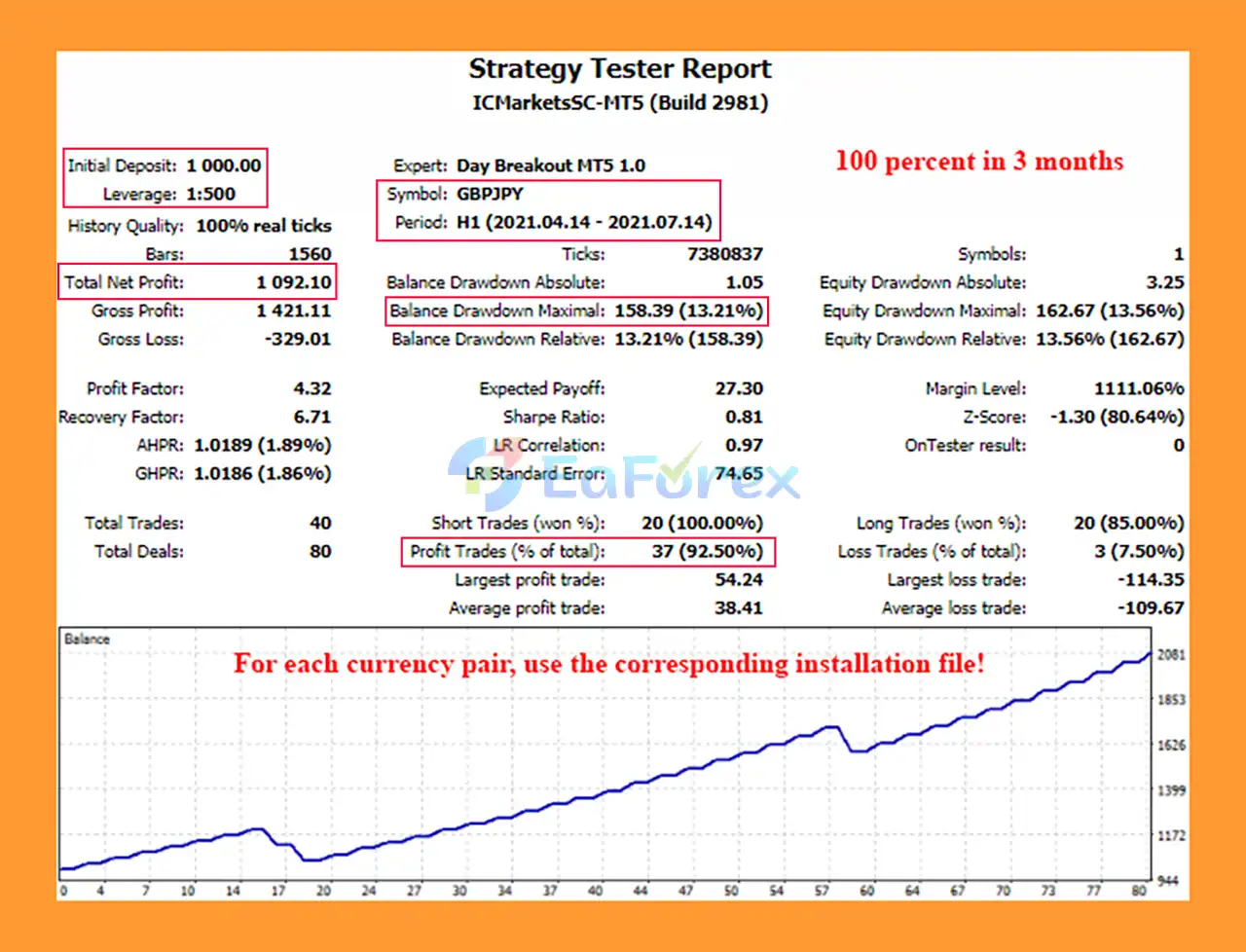
🔺GBPJPY pair – 3 Months
Day Breakout MT5 Backtests
Day Breakout MT5 provides several parameters that can be used to manage trading exposure.
With Automatic Money Management, the EA calculates the trading lot according to the configured:
Lot for 1000 units of free margin
This allows position sizing to adapt to the available account funds.
When trading several currency pairs simultaneously, the recommended approach is to reduce this parameter according to the number of pairs being traded.
Traders who prefer direct control over position size can select Fixed Lot and specify the desired lot manually.
The Stop Loss parameter defines the maximum intended loss distance for an individual position.
The Take Profit parameter determines the target distance at which a profitable position can be automatically closed.
The EA allows traders to define:
This can restrict market entries to the desired trading period.
The Forced Closing Method provides four different approaches to end-of-day exposure:
| Setting | Function |
|---|---|
| 0 | Do not force close |
| 1 | Close at the end of the day regardless of result |
| 2 | Close at the end of the day if profitable |
| 3 | Close at the end of the day if losing |
The Forced Closing Hour determines when this position-management action takes place.
Although Day Breakout MT5 is designed to automate a daily breakout strategy, it is not risk-free.
A break of the previous day’s high or low does not guarantee continued momentum. False breakouts and reversals can result in losing trades.
The default settings are designed for GBPJPY. Other currency pairs may behave differently and may require separate optimization.
Daily high and low levels can differ depending on the broker’s server time. Trading-session settings should therefore be tested carefully on the intended broker.
The developer states that the EA can be optimized for other instruments. Settings that work well on one pair or broker may not produce the same behavior elsewhere.
Trading several pairs simultaneously can increase the number of positions and total exposure. The recommended adjustment is to reduce the Lot for 1000 units of free margin parameter according to the number of currency pairs.
Although the EA can technically start from around $10, the provided guidance suggests approximately $300 or more for faster account acceleration. A small account can still be highly sensitive to lot size, spread, slippage, and drawdown.
Past results, backtests, optimization results, or historical trading performance do not guarantee future profitability. Always test the EA on a demo account or small-risk environment before using it with significant capital.
Installing Day Breakout MT5 is straightforward for traders familiar with MetaTrader 5 Expert Advisors.
Launch your MetaTrader 5 trading platform.
Go to:
File → Open Data Folder
Then navigate to:
MQL5 → Experts
Copy the Day Breakout MT5 EA file into the Experts folder.
Restart MT5 or refresh the Navigator → Expert Advisors section so the EA appears in the platform.
Open the currency pair you want to trade.
The default parameters are configured for GBPJPY, so this pair is the recommended starting point for testing the supplied settings.
Drag Day Breakout MT5 from the Navigator onto the selected chart.
Enable:
Review the main settings, including:
Before deploying the EA on a live account, conduct a backtest and demo test using your broker’s trading conditions.
For multi-pair trading, carefully adjust the lot-management parameter so that total exposure remains appropriate for your account size and risk tolerance.
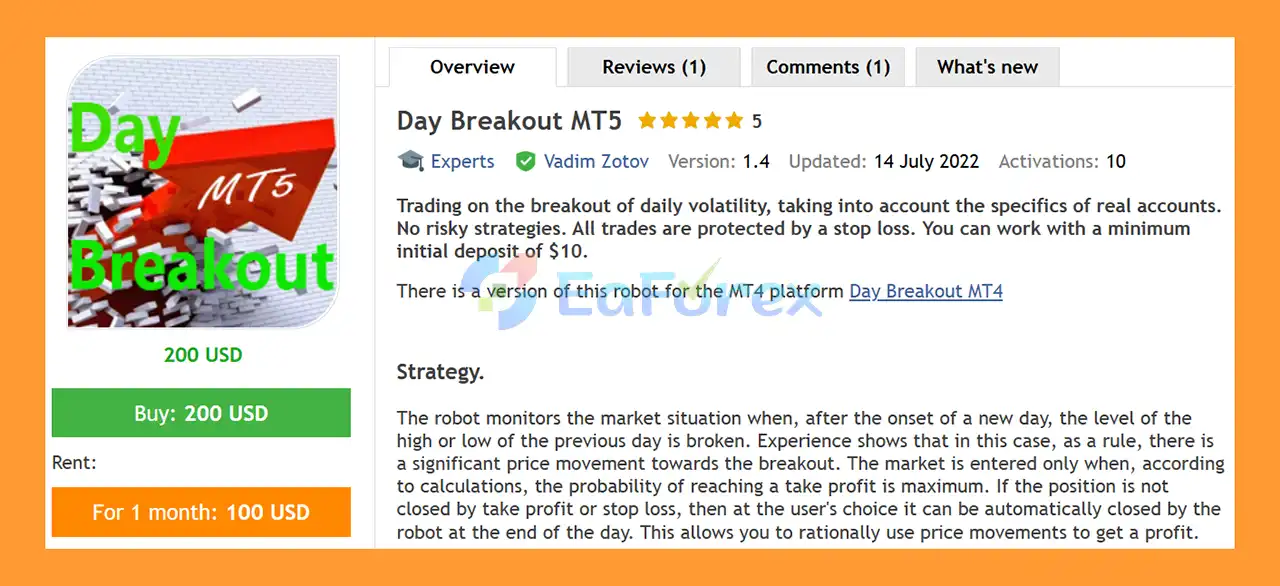
🔺Day Breakout MT5 is highly appreciated by the MQL5 community for bringing stable and reliable profits. Below are 5 star reviews from users:
In summary, Day Breakout MT5 is an automated Forex Breakout Expert Advisor for MetaTrader 5, designed to trade breaks of the previous day’s high and low. Its strategy focuses on clearly defined daily price levels while using internal entry calculations to filter potential breakout opportunities rather than simply trading every level break.
The EA provides flexible trade and risk management, including Stop Loss, Take Profit, automatic or fixed lot sizing, configurable trading hours, Clearance settings, and multiple end-of-day closing methods. These features allow traders to control both individual trade risk and overnight exposure. Multi-pair support also provides flexibility, although running several currency pairs simultaneously can increase total account exposure.
The supplied 3-month GBPJPY backtest reports $1,092.10 total net profit, a 92.50% win rate, and 13.21% maximum drawdown from an initial deposit of $1,000. These historical backtest results do not guarantee future performance. Actual trading results can vary because of false breakouts, spread, slippage, commissions, execution quality, broker server time, liquidity, leverage, and changing market conditions.
The default configuration is optimized for GBPJPY, while other Forex pairs may require separate testing or optimization. Broker server time is also particularly important because it can affect the calculation of the previous day’s high and low.
Overall, Day Breakout MT5 provides a structured framework for automated daily breakout trading with configurable position and end-of-day risk management. Thorough backtesting and demo forward testing under the intended broker conditions, together with conservative position sizing and careful multi-pair exposure management, are recommended before live deployment.
1. What is Day Breakout MT5?
Day Breakout MT5 is an automated trading robot for the MetaTrader 5 platform that trades daily volatility breakouts. The system monitors the previous day’s high and low levels and automatically opens trades when those levels are broken, aiming to capture strong directional price movements.
2. How does Day Breakout MT5 work?
Day Breakout MT5 analyzes market activity after the start of a new trading day. When the price breaks the previous day’s high or low, the algorithm calculates the probability of reaching a predefined take-profit level. If the probability is high, the EA automatically enters the trade and manages it with a stop loss.
3. What trading strategy does Day Breakout MT5 use?
The robot uses a daily breakout strategy, a popular trading method that targets strong price movements triggered by volatility. By trading breakouts of key price levels, the EA aims to capture momentum that often occurs when the market leaves a consolidation zone.
4. Does Day Breakout MT5 use martingale or grid strategies?
No. Day Breakout MT5 follows a risk-controlled trading approach and does not rely on high-risk methods such as martingale or grid trading systems. Each trade is protected with a predefined stop loss to maintain disciplined risk management.
5. What is the minimum deposit required for Day Breakout MT5?
The EA can operate with a minimum deposit starting from $10, making it accessible to both beginners and experienced traders. However, using a larger balance can help provide better stability and risk management.
6. Can Day Breakout MT5 trade multiple currency pairs?
Yes. Day Breakout MT5 is designed with multi-pair compatibility, allowing traders to run the EA on multiple currency pairs at the same time. This can help diversify trading opportunities and reduce reliance on a single market.
7. What risk management features are included in Day Breakout MT5?
Day Breakout MT5 includes several important risk control tools, such as:
Automatic stop-loss protection for every trade
Advanced money management based on free margin
Customizable lot size settings
End-of-day trade closing options
Flexible trading schedule settings
These features help traders control exposure and protect their capital.
8. Can traders customize the settings of Day Breakout MT5?
Yes. The EA offers customizable trading parameters, including stop loss, take profit, trading hours, lot size management, and breakout clearance levels. This flexibility allows traders to optimize the system for different currency pairs and market conditions.
9. What are the backtest results of Day Breakout MT5?
Example backtest results for the GBPJPY pair over three months show:
Initial Deposit: $1,000
Total Net Profit: $1,092.10
Win Rate: 92.50%
Maximum Drawdown: 13.21%
These results highlight the EA’s potential to capture daily breakout movements while maintaining controlled risk.
10. Is Day Breakout MT5 suitable for beginners?
Yes. Day Breakout MT5 is suitable for beginners because it is fully automated and easy to configure. With a simple parameter structure and automated trade execution, traders can run the EA without needing advanced manual trading skills.
In stock
In stock
In stock
In stock
In stock
Out of stock
No account yet?
Create an Account












 Automatic EA
 EA Best Seller
 Expert Advisor MT4
 Expert Advisor MT5
 HFT EA


Reviews
Clear filtersThere are no reviews yet.