Product Overview
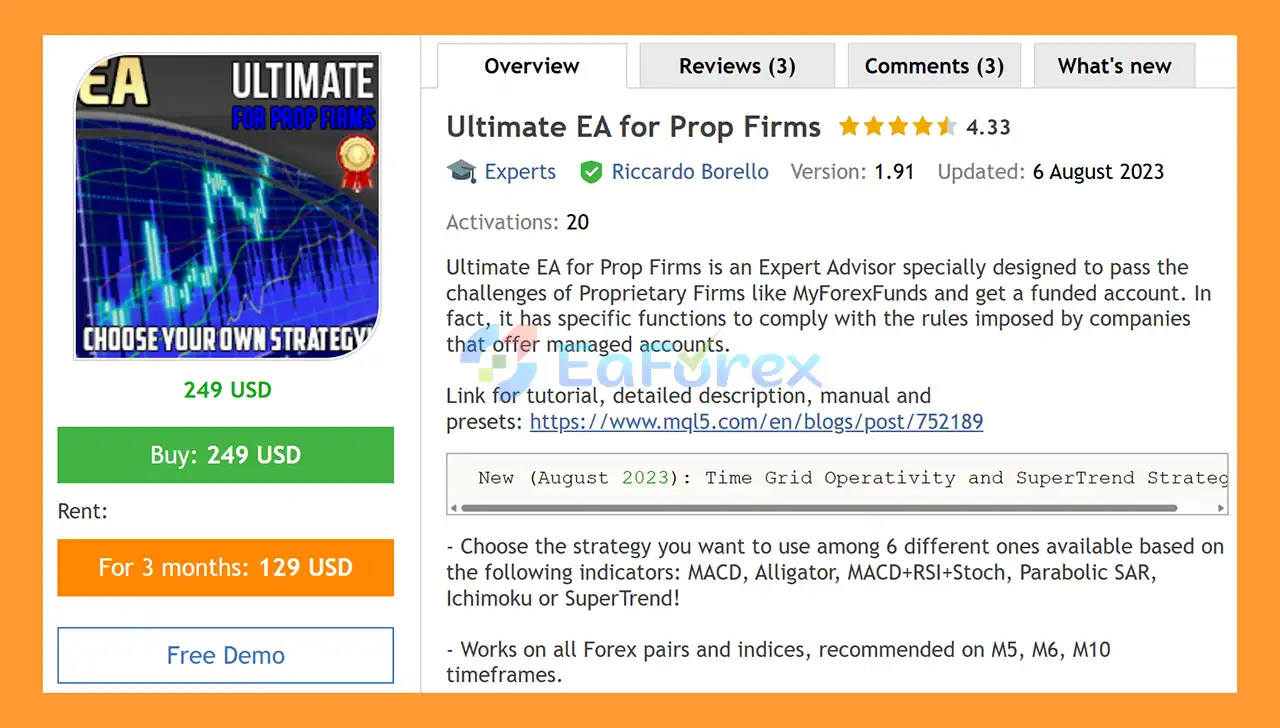
Ultimate EA for Prop Firms MT5 is an automated MetaTrader 5 Expert Advisor (EA) designed specifically for traders who want to automate strategies while operating under the risk-management rules commonly imposed by Proprietary Trading Firms (Prop Firms).
Unlike a conventional Forex EA, this system includes dedicated drawdown controls, profit-target management, trading-session restrictions, spread protection, and configurable risk parameters that can be adapted to different challenge requirements.
The EA offers a choice of six different trading strategies, allowing traders to select a strategy based on different technical indicators:
- MACD
- Williams Alligator
- MACD + RSI + Stochastic
- Parabolic SAR
- Ichimoku
- SuperTrend
It supports Forex pairs and indices and is recommended for M5, M6, and M10 timeframes.
The EA can also be configured to automatically stop trading when a predefined profit target is reached. This can be useful when working toward a specific challenge objective, such as an 8% target used in some historical prop-firm challenge structures.
For continuous automated operation, the EA is designed to run on a VPS 24/7.
About the Developer
- Author: Riccardo Borello.
- Experience: Over +3 years of experience on MQL5.
- Notable Products: Ultimate EA for Prop Firms MT5, MACD Expert Advisor for Prop Firms MT5, FundedBridge EA for Prop Firms MT5 and other advisors.
- Flagship Product: Ultimate EA for Prop Firms MT5 is rated as the best performing product of the year.
>> Delivery time 24h-48h after payment.
>>> Refund if not delivered.
>>> You will receive the latest version without any limitations (ID+Time).
>>Reviewed by Jason Stap <<
Key Features of Ultimate EA for Prop Firms MT5
- Prop Firm-Focused Risk Management – Includes features designed around common proprietary trading challenge constraints.
- Six Trading Strategies – Choose from six indicator-based trading systems.
- MACD Strategy – Uses Moving Average Convergence Divergence as the primary indicator.
- Williams Alligator Strategy – Uses Alligator-based market analysis.
- MACD + RSI + Stochastic Strategy – Combines three technical indicators for signal filtering.
- Parabolic SAR Strategy – Uses Parabolic SAR for market-direction and trade management logic.
- Ichimoku Strategy – Uses the Ichimoku framework to identify market conditions.
- SuperTrend Strategy – Uses SuperTrend-based trend analysis.
- Forex & Indices Support – Designed to work across multiple Forex pairs and index instruments.
- Multiple Timeframe Support – Recommended on M5, M6, and M10.
- Daily Drawdown Protection – Monitors daily drawdown according to configured limits.
- Monthly Drawdown Protection – Provides additional control over longer-term account exposure.
- Automatic Profit Target – The EA can stop trading after reaching a predefined profit target.
- Challenge Backtesting Function – Allows users to evaluate historical periods using custom challenge-related parameters.
- Automatic Strategy Discarding – If the configured drawdown limit is reached during the challenge simulation, the parameter combination can be rejected.
- Advanced Drawdown Controls – Provides additional drawdown-management functionality.
- Configurable Risk Percentage – Allows users to determine the percentage of capital to risk.
- Optional Martingale Mode – Martingale operation can be enabled when desired.
- Flexible Take Profit Logic – Supports fixed risk/reward-based TP or indicator-reversal-based exits.
- Trading Schedule – Configure specific days and trading hours.
- Break-Even Function – Automatically move the Stop Loss toward the entry level when conditions are met.
- Partial Take Profit – Supports one or two partial TP levels.
- Stop Loss Distance Limits – Can restrict minimum and maximum Stop Loss distances.
- High Spread Protection – Includes an anti-spread control to avoid unfavorable execution conditions.
- 24/7 VPS Operation – Recommended for uninterrupted automated trading.
How Does Ultimate EA for Prop Firms MT5 Work?
Ultimate EA for Prop Firms MT5 combines technical-indicator trading strategies with a dedicated risk-management layer designed for accounts operating under predefined trading restrictions.
🔺Select a Trading Strategy
The EA provides six strategy options:
Strategy 1 – MACD
Uses MACD-based market analysis to generate trading conditions.
Strategy 2 – Williams Alligator
Uses the Alligator indicator to identify market direction and potential trading conditions.
Strategy 3 – MACD + RSI + Stochastic
Combines three indicators to create a more filtered trading approach.
Strategy 4 – Parabolic SAR
Uses Parabolic SAR to identify potential changes in market direction.
Strategy 5 – Ichimoku
Uses the Ichimoku indicator framework to analyze trend and market structure.
Strategy 6 – SuperTrend
Uses SuperTrend-based signals for directional trading.
This flexibility allows traders to test different approaches across various instruments and market conditions.
🔺Monitor Risk and Drawdown
The EA continuously monitors account performance against configured risk parameters.
Its drawdown controls can include:
- Daily drawdown
- Monthly drawdown
- Advanced drawdown conditions
- Maximum risk percentage
- Maximum profit target
This risk layer is particularly relevant for trading environments where exceeding a predefined loss limit can invalidate an account or challenge attempt.
🔺Apply the Profit Target
Users can define a maximum profit target at which the EA automatically stops trading.
For example, if a challenge requires an 8% profit target, the EA can be configured to stop after reaching the selected target.
The actual rules and limits should always be matched to the current requirements of the specific prop firm.
🔺Manage Trade Entries and Exits
The EA provides several options for managing individual positions.
Depending on the selected configuration, traders can use:
- Fixed risk/reward Take Profit
- Indicator-reversal Take Profit
- Break-Even
- One partial Take Profit
- Two partial Take Profits
- Stop Loss distance limits
This provides flexibility when adapting the EA to different trading strategies.
🔺Control Trading Time
Users can specify the days and hours during which the EA is permitted to trade.
This can help restrict trading to selected market sessions or avoid periods that are unsuitable for the chosen strategy.
🔺Monitor Spread Conditions
The built-in anti-spread control can help prevent the EA from opening trades when the spread becomes too high according to the configured conditions.
This is particularly relevant for short-term timeframes such as M5, M6, and M10.
Why Choose Ultimate EA for Prop Firms MT5?
Built Around Prop-Firm Risk Constraints
The EA includes features specifically aimed at managing account-level restrictions such as daily and monthly drawdown limits and predefined profit targets.
Six Strategies in One EA
Instead of being restricted to a single trading model, users can select from six technical-indicator strategies.
This makes the EA suitable for testing different approaches across multiple markets.
Dedicated Drawdown Controls
Daily and monthly drawdown monitoring can help traders structure the EA around predefined risk limits.
Automatic Trading Shutdown
The EA can automatically stop when a configured profit target is reached, helping prevent unnecessary additional trades after the objective has been achieved.
Challenge-Oriented Backtesting
The custom backtesting functionality can be used to examine historical periods and determine whether a selected parameter combination would have met the configured challenge criteria.
However, historical challenge simulations should be treated as research tools rather than guarantees of future challenge results.
Flexible Trade Management
Break-even, partial Take Profit, Stop Loss restrictions, and multiple TP methods provide extensive control over individual trades.
Multi-Market Compatibility
The EA is designed for Forex pairs and indices, providing flexibility when selecting instruments.
Ultimate EA for Prop Firms MT5 Backtest Results
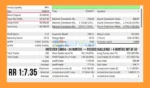
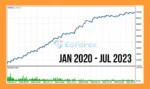
- Initial Deposit: $20,000
- Total Net Profit: $54,147.76
- Maximum Drawdown: 3.15%
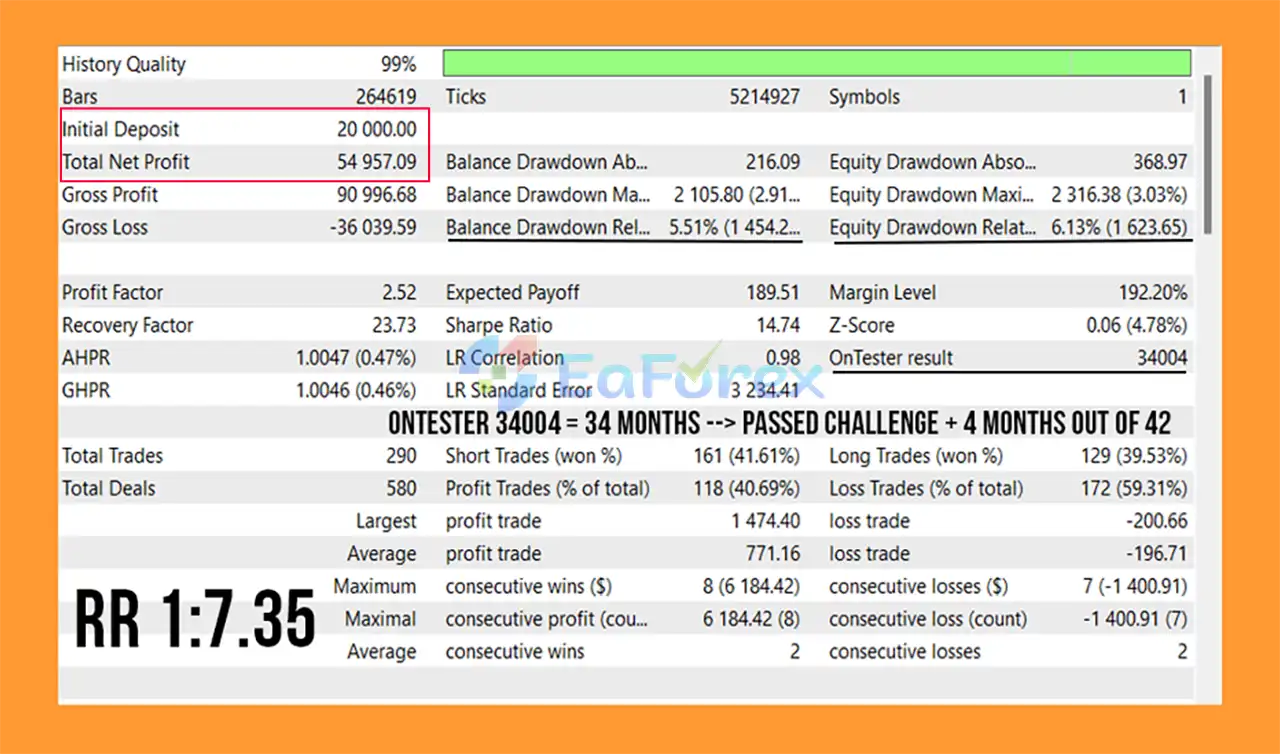
Ultimate EA for Prop Firms MT5 Backtest
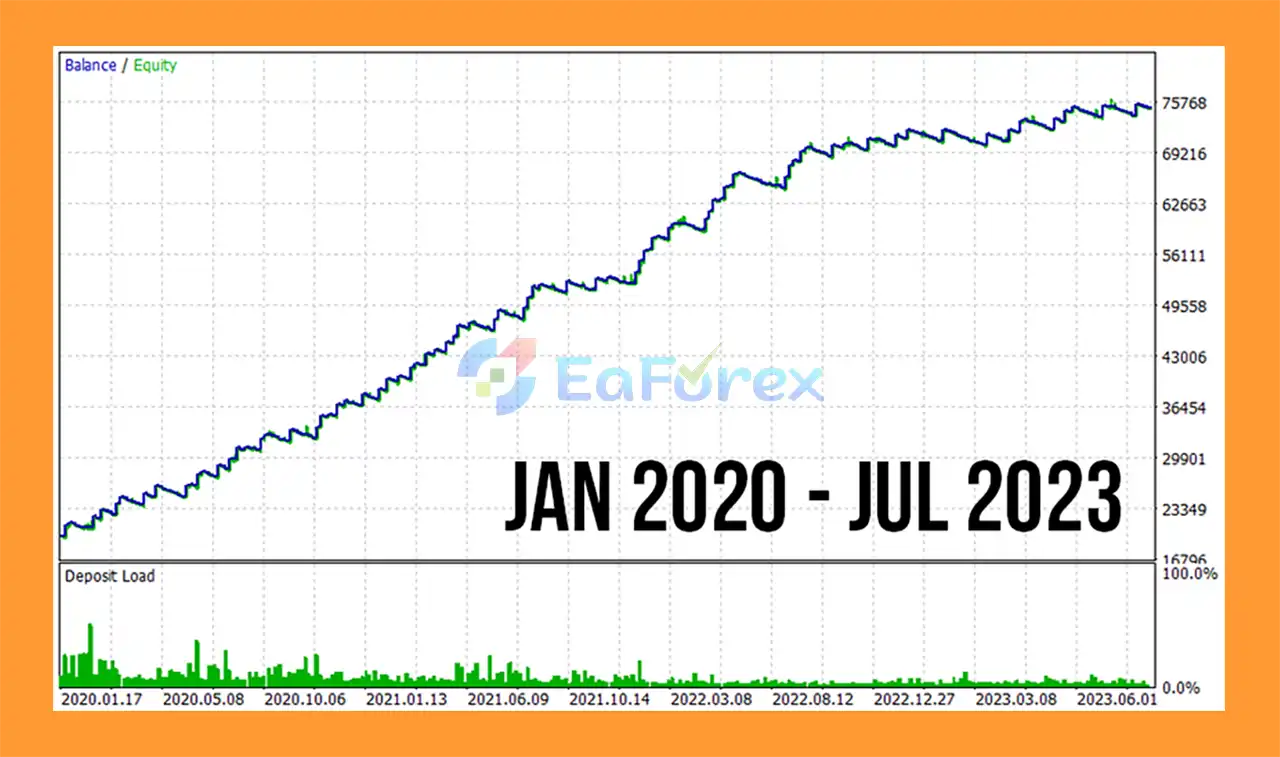
Ultimate EA for Prop Firms Backtest
Performance and Risk Management
The main strength of Ultimate EA for Prop Firms MT5 is its extensive account-level risk management.
Daily Drawdown Control
The EA can monitor daily account drawdown and restrict trading when the configured limit is reached.
This is particularly important for trading accounts subject to daily loss restrictions.
Monthly Drawdown Control
Monthly drawdown protection adds another layer of account-level risk management and can help prevent excessive exposure over a longer period.
Maximum Profit Target
Users can specify a maximum profit objective.
Once that target is reached, the EA can automatically stop trading.
This functionality can be used to align the EA with a specific challenge target, but traders must manually verify the current rules of their prop firm before configuring the value.
Risk Percentage
The EA allows users to select the percentage of capital they want to risk.
A lower risk percentage generally results in smaller position exposure, while higher settings increase potential gains and losses.
Martingale Option
The EA includes an optional Martingale operation.
Because Martingale can substantially increase exposure following losing trades, this feature should be approached with particular caution when used on prop-firm accounts with strict drawdown limits.
Take Profit Options
Users can choose between:
- Fixed risk/reward Take Profit
- Indicator-reversal Take Profit
The second method can allow a position to remain open until the selected indicator generates an opposing signal.
Break-Even
The break-even function can move the Stop Loss toward the entry price after predefined conditions are satisfied.
Partial Take Profit
The EA supports:
- One partial Take Profit
- Two partial Take Profit levels
This allows a portion of the position to be closed while leaving the remaining volume active.
Stop Loss Restrictions
Users can set minimum and maximum pip limits for Stop Loss placement.
This can help prevent the EA from opening trades with excessively wide or unusually tight Stop Loss distances.
Spread Protection
The high-level anti-spread control can restrict trading when market spreads become unfavorable.
Prop Firm Challenge Backtesting
One of the specialized features of Ultimate EA for Prop Firms MT5 is its challenge-oriented historical testing functionality.
The EA can be configured to evaluate a specified number of previous months and determine how a particular parameter combination performed under the configured challenge conditions.
A custom maximum value can be used to represent historical challenge results. For example, according to the supplied description, a value such as 31001 can represent:
- 31 months that passed the configured challenge conditions
- 1 month that closed positively
If the configured drawdown limit is reached during the simulation, the EA can stop that test and discard the parameter combination by setting the custom maximum value to 0.
This functionality can help users compare historical parameter combinations more systematically.
However, historical challenge simulations have important limitations. They cannot reproduce future market conditions, execution quality, spreads, slippage, liquidity, broker behavior, or changes in prop-firm rules.
Recommended Settings and Usage
According to the supplied product information:
| Setting |
Recommendation |
| Platform |
MetaTrader 5 |
| Markets |
Forex & Indices |
| Recommended Timeframes |
M5, M6, M10 |
| VPS |
24/7 recommended |
| Strategies |
6 selectable systems |
| Risk Management |
Daily & Monthly Drawdown |
| Profit Target |
Configurable |
| Trading Schedule |
Configurable |
| Spread Protection |
Available |
For challenge trading, users should configure the EA according to the current rules of the specific proprietary trading firm, including:
- Maximum daily loss
- Maximum overall drawdown
- Profit target
- Trading restrictions
- News restrictions
- Overnight/weekend rules
- Position-size limitations
- Any other account-specific requirements
Prop-firm rules can change over time, so historical settings should not automatically be assumed to remain valid.
Weaknesses and Risk Warnings
Passing a Prop-Firm Challenge Is Not Guaranteed
Although the EA is designed with prop-firm-oriented risk controls, no Expert Advisor can guarantee that a challenge will be passed.
Market conditions, execution, spreads, slippage, and firm-specific rules can all affect the outcome.
Martingale Can Increase Risk
The optional Martingale feature can significantly increase position size after losses.
On accounts with strict drawdown limits, this can create substantial additional risk and should be tested carefully before activation.
Drawdown Protection Has Limits
Risk controls can stop new trading when configured thresholds are reached, but they cannot eliminate losses from positions that are already exposed to the market or protect against every form of slippage and execution risk.
Prop-Firm Rules Can Change
A configuration designed for one firm’s challenge may not comply with another firm’s rules.
Always verify the current official trading rules before deploying the EA.
Historical Backtesting Is Not Live Performance
A parameter combination that passes historical simulations may perform differently in live trading.
Backtests cannot perfectly reproduce:
- Real-time spreads
- Slippage
- Execution delays
- Liquidity
- Market gaps
- Broker conditions
- Psychological or operational factors
Short Timeframes Require Careful Testing
M5, M6, and M10 trading can be sensitive to execution costs and spread changes. VPS operation and suitable broker conditions are therefore important considerations.
Over-Optimization Risk
The ability to test many parameter combinations can lead to overfitting. A configuration optimized heavily against historical data may not generalize well to future markets.
Pros and Cons
Pros
- Designed specifically around prop-firm-style risk management.
- MetaTrader 5 Expert Advisor.
- Supports Forex pairs and indices.
- Six selectable trading strategies.
- MACD strategy.
- Williams Alligator strategy.
- MACD + RSI + Stochastic strategy.
- Parabolic SAR strategy.
- Ichimoku strategy.
- SuperTrend strategy.
- Daily drawdown control.
- Monthly drawdown control.
- Configurable profit target.
- Challenge-oriented historical backtesting.
- Custom risk-percentage control.
- Optional Martingale mode.
- Multiple Take Profit methods.
- Break-even functionality.
- One or two partial Take Profit levels.
- Stop Loss distance controls.
- Trading-day and trading-hour filters.
- High-spread protection.
- Suitable for continuous VPS operation.
Cons
- Passing a proprietary trading challenge cannot be guaranteed.
- Different prop firms may have different rules.
- Martingale can substantially increase drawdown and account risk.
- Historical challenge results may differ from live performance.
- Short-term trading can be sensitive to spread and slippage.
- Extensive optimization can create overfitted settings.
- Requires careful configuration of daily and maximum drawdown limits.
- VPS operation is recommended for continuous automated trading.
- The EA may require different settings for different instruments and market conditions.
How to Install Ultimate EA for Prop Firms MT5
Step 1: Open MetaTrader 5
Launch your MetaTrader 5 trading platform.
Step 2: Open the Data Folder
Go to:
File → Open Data Folder
Then navigate to:
MQL5 → Experts
Step 3: Install the EA
Copy the Ultimate EA for Prop Firms MT5 Expert Advisor file into the Experts folder.
Step 4: Restart MetaTrader 5
Restart MT5 or refresh the Navigator → Expert Advisors section.
Step 5: Open the Trading Chart
Open the Forex pair or index you want to trade.
For the recommended setup, consider testing the EA on:
Step 6: Attach the EA
Drag Ultimate EA for Prop Firms MT5 onto the chart and enable Algo Trading.
Step 7: Select Your Strategy
Choose one of the six available strategies:
- MACD
- Williams Alligator
- MACD + RSI + Stochastic
- Parabolic SAR
- Ichimoku
- SuperTrend
Step 8: Configure Prop-Firm Risk Limits
Set the parameters according to the current rules of your chosen prop firm, including:
- Daily drawdown
- Monthly/overall drawdown
- Maximum profit target
- Risk percentage
- Stop Loss limits
- Trading days
- Trading hours
- Spread protection
Step 9: Configure Trade Management
Select your preferred:
- Take Profit method
- Break-even settings
- Partial TP configuration
- Stop Loss limits
- Trailing or other available trade-management options
If using Martingale, carefully evaluate the additional exposure before enabling it.
Step 10: Run on a VPS
For continuous automated operation, use a stable VPS running 24/7.
Step 11: Backtest and Forward Test
Before using the EA in a live prop-firm challenge, perform historical backtesting and forward testing under conditions that closely resemble the intended account.
Always verify the current prop-firm rules immediately before deployment.
Real User Reviews and Feedback
🔺Ultimate EA for Prop Firms MT5 is highly appreciated by the MQL5 community for bringing stable and reliable profits. Below are 5 star reviews from users:
- Sonicissimo (2023.06.06): “Ho acquistato da poco l’Ea completo di presets per le 2 fasi delle Challenge delle Prop Firms. L’Ea dai primi test promette molto bene, ci sono tante impostazioni da poter regolare e con la possibilità di Backtest. In conclusione, Ea consigliatissimo!”
- Kingrich1900 (2023.05.24): “Premetto che ho tanta esperienza nel campo EA, ne ho testati tantissimi soprattutto per quanto riguarda il passaggio della Fase 1 e 2 delle prop trading firms. Prima di acquistare ho fatto tantissimi test e ho chiesto tantissime informazioni a Riccardo che mi ha dato supporto in tutto e tutt’ora mi consiglia con i setup e mi aiuta a capire il funzionamento dell’EA.”
What’s Included in the Download Package?
- Setting (If Any).docx
- Installation Guide.docx
>>> Join VIP Membership Now <<<
Final Thoughts
In summary, Ultimate EA for Prop Firms MT5 is a specialized Prop Firm Expert Advisor for MetaTrader 5, designed to combine indicator-based automated trading with account-level risk controls commonly required by proprietary trading environments. With six selectable strategies—including MACD, Williams Alligator, MACD + RSI + Stochastic, Parabolic SAR, Ichimoku, and SuperTrend—the EA provides flexibility when testing different approaches across Forex pairs and indices.
Its main focus is risk management. The system includes daily and monthly drawdown controls, configurable profit targets, risk-percentage settings, trading schedules, spread protection, break-even, partial Take Profit, and Stop Loss distance limits. The challenge-oriented backtesting function can also help evaluate historical parameter combinations, although it should not be treated as evidence that a future prop-firm challenge will be passed.
Particular attention should be given to the optional Martingale mode, as increasing exposure after losses can conflict with strict prop-firm drawdown limits and substantially increase risk.
Overall, Ultimate EA for Prop Firms MT5 provides a configurable framework for automated challenge-oriented trading and risk management. Traders should verify the current rules of their specific prop firm, thoroughly backtest and forward test the selected configuration, use conservative risk settings, and carefully evaluate all Martingale-related exposure before deployment.
















 Unlimited Activations
 Instant delivery
 Easy to install
















 Automatic EA
 EA Best Seller
 Expert Advisor MT4
 Expert Advisor MT5
 HFT EA


Reviews
Clear filtersThere are no reviews yet.