

Product Overview
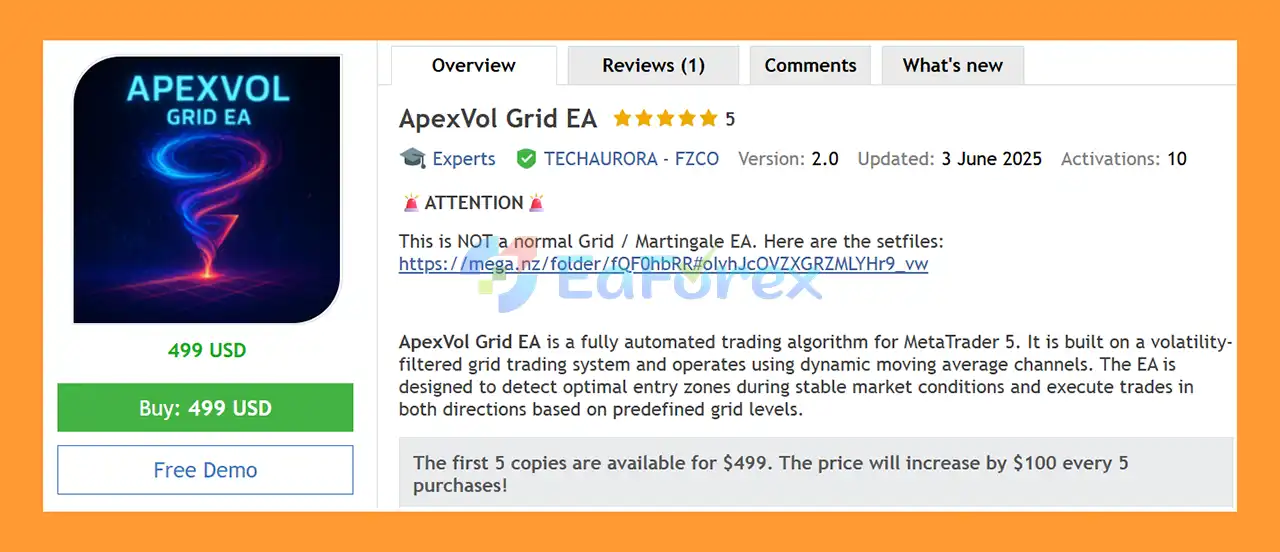
ApexVol Grid EA MT5 is a fully automated MetaTrader 5 Expert Advisor (EA) built around a volatility-filtered grid trading strategy and dynamic moving average price channels. The system is designed to identify potential entry zones when market volatility remains within predefined conditions and automatically manage multiple grid positions according to configurable price levels.
Unlike a simple grid system that continuously adds positions regardless of market conditions, ApexVol Grid EA MT5 incorporates an ATR-based volatility filter designed to prevent new entries when market volatility exceeds the configured threshold. This approach is intended to reduce unnecessary exposure during highly volatile market periods.
The EA uses dynamic price channels calculated around a moving average to determine potential entry areas. Depending on the selected configuration, traders can operate the system in Long Only, Short Only, Both, or Pause mode.
ApexVol Grid EA MT5 also provides flexible lot sizing, multi-symbol trading, drawdown protection, exposure controls, time-gap entry logic, and optional recovery features. These controls allow traders to customize the EA according to their account size, risk tolerance, and preferred trading conditions.
The default configuration is optimized for Forex pairs on the M15 timeframe, with the volatility filter using a higher timeframe such as the Daily timeframe.
About the Developer
- Author: Dominic Michael Frehner.
- Experience: Over +1 years of experience on MQL5.
- Notable Products: ApexVol Grid EA MT5, Fakeouts Indicator MT5, Heikin Ashi RSI Oscillator MT5, Bayesian Trend Indicator MT5 and other advisors.
- Flagship Product: ApexVol Grid EA MT5 is rated as the best performing product of the year.
>> Delivery time 24h-48h after payment.
>>> Refund if not delivered.
>>> You will receive the latest version without any limitations (ID+Time).>>Reviewed by Jason Stap <<
Key Features of ApexVol Grid EA MT5
Volatility-Filtered Grid System
ApexVol Grid EA MT5 automatically places staggered grid entries according to predefined price levels. However, new trading activity can be restricted when market volatility becomes excessive.
The combination of grid logic and volatility filtering is designed to focus the strategy on market conditions considered more suitable for its trading approach.
ATR Volatility Filter
The EA uses the Average True Range (ATR) to monitor market volatility.
When the ATR-to-price ratio exceeds the configured maximum volatility threshold, the EA can stop opening new trades.
This feature is designed to reduce exposure during unusually volatile market conditions.
Dynamic Moving Average Channels
ApexVol Grid EA MT5 calculates dynamic price channels around a selected moving average.
Price deviations from the moving average are used to determine potential entry zones, allowing the grid levels to adapt to changing market conditions rather than relying exclusively on fixed price distances.
Smart Lot Sizing
The EA supports several position-sizing approaches:
- Automatic lot calculation
- Fixed lot sizing
- Account-balance-based sizing
- Equity-based risk management
- Lot-size multiplier
- Configurable grid-level position sizing
This allows traders to adapt the system to different account sizes and risk-management approaches.
Directional Trade Control
Traders can select the preferred trading direction:
- Long Only
- Short Only
- Both
- Pause
This provides greater control over when the EA is allowed to open positions.
Multi-Symbol Trading
ApexVol Grid EA MT5 can be configured to trade multiple instruments simultaneously.
The system includes exposure controls designed to help manage the maximum number of positions and grid activity across supported symbols.
Default recommended instruments include:
- AUDNZD
- NZDCHF
- AUDUSD
- USDCAD
- NZDCAD
Drawdown Protection
The EA includes multiple drawdown-related controls designed to restrict additional exposure when account drawdown reaches predefined thresholds.
These include:
- Maximum total drawdown
- Drawdown threshold for new trades
- Automatic Recovery Mode disable
- Position-entry restrictions
Time-Gap Entry Logic
The EA can require a minimum amount of time between new positions.
This helps prevent excessive re-entry activity and gives the strategy greater control over trade frequency.
Capital & Margin Protection
Before opening additional positions, the EA checks relevant account conditions such as:
- Available margin
- Account balance
- Current exposure
- Existing positions
- Maximum allowed grid levels
These checks are designed to help prevent the EA from continuously adding positions without considering account capacity.
How Does ApexVol Grid EA MT5 Work?
ApexVol Grid EA MT5 combines several components to determine when and how new grid positions can be opened.
Step 1 – Market Monitoring
The EA continuously monitors the selected Forex instruments and evaluates market conditions according to its configured timeframe and parameters.
The default trading timeframe is M15.
Step 2 – Volatility Analysis
The EA calculates ATR using the selected volatility timeframe and period.
The default recommended volatility timeframe is Daily.
If the calculated volatility ratio exceeds the configured Max Volatility Ratio, the EA can prevent new trades from being opened.
Step 3 – Dynamic Channel Calculation
A selected moving average is used to construct dynamic price channels.
The system evaluates the relationship between the current market price and these dynamic channel levels to identify potential entry areas.
Step 4 – Grid Entry
When the required conditions are satisfied, the EA can open positions according to its configured grid levels.
Additional entries are staggered according to the strategy's entry logic rather than being opened simultaneously.
Step 5 – Position Sizing
The lot size can be determined automatically based on the selected money-management settings or set to a fixed volume.
A Lotsize Multiplier can also increase position size at subsequent grid levels.
Step 6 – Risk Protection
Before opening additional trades, the EA checks its configured exposure and drawdown restrictions.
If the account reaches a defined drawdown threshold or another safety condition is triggered, new trades can be blocked.
Step 7 – Recovery Management
The EA includes an optional Recovery Mode that can increase position size after losses.
Because this feature can significantly increase exposure, traders should understand the risks associated with recovery and multiplier-based grid trading before enabling it.
Step 8 – Continuous Monitoring
The EA continues monitoring open positions, grid levels, volatility, account drawdown, and trading conditions while MetaTrader 5 remains active.
Why Choose ApexVol Grid EA MT5?
ApexVol Grid EA MT5 is designed for traders who want a more structured approach to automated grid trading rather than using a basic grid that continuously adds positions regardless of market volatility.
One of its key characteristics is the integration of an ATR volatility filter. By restricting new entries when volatility exceeds a predefined threshold, the EA provides an additional layer of market-condition filtering.
The dynamic moving average channel also allows entry zones to adjust according to market price behavior.
Another advantage is the level of configuration available. Traders can control:
- Trading direction
- Lot sizing
- Grid entries
- Lot multipliers
- Recovery Mode
- Maximum drawdown
- Volatility thresholds
- Signal age
- Trading exposure
- Entry frequency
The EA can also be used across multiple Forex symbols, providing traders with the ability to distribute the strategy across several instruments while maintaining exposure controls.
However, ApexVol Grid EA MT5 remains a grid-based trading system, and users should understand that grid strategies can accumulate multiple positions during persistent market movements. Proper risk settings are therefore essential
ApexVol Grid EA MT5 Backtest Results
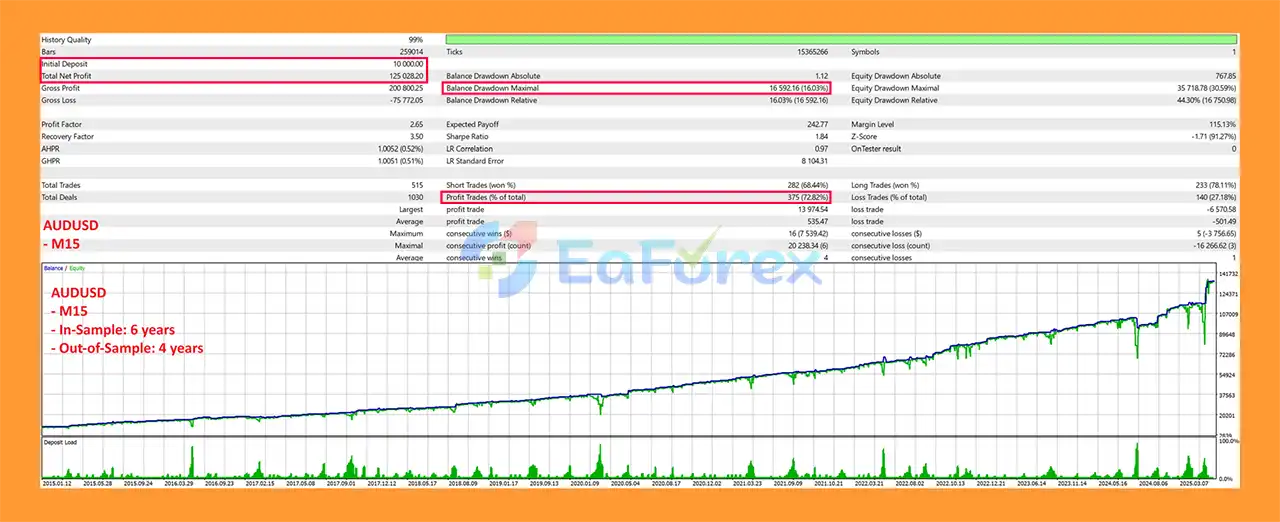
🔺AUDUSD pair
- Initial Deposit: $10,000
- Total Net Profit: $125,028.20
- Win Rate (% of total): 72.82%
- Maximum Drawdown: 16.03%
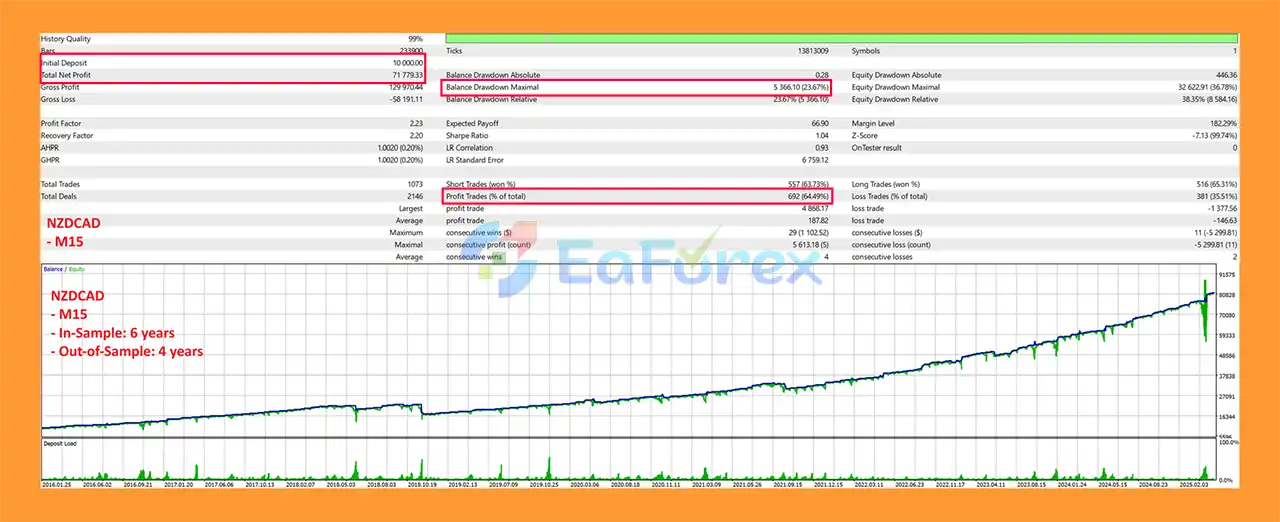
🔺NZDCAD pair
- Initial Deposit: $10,000
- Total Net Profit: $71,779.33
- Win Rate (% of total): 64.49%
- Maximum Drawdown: 23.67%
Performance and Risk Management
ApexVol Grid EA MT5 is designed primarily for Forex trading on the M15 timeframe, with the default settings optimized for selected currency pairs.
Recommended Trading Environment
| Setting | Recommendation |
|---|---|
| Trading Timeframe | M15 |
| Volatility Timeframe | Daily |
| Instruments | AUDNZD, NZDCHF, AUDUSD, USDCAD, NZDCAD |
| Market Conditions | Sideways or mildly trending markets |
| Hosting | VPS recommended for continuous operation |
The EA includes several mechanisms intended to manage trading risk.
Maximum Drawdown Control
The Max Drawdown (%) setting can prevent the EA from opening additional positions after account drawdown reaches the configured threshold.
New Trade Drawdown Protection
The Max Drawdown % to Enter New Trade parameter can prevent additional positions from being opened when current account drawdown is already too high.
Recovery Protection
The EA provides an option to automatically disable Recovery Mode when drawdown exceeds a predefined percentage.
This can help prevent aggressive recovery behavior from continuing indefinitely during unfavorable market conditions.
Grid-Level Limits
Users can control the number of grid entries using parameters such as:
- Position Entry Level
- Last Entry Level
- Stop Multiplying at Trade X
These settings are important because increasing the number of grid positions can substantially increase total account exposure.
Volatility Protection
The ATR-based volatility filter can prevent new trades when market conditions become excessively volatile.
Capital Management
Before opening additional trades, the EA checks available margin, balance, and exposure to determine whether trading conditions remain within configured limits.
Important Risk Consideration: Grid & Recovery Logic
ApexVol Grid EA MT5 includes grid trading and optional recovery/multiplier functionality.
When the Lotsize Multiplier is increased, subsequent positions can become larger than previous positions. For example, a multiplier of 2.5 means that the next grid position can be 2.5 times the previous position size, depending on the EA's configured logic.
Recovery Mode can further increase exposure following losses.
This means that although the EA provides drawdown protection, aggressive grid and recovery settings can significantly increase account risk.
Traders should carefully evaluate:
- Maximum grid levels
- Fixed lot size
- Auto lot calculation
- Lot multiplier
- Recovery Mode
- Maximum drawdown
- Available margin
- Account leverage
before using the EA on a live account.
Weaknesses and Risk Warnings
Grid Trading Can Accumulate Positions
A grid strategy may open multiple positions when price continues moving against the initial entry.
If the market develops a strong one-directional trend, several grid positions may remain open simultaneously and create significant floating drawdown.
Recovery Mode Increases Risk
Recovery Mode is designed to increase position sizing after losses. While this may accelerate recovery in certain market conditions, it can also increase losses when the market continues moving against the strategy.
Lot Multipliers Can Create High Exposure
Using a high Lotsize Multiplier can cause position sizes to increase rapidly across grid levels.
Conservative settings should be considered, particularly on smaller accounts.
Volatility Filters Are Not Perfect
The ATR filter can restrict trading during high-volatility conditions, but no volatility indicator can predict every sudden market movement.
Unexpected news events and rapid price gaps may still create substantial risk.
Market Conditions Matter
The default configuration is intended for sideways or mildly trending markets.
Persistent strong trends can create unfavorable conditions for grid-based strategies because price may continue moving in one direction without returning to previous levels.
Multi-Symbol Trading Increases Exposure
Trading several currency pairs simultaneously can increase overall account exposure, particularly when multiple pairs experience correlated movements.
VPS and Platform Reliability
For continuous automated operation, a reliable VPS is recommended. MT5 must remain connected to the trading account for the EA to operate normally.
Past Performance Is Not a Guarantee
Historical backtests or previous trading results cannot guarantee future performance.
Actual results may differ due to:
- Spread
- Slippage
- Commission
- Liquidity
- Broker execution
- Market volatility
- Account leverage
- Trading conditions
- EA configuration
Leveraged trading involves substantial risk and may not be suitable for all investors. This EA is not financial advice.
Pros and Cons
Pros
- Fully automated MetaTrader 5 Expert Advisor
- Volatility-filtered grid trading system
- ATR-based market volatility filter
- Dynamic moving average price channels
- M15 default trading timeframe
- Supports multiple Forex symbols
- Long Only, Short Only, Both, and Pause modes
- Automatic and fixed lot sizing
- Equity and balance-based position sizing
- Configurable lot multiplier
- Maximum grid-level controls
- Drawdown protection
- Recovery Mode controls
- Automatic Recovery Mode disable option
- Time-gap entry protection
- Maximum volatility filter
- Capital and margin checks
- Custom Magic Number and trade comments
- Suitable for automated VPS-based operation
Cons
- Grid trading can accumulate multiple positions
- Recovery Mode can significantly increase exposure
- Lot multipliers can accelerate account drawdown
- Strong trending markets may be unfavorable for the strategy
- Requires careful configuration of grid levels and lot sizes
- Multi-symbol trading can increase total account exposure
- High volatility can cause trading to pause or produce different execution conditions
- Results depend heavily on broker conditions and EA settings
- No automated strategy can eliminate market risk
How to Install ApexVol Grid EA MT5
Step 1 – Install MetaTrader 5
Install MetaTrader 5 from your broker or the official MetaTrader platform.
Step 2 – Obtain the EA File
After purchasing ApexVol Grid EA MT5, obtain the EA installation file and any setup instructions supplied with the product.
Step 3 – Open the MT5 Data Folder
In MetaTrader 5, select:
File → Open Data Folder → MQL5 → Experts
Copy the ApexVol Grid EA file into the Experts folder.
Step 4 – Restart or Refresh MT5
Restart MetaTrader 5 or refresh the Expert Advisors section in the Navigator window.
Step 5 – Open the Trading Chart
Open the desired Forex pair and select the M15 timeframe.
For the default configuration, the recommended instruments include:
- AUDNZD
- NZDCHF
- AUDUSD
- USDCAD
- NZDCAD
Step 6 – Attach the EA
Drag ApexVol Grid EA MT5 from the Navigator window onto the selected chart.
Make sure Algo Trading / AutoTrading is enabled.
Step 7 – Configure the Inputs
Review and configure the EA parameters, especially:
- Auto Lotsize Calculation
- Fixed Lotsize
- Lotsize Multiplier
- Position Entry Level
- Recovery Mode
- Maximum Drawdown
- Last Entry Level
- Max Drawdown to Enter New Trade
- Stop Multiplying at Trade X
- Candle Age
- Maximum Volatility Ratio
- Volatility Timeframe
- Volatility Period
- Moving Average Mode
For a first test, avoid aggressive recovery and multiplier settings until the EA has been evaluated under your broker's conditions.
Step 8 – Configure Trading Direction
Select the desired trading mode:
Long Only, Short Only, Both, or Pause.
Step 9 – Use a VPS
For continuous automated trading, run MetaTrader 5 on a reliable Forex VPS to reduce interruptions caused by computer shutdowns or unstable internet connections.
Step 10 – Test Before Live Trading
Before using ApexVol Grid EA MT5 with real money, test the EA through:
- MT5 Strategy Tester
- Demo account
- Different market conditions
- Different spreads
- Conservative risk settings
Pay particular attention to maximum drawdown, floating exposure, margin usage, number of grid positions, and recovery behavior.
What’s Included in the Download Package?
- Experts:
- Setting (If Any).docx
- Installation Guide.docx
- SetFiles:
- ApexVol Grid EA_NZDCHF_M15.set
- ApexVol Grid EA_NZDCAD_M15.set
- ApexVol Grid EA_USDJPY_M15.set
- ApexVol Grid EA_AUDNZD_M15.set
- ApexVol Grid EA_AUDUSD_M15.set
- ApexVol Grid EA_USDCAD_M15.set
- ApexVol Grid EA_NZDUSD_M30.set
Final Thoughts
In summary, ApexVol Grid EA MT5 is a volatility-filtered Forex Grid Trading Expert Advisor for MetaTrader 5, designed primarily for M15 trading with dynamic moving average channels and ATR-based volatility filtering. By restricting new entries when volatility exceeds the configured threshold, the EA adds an additional market-condition filter to its grid-based trading architecture.
The system provides extensive configuration options, including fixed or automatic lot sizing, directional controls, grid-level limits, lot multipliers, drawdown protection, time-gap entry logic, margin checks, and optional Recovery Mode. These features provide flexibility, but the underlying grid structure remains an important risk factor. Prolonged one-directional market movements can cause multiple positions to accumulate, while lot multipliers or recovery settings can significantly increase exposure and margin requirements.
The supplied AUDUSD backtest reports $125,028.20 total net profit, a 72.82% win rate, and 16.03% maximum drawdown from an initial $10,000 deposit. The NZDCAD backtest reports $71,779.33 total net profit, a 64.49% win rate, and 23.67% maximum drawdown from the same initial deposit. These historical results do not guarantee future performance.
Because ApexVol Grid EA MT5 is designed primarily for sideways or mildly trending conditions, traders should pay particular attention to strong trends, correlated multi-symbol exposure, recovery settings, grid levels, and available margin. Actual performance can also vary because of spread, slippage, commissions, liquidity, execution quality, leverage, and broker conditions.
Overall, ApexVol Grid EA MT5 provides a configurable framework for automated grid trading with volatility and drawdown controls. Thorough Strategy Tester evaluation, extended demo and forward testing, conservative lot sizing, and careful management of grid and recovery exposure are recommended before considering live deployment.



