Equilibrium Synthetix v4 EA
Equilibrium Synthetix v4 EA MT4 (Latest version) | Unbounded Original price was: $1,777.00.Current price is: $249.00.
Back to products
XAU Sniper Pro EA
XAU Sniper Pro EA MT5 + SetFiles (Latest version) | Unbounded Original price was: $999.00.Current price is: $599.00.

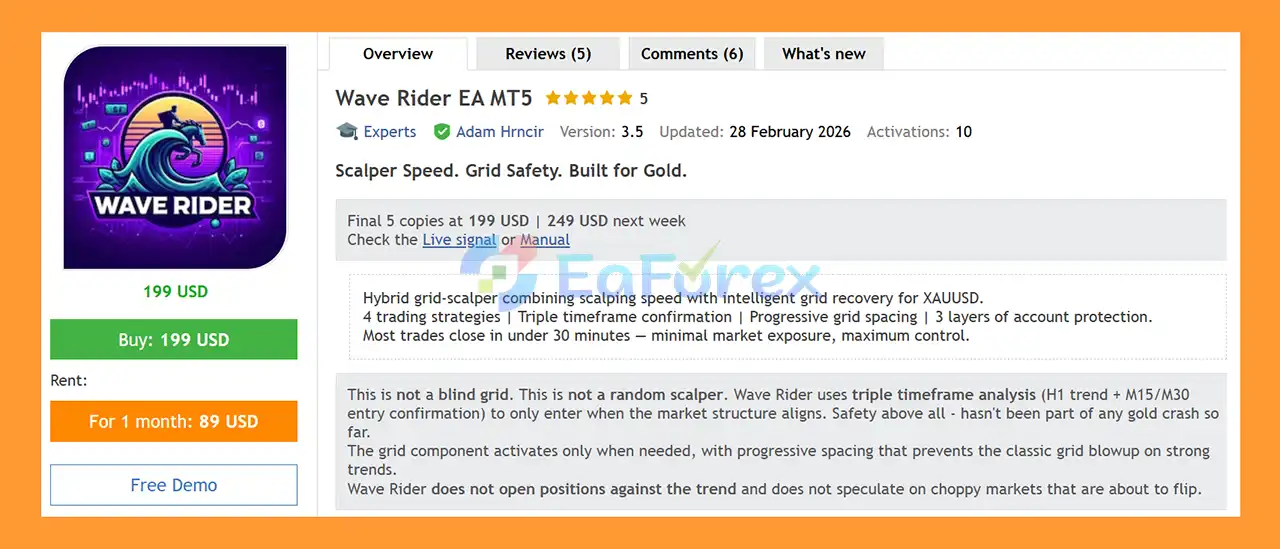
Wave Rider EA MT5 (Official version) | Unbounded

Wave Rider EA MT5 is a professional XAUUSD trading robot combining grid and scalping strategies, smart recovery, low drawdown, and high win rate performance.

Original price was: $999.00.Current price is: $599.00.

89 People watching this product now!
  • Unlimited Activations

You can use product with unlimited account


  • Instant delivery

Download link will be sent instantly after purchase


  • Easy to install

Pre-activated, ready to use immediately


  • Free Update
  • Free Install Support

Payment Methods:

Description

Product Overview

Wave Rider EA MT5 is a fully automated XAUUSD Gold Expert Advisor for MetaTrader 5, designed to combine fast scalping execution with precise, trend-aligned entries. The system is built specifically for traders who want short market exposure while maintaining structured risk management and multiple layers of account protection.

Unlike a conventional single-strategy Gold EA, Wave Rider EA MT5 uses 7 independent trading strategies, multi-timeframe market confirmation, intelligent recovery logic, and configurable position sizing. The system analyzes the H1 trend together with lower-timeframe confirmation from M5, M15, and M30 before opening trades.

The core philosophy is simple: knowing when not to trade is just as important as knowing when to enter. Wave Rider is designed to avoid trading against the broader trend and can remain inactive during unfavorable or highly unstable market conditions.

Most trades are intended to close within a relatively short period, helping reduce prolonged market exposure. Depending on the selected mode, Wave Rider EA MT5can operate as a Single Position EA using SL/TP or as an Intelligent Grid Recovery EA.

The EA has been continuously developed and updated for more than six months, with testing across multiple broker feeds. According to the developer, problematic trading events are investigated across different broker environments rather than simply optimizing settings to improve historical backtests.

Important: Past performance does not guarantee future results. Always test the EA on a demo account and backtest your exact XAUUSD symbol, broker conditions, and settings before using real funds.

About the Developer

  • Author: Adam Hrncir.
  • Experience: Over +1 years of experience on MQL5.
  • Notable Products: Wave Rider EA MT5, Wave Rider EA MT4 and other advisors.
  • Flagship Product: Wave Rider EA MT5 is rated as the best performing product of the year.

>> Delivery time 24h-48h after payment.
>>> Refund if not delivered.
>>> You will receive the latest version without any limitations (ID+Time).

>>Reviewed by Jason Stap <<

Key Features of Wave Rider EA MT5

Seven Integrated Trading Strategies

Wave Rider EA MT5 includes seven strategies designed to address different Gold market conditions:

  • S01 – Support & Resistance: Uses dual-timeframe ZigZag analysis to identify meaningful support and resistance zones on M15/M30, combined with volatility and trend-strength filters.
  • S02 – Pullback: Monitors M1, M5, and M15 price action to identify momentum shifts, bounce zones, and potential exhaustion during retracements.
  • S03 – Trend Breakout: Detects consolidation breakouts and attempts to participate in strong directional movements after momentum confirmation.
  • S04 – M5 Bounce: Searches for oversold bounce opportunities using market strength, momentum, and candle-pattern confirmation.
  • S05 – Smart-Money Volume: Analyzes volume and candle spread to identify conditions such as No Supply, No Demand, Stopping Volume, and Buying Climax.
  • S06 – Momentum Continuation: Uses separate BUY and SELL engines to identify fresh M15 momentum and follow established directional structures.
  • S07 – Impulse: An optional strategy that detects strong M30 impulses and looks for controlled M5 pullbacks. It is disabled by default.

Some strategies support both BUY and SELL trading, while others are BUY-only. The EA can also be configured globally for BUY-only or SELL-only operation.

Multi-Timeframe Trend Confirmation

Wave Rider combines higher-timeframe and lower-timeframe analysis to improve entry filtering.

The H1 trend provides the broader market direction, while M5, M15, and M30 confirmation helps identify potential entry opportunities.

This architecture is designed to reduce trades taken against the dominant market structure.

Two Trading Modes

Wave Rider EA MT5 gives traders two fundamentally different ways to manage positions:

Recovery Mode

  • Intelligent grid recovery
  • Progressive spacing
  • Basket-level breakeven
  • Trailing stop
  • Recovery depth limitations
  • Position-count protection
  • Basket volume protection

Single Position Mode

  • One position at a time
  • Fixed SL and TP
  • Built-in trailing stop
  • No grid
  • No recovery positions
  • Simpler exposure structure

Single Position Mode can be particularly relevant for traders who want to avoid grid-style recovery exposure.

Four Recovery Personalities

Recovery Mode provides four predefined recovery approaches:

  • Wide Slow: More patience, wider volatility-based spacing, fewer recovery positions.
  • Wide Fast: Earlier recovery activity with potentially higher trading activity and higher drawdown.
  • Static: Fixed BUY/SELL spacing with a tighter basket target.
  • Hybrid: Uses a fixed minimum distance while allowing volatility to widen recovery spacing.

These settings are designed as complete recovery profiles rather than a collection of unrelated parameters.

Three Layers of Account Protection

Wave Rider includes:

  • Drawdown Protection
  • ATH Protection
  • Dynamic Exit

These mechanisms are designed to limit exposure during unfavorable market conditions.

Advanced News Protection

The EA can pause new entries around important economic events.

The system includes protection around major events such as:

  • CPI
  • FOMC
  • NFP
  • High-impact USD/EUR/GBP events
  • USD bank holidays

Existing positions can continue to be managed while new entries are temporarily restricted.

Flexible Position Sizing

Wave Rider EA MT5 supports several position-sizing approaches:

  • Fixed Lot
  • Auto Risk
  • Custom Scale

This allows traders to separate entry aggressiveness from account risk and lot sizing.

NextGen Dashboard

The visual dashboard provides information including:

  • Account performance
  • Current drawdown
  • Strategy status
  • Individual strategy P/L
  • News protection status
  • Calculated lot size
  • Entry profile
  • Risk information

This helps traders monitor the EA without having to inspect multiple input parameters manually.


How Does Wave Rider EA MT5 Work?

Wave Rider EA MT5 follows a multi-stage trading process rather than relying on a single technical indicator.

Step 1: Analyze the Higher-Timeframe Trend

The EA first evaluates the broader H1 market structure to determine the prevailing directional environment.

This helps prevent the system from entering trades that conflict with the larger trend.

Step 2: Confirm the Lower-Timeframe Setup

Depending on the selected strategy, Wave Rider evaluates price action and market conditions on M5, M15, and M30.

The system looks for conditions such as:

  • Support and resistance reactions
  • Pullbacks
  • Momentum continuation
  • Breakouts
  • Bounce setups
  • Volume behavior
  • Impulsive price movements

Step 3: Apply Market Filters

Before an entry is allowed, the EA can evaluate additional conditions such as:

  • Trend strength
  • Volatility
  • Market structure
  • Trading session
  • News events
  • ATH proximity
  • Entry profile
  • Spread and broker conditions

If the required conditions are not satisfied, the EA can remain inactive.

Step 4: Open the Trade

Once the selected strategy receives sufficient confirmation, Wave Rider opens a position according to the configured risk and position-sizing parameters.

Step 5: Manage the Position

The EA continuously manages open trades using features such as:

  • Stop Loss
  • Take Profit
  • Trailing Stop
  • Breakeven
  • Basket management
  • Dynamic Exit
  • Drawdown protection

Step 6: Recovery When Enabled

If Recovery Mode is selected and the market moves against the initial position, the EA can activate its predefined recovery logic.

Recovery spacing, basket targets, position limits, and exposure are controlled according to the selected recovery personality.

If Single Position Mode is selected, this recovery mechanism is completely disabled.


Why Choose Wave Rider EA MT5?

Wave Rider EA MT5 is designed for traders looking for a structured XAUUSD scalping system rather than a simple one-indicator Gold EA.

Multiple Strategies in One EA

The seven strategies are designed for different market environments. When one setup is inactive, another strategy may identify an opportunity.

Trend-Aware Trading

The combination of H1 trend analysis with lower-timeframe confirmation is intended to reduce unnecessary counter-trend entries.

Flexible Risk Architecture

Traders can choose between Single Position trading and Recovery Mode depending on their preferred exposure structure.

Recovery Without Unlimited Stacking

Instead of leaving every recovery parameter completely independent, Wave Rider provides four predefined recovery personalities with coordinated behavior.

Strong Account Protection Framework

Drawdown protection, ATH protection, dynamic exits, news filters, and position limits provide multiple layers of risk control.

Continuous Development

The developer states that Wave Rider is actively maintained, with updates and testing across multiple broker feeds.

Suitable for Gold Trading

The EA is specifically designed for XAUUSD, one of the most volatile instruments in the forex and CFD market.

Wave Rider EA MT5 Backtest Results

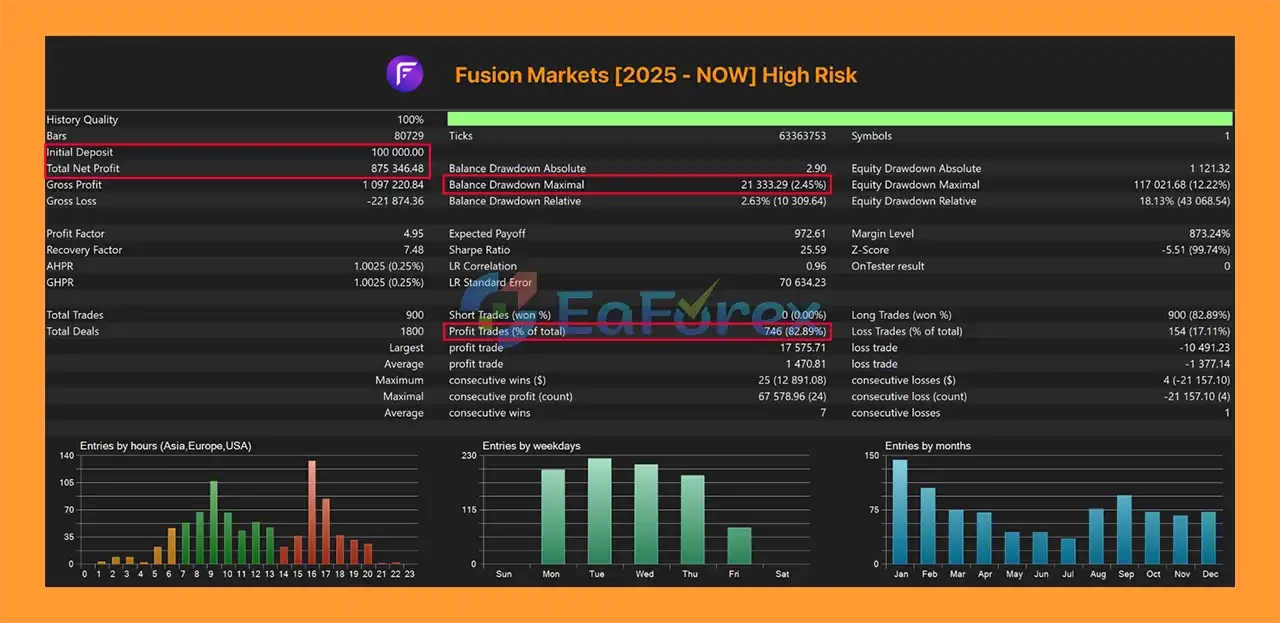
🔺XAUUSD pair – 12 months – Fusion Markets

  • Initial Deposit: $100,000.00
  • Total Net Profit: $875,346.48
  • Win Rate (% of total): 82.89%
  • Maximum Drawdown: 2.45%
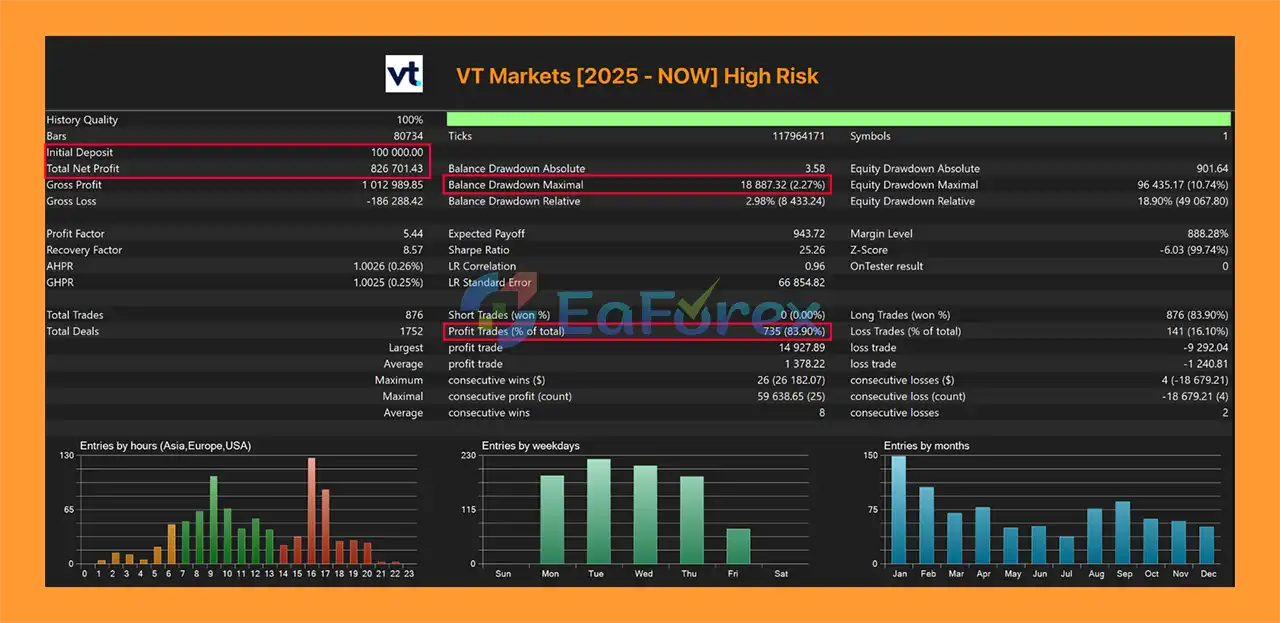
Wave Rider EA Backtests Results

Wave Rider EA Backtests Results

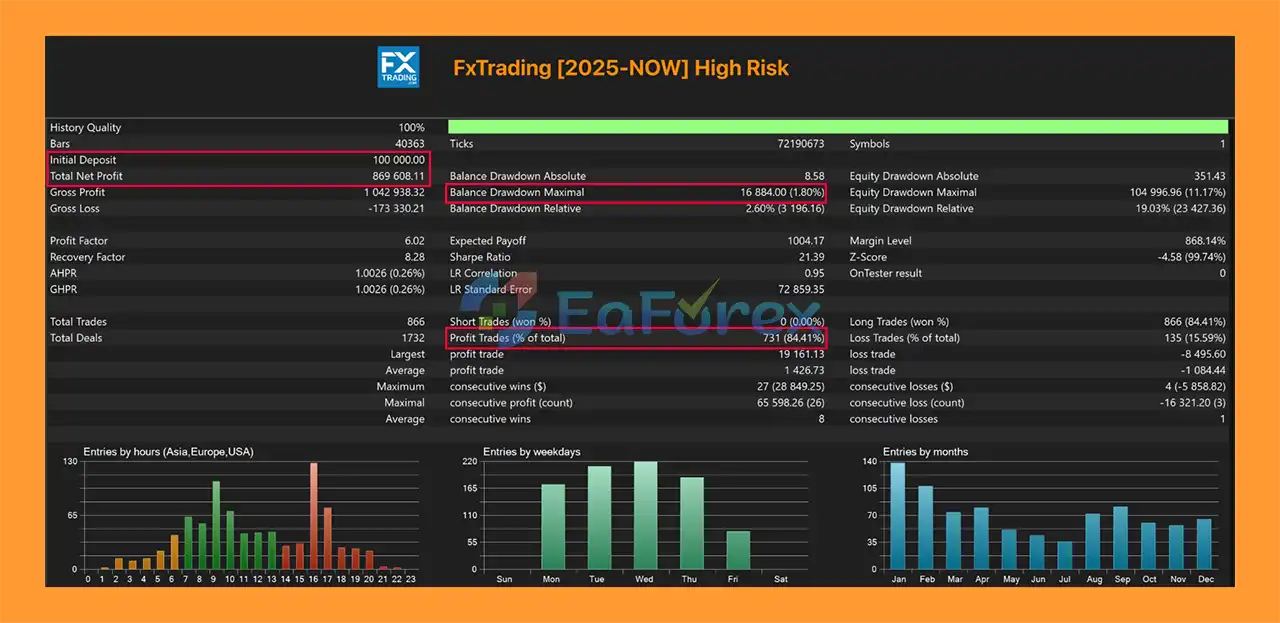
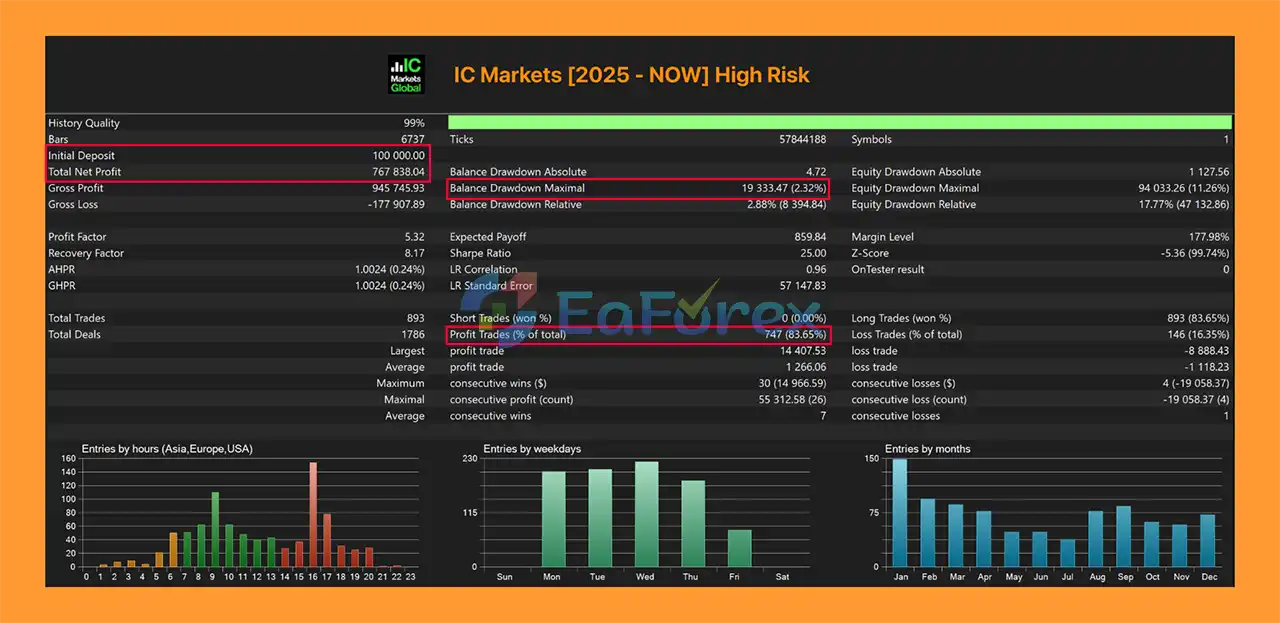
🔺XAUUSD pair – 12 months –  IC Markets

  • Initial Deposit: $100,000.00
  • Total Net Profit: $767,838.04
  • Win Rate (% of total): 83.65%
  • Maximum Drawdown: 2.32%
Wave Rider EA MT5 Backtests

Wave Rider EA MT5 Backtests

Performance and Risk Management

Wave Rider EA MT5 has been tested across multiple broker feeds, with Version 5.0 testing covering the period from 2025 to the current period according to the developer’s documentation.

The testing process reportedly involved thousands of positions and multiple broker environments.

However, performance can vary significantly depending on:

  • Broker
  • XAUUSD contract specifications
  • Spread
  • Commission
  • Slippage
  • Execution speed
  • Leverage
  • Account type
  • VPS quality
  • Historical tick quality
  • EA settings
  • Market conditions

For this reason, traders should not assume that results from one broker will be reproduced on another broker.

Recommended Trading Conditions

Parameter Recommendation
Symbol XAUUSD / Gold
Platform MetaTrader 5
Timeframe Any chart timeframe
Minimum Deposit Around $300 with 0.01 lot
Recommended Deposit $800+ for Grid Recovery
Single Position Around $150 at 0.01 lot, depending on broker conditions
Account Type Hedge
Minimum Leverage 1:100
Recommended Leverage 1:500
Broker Type ECN / RAW spread preferred
VPS Recommended
Testing Period 2025 to current
Backtest Mode Real Ticks recommended

For Grid Recovery, a larger account balance is recommended because recovery trading can require additional margin when price moves against the initial position.

Never choose lot size solely because of a historical win rate. Account equity, maximum drawdown, margin requirements, and worst-case exposure should be considered together.


Weaknesses and Risk Warnings

No automated trading system can eliminate market risk, and Wave Rider EA MT5 has several important limitations that traders should understand.

Grid Recovery Can Increase Exposure

Recovery Mode can open additional positions when the market moves against the initial trade.

Although Wave Rider includes position-count and basket-volume limits, a prolonged directional move can still create substantial drawdown and margin requirements.

High Gold Volatility

XAUUSD can experience extremely rapid movements during major economic announcements, geopolitical events, liquidity changes, or unexpected market conditions.

Sudden price movements can cause:

  • Slippage
  • Wider spreads
  • Delayed execution
  • Larger-than-expected losses

Broker Conditions Matter

Different brokers can provide different spreads, execution speeds, contract specifications, and historical data.

The developer specifically recommends testing the EA on supported environments such as VT Markets, Vantage, BlackBull, Fusion Markets, IC Markets, and FxTrading, but compatibility and trading results should still be verified on the user’s own account.

Backtest Results Are Not Guarantees

Historical backtests can provide useful information about how a strategy behaved under specific historical conditions, but they cannot guarantee future performance.

Always test with real tick data where available.

Recovery Mode Requires More Capital

The recommended minimum deposit for Recovery Mode is higher than for Single Position Mode because additional positions may require additional margin.

News Protection Is Not a Guarantee

News filters can prevent new trades around scheduled economic events, but they cannot predict every unexpected market event or eliminate slippage.

Updates May Change Settings

When updating Wave Rider, existing positions should be closed according to the developer’s instructions.

Strategy Magic Numbers and input names may change between versions, so older presets or templates may not restore every option correctly.

No EA Can Guarantee a Specific Win Rate

Even if historical testing shows a high winning percentage, future market conditions can produce different results.

Traders should evaluate drawdown, exposure, recovery depth, margin requirements, and losing periods, rather than focusing only on the percentage of winning trades.


Pros and Cons

Pros

  • Designed specifically for XAUUSD Gold
  • Built for MetaTrader 5
  • Seven integrated trading strategies
  • Multi-timeframe market confirmation
  • H1 trend analysis
  • M5/M15/M30 entry confirmation
  • Single Position and Recovery modes
  • Four predefined recovery personalities
  • Built-in trailing stop
  • Basket breakeven management
  • Drawdown protection
  • ATH protection
  • Dynamic Exit
  • Advanced news protection
  • Flexible position sizing
  • NextGen visual dashboard
  • Multiple trading-session controls
  • Designed for ECN/RAW trading conditions
  • VPS recommended for continuous operation
  • Regular development and updates

Cons

  • Recovery Mode can create significant exposure during extended trends
  • Requires sufficient margin for grid recovery
  • XAUUSD volatility can cause rapid drawdown
  • Results may vary between brokers
  • Slippage and spread can affect execution
  • Requires careful lot-size selection
  • Historical backtests cannot guarantee future performance
  • More complex than a basic single-strategy EA
  • Updates may require settings and preset review
  • Traders must understand the risks of automated Gold trading

How to Install Wave Rider EA MT5

Installing Wave Rider EA MT5 follows the standard MetaTrader 5 Expert Advisor installation process.

Step 1: Download the EA

Obtain the Wave Rider EA MT5 files and any license, setup guide, or preset files supplied with your purchase.

Step 2: Open MetaTrader 5

Launch your MetaTrader 5 trading platform.

Go to:

File → Open Data Folder

Step 3: Open the Experts Folder

Navigate to:

MQL5 → Experts

Copy the Wave Rider EA files into this folder.

Step 4: Restart MetaTrader 5

Close and reopen MT5, or refresh the Expert Advisors section inside the Navigator.

You should then see Wave Rider EA in the Expert Advisors list.

Step 5: Open an XAUUSD Chart

Open the XAUUSD / Gold chart from your broker.

Wave Rider uses its own internal timeframes, so the EA can be attached to the chart timeframe specified by the developer.

Step 6: Enable Automated Trading

Make sure Algo Trading / AutoTrading is enabled in MetaTrader 5.

Also check the EA’s permission settings when attaching it to the chart.

Step 7: Configure Risk Settings

Before starting live trading, review:

  • Trading mode
  • Recovery personality
  • Entry profile
  • Lot size
  • Risk percentage
  • Drawdown protection
  • Trading sessions
  • News protection
  • BUY/SELL direction
  • Maximum positions
  • Account protection settings

For new users, testing with Single Position Mode or conservative settings on a demo account can help you understand how the EA behaves before considering Recovery Mode.

Step 8: Backtest Your Broker’s XAUUSD Symbol

Use the MT5 Strategy Tester and test the exact Gold symbol provided by your broker.

The developer recommends testing from 2025 to the current period using Real Ticks, because historical data quality for earlier periods may not be considered reliable for this EA.

Step 9: Run on a VPS

For 24/5 automated operation, a stable VPS is recommended.

The VPS should remain connected to your MT5 terminal so the EA can monitor positions and execute its trading logic continuously.

Important Update Warning

Before installing a new Wave Rider version, close all Wave Rider positions as instructed by the developer.

Because strategy Magic Numbers and some input names may change between versions, review your settings carefully and create a new preset after updating. Older templates or .set files may not restore every available option correctly.

Final Note: Wave Rider EA MT5 is a specialized automated Gold trading system with multiple strategies, recovery options, and several layers of risk protection. These features can provide greater flexibility, but they do not remove trading risk. Always test the EA on a demo account, verify broker compatibility, use appropriate position sizing, and avoid risking capital you cannot afford to lose.

What’s Included in the Download Package?

  • Setting (If Any).docx
  • Installation Guide.docx

>>> Join VIP Membership Now <<<

Final Thoughts

In summary, Wave Rider EA MT5 is a specialized XAUUSD Gold Trading Expert Advisor for MetaTrader 5, combining seven independent trading strategies with multi-timeframe trend confirmation and configurable position-management systems. The EA can operate in Single Position Mode with fixed SL/TP or Recovery Mode with intelligent grid-based recovery, giving traders different approaches to managing Gold exposure.

Its risk-management framework includes drawdown protection, ATH protection, dynamic exits, news filtering, position limits, trailing management, and flexible lot sizing. However, Recovery Mode remains an important risk consideration because additional positions can increase exposure and margin requirements when XAUUSD moves against the initial trade. Traders who prefer a simpler exposure structure may therefore evaluate Single Position Mode separately.

The supplied 12-month XAUUSD backtests report $875,346.48 net profit, 82.89% win rate, and 2.45% maximum drawdown on Fusion Markets, while the IC Markets test reports $767,838.04 net profit, 83.65% win rate, and 2.32% maximum drawdown, both from $100,000 initial deposits. These historical results do not guarantee future performance and should be evaluated together with their specific testing conditions.

Because Gold trading is highly sensitive to volatility, spread, slippage, execution, leverage, and broker conditions, results may differ significantly in live trading. Thorough Real Tick backtesting, extended demo forward testing, appropriate position sizing, sufficient margin, and a reliable VPS are recommended before considering live deployment.

FAQs

FAQs

1. What Is Wave Rider EA MT5?

Wave Rider EA MT5 is a professional automated trading robot (Expert Advisor) designed for the MetaTrader 5 platform. It combines grid strategy and scalping technology, specifically optimized for trading XAUUSD (Gold), with structured entries and controlled risk management.

2. How Does Wave Rider EA MT5 Work on XAUUSD?

Wave Rider EA MT5 uses a hybrid grid-scalping system with triple timeframe confirmation (H1 trend direction and M15/M30 entry validation). It executes fast scalping trades and activates intelligent grid recovery only when necessary, avoiding risky martingale multiplication.

3. Is Wave Rider EA MT5 Safe to Use?

Yes, Wave Rider EA MT5 is built with a safety-first architecture. It includes:

Drawdown Protection

ATH (All-Time High) Entry Filter

Dynamic Exit Technology

Daily loss limit control

No martingale system (default multiplier 1.0)

These protections help minimize risk exposure and maintain structured capital management.

4. Does Wave Rider EA MT5 Use Martingale Strategy?

No. Wave Rider EA MT5 does not use a traditional martingale system. The default lot multiplier is set to 1.0, ensuring controlled risk exposure and preventing aggressive lot escalation.

5. What Strategies Are Included in Wave Rider EA MT5?

Wave Rider EA MT5 integrates four independent gold trading strategies:

Support & Resistance

Pullback Trading

Trend Breakout

M5 Bounce Strategy

These strategies can operate individually or together depending on market conditions.

6. What Are the Backtest Results of Wave Rider EA MT5?

According to 12-month backtests:

Fusion Markets (XAUUSD)

Initial Deposit: $100,000

Net Profit: $875,346.48

Win Rate: 82.89%

Maximum Drawdown: 2.45%

IC Markets (XAUUSD)

Initial Deposit: $100,000

Net Profit: $767,838.04

Win Rate: 83.65%

Maximum Drawdown: 2.32%

These results demonstrate high consistency with low drawdown levels.

7. What Timeframes Does Wave Rider EA MT5 Use?

Wave Rider EA MT5 applies a triple timeframe confirmation system:

H1 for primary trend direction

M15 and M30 for entry validation

M5 for bounce strategy execution

This multi-layer structure improves entry precision and reduces false signals.

8. How Long Are Trades Open in Wave Rider EA MT5?

Most trades are designed to close within 30 minutes. This fast scalping execution minimizes market exposure and reduces overnight risk.

Specification

Technical Details

Trading platform

MetaTrader 5 (MT5)

Time frames

Any

Currency pairs

XAUUSD (Gold)

Product type

Official version

Customer Reviews

0 reviews
0
0
0
0
0

There are no reviews yet.

Be the first to review “Wave Rider EA MT5 (Official version) | Unbounded”

Your email address will not be published. Required fields are marked *

1 2 3 4 5
1 2 3 4 5
1 2 3 4 5