


Product Overview
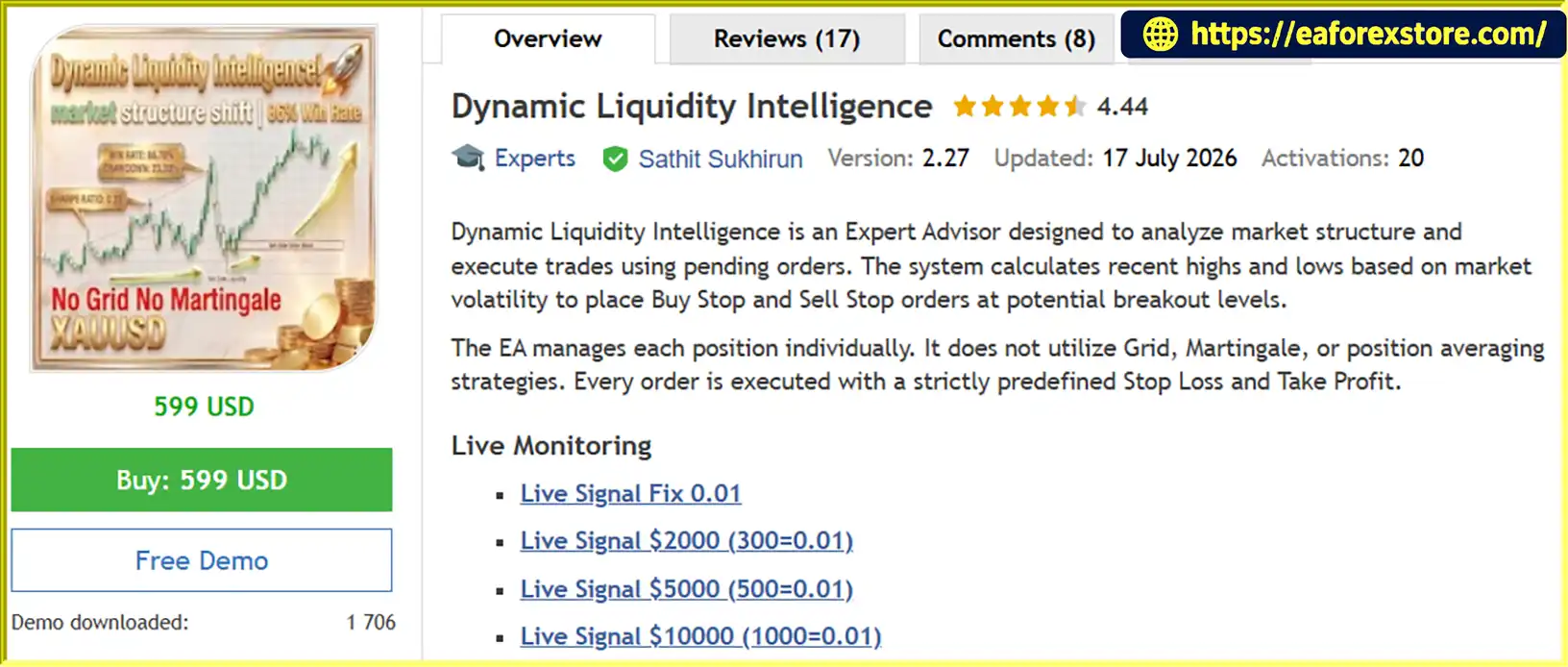
Dynamic Liquidity Intelligence EA MT5 is an advanced automated trading system (Expert Advisor) developed for MetaTrader 5 (MT5), specifically designed for trading Gold (XAUUSD).
The EA uses market structure analysis and real-time volatility measurements to identify potential breakout opportunities. By analyzing recent swing highs and lows, the system automatically places Buy Stop and Sell Stop pending orders at strategically calculated price levels.
Unlike traditional Grid or Martingale trading systems, Dynamic Liquidity Intelligence EA MT5 manages every position independently, with predefined Stop Loss (SL) and Take Profit (TP) levels. This approach helps maintain structured trade execution and clearly defined risk parameters.
With dynamic volatility-based calculations, automated position management, and built-in trading filters, this EA provides a systematic approach to automated Gold trading.
About the Developer
- Author: Sathit Sukhirun
- Experience: Over +3 years of experience on MQL5.
- Notable Products: Dynamic Liquidity Intelligence EA MT5 and other advisor.
- Flagship Product: Dynamic Liquidity Intelligence EA MT5 is rated as the best performing product of the year.
>>> Delivery time 24h-48h after payment.
>>> Refund if not delivered.
>>> You will receive the latest version without any limitations (ID+Time).Reviewed by Jason Stap <<<
Key Features of Dynamic Liquidity Intelligence EA MT5
Dynamic Market Structure Analysis
The EA continuously monitors market conditions and analyzes recent price movements to identify significant swing highs and lows.
Based on real-time volatility, it calculates potential breakout levels and automatically places Buy Stop and Sell Stop pending orders.
Volatility-Based Stop Loss and Take Profit
Stop Loss and Take Profit levels are automatically calculated according to current market volatility.
The system maintains predefined risk-to-reward parameters to ensure that every trade follows a structured risk management approach.
Individual Position Management
Each trade is managed independently without relying on Grid, Martingale, or position averaging strategies.
Every position has its own predefined Stop Loss and Take Profit, helping traders maintain better control over individual trade exposure.
Automatic Break-Even Protection
The built-in Break-Even function automatically adjusts the Stop Loss to the entry price once a trade reaches a predefined profit threshold.
This feature helps protect trading capital by reducing the risk of turning a profitable position into a losing trade, although execution costs may still apply.
Step-by-Step Trailing Stop
The EA includes an automatic Trailing Stop mechanism that gradually adjusts Stop Loss levels as the market moves in a favorable direction.
This allows profitable trades to remain open while helping protect accumulated gains.
Advanced Trading Time Filters
Dynamic Liquidity Intelligence EA MT5 includes several time-based trading filters:
-
Friday Filter: Stops opening new trades before the weekend market close to help reduce exposure to weekend price gaps.
-
New Year Holiday Filter: Automatically pauses trading during the New Year holiday period.
-
Trading Session Filter: Allows the EA to operate only during selected market sessions, helping align trading activity with preferred market hours.
How It Works
Dynamic Liquidity Intelligence EA MT5 follows a systematic trading process based on market structure and volatility.
Step 1: Analyze Market Conditions
The EA monitors XAUUSD price movements on the M15 timeframe and evaluates current market volatility.
Step 2: Identify Key Price Levels
It calculates recent swing highs and swing lows to identify potential breakout areas.
Step 3: Place Pending Orders
Based on the identified levels, the EA automatically places:
-
Buy Stop orders above selected resistance or swing-high levels.
-
Sell Stop orders below selected support or swing-low levels.
Step 4: Execute and Manage Trades
When the market reaches a pending order level, the trade is activated. Each position receives its own Stop Loss and Take Profit.
Step 5: Protect Open Positions
Once predefined profit thresholds are reached, the EA activates Break-Even and Trailing Stop functions to manage open positions.
Step 6: Apply Trading Filters
The EA follows configured trading sessions, Friday restrictions, and New Year holiday settings to manage trading activity.
Why Choose Dynamic Liquidity Intelligence EA MT5?
Choosing the right MT5 Expert Advisor is essential for building a disciplined automated trading strategy.
Dynamic Liquidity Intelligence EA MT5 offers several advantages:
-
Designed for Gold Trading: Specifically optimized for XAUUSD market conditions.
-
Smart Pending Order Strategy: Uses market structure and volatility to identify potential breakout opportunities.
-
No Grid or Martingale: Does not use progressive lot sizing, position averaging, or recovery-based trading methods.
-
Defined Risk Parameters: Every trade is protected by predefined Stop Loss and Take Profit levels.
-
Automated Trade Management: Includes Break-Even and Trailing Stop functions.
-
Flexible Risk Settings: Supports conservative, moderate, and aggressive position sizing.
-
Time-Based Trading Controls: Built-in filters help manage trading activity around weekends, holidays, and selected market sessions.
-
MT5 Compatibility: Runs directly on the MetaTrader 5 trading platform.
This EA is designed for traders who prefer a structured breakout trading approach with automated execution and predefined risk controls.
Dynamic Liquidity Intelligence EA MT5 Performance Review
🟢Signal Results
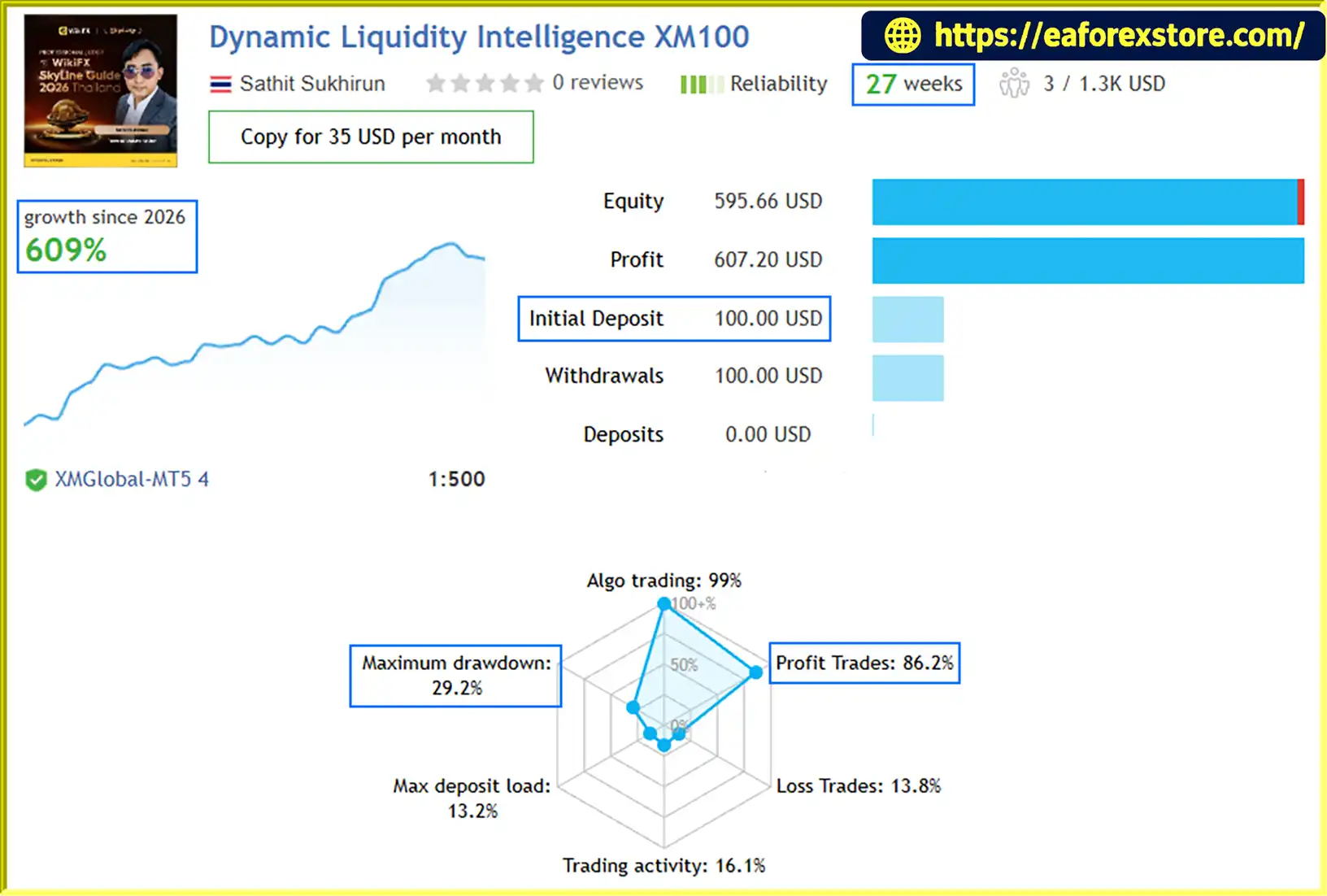
🔺Dynamic Liquidity Intelligence XM100 – 27 consecutive weeks
- Initial Deposit: $100
- Growth Rate: +609%
- Win Rate (% of total): 86.2%
- Maximum Drawdown: 29.2%
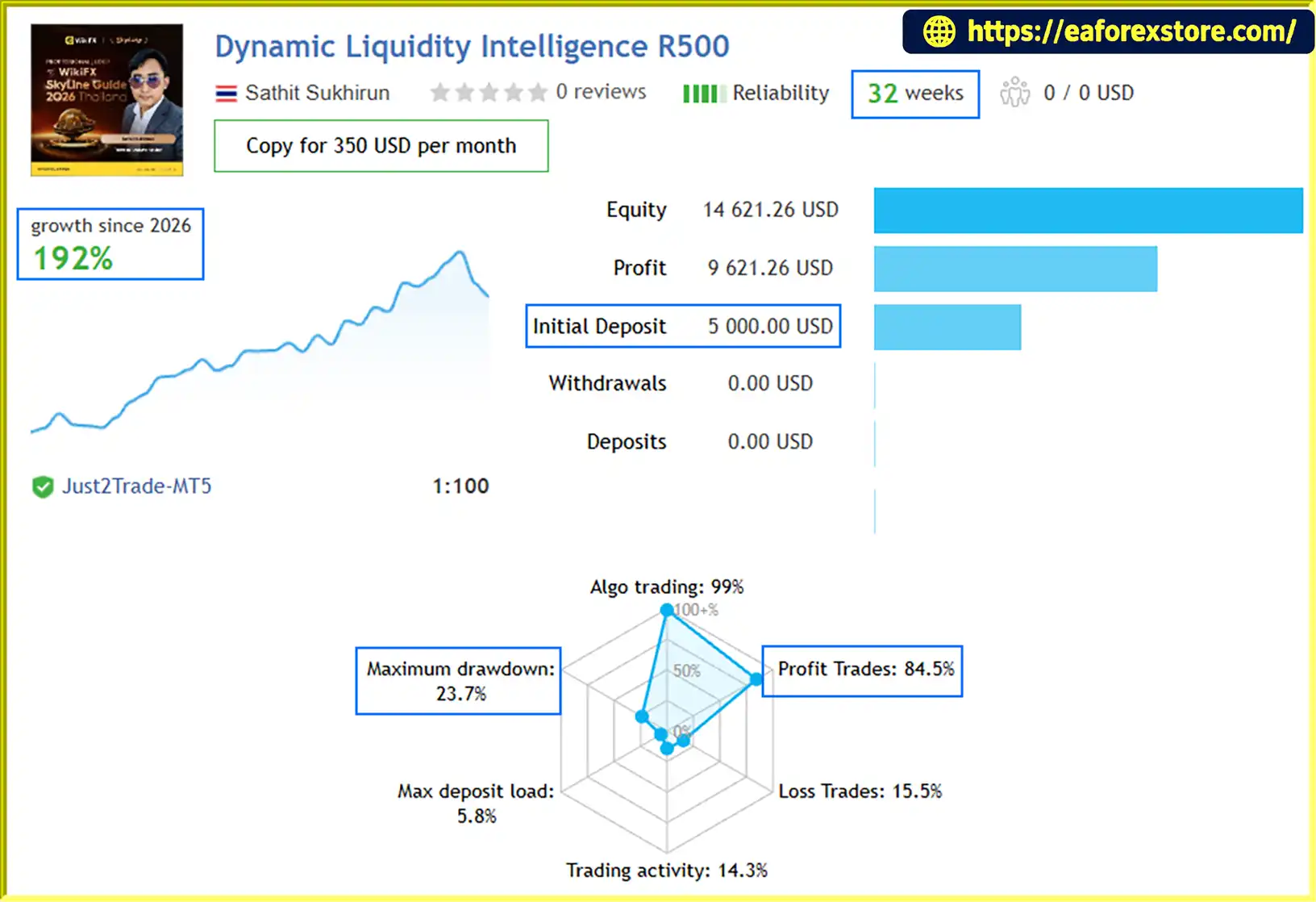
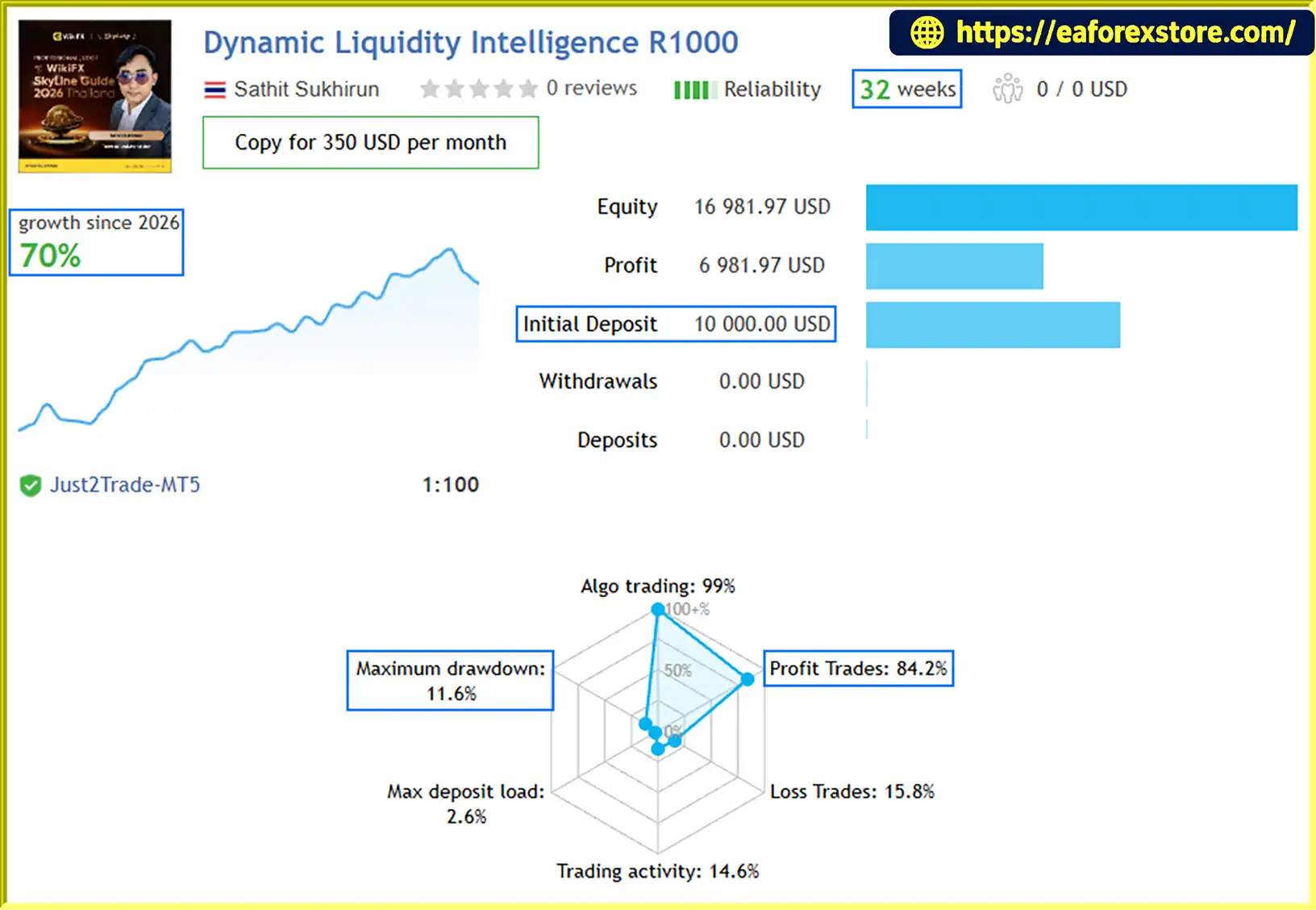
🔺Dynamic Liquidity Intelligence R1000 – 32 consecutive weeks
- Initial Deposit: $10.000
- Growth Rate: +70%
- Win Rate (% of total): 84.2%
- Maximum Drawdown: 11.6%
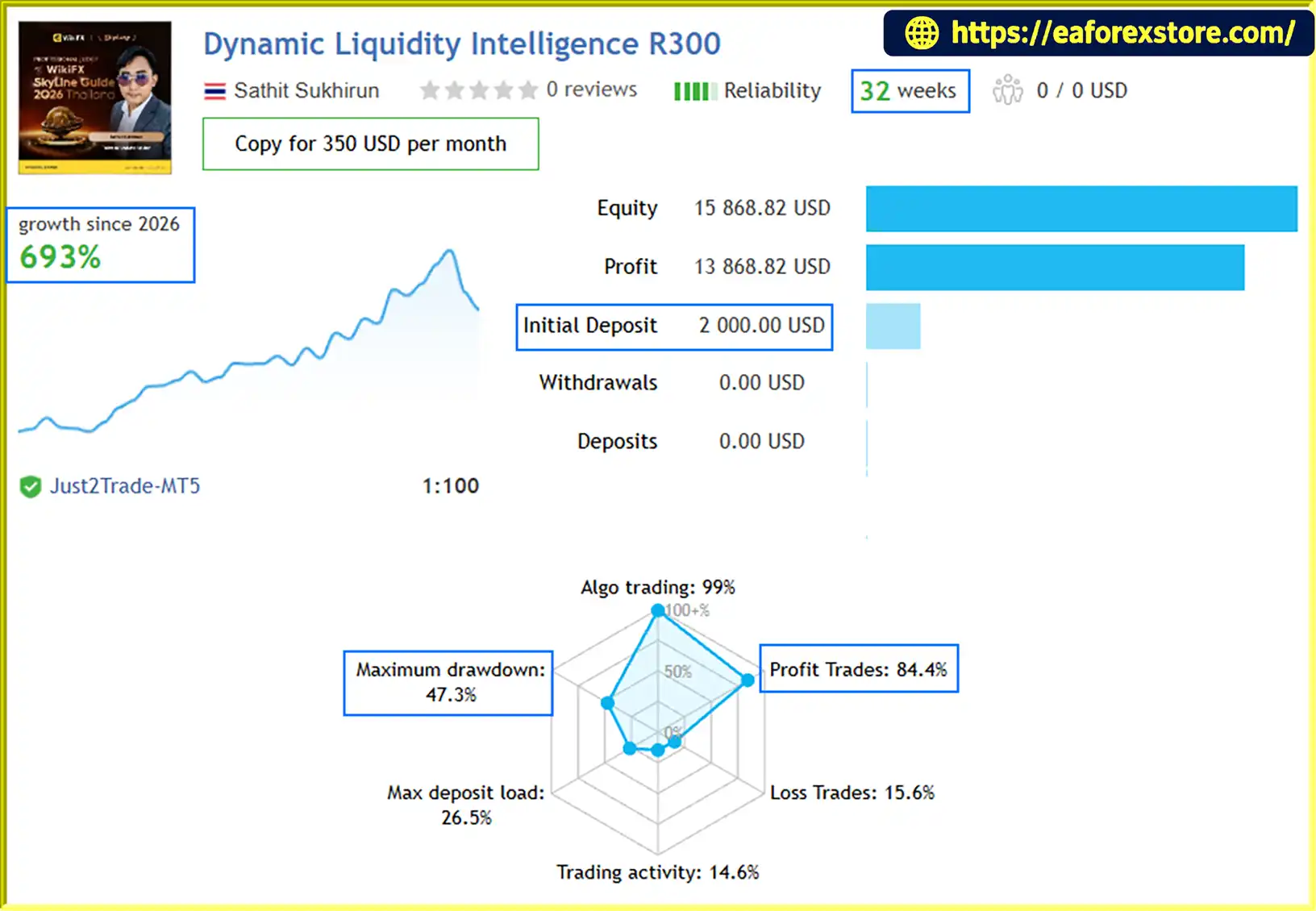
🔺Dynamic Liquidity Intelligence R300 – 32 consecutive weeks
- Initial Deposit: $2.000
- Growth Rate: +693%
- Win Rate (% of total): 84.4%
- Maximum Drawdown: 47.3%
🟢Backtest Results
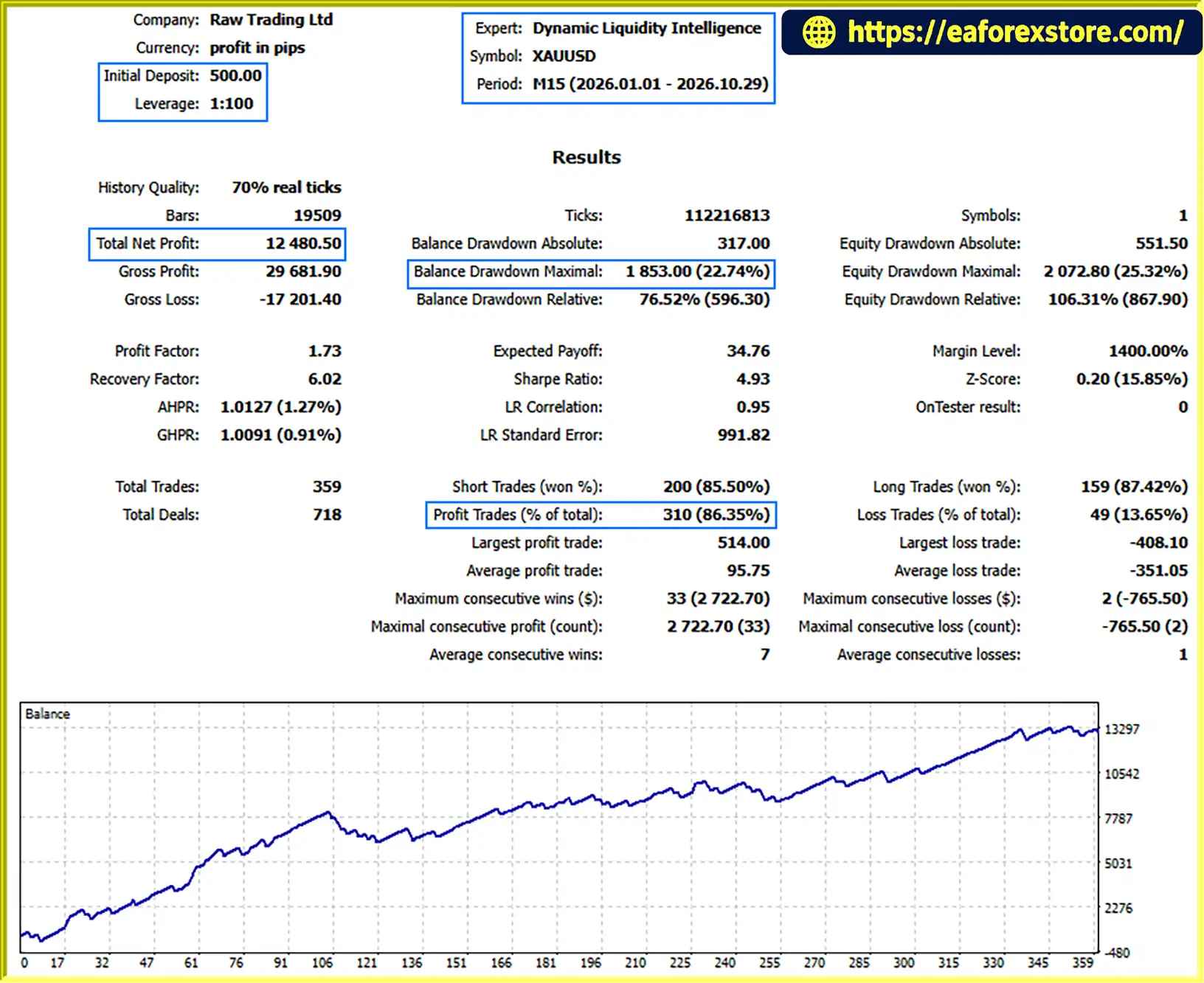
🔺XAUUSD (Gold) pair – 10 months
- Initial Deposit: $500
- Total Net Profit: $12.480,50
- Win Rate: 86.35%
- Maximum Drawdown: 22.74%
Risk Management & Alerts
Effective risk management is an essential part of automated trading. Dynamic Liquidity Intelligence EA MT5 provides flexible lot sizing recommendations to help traders adjust their exposure according to account balance.
Recommended Risk Settings
| Risk Profile | Recommended Lot Size |
|---|---|
| Conservative | 0.01 lot per $1,000 |
| Moderate | 0.01 lot per $500 |
| Aggressive | 0.01 lot per $300 |
These are suggested starting guidelines, not guaranteed risk limits. Actual exposure depends on Stop Loss distance, contract specifications, leverage, and broker execution.
Trading Requirements
| Parameter | Recommendation |
|---|---|
| Supported Symbol | XAUUSD |
| Recommended Timeframe | M15 |
| Minimum Deposit | $300 |
| Recommended Deposit | $500–$1,000 |
| Account Type | ECN, Raw, or Razor |
| Leverage | 1:100 minimum |
| Recommended Leverage | 1:500 |
| Account Mode | Hedging |
| VPS | Recommended |
Important Risk Considerations
Although the EA uses predefined Stop Loss levels, automated trading does not eliminate market risk.
Traders should consider the following factors:
-
Spread and Slippage: High spreads and execution slippage can affect trade entries and exits.
-
Market Volatility: Gold prices can experience sudden movements during major economic announcements.
-
Weekend Gaps: Price gaps may cause execution at less favorable prices than expected.
-
Broker Conditions: Different brokers may have different spreads, commissions, execution speeds, and contract specifications.
-
Account Drawdown: Consecutive losing trades can reduce account equity.
Important: Always test the EA on a demo account before using real funds. Start with conservative risk settings and avoid trading with money you cannot afford to lose.
Pros and Cons
Understanding the advantages and limitations of an automated trading system helps traders make more informed decisions.
| Pros | Cons |
|---|---|
| Designed specifically for XAUUSD | Limited to the supported XAUUSD symbol |
| Uses dynamic market structure analysis | Requires suitable market conditions |
| No Grid or Martingale strategy | Cannot eliminate losing trades |
| Individual Stop Loss and Take Profit | Slippage may affect execution |
| Automatic Break-Even and Trailing Stop | Requires proper configuration |
| Multiple risk settings | Aggressive settings increase exposure |
| Trading session and holiday filters | VPS is recommended for continuous operation |
| Compatible with MetaTrader 5 | Requires a broker supporting hedging |
Overall, Dynamic Liquidity Intelligence EA MT5 is suitable for traders who prefer automated breakout trading with structured position management rather than recovery-based trading strategies.
How to Install Dynamic Liquidity Intelligence EA MT5
Follow these steps to install and activate the Expert Advisor on MetaTrader 5.
Step 1: Download the EA
Download the Dynamic Liquidity Intelligence EA MT5 file provided by the developer. The file should normally have an .ex5 extension.
Step 2: Open MetaTrader 5
Launch your MetaTrader 5 trading platform.
Step 3: Open the Data Folder
Navigate to:
File → Open Data Folder
Then open the following directory:
MQL5 → Experts
Step 4: Install the EA
Copy the downloaded EA file into the Experts folder.
Step 5: Refresh MetaTrader 5
Return to the MT5 platform, open the Navigator panel, right-click on Expert Advisors, and select Refresh.
Step 6: Open the XAUUSD M15 Chart
Select the XAUUSD trading symbol and open an M15 chart.
Step 7: Attach the Expert Advisor
Drag Dynamic Liquidity Intelligence EA MT5 onto the chart.
Configure the input parameters according to your preferred risk profile.
Step 8: Enable Automated Trading
Make sure the following settings are enabled:
- Allow Algo Trading in the EA settings.
- Enable the Algo Trading button on the MT5 toolbar.
- Confirm that your account supports hedging.
- Check that your broker's symbol specifications meet the EA requirements.
Step 9: Monitor the EA
Check the Experts and Journal tabs to ensure the EA is running correctly without errors.
For more stable continuous operation, using a reliable VPS is recommended.
Real User Reviews and Feedback
🔺Dynamic Liquidity Intelligence EA MT5 is highly appreciated by the MQL5 community for bringing stable and reliable profits. Below are 5 star reviews from users:

What’s Included in the Download Package?
- Experts: Dynamic Liquidity Intelligence.ex5
>> Join VIP Membership Now <<<
Final Thoughts
Dynamic Liquidity Intelligence EA MT5 is an automated Gold trading solution designed to combine market structure analysis, volatility-based pending orders, and disciplined position management.
Its breakout-based approach, predefined Stop Loss and Take Profit levels, automatic Break-Even protection, and step-by-step Trailing Stop provide a structured framework for trading XAUUSD on MetaTrader 5.
By avoiding Grid, Martingale, and position averaging strategies, the EA focuses on managing individual trades with predefined parameters rather than relying on recovery-based techniques.
Whether you are an experienced algorithmic trader or looking to explore automated Gold trading, Dynamic Liquidity Intelligence EA MT5 offers a systematic approach worth evaluating through demo testing and careful risk management.



