









-
 Unlimited Activations
-
 Instant delivery
-
 Easy to install






 Unlimited Activations
Instant delivery
Easy to install
Unlimited Activations
Instant delivery
Easy to install
 Free Update
 Free Install Support

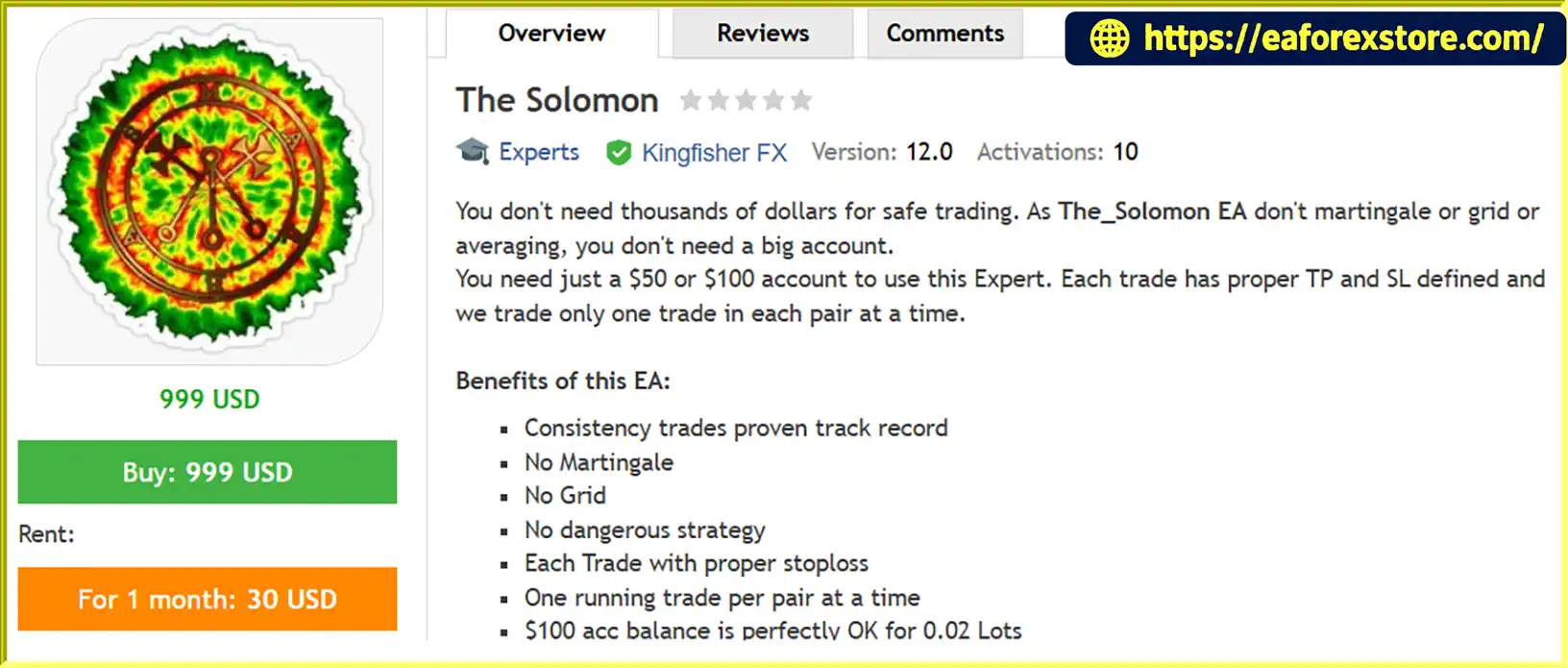
The Solomon EA MT4 is an automated Forex trading Expert Advisor designed for traders who prefer a disciplined trading approach without relying on high-risk strategies such as Martingale, Grid Trading, or position averaging.
Developed for MetaTrader 4 (MT4), this Forex trading robot focuses on consistency, controlled trade execution, and predefined risk management.
Unlike aggressive automated trading systems that increase position sizes after losses, The Solomon EA uses a straightforward trading approach. Every trade has its own predefined Stop Loss (SL) and Take Profit (TP), with a maximum of one active trade per currency pair at any given time.
One of the main advantages of The Solomon EA MT4 is its accessibility. Traders can start with a relatively small account balance of $50–$100, depending on broker conditions and position sizing.
With support for eight major and cross-currency pairs, this EA offers a multi-pair automated Forex trading solution for traders looking for a structured and risk-conscious trading system.
>>> Delivery time 24h-48h after payment.
>>> Refund if not delivered.
>>> You will receive the latest version without any limitations (ID+Time).Reviewed by Jason Stap <<<
The Solomon EA MT4 Overview
The Solomon EA MT4 does not use Martingale position sizing.
It does not automatically increase lot sizes to recover previous trading losses, helping traders avoid the escalating exposure associated with traditional Martingale systems.
The EA does not rely on Grid Trading strategies or continuously stacking positions at different price levels.
This helps maintain a more straightforward trading structure without accumulating multiple grid positions.
The system does not use position averaging to manage losing trades.
Instead, each position is managed independently with predefined Stop Loss and Take Profit levels.
Every trade opened by The Solomon EA MT4 has its own Stop Loss and Take Profit.
This allows traders to define potential downside and profit-taking levels before trade execution.
The EA opens a maximum of one active trade per currency pair at a time.
This feature helps prevent excessive position accumulation on the same trading instrument and keeps trade management more organized.
The_Solomon EA is designed to be accessible to traders with relatively small trading accounts.
The recommended starting balance is $50–$100, with a suggested lot size of 0.02 for a $100 account.
However, actual risk depends on Stop Loss distance, currency pair specifications, leverage, and broker margin requirements.
For optimal trading conditions, The Solomon EA MT4 is recommended for ECN or Raw spread accounts.
Lower spreads can help reduce transaction costs, which may be particularly important for automated Forex trading strategies.
The_Solomon EA MT4 automates Forex trading through a predefined trading process designed to maintain controlled position management.
Step 1: Monitor Selected Currency Pairs
The EA operates on the supported currency pairs and analyzes market conditions using its internal trading logic.
Step 2: Identify Trading Opportunities
When the system detects a valid trading setup, it evaluates whether the currency pair is eligible for a new position.
Step 3: Execute the Trade
The EA automatically opens a position according to its internal strategy and configured lot size.
Step 4: Set Stop Loss and Take Profit
Each trade receives predefined Stop Loss and Take Profit levels to establish its exit conditions.
Step 5: Manage Open Positions
The EA manages each position independently and does not open additional simultaneous trades on the same currency pair.
Step 6: Wait for the Next Opportunity
Once the existing position on a currency pair is closed, the EA can evaluate new trading opportunities on that pair.
This process helps maintain a structured automated trading approach without Grid, Martingale, or averaging techniques.
Choosing an automated Forex trading system requires careful consideration of trading strategy, risk management, and account requirements.
The Solomon EA MT4 offers several advantages for traders who prefer simplicity and disciplined execution.
No Martingale: Avoids progressive lot increases to recover losses.
No Grid Trading: Does not accumulate positions through grid-based entries.
No Position Averaging: Each trade is managed independently.
Predefined Risk Parameters: Every position has its own Stop Loss and Take Profit.
One Trade Per Pair: Limits simultaneous active positions on each currency pair.
Small Account Friendly: Designed to operate with relatively small starting balances.
Multi-Pair Trading: Supports eight different Forex currency pairs.
MT4 Compatibility: Runs on the widely used MetaTrader 4 platform.
ECN/Raw Account Recommendation: Designed to be used with low-spread trading conditions.
The_Solomon EA is particularly suitable for traders who want to avoid complex recovery-based trading systems and prefer predefined trade exits.
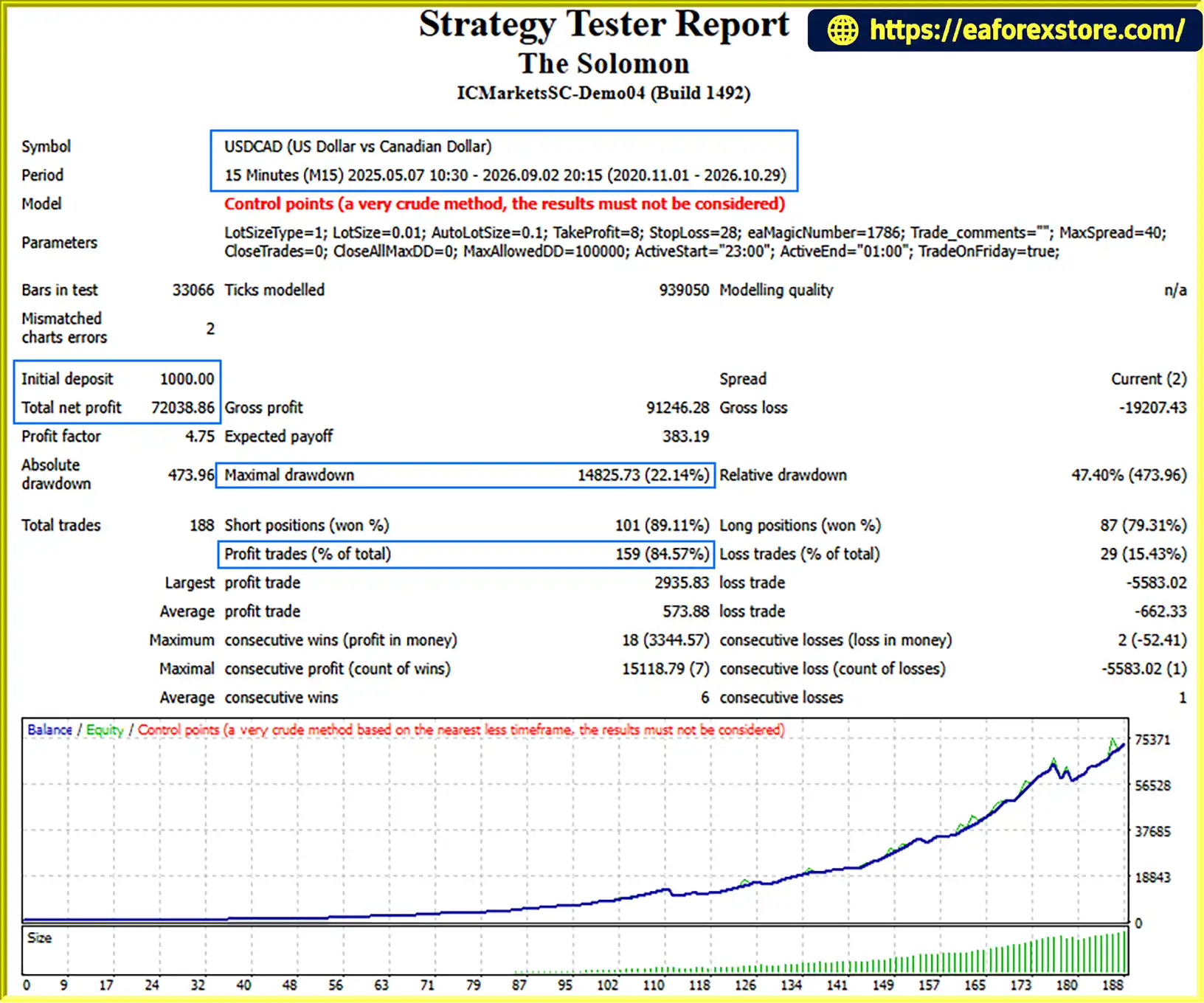
🔺USDCAD (Gold) – 6 Year
The Solomon EA MT4 Backtets
Risk management is an important part of automated Forex trading. Although The Solomon EA MT4 avoids Martingale and Grid strategies, every Forex trade still carries financial risk.
| Parameter | Recommended Setting |
|---|---|
| Expert Advisor | The_Solomon EA MT4 |
| Platform | MetaTrader 4 |
| Timeframe | M15 |
| Minimum Suggested Balance | $50–$100 |
| Recommended Lot Size | 0.02 per $100 |
| Account Type | ECN or Raw |
| Trading Strategy | Automated Forex Trading |
| Position Management | One active trade per pair |
The Solomon EA MT4 supports the following eight currency pairs:
| No. | Currency Pair |
|---|---|
| 1 | USDCHF |
| 2 | EURCHF |
| 3 | USDJPY |
| 4 | USDCAD |
| 5 | AUDCAD |
| 6 | AUDCHF |
| 7 | EURCAD |
| 8 | CHFJPY |
1. Position Sizing
The suggested 0.02 lot size for a $100 account should be evaluated carefully against the actual Stop Loss distance and account equity.
A small account can still experience substantial percentage losses if the position size is too large.
2. Currency Correlation
Several supported pairs share common currencies, particularly CHF, USD, and AUD.
Multiple positions across correlated pairs may increase overall account exposure, even when the EA limits trading to one position per pair.
3. Spread and Execution
ECN or Raw accounts are recommended to help reduce transaction costs. However, commissions, slippage, and spread fluctuations can still affect trading results.
4. Market Volatility
Major economic announcements and unexpected market movements can cause slippage or losses beyond the expected Stop Loss execution price.
5. Historical Performance
Although the EA may have a historical trading track record, past performance does not guarantee future results.
Always test the system on a demo account before trading with real money.
| Pros | Cons |
|---|---|
| No Martingale strategy | Forex trading still involves financial risk |
| No Grid Trading | Limited to eight supported pairs |
| No position averaging | Requires suitable broker conditions |
| Every trade has predefined SL and TP | Stop Loss execution may be affected by slippage |
| One active trade per pair | Multiple correlated pairs can increase exposure |
| Designed for small accounts | Small balances have limited margin flexibility |
| M15 timeframe | Requires MT4 to remain operational |
| ECN and Raw account recommendation | Trading costs and commissions still apply |
Overall, The Solomon EA MT4 provides a relatively straightforward approach to automated Forex trading, particularly for traders who prefer individual trade management over aggressive recovery-based strategies.
Follow these simple steps to install and run The Solomon EA on MetaTrader 4.
Download The Solomon EA MT4 file provided by the developer.
The file should normally have an .ex4 extension.
Launch MetaTrader 4 and log in to your trading account.
Navigate to:
File → Open Data Folder
Open the following directory:
MQL4 → Experts
Copy the downloaded .ex4 file into the Experts folder.
Return to MT4, open the Navigator panel, right-click Expert Advisors, and select Refresh.
The_Solomon EA should now appear in your Expert Advisors list.
Open an M15 chart for each supported currency pair:
Drag The_Solomon EA onto each corresponding M15 chart.
Configure the lot size and other available input parameters according to your account balance and risk tolerance.
Make sure the following settings are enabled:
Allow live trading in the EA settings.
Enable AutoTrading on the MT4 toolbar.
Confirm that automated trading permissions are correctly configured.
Check the Experts and Journal tabs to confirm that the EA is operating correctly.
For continuous automated trading, a reliable VPS is recommended.
>> Join VIP Membership Now <<<
The Solomon EA MT4 is an automated Forex trading solution designed for traders who value disciplined execution, individual trade management, and predefined risk parameters.
By avoiding Martingale, Grid Trading, and position averaging, the EA follows a straightforward trading approach in which each position has its own Stop Loss and Take Profit.
Its one-trade-per-pair structure, support for eight currency pairs, and compatibility with ECN and Raw accounts make it an interesting option for traders exploring automated Forex trading on smaller account balances.
Whether you are a beginner looking for an automated trading solution or an experienced trader seeking a non-Martingale Forex EA, The Solomon EA MT4 offers a structured approach worth evaluating.
No Martingale. No Grid. No Averaging. Just Structured Forex Trading.
1. What Is The Solomon EA MT4 and How Does It Work?
The Solomon EA MT4 is an automated Forex trading Expert Advisor designed for the MetaTrader 4 platform. It analyzes supported currency pairs, identifies trading opportunities, and automatically executes trades based on its internal strategy. Each position has predefined Stop Loss and Take Profit levels, helping maintain structured trade management without requiring constant manual intervention.
2. Does The Solomon EA MT4 Use Martingale, Grid Trading, or Position Averaging?
No. The Solomon EA MT4 does not use Martingale, Grid Trading, or position averaging strategies. It does not increase lot sizes to recover previous losses or continuously add positions at different price levels. Instead, each trade is managed independently with its own Stop Loss and Take Profit.
3. What Is the Minimum Deposit Required to Use The Solomon EA MT4?
The recommended starting balance is approximately $50–$100, depending on broker conditions and trading settings. The suggested lot size is 0.02 per $100 account balance. However, traders should carefully consider Stop Loss distance, leverage, margin requirements, and overall risk before choosing their position size.
4. Which Currency Pairs Does The Solomon EA MT4 Support?
The Solomon EA MT4 supports eight Forex currency pairs:
USDCHF
EURCHF
USDJPY
USDCAD
AUDCAD
AUDCHF
EURCAD
CHFJPY
This multi-pair functionality allows traders to automate trading across several supported Forex instruments.
5. What Trading Platform and Timeframe Does The Solomon EA MT4 Require?
The Solomon EA is designed exclusively for MetaTrader 4 (MT4). The recommended timeframe is M15 (15-minute chart). To operate across all eight supported currency pairs, users should open an M15 chart for each pair and attach the Expert Advisor to the corresponding chart.
6. Does The Solomon EA MT4 Set Stop Loss and Take Profit Automatically?
Yes. Every trade opened by The Solomon EA MT4 receives its own predefined Stop Loss (SL) and Take Profit (TP). These levels establish the intended exit conditions for each position. The EA also limits trading to a maximum of one active trade per currency pair at a time, helping prevent excessive position accumulation.
7. What Are the Backtest Results of The Solomon EA MT4?
According to the provided backtest report, The Solomon EA MT4 achieved the following results on USDCAD over a six-year testing period:
Initial Deposit: $1,000
Total Net Profit: $72,038.86
Win Rate: 84.57%
Maximum Drawdown: 22.14%
These figures represent historical backtest performance and do not guarantee similar results in live trading. Actual performance may vary depending on broker conditions, spreads, commissions, slippage, and market volatility.
8. How Do I Install and Set Up The Solomon EA MT4?
Installing The Solomon EA MT4 is straightforward:
Download the provided .ex4 Expert Advisor file.
Open MetaTrader 4 and select File → Open Data Folder.
Navigate to MQL4 → Experts.
Copy the EA file into the Experts folder.
Return to MT4 and refresh the Expert Advisors list in Navigator.
Open an M15 chart for each supported currency pair.
Attach The Solomon EA to each chart and configure the lot size.
Enable Allow live trading and the AutoTrading button.
For uninterrupted automated trading, using a reliable VPS is recommended. Always test the EA on a demo account before using real funds.
In stock
In stock
In stock
In stock
In stock
Out of stock
No account yet?
Create an Account












 Automatic EA
 EA Best Seller
 Expert Advisor MT4
 Expert Advisor MT5
 HFT EA


Reviews
Clear filtersThere are no reviews yet.