









-
 Unlimited Activations
-
 Instant delivery
-
 Easy to install





 Unlimited Activations
Instant delivery
Easy to install
Unlimited Activations
Instant delivery
Easy to install
 Free Update
 Free Install Support

Trader AI ECN EA MT4 is an advanced automated Forex trading Expert Advisor developed for the MetaTrader 4 platform and optimized for ECN trading environments. Powered by Neural Network Artificial Intelligence, advanced trading algorithms, and fast order execution technology, this Forex robot is designed to identify market opportunities and automatically execute trades.
The Expert Advisor combines AI-driven market analysis, trend detection, supply and demand zone identification, and automated risk management to support trading across multiple Forex currency pairs and gold (XAUUSD).
One of the distinctive features of Trader AI ECN EA MT4 is its order virtualization technology, designed to manage trading orders and their associated protection mechanisms. The system also incorporates the Kelly Formula into its position-sizing approach to help calculate trading exposure.
With a stated focus on rapid trade execution, including a high-frequency trading approach involving transactions under 30 seconds, Trader AI ECN EA targets short-term market opportunities. Actual execution speeds depend on broker infrastructure, server latency, and market liquidity.
Designed for both experienced algorithmic traders and users exploring automated Forex trading, Trader AI ECN EA offers a multi-currency trading solution with predefined strategy parameters.
>>> Delivery time 24h-48h after payment.
>>> Refund if not delivered.
>>> You will receive the latest version without any limitations (ID+Time).
>> Reviewed by Jason Stap <<<
Trader AI ECN EA MT4 Overview
Trader AI ECN EA MT4 integrates Neural Network AI technology and advanced trading algorithms to analyze market behavior, detect trends, and identify potential buy and sell opportunities.
The developer describes the system as capable of learning from market conditions, although the precise adaptive-learning mechanisms have not been independently verified.
The Expert Advisor incorporates technology described as High-Frequency Trading (HFT), targeting rapid trading operations and short-term market opportunities.
Its trading approach includes transactions designed around periods shorter than 30 seconds. Real-world execution and holding times may vary significantly depending on market conditions and broker performance.
Trader AI ECN EA includes order virtualization technology designed to manage trading orders and their protective levels through its internal trading logic.
This approach can provide flexibility in order management, but virtual protective orders depend on the EA and trading platform remaining operational.
The Expert Advisor incorporates the Kelly Formula into its automatic lot-sizing approach.
Its default configuration specifies a Kelly-based risk setting of 1%, with an automatic lot parameter of 0.01265 per 100 account units.
Actual financial risk depends on the instrument, contract size, leverage, Stop Loss execution, and the EA’s implementation of its position-sizing formula.
According to the developer, Trader AI ECN EA MT4 does not use Martingale, Grid, or Arbitrage trading strategies.
Instead, it focuses on algorithmic trade selection and defined position-management rules.
The trading system incorporates trend analysis, supply and demand zones, and supporting technical indicators to evaluate potential entry and exit opportunities.
Trader AI ECN EA MT4 supports trading across 12 recommended instruments:
The Expert Advisor is designed to operate on five recommended timeframes:
M1, M5, M15, M30, and H1.
This provides flexibility across short-term trading strategies and different market conditions.
Trader AI ECN EA MT4 combines artificial intelligence, technical market analysis, and automated order execution in a structured trading process.
Step 1: AI Market Analysis
The Expert Advisor analyzes incoming market information through its proprietary algorithms and Neural Network AI framework.
Step 2: Trend and Momentum Detection
The system evaluates market direction and uses supporting indicators to identify potential opportunities consistent with its trading logic.
Step 3: Supply and Demand Zone Evaluation
Trader AI ECN EA MT4 incorporates supply and demand zones to assess potential price reaction areas and support trading decisions.
Step 4: Fast Order Execution
When programmed trading conditions are satisfied, the EA can automatically execute orders through an ECN broker.
The trading system is designed for rapid transactions, but execution quality depends on broker conditions and market liquidity.
Step 5: Automatic Lot Calculation
The Expert Advisor uses its Kelly-based money management approach to calculate position sizes under the configured trading parameters.
Step 6: Virtual Order Management
The system uses order virtualization to manage positions and protective levels according to its internal programming.
Step 7: Automated Position Monitoring
After a position is opened, the EA continues monitoring market conditions and applies its predefined position-exit and risk-management logic.
Designed for ECN Trading Accounts
Trader AI ECN EA MT4 is specifically designed for trading environments where low spreads, competitive execution, and reduced latency are important.
AI-Driven Trading Decisions
The integration of Neural Network AI, market trend detection, and supply-demand analysis provides a multi-component approach to automated trading.
Fast Short-Term Trading Strategy
The system is designed for rapid trading activity, making execution speed and low-latency connectivity important operating requirements.
Integrated Capital Management
Its Kelly-based position-sizing approach offers an automated mechanism for determining trade volume according to the developer’s risk model.
Avoids Martingale and Grid Strategies
The trading robot does not rely on Martingale or Grid recovery systems according to its supplied specifications.
Supports 12 Trading Instruments
Users can explore automated trading opportunities across major Forex pairs, cross-currency pairs, and gold.
Preconfigured Trading Parameters
The developer recommends using the default configuration when initially testing the EA on an ECN trading account.
Previously Used with ECN Brokers
The developer reports trading experience with Tickmill and IC Markets. Compatibility with every MT4 broker has not been independently confirmed.
For optimal operation, a low-latency Forex VPS is recommended.
Effective risk management is essential for automated Forex trading, particularly when using fast-execution strategies.
Trader AI ECN EA includes several predefined protective parameters and trading controls.
The system incorporates the Kelly Formula into its automatic position-sizing configuration.
These values are developer-supplied parameters. The stated Kelly percentage should not be interpreted as a guaranteed maximum loss of 1% per trade.
The Expert Advisor provides a specified Stop Loss parameter of 5 pips, with protective order logic defined internally by the developer.
Actual losses can exceed a target Stop Loss because of market gaps, slippage, execution delays, or failures of virtual order management.
The EA includes a spread filter intended to prevent new trading entries when spreads exceed the specified limit.
Default Maximum Spread: 2.5 pips (25 points under a five-digit pricing convention).
The system includes a slippage parameter designed to control acceptable execution deviation.
Default Slippage: 2 pips.
Actual execution may differ depending on broker policies and prevailing market conditions.
The Expert Advisor uses virtualization technology for trading order management.
Because virtual protective levels may be handled internally rather than stored as broker-side orders, uninterrupted platform connectivity and correct EA operation are especially important.
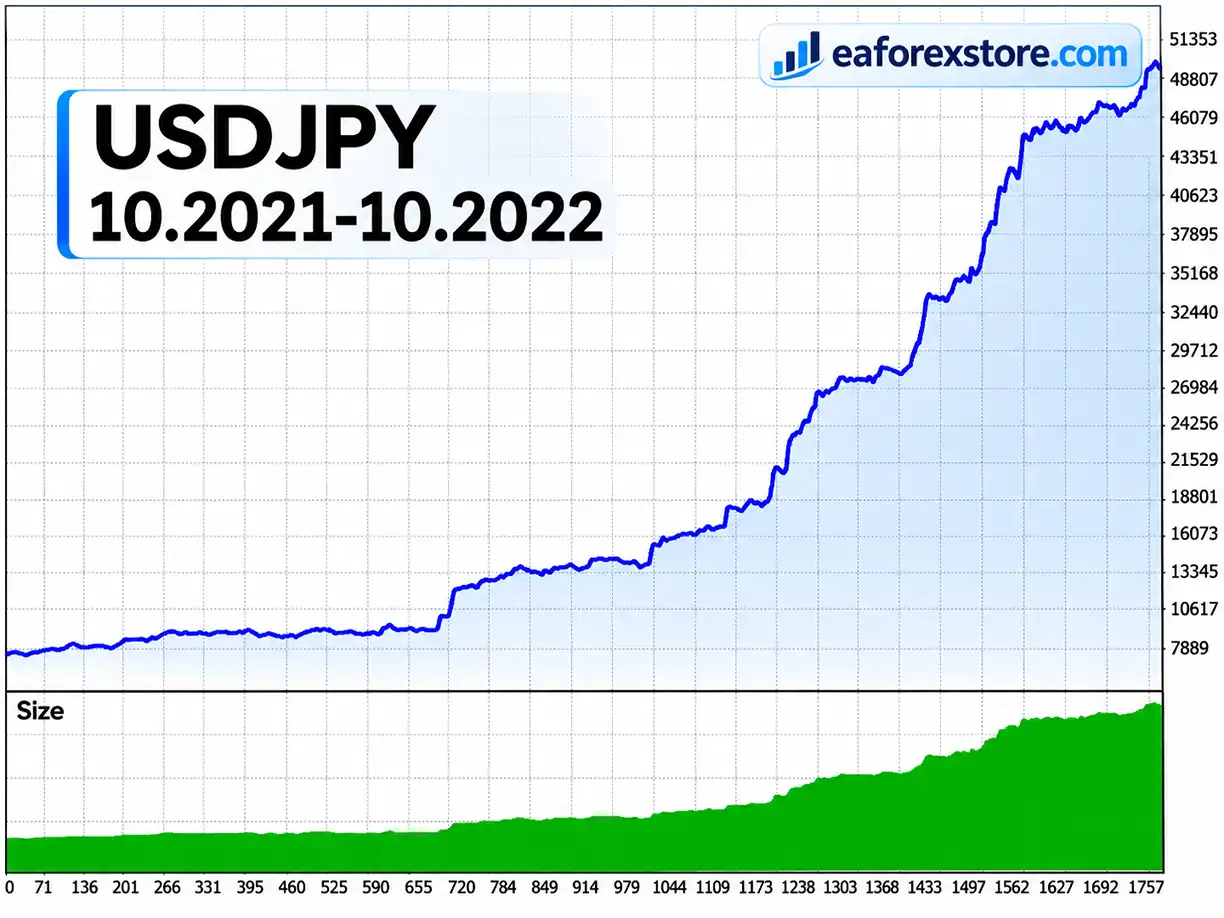
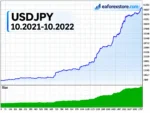
🔺USDJPY – October 2021 – October 2022
TRADER AI ECN MT4 EA Backtets
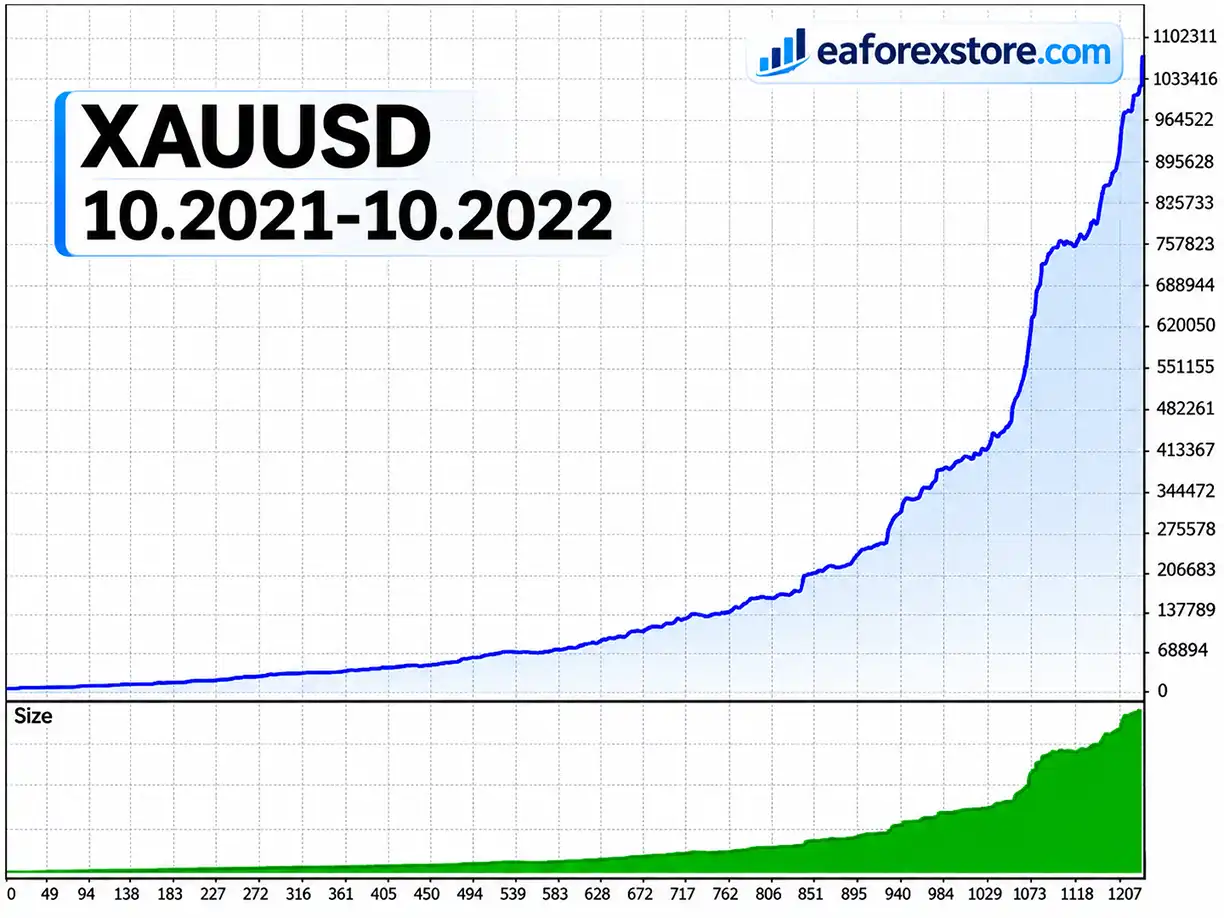
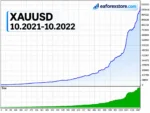
🔺XAUUSD – October 2021 – October 2022
TRADER AI ECN MT4 Backtets
Users should regularly monitor open positions, trading history, account drawdown, execution performance, and MetaTrader 4 journal messages.
Dedicated push notifications, email alerts, and custom warning systems have not been confirmed in the supplied product specifications.
Important Trading Risk Warning
Forex and CFD trading involves substantial financial risk. No artificial intelligence system, automated trading robot, or money management formula can guarantee consistent profitability.
Backtesting should not be treated as a reliable prediction of future trading performance. Market volatility, spread widening, slippage, and unfavorable trading conditions can lead to significant drawdowns or complete capital loss.
Step 1: Download Trader AI ECN EA
Obtain the Expert Advisor installation file from your trusted product source.
The MT4 trading robot is generally distributed in EX4 or MQ4 format.
Step 2: Launch MetaTrader 4
Open the MetaTrader 4 trading platform and log in to your ECN trading account.
Step 3: Open the Experts Folder
Navigate to:
File → Open Data Folder → MQL4 → Experts
Copy the Trader AI ECN EA file into the Experts directory.
Step 4: Restart MetaTrader 4
Restart MT4 or refresh the Expert Advisors list in the Navigator panel.
Step 5: Select a Trading Instrument
Open a chart for one of the supported instruments, such as EURUSD, USDJPY, GBPUSD, or XAUUSD.
Step 6: Choose a Recommended Timeframe
Select one of the recommended chart timeframes:
M1, M5, M15, M30, or H1.
Step 7: Attach the Expert Advisor
Drag Trader AI ECN EA MT4 from the Navigator panel onto your selected chart.
Configure the available parameters according to the developer’s instructions.
Step 8: Review the Default Settings
| Parameter | Default Value |
|---|---|
| Auto Lots | 0.01265 per 100 |
| Kelly Setting | 1% |
| Maximum Spread | 2.5 pips |
| Maximum Slippage | 2 pips |
| Minimum Lots | 0.01 |
| Maximum Lots | 200 |
| Stop Loss | 5 pips |
| Gold Trading | Configurable |
| Account Type | ECN Recommended |
| Timeframes | M1, M5, M15, M30, H1 |
Some parameters are defined in the source code and may not be adjustable through the EA’s user interface.
Step 9: Enable Automated Trading
Activate AutoTrading in MetaTrader 4 and enable live trading permissions in the Expert Advisor properties where required.
Check the Experts and Journal tabs for any operational errors.
Step 10: Test and Use a Low-Latency VPS
Before trading with real funds, test the EA on a demo account and evaluate its performance under realistic spreads, commissions, slippage, and execution conditions.
For continuous automated operation, consider using a low-latency Forex VPS located near your broker’s trading servers.
>> Join VIP Membership Now <<<
Trader AI ECN EA MT4 is an automated Forex trading robot that combines Neural Network Artificial Intelligence, algorithmic market analysis, fast trading execution, order virtualization, and Kelly Formula-based position sizing.
With support for 12 trading instruments, five timeframes, trend detection, and supply-demand analysis, the Expert Advisor provides a configurable solution for traders interested in AI-assisted Forex automation.
Its ECN-focused architecture and emphasis on low-latency trading make broker execution quality, stable connectivity, and careful position sizing especially important.
The developer also references historical backtesting conducted between November 22, 2021, and November 22, 2022, using USDJPY and XAUUSD under stated IC Markets Raw account conditions with a spread of 20 points.
However, detailed verified performance metrics were not supplied, so these historical tests should not be interpreted as evidence of profitability.
For traders evaluating automated Forex trading systems, Trader AI ECN EA MT4 offers a combination of AI-assisted market analysis and predefined trade-management features. Its suitability should ultimately be assessed through independent testing, risk analysis, and ongoing monitoring.
Disclaimer: Trading Forex and CFDs involves significant risk and may result in the loss of your entire investment. Past performance and backtesting results do not guarantee future outcomes. Always assess your financial circumstances and risk tolerance before enabling automated trading.
1. What Is Trader AI ECN EA MT4 and How Does It Work?
Trader AI ECN EA MT4 is an AI-powered automated Forex trading robot designed for the MetaTrader 4 platform and ECN trading accounts. It uses Neural Network Artificial Intelligence, advanced trading algorithms, trend detection, and supply and demand analysis to identify potential trading opportunities.
The Expert Advisor automatically executes buy and sell orders, incorporates fast trading technology, and uses virtual order management to control positions. It also integrates Kelly Formula-based money management to calculate trading lot sizes.
2. Is Trader AI ECN EA MT4 Profitable, and How Much Money Can It Make?
Trader AI ECN EA MT4 is designed to identify short-term Forex trading opportunities through AI-powered market analysis and rapid automated trade execution.
The developer provides historical backtesting references for USDJPY and XAUUSD covering approximately 12 months between 2021 and 2022. However, independently verified profit figures, monthly returns, and win rates are not available.
Actual profitability depends on market conditions, trading capital, broker spreads, execution speed, and risk management.
No Forex trading robot can guarantee daily profits, consistent monthly returns, or risk-free trading.
3. Which Forex Pairs and Timeframes Does Trader AI ECN EA Support?
Trader AI ECN EA MT4 supports automated trading across 12 recommended Forex and gold instruments:
USDJPY, EURJPY, GBPJPY, AUDJPY
USDCAD, USDCHF, NZDUSD, EURGBP
EURUSD, GBPUSD, AUDUSD
XAUUSD (Gold)
The recommended trading timeframes are M1, M5, M15, M30, and H1.
This multi-currency compatibility allows traders to explore different Forex market opportunities, although each instrument should be tested individually before live trading.
4. What Is the Minimum Deposit Required for Trader AI ECN EA MT4?
Trader AI ECN EA MT4 does not have a verified universal minimum deposit requirement.
The Expert Advisor includes an automatic lot-sizing system based on the Kelly Formula, with a default Auto Lots parameter of 0.01265 per 100 account units and a stated Kelly risk setting of 1%.
The minimum lot size is 0.01, while the maximum configurable lot size is 200.
The appropriate trading balance depends on account leverage, broker margin requirements, position size, and market volatility.
Beginners should test the Forex EA on a demo account before committing real trading capital.
5. Does Trader AI ECN EA Use Martingale or Grid Trading Strategies?
No. According to the developer, Trader AI ECN EA MT4 does not use Martingale, Grid, or Arbitrage strategies.
Instead, the automated Forex robot uses Neural Network AI, algorithmic market analysis, trend detection, and supply and demand zones to identify trading opportunities.
It also incorporates Kelly Formula money management, predefined Stop Loss parameters, spread filtering, and virtual order protection.
Although the strategy avoids Martingale and Grid recovery systems, trading losses and significant drawdowns are still possible.
6. Which Forex Brokers Are Recommended for Trader AI ECN EA MT4?
Trader AI ECN EA MT4 is optimized for ECN Forex brokers offering low spreads, low slippage, and fast order execution.
The developer reports experience using the trading robot with brokers such as IC Markets and Tickmill.
Because the Expert Advisor focuses on rapid trading opportunities, execution speed and server latency can significantly influence trading results.
A low-latency Forex VPS is recommended to maintain stable MetaTrader 4 operation and support the EA's virtual order-management functionality.
Broker compatibility and performance should always be verified through demo testing.
7. How Do I Install and Configure Trader AI ECN EA on MetaTrader 4?
Installing Trader AI ECN EA MT4 follows the standard MetaTrader 4 Expert Advisor installation process.
Step 1: Download the Trader AI ECN EA installation file.
Step 2: Open MetaTrader 4 and navigate to File → Open Data Folder → MQL4 → Experts.
Step 3: Copy the EA file into the Experts folder.
Step 4: Restart MetaTrader 4 or refresh the Expert Advisors list.
Step 5: Open a supported Forex chart, such as EURUSD, USDJPY, GBPUSD, or XAUUSD.
Step 6: Select a recommended timeframe: M1, M5, M15, M30, or H1.
Step 7: Attach Trader AI ECN EA to the chart and review the default trading parameters.
Step 8: Enable AutoTrading and confirm that the Expert Advisor is running correctly.
For better stability, use a reliable Forex VPS and test the EA on a demo account before live trading.
8. What Will I Receive After Purchasing Trader AI ECN EA MT4, and How Long Is Delivery?
After purchasing Trader AI ECN EA MT4, customers will receive the automated Forex trading robot installation file named TRADER AI ECN.ex4, designed for the MetaTrader 4 platform.
According to the product information, the purchase includes:
Delivery Time: 24–48 hours after payment.
Product Version: Latest available version.
License Conditions: Advertised without ID or time limitations.
Delivery Guarantee: Refund if the product is not delivered.
Trading Platform: MetaTrader 4 (MT4).
Recommended Account: ECN Forex trading account.
Customers should confirm delivery instructions and licensing conditions before purchasing.
Trader AI ECN EA MT4 offers automated Forex trading features, but users should always understand the financial risks and evaluate the software before trading with real money.
In stock
In stock
In stock
In stock
In stock
Out of stock
No account yet?
Create an Account












 Automatic EA
 EA Best Seller
 Expert Advisor MT4
 Expert Advisor MT5
 HFT EA


Reviews
Clear filtersThere are no reviews yet.