





-
 Unlimited Activations
-
 Instant delivery
-
 Easy to install






 Unlimited Activations
Instant delivery
Easy to install
 Free Update
 Free Install Support

Trends Radar EA MT4 is an automated Forex trading Expert Advisor developed for the MetaTrader 4 platform. It uses a proprietary price-channel analysis model, slope angle filtering, and dynamic entry corridors to identify potential trading opportunities based on market price movements.
Unlike conventional Forex robots that rely on a single technical indicator, Trends Radar EA MT4 combines multiple signal conditions to evaluate channel direction, price deviations, and potential breakout opportunities.
The trading system analyzes recent price bars, calculates the slope of the price channel, and determines whether market momentum is strong enough to generate a trading signal. Its dynamic corridor mechanism adjusts to changing market conditions, helping distinguish meaningful price movements from ordinary market noise.
In addition to its advanced signal generation, Trends Radar EA MT4 offers flexible money management, customizable Stop Loss and Take Profit levels, automated trailing stops, and optional trade-series protection.
Designed for traders seeking a configurable automated Forex trading system, Trends Radar EA provides control over entry signals, position sizing, and trade management through its clearly organized settings.
>>> Delivery time 24h-48h after payment.
>>> Refund if not delivered.
>>> You will receive the latest version without any limitations (ID+Time).
>> Reviewed by Jason Stap <<<
Trends Radar EA MT4 Overview
Trends Radar EA MT4 uses a price-channel model to analyze market direction and identify potential trading opportunities.
The system evaluates historical price movements over a configurable number of bars using the SignalBarCount parameter.
The EA incorporates an EntrySlopeAngle threshold to determine whether the calculated channel slope is sufficiently pronounced.
This filter helps eliminate potential entry signals when price movements do not meet the required directional conditions.
Trends Radar EA MT4 constructs a working corridor around the center of the price channel.
The SignalCorridorWidth parameter determines corridor width, while EntryDeviationFactor controls sensitivity to price deviations.
This combination is designed to filter ordinary price fluctuations and identify potentially meaningful breakouts.
The StepCorrectionValue parameter dynamically adjusts the corridor position as market conditions change.
This mechanism is intended to maintain signal responsiveness during periods of accelerating or slowing price movement.
The Expert Advisor supports two position-sizing methods:
Traders can select the method that best suits their capital allocation and risk preferences.
Trends Radar EA MT4 provides configurable exit levels using ProfitTargetPoints and LossLimitPoints.
These parameters allow traders to define intended profit targets and loss limits for individual trades.
The EA includes an automated trailing stop system.
Trailing protection begins after the position reaches the configured TrailStartPoints threshold and adjusts according to TrailStepPoints.
The Protections parameter enables an additional protective mechanism intended to tighten stop levels when a trade series becomes extended.
Setting Protections to 0 disables this feature.
Trends Radar EA MT4 includes an ECN mode flag and a configurable requote limit to support execution settings used by ECN and RAW trading accounts.
The Expert Advisor organizes its settings into four logical groups:
This structure makes it easier to locate, review, and adjust the trading parameters.
Trends Radar EA MT4 follows a systematic trading process based on channel analysis, directional filtering, and automated position management.
Step 1: Price Channel Construction
The EA analyzes the most recent price bars according to the SignalBarCount setting.
It constructs a price channel and determines the overall directional slope of the analyzed price structure.
Step 2: Slope Angle Evaluation
The calculated slope angle is compared with the EntrySlopeAngle threshold.
A potential trading signal proceeds only when the channel’s directional movement meets the configured requirement.
Step 3: Entry Corridor Calculation
The Expert Advisor builds an entry corridor around the channel’s center line.
SignalCorridorWidth controls its width, while EntryDeviationFactor determines the required deviation from the channel reference.
Step 4: Dynamic Corridor Adjustment
The StepCorrectionValue parameter adjusts the corridor position to account for changing market behavior and volatility.
Step 5: Breakout Signal Detection
When price crosses the relevant corridor boundary in the direction of the channel slope, the EA identifies a potential market entry.
Step 6: Automated Trade Execution
The Expert Advisor opens a trading position using the selected lot-sizing method.
Position volume is determined by ManualLotVolume or the applicable balance-based risk calculation.
Step 7: Stop Loss and Take Profit Management
After opening a position, the EA applies its configured ProfitTargetPoints and LossLimitPoints levels.
Step 8: Trailing Stop Activation
When a trade reaches TrailStartPoints, the trailing mechanism activates and adjusts the protective stop according to TrailStepPoints.
Step 9: Trade-Series Risk Control
If the optional Protections function is enabled, the EA can tighten protective stop levels when a trading series extends.
The maximum number of orders within a series is controlled through MaxSeriesOrders.
Trends Radar EA combines price-channel analysis, slope filtering, corridor width, and deviation sensitivity to generate structured trading signals.
Its StepCorrectionValue mechanism adjusts the entry corridor as price behavior changes, allowing the signal model to respond to different market conditions.
Traders can choose between fixed-lot trading and balance-based position sizing according to their preferred risk-management approach.
Separate Take Profit, Stop Loss, trailing activation, and trailing step parameters provide flexibility when managing open positions.
The optional Protections mechanism is designed to reduce the accumulation of open risk by tightening stop levels during extended trade series.
The Expert Advisor includes execution-related configuration options intended for ECN and RAW broker accounts.
All described trading controls are organized into clearly defined parameter groups, making the EA easier to configure and evaluate.
Trends Radar EA MT4 allows traders to adjust signal sensitivity and risk parameters based on the volatility and timeframe of their selected instrument.
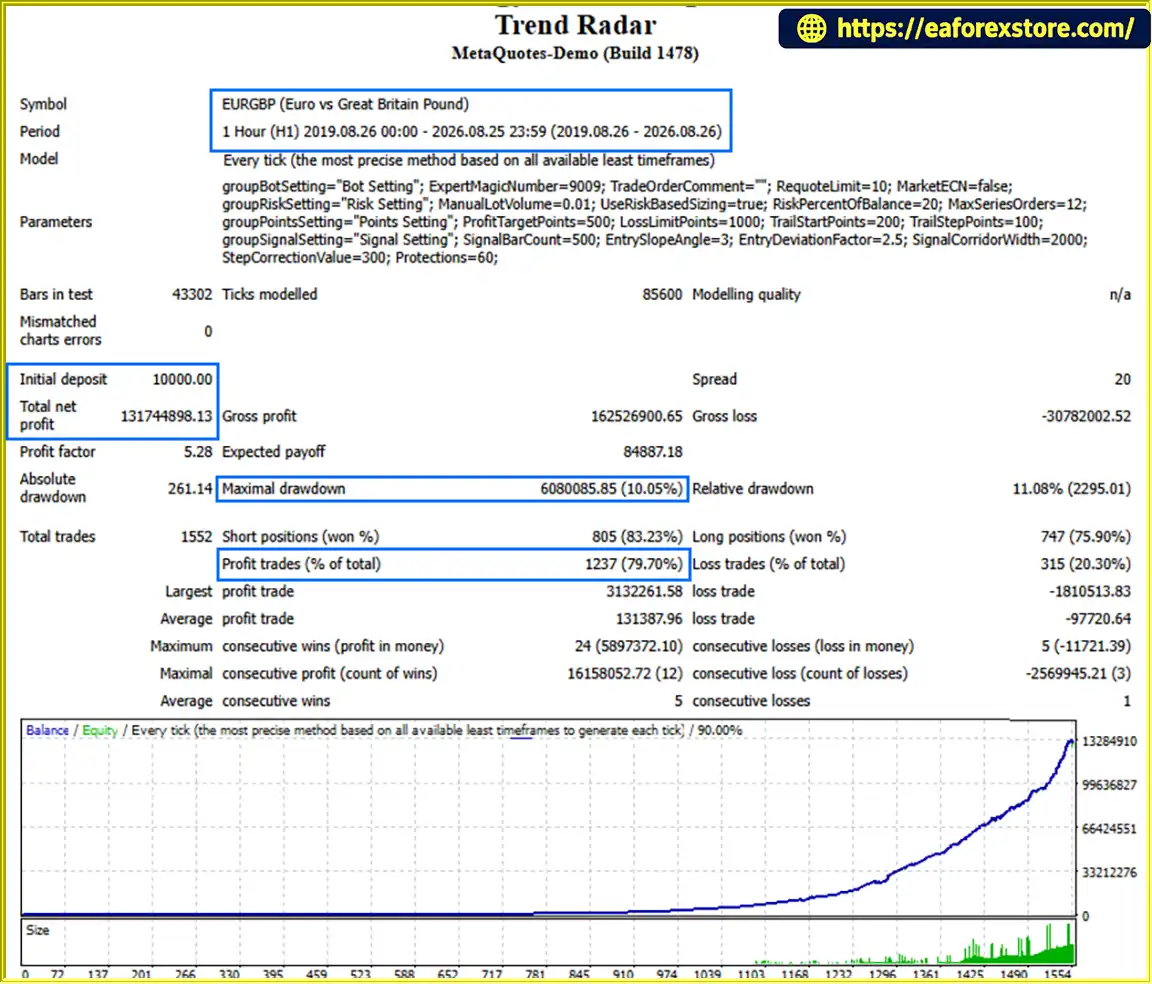
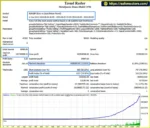
🔺EURGBP – 7 Year
Trend Radar EA MT4 Backtets
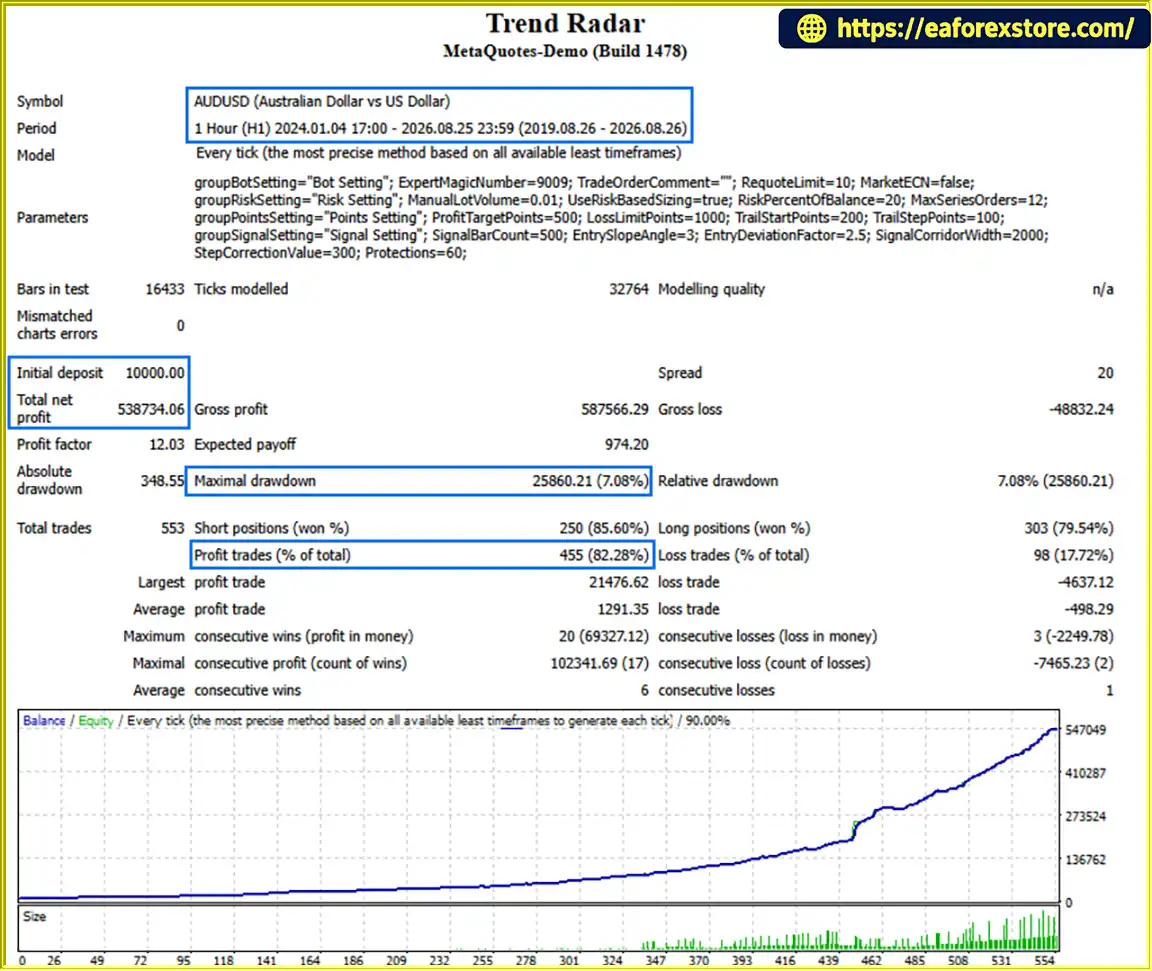
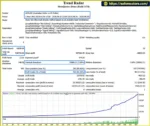
🔺 AUDUSD – 7 Year
Trend Radar MT4 Backtets
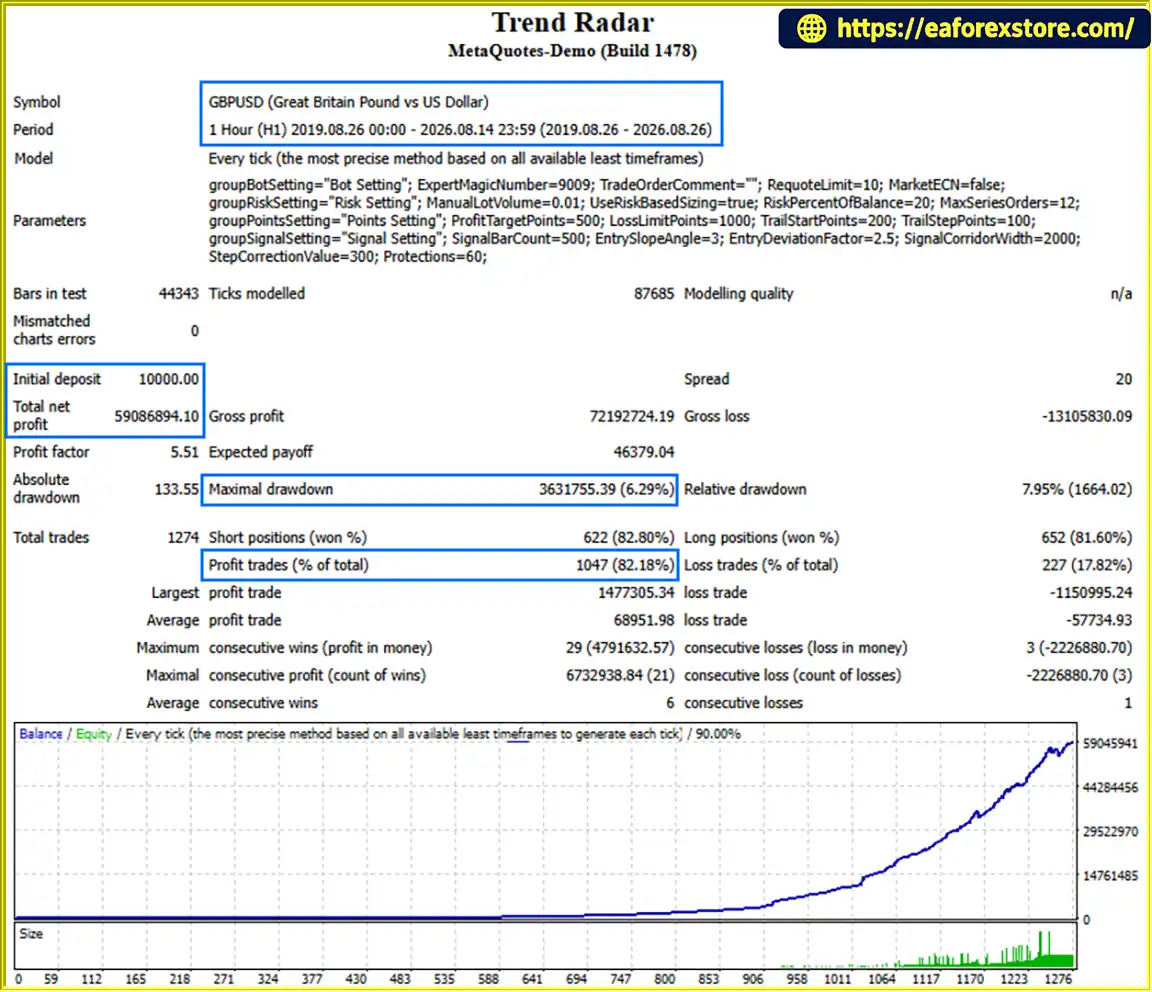
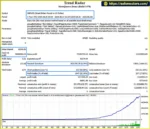
🔺GBPUSD – 7 Year
Trend Radar EA Backtets
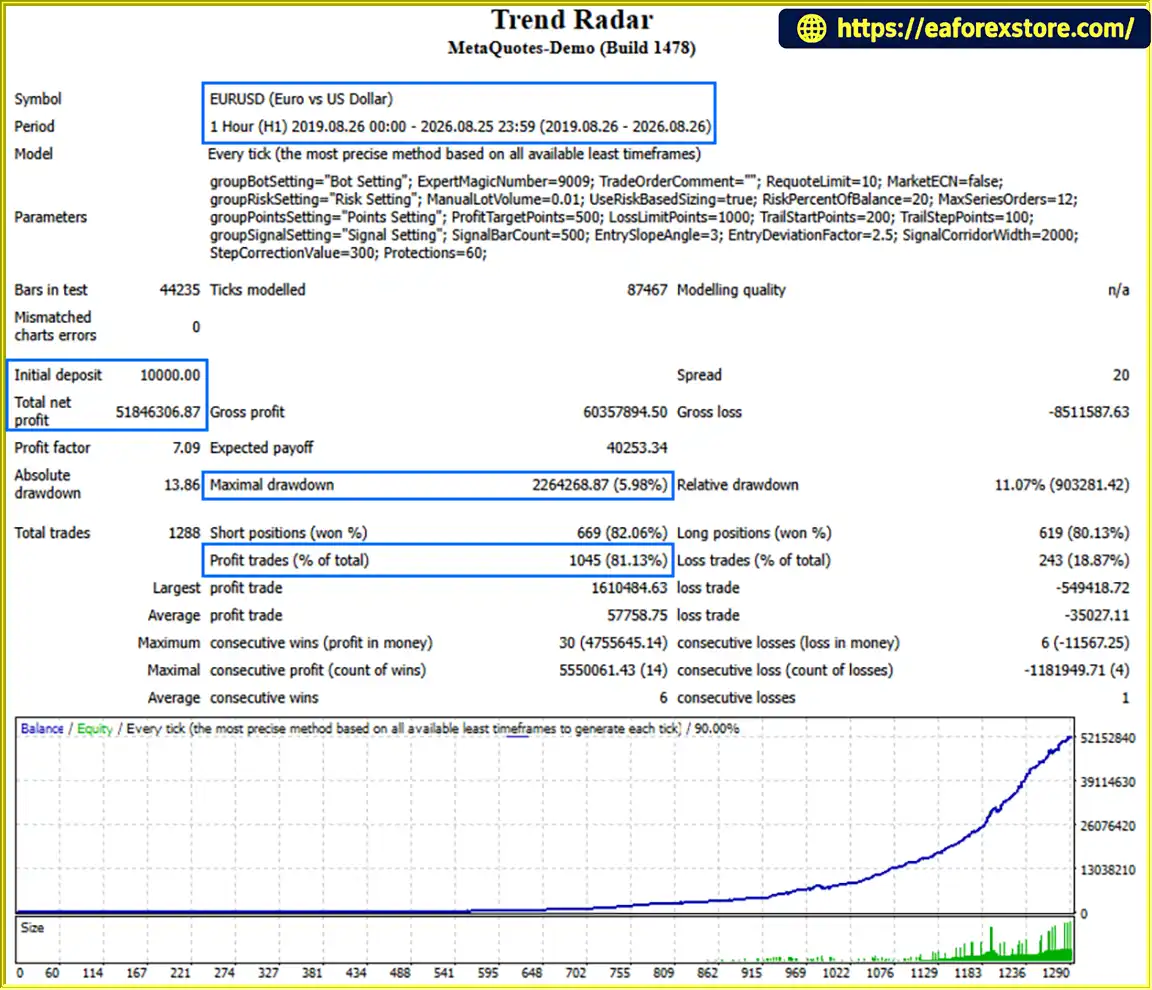
Trend Radar Backtets
Risk management is an important component of Trends Radar EA MT4. The system offers several configurable controls for position sizing, protective exits, and extended trade series.
Traders can configure trading volume using ManualLotVolume or RiskPercentOfBalance.
Fixed-lot trading specifies position volume directly, while percentage-based sizing uses the account balance as an input to the EA’s position-sizing logic.
The actual financial risk depends on the calculation method, instrument specifications, and execution prices.
The MaxSeriesOrders parameter limits the number of simultaneous orders allowed within a trading series.
This feature is designed to help control cumulative position exposure.
LossLimitPoints defines the intended Stop Loss distance in points.
A Stop Loss can help limit planned downside exposure, but actual losses may exceed the configured amount due to gaps, slippage, and execution delays.
ProfitTargetPoints determines the intended profit-taking level.
This allows traders to establish a predefined exit objective for each position.
Trends Radar EA MT4 includes a trailing stop mechanism controlled by:
Trailing stops can help manage favorable price movements but cannot guarantee that a position will close in profit.
The optional Protections function is designed to tighten stop levels when a trade series becomes prolonged.
This may reduce some exposure, but it does not eliminate the possibility of substantial drawdowns.
The EA includes an ECN mode flag and a requote limit.
Traders should verify broker compatibility, spread conditions, execution rules, and minimum stop distances before using the system.
Users should monitor open positions, trading history, account drawdown, and MetaTrader 4 execution logs.
The supplied product description does not confirm dedicated email alerts, mobile push notifications, or automatic equity-drawdown shutdown features.
Important Risk Warning: Forex and CFD trading involves significant financial risk. Automated Stop Loss management, trailing protection, and position limits cannot guarantee capital preservation or profitable trading results.
Step 1: Download Trends Radar EA MT4
Obtain the Expert Advisor installation file from your trusted product source.
MT4 Expert Advisors are generally supplied in EX4 or MQ4 format.
Step 2: Open MetaTrader 4
Launch MetaTrader 4 and log in to your trading account.
Step 3: Access the Experts Folder
Navigate to:
File → Open Data Folder → MQL4 → Experts
Copy the Trends Radar EA file into the Experts folder.
Step 4: Restart MetaTrader 4
Restart the trading platform or refresh the Expert Advisors section in the Navigator window.
Step 5: Open a Trading Chart
Select the instrument you intend to test.
The developer has not specified a universal recommended trading pair or timeframe, so compatibility should be verified through testing.
Step 6: Attach Trends Radar EA
Drag the Expert Advisor from the Navigator panel onto the selected chart.
Review the available trading permissions and input settings.
Step 7: Configure the EA Parameters
The Expert Advisor provides four main parameter groups:
| Settings Group | Parameters |
|---|---|
| Bot Setting | Magic Number, Order Comment, Requote Limit, ECN Mode |
| Risk Setting | ManualLotVolume, RiskPercentOfBalance, MaxSeriesOrders |
| Points Setting | ProfitTargetPoints, LossLimitPoints, TrailStartPoints, TrailStepPoints |
| Signal Setting | SignalBarCount, EntrySlopeAngle, EntryDeviationFactor, SignalCorridorWidth, StepCorrectionValue |
| Additional Protection | Protections |
Step 8: Select Your Risk Management Mode
Choose between fixed-lot sizing and balance-based position sizing.
Set the relevant position volume or risk percentage according to your trading plan.
Step 9: Configure Trade Exit Levels
Adjust ProfitTargetPoints, LossLimitPoints, TrailStartPoints, and TrailStepPoints to define how the EA manages open positions.
Remember that these values are measured in points, not necessarily pips.
Step 10: Optimize Signal Sensitivity
Review the signal parameters according to the instrument’s volatility and the timeframe being tested.
Avoid relying solely on historically optimized settings without out-of-sample validation.
Step 11: Enable Automated Trading
Activate AutoTrading on MetaTrader 4 and enable the required trading permissions for the Expert Advisor.
Confirm that the EA is operating correctly by checking the Experts and Journal tabs.
Step 12: Backtest and Demo Test
Use MetaTrader 4 Strategy Tester to evaluate the trading system under historical market conditions.
Then run the EA on a demo account to examine execution behavior, drawdowns, and trade management under current market conditions.
Only consider live deployment after evaluating the strategy and understanding its potential financial risks.
>> Join VIP Membership Now <<<
Trends Radar EA MT4 is an automated Forex trading Expert Advisor that combines proprietary price-channel analysis, slope angle filtering, dynamic entry corridors, and customizable position management.
Its trading approach focuses on identifying meaningful directional price movements while using configurable signal filters to reduce the influence of ordinary market noise.
With fixed and percentage-based lot sizing, customizable Take Profit and Stop Loss parameters, automated trailing stops, and optional trade-series protection, Trends Radar EA provides a flexible framework for algorithmic Forex trading.
The additional ECN compatibility options and transparent parameter organization make the system suitable for traders who want detailed control over their automated trading configurations.
However, the effectiveness of its channel-based strategy depends on market conditions, parameter selection, broker execution, and disciplined risk management.
For traders interested in a configurable MT4 price-channel trading robot with automated breakout detection and trailing stop management, Trends Radar EA offers a strategy worth evaluating through historical backtesting and demo trading.
Disclaimer: Forex and CFD trading involves substantial risk, including the potential loss of invested capital. Backtesting results do not guarantee future profitability. Always evaluate trading parameters, broker conditions, and financial risk before using an Expert Advisor on a live account.
1. How Does Trends Radar EA MT4 Find High-Probability Forex Trading Opportunities?
Trends Radar EA MT4 is an automated Forex trading robot that uses proprietary price-channel analysis, slope angle filtering, and dynamic entry corridors to identify potential trading opportunities.
The Expert Advisor analyzes recent price movements, calculates market direction, and monitors price deviations from established channels. When predefined breakout conditions are satisfied, it can automatically execute trades on MetaTrader 4.
This multi-layer signal detection system is designed to filter ordinary market noise and identify meaningful directional price movements.
2. What Are the Backtesting Results and Win Rates of Trends Radar EA MT4?
According to the supplied historical backtesting information, Trends Radar EA MT4 has reported the following results over approximately seven years:
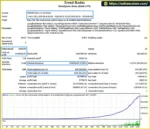
EURGBP: $131,744,898.13 net profit, 79.70% win rate, and 10.05% maximum drawdown.
AUDUSD: $538,734.06 net profit, 82.28% win rate, and 7.08% maximum drawdown.
GBPUSD: $59,086,894.10 net profit, 82.18% win rate, and 6.29% maximum drawdown.
Each reported test started with a $10,000 initial deposit.
These figures come from the supplied backtesting information and have not been independently verified. Backtest profits are hypothetical and do not guarantee similar results in live Forex trading.
3. Can Trends Radar EA MT4 Automatically Protect Profits and Limit Trading Losses?
Its main risk-management tools include:
Stop Loss: Configurable through LossLimitPoints.
Take Profit: Adjustable using ProfitTargetPoints.
Trailing Stop: Automatically adjusts protective levels after reaching the configured profit threshold.
Trade-Series Protection: Optional protection designed to tighten stop levels during extended trading series.
Maximum Series Orders: Limits the number of orders allowed within a trading series.
These features support structured risk management, but they cannot eliminate losses or guarantee capital protection.
4. What Makes the Dynamic Price Channel Strategy of Trends Radar EA Unique?
The dynamic price-channel strategy combines several configurable technical parameters to evaluate market movements.
SignalBarCount determines how many historical price bars are analyzed, while EntrySlopeAngle measures the minimum directional slope required for a potential trading signal.
SignalCorridorWidth and EntryDeviationFactor control the entry corridor and signal sensitivity.
Additionally, StepCorrectionValue adjusts the corridor position as market conditions change.
Together, these parameters allow traders to customize how Trends Radar EA detects potential breakouts and responds to market volatility.
5. Does Trends Radar EA MT4 Support Fixed Lot Sizes and Automatic Risk-Based Trading?
Yes. Trends Radar EA MT4 provides two position-sizing methods to accommodate different trading preferences.
Fixed Lot Trading: The ManualLotVolume parameter allows traders to specify a fixed trading volume for each position.
Balance-Based Trading: The RiskPercentOfBalance parameter uses account balance information to determine trading exposure through the EA's internal calculation.
Traders can also configure MaxSeriesOrders to restrict the number of simultaneous orders within a trading series.
The actual financial risk depends on position size, market conditions, broker execution, and the selected settings.
6. Can I Use Trends Radar EA MT4 With ECN or RAW Spread Forex Brokers?
Trends Radar EA MT4 includes configuration options intended to support ECN and RAW trading accounts.
The Expert Advisor provides an ECN mode setting and a configurable requote limit to help manage order execution under different broker conditions.
However, compatibility with specific brokers is not independently confirmed.
Before live trading, users should verify spreads, commissions, minimum stop distances, slippage, and execution requirements. Testing the EA on a demo account is recommended.
7. Is Trends Radar EA MT4 Suitable for Beginners Who Want Automated Forex Trading?
Trends Radar EA MT4 may appeal to beginners who want to explore automated Forex trading while maintaining control over trading parameters.
The Expert Advisor organizes its configuration into four main categories: Bot Setting, Risk Setting, Points Setting, and Signal Setting.
Once properly configured, the Forex robot can automatically analyze market conditions, identify trading signals, execute orders, and manage positions.
However, beginners should understand Stop Loss settings, lot sizing, leverage, drawdowns, and basic Forex risk management before using the EA with real money.
8. What Do I Receive After Buying Trends Radar EA MT4, and When Will It Be Delivered?
After purchasing Trends Radar EA MT4, customers receive the Expert Advisor installation file named Trend Radar.ex4 for the MetaTrader 4 platform.
The advertised purchase conditions include:
Delivery Time: 24–48 hours after successful payment.
Product Version: Latest available release.
License: Advertised without account ID or time restrictions.
Delivery Guarantee: Refund if the product is not delivered.
Trading Platform: MetaTrader 4 (MT4).
Key Features: Automated price-channel trading, customizable Stop Loss and Take Profit, trailing stops, and flexible money management.
Customers should verify the license conditions and test the software before deploying it on a live Forex trading account.
In stock
In stock
In stock
In stock
In stock
Out of stock
No account yet?
Create an Account












 Automatic EA
 EA Best Seller
 Expert Advisor MT4
 Expert Advisor MT5
 HFT EA



Reviews
Clear filtersThere are no reviews yet.