





-
 Unlimited Activations
-
 Instant delivery
-
 Easy to install






 Unlimited Activations
Instant delivery
Easy to install
 Free Update
 Free Install Support

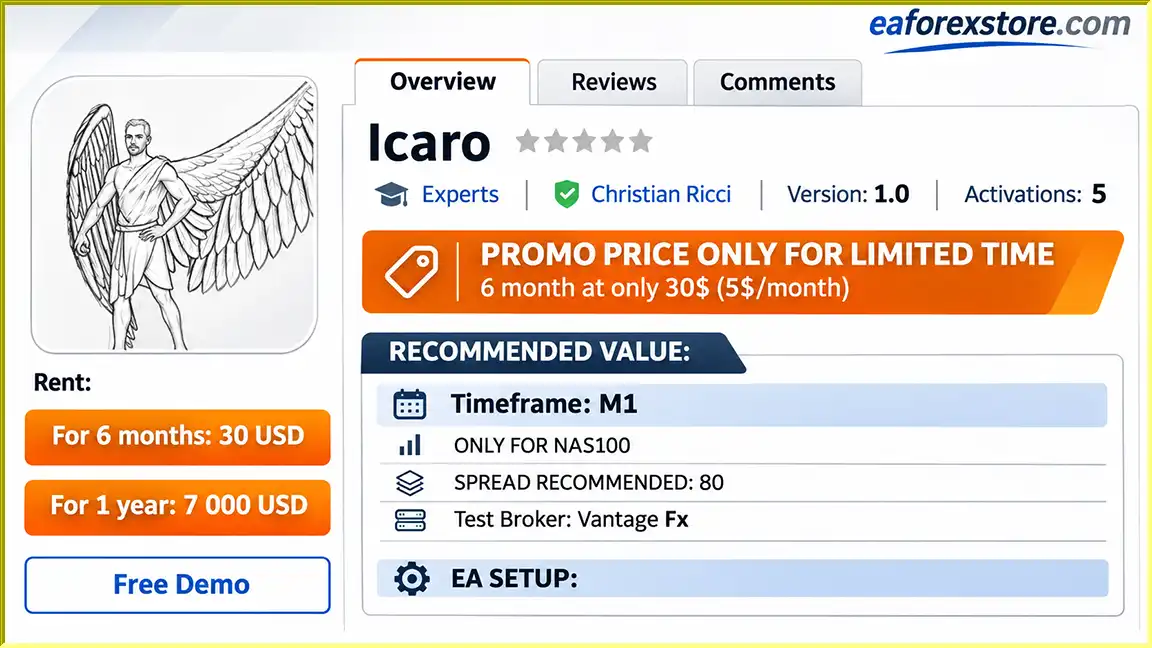
Icaro EA MT4 is an automated trading Expert Advisor developed specifically for the NAS100 index on the MetaTrader 4 platform. Designed to operate on the M1 (1-minute) timeframe, this trading robot provides an automated approach for traders interested in short-term NAS100 market movements.
The Expert Advisor comes with recommended configuration parameters, including lot size, take profit, stop loss, and spread settings. Its focus on a single trading instrument allows users to configure their trading environment specifically for NAS100 rather than managing multiple currency pairs.
According to the developer, Icaro EA MT4 has been tested with Vantage FX, although actual trading results may vary depending on broker conditions, account specifications, market volatility, and execution quality.
With its automated trading functionality and developer-assisted installation support, Icaro EA MT4 is intended for traders who want to explore algorithmic trading on the NAS100 index.
>>> Delivery time 24h-48h after payment.
>>> Refund if not delivered.
>>> You will receive the latest version without any limitations (ID+Time).> Reviewed by Jason Stap <<<
Icaro EA MT4 Overview
Icaro EA MT4 is designed exclusively for NAS100 trading. The developer recommends using the Expert Advisor only on this instrument.
NAS100 tracks the Nasdaq-100 index, which includes many major non-financial companies listed on the Nasdaq exchange.
The recommended trading timeframe is M1, allowing the EA to operate on one-minute price charts.
This short timeframe is commonly associated with fast-paced trading environments where execution speed, spreads, and market volatility are particularly important.
Icaro EA MT4 is designed to automate trading operations through MetaTrader 4, reducing the need to place every trade manually.
However, the developer has not provided detailed information about its internal entry signals or trade execution algorithms.
The Expert Advisor includes a lot-size parameter that traders can adjust according to their account balance and risk tolerance.
The developer’s suggested configuration is one lot for every €100 in account balance.
For example, a €1,000 account would correspond to 10 lots under the provided settings.
This is an aggressive example rather than a generally safe position-sizing recommendation. Contract specifications and margin requirements must be reviewed before using it.
The provided configuration includes:
The exact price or point interpretation of these values depends on the EA’s programming and broker specifications.
A stop-loss value of zero may disable the fixed stop loss, depending on how the EA interprets this parameter.
The developer identifies Vantage FX as the broker used for testing Icaro EA MT4.
This information provides a reference trading environment but does not guarantee identical execution or performance with other brokers.
The developer offers direct assistance to buyers after purchase.
Users are encouraged to contact the seller through private messages to receive help with installation and configuration.
Icaro EA MT4 operates within the MetaTrader 4 trading platform and is intended to automate NAS100 trading on the one-minute chart.
Once installed and configured, the EA can execute trading operations according to its programmed strategy.
The general operating process includes:
Step 1 – NAS100 Chart Setup
The trader opens the NAS100 instrument on MetaTrader 4 and selects the M1 timeframe.
Step 2 – EA Initialization
Icaro EA is attached to the NAS100 chart, and its trading parameters are configured.
Step 3 – Trading Configuration
The user enters the recommended or individually adjusted lot size, take-profit value, stop-loss value, and other available settings.
Step 4 – Automated Trading
With automated trading enabled, the EA can execute trades according to its internal trading rules.
Step 5 – Trade Monitoring
The trader monitors open positions, account equity, broker execution, and overall trading exposure.
The exact trading strategy, market-entry conditions, exit algorithm, and position management system have not been disclosed in the supplied product information.
Therefore, traders should evaluate its behavior through demo testing before using real capital.
Icaro EA MT4 offers a specialized approach to automated index trading, with a primary focus on NAS100 and short-term market activity.
Specialized Trading Instrument
Rather than targeting numerous Forex pairs, Icaro EA concentrates on NAS100, making it suitable for traders specifically interested in this market.
Simple Recommended Configuration
The developer provides a concise set of parameters, allowing users to begin testing without having to design a complete trading configuration independently.
Automated Trading Convenience
The EA can reduce manual order-entry requirements and support traders who prefer algorithmic execution.
Short-Term Trading Environment
The M1 timeframe provides opportunities to evaluate frequent market movements, although it also increases sensitivity to spreads, slippage, and execution delays.
Developer Assistance
Buyers can contact the developer for assistance with installation and configuration, which may be particularly useful for users unfamiliar with MetaTrader 4 Expert Advisors.
Icaro EA MT4 may appeal to traders seeking a dedicated NAS100 automation tool, but its profitability and reliability require independent verification.
🔺NAS100
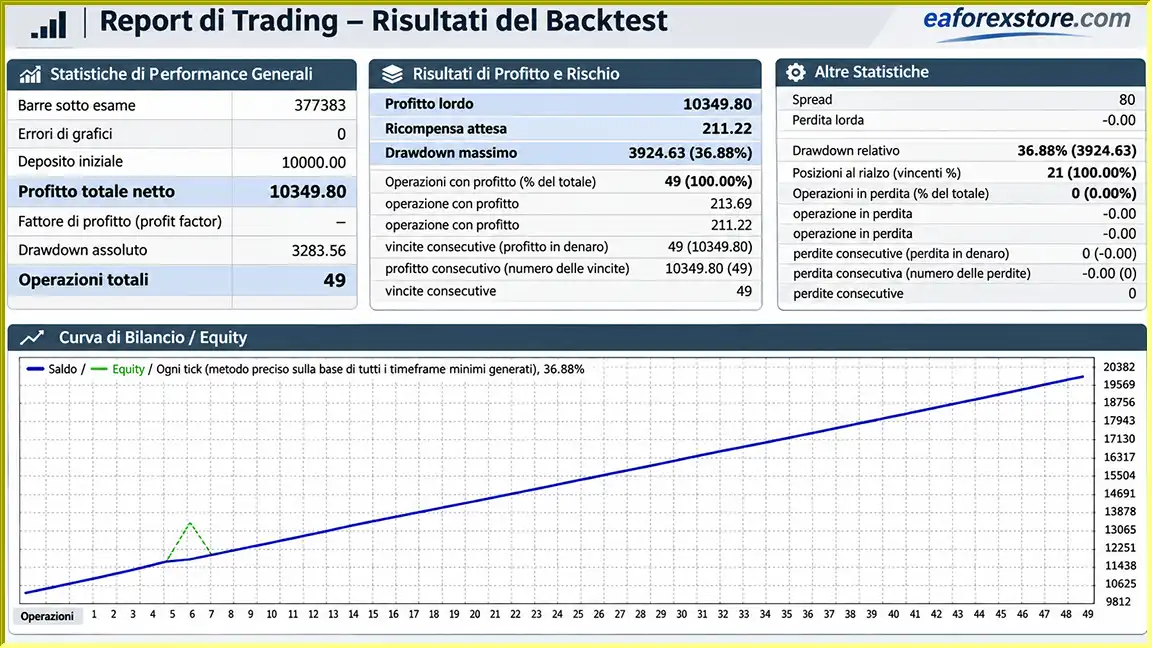
Icaro EA MT4 backtets
Risk management is especially important when trading NAS100 on the M1 timeframe because rapid price fluctuations can cause significant changes in account equity.
| Parameter | Developer’s Recommended Value |
|---|---|
| Trading Platform | MetaTrader 4 |
| Trading Instrument | NAS100 Only |
| Timeframe | M1 |
| Recommended Spread | 80 |
| Test Broker | Vantage FX |
| Lot Size | 1 lot per €100 balance |
| Take Profit (TP) | 5 |
| Stop Loss (SL) | 0 |
| Min Parameter | 10 |
The meaning of the Min parameter is not explained in the provided documentation and should be confirmed with the developer.
The developer’s example specifies:
These values are reproduced from the developer’s configuration instructions and should not be treated as suitable risk levels for every trading account.
NAS100 contract sizes differ between brokers. A lot size that is acceptable with one broker may create excessive margin requirements or significant losses with another.
The recommended SL value is zero.
If this value disables the stop loss, positions may remain exposed to substantial adverse price movements unless another protective mechanism is present.
Traders should verify whether the EA includes alternative risk controls before using this configuration.
The recommended spread parameter is 80, but its measurement unit is not specified.
NAS100 spreads can widen during periods of market volatility, major economic announcements, or reduced liquidity.
Execution slippage may also cause trades to open or close at prices different from those expected.
Important Risk Warning: Automated NAS100 trading involves substantial financial risk. Aggressive position sizing and trading without a protective stop loss can result in rapid losses or account liquidation.
Installing Icaro EA MT4 requires MetaTrader 4, the Expert Advisor installation file, and access to a broker offering NAS100 trading.
After purchasing the Expert Advisor, obtain the installation file or follow the official product installation procedure supplied by the seller.
Open MetaTrader 4 and log in to your trading account.
Ensure that your broker provides access to NAS100 or its equivalent instrument name.
If the developer supplies an EX4 file:
If the EA is purchased through the MQL5 Market, follow the marketplace installation process instead.
Locate NAS100 in the Market Watch panel.
Open the trading chart and select the M1 timeframe.
Find Icaro EA in the Navigator panel under Expert Advisors.
Drag it onto the NAS100 M1 chart.
Open the EA Inputs tab and enter the developer’s recommended settings where applicable:
These are the developer’s example settings, not risk-optimized defaults. Confirm the exact parameter names, units, and effects before use.
Allow automated trading in MetaTrader 4 and verify that the EA is correctly initialized.
Review the Experts and Journal tabs for any installation or trading errors.
Before using a live account, operate the EA in a demo environment and evaluate:
After purchasing Icaro EA MT4, the seller requests that buyers contact them through private messages.
The developer offers assistance with installation and configuration to help users set up the Expert Advisor correctly.
>> Join VIP Membership Now <<<
Icaro EA MT4 is a specialized automated trading robot developed for NAS100 on the MetaTrader 4 platform. With its recommended M1 timeframe, configurable trading parameters, and developer installation support, it offers an accessible configuration process for traders interested in automated index trading.
Its dedicated NAS100 focus and short-term trading approach may appeal to users who prefer a narrowly defined trading instrument rather than a multi-asset Expert Advisor.
However, the developer’s recommended position sizing is highly aggressive, and the suggested SL value of zero raises important risk management concerns.
Additionally, the available documentation does not include independently verified profitability, drawdown statistics, or detailed descriptions of the trading algorithm.
For these reasons, Icaro EA MT4 should be evaluated carefully through demo testing, with particular attention to position sizing, margin requirements, execution quality, and downside protection.
If you are considering Icaro EA MT4, review the developer’s specifications and contact the seller for installation assistance before deploying the robot on a live trading account.
Disclaimer: Forex and CFD trading involves significant risk and may result in the loss of invested capital. Automated trading systems do not guarantee profits. The settings described in this article are provided by the developer and do not constitute financial advice.
1. What is Icaro EA MT4, and how does it work?
Icaro EA MT4 is an automated NAS100 trading robot designed specifically for the MetaTrader 4 platform. It operates on the M1 (1-minute) timeframe and automatically executes trades based on its programmed trading strategy. The Expert Advisor allows traders to automate NAS100 trading without manually opening and closing every position.
2. Is Icaro EA MT4 compatible with all Forex brokers?
Icaro EA MT4 is designed for brokers that support NAS100 trading on MetaTrader 4. The developer identifies Vantage FX as the broker used for testing. However, compatibility and trading performance may vary depending on broker spreads, execution speed, contract specifications, leverage, and margin requirements. Traders should verify broker compatibility before using the EA.
3. What are the recommended settings for Icaro EA MT4?
The developer recommends using Icaro EA MT4 exclusively on NAS100 with the M1 timeframe. The suggested settings include a spread value of 80, Take Profit (TP) of 5, Stop Loss (SL) of 0, and Min parameter of 10. The recommended lot size is 1 lot per €100 account balance. These settings are highly aggressive, and traders should carefully assess their account risk before applying them.
4. What is the minimum deposit required to use Icaro EA MT4?
The developer does not specify an official minimum deposit for Icaro EA MT4. However, the suggested lot-sizing formula is 1 lot for every €100 of account balance. For example, a €1,000 trading account would correspond to 10 lots under this configuration. This approach involves substantial financial risk, and actual margin requirements depend on the broker's NAS100 contract specifications.
5. Is Icaro EA MT4 profitable, and can it guarantee consistent trading results?
Icaro EA MT4 is designed to automate short-term NAS100 trading, but profitability is not guaranteed. The supplied product description includes promotional backtest results reporting a 100% win rate and 36.88% maximum drawdown. However, these figures are not independently verified and do not predict future performance. Real trading results depend on market volatility, broker execution, spread conditions, and risk management.
6. Does Icaro EA MT4 use a Stop Loss to protect trading capital?
The developer's recommended configuration sets Stop Loss (SL) to 0. Depending on the EA's internal programming, this may disable the fixed stop-loss function. The available documentation does not confirm whether alternative risk management mechanisms are included. Trading NAS100 without adequate downside protection can expose an account to significant losses, especially during volatile market conditions.
7. How do I install and activate Icaro EA MT4 on MetaTrader 4?
To install Icaro EA MT4, obtain the Expert Advisor file after purchase and open MetaTrader 4. Navigate to File → Open Data Folder → MQL4 → Experts and copy the EX4 file into the Experts folder. Restart or refresh MetaTrader 4, open the NAS100 chart, select the M1 timeframe, and attach Icaro EA. Configure the trading parameters and enable AutoTrading. The developer also offers installation and configuration assistance to buyers.
8. Can beginners use Icaro EA MT4, and is a VPS required?
Beginners can explore Icaro EA MT4, but they should understand the risks associated with automated NAS100 trading, aggressive lot sizing, and short-term market volatility. A Forex VPS is not mandatory, but it can help keep MetaTrader 4 running continuously with a stable connection. New users should test the EA on a demo account, evaluate drawdown and margin requirements, and contact the developer for setup assistance before trading with real money.
In stock
In stock
In stock
In stock
In stock
Out of stock
No account yet?
Create an Account












 Automatic EA
 EA Best Seller
 Expert Advisor MT4
 Expert Advisor MT5
 HFT EA



Reviews
Clear filtersThere are no reviews yet.