





-
 Unlimited Activations
-
 Instant delivery
-
 Easy to install





 Unlimited Activations
Instant delivery
Easy to install
 Free Update
 Free Install Support

Oceania Algo EA MT4 is an automated Forex trading Expert Advisor developed for the MetaTrader 4 platform. Designed around a proprietary algorithmic trading strategy, the robot combines custom technical indicators, automated money management, and an integrated news filter to identify potential trading opportunities.
Unlike conventional Forex robots that rely on widely available technical indicators, Oceania Algo EA MT4 uses proprietary strategy-based indicators developed specifically for its internal trading logic.
The Expert Advisor follows a day trading approach rather than high-frequency trading (HFT) or traditional scalping. Its recommended configuration focuses on three currency pairs: AUDCAD, AUDNZD, and NZDCAD, using the M15 timeframe.
Oceania Algo EA MT4 also supports multi-currency trading, allowing traders to operate the system across multiple charts while managing trading exposure through configurable risk parameters.
The developer recommends an ECN trading account, a minimum deposit of $1,000, and a preferred starting balance of $3,000.
With default configurations available for the recommended currency pairs, Oceania Algo EA MT4 aims to provide a straightforward automated Forex trading solution for traders interested in algorithmic day trading.
>>> Delivery time 24h-48h after payment.
>>> Refund if not delivered.
>>> You will receive the latest version without any limitations (ID+Time).
>> Reviewed by Jason Stap <<<
Oceania Algo EA MT4 Overview
Oceania Algo EA MT4 incorporates custom-developed indicators that are derived from its internal trading strategy rather than standard technical indicators commonly available in the Forex market.
The system uses three proprietary indicator settings:
These indicators form part of the EA’s automated trading decision process.
The Expert Advisor follows a day trading strategy designed to identify trading opportunities based on its internal market analysis.
Unlike scalping robots and high-frequency trading systems, Oceania Algo EA does not focus on executing extremely large numbers of rapid transactions.
Oceania Algo EA MT4 supports simultaneous trading across multiple currency pairs.
The developer recommends the following instruments:
This allows traders to explore trading opportunities across several currency markets using the same automated strategy.
The EA includes a news-filtering feature designed to incorporate economic news information into its trading operation.
The news filter requires an authorized web request URL to be configured in MetaTrader 4.
Without the correct URL configuration, the news-filtering function will not operate as intended.
Oceania Algo EA MT4 includes an automatic money management system controlled through the Risk parameter.
The developer provides a default Risk setting of 3000 and indicates that users can adjust this parameter according to their trading preferences.
The exact financial meaning and calculation method of this parameter have not been disclosed.
The recommended timeframe for Oceania Algo EA is M15.
This enables the trading system to evaluate price movements using 15-minute market data.
The developer states that the default EA configuration is suitable for the three recommended currency pairs.
This simplifies the initial setup process without requiring separate configuration files for each instrument.
Oceania Algo EA MT4 is intended for ECN trading accounts and is described by the developer as compatible with various Forex brokers.
Actual compatibility depends on the broker’s execution conditions and platform specifications.
The developer states that Oceania Algo EA can be used as part of a copy trading setup, allowing other traders to follow the trading signals generated by the system.
Actual copy trading functionality depends on the external copying service or infrastructure used.
The developer offers assistance with installing and configuring the Expert Advisor.
Buyers are also invited to contact the developer for access to a private support group.
Oceania Algo EA MT4 operates through a proprietary automated trading process combining custom indicators, risk management, and economic news filtering.
Step 1: Market Monitoring
The Expert Advisor analyzes market activity on the M15 timeframe, focusing on the recommended AUDCAD, AUDNZD, and NZDCAD currency pairs.
Step 2: Proprietary Indicator Analysis
The system applies its internal ST1, ST2, and ST3 indicator logic to evaluate potential trading opportunities.
These indicators are specifically developed for the EA’s strategy rather than being standard MetaTrader 4 technical indicators.
Step 3: Trading Signal Generation
When the proprietary indicators identify conditions that satisfy the algorithm’s requirements, the EA determines whether a trading opportunity is present.
The exact signal-generation formulas have not been disclosed.
Step 4: Economic News Filtering
When properly configured, the integrated news filter can incorporate economic news information into the trading process.
The feature depends on a valid external web request connection.
Step 5: Automatic Position Sizing
Before opening a trade, the Expert Advisor applies its automated money management logic using the configured Risk parameter.
Step 6: Automated Trade Execution
When its programmed conditions are satisfied, Oceania Algo EA can automatically execute a buy or sell order through MetaTrader 4.
Step 7: Multi-Currency Monitoring
The EA can operate across multiple supported currency charts, allowing traders to monitor trading opportunities on different instruments.
Step 8: Automated Trade Management
After opening a position, the Expert Advisor follows its programmed position-management logic.
Specific Stop Loss, Take Profit, and trailing stop mechanisms have not been detailed in the supplied product specifications.
Oceania Algo EA MT4 uses internally developed indicators rather than relying exclusively on conventional Forex technical indicators.
This provides a specialized approach to automated market analysis.
The EA focuses on day trading instead of high-frequency scalping, making it a potential option for traders interested in a different automated trading style.
With AUDCAD, AUDNZD, and NZDCAD as its recommended instruments, the system offers trading opportunities across three related currency markets.
The integrated news filter provides an additional component to the EA’s trading operation when the required external connection is configured correctly.
The Risk parameter allows users to adjust the EA’s position-sizing behavior according to its internal money management rules.
The developer recommends using default settings for the supported currency pairs, reducing the need for extensive initial customization.
Oceania Algo EA can be incorporated into a compatible copy trading environment, allowing traders to distribute signals to followers through an appropriate external service.
The developer offers installation guidance and access to a private support group for buyers.
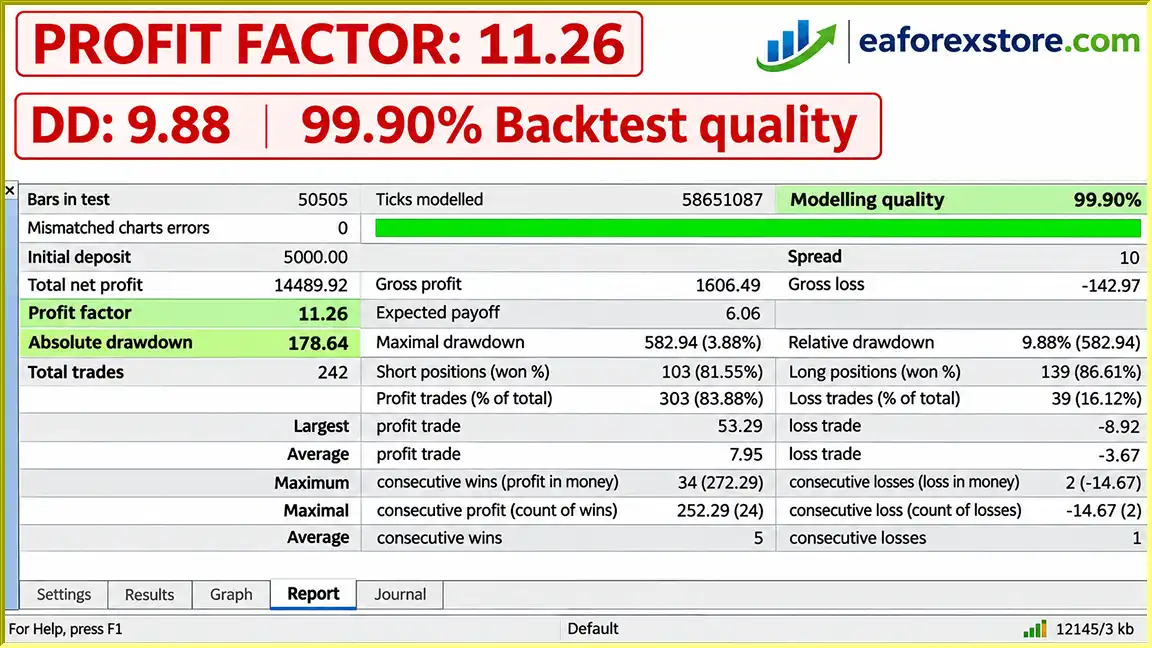
🔺Profit Factor: 11.26
Oceania Algo EA MT4 Backtets
Oceania Algo EA MT4 includes configurable money management and economic news filtering, both of which are relevant to automated Forex trading.
However, traders should carefully evaluate the system’s exposure and understand its operational requirements before using real capital.
The EA includes an automated position-sizing system controlled through its Risk setting.
The supplied configuration identifies:
The developer also references alternative Risk values such as 1500 and 2000.
However, the precise relationship between these numbers and actual monetary exposure has not been provided. Traders should not assume that a higher numerical value always represents higher or lower risk without verifying the EA’s calculation method.
The developer specifies:
A larger account balance may provide more available margin, but it does not guarantee reduced percentage risk or prevent substantial drawdowns.
The integrated news filter requires an authorized external web request URL.
If the URL is missing, incorrect, or inaccessible, the news filter may fail to operate.
Traders should verify that the connection is working before enabling automated trading.
Although Oceania Algo EA MT4 supports multiple currency pairs, AUDCAD, AUDNZD, and NZDCAD can experience correlated market movements.
Holding positions across these instruments may increase combined exposure to the Australian Dollar, New Zealand Dollar, or Canadian Dollar.
The developer recommends using an ECN account and states that the EA can work with different brokers.
Nevertheless, spreads, commissions, slippage, execution delays, and broker-specific trading conditions can influence trading results.
The supplied description does not specify the EA’s Stop Loss or Take Profit calculations.
Traders should verify how losing positions are limited, how profits are realized, and whether protective orders are placed with the broker.
Users should monitor account equity, margin usage, open positions, trading history, and MetaTrader 4 journal messages.
The supplied specifications do not confirm built-in email alerts, mobile push notifications, maximum drawdown warnings, or automatic equity protection.
Important Risk Warning: Forex trading involves substantial financial risk. Automated money management and economic news filtering cannot eliminate losses or guarantee profitable trading results.
Step 1: Download Oceania Algo EA MT4
Obtain the Expert Advisor installation file from the official developer or a trusted product source.
MetaTrader 4 Expert Advisors are generally distributed as EX4 or MQ4 files.
Step 2: Open MetaTrader 4
Launch MetaTrader 4 and log in to your trading account.
The developer recommends an ECN account with at least $1,000 in capital and suggests $3,000 as the preferred starting balance.
Step 3: Open the Expert Advisors Folder
Navigate to:
File → Open Data Folder → MQL4 → Experts
Copy the Oceania Algo EA file into the Experts directory.
Step 4: Restart MetaTrader 4
Restart the trading platform or refresh the Expert Advisors section in the Navigator window.
Step 5: Open the Recommended Trading Charts
Open charts for:
Set each chart to the M15 timeframe.
Step 6: Attach Oceania Algo EA
Drag the Expert Advisor from the Navigator panel onto the selected chart.
Review its trading permissions and available input parameters.
Step 7: Configure the EA Settings
| Parameter | Recommended Setting |
|---|---|
| Platform | MetaTrader 4 |
| Trading Style | Day Trading |
| Currency Pairs | AUDCAD, AUDNZD, NZDCAD |
| Timeframe | M15 |
| Minimum Deposit | $1,000 |
| Recommended Deposit | $3,000 |
| Account Type | ECN |
| Risk | 3000 |
| ST1 | Default |
| ST2 | 3 |
| ST3 | Default |
| Setfiles | Default Settings |
| News Filter | External URL Required |
Step 8: Enable the News Filter
To activate the news filter, configure the web request permissions in MetaTrader 4.
Important: The exact news-filter URL was not included in the supplied product description. Contact the developer to obtain the correct URL. Do not substitute an unrelated website.
Step 9: Enable Automated Trading
Activate AutoTrading in MetaTrader 4 and enable the necessary trading permissions in the Expert Advisor properties.
Check the Experts and Journal tabs to confirm that the EA has initialized correctly.
Step 10: Test the Trading System
Before trading with real funds, test Oceania Algo EA in MetaTrader 4 Strategy Tester and on a demo account.
Evaluate its trading behavior, position sizing, drawdowns, news filter operation, and multi-currency exposure.
Because external WebRequest functionality is not directly supported in the standard MT4 Strategy Tester, historical testing may not reproduce live news-filter behavior. Verify the filter separately in demo trading.
Step 11: Contact the Developer for Support
The developer offers installation and configuration assistance and invites buyers to request access to a private support group.
For ongoing automated trading, a reliable VPS may help maintain continuous platform connectivity.
>> Join VIP Membership Now <<<
Oceania Algo EA MT4 is an automated Forex day trading robot that combines proprietary trading indicators, multi-currency analysis, automated money management, and economic news filtering.
Designed primarily for AUDCAD, AUDNZD, and NZDCAD on the M15 timeframe, the Expert Advisor offers a specialized trading approach that differs from traditional scalping and high-frequency Forex robots.
Its key features include custom ST1, ST2, and ST3 indicators, default configurations for multiple currency pairs, ECN account support, and compatibility with external copy trading infrastructure.
The developer recommends a minimum account balance of $1,000 and suggests $3,000 for initial deployment.
However, the strategy’s effectiveness depends on market conditions, actual risk exposure, execution quality, and correct configuration of its external news filter.
For traders exploring automated Forex day trading on MetaTrader 4, Oceania Algo EA offers a configurable multi-currency trading system worth evaluating through historical testing and demo trading.
Disclaimer: Forex and CFD trading involves substantial financial risk, including the potential loss of invested capital. Automated trading systems, proprietary indicators, and economic news filters cannot guarantee profitability. Always evaluate broker conditions, risk exposure, and trading performance before using real funds.
1. Is Oceania Algo EA MT4 a Good Choice for Automated Forex Day Trading?
Oceania Algo EA MT4 is an automated Forex Expert Advisor designed for traders interested in algorithmic day trading rather than high-frequency scalping. It combines three proprietary trading indicators (ST1, ST2, and ST3), automatic money management, and an integrated economic news filter.
The EA operates on MetaTrader 4 and is optimized for AUDCAD, AUDNZD, and NZDCAD on the M15 timeframe. Its predefined settings make it a potential option for traders seeking a structured, multi-currency automated trading strategy.
2. How Much Profit Has Oceania Algo EA MT4 Generated in Backtesting?
According to the supplied backtesting report, Oceania Algo EA MT4 recorded the following historical performance:
Initial Deposit: $5,000
Total Net Profit: $1,466.72
Win Rate: 83.88%
Profit Factor: 11.26
Maximum Drawdown: 3.88%
These figures suggest favorable results under the reported historical testing conditions. However, they have not been independently verified and should not be interpreted as guaranteed future performance.
Actual Forex trading profits depend on market conditions, broker execution, trading costs, and money management.
3. Why Does Oceania Algo EA Focus on AUDCAD, AUDNZD, and NZDCAD?
Oceania Algo EA MT4 is specifically configured for three currency pairs: AUDCAD, AUDNZD, and NZDCAD.
These instruments provide exposure to the Australian Dollar, New Zealand Dollar, and Canadian Dollar markets.
The Expert Advisor uses proprietary indicators to analyze trading opportunities across these currency pairs on the M15 timeframe.
Although multi-currency trading allows the EA to monitor several markets, these pairs may experience correlated price movements. Traders should monitor their combined currency exposure rather than assuming that multiple positions automatically provide diversification.
4. How Does the Built-In News Filter Work in Oceania Algo EA MT4?
Oceania Algo EA MT4 includes an integrated economic news filter designed to incorporate news information into its automated trading decisions.
To activate this feature, users must configure an authorized external URL in MetaTrader 4.
Navigate to Tools → Options → Expert Advisors, enable "Allow WebRequest for listed URL", and add the news service URL provided by the developer.
The filter requires an active connection to the correct news service. Without proper configuration, it may not function as intended.
5. What Is the Recommended Starting Capital for Oceania Algo EA MT4?
The developer specifies a minimum deposit of $1,000 and recommends $3,000 as the preferred starting balance.
Oceania Algo EA uses an automatic money management system controlled by the Risk parameter, with a default setting of 3000.
However, the exact calculation behind this parameter has not been publicly explained.
A larger account balance may provide additional margin flexibility, but it does not guarantee lower percentage losses or prevent drawdowns. Traders should evaluate the EA's position sizing and risk exposure before live deployment.
6. Can Oceania Algo EA MT4 Trade Multiple Currency Pairs at the Same Time?
Yes. Oceania Algo EA MT4 supports multi-currency automated trading, allowing users to run the Expert Advisor across multiple supported currency charts.
The recommended configuration uses AUDCAD, AUDNZD, and NZDCAD on the M15 timeframe.
The developer states that the default settings can be applied to all three recommended pairs without requiring separate optimization files.
For reliable operation, traders should use a compatible ECN broker, monitor their total account exposure, and consider a stable Forex VPS connection.
7. Does Oceania Algo EA MT4 Support Copy Trading and Beginner-Friendly Setup?
According to the developer, Oceania Algo EA MT4 can be integrated with compatible third-party copy trading services, allowing trading signals to be shared with follower accounts.
The Expert Advisor also offers predefined settings for its recommended currency pairs, simplifying the initial configuration process.
Additionally, the developer advertises installation assistance and access to a private support group for customers.
However, copy trading requires compatible external software or infrastructure, and beginners should test the EA on a demo account before using real capital.
8. What Will I Receive After Purchasing Oceania Algo EA MT4?
Customers purchasing Oceania Algo EA MT4 are offered the latest available version of the automated Forex trading software for MetaTrader 4.
According to the supplied product information, the advertised purchase conditions include:
Delivery Time: 24–48 hours after payment.
License: Advertised without account ID or time limitations.
Delivery Guarantee: Refund if the product is not delivered.
Trading Platform: MetaTrader 4.
Recommended Currency Pairs: AUDCAD, AUDNZD, and NZDCAD.
Recommended Timeframe: M15.
The developer also advertises installation guidance and private group support. Customers should confirm the installation file, licensing terms, and required news-filter URL before purchasing.
Forex trading involves financial risk, and historical performance does not guarantee future profitability.
In stock
In stock
In stock
In stock
In stock
Out of stock
No account yet?
Create an Account












 Automatic EA
 EA Best Seller
 Expert Advisor MT4
 Expert Advisor MT5
 HFT EA



Reviews
Clear filtersThere are no reviews yet.