





-
 Unlimited Activations
-
 Instant delivery
-
 Easy to install





 Unlimited Activations
Instant delivery
Easy to install
 Free Update
 Free Install Support

Nasdaq100 Trader EA MT4 is a fully automated index trading Expert Advisor developed exclusively for the NASDAQ100 (USTECH100) index on the MetaTrader 4 platform. Designed for the H4 timeframe, this trading robot combines pivot point analysis, dynamic lot management, trailing stop technology, and a compounding-based trading approach to identify and manage long-term trading opportunities.
Unlike traditional Forex scalping robots that focus on frequent short-term transactions, Nasdaq100 Trader EA MT4 follows a longer-term trading strategy designed to capture significant price movements in the NASDAQ100 market.
The Expert Advisor identifies potential market turning points using pivot-based analysis and manages open positions through an automated Stop Loss adjustment mechanism. Its dynamic lot-sizing approach aims to adjust trading exposure as account equity changes.
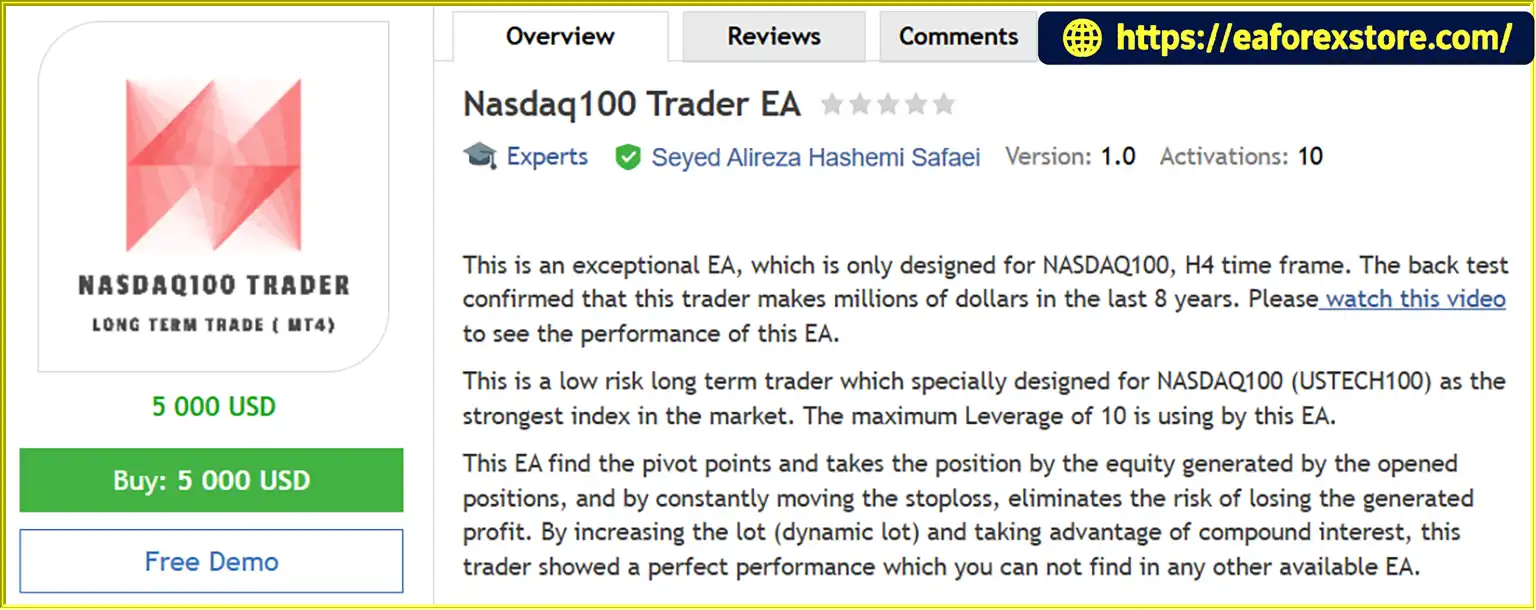
According to the developer, historical backtesting covering approximately eight years demonstrated substantial hypothetical profits. However, these results have not been independently verified and should not be considered a guarantee of future performance.
Nasdaq100 Trader EA MT4 requires a minimum deposit of $5,000 and must operate on a Forex VPS for continuous trading execution.
The system is designed exclusively for MetaTrader 4, with the developer indicating that an MT5 version is planned.
>>> Delivery time 24h-48h after payment.
>>> Refund if not delivered.
>>> You will receive the latest version without any limitations (ID+Time).
>> Reviewed by Jason Stap <<<
Nasdaq100 Trader EA MT4 Overview
Nasdaq100 Trader EA is specifically developed for the NASDAQ100 index, also known as USTECH100 on some trading platforms.
The algorithm is designed around the characteristics and price movements of this particular index.
The developer explicitly advises against using the EA on other trading instruments.
The Expert Advisor operates exclusively on the H4 timeframe.
By analyzing four-hour price movements, the system focuses on broader market opportunities rather than short-term price fluctuations.
Nasdaq100 Trader EA MT4 incorporates pivot point detection to identify potential trading opportunities.
The system evaluates market price structures and uses its programmed pivot analysis to determine potential entry points.
The EA features a dynamic lot-sizing mechanism designed to adjust trading volume according to account equity and the strategy’s internal rules.
This approach aims to increase trading exposure as equity grows, allowing the system to participate in potential compounding effects.
However, increasing position sizes also increases potential financial losses.
Nasdaq100 Trader EA MT4 includes an automated trailing Stop Loss mechanism.
As a position moves favorably, the EA can adjust protective stop levels to help preserve a portion of unrealized gains.
Trailing stops cannot completely eliminate the risk of losing accumulated profits because market gaps and slippage may affect execution.
The system incorporates a compounding-oriented strategy through dynamic position sizing.
Rather than maintaining a fixed trading volume indefinitely, the EA is designed to adjust trade sizes as the account’s equity changes.
The developer states that the Expert Advisor uses a maximum leverage level of 10.
Actual effective leverage depends on position size, contract specifications, account equity, and broker margin requirements.
Once installed and configured, the EA automatically analyzes the NASDAQ100 market, identifies potential entries, executes trades, and manages positions according to its programmed strategy.
The trading robot focuses on longer-duration price movements using the H4 timeframe, making it different from high-frequency scalping systems.
The developer requires the EA to run on a Forex VPS.
A reliable VPS helps maintain continuous MetaTrader 4 operation and reduces interruptions caused by local computer shutdowns or internet disconnections.
Nasdaq100 Trader EA MT4 follows a systematic trading process based on pivot point analysis, dynamic position sizing, and automated Stop Loss management.
Step 1: NASDAQ100 Market Analysis
The Expert Advisor monitors NASDAQ100 (USTECH100) price movements on the H4 timeframe.
It processes available market data through its proprietary trading algorithm.
Step 2: Pivot Point Identification
The EA analyzes market price structures to identify potential pivot points.
These pivot points form part of the strategy’s trading signal generation process.
Step 3: Trading Opportunity Detection
When market conditions meet the algorithm’s predefined requirements, Nasdaq100 Trader EA identifies a potential trading opportunity.
The developer has not disclosed the precise entry formulas or technical confirmation rules.
Step 4: Dynamic Position Sizing
Before executing an order, the Expert Advisor calculates trading volume according to its dynamic lot-management logic.
This calculation incorporates account equity and the strategy’s internal position-sizing rules.
Step 5: Automated Trade Execution
Once a valid trading signal is generated, the EA automatically opens a position on the NASDAQ100 index.
Step 6: Automated Stop Loss Adjustment
As an open position develops, the EA can progressively adjust its Stop Loss level.
The trailing mechanism is designed to respond to favorable price movements and help manage unrealized profits.
Step 7: Equity-Based Trade Management
The system incorporates changes in account equity into its dynamic lot-sizing approach.
As equity increases, the algorithm may increase position sizes according to its programmed conditions.
Step 8: Continuous Market Monitoring
The EA continues monitoring NASDAQ100 and managing open positions while MetaTrader 4 remains active and connected through the VPS.
Nasdaq100 Trader EA is developed specifically for one financial instrument rather than applying a general-purpose algorithm to multiple unrelated markets.
The H4 timeframe allows the system to focus on larger price movements instead of depending on high-frequency trade execution.
The Expert Advisor uses pivot-based analysis to identify potential market turning points and trading opportunities.
Its equity-based lot-sizing approach allows trading volume to change according to the EA’s programmed capital management rules.
The trailing Stop Loss feature is designed to manage profitable positions and protect part of favorable price movements.
The algorithm aims to incorporate account equity growth into future position sizing.
Compounding can increase potential returns, but it can also magnify losses when trading exposure increases.
Nasdaq100 Trader EA handles market analysis, trade execution, and position management automatically through MetaTrader 4.
The developer references approximately eight years of historical backtesting and provides a video demonstrating the EA’s reported performance.
These results are hypothetical unless supported by independently verified live trading records.
🔺NASDAQ 100 (US100) index
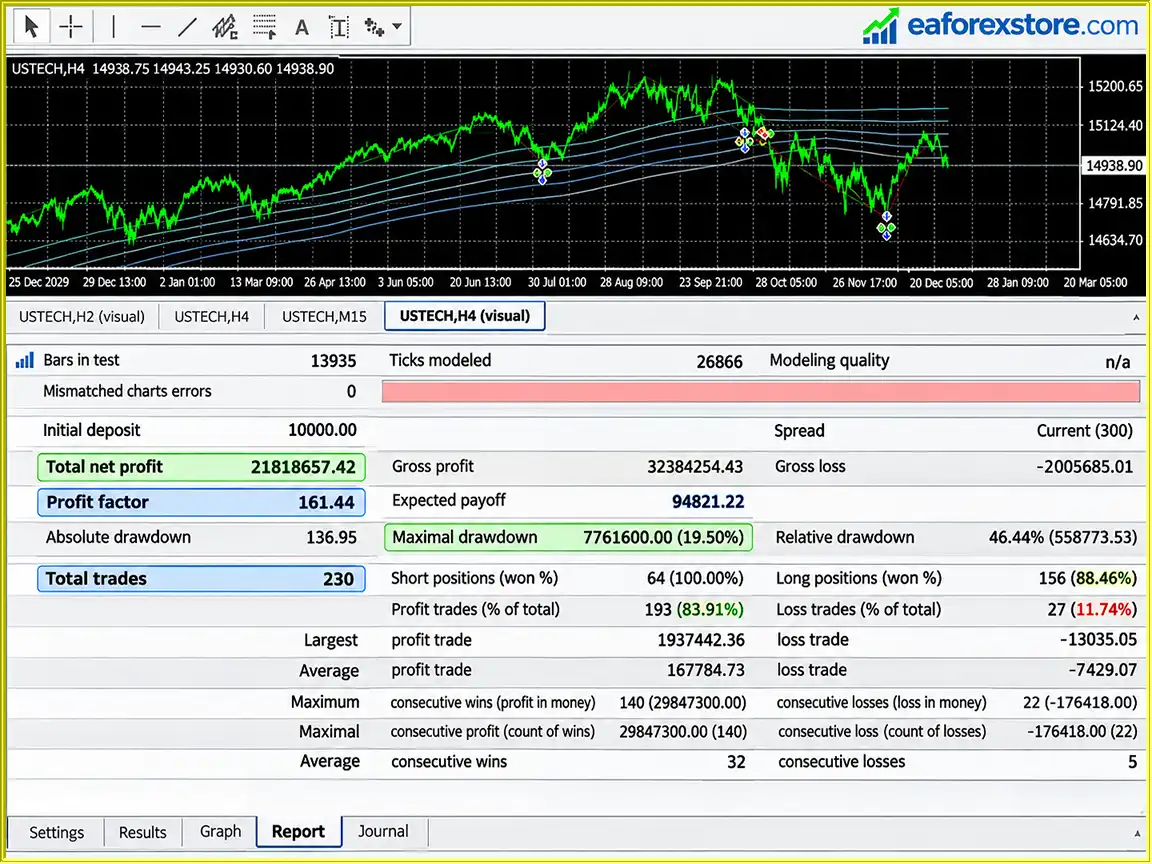
Nasdaq100 Trader EA MT4 Backtets
Nasdaq100 Trader EA MT4 includes automated position management and trailing Stop Loss functionality. However, index trading can involve substantial volatility and financial risk.
The Expert Advisor uses dynamic lot sizing based on its internal strategy and account equity.
Position sizes may increase as equity grows, creating the potential for larger profits and larger losses.
Traders should carefully monitor effective leverage, margin requirements, and total account exposure.
The EA incorporates a moving Stop Loss mechanism intended to help protect favorable price movements.
However, Stop Loss orders cannot guarantee execution at the requested price during extreme volatility, price gaps, or reduced market liquidity.
According to the developer, the trading system uses a maximum leverage level of 10.
This should not be interpreted as a maximum 10% account risk or a guarantee against liquidation.
The developer specifies a minimum deposit of $5,000.
A larger initial account balance may provide additional margin capacity, but it does not eliminate the risk of drawdowns or capital loss.
The NASDAQ100 index can experience substantial price movements because of economic announcements, interest rate expectations, technology-sector developments, and broader financial market conditions.
These movements can affect trade entries, open positions, and Stop Loss execution.
Increasing trading volume as account equity grows may amplify both gains and losses.
A series of unfavorable trades after position sizes have increased can cause significant drawdowns.
The developer requires continuous operation through a Forex VPS.
If the VPS becomes disconnected or MetaTrader 4 stops functioning, the EA may be unable to update trailing Stop Loss levels or execute programmed trading actions.
Traders should monitor account equity, open positions, margin usage, effective leverage, and trading history.
MetaTrader 4 provides trading logs and account information, but the supplied product description does not confirm dedicated push notifications, email alerts, or automatic maximum-drawdown shutdown features.
Important Risk Warning: NASDAQ100 index trading involves financial risk. Dynamic lot sizing, automated trailing stops, and historical backtesting do not guarantee profitability or prevent substantial losses.
Step 1: Download Nasdaq100 Trader EA MT4
Obtain the Expert Advisor installation file from the developer or a trusted product source.
MetaTrader 4 Expert Advisors are typically distributed as EX4 or MQ4 files.
Step 2: Prepare Your Trading Account
Open a MetaTrader 4 trading account with a broker offering NASDAQ100 index trading.
Verify that the broker provides the appropriate NASDAQ100 symbol, which may be named USTECH100, NAS100, US100, or another broker-specific variation.
The developer specifies a minimum deposit of $5,000.
Step 3: Set Up a Forex VPS
Install MetaTrader 4 on a reliable Forex VPS.
The developer explicitly requires VPS operation for this Expert Advisor.
Step 4: Open MetaTrader 4 Data Folder
Launch MT4 and navigate to:
File → Open Data Folder → MQL4 → Experts
Copy the Nasdaq100 Trader EA file into the Experts directory.
Step 5: Restart MetaTrader 4
Restart the trading platform or refresh the Expert Advisors list in the Navigator window.
Step 6: Open the NASDAQ100 Chart
Locate the NASDAQ100 trading symbol provided by your broker.
Open the corresponding index chart.
Do not use unsupported financial instruments.
Step 7: Set the Timeframe to H4
Change the chart timeframe to H4.
The developer specifically states that Nasdaq100 Trader EA must not be used on alternative timeframes.
Step 8: Attach the Expert Advisor
Drag Nasdaq100 Trader EA MT4 from the Navigator panel onto the NASDAQ100 H4 chart.
Review all available input settings and confirm the configuration with the developer.
Step 9: Verify Trading Requirements
| Parameter | Requirement |
|---|---|
| Expert Advisor | Nasdaq100 Trader EA |
| Trading Platform | MetaTrader 4 |
| Trading Instrument | NASDAQ100 / USTECH100 |
| Timeframe | H4 |
| Minimum Deposit | $5,000 |
| Stated Maximum Leverage | 10 |
| Trading Strategy | Pivot Point Analysis |
| Lot Management | Dynamic |
| Stop Loss Management | Automated Trailing Stop |
| VPS | Mandatory |
| MT5 Compatibility | Not Currently Available |
Step 10: Enable Automated Trading
Activate the AutoTrading function in MetaTrader 4.
Enable the necessary automated trading permissions in the Expert Advisor properties.
Check the Experts and Journal tabs to confirm that the system has initialized correctly.
Step 11: Perform Backtesting
Use MetaTrader 4 Strategy Tester to evaluate the EA on historical NASDAQ100 data.
Ensure that the test includes realistic spreads, commissions, swaps, slippage assumptions, and broker contract specifications.
Pay particular attention to maximum drawdown, margin usage, effective leverage, and dynamic lot-size changes.
Step 12: Run a Demo Test
Before considering live trading, test the EA on a demo account with conditions that closely resemble the intended live account.
Monitor its pivot-based entries, trading exposure, trailing Stop Loss behavior, and overall strategy performance.
Step 13: Contact the Developer
The developer recommends contacting them through private messages before placing an order.
This provides an opportunity to confirm broker compatibility, installation requirements, supported symbols, and recommended settings.
>> Join VIP Membership Now <<<
Nasdaq100 Trader EA MT4 is an automated index trading robot developed specifically for NASDAQ100 (USTECH100) on the H4 timeframe.
The Expert Advisor combines pivot point analysis, equity-based dynamic lot sizing, automated trailing stops, and a compounding-oriented strategy to identify and manage trading opportunities.
Its focus on one index and one timeframe distinguishes it from multi-currency Forex robots and high-frequency scalping systems.
The developer reports substantial hypothetical profits from approximately eight years of historical backtesting, but such results should be evaluated carefully and cannot establish future profitability.
With a minimum deposit requirement of $5,000, mandatory VPS operation, and dynamic position sizing, this EA is more appropriate for traders who understand leveraged index trading and can carefully evaluate automated risk exposure.
For traders researching automated NASDAQ100 trading robots for MetaTrader 4, Nasdaq100 Trader EA offers a specialized strategy centered on longer-term price movements and automated position management.
Its suitability should ultimately be determined through independent backtesting, realistic demo trading, and careful risk assessment.
Disclaimer: NASDAQ100 index and CFD trading involves substantial financial risk, including the possibility of losing your entire trading capital. Dynamic lot sizing, trailing Stop Loss functionality, and compounding strategies cannot guarantee profits. Historical backtesting results are hypothetical and do not reliably predict future performance.
1. What is Nasdaq100 Trader EA MT4, and how does it work?
Nasdaq100 Trader EA MT4 is a fully automated trading robot designed specifically for the NASDAQ100 (USTECH100) index on MetaTrader 4. It uses pivot point analysis, dynamic lot sizing, and automated trailing Stop Loss technology to identify trading opportunities, execute trades, and manage positions on the H4 timeframe.
2. What is the minimum deposit required to use Nasdaq100 Trader EA MT4?
The minimum recommended deposit for Nasdaq100 Trader EA MT4 is $5,000, as specified by the developer. Traders should ensure they have sufficient capital to meet margin requirements and withstand potential market drawdowns. A higher account balance does not guarantee profitability or eliminate trading risks.
3. Which trading platform and timeframe does Nasdaq100 Trader EA support?
Nasdaq100 Trader EA is exclusively compatible with MetaTrader 4 (MT4) and operates on the H4 (4-hour) timeframe. It is specifically optimized for NASDAQ100, also known as NAS100, US100, or USTECH100, depending on the broker. The EA should not be used on other trading instruments or timeframes. An MT5 version is planned but is not currently available.
4. Is Nasdaq100 Trader EA MT4 profitable and safe to use?
Nasdaq100 Trader EA MT4 has reported impressive historical backtesting results, including an 83.91% win rate and a 19.50% maximum drawdown. However, these results have not been independently verified and do not guarantee future profits. Like all automated trading systems, the EA carries financial risks, particularly during periods of high NASDAQ100 market volatility.
5. Does Nasdaq100 Trader EA MT4 require a Forex VPS?
Yes. According to the developer, Nasdaq100 Trader EA MT4 must run on a Forex VPS (Virtual Private Server). A VPS allows MetaTrader 4 to operate continuously, enabling the trading robot to monitor market conditions, execute orders, and adjust trailing Stop Loss levels without interruptions caused by computer shutdowns or unstable local internet connections.
6. How does Nasdaq100 Trader EA MT4 manage trading risks?
Nasdaq100 Trader EA MT4 uses automated trailing Stop Loss technology and dynamic position sizing to manage open trades. The trailing Stop Loss adjusts as market prices move favorably, while dynamic lot management changes trading volume according to account equity and internal strategy rules. However, these features cannot prevent all losses, and larger position sizes may increase trading exposure.
7. How do I install and activate Nasdaq100 Trader EA on MetaTrader 4?
To install Nasdaq100 Trader EA MT4, download the EA file and copy it into the MQL4/Experts folder within your MetaTrader 4 data directory. Restart MT4, open a NASDAQ100 chart, select the H4 timeframe, and attach the Expert Advisor. Enable AutoTrading, verify the EA settings, and ensure your Forex VPS is running correctly. Demo testing is recommended before live trading.
8. What will I receive after purchasing Nasdaq100 Trader EA MT4?
After purchasing Nasdaq100 Trader EA MT4, you will receive the Expert Advisor file named Nasdaq100 Trader.ex4. According to the product information, delivery takes approximately 24–48 hours after payment. The package includes the latest version without ID or time limitations, and a refund is offered if the product is not delivered. Confirm compatibility and installation requirements with the seller before purchasing.
In stock
In stock
In stock
In stock
In stock
Out of stock
No account yet?
Create an Account












 Automatic EA
 EA Best Seller
 Expert Advisor MT4
 Expert Advisor MT5
 HFT EA



Reviews
Clear filtersThere are no reviews yet.